

Every time you sync your CRM, pull shipping updates, or connect two SaaS tools, a REST API is doing the heavy lifting behind the scenes. Most people never think about it—until something breaks.
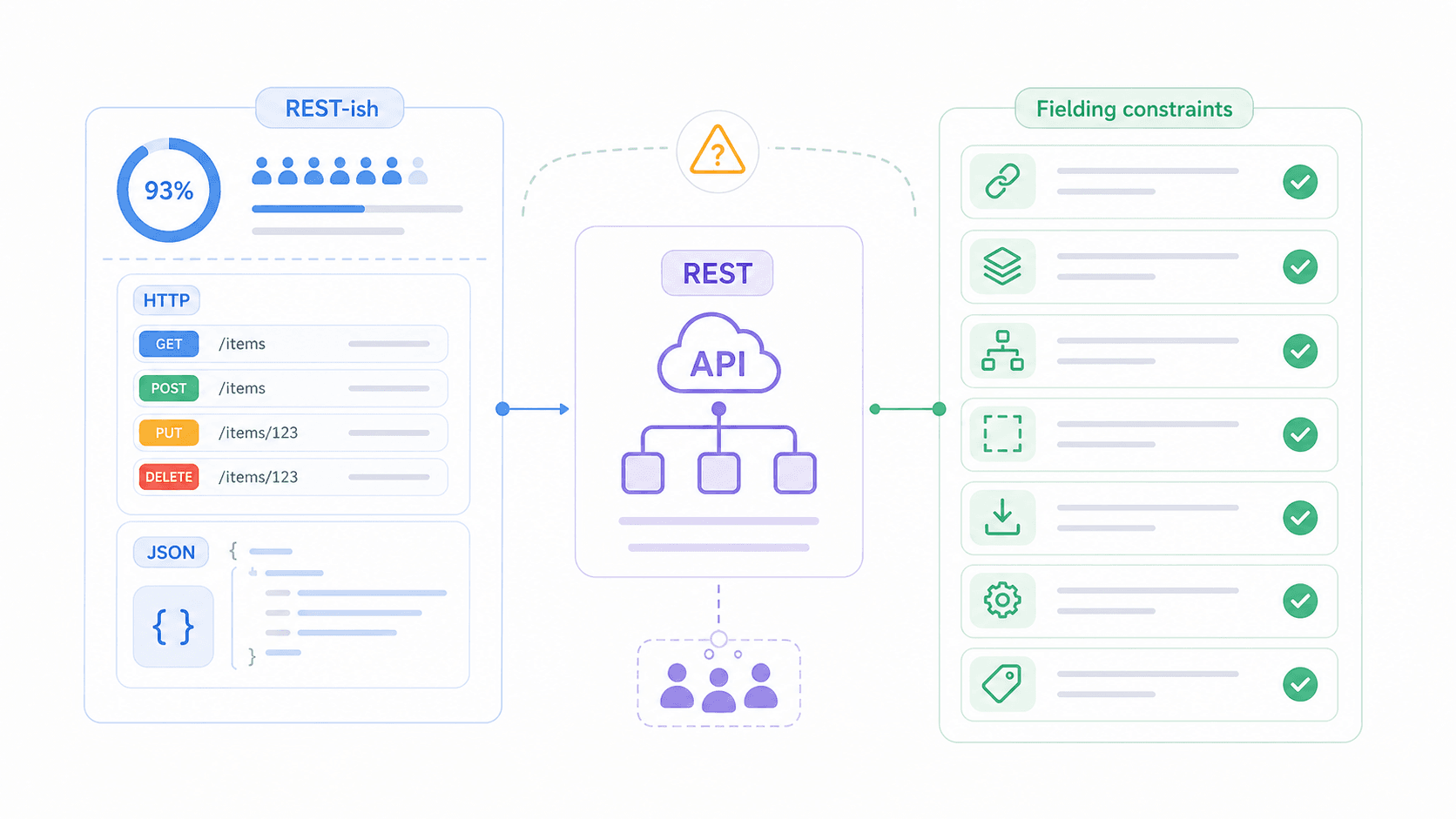
Here's what's funny: even among developers, there's genuine confusion about what makes an API "RESTful." The term gets thrown around so loosely that one Reddit thread put it bluntly—"I don't think I've built a single truly RESTful API based on the definition of Roy Fielding." And that's a developer talking, not a business user. The concept originated in Roy Fielding's 2000 doctoral dissertation at UC Irvine, where he described REST as an architectural style—a set of design constraints—not a protocol, not a product, not a spec you download.
Yet according to the Postman 2025 State of the API Report, REST usage sits at 93% among API professionals. So nearly everyone uses it, but a surprising number of teams misunderstand what it actually requires. This article will walk through the 6 core REST API characteristics in plain language, show you which ones most teams get wrong, introduce a maturity model you can use to self-assess, and compare REST to its alternatives—SOAP, GraphQL, and gRPC.
What Is a REST API? (A Plain-English Definition)
REST (Representational State Transfer) is a set of design rules for how software systems should communicate over a network.
More precisely, it's an architectural style that defines constraints—like statelessness, cacheability, and a uniform interface—that guide how clients (your browser, mobile app, or automation tool) interact with servers (where data lives). REST typically runs over HTTP and usually returns JSON, but REST itself is not tied to any specific protocol or data format.
Think of it like etiquette rules for a dinner party. REST doesn't dictate what food you serve or what language you speak—it defines how you pass dishes, how you ask for seconds, and how you signal you're done. Two systems following the same etiquette can communicate predictably, even if they've never met.
What REST is NOT: REST is not a product you install. It's not a protocol like HTTP or SOAP. And calling an API "RESTful" doesn't mean it fully complies with Fielding's original constraints—it usually just means the API uses resource URLs and HTTP methods. The gap between "REST-ish" and "truly RESTful" is one of the biggest sources of confusion in the industry, and we'll dig into that shortly.
The 6 REST API Characteristics at a Glance
Before going deep, here's the cheat sheet. Fielding defined 6 constraints that an API should follow to be considered RESTful. Five are mandatory; one is optional.
| Constraint | Core Idea | Key Benefit | Concrete Example |
|---|---|---|---|
| Client-Server | Separate UI from data storage | Front end and back end evolve independently | React SPA calling a REST API |
| Stateless | Each request carries all needed context | Horizontal scalability, no session affinity | Auth token sent in every request header |
| Cacheable | Responses declare whether they can be cached | Reduced latency and server load | Cache-Control: max-age=3600 on a GET response |
| Uniform Interface | Standardized resource interaction | Predictable, learnable API surface | GET /users/42, DELETE /users/42 |
| Layered System | Client can't tell if it's talking directly to the server | Enables CDN, gateway, load balancer insertion | Client → CDN → API Gateway → App Server |
| Code-on-Demand (optional) | Server can send executable code to extend the client | Extended client functionality on demand | API returning a JavaScript widget snippet |
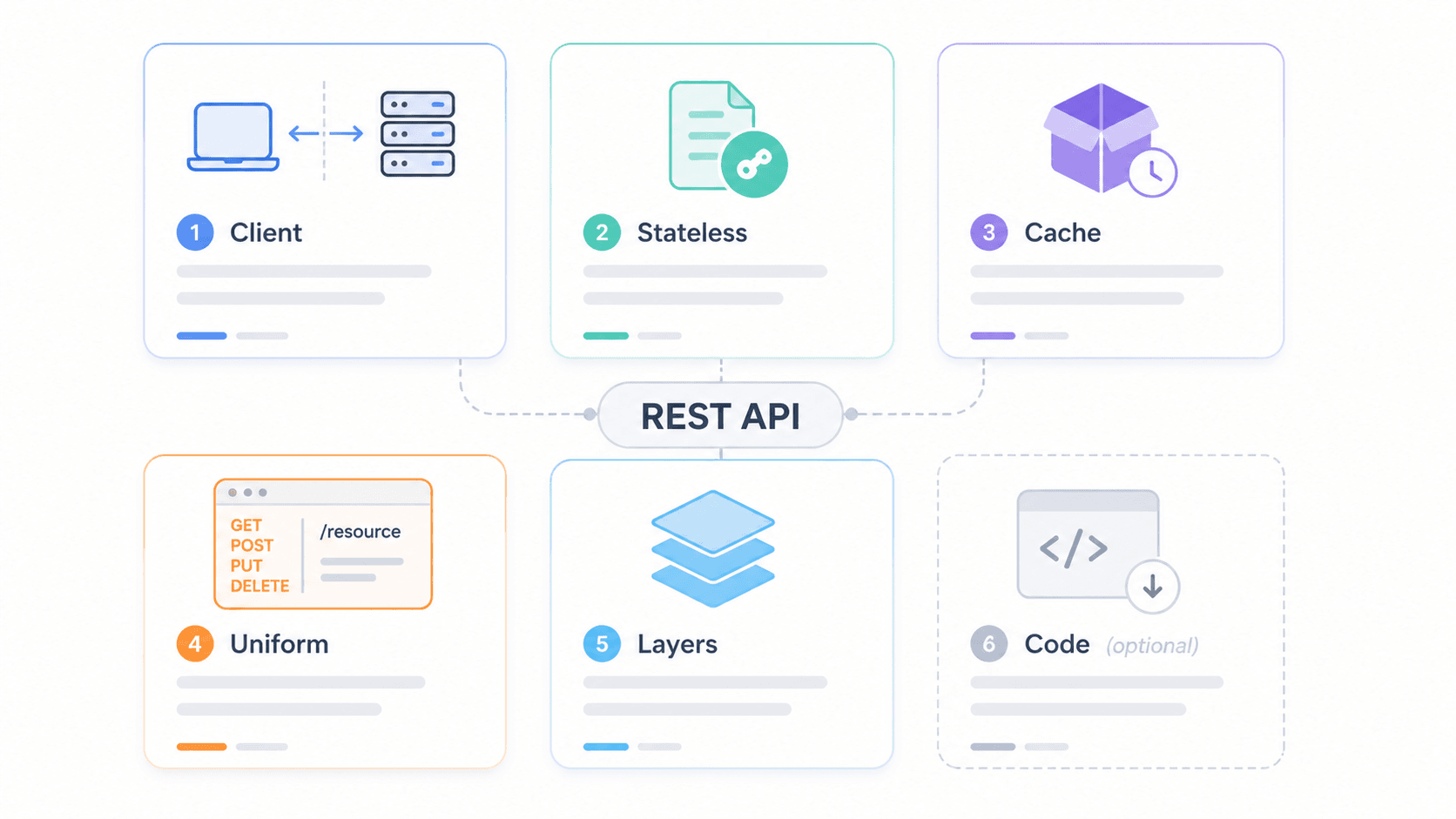
To visualize how these constraints work together in a real system, picture this layered architecture:
Client / Mobile App
        ↓
CDN / Edge Cache (e.g., Cloudflare)
        ↓
API Gateway (rate limiting, auth, CORS)
        ↓
Load Balancer
        ↓
Application Servers
        ↓
Database / Internal Services
The client only talks to the CDN layer. It has no idea how many layers sit behind it. That's the layered system constraint in action—and it's also where security, caching, and scaling happen without the client needing to know.
Now, the detailed breakdown.
REST API Characteristics Explained, One by One
Client-Server Separation
Fielding's first constraint: the client (what users interact with) and the server (where data lives and logic runs) must be separate. He called it separation of concerns.
Why does this matter in practice? Because it means a mobile banking app can get a complete visual redesign without the bank touching its account database or transaction engine. The Salesforce Marketing Cloud REST API, for example, exposes contacts, campaigns, journeys, and push notifications through resource endpoints. Whether you're building a custom dashboard, a mobile app, or connecting a third-party tool, the backend stays the same.
For business teams, this translates to faster iteration. Your front-end designers and back-end engineers don't need to be on the same release cycle. As long as the API contract is stable, both sides can move independently.
Statelessness
No memory between requests. Every call from client to server must include all the information the server needs to process it—the server retains nothing from previous interactions.
I like to think of it as calling a support hotline where you have to re-explain your issue every single time. Annoying? Sure. But the upside is massive: any available agent can help you, and the call center can add 500 more agents without redesigning anything. That's horizontal scaling.
In technical terms,# Strapi Markdown Content
REST API Characteristics Explained (With What Most Get Wrong)
Every time you sync your CRM, pull shipping updates, or connect two SaaS tools, a REST API is doing the heavy lifting behind the scenes. Most people never think about it—until something breaks.
Here's what's funny: even among developers, there's genuine confusion about what makes an API "RESTful." The term gets thrown around so loosely that one Reddit thread put it bluntly—"I don't think I've built a single truly RESTful API based on the definition of Roy Fielding." And that's a developer talking, not a business user. The concept originated in Roy Fielding's 2000 doctoral dissertation at UC Irvine, where he described REST as an architectural style—a set of design constraints—not a protocol, not a product, not a spec you download. Yet according to the Postman 2025 State of the API Report, REST usage sits at 93% among API professionals. So nearly everyone uses it, but a surprising number of teams misunderstand what it actually requires. This article will walk through the 6 core REST API characteristics in plain language, show you which ones most teams get wrong, introduce a maturity model you can use to self-assess, and compare REST to its alternatives—SOAP, GraphQL, and gRPC.
What Is a REST API? (A Plain-English Definition)
REST (Representational State Transfer) is a set of design rules for how software systems should communicate over a network.
More precisely, it's an architectural style that defines constraints—like statelessness, cacheability, and a uniform interface—that guide how clients (your browser, mobile app, or automation tool) interact with servers (where data lives). REST typically runs over HTTP and usually returns JSON, but REST itself is not tied to any specific protocol or data format.
Think of it like etiquette rules for a dinner party. REST doesn't dictate what food you serve or what language you speak—it defines how you pass dishes, how you ask for seconds, and how you signal you're done. Two systems following the same etiquette can communicate predictably, even if they've never met.
What REST is NOT: REST is not a product you install. It's not a protocol like HTTP or SOAP. And calling an API "RESTful" doesn't mean it fully complies with Fielding's original constraints—it usually just means the API uses resource URLs and HTTP methods. The gap between "REST-ish" and "truly RESTful" is one of the biggest sources of confusion in the industry, and we'll dig into that shortly.
The 6 REST API Characteristics at a Glance
Before going deep, here's the cheat sheet. Fielding defined 6 constraints that an API should follow to be considered RESTful. Five are mandatory; one is optional.
| Constraint | Core Idea | Key Benefit | Concrete Example |
|---|---|---|---|
| Client-Server | Separate UI from data storage | Front end and back end evolve independently | React SPA calling a REST API |
| Stateless | Each request carries all needed context | Horizontal scalability, no session affinity | Auth token sent in every request header |
| Cacheable | Responses declare whether they can be cached | Reduced latency and server load | Cache-Control: max-age=3600 on a GET response |
| Uniform Interface | Standardized resource interaction | Predictable, learnable API surface | GET /users/42, DELETE /users/42 |
| Layered System | Client can't tell if it's talking directly to the server | Enables CDN, gateway, load balancer insertion | Client → CDN → API Gateway → App Server |
| Code-on-Demand (optional) | Server can send executable code to extend the client | Extended client functionality on demand | API returning a JavaScript widget snippet |
To visualize how these constraints work together in a real system, picture this layered architecture:
Client / Mobile App
        ↓
CDN / Edge Cache (e.g., Cloudflare)
        ↓
API Gateway (rate limiting, auth, CORS)
        ↓
Load Balancer
        ↓
Application Servers
        ↓
Database / Internal Services
The client only talks to the CDN layer. It has no idea how many layers sit behind it. That's the layered system constraint in action—and it's also where security, caching, and scaling happen without the client needing to know.
Now, the detailed breakdown.
REST API Characteristics Explained, One by One
Client-Server Separation
Fielding's first constraint: the client (what users interact with) and the server (where data lives and logic runs) must be separate. He called it separation of concerns.
Why does this matter in practice? Because it means a mobile banking app can get a complete visual redesign without the bank touching its account database or transaction engine. The Salesforce Marketing Cloud REST API, for example, exposes contacts, campaigns, journeys, and push notifications through resource endpoints. Whether you're building a custom dashboard, a mobile app, or connecting a third-party tool, the backend stays the same.
For business teams, this translates to faster iteration. Your front-end designers and back-end engineers don't need to be on the same release cycle. As long as the API contract is stable, both sides can move independently.
Statelessness
No memory between requests. Every call from client to server must include all the information the server needs to process it—the server retains nothing from previous interactions.
I like to think of it as calling a support hotline where you have to re-explain your issue every single time. Annoying? Sure. But the upside is massive: any available agent can help you, and the call center can add 500 more agents without redesigning anything. That's horizontal scaling.
In technical terms, statelessness means no sticky sessions. A load balancer can route your next request to any healthy server. If one server crashes, another picks up without missing a beat. Fielding's dissertation explicitly notes that statelessness improves visibility (monitoring tools can understand each request in isolation), reliability (failures don't corrupt shared session state), and scalability (servers can free resources between requests).
The practical caveat: real systems still have authentication tokens, shopping carts, and OAuth flows. The point isn't that no state exists anywhere—it's that the server doesn't store client session state in its own memory between requests. Tokens, databases, and shared caches handle that instead.
Cacheability
Can this response be reused? That's the question cacheability answers. Responses should explicitly declare whether they can be cached, and if so, clients and intermediaries (like CDNs) reuse them for equivalent future requests—reducing server load and improving speed.
The HTTP mechanism is straightforward: headers like Cache-Control, ETag, Last-Modified, and Expires tell caches how long a response is valid and when to recheck. For a business reader, think of it as a label on the response that says "this answer is good for the next hour" or "always ask me fresh."
The performance impact is real. Cloudflare's Regional Tiered Cache trials reported 50–100ms improvement in tail cache hit response times. And Fielding's own dissertation documents how Web traffic scaled from 100,000 requests/day in 1994 to 600,000,000 requests/day in 1999—with caching as a critical design factor.
What's typically cacheable: product catalogs, public blog content, country/currency lists, API documentation.
What's typically not cacheable: personal dashboards, checkout totals, bank balances, admin reports.
Uniform Interface
This is the constraint Fielding himself called the central feature that distinguishes REST from other architectural styles. It standardizes how clients interact with resources, making APIs predictable.
Four sub-constraints live under this umbrella:
- Resource identification: Every resource gets a stable URI.
/customers/123is a customer./orders/456is an order. - Manipulation through representations: Clients work with representations (JSON, XML, HTML) of resources, not the server's internal objects.
- Self-descriptive messages: Requests and responses carry enough metadata—method, status code, content type, error details—for any intermediary or client to understand them.
- HATEOAS (Hypermedia as the Engine of Application State): Responses include links to related actions and resources, so clients can discover what to do next without hardcoding every endpoint.
The HTTP method mapping is the most visible part of uniform interface:
| HTTP Method | CRUD Meaning | Safe? | Idempotent? | Example |
|---|---|---|---|---|
| GET | Read | Yes | Yes | GET /products/42 |
| POST | Create / action | No | No | POST /orders |
| PUT | Replace entire resource | No | Yes | PUT /users/42 |
| PATCH | Partial update | No | Not guaranteed | PATCH /users/42 |
| DELETE | Delete | No | Yes | DELETE /sessions/abc |
Google Cloud's HTTP guidelines explicitly state that GET should be safe, and GET, PUT, and DELETE should be idempotent. Well-known APIs from GitHub, Stripe, and Spotify follow these patterns closely, which is why developers who learn one can pick up another quickly.
Layered System
Your client has no idea whether it's talking to the origin server, a CDN cache, an API gateway, or a load balancer. And that's the point—each component only sees its adjacent layer.
This is what enables:
- CDNs like Cloudflare sitting in front of your API to cache and accelerate responses
- API gateways (AWS API Gateway, Kong, Apigee) handling authentication, rate limiting, and quotas
- Load balancers distributing stateless requests across multiple app servers
The Postman 2025 report notes that 47% of organizations use AWS API Gateway, 26% use Azure's gateway, and 31% use multiple gateways simultaneously. Layered architecture isn't theoretical—it's how production systems actually work.
The tradeoff: each layer adds a small amount of latency. But Fielding argued that shared caching at intermediary layers more than compensates for this overhead in most real-world systems.
Code-on-Demand (Optional)
This is the oddball. Code-on-demand is the only optional REST constraint: the server can send executable code—like JavaScript—to extend client functionality on the fly.
The most common real-world example is simply a web page loading JavaScript from a server. But for typical JSON REST APIs consumed by mobile apps, backend jobs, or automation tools, code-on-demand is almost never used. API clients generally don't want to execute arbitrary code from a remote server.
For most readers, this constraint is a footnote. It exists in Fielding's model for completeness, but it won't factor into your day-to-day API evaluations.
What Most People Get Wrong: Are Most REST APIs Actually RESTful?
Here's the part nobody wants to talk about: most production APIs that call themselves "RESTful" are really HTTP JSON APIs with REST-ish conventions. They use resource URLs, HTTP methods, and status codes—and that's about it. A Reddit thread in r/softwarearchitecture had developers admitting they'd never built a truly Fielding-compliant REST API. Another r/learnprogramming discussion devolved into arguments about whether anyone can even agree on what "RESTful" means.
A 2026 study interviewing 16 REST API experts found that while guidelines improve usability, developers show significant resistance to strict REST rules—citing guideline size and poor fit to their specific organization as barriers.
So where do the constraints actually land in practice?
| Constraint | Adoption in Practice | Why |
|---|---|---|
| Client-Server | ✅ Nearly universal | Fundamental to web architecture; hard to avoid |
| Statelessness | ✅ Nearly universal | Required for horizontal scaling; standard practice |
| Uniform Interface (basic) | ✅ Common | Resource URIs + HTTP verbs are the default pattern |
| Cacheability | ⚠️ Inconsistent | Many teams skip Cache-Control headers entirely |
| Layered System | ⚠️ Implicit | CDNs and gateways exist, but aren't always deliberately designed |
| HATEOAS | ❌ Rare | Most clients hardcode endpoints; link-based discovery adds complexity |
| Code-on-Demand | ❌ Very rare | Optional by definition; almost never implemented in JSON APIs |
Why teams skip HATEOAS: Client developers prefer reading OpenAPI docs and using SDKs over dynamically following links at runtime. HATEOAS requires stable media types, link relation definitions, and workflow modeling—short-term cost is high, and the payoff is unclear for most teams.
The pragmatic takeaway: an API doesn't need to be 100% Fielding-compliant to be useful. But knowing which constraints you've skipped—and what you lose by skipping them—helps you make better design and integration decisions.
The Richardson Maturity Model: How RESTful Is Your API, Really?
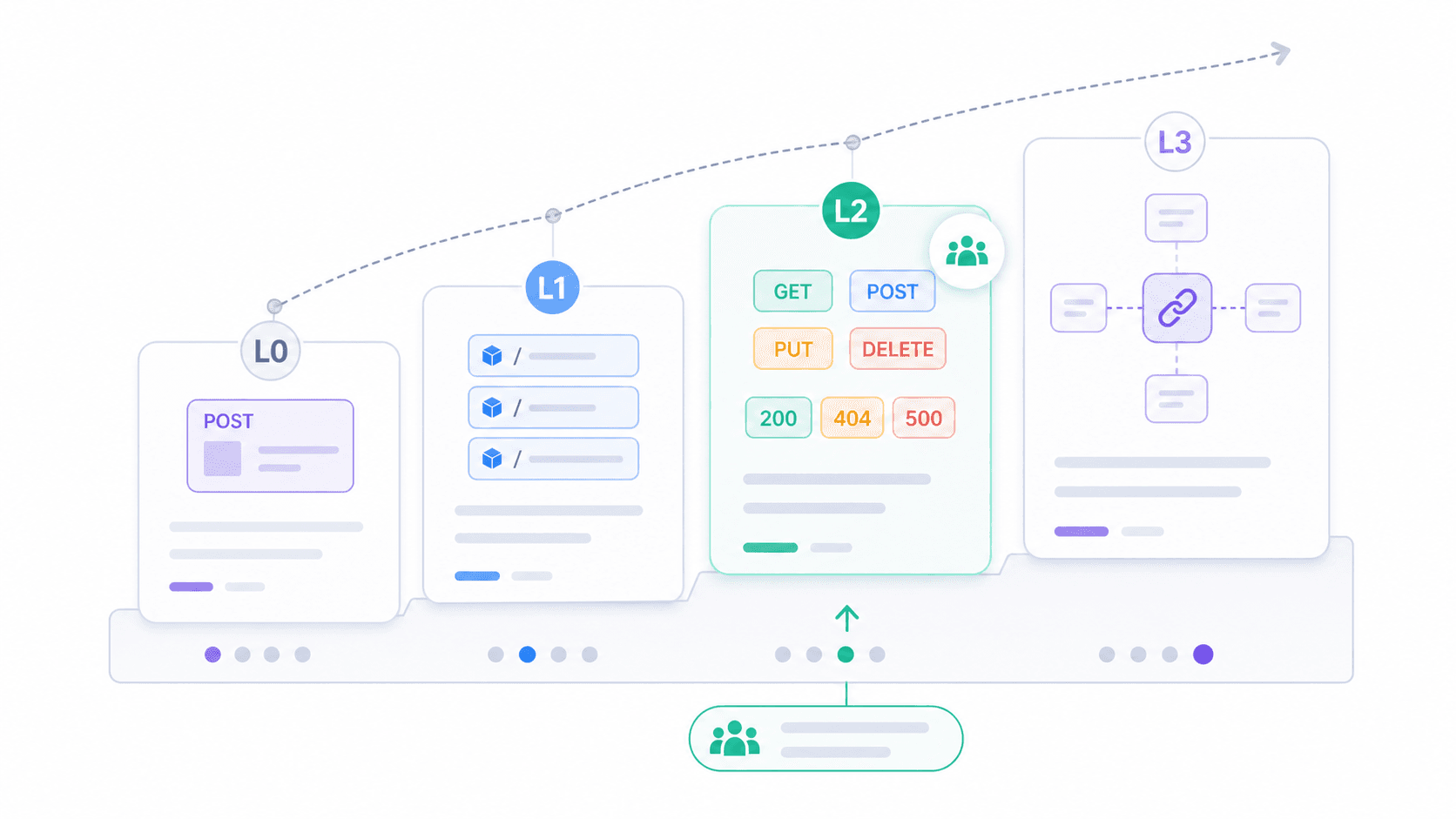
If the binary question "Is it RESTful or not?" feels unhelpful, the Richardson Maturity Model offers a more practical framework. Proposed by Leonard Richardson and explained by Martin Fowler, it breaks REST adoption into four levels.
| Level | Name | Description | Real-World Example |
|---|---|---|---|
| 0 | The Swamp of POX | Single URI, single HTTP verb (usually POST) | Legacy SOAP-over-HTTP endpoints; POST /api with { "action": "getUser" } |
| 1 | Resources | Multiple URIs (one per resource), but still mostly POST | POST /users/123/getProfile, POST /orders/456/cancel |
| 2 | HTTP Verbs | Correct use of GET, POST, PUT, DELETE + proper status codes | Most production "REST" APIs today |
| 3 | Hypermedia (HATEOAS) | Responses include links to related actions/resources | Spring Data REST, HAL-based APIs; very few public APIs in practice |
Most APIs you'll encounter in the wild sit at Level 2. They use resources, verbs, and status codes correctly. That's enough to be practical, interoperable, and well-supported by tooling. Level 3 is Fielding's full vision, but adoption remains thin.
Where does your API sit? Ask yourself:
- Does the API have a single endpoint for everything? (Level 0)
- Does each business object have its own URI? (Level 1+)
- Are HTTP methods and status codes used correctly? (Level 2)
- Do responses tell the client what it can do next, without relying on external docs? (Level 3)
This model is the single most useful tool I've found for cutting through the "is it REST or not" debate. It replaces a binary judgment with a spectrum.
Common REST API Mistakes (And How to Avoid Them)
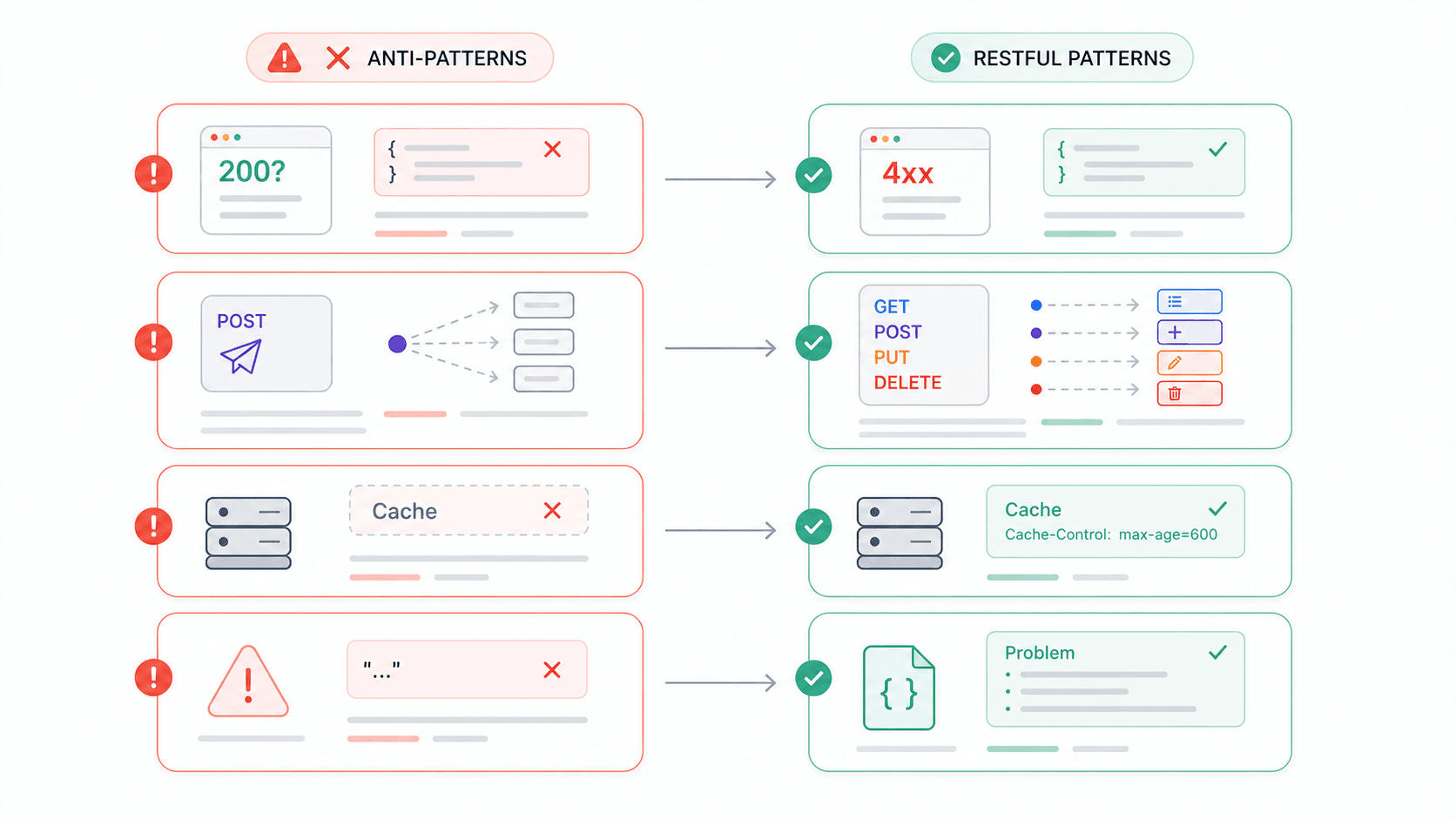
I've spent enough time integrating third-party APIs to have a running list of frustrations. And based on developer forums, I'm not alone. Here are the anti-patterns that show up most often—and each one maps directly to a REST constraint violation.
| Anti-Pattern | Why It Breaks REST | What to Do Instead |
|---|---|---|
HTTP 200 with error body ({ "error": "Invalid username" }) | Violates self-descriptive messages; clients can't trust status codes | Use appropriate 4xx/5xx codes + a structured error body (e.g., application/problem+json) |
| POST for everything | Ignores uniform interface; loses safe/idempotent semantics | Map CRUD to GET/POST/PUT(PATCH)/DELETE |
No Cache-Control headers | Wastes the cacheability constraint entirely | Set explicit cache directives—even no-store for sensitive data |
| Vague error responses ("409 error") | Humans and machines can't determine what went wrong | Include error type, human-readable message, and a link to docs |
| Not enforcing HTTPS | Bearer tokens and API keys travel in plaintext | Enforce TLS everywhere; Google APIs default to HTTPS only |
| Versioning in the request body | Breaks resource identification; gateways and caches can't route properly | Use URI path versioning (/v1/) or Accept header versioning |
The Zalando RESTful API Guidelines require official HTTP status codes and recommend Problem JSON for error responses. The Adidas API Guidelines specify that Problem Detail should only be used for 4xx/5xx, never mixed with 2xx. These aren't academic preferences—they're production standards from teams running APIs at scale.
A Reddit thread in r/learnprogramming had a developer genuinely asking whether it's okay to always return HTTP 200 for errors. The fact that this question still comes up in 2026 tells you how persistent these anti-patterns are.
REST vs SOAP vs GraphQL vs gRPC: How REST API Characteristics Compare
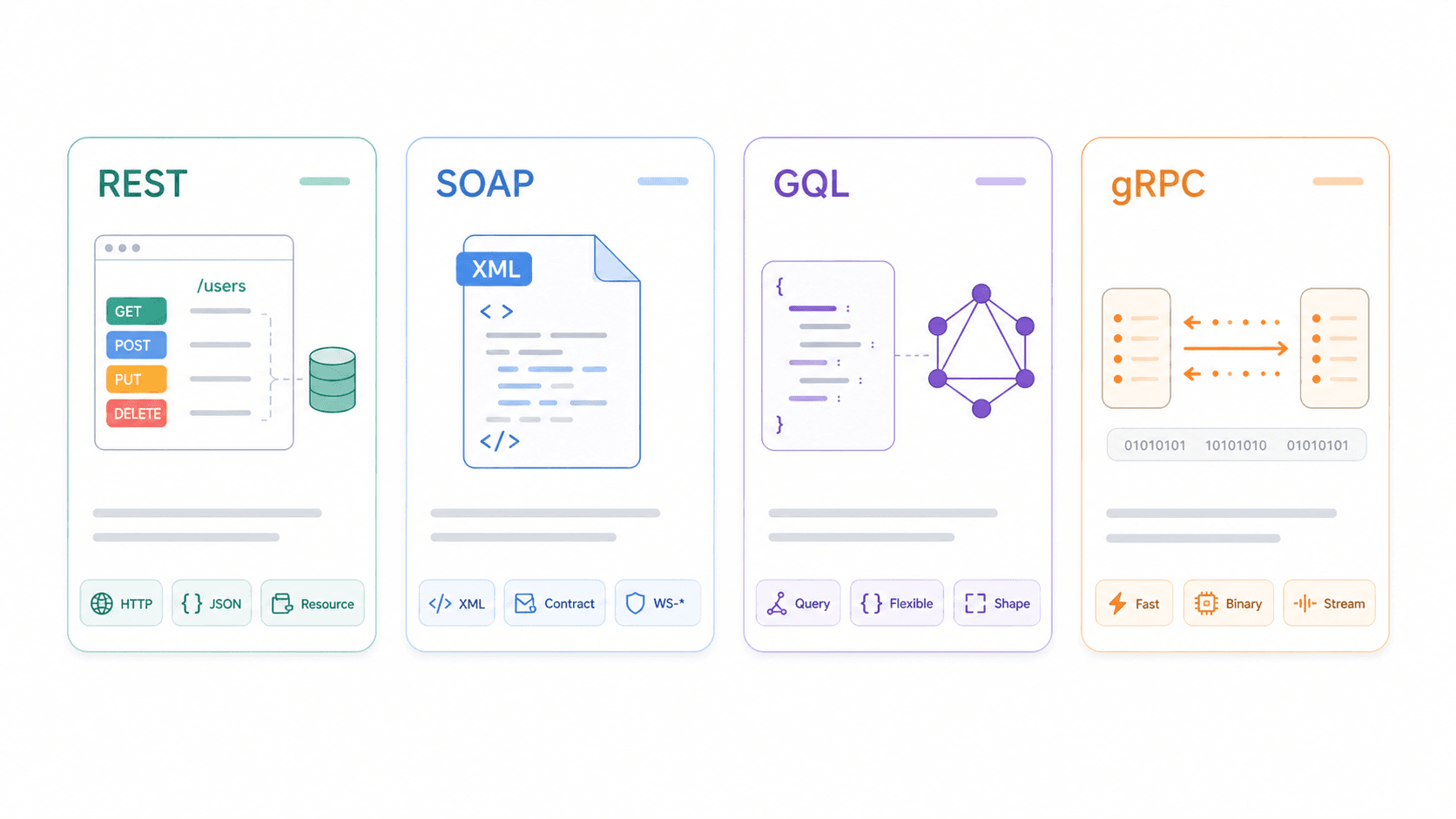
Understanding REST in isolation is useful. Understanding it relative to alternatives is better.
| Dimension | REST | SOAP | GraphQL | gRPC |
|---|---|---|---|---|
| Protocol / Transport | Architectural style, usually HTTP | XML-based messaging protocol; HTTP, SMTP, etc. | Query language/runtime, usually over HTTP | RPC framework over HTTP/2 |
| Data Format | JSON (typically), also XML/HTML | XML only (WSDL contracts) | JSON matching query shape | Protocol Buffers (binary) |
| Caching | ✅ Native HTTP caching when designed well | ❌ Complex; not HTTP-cache-friendly | ⚠️ Harder (POST + single endpoint + query variation) | ❌ Not HTTP-cache-oriented |
| Real-Time Support | ❌ Polling/webhooks | ❌ Enterprise messaging patterns | ✅ Subscriptions | ✅ Streaming, low-latency |
| Learning Curve | Low to medium | High | Medium | Medium to high |
| Best For | Public APIs, CRUD, web/mobile integrations | Enterprise/legacy, strict contracts, compliance | Complex queries, flexible frontends, mobile apps | Microservice-to-microservice, internal high-performance |
Postman's comparison of API architectural styles recommends choosing based on compatibility, data shape, operations, and user tooling.
When to pick what:
- REST wins when you need broad compatibility, simple CRUD operations, and HTTP caching. It's the default for public APIs and web/mobile integrations.
- SOAP still makes sense for enterprise systems with strict contracts, WS-Security requirements, or legacy integrations that aren't going anywhere.
- GraphQL shines when your frontend needs flexible, nested queries and you want to avoid over-fetching or under-fetching data—common in complex mobile apps.
- gRPC is built for internal microservice communication where low latency and binary serialization matter more than browser compatibility.
As a real-world REST example: Thunderbit's Open API uses straightforward POST endpoints (/distill and /extract), JSON request/response bodies, bearer token authentication, and standard HTTP status codes (400, 401, 402, 408, 422, 429, 500, 502, 503, 504). It illustrates REST characteristics in a production AI product without requiring SOAP contracts or gRPC complexity. Not a HATEOAS showcase—but a practical Level 2 API that's easy for business teams and developers to integrate.
Why REST API Characteristics Matter for Business Teams
Sales, Operations, Ecommerce—none of these teams write API code. But you are choosing vendors, connecting tools, and building automation workflows—and REST API quality directly affects how painful (or painless) those integrations are.
Integrating tools: When your CRM syncs with a marketing automation platform, REST API design determines whether that sync is reliable or brittle. The Salesforce Marketing Cloud REST API manages contacts, campaigns, journeys, and push notifications through predictable resource endpoints. If those endpoints follow REST conventions, your RevOps team can automate without custom workarounds.
Ecommerce operations: Shopify's fulfillment REST resources manage fulfillment orders, tracking numbers, and shipment states. Shipping apps and fulfillment tools depend on this layer. When the API is well-designed—proper status codes, cacheable catalog data, clear error messages—your logistics pipeline runs smoothly. When it's not, you get mysterious failures at 2 AM.
Evaluating vendors: Knowing the 6 constraints gives you a practical checklist:
- Does the API use standard status codes, or does every failure look like 200 OK?
- Are errors specific enough for your automation tool to recover?
- Is there clear documentation for rate limits, pagination, and authentication?
- Can common responses be cached to reduce load?
Data extraction and automation: Tools like Thunderbit use REST-based architecture to let business users extract structured data from websites, PDFs, and images—then export to Google Sheets, Airtable, Notion, or Excel. Thunderbit's AI Web Scraper Chrome Extension handles the complexity behind a 2-click interface, but under the hood, it's REST principles—stateless requests, JSON responses, standard errors—that make the integration layer reliable.
One more data point worth flagging: the Postman 2025 report found that only 24% of developers actively design APIs with AI agents in mind, while 51% worry about unauthorized or excessive API calls from AI agents. As automation and AI-driven workflows become standard in business teams, predictable REST patterns, least-privilege API keys, and rate limits aren't just developer concerns—they're operational risk factors.
How Thunderbit Applies REST Principles for Business Users
We built Thunderbit with the assumption that most of our users would never read a REST specification—and shouldn't have to. But the design choices that make Thunderbit easy to use are rooted in the same REST characteristics this article covers.
Here's a quick walkthrough of how it works in practice:
- Install the Chrome extension from the Chrome Web Store and open any website, PDF, or image you want to extract data from.
- Click "AI Suggest Fields" and Thunderbit's AI reads the page and proposes a structured table of columns—product names, prices, emails, whatever the page contains.
- Adjust columns if needed, then click "Scrape." Thunderbit handles pagination, subpages, and dynamic content automatically.
- Export your data to Google Sheets, Airtable, Notion, CSV, or Excel—free, no paywall.
For developers and automation workflows, Thunderbit's Open API exposes /distill (clean Markdown extraction) and /extract (structured data extraction) as REST-style POST endpoints with JSON bodies and standard HTTP error codes. In Richardson Maturity Model terms, that's a solid Level 2—resources, proper methods, meaningful status codes.
If you're exploring web scraping or data extraction more broadly, we've written deeper guides on AI web scraping, web scraping without coding, and what web scraping actually is.
Key Takeaways
- REST is an architectural style, not a protocol. It defines 6 constraints—client-server, stateless, cacheable, uniform interface, layered system, and optional code-on-demand—that guide API design.
- Most "RESTful" APIs aren't fully RESTful. The majority sit at Richardson Level 2 (resources + HTTP verbs + status codes). HATEOAS and code-on-demand are rarely implemented.
- The Richardson Maturity Model is the best self-assessment tool. It replaces the binary "REST or not" question with a practical spectrum (Levels 0–3).
- Common mistakes—200 OK for errors, POST for everything, missing cache headers—are still rampant. Knowing the constraints helps you spot and fix these anti-patterns.
- REST vs SOAP vs GraphQL vs gRPC isn't about "best"—it's about fit. REST dominates public APIs and CRUD integrations. GraphQL suits complex frontends. gRPC excels at internal microservices. SOAP persists in enterprise/legacy contexts.
- Business teams benefit from understanding REST characteristics when evaluating vendors, connecting tools, and building automation workflows. Tools like Thunderbit apply REST principles to make data extraction accessible without requiring technical expertise.
FAQs
What are the 6 characteristics of a REST API?
The 6 REST constraints are: (1) client-server separation, (2) statelessness, (3) cacheability, (4) uniform interface, (5) layered system, and (6) code-on-demand (optional). The first five are mandatory for an API to be considered RESTful under Fielding's original definition.
What is the difference between REST and RESTful?
REST is the architectural style—the set of design constraints defined by Roy Fielding. "RESTful" describes an API that follows those constraints. In practice, many APIs labeled "RESTful" only partially comply, typically implementing resources, HTTP methods, and status codes but skipping HATEOAS and code-on-demand.
Do all REST APIs follow every REST constraint?
No. Most production APIs follow client-server separation, statelessness, and basic uniform interface (resources + HTTP verbs). Cacheability and layered system design are inconsistently implemented. HATEOAS is rare, and code-on-demand is almost never used in JSON APIs.
What is the difference between REST and GraphQL?
REST exposes resources through multiple endpoints with standard HTTP methods (GET, POST, PUT, DELETE). GraphQL typically uses a single endpoint where clients specify exactly which fields they want in a query. REST has stronger native HTTP caching; GraphQL offers more flexibility for complex, nested data needs and reduces over-fetching.
What is HATEOAS, and does anyone actually use it?
HATEOAS (Hypermedia as the Engine of Application State) means API responses include links that tell clients what actions are available next—so clients can navigate the API without hardcoding every endpoint. It's central to Fielding's vision of REST (Richardson Level 3), but in practice, very few public APIs implement it. Most teams stop at Level 2 and rely on documentation and SDKs instead.
Try Thunderbit for AI Web Scraping
Try Thunderbit for AI Web Scraping Get Started Free
Learn More




