

When I first started building automation tools, I never imagined I’d spend so much time peering into the guts of websites, poking at their HTML like a digital archaeologist. But here we are in 2026, and the web is still the world's biggest, messiest data warehouse — only now half of it is hidden behind JavaScript, dynamic loading, and increasingly aggressive bot defenses. Whether you’re a sales pro, an ecommerce operator, or just a curious coder, web scraping has become the secret ingredient for turning public web pages into actionable business gold. And if you’re like me, you’ve probably wondered: “Can I really build my own web scraper with just JavaScript?” Spoiler: Yes, you can. But should you? Well, let’s walk through it together.
In this guide, I’ll show you how to go from zero to your own JavaScript-powered web scraper—covering everything from static HTML parsing to wrangling dynamic, JavaScript-heavy sites. And because I’ve seen both sides of the fence, I’ll also share when it makes sense to ditch the code and let an AI-powered tool like Thunderbit do the heavy lifting. Ready to get your hands dirty (digitally speaking)? Let’s dive in.
What is Web Scraping Using JavaScript?
Let’s start with the basics. Web scraping is the automated process of extracting information from websites. Instead of copying and pasting data by hand (which, let’s be honest, is about as fun as watching paint dry), you write a program—a “scraper”—that fetches web pages and pulls out the data you care about.
So where does JavaScript fit in? Well, JavaScript is the language of the web. It runs in browsers, powers interactive sites, and—thanks to Node.js—can also run on your laptop or server. When we talk about web scraping using JavaScript, we’re usually talking about writing scripts in Node.js that:
- Fetch web pages (using HTTP requests)
- Parse the HTML to find the data you want
- Sometimes, automate a real browser to handle sites that load content dynamically
There are two main types of web pages in this context:
- Static pages: The data is right there in the HTML. Think of a simple product listing page.
- Dynamic pages: The data only appears after the page runs its own JavaScript—like an infinite scroll feed or a dashboard that loads data via AJAX.
JavaScript, with its ecosystem of libraries, can handle both. For static pages, you can fetch and parse HTML directly. For dynamic pages, you’ll need to automate a browser to “see” what a real user would see.
Why Web Scraping Using JavaScript Matters for Business
Best Automated Web Scraping Tools Get Started Free
Let’s be real: nobody scrapes websites just for the thrill of it (well, except maybe me on a Saturday night). Businesses scrape because it’s a shortcut to insights, leads, and competitive advantage. Here’s why it matters:
- Time Savings: Automated scrapers can collect thousands of data points in minutes, saving teams hundreds of hours compared to manual copy-paste (BrowserCat).
- Better Decisions: Real-time data means you can react to market changes, adjust pricing, or spot trends before your competitors (BrowserCat).
- Accuracy: Automated extraction reduces human error, giving you cleaner, more reliable datasets (Thunderbit Blog).
- Competitive Insights: Track competitor prices, monitor reviews, or analyze market trends—scraping turns the open web into your private research lab.
- Lead Generation: Build prospect lists, enrich CRM data, or find new sales opportunities—all on autopilot.
Here’s a quick table to sum up the business impact:
| Use Case | Business Impact (Example) |
|---|---|
| Competitive Price Tracking | Improved revenue by optimizing pricing. John Lewis saw a 4% sales uplift after using scraping to monitor competitor prices. |
| Market Expansion Research | Informed market-specific strategy, leading to growth. ASOS doubled international sales by leveraging scraped local market data. |
| Process Automation | Dramatically reduced manual workload. An automated scraper handled 12,000+ entries in one week, saving hundreds of hours of labor. |
And here’s a stat that always blows my mind: 82% of e-commerce companies use web scraping for public data gathering, and 36% of investment firms use it for research. That’s not a niche hobby—that’s mainstream business.
Setting Up Your Web Scraping Environment with JavaScript
Okay, let’s get practical. If you want to build your own scraper, you’ll need to set up your environment. Here’s how I do it:
-
Install Node.js (and npm)
Head over to the official Node.js website and grab the LTS version. This gives you Node.js (the runtime) and npm (the package manager).
-
Check your install:
node -v
npm -v
-
-
Set Up a Project Folder
Make a new directory for your project (e.g.,
web-scraper-demo), open a terminal there, and run:npm init -yThis creates a
package.jsonfile to manage your dependencies. -
Install Essential Libraries
Here’s your starter pack:
- Axios: HTTP client for fetching web pages
npm install axios - Cheerio: jQuery-like HTML parser
npm install cheerio - Puppeteer: Headless Chrome automation (for dynamic sites)
npm install puppeteer - Playwright: Multi-browser automation (Chromium, Firefox, WebKit)
npm install playwrightThen run:
npx playwright install(downloads browser binaries)
- Axios: HTTP client for fetching web pages
Here’s a quick comparison of these tools:
| Library | Purpose & Strengths | Use Case Examples |
|---|---|---|
| Axios | HTTP client for making requests. Lightweight. Static pages only. | Fetch raw HTML of a news article or product page. |
| Cheerio | DOM parser, jQuery-like selectors. Fast for static content. | Extract all titles or links from static HTML. |
| Puppeteer | Headless Chrome automation. Executes page JS, can automate clicks, screenshots. | Scrape modern web apps, login-protected sites. |
| Playwright | Multi-browser automation, auto-wait features, robust for complex scenarios. | Scrape sites across Chrome, Firefox, Safari engines. |
For static pages, Axios + Cheerio is your go-to. For anything dynamic or interactive, Puppeteer or Playwright is the way to go (ZenRows).
Building a Simple Web Scraper Using JavaScript
Let’s roll up our sleeves and build a basic scraper. Suppose you want to grab book titles and prices from a static site like “Books to Scrape” (a great sandbox for learning).
Step 1: Inspect the page in your browser. You’ll notice each book is inside an <article class="product_pod">, with the title in an <h3> and the price in a <p class="price_color">.
Step 2: Here’s the code:
const axios = require('axios');
const cheerio = require('cheerio');

(async function scrapeBooks() {
  try {
    // 1. Fetch the page HTML
    const { data: html } = await axios.get('http://books.toscrape.com/');
    // 2. Load the HTML into Cheerio
    const $ = cheerio.load(html);
    // 3. Select and extract the desired data
    const books = [];
    $('.product_pod').each((_, element) => {
      const title = $(element).find('h3 a').attr('title');
      const price = $(element).find('.price_color').text();
      books.push({ title, price });
    });
    // 4. Output the results
    console.log(books);
  } catch (error) {
    console.error('Scraping failed:', error);
  }
})();
What’s happening here?
- Fetch: Use Axios to get the HTML.
- Parse: Cheerio loads the HTML and lets you use CSS selectors.
- Extract: For each
.product_pod, grab the title and price. - Output: Print the array of book objects.
Tips for Selectors:
Use your browser’s DevTools (right-click → Inspect) to find unique classes or tags. Cheerio supports most CSS selectors, so you can target elements precisely.
Parsing and Extracting Data
A few pro tips from my own scraping adventures:
- Text vs. Attributes: Use
.text()for inner text,.attr('attributeName')for attributes (liketitleorhref). - Data Types: Clean your data as you extract. Strip currency symbols, parse numbers, format dates.
- Missing Data: Always check if an element exists before extracting, to avoid errors.
- Mapping: Use
.each()or.map()to loop through elements and build your results array.
Once you’ve got your data, you can write it to a CSV, JSON, or even a database. The world is your oyster (or at least your spreadsheet).
Scraping Dynamic Websites with JavaScript: Puppeteer & Playwright
Now, let’s tackle the hard stuff: dynamic websites. These are pages where the data only appears after the site’s own JavaScript runs. Think social feeds, dashboards, or sites with “Load More” buttons.
Why use headless browsers?
A simple HTTP request won’t cut it—you’ll just get a skeleton HTML. Headless browsers like Puppeteer and Playwright let you:
- Launch a real browser (without the GUI)
- Run the site’s JavaScript
- Wait for content to load
- Extract the rendered data
Example with Puppeteer:
const puppeteer = require('puppeteer');

(async function scrapeQuotes() {
  const browser = await puppeteer.launch({ headless: true });
  const page = await browser.newPage();

  await page.goto('https://quotes.toscrape.com/js/', { waitUntil: 'networkidle0' });
  await page.waitForSelector('.quote');  // wait for quotes to appear

  const quotesData = await page.$$eval('.quote', quoteElements => {
    return quoteElements.map(q => {
      const text = q.querySelector('.text')?.innerText;
      const author = q.querySelector('.author')?.innerText;
      return { text, author };
    });
  });

  console.log(quotesData);
  await browser.close();
})();
What’s happening?
- Launch headless Chrome
- Navigate to the page and wait for network activity to settle
- Wait for the
.quoteselector to appear - Extract quotes and authors from the DOM
Playwright works almost identically, but supports multiple browsers (Chromium, Firefox, WebKit) and has some handy auto-wait features (Apify Blog).
Choosing the Right Tool: Puppeteer vs. Playwright
Both Puppeteer and Playwright are excellent for dynamic scraping, but here’s how I think about the choice:
- Puppeteer:
- Chrome/Chromium only (with some Firefox support)
- Simple, plug-and-play for Chrome-based scraping
- Huge community, lots of plugins (like stealth mode)
- Playwright:
- Multi-browser (Chromium, Firefox, WebKit/Safari)
- Official support for multiple languages (JS, Python, .NET, Java)
- Auto-wait for elements, handles multiple pages/contexts easily
- Great for complex or cross-browser scenarios
If you just need to scrape one site and Chrome is fine, Puppeteer is quick and easy. If you need cross-browser coverage, auto-waiting, or you're wiring scraping into an AI agent (Playwright now ships an official MCP server, so agents can drive it directly), Playwright is the safer default for new 2026 projects (Apify Blog).
Overcoming Common Challenges in Web Scraping Using JavaScript
Scrape data from any website using AI Get Started Free
Here’s where the real fun begins (and by fun, I mean “why is my scraper suddenly broken at 2am?”). Web scraping isn’t just about code—it’s about navigating obstacles:
- IP Blocking & Rate Limiting: Too many requests from one IP? You’ll get blocked. Use proxies and rotate them (Apify Blog).
- CAPTCHAs & Bot Detection: Sites use CAPTCHAs, fingerprinting, and honeypots. Slow down your requests, use stealth plugins, or third-party CAPTCHA solvers.
- Dynamic Content & AJAX: Sometimes, you can skip the browser and call the site’s background API directly (if you can find it in the network logs).
- Page Structure Changes: Sites update their HTML all the time. Keep your selectors modular and be ready to update them.
- Performance Bottlenecks: Scraping thousands of pages? Use concurrency, but don’t overwhelm your machine (or the target site).
Best Practices:
- Throttle your requests (add delays)
- Set realistic user-agent headers
- Use proxies for large-scale scraping
- Log everything (so you know when/why things break)
- Respect robots.txt and terms of service
And remember: scraping is a moving target. Sites evolve, anti-bot tech gets smarter, and you’ll need to keep your scripts up to date (Thunderbit Blog).
Troubleshooting and Maintenance Tips
- Modularize selectors: Keep your CSS selectors in one place for easy updates.
- Descriptive logging: Log progress and errors to spot issues fast.
- Debug in headful mode: Run your browser automation with the GUI to watch what’s happening.
- Error handling: Use try/catch and retries for robustness.
- Test regularly: Set up alerts if your scraper suddenly returns zero results.
- Version control: Use Git to track changes and roll back if needed.
Even with all this, maintaining dozens of custom scrapers can become a real chore. That’s why more teams are looking at AI-powered, no-code solutions.
When to Consider No-Code Alternatives: Thunderbit vs. JavaScript Scraping
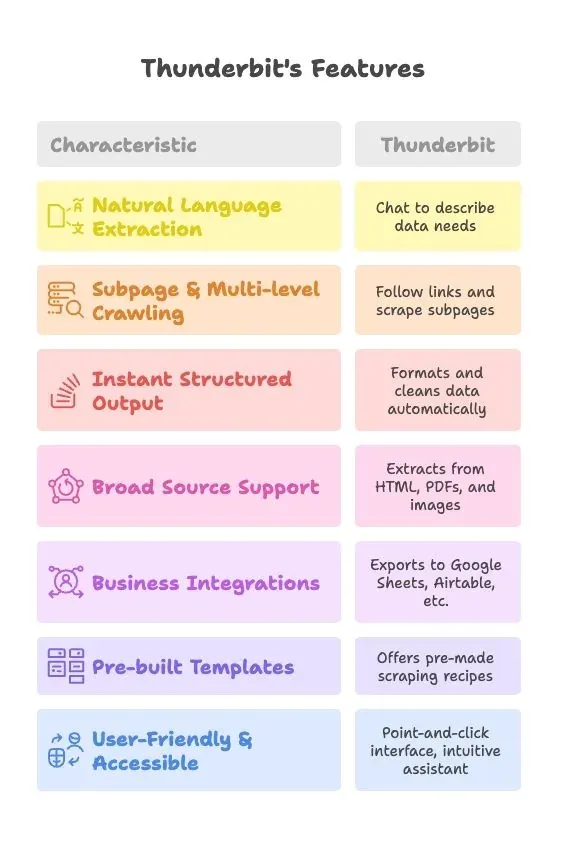
Let’s be honest: not everyone wants to spend their weekend debugging selectors or fighting with proxies. Enter Thunderbit, our AI-powered web scraper Chrome extension.
How does Thunderbit work?
- Install the Chrome extension
- Navigate to any page, click “AI Suggest Fields”
- Thunderbit’s AI reads the page, suggests columns, and extracts the data
- Handles dynamic pages, subpages, documents, PDFs, and more
- Export directly to Google Sheets, Airtable, Notion, or CSV—no code required
Here’s a side-by-side comparison:
| Aspect | JavaScript Scraping (Code it Yourself) | Thunderbit (No-Code AI Tool) |
|---|---|---|
| Setup Time | Hours per scraper (coding, debugging, environment setup) | Minutes per site—install extension, click, and go |
| Learning Curve | Requires JS/Node, HTML/CSS, scraping libraries, debugging | No coding required, point-and-click interface, AI guides you |
| Maintenance | You fix scripts when sites change (ongoing engineering effort) | AI adapts to layout changes, minimal maintenance for users |
| Collaboration/Sharing | Share code or CSVs, non-devs may struggle to use | Export to Google Sheets, Airtable, Notion; easy for teams to share |
Thunderbit’s AI can even summarize, categorize, or translate data as it scrapes—something that would take extra coding in a DIY approach (Thunderbit Docs).
Real-World Scenarios: Which Approach Fits Your Team?
-
Scenario 1: Developer, Complex Project
You’re building a product that aggregates job postings from five different sites, needs custom logic, and runs on your own servers. Coding your own scrapers makes sense—you get full control, can optimize for scale, and integrate directly with your backend.
-
Scenario 2: Business Team, Rapid Data Needs
You’re a marketing manager who needs a list of leads from several directories—today. No coding skills, no time for dev cycles. Thunderbit is perfect: point, click, export to Google Sheets, done in an hour (Thunderbit Blog).
-
Scenario 3: Hybrid Approach
Sometimes, teams use Thunderbit to prototype or handle quick tasks, then invest in custom code if it becomes a long-term need. Or, devs build the initial scraper, then hand off ongoing scraping to non-devs via Thunderbit templates.
How to choose?
- If you need deep customization, have technical skills, or want full control—code it.
- If you want speed, ease, and team collaboration—Thunderbit is hard to beat.
- Many teams use both: code for core systems, Thunderbit for ad-hoc or business-led scraping.
A Third Path: AI Coding Agents and Browser Agents
There's a middle ground that didn't really exist when most JavaScript scraping tutorials were written. Two flavors worth knowing about:
- AI coding agents (Claude Code, OpenAI Codex CLI, Cursor) — you describe the page and the data you want in plain English, and they write the Axios/Cheerio/Playwright script for you. You still own the code, you still hit the same anti-bot walls, but the writing part shrinks from hours to a few minutes. Useful when you want a real script in your repo and not a black-box tool.
- Browser-driving agents (Browser Use, Playwright MCP, Skyvern) — instead of generating a script, the agent itself navigates the page. You write a prompt like "log in, go to orders, export the last 30 days as CSV" and it figures out the clicks. Better for flows that involve logins, multi-step navigation, or pages that change layout often, since the agent reasons about what it sees rather than relying on a fixed selector.
Neither one removes the boring constraints — rate limits, terms of service, CAPTCHAs, IP blocks are all still your problem. But for the "I just need this data once" or "the selectors keep breaking" cases, they're worth a look before you commit to maintaining yet another puppeteer.launch() script.
If you'd rather skip the agent layer entirely and just point-and-click, that's where Thunderbit comes in — see the comparison above.
Try Thunderbit Chrome Extension for No-Code Scraping
Data Export, Automation, and Collaboration: Going Beyond Basic Scraping
Collecting data is just the start. What you do with it next is what matters.
With JavaScript scrapers:
- Write data to CSV/JSON using Node’s
fsmodule - Insert into a database or call an API (like Google Sheets API)
- Schedule with cron jobs or cloud functions
- Sharing requires sending files or building dashboards
With Thunderbit:
- One-click export to Google Sheets, Airtable, Notion, or CSV (Thunderbit Docs)
- Built-in scheduling—set it and forget it, data updates automatically
- Team members can use shared templates, outputs are instantly collaborative
- AI-powered post-processing (summarize, categorize, translate) built-in
Imagine scraping competitor prices daily and having your Google Sheet update every morning—no code, no manual steps. That’s the kind of workflow Thunderbit unlocks.
Key Takeaways: Web Scraping Using JavaScript for Business Success
Let’s wrap up with the big lessons:
- JavaScript is a powerful scraping tool: With Node.js, Axios, Cheerio, Puppeteer, and Playwright, you can scrape almost any site (Apify Blog).
- Business value is the goal: Scraping is about better decisions, faster workflows, and competitive edge (Keboola).
- Choose the right approach: Use lightweight tools for static pages, headless browsers for dynamic ones.
- Anticipate challenges: IP bans, CAPTCHAs, and site changes are part of the game—use proxies, stealth tactics, and keep your code modular.
- Maintenance is real: Be ready to update scripts, or consider AI-powered tools that adapt automatically (Thunderbit Blog).
- No-code tools like Thunderbit accelerate results: For non-devs or rapid business needs, Thunderbit’s AI, subpage scraping, and one-click exports make scraping accessible to everyone.
- Integration and collaboration matter: Make sure your data flows into the tools your team uses—Google Sheets, Airtable, Notion, or your CRM.
Final thought:
The web is overflowing with data—if you know how to grab it, you’re already ahead of the pack. Whether you build your own scraper in JavaScript or let Thunderbit’s AI do the heavy lifting, the key is to turn that raw data into business value. Try both approaches, see what fits your workflow, and remember: the best scraper is the one that gets you the answers you need, when you need them.
Curious to try Thunderbit? Download the Chrome extension here and see how easy web scraping can be. Want to geek out more? Check out the Thunderbit Blog for more guides, tips, and stories from the front lines of data automation.
Explore Thunderbit AI Web Scraper
FAQs
1. What is JavaScript web scraping and how does it work?
JavaScript web scraping involves using tools like Node.js, Axios, Cheerio, Puppeteer, or Playwright to programmatically fetch and extract data from websites. Static pages can be scraped using HTTP requests and HTML parsers, while dynamic pages require headless browsers to simulate real user interactions.
2. Why should businesses care about web scraping with JavaScript?
Web scraping helps businesses save time, reduce manual effort, improve data accuracy, and gain real-time competitive insights. It supports use cases like lead generation, price tracking, market research, and sales automation—making it a valuable tool for data-driven decision-making.
3. What are the key tools and libraries used in JavaScript scraping?
- Axios: For HTTP requests to static pages.
- Cheerio: To parse and query static HTML.
- Puppeteer: To automate Chrome and extract dynamic content.
- Playwright: A multi-browser automation tool with robust scraping capabilities.
4. When should I use Thunderbit instead of building a scraper with JavaScript?
Use Thunderbit when you want fast, no-code scraping without writing or maintaining scripts. It’s ideal for business teams, quick projects, and collaborative workflows. Thunderbit handles dynamic content, subpages, and exports directly to tools like Google Sheets and Airtable.
5. What are the biggest challenges in JavaScript web scraping and how can I overcome them?
Common challenges include IP bans, CAPTCHAs, changing page structures, and performance limits. You can mitigate these by using proxies, stealth plugins, browser automation, modular code, and retry logic. Alternatively, tools like Thunderbit can bypass many of these hurdles automatically.
6. What about AI coding agents like Claude Code or browser agents like Browser Use — do they replace JavaScript scrapers?
Not entirely, but they change the workflow. AI coding agents (Claude Code, Codex CLI, Cursor) can generate the Axios/Cheerio/Playwright script for you from a plain-English description — you still run the code, you still handle anti-bot and rate limits yourself. Browser agents (Browser Use, Playwright MCP) go a step further and actually drive the browser via natural-language instructions, which is handy for login-gated or multi-step flows where selectors break often. For one-off jobs they save real time; for production scraping you still want your own script (or a managed tool like Thunderbit) so you can debug it when something changes.
Try AI Web Scraper Get Started Free




