
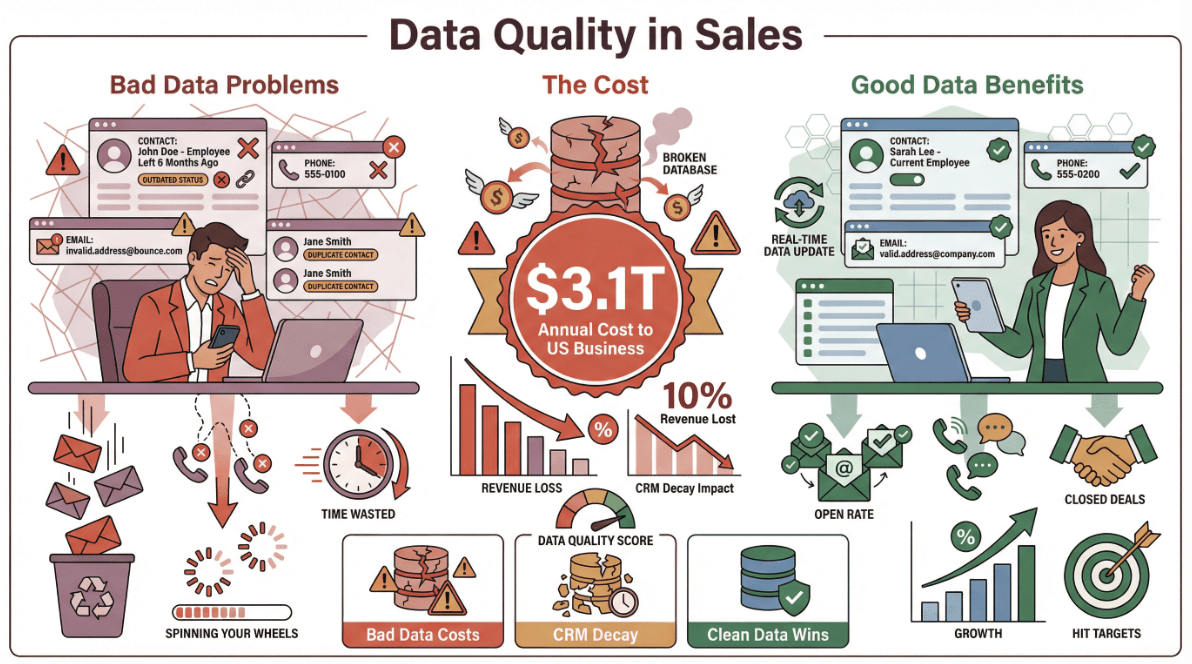
There’s an old saying in sales: “You’re only as good as your data.” These days, that’s not just a catchy phrase—it’s the difference between winning new business and spinning your wheels. I’ve seen firsthand how teams struggle with outdated CRM records, wasted outreach, and the endless game of “Who actually works here now?” (If I had a dollar for every time I called a lead who left the company six months ago, I’d probably have enough to buy a new CRM.) The numbers don’t lie: bad data costs U.S. businesses an estimated $3.1 trillion every year, and nearly half of companies have lost over 10% of their revenue just from CRM decay.
So, how do you break out of this cycle and actually use data as a lever for growth? That’s where Apollo data comes in. And if you want to take things to the next level, pairing Apollo with AI-powered tools like Thunderbit can give your sales and operations teams a serious edge. In this guide, I’ll walk you through how to use Apollo data for precise targeting, workflow automation, and real-time enrichment—plus how Thunderbit can help you fill in the gaps and keep your data strategy sharp.
What is Apollo Data and Why Does It Matter for Business Growth?
Let's start with the basics. Apollo.io is a B2B sales intelligence platform with a continually updated database. As of 2026, Apollo's homepage advertises 230M+ contacts and 30M+ companies with verified emails, direct dials, and rich company details—sourced from a contributor network, public web crawling, and vetted third-party providers (Smarte). Think of it as your always-on source of leads, accounts, and decision-makers.
But Apollo isn’t just a giant phone book. It’s a living, breathing data engine that helps you:
- Build targeted lead lists using dozens of filters (industry, company size, tech stack, funding, and more)
- Segment your market for smarter campaigns
- Enrich and update your CRM so your team isn’t chasing ghosts
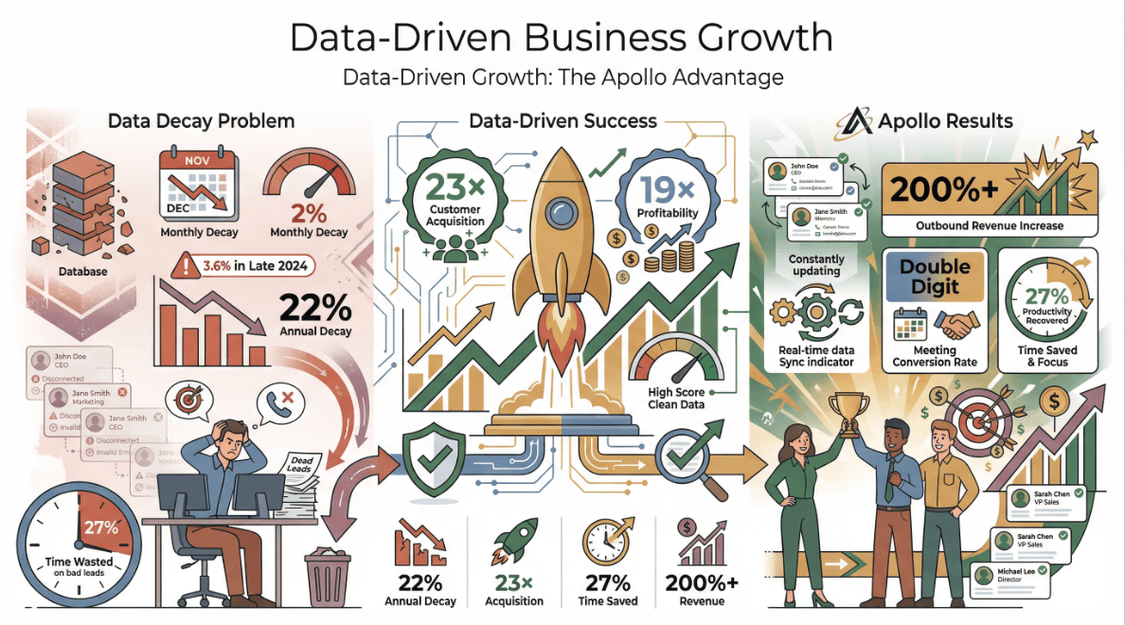
Why does this matter? Because high-quality, current data is the rocket fuel for business growth. Companies that are truly data-driven are 23× more likely to acquire customers and 19× more likely to be profitable. On the flip side, B2B data decays at about 2% per month—meaning 22% of your contacts go bad every year if you’re not refreshing them (Landbase). In late 2024, business email records decayed at an even faster clip: 3.6% in just one month. That’s a lot of missed opportunities.
Apollo’s constantly-updated database helps you fight this decay, keep your targeting sharp, and protect your revenue. Sales reps waste about 27% of their time chasing bad leads—time you get back when your data is clean.
And the results speak for themselves: companies using Apollo have reported 200%+ increases in outbound revenue, and boosted meeting conversion rates by double digits.
How Apollo Data Enables Precise Customer Targeting
One of Apollo’s superpowers is its ability to help you find exactly the right customers—not just anyone with a LinkedIn profile. Apollo offers 65+ smart filters across firmographics, technographics, funding, hiring signals, and even buyer intent (Breakcold). Here’s how you can use them:
| Apollo Filter | Description & Use Case |
|---|---|
| Firmographics | Industry, location, employee size, revenue—e.g., target mid-market healthcare companies in the Midwest |
| Technographics | Filter by technologies a company uses—e.g., find companies using a competitor’s tool |
| Funding & Hiring | Target recently funded companies or those hiring for key roles—signals they’re ready to buy |
| Intent & Events | Find companies showing buying intent or recent job changes—strike while the iron is hot |
| Contact Attributes | Title, seniority, department—reach decision makers, not just anyone with an email address |
Real-world example: Let’s say you sell HR software. You could filter for tech companies in North America, 200–1000 employees, using Workday, and who just raised a Series B. That’s a list of prospects with budget, need, and the right tech stack—no more “spray and pray.”
Apollo’s precision means you can build laser-focused campaigns. One company increased meetings booked by 20% just by sharpening their ICP with Apollo (Apollo Case Study).
Integrating Apollo Data into Your Existing Business Workflows
Having great data is only half the battle—you need it to flow into your CRM and sales automation tools, where your team actually works. Apollo makes this easy with native integrations for Salesforce, HubSpot, and more (TwoPirConsulting). Here’s how it works:
- Connect Apollo to your CRM: Usually just a few clicks in Settings. Authorize the connection, and you’re ready to sync.
- Map fields: Apollo lets you match its fields (like “Technologies Used” or “Last Funding Amount”) to your CRM’s properties—even custom fields. This keeps your data organized and prevents anything from getting lost in translation.
- Bidirectional sync: Push new leads from Apollo into your CRM, and pull existing records from your CRM for enrichment. No more duplicate entry or “which system is right?” debates.
Supported tools: Salesforce, HubSpot, Zoho CRM, Pipedrive, Outreach, Salesloft, and more. You can even use Zapier or Apollo’s API for custom workflows (Zapier).
Automating Data Sync and Enrichment
Here’s where things get really interesting. Apollo can automatically enrich your CRM records—filling in missing emails, updating job titles, and flagging outdated info (Apollo Knowledge Base). You can:
- Enable real-time enrichment for new leads (so every inbound gets full context before your rep calls)
- Schedule bulk enrichment jobs (monthly, quarterly, or as needed)
- Set up alerts for key changes (like a target account raising a new funding round)
This keeps your CRM fresh, reduces bounce rates, and ensures your team is always working with the best info.
Best practices: Start with a test sync, use Apollo’s Data Health tools to spot duplicates, and train your team on how to use the integration. Trust me, a little setup goes a long way.
Leveraging Apollo Data for Sales and Marketing Efficiency
Let’s talk about results. With Apollo data, you can:
- Build prospect lists in minutes, not hours—just set your filters and export
- Automate lead qualification—Apollo enriches inbound leads so you can score and route them instantly
- Personalize outreach at scale—use Apollo’s data to tailor emails, calls, and LinkedIn messages (mention a prospect’s tech stack, recent funding, or even their latest blog post)
- Improve lead scoring—feed Apollo’s data into your scoring model so reps focus on the best opportunities
Here’s a quick before-and-after:
| Task | Before Apollo | After Apollo |
|---|---|---|
| Prospecting | Manual, slow | Automated, targeted |
| Lead Qualification | Google + LinkedIn | Auto-enriched in CRM |
| Email Personalization | Generic, low reply | Segmented, relevant |
| Data Maintenance | Manual, error-prone | Automated, ongoing |
Teams using Apollo often report 5–10 hours saved per rep per week, higher conversion rates, and less time wasted on bad leads (Breakcold).
Ensuring Data Security and Compliance When Using Apollo Data
Data privacy isn’t just a checkbox—it’s a must-have. Apollo takes compliance seriously:
-
GDPR and CCPA/CPRA compliant—with frameworks for handling personal data, opt-outs, and cross-border transfers (Apollo Privacy)
-
ISO 27001 certified and SOC 2 audited—regular third-party audits (A-LIGN) plus encryption at rest and in transit (Apollo Security)
-
Opt-out and data subject rights—anyone can search, access, or remove their info from Apollo’s database (Apollo Privacy Center)
What does this mean for you? Use Apollo data for legitimate B2B outreach, honor opt-outs, and keep your own systems secure. Apollo’s compliance gives you peace of mind—and a competitive edge.
Thunderbit: Enhancing Apollo Data with AI Web Scraping
Now, let’s talk about the “secret sauce” that can take your Apollo data even further: Thunderbit. Thunderbit is an AI Web Scraper Chrome Extension that lets you capture unstructured data from anywhere on the web—company websites, news pages, social media, PDFs, you name it.
Here’s how Thunderbit complements Apollo:
- Fill in the gaps: Apollo gives you structured contact and company data. Thunderbit lets you grab real-time insights—like the latest news, customer testimonials, or product updates—from a prospect’s website.
- Enrich your leads: Scrape LinkedIn bios, recent blog posts, or even extract emails and phone numbers from niche directories.
- Monitor competitors: Use Thunderbit’s scheduled scraping to keep tabs on competitor websites for new product launches, pricing changes, or press releases.
- Automate the grunt work: Thunderbit’s “AI Suggest Fields” feature reads any page and recommends what to extract—just click, scrape, and export to Excel, Google Sheets, Airtable, or Notion (Thunderbit Blog).
Try Thunderbit AI Web Scraper for Free
Why do I love Thunderbit? Because it’s built for non-technical users. No code, no templates, no headaches. Just point, click, and get your data.
Practical Example: Combining Apollo Data and Thunderbit for Lead Enrichment
Let’s say your sales team has a list of 50 SaaS companies from Apollo. You want to personalize your outreach with the latest news about each company and maybe a quote from their CEO.
Here’s how you’d do it:
- Export your Apollo list with company names and website URLs.
- Use Thunderbit to visit each company’s news or press page. Click “AI Suggest Fields” to grab the latest headline and date.
- Export the scraped news to Google Sheets.
- Merge the Thunderbit data with your Apollo list—now you have a column for “Latest News” next to each company.
- Personalize your outreach: “Congrats on your recent funding round—I saw the news on your site! Here’s how we can help you scale…”
This combo gives you a 360° view: Apollo tells you who to contact, Thunderbit tells you what’s happening right now.
Integrating Thunderbit and Apollo Data into Your Business Processes
Getting Thunderbit data into your workflow is a breeze:
- Export to Excel, Google Sheets, Airtable, or Notion—Thunderbit supports all the major formats (Thunderbit Docs).
- Merge with Apollo data using a common key (like company name or website).
- Import enriched lists back into your CRM—either as new fields, notes, or attachments.
- Automate with Zapier or integration platforms—set up workflows to push Thunderbit-scraped data into your CRM or Apollo via API.
Pro tip: Thunderbit’s natural language scheduling makes it easy to run scrapes on a regular basis (“every Monday at 9am”), so your data stays fresh without you lifting a finger.
Why Thunderbit is the Smart Choice for Data Automation and Integration
Here’s what sets Thunderbit apart:
- Ridiculously easy to use: No coding, no complex setup—just click and go.
- AI-powered field suggestions: Thunderbit reads any page and tells you what’s worth extracting.
- Handles subpages and pagination: Scrape lists, then drill down into detail pages automatically.
- Free data export: No hidden fees for getting your data out.
- Works with your stack: Export to all the tools your team already uses.
- Natural language controls: Schedule scrapes or fill out forms just by describing what you want.
- Trusted by 100,000+ users worldwide—from sales teams to operations and marketing (Thunderbit).
Compared to traditional scrapers (which often break or require constant maintenance), Thunderbit’s AI adapts to website changes and keeps your data pipeline flowing.
| Feature | Thunderbit | Traditional Scraper |
|---|---|---|
| Setup Time | 2 clicks | 30+ minutes |
| Coding Required | None | Usually |
| Handles Subpages | Yes, automatically | Manual setup |
| Data Export | Free, all formats | Sometimes extra cost |
| Natural Language | Yes | No |
| Maintenance | AI adapts | Manual fixes needed |
Step-by-Step Guide: Maximizing Business Growth with Apollo Data and Thunderbit
Ready to put this into action? Here’s your checklist:
- Audit your current data: Identify gaps, decay, and missing info in your CRM.
- Set up Apollo: Connect to your CRM, map fields, and run initial enrichment.
- Define your ICP: Use Apollo’s filters to build targeted lists.
- Export and sync: Push Apollo leads into your CRM or sales automation tools.
- Personalize outreach: Use Apollo’s data for segmentation and dynamic email fields.
- Identify data gaps: What extra info would help your team? (e.g., recent news, testimonials)
- Use Thunderbit to fill the gaps: Scrape company websites, news, or social media for real-time insights.
- Merge and enrich: Combine Thunderbit data with Apollo lists in Google Sheets, Excel, or directly in your CRM.
- Automate updates: Schedule regular Thunderbit scrapes and Apollo enrichment jobs.
- Stay compliant: Use Apollo’s privacy tools, honor opt-outs, and keep data secure.
- Measure and optimize: Track improvements in lead quality, conversion rates, and sales cycle length.
Troubleshooting tips:
- If field mapping gets tricky, start with a small test batch.
- Use Apollo’s Data Health tools to spot duplicates or errors.
- For Thunderbit, if a site is tricky to scrape, try browser mode or adjust your AI field prompts.
Conclusion & Key Takeaways
Here’s the bottom line: Great data is the foundation of business growth. Apollo gives you the structured, up-to-date B2B data you need to target, segment, and automate. Thunderbit fills in the real-world context—so you’re not just reaching out, you’re reaching out with insight.
- Start with Apollo: Clean, enrich, and segment your leads.
- Supercharge with Thunderbit: Capture the latest news, testimonials, and signals from the web.
- Integrate everywhere: Make sure your CRM, sales, and marketing tools are all in sync.
- Automate and personalize: Let the data do the heavy lifting, so your team can focus on closing deals.
If you’re ready to see what data-driven growth looks like, try combining Apollo and Thunderbit in your workflow. It’s the fastest way I know to go from “just another sales team” to a true revenue machine.
Want to dive deeper? Check out the Thunderbit Blog for more guides, or download the Chrome extension and see for yourself how easy it is to enrich your Apollo data with real-time web insights.
Enrich Apollo Data with Thunderbit AI
Try AI Web Scraper Get Started Free
FAQs
1. What is Apollo data, and how does it help my business?
Apollo data is a massive, up-to-date B2B database of contacts and companies. It helps you build targeted lead lists, segment your market, and keep your CRM fresh—so your sales and marketing teams can focus on high-value prospects and avoid wasted effort.
2. How do I integrate Apollo data with my CRM or sales tools?
Apollo offers native integrations for Salesforce, HubSpot, and more. Just connect your accounts, map your fields, and set up bidirectional sync. You can also use Zapier or Apollo’s API for custom workflows.
3. Is Apollo data compliant with privacy regulations?
Yes. Apollo is GDPR and CCPA/CPRA compliant, with ISO 27001 and SOC 2 Type II certifications. They offer opt-out tools and data subject rights, so you can use their data responsibly and legally.
4. How does Thunderbit enhance Apollo data?
Thunderbit is an AI Web Scraper that lets you capture unstructured, real-time data from the web—like news, testimonials, or contact info not found in Apollo. It’s perfect for filling in gaps and personalizing your outreach.
5. Do I need technical skills to use Thunderbit or Apollo?
Nope! Both are designed for non-technical business users. Thunderbit uses AI to suggest what to scrape, and Apollo’s integrations are point-and-click. You’ll be up and running in minutes.
Ready to turn your data into a growth engine? Start experimenting with Apollo and Thunderbit today—and watch your sales results take off.
Learn More




