

Recruitment has always been a bit of a high-wire act—balancing speed, accuracy, and the never-ending flood of resumes and job postings. These days, with millions of new listings appearing on platforms like LinkedIn and Indeed every month, it’s no wonder HR teams feel like they’re running a marathon with a backpack full of paperwork. I’ve seen firsthand how even the most organized recruiters can get buried under the sheer volume of data, missing out on great candidates or spending hours on manual data entry that could have gone into actually talking to people.
Streamline Recruitment with AI Job Scraping Get Started Free
That’s where job scraping comes in—a not-so-secret weapon for modern recruitment teams who want to work smarter, not harder. In this guide, I’ll break down exactly what job scraping is, why it’s changing the hiring game, and how you can use AI-powered tools like Thunderbit to turn the chaos of online job boards into a streamlined, data-driven hiring process. Whether you’re an HR pro, a talent sourcer, or just someone tired of copy-pasting job descriptions, let’s dive into how job scraping can make your recruitment efforts faster, more accurate, and a whole lot less stressful.
What is Job Scraping and Why Does It Matter in Recruitment?
Let’s start with the basics: job scraping is the process of automatically extracting job postings, candidate profiles, and related data from websites—think job boards, company career pages, or even professional forums. Instead of manually copying and pasting details from dozens (or hundreds) of listings, job scraping tools “read” the web for you, pulling structured information into a spreadsheet or database in minutes.
For recruiters, this means no more endless scrolling or data entry marathons. Job scraping lets you:
- Quickly gather job postings or candidate data from multiple sources at once
- Standardize and organize information for easier comparison and analysis
- Accelerate shortlisting and matching by having all the details in one place
Imagine having a fresh, up-to-date list of every relevant job or candidate in your market—without lifting a finger. That’s the power of job scraping, and it’s why more companies are making it a core part of their recruitment workflow.
Common Challenges with Traditional Recruitment Methods
Let’s be honest: traditional recruiting can feel like trying to find a needle in a haystack—except the haystack keeps getting bigger. Here’s what a typical manual process looks like:
- Searching job boards (LinkedIn, Indeed, etc.) for relevant postings or candidate profiles
- Copying details (job title, company, requirements, contact info) into a spreadsheet or ATS
- Manually updating as new jobs appear or candidates apply
- Sorting and filtering to find the best matches—often by eye
- Repeating the process across multiple platforms, every day
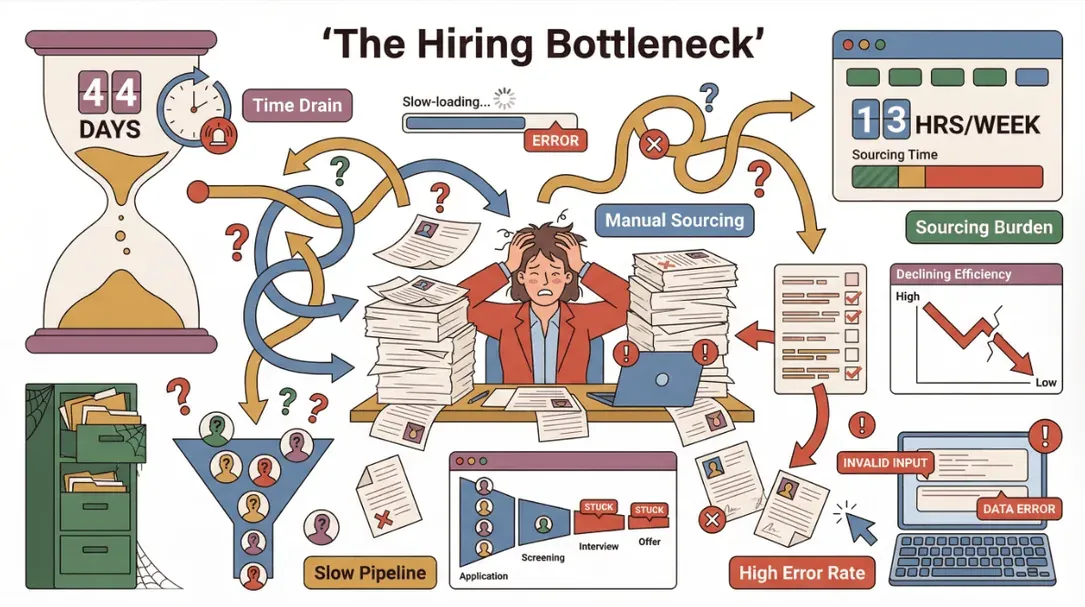 This approach is slow, error-prone, and just can’t keep up with the pace of modern hiring. SHRM's 2025 Benchmarking Report puts the average U.S. time-to-fill at around 42 days, up roughly 24% since 2021, and recruiters still report spending about 13 hours a week sourcing candidates for a single role.
Let’s break down the differences:
| Process Step | Manual Approach | Job Scraping Approach |
|---|---|---|
| Data Collection | Copy-paste from each site | Automated extraction |
| Data Entry | Manual, error-prone | Structured, consistent |
| Updates | Repeated daily/weekly | Scheduled, real-time |
| Scalability | Limited by team size | Scales to thousands of posts |
| Accuracy | Prone to mistakes | High, with validation |
It’s no wonder so many recruiters feel overwhelmed. The more platforms you monitor, the more time you spend just organizing information—leaving less time for actual recruiting.
How Job Scraping Optimizes Recruitment Workflows
So, what happens when you automate the grunt work? Job scraping can transform recruitment in a few key ways:
- Faster Shortlisting: Instantly pull all relevant jobs or candidates into a single view, so you can filter and prioritize in seconds.
- Better Matching: Structured data makes it easier to compare requirements, skills, or experience—improving your hit rate.
- Market Intelligence: Scrape competitor job postings to spot hiring trends, salary benchmarks, or new roles in your industry.
- Talent Mapping: Build a database of potential candidates—even passive ones—for future outreach.
Here’s a quick look at some high-impact use cases:
| Use Case | Business Impact |
|---|---|
| Lead Generation | Build lists of target candidates for outreach |
| Competitor Analysis | Monitor hiring trends and roles at rival companies |
| Talent Mapping | Identify skill gaps or emerging roles in your market |
| Job Board Aggregation | Centralize postings from multiple platforms |
| Resume/CV Extraction | Quickly parse and organize candidate submissions |
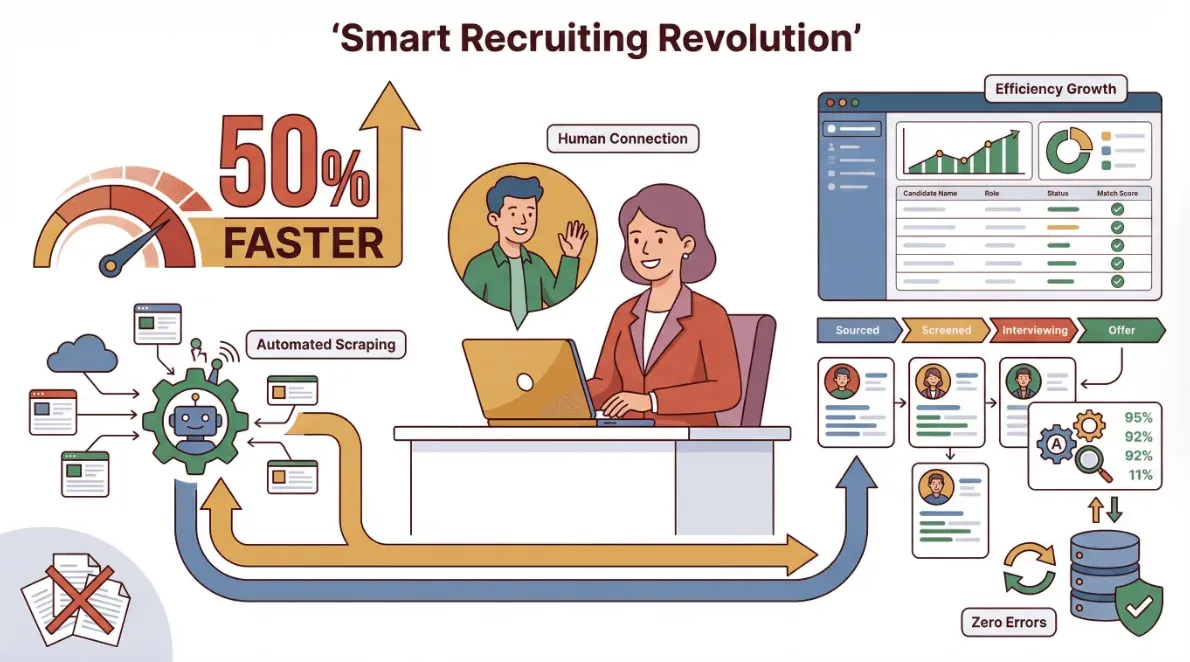
Recruiters using job scraping tools report up to 50% faster time-to-fill and a significant reduction in manual errors—meaning more time spent actually engaging with candidates, not just wrangling data.
Overview of Job Scraping Solutions: From Traditional to AI-Powered Tools
There’s more than one way to scrape a job board. Here’s a quick rundown of the main approaches:
- Manual Scraping: Good old copy-paste. Works for a handful of listings, but not scalable.
- Code-Based Tools: Scripts in Python (using libraries like BeautifulSoup or Scrapy) can automate scraping, but require technical skills and constant maintenance as websites change.
- Pre-Built Software: No-code tools like Octoparse or ParseHub offer visual interfaces, but often need templates for each site and can struggle with dynamic content.
- AI-Powered Platforms: A newer category of tools (including Thunderbit) uses LLMs to "read" any web page, suggest relevant fields, and extract structured data with a couple of clicks — no per-site templates, no XPath tuning. AI coding agents (Claude Code, Cursor, GitHub Copilot) can also generate one-off scraping scripts from a plain-English description, which works well if you have an engineer in the loop and a tolerance for handling anti-bot defenses yourself.
Here’s how Thunderbit stacks up:
| Criteria | Manual | Code-Based | Pre-Built Software | Thunderbit (AI-Powered) |
|---|---|---|---|---|
| Ease of Use | Low | Low | Medium | High |
| Speed | Slow | Fast | Fast | Very Fast |
| Data Accuracy | Medium | High | Medium | High (AI-validated) |
| Maintenance | High | High | Medium | Low (adapts to changes) |
| Integration | Low | High | Medium | High (Excel, Sheets, etc.) |
With Thunderbit, you can use natural language prompts (“Extract all job titles, companies, and locations from this page”), and the AI figures out the rest. It’s designed for business users—no need to call in IT or learn Python.
Try Thunderbit for Job Scraping
Step-by-Step Guide: Using Thunderbit for Job Scraping
Ready to see how easy job scraping can be? Here’s how I use Thunderbit to pull job or candidate data from any website:
1. Install Thunderbit Chrome Extension
Head to the Thunderbit Chrome Extension Download Page and add it to your browser. Sign up for a free account—no credit card required.
2. Navigate to Your Target Job Board or Resume Site
Open the page you want to scrape—this could be LinkedIn Jobs, Indeed, a niche industry forum, or even a company’s careers page. Make sure the listings you want are visible on the page.
3. Launch Thunderbit and Use “AI Suggest Fields”
Click the Thunderbit icon in your Chrome toolbar. Hit “AI Suggest Fields,” and Thunderbit’s AI will scan the page, recommending columns like “Job Title,” “Company,” “Location,” “Salary,” or “Contact Email.” You can tweak or add fields as needed.
4. Start the Scrape
Click “Scrape.” Thunderbit will automatically extract the data, handling pagination or infinite scroll if needed. For listings with detail pages (like individual job descriptions), use Thunderbit’s Subpage Scraping feature to visit each link and pull extra info (requirements, application links, etc.).
5. Export Results
Once the scrape is complete, preview your data in Thunderbit’s table view. Then export directly to Excel, Google Sheets, Airtable, or Notion—or download as CSV/JSON for your ATS or HRIS.
Pro tip: Thunderbit also offers instant templates for popular job boards, so you can skip setup entirely and get structured data in one click.
From Data Extraction to Application: Integrating Job Scraping Results
Scraping is just the first step—what you do with the data is where the magic happens. Here’s how to make the most of your job scraping results:
- Export to Excel or Google Sheets: Thunderbit makes this a breeze. Once your data is in a spreadsheet, you can filter, sort, and analyze to your heart’s content.
- Import into Your ATS or CRM: Most modern applicant tracking systems let you upload CSVs or connect to Google Sheets. This centralizes your pipeline and enables automated follow-ups.
- Clean and Organize: Use clear column names, remove duplicates, and standardize formats (Thunderbit can help with this during export).
- Automate Reporting: Set up dashboards or scheduled reports to track hiring trends, candidate sources, or time-to-fill metrics.
Here’s a sample workflow:
- Scrape job postings from multiple boards
- Export to Google Sheets
- Use filters to shortlist candidates by skill, location, or experience
- Import shortlisted profiles into your ATS for outreach and tracking
For more on integrating scraped data, check out How to Scrape Website Data into Excel using AI.
Thunderbit’s Advantages for Recruitment Teams
So why do I recommend Thunderbit for recruitment teams? Here’s what sets it apart:
- No-Code, AI-Powered: Anyone can use it—no technical skills required.
- Natural Language Prompts: Just describe what you want (“Extract all resumes with Python experience”), and Thunderbit’s AI does the rest.
- Subpage Scraping: Automatically visit detail pages (like job descriptions or candidate profiles) and enrich your dataset.
- Instant Templates: 1-click scraping for major job boards—no setup needed.
- Free Data Export: Export to Excel, Google Sheets, Airtable, Notion, CSV, or JSON—no paywall for your own data.
- Multi-Language Support: The Chrome Web Store listing currently shows support for 55 languages — useful when you're sourcing candidates across regions and the source pages aren't all in English.
- Scheduled Scraping: Automate recurring data pulls—great for ongoing hiring or market mapping.
- Data Cleaning and Enrichment: AI can format, categorize, and even translate data as you scrape.
Here’s a quick summary table:
| Thunderbit Feature | Recruitment Benefit |
|---|---|
| AI Suggest Fields | Fast, accurate field mapping |
| Subpage Scraping | Pulls full job/candidate details |
| Instant Templates | 1-click scraping for popular job boards |
| Free Export | Easy integration with HR tools |
| Scheduled Scraping | Keeps your data fresh and up-to-date |
| 55-Language Support | Global recruitment, including non-English sources |
For more details, see Thunderbit’s full feature list.
Learn More About Ethical Data Scraping Get Started Free
Ethical and Privacy Considerations in Job Scraping
With great scraping power comes great responsibility. Here’s what every recruitment team should keep in mind:
- Respect Data Privacy: Only scrape publicly available information. Avoid collecting sensitive personal data unless you have explicit permission.
- Follow Website Terms: Always check the terms of service for each site you scrape. Some platforms prohibit automated data extraction.
- Comply with Laws: Be aware of regulations like GDPR (Europe) or CCPA (California) that govern how you collect and use personal data.
- Use Data Responsibly: Don’t misuse scraped data for spam or unauthorized marketing. Always act in the best interest of candidates and your company’s reputation.
A simple compliance checklist:
- Scrape only public, non-sensitive data
- Review and respect website terms of service
- Store and process data securely
- Inform candidates if you collect or use their data
- Stay up to date on relevant privacy laws
For more on responsible scraping, see Thunderbit’s guide to ethical data practices.
Key Takeaways and Next Steps for Smarter Recruitment
Let’s wrap up with the big picture:
- Job scraping transforms recruitment: Automate data collection, speed up shortlisting, and make smarter hiring decisions.
- Thunderbit makes it easy: No code, no templates, just describe what you want and let AI handle the rest.
- Integrate and act: Export your data to Excel, Sheets, or your ATS for analysis, tracking, and outreach.
- Stay ethical: Respect privacy, follow the rules, and use data responsibly.
Ready to see the difference? Download Thunderbit and try job scraping on your next hiring project. Or, if you want to dig deeper, check out the Thunderbit Blog for more tips, tutorials, and best practices.
Happy recruiting—and may your next great hire be just a scrape away.
Start Job Scraping with Thunderbit
FAQs
1. What is job scraping and how does it help recruitment?
Job scraping is the automated extraction of job postings or candidate data from websites. It helps recruiters gather, organize, and analyze large volumes of information quickly, making it easier to find and engage top talent.
2. Is job scraping legal and ethical?
Job scraping is legal when you collect only publicly available, non-sensitive data and respect website terms of service and privacy laws. Always check compliance requirements before scraping.
3. How does Thunderbit simplify job scraping for HR teams?
Thunderbit uses AI to read web pages, suggest relevant fields, and extract data with just a couple of clicks—no coding or templates required. It supports subpage scraping, instant templates, and free export to Excel, Sheets, and more.
4. Can I use job scraping results in my ATS or HR system?
Absolutely. Thunderbit lets you export data in formats compatible with Excel, Google Sheets, Airtable, Notion, or CSV/JSON—making it easy to import into most applicant tracking or HR systems.
5. What are the best practices for integrating job scraping into recruitment?
Start by identifying your key data needs, use AI-powered tools like Thunderbit for extraction, clean and organize your data, and integrate it with your existing recruitment workflows. Always prioritize data privacy and compliance.
Ready to modernize your hiring? Try Thunderbit for free and see how easy job scraping can be.
Try AI Job Scraping for Recruitment Get Started Free




