

There’s a reason Etsy has become the go-to marketplace for everything from handmade jewelry to quirky home décor: it’s massive, it’s competitive, and it’s evolving faster than my coffee disappears on a Monday morning. With over 8 million active sellers and 100 million+ items as of 2024, standing out isn’t just about having the prettiest product photo or the catchiest shop name. These days, the real winners are the sellers who treat Etsy like a data-driven battlefield—tracking prices, reviews, and trends with the precision of a hawk eyeing its next meal.
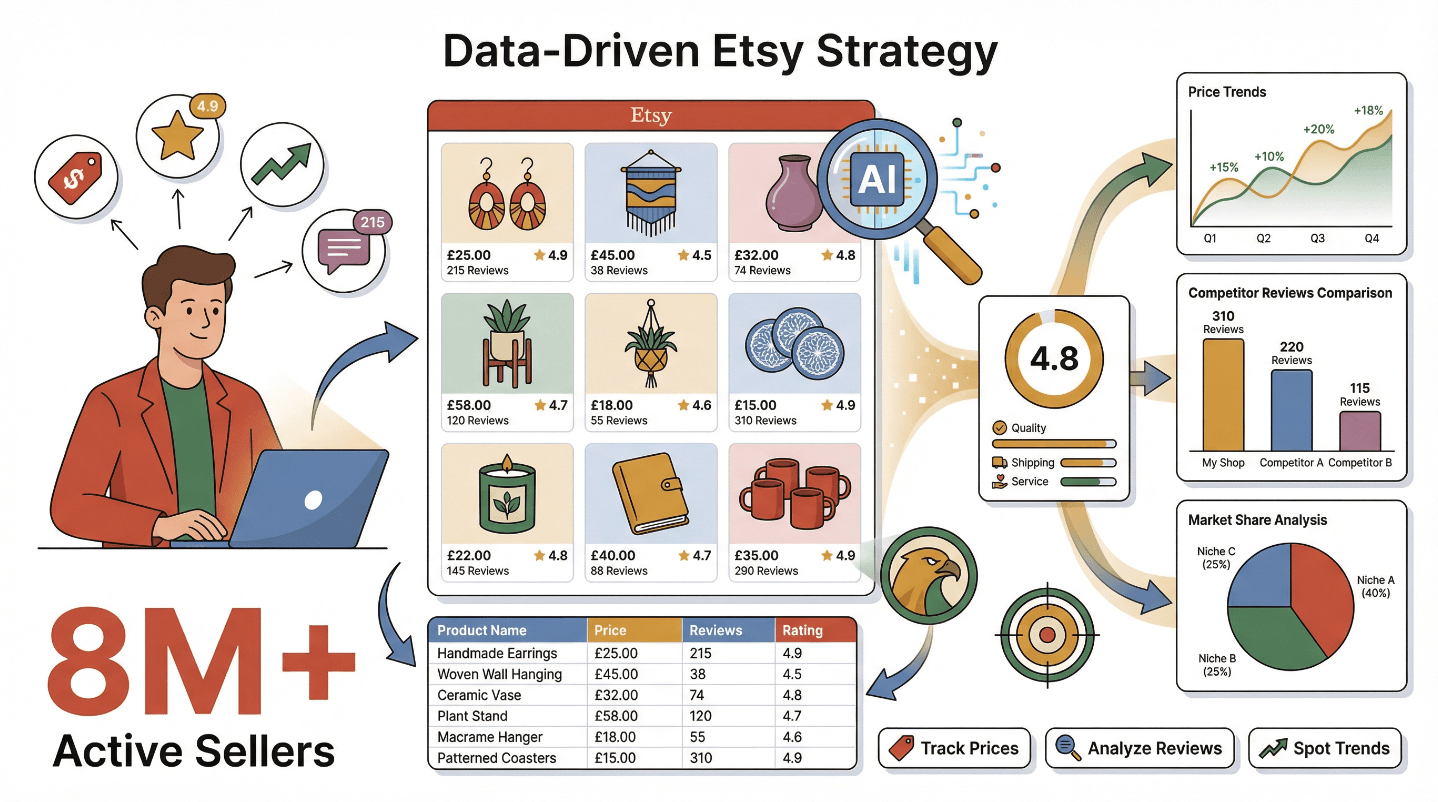
I’ve spent years helping ecommerce teams and solo sellers get ahead, and if there’s one thing I’ve learned, it’s this: the difference between “just another Etsy shop” and a top performer is often how you use data. In this guide, I’ll show you how an Etsy scraper—especially one powered by AI like Thunderbit—can transform your sales strategy from guesswork to greatness. Whether you’re a spreadsheet lover or allergic to code, you’ll find practical steps, real-world examples, and a few bad puns (sorry, not sorry) to help you turn Etsy data into your secret weapon.
Try Thunderbit Etsy Scraper for Free
What is an Etsy Scraper and Why Does It Matter for Sales?
Let’s start with the basics: an Etsy scraper is a tool that automatically extracts structured data from Etsy’s website. Instead of painstakingly copying product titles, prices, or reviews by hand (been there, done that, got the carpal tunnel), a scraper pulls all that information into a neat, usable format—usually a spreadsheet or database. Modern Etsy scrapers can grab everything from product names and prices to review counts, ratings, images, seller info, and even those all-important keywords and tags (PromptCloud).
But why does this matter for sales? Because data is the new lifeblood of successful Etsy businesses. Sellers who systematically analyze competitor prices, track popular products, and learn from customer reviews can refine their own pricing, product development, and marketing strategies. In fact, companies that embrace data are 23× more likely to acquire customers and 19× more likely to be profitable than their less data-savvy peers.
Here’s a quick look at what an Etsy scraper can do for your sales strategy:
| Use Case | Data Extracted | How It Informs Sales Strategy |
|---|---|---|
| Competitor Pricing | Prices, discounts, stock levels | Adjust your pricing to stay competitive; spot undercutting or premium pricing |
| Keyword Research | Titles, tags, categories | Discover trending keywords; optimize your own listings for better search visibility |
| Inventory & Demand | Stock indicators, “favorites,” “in carts” | Gauge product demand; identify opportunities to stock up or promote alternatives |
| Customer Sentiment | Review texts, star ratings | Learn what buyers love or dislike; improve your products and customer service |
| Trend Spotting | Hot products, trending styles | Stay ahead of market trends; design or source items that shoppers are actively searching for |
In short, an Etsy scraper is like having a market research assistant who never sleeps and never complains about too much data entry.
What Is Data Scraping and How to Do It in 2025 Get Started Free
How Etsy Scraper Tools Unlock Competitive Advantage
Imagine being able to benchmark your shop against your top 10 competitors in minutes—not hours or days. Etsy scraper tools make this possible by letting you analyze competitor pricing, product positioning, and customer sentiment at scale. Instead of guessing whether your $27 gold bar necklace is priced right, you can see exactly how it stacks up against similar listings:
| Seller | Product | Price | Reviews | Avg Rating |
|---|---|---|---|---|
| Competitor A | Gold Bar Necklace | $25.00 | 150 | 4.9 ★ |
| Competitor B | Gold Bar Necklace | $22.00 | 210 | 4.8 ★ |
| Your Shop | Gold Bar Necklace | $27.00 | 45 | 4.7 ★ |
| Competitor C | Gold Bar Necklace | $30.00 | 80 | 4.5 ★ |
With this data, you can immediately spot if you’re overpriced, under-reviewed, or missing a key feature that customers rave about in competitor reviews. And it’s not just about numbers—scraping reviews and keywords lets you uncover what buyers are actually searching for (“minimalist,” “boho chic,” “personalized”) and what pain points they encounter (“chain too short,” “slow shipping”).
The real magic happens when you combine these insights:
- React faster: If a competitor drops their price or launches a new product, you’ll know right away and can respond before losing sales (Thunderbit Blog).
- Make better decisions: Launch new products, adjust inventory, or run promotions based on real market demand—not just gut feeling.
- Save time: Automate the grunt work and focus on strategy, not spreadsheets.
Why Thunderbit is the Best Choice for Etsy Scraping
There are plenty of Etsy Scraper out there, but Thunderbit is in a league of its own—especially if you’re not a coder (or just don’t want to be one on weekends). Thunderbit is an AI-powered Chrome Extension that turns Etsy data extraction into a two-click operation. Here’s what makes it stand out:
- No-Code, AI-Smart Scraping: Click “AI Suggest Fields” and Thunderbit’s AI will instantly propose the best columns to extract (think: Product Name, Price, Rating, Reviews). No fiddling with selectors or templates—just point and click (Thunderbit Blog).
- Structured Data Output: Thunderbit delivers clean, analysis-ready tables by default. Prices are numbers, ratings are numeric, and images are organized—no messy cleanup required.
- Pagination & Subpage Scraping: Scrape across multiple pages and even dive into each product’s detail page for extra info (like full descriptions or shipping costs) with a single click.
- Cloud Scraping for Speed: Scrape up to 50 pages at a time in the cloud—perfect for large-scale research.
- Instant Export: Send your data straight to Excel, Google Sheets, Airtable, or Notion. All export features are free, even on the basic plan.
- Scheduled Scraping: Set up recurring scrapes to monitor prices, stock, or new listings automatically—no more “set a reminder to check competitors” sticky notes.
Here’s how Thunderbit stacks up against traditional scraping methods:
| Aspect | Thunderbit (AI Scraper) | Traditional Scraping (Code/Old Tools) |
|---|---|---|
| Ease of Use | No coding; AI suggests fields; simple Chrome interface | Coding/configuration required; steep learning curve |
| Setup Time | Minutes (point and click) | Hours/days (write/debug scripts) |
| Data Quality | Clean, structured, formatted automatically | Often raw; needs manual cleaning |
| Features & Automation | Built-in scheduling, subpages, multi-language, instant export | Often requires multiple tools or extra code |
| Scalability | Cloud scraping, up to 50 pages in parallel | Custom code needed for scale |
| Cost | Freemium; affordable paid plans; free export | “Free” if DIY, but high time/maintenance cost |
Thunderbit’s reviews consistently highlight its practicality, reliability, and the sheer time it saves over manual or semi-manual methods.
How to Scrape Any Website Using AI Get Started Free
Step-by-Step Guide: Using Thunderbit Etsy Scraper for Sales Insights
Ready to see Thunderbit in action? Here’s how to go from Etsy page to actionable data in just a few clicks:
1. Install the Thunderbit Chrome Extension
Head to the Chrome Web Store, search for “Thunderbit AI Web Scraper,” and add it to Chrome. Sign up for a free account and you’re ready to roll.
2. Navigate to Your Target Etsy Page
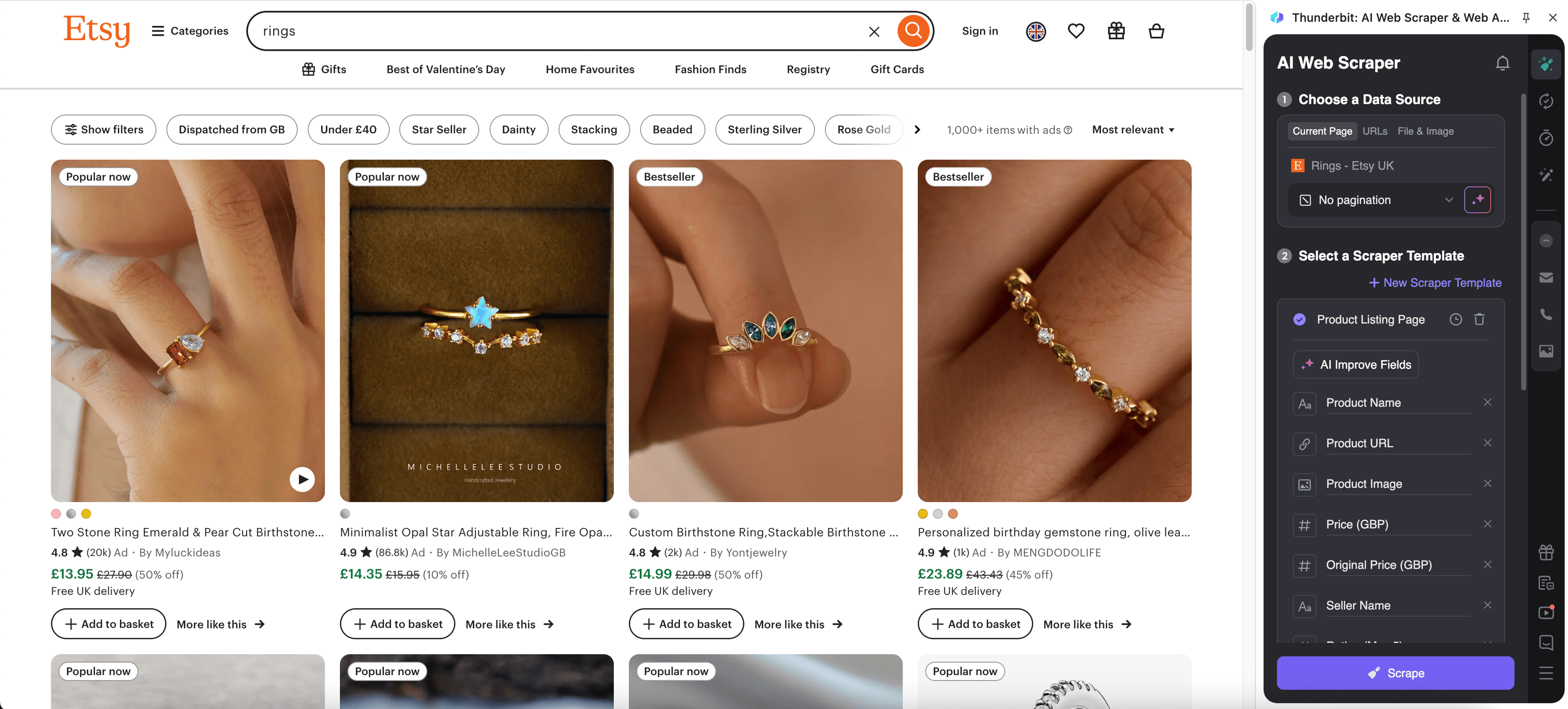
Open Etsy and go to the page you want to analyze. This could be:
- A search results page (“personalized mugs”)
- A category page (“Jewelry > Necklaces”)
- A competitor’s shop page
- An individual product listing
Pro tip: For broad analysis, start with a search or category page to capture multiple listings at once.
3. Activate Thunderbit and Use “AI Suggest Fields”
Click the Thunderbit icon in your browser. In the sidebar, hit “AI Suggest Fields.” Thunderbit’s AI will scan the page and propose columns like Product Name, Price, Rating, Number of Reviews, and more. You can add, remove, or rename columns as needed.
4. Click “Scrape” to Extract Data
Confirm your fields and hit “Scrape.” Thunderbit will extract all the listings on the page into a structured table—no copy-paste, no errors, just instant data.
5. (Optional) Scrape Subpages for More Detail
Want even more info? Use “Scrape Subpages” to have Thunderbit visit each product’s detail page and pull extra fields like full descriptions, shipping info, or top customer reviews. These details are automatically appended to your main table.
6. Review and Export Your Data
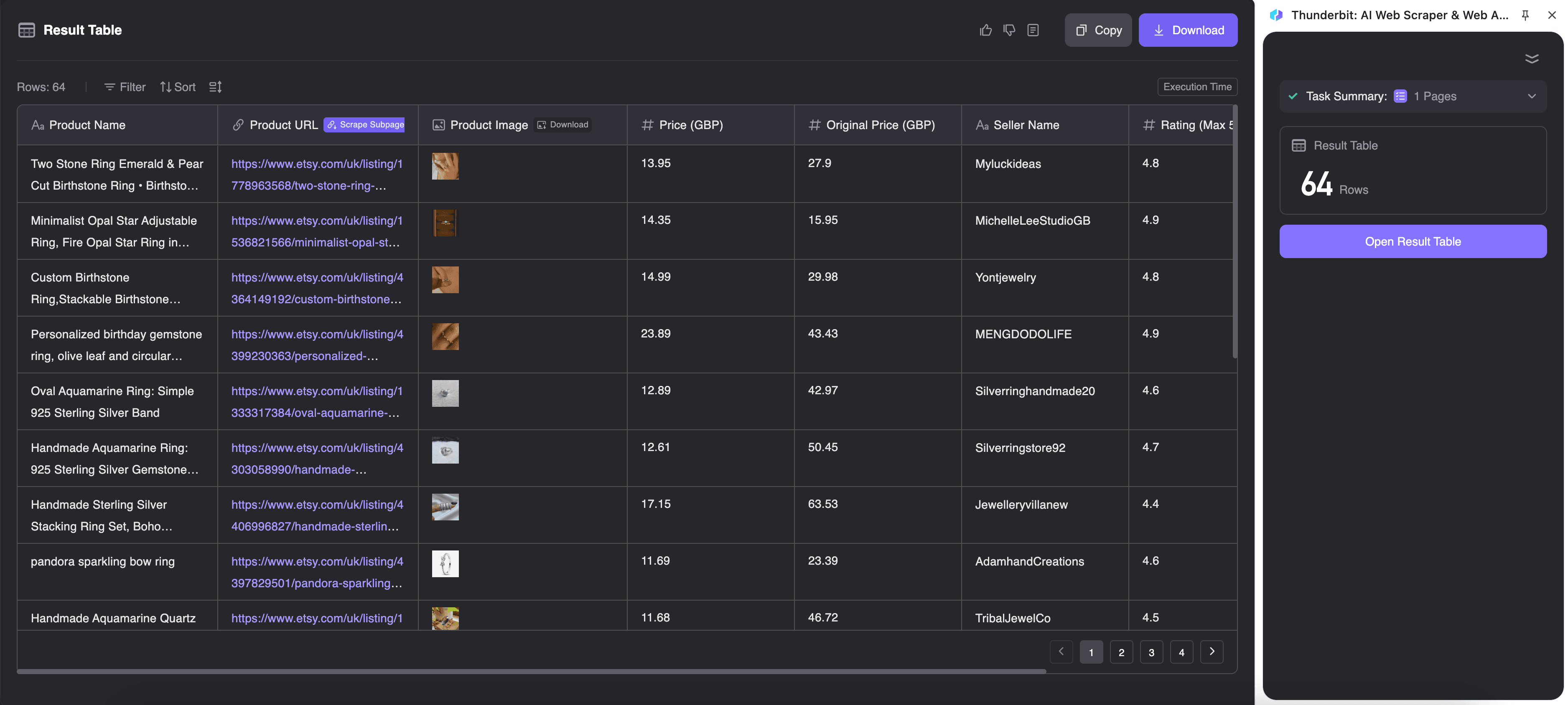
Check the results in Thunderbit’s interface. When you’re happy, export your data to Excel, Google Sheets, Airtable, Notion, CSV, or JSON. All it takes is a click.
7. Analyze and Take Action
Sort, filter, and visualize your data to spot pricing trends, top products, or keyword opportunities. Use it to adjust your pricing, launch new products, or fine-tune your marketing.
For a visual walkthrough, check out the Thunderbit Etsy Scraper template for screenshots and sample exports.
See Etsy Scraper Template & Sample Exports
How to Extract and Organize Etsy Data with Thunderbit
Thunderbit doesn’t just scrape data—it organizes it into clean, ready-to-analyze tables. Each column is clearly labeled (thanks, AI), and each row corresponds to a product or listing. Here’s how to make the most of your data:
- Export to Your Favorite Tool: Download as Excel, push to Google Sheets, or send to Airtable/Notion. Thunderbit even uploads images so you see thumbnails, not just URLs.
- Filter and Sort: Want to see only products above $50? Or sort by number of reviews? Easy—just use your spreadsheet’s built-in tools.
- Pivot and Visualize: Create pivot tables to compare competitors, chart price vs. rating, or plot trends over time if you schedule recurring scrapes.
- Template Your Analysis: Save your favorite analysis as a template—next time you scrape, just refresh the data and your charts update automatically.
The end result: you spend less time cleaning data and more time making decisions.
Ensuring Data Accuracy and Cleanliness with Thunderbit’s AI
One of my favorite Thunderbit features is how it keeps data clean and accurate—no more “garbage in, garbage out.” Here’s how:
- AI Field Detection: Thunderbit’s AI is trained to recognize and extract the right data—even if Etsy tweaks its layout. If you want to tweak a field, just use “AI Improve Fields” for smarter suggestions.
- Field AI Prompts: Want prices as numbers, not “$45.00”? Add a prompt like “Remove currency symbol.” Need dates in YYYY-MM-DD format? Just say so. Thunderbit cleans and formats data as it scrapes.
- Error Reduction: Automation means no typos, no skipped rows, and no misaligned columns. What you see on Etsy is what you get in your spreadsheet.
- Adaptability: If Etsy changes, Thunderbit’s AI can often adapt without you lifting a finger—no broken scripts or hours spent debugging.
The bottom line: your data is analysis-ready from the start, so you can trust your insights.
Automating Etsy Data Collection: Schedule Scraping for Ongoing Insights
Manually scraping every time you want an update? That’s so 2022. Thunderbit’s Scheduled Scraper lets you automate the whole process:
- Set It and Forget It: Define your schedule in plain English (“every day at 8am,” “every Monday at 6pm,” etc.). Thunderbit will scrape your chosen Etsy pages automatically—even if your computer is off.
- Monitor Prices, Stock, and Trends: Keep tabs on competitor pricing, inventory changes, or new listings without lifting a finger.
- Auto-Export: Scheduled scrapes can update your Google Sheet, Airtable, or Notion workspace automatically—perfect for live dashboards or weekly sales meetings.
- React Faster: If a competitor drops their price over the weekend, you’ll know first thing Monday morning.
For sales and ops teams, scheduled scraping is like having a 24/7 market analyst on your payroll (minus the benefits package).
Real-World Applications: How Sales and Operations Teams Use Etsy Scraper Data
So, how do real sellers and teams use Etsy scraper data? Here are some scenarios I’ve seen work wonders:
- Dynamic Pricing: Adjust your prices in real time based on competitor moves. One seller saw conversion rates jump after using daily price monitoring to stay just below the competition.
- Product Launches: Scrape categories to spot hot trends (like “mushroom jewelry” suddenly taking off) and launch new products before the market gets saturated.
- Inventory Planning: Track “in carts” and “favorites” to forecast demand and avoid stockouts—or reduce orders for slow movers.
- Marketing Campaigns: Use review sentiment to highlight your strengths (“fast shipping!”) or address competitor weaknesses (“ours won’t break in the mail”).
- Benchmarking: Set realistic goals by comparing your reviews, prices, and product range to the top shops in your niche.
Here’s a quick list of actionable insights you can gain:
| Insight Type | Example Action |
|---|---|
| Price Undercut | Lower price or run a promo to match a competitor’s sudden discount |
| Trend Detection | Add new products or keywords based on rising search terms |
| Review Analysis | Improve packaging or features based on common complaints in competitor reviews |
| Stock Monitoring | Ramp up inventory if competitors are selling out |
| New Entrant Alert | Spot new competitors and analyze their positioning |
Thunderbit’s ease of use means even solo sellers can run these analyses—no data science degree required.
Comparing Etsy Scraper Solutions: Thunderbit vs. Traditional Methods
Let’s be honest: not all Etsy scrapers are created equal. Here’s how Thunderbit compares to the usual suspects:
| Method | Pros | Cons | Best For |
|---|---|---|---|
| Thunderbit | No code, AI field detection, fast setup, scheduling, instant export | Browser-based (not for millions of pages), Chrome required | Non-technical users, fast insights, all-in-one |
| Octoparse | No code, visual interface, cloud options | Manual setup for each task, more complex for non-tech users, paid for advanced features | Semi-technical users, custom flows |
| Custom Code (Scrapy) | Full control, scalable | Requires programming, high maintenance, no built-in cleaning | Developers, unique large-scale projects |
| Manual Copy-Paste | No setup, 100% compliant | Slow, error-prone, not scalable | Verifying a few data points (rarely worth it) |
Thunderbit hits the sweet spot for most Etsy sellers and teams: easy, fast, and powerful—without the headaches of code or the tedium of manual work.
Conclusion & Key Takeaways: Supercharge Your Etsy Sales with Data
Let’s bring it home. Etsy is more competitive than ever, but it’s also a goldmine of actionable data—if you know how to tap into it. Using an Etsy scraper like Thunderbit, you can:
- Monitor competitors and trends in real time
- Optimize your pricing, product mix, and marketing based on facts, not hunches
- Save hours (or days) of manual work every month
- Automate ongoing research so you’re always a step ahead
Thunderbit’s AI-powered, no-code approach makes Etsy data scraping accessible to everyone—no tech skills required. With features like “AI Suggest Fields,” subpage scraping, and scheduled automation, you can turn Etsy’s ocean of data into a daily part of your sales strategy.
Ready to try it? Download Thunderbit for free, run your first Etsy scrape, and see what insights you uncover. Your future self (and your bottom line) will thank you.
For more tips and deep dives on web scraping and ecommerce strategy, check out the Thunderbit Blog.
Try Thunderbit AI Etsy Scraper Get Started Free
FAQs
1. Is it legal to use an Etsy scraper like Thunderbit?
Thunderbit operates in your browser, mimicking normal user behavior and respecting Etsy’s rate limits. Always use scrapers responsibly, focus on publicly available data, and review Etsy’s terms of service before large-scale scraping.
2. What kind of Etsy data can Thunderbit extract?
Thunderbit can pull product names, prices, images, ratings, review counts, keywords, shop names, shipping info, and more. You can also scrape subpages for full descriptions and customer reviews.
3. How does Thunderbit keep my data accurate and clean?
Thunderbit uses AI to detect, format, and clean data as it scrapes. Features like “AI Suggest Fields” and “Field AI Prompt” ensure your exports are structured, labeled, and ready for analysis—no manual cleanup required.
4. Can I automate Etsy data collection with Thunderbit?
Absolutely. Thunderbit’s Scheduled Scraper lets you set up recurring scrapes (daily, weekly, etc.) and auto-export results to Google Sheets, Airtable, or Notion—perfect for ongoing price monitoring or trend tracking.
5. How does Thunderbit compare to other Etsy scrapers?
Thunderbit stands out for its no-code, AI-driven setup, instant exports, and built-in automation. It’s faster and easier than manual methods or code-based tools, making it ideal for business users who want insights without the hassle.
Ready to see what Thunderbit can do for your Etsy shop? Get started here and let data drive your next big win.
Learn More




