
Thunderbit is an AI Web Scraper Chrome Extension that helps business users scrape data from websites using AI. The core tension is this: what looks affordable on ScrapingBee's pricing page can look very different once you're running production workloads and watching credits evaporate at 5× to 75× the base rate. This review covers five angles most articles skip: the real cost at scale, selector-based vs. AI extraction, usability for non-developers, post-scrape data workflows, and 2026 reliability benchmarks. If you're evaluating ScrapingBee for your team — whether you're a developer, a sales ops lead, or a founder — this is the breakdown you need.
What Is ScrapingBee? A Quick Overview
ScrapingBee is a web scraping API that handles proxy rotation, JavaScript rendering, and CAPTCHA solving so developers can extract data from websites without building their own scraping infrastructure. You send an HTTP request with parameters, and you get HTML (or JSON for certain endpoints) back. There is no visual or click-based interface for building scrapes.
Core capabilities include:
- Rotating and premium proxies (classic, premium, stealth, residential)
- Headless browser rendering (full Chrome, enabled by default)
- Automatic CAPTCHA bypass
- Google Search API (structured JSON: organic results, ads, maps, knowledge graph, People Also Ask, images, news)
- Screenshot capture (standard, full-page, or CSS-selector-targeted)
- Geographic targeting via country_code parameter
- CSS/XPath extraction rules (declarative JSON-based, returns structured JSON)
- Dedicated APIs for Amazon, Walmart, YouTube, and ChatGPT scraping
- AI extraction (added ~2024–2025): ai_query, ai_extract_rules, ai_selector parameters (+5 credits per request)
- CLI tool (launched ~2025–2026): batch processing, crawling, sitemap parsing, CSV enrichment, scheduled cron jobs, proxy escalation
Founded in 2019 in France, ScrapingBee grew to roughly $5 million ARR by early 2026 with 2,500+ customers (SAP, Zapier, Deloitte, Zillow) — all bootstrapped with a team of 4–6 people. In June 2025, Oxylabs Group acquired ScrapingBee in an eight-figure deal. The brand and leadership remain independent, and the support team has more than doubled for better timezone coverage.
One important note: ScrapingBee still does not have a native visual builder, point-and-click GUI, or built-in web dashboard scheduler. Scheduling requires the CLI tool, cron jobs, or third-party automation (Zapier, Make, n8n). The "no-code" guides they publish are about using Make and Zapier integrations — not a native no-code interface.
Who Is ScrapingBee Actually Built For?
ScrapingBee is designed for developers comfortable writing Python or cURL calls, reading HTML, and constructing CSS/XPath selectors. The documentation is code-heavy, leaning toward Python and cURL examples. One reviewer on Capterra noted they "do not provide examples in JavaScript," and another described the docs as "bulky, takes a day to a week to read through."
But the audience searching "ScrapingBee review" in 2026 is broader than backend engineers. It includes marketing managers building lead lists, sales ops teams enriching CRM data, ecommerce operations monitoring competitor prices, and founders evaluating tools for their teams. For each section below, I'll flag whether a feature or limitation matters to developers, business users, or both.
ScrapingBee Pricing Plans at a Glance
Here are ScrapingBee's current plan tiers (as of April 2026):
| Plan | Monthly Price | API Credits/Month | Concurrent Requests |
|---|---|---|---|
| Freelance | $49 | 250,000 | 10 |
| Startup | $99 | 1,000,000 | 50 |
| Business | $249 | 3,000,000 | 100 |
| Business+ | $599 | 8,000,000 | 200 |
| Enterprise | Contact sales | 41M+ | Custom |
Annual billing offers a 17% discount. A free trial provides 1,000 API credits with no credit card required. The Google Search API was recently reduced from 25 to 15 credits per call post-acquisition.
Those headline credit numbers look generous. They are not what they seem.
The Credit Multiplier Table
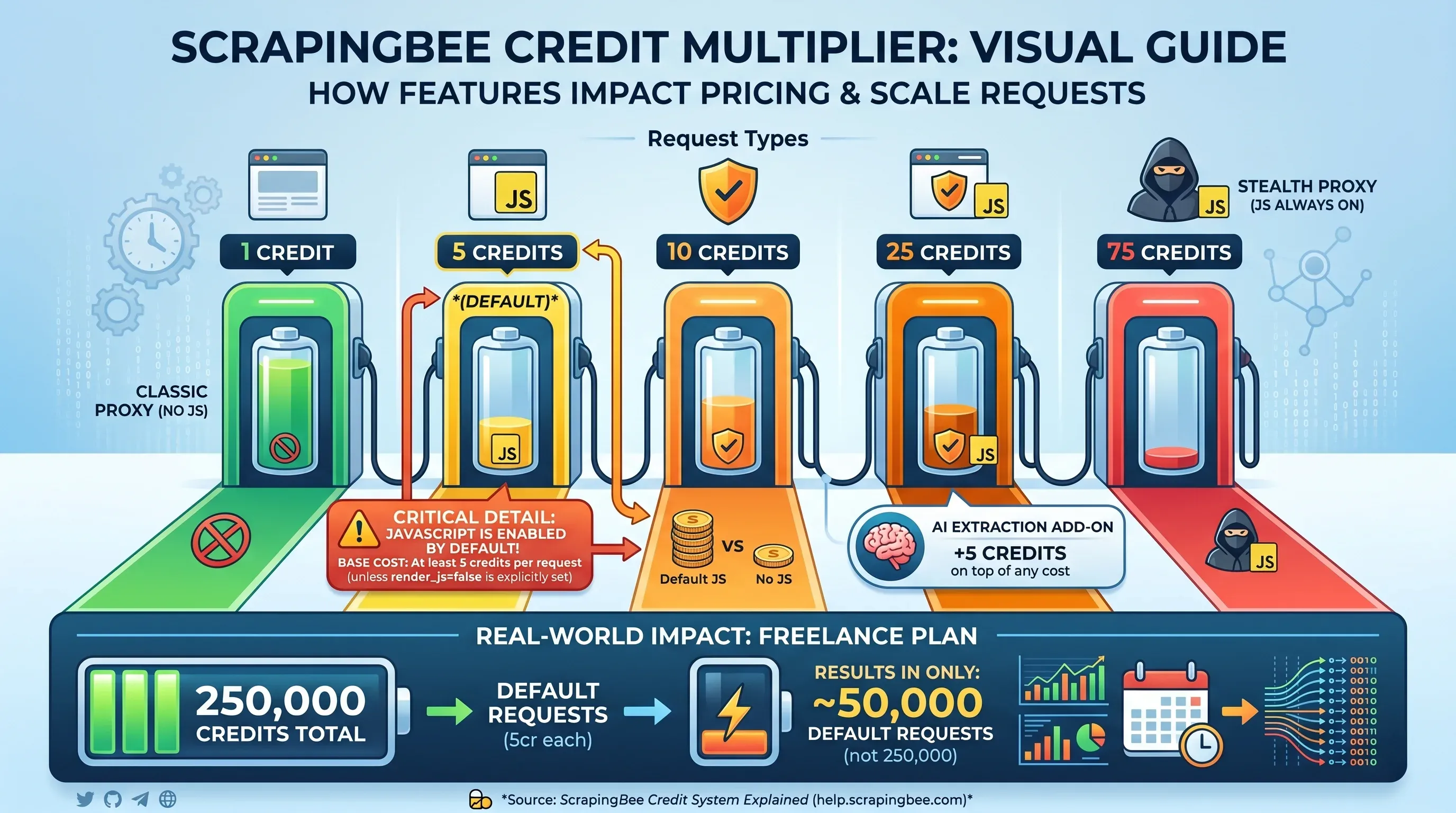
This is where ScrapingBee's pricing gets complicated. The headline credit count is not the number of pages you can scrape — it depends on which features you enable per request:
| Request Type | Credits Per Request |
|---|---|
Classic proxy, no JS rendering (render_js=false) | 1 credit |
| Classic proxy, JS rendering (default) | 5 credits |
| Premium proxy, no JS rendering | 10 credits |
| Premium proxy, JS rendering | 25 credits |
| Stealth proxy (JS always on) | 75 credits |
| AI extraction add-on | +5 credits on top |
Critical detail: JavaScript rendering is enabled by default. If you don't explicitly set render_js=false, every request costs at least 5 credits. That means the Freelance plan's 250,000 credits actually covers only 50,000 default requests — not 250,000.
The Hidden Credit Math No One Shows You
Here's what ScrapingBee actually costs for 10,000 pages across different scenarios and plan tiers:
| Scenario | Credits Needed | Freelance ($49/250K) | Startup ($99/1M) | Business ($249/3M) |
|---|---|---|---|---|
| 10K pages (static HTML, 1 cr) | 10,000 | ✅ Covered ($0.20/1K) | ✅ Covered ($0.10/1K) | ✅ Covered ($0.08/1K) |
| 10K pages (JS render, 5 cr) | 50,000 | ✅ Covered ($0.98/1K) | ✅ Covered ($0.50/1K) | ✅ Covered ($0.42/1K) |
| 10K pages (premium proxy + JS, 25 cr) | 250,000 | ⚠️ Exactly at limit ($4.90/1K) | ✅ Covered ($2.48/1K) | ✅ Covered ($2.08/1K) |
| 10K pages (stealth proxy, 75 cr) | 750,000 | ❌ Way over limit | ✅ Barely covered ($7.43/1K) | ✅ Covered ($6.23/1K) |
The same 10,000 pages can cost anywhere from $0.20 to $7.43 per thousand depending on the proxy and rendering configuration. And you won't always know which configuration you need until you try.
Budget Scenario: Lead Generation at 10,000 Pages/Month
A sales team scraping 10,000 company pages per month for lead generation. Most modern B2B sites use React or Vue, so JS rendering is required:
- Credits needed: 50,000 (10K × 5 credits)
- Freelance plan ($49): Covers it with 200K credits to spare
- But if targets require premium proxies: 250,000 credits — exactly one Freelance plan's allocation, zero buffer
- If stealth proxies needed: 750,000 credits — requires Startup plan at $99/month
Budget Scenario: E-commerce Price Monitoring at 100,000 Pages/Month
An ecommerce team monitoring 100,000 product pages on competitor sites:
| Configuration | Credits Needed | Plan Required | Monthly Cost |
|---|---|---|---|
| Static HTML (1 cr) | 100,000 | Freelance | $49 |
| JS rendering (5 cr) | 500,000 | Startup | $99 |
| Premium proxy + JS (25 cr) | 2,500,000 | Business | $249 |
| Stealth proxy (75 cr) | 7,500,000 | Business+ | $599 |
The same job ranges from $49 to $599/month. That's not a rounding error — it's a 12× cost difference based on configuration.
"The $49 entry price is the most misleading number in the scraping API market." — Prospeo
"Credits are consumed quickly when using JavaScript rendering or advanced features, making it harder to justify for smaller projects or teams with unpredictable scraping volumes." — Nick S, Manager, Computer Software, Capterra
And unused credits do not roll over month-to-month.
How ScrapingBee's Costs Compare to Competitors
Using mid-tier plans for a fair comparison:
| Scenario (per 1K pages) | ScrapingBee ($99/1M) | ScraperAPI ($149/1M) | Scrapfly ($100/1M) |
|---|---|---|---|
| Static HTML | $0.10 | $0.15 | $0.10 |
| JS-rendered pages | $0.50 | $1.64 | $0.60 |
| Premium + JS | $2.48 | $3.73 | $3.00 |
| Stealth/ultra premium + JS | $7.43 | $11.18 | N/A |
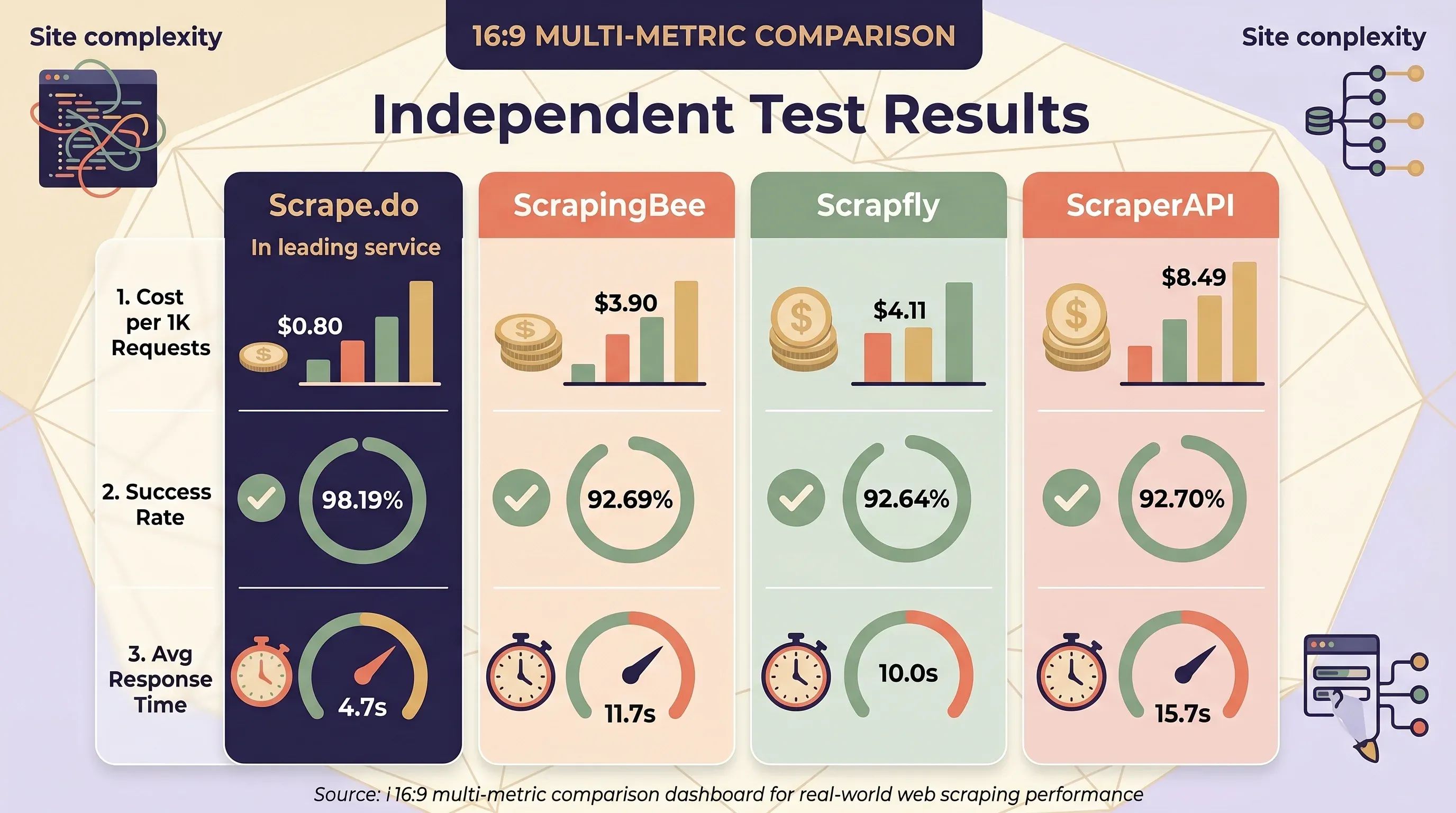
ScrapingBee is generally the cheapest or tied for cheapest on static and JS-rendered pages. ScraperAPI is consistently the most expensive — its JS rendering costs +10 credits vs. +5 for both ScrapingBee and Scrapfly. But independent testing by Scrape.do tells a different story when real-world site complexity is factored in:
| Service | Avg Cost per 1K Requests | Success Rate | Avg Response Time |
|---|---|---|---|
| Scrape.do | $0.80 | 98.19% | 4.7s |
| ScrapingBee | $3.90 | 92.69% | 11.7s |
| Scrapfly | $4.11 | — | — |
| ZenRows | $4.48 | 92.64% | 10.0s |
| ScraperAPI | $8.49 | 92.70% | 15.7s |
Thunderbit's Credit Model: A Different Approach
Thunderbit uses a fundamentally simpler pricing model: 1 credit = 1 output row, with no multipliers for JS rendering, proxy type, or target domain. Subpage scraping costs 2 credits per row.
| Plan | Monthly Price | Credits | Per-Row Cost |
|---|---|---|---|
| Free | $0 | 6 pages/month | Free |
| Starter | $15 | 500 | $0.030 |
| Pro 1 | $38 | 3,000 | $0.013 |
| Pro 2 | $75 | 6,000 | $0.013 |
| Pro 3 | $125 | 10,000 | $0.013 |
| Pro 4 | $249 | 20,000 | $0.012 |
A Thunderbit user scraping 10,000 product listings from JS-heavy ecommerce sites pays $125/month regardless of whether those sites require JavaScript rendering, premium proxies, or anti-bot bypass. With ScrapingBee, the same job could cost $49 to $599 depending on configuration. Budget predictability is a real thing.
CSS Selectors vs. AI Extraction: The Maintenance Cost You Should Know
Most ScrapingBee reviews skip this entirely. It's arguably the most important consideration for anyone planning to scrape at scale over months or years.
ScrapingBee uses CSS/XPath selectors to extract data from HTML. You define extraction rules as JSON objects specifying CSS selectors, and ScrapingBee returns matching data. This works well initially. The problem is what happens next.
The Selector Breakage Problem
When a target website changes its layout — class names, DOM structure, framework version — your CSS selectors break. In mature scraping systems operating across 2,500+ active jobs, research shows a 1–2% weekly break rate, requiring 30–35 fixes per week just to keep extractors working. For organizations scraping 50 sites, annual maintenance runs 850–1,300 hours, costing $64,000–$156,000 at fully loaded engineer rates.
Teams consistently underestimate this. Initial estimates typically call for 10–15 maintenance hours/month, but actual reality is 4–6× higher (40–90 hours/month). A single silent failure — where a selector breaks but continues returning empty data without alerting anyone — costs an estimated $38,000–$57,000 in lost sales, ranking recovery, and staff time.
Common causes: CSS class renaming during framework updates, new container elements inserted around targets, React/Vue/Angular version upgrades restructuring the DOM, A/B testing with dynamic class names, and anti-scraping obfuscation.
AI-Powered Extraction Cuts Maintenance by 60–80%
A 2025 DataRobot study found that AI-powered scrapers require 70% less maintenance than traditional selector-based scrapers after site redesigns. The time allocation ratio effectively inverts:
| Metric | Traditional (CSS selectors) | AI-Powered |
|---|---|---|
| Maintenance after redesigns | Baseline | 70% less |
| Time split (setup : maintenance) | 20% : 80% | 5% : 95% using data |
| Overall maintenance reduction | Baseline | 60–80% reduction |
| Speed on JS-heavy pages | Baseline | 30–40% faster |
Setup Time: Writing Selectors vs. AI-Suggested Fields
ScrapingBee setup: Inspect page source → identify CSS selectors → write extraction rules as JSON → test and debug → handle edge cases for page variations → monitor for breakage → fix broken selectors when sites update.
Thunderbit setup: Open page in Chrome → click "AI Suggest Fields" → AI reads the page and proposes columns with appropriate data types → click "Scrape." No selector writing, no source-code inspection. Thunderbit's AI is powered by multiple foundation models (ChatGPT, Gemini, Claude, DeepSeek R1) that visually read web pages like a human.
Thunderbit's Field AI Prompts add another layer: each column can have a custom AI instruction that transforms data during extraction — formatting dates, translating text, categorizing products, splitting names, normalizing phone numbers. This eliminates a separate post-processing step that ScrapingBee users have to build themselves.
Structured Output: Raw HTML vs. Ready-to-Use Rows
| Dimension | ScrapingBee (Selector-Based) | Thunderbit (AI-Powered) |
|---|---|---|
| Default output | Raw HTML | Structured rows with typed columns |
| Structured extraction | Requires writing CSS/XPath rules or using AI (+5 credits) | AI auto-detects fields |
| Supported data types | Text (HTML parsing required) | Text, number, date, URL, email, phone, image |
| Layout change resilience | ⚠️ Manual selector updates needed | ✅ AI re-reads page fresh each time |
| Technical skill required | Python/cURL, CSS selectors, HTML understanding | None — Chrome extension with 2-click workflow |
| Maintenance over time | Ongoing (1–2% weekly breakage rate) | Minimal (AI adapts automatically) |
ScrapingBee has added AI extraction features (ai_query, ai_extract_rules) that partially address the selector maintenance problem. But these add +5 credits per request on top of the base cost, and the tool remains fundamentally API-first with no visual interface.
ScrapingBee for Non-Developers: An Honest Usability Check
ScrapingBee is not built for non-technical users. It's an API. You write code to use it. If you're a marketing manager or sales ops lead reading this, that's the whole story right there.
Here's what a non-technical user actually experiences with ScrapingBee:
- Write an API call in Python, cURL, or another language
- Understand HTTP parameters like
render_js=true,premium_proxy=true,country_code=us - Parse raw HTML responses using a library like BeautifulSoup
- Write CSS selectors to extract specific data fields
- Handle pagination by writing custom crawl logic (ScrapingBee handles single-page requests only)
- Build a data pipeline to clean, structure, and store the extracted data
There is no drag-and-drop builder. No point-and-click interface. No visual preview of what you're scraping.
"There is a learning curve. And documentation is bulky, takes a day to a week to read through." — Arvind K, Proprietor, Financial Services, Capterra
"Their system is very particular and it takes a while to learn their codes and their structure." — Capterra review
Developers love this. One reviewer called it "wholly API based: very modern and elegant: it just works." But "ease of use" for a developer evaluating APIs is very different from "ease of use" for someone trying to build a lead list without writing code.
When a No-Code Alternative Makes More Sense
The Thunderbit Chrome Extension offers a fundamentally different experience:
- Open a webpage in Chrome with the extension installed
- Click "AI Suggest Fields" — AI scans the page and proposes columns (Product Name, Price, Rating, URL, etc.) with appropriate data types
- Review and customize — add, remove, or rename columns; add Field AI Prompts for transformation
- Click "Scrape" — data is extracted into structured rows
- Export — one-click to Google Sheets, Airtable, Notion, Excel, CSV, or JSON (all exports are free)
No API calls, no selectors, no code. Thunderbit supports 55 languages as of April 2026.
For common sites, Thunderbit also provides instant scraper templates — pre-built, maintained templates for Amazon, Zillow, Shopify, LinkedIn, Google Maps, Instagram, eBay, Apollo, and more. You don't even need to wait for AI to suggest fields; the template is ready to go.
Plus, Thunderbit includes several free-forever tools that require no plan: email extractor, phone number extractor, and image extractor — handy for sales and marketing teams who just need quick data pulls.
Decision Framework: Who Should Use What
| If you are… | Best fit |
|---|---|
| Developer comfortable with APIs & parsing HTML | ScrapingBee or ScraperAPI |
| Technical user who wants structured data without selector work | Thunderbit API (Extract endpoint) |
| Business user (sales, marketing, ecommerce ops) with no coding skills | Thunderbit Chrome Extension |
| Team needing scheduled monitoring without devops | Thunderbit Scheduled Scraper (natural language scheduling) |
| Building LLM/RAG pipelines needing clean markdown | Thunderbit Distill API or Firecrawl |
| Budget-conscious and want no credit multipliers | Thunderbit (1 credit = 1 row) |
After the Scrape: Where Does Your Data Actually Go?
Scraping is only half the job. The other half — getting that data somewhere useful — is where most ScrapingBee reviews go silent.
ScrapingBee: Raw HTML Out, Build Your Own Pipeline
ScrapingBee returns raw HTML by default. From there, you need to:
- Parse the HTML using BeautifulSoup or lxml
- Strip away navigation, footers, scripts, and styles (which comprise 80–90% of a typical page's content)
- Extract specific data fields
- Convert to structured formats
- Handle pagination and error states
- Store and distribute the data
"ScrapingBee returns raw HTML. AI agents need clean markdown, semantic search, and webhooks." — KnowledgeSDK
ScrapingBee does offer return_page_markdown=true and return_page_text=true as opt-in alternatives, and the Google Search API returns structured JSON. But the default workflow — and the general-purpose scraping experience — is raw HTML that you have to process yourself.
Users typically need additional tools: BeautifulSoup/lxml for parsing, Pandas for data cleaning, cron/Airflow for scheduling, custom crawl logic for multi-page scraping, and separate cloud storage. That's a lot of engineering between "I scraped it" and "I can use it."
Thunderbit: Structured Output with Built-In Export
Thunderbit returns structured rows with defined data types (text, number, date, URL, email, phone, image) ready to export. All exports are free across all plan tiers:
| Export Destination | Cost |
|---|---|
| Excel (.xlsx) | Free |
| Google Sheets | Free (direct integration) |
| Airtable | Free (direct integration) |
| Notion | Free (direct integration) |
| CSV | Free |
| JSON | Free |
For teams already using Google Sheets or Airtable as their CRM or operations hub, this removes an entire layer of engineering. When exporting to Notion or Airtable, images are uploaded to the image library so users can view them inline — a small detail that matters a lot in practice.
ScrapingBee's Integration Ecosystem
ScrapingBee does offer third-party integrations: Zapier (8,000+ app connections), Make (3,000+ apps), n8n, and Microsoft Power Automate. These can bridge the gap between raw HTML and your destination tools — but they add cost, complexity, and another point of failure.
For Developers: Thunderbit's Open API
For readers who do want programmatic pipelines, Thunderbit offers an Open API with two key endpoints:
- Distill endpoint — converts pages to clean Markdown, ideal for LLM/RAG pipelines (1 credit per call)
- Extract endpoint — returns structured JSON matching a user-defined schema (20 credits per call)
- Batch processing — up to 100 URLs per request
This means Thunderbit serves both no-code users (Chrome Extension) and developers (Open API) from the same AI engine. Don't just ask "can it scrape" — ask "where does the data go?"
2026 Reliability Check: Does ScrapingBee Hold Up in Production?
Older Reddit threads (2021–2023) contain reliability complaints about ScrapingBee. Do they still reflect reality in 2026? I pulled data from six independent benchmarks. The results are mixed — and sometimes contradictory.
Scrapeway Bi-Weekly Benchmark (April 2026)
Overall: 33.3% success rate — ranked 7th out of 9 services tested.
| Website | Success Rate |
|---|---|
| Amazon | 48% |
| 41% | |
| Indeed | 38% |
| Etsy | 21% |
| Booking | 17% |
| Realtor | 0% |
| StockX | 0% |
| Twitter/X | 0% |
| Zillow | 0% |
| Walmart | 0% |
| 0% |
Scrapingdog Head-to-Head Test (2025)
| Website | ScrapingBee | Scrapingdog | ScraperAPI |
|---|---|---|---|
| Amazon | 100% | 100% | 100% |
| Glassdoor | 0% | 100% | 100% |
| eBay | 100% | 100% | 100% |
| Walmart | 40% | 100% | 100% |
| 90% | 100% | 80% |
Proxyway Benchmark (December 2025)
- 84.47% success at 2 requests/second
- 72.98% success at 10 requests/second — a 12-point drop under load
- 25.46s average response time — the slowest in the benchmark group
Scrape.do Benchmark (2025–2026)
- 92.69% overall success rate
- Strong on individual sites: Amazon 99.11%, Indeed 99.29%, GitHub 100%, X/Twitter 99.6%
- Weak on Capterra: only 59% success with 36-second response times
The Pattern
The data reveals a clear pattern:
- ScrapingBee performs well on mainstream, moderately protected sites — Amazon, eBay, GitHub, and Indeed consistently show 90–100% success rates
- ScrapingBee fails completely on heavily protected sites — consistent 0% on LinkedIn, Zillow, Realtor.com, StockX, and Twitter across multiple benchmarks
- Performance degrades significantly under load — 84% at 2 req/s drops to 73% at 10 req/s
- Benchmark results vary wildly by methodology — from 33.3% (Scrapeway, broad site mix) to 92.69% (Scrape.do, moderate targets)
ScrapingBee's Capterra rating of 4.9/5 (137 reviews) is a positive signal, but high ratings for ease of initial setup don't always reflect long-term production reliability at scale. Users who switch away often cite increasing failure rates and rising costs — not initial setup difficulty.
"Very positive. ScrapingBee has been stable, predictable, and easy to integrate into production." — Verified Reviewer, CEO, Capterra
ScrapingBee exhibited "inconsistent reliability," specifically achieving "0% success rate on Glassdoor" and "40% on Walmart."
How AI-Powered Scraping Handles Reliability Differently
Thunderbit's AI reads the rendered page in real time, adapting to anti-bot measures and layout changes each session. Two scraping modes address different reliability challenges:
- Cloud scraping — runs on Thunderbit's cloud servers, handles up to 50 pages at a time, best for large public scraping jobs on sites like Amazon, Zillow, and Shopify
- Browser scraping — runs locally in the user's Chrome browser, using the user's own authenticated session — ideal for logged-in sites (LinkedIn, private dashboards, SaaS platforms) where API-based tools like ScrapingBee cannot access content behind authentication
Thunderbit also provides instant scraper templates for popular sites that are pre-built and maintained, keeping them working even when sites change structure. For the sites where ScrapingBee shows 0% success (LinkedIn, Zillow), Thunderbit's browser scraping mode — using your own logged-in session — is a fundamentally different approach.
ScrapingBee vs. Top Alternatives: Side-by-Side Comparison
| Dimension | ScrapingBee | Thunderbit | ScraperAPI | Scrapfly |
|---|---|---|---|---|
| Type | API-only | Chrome Extension + API | API-only | API-only |
| Starting price | $49/mo | Free ($0) | $49/mo | $30/mo |
| Credit model | Multipliers (1×–75×) | 1 credit = 1 row (no multipliers) | Multipliers (1×–75×) | Multipliers (1×–30×) |
| AI extraction | Yes (+5 credits/request) | Built-in (AI Suggest Fields) | No native AI | Yes |
| No-code option | No (API only) | Yes (Chrome Extension) | No (API only) | No (API only) |
| Structured output | Requires CSS rules or AI add-on | Default (typed columns) | Structured endpoints for specific sites | Varies |
| Export destinations | Raw HTML/JSON (build your own) | Excel, Sheets, Airtable, Notion, CSV, JSON (all free) | Raw HTML/JSON | Raw HTML/JSON |
| Subpage scraping | Manual (write crawl logic) | Built-in (2 credits/row) | Manual | Manual |
| Scheduled scraping | CLI only (no dashboard scheduler) | Built-in (natural language) | No built-in | No built-in |
| Free tier | 1,000 credits trial | 6 pages/month (forever) | 5,000 credits (7-day trial) | 1,000 credits |
| JS rendering default | ON (5× cost) | Included (no extra cost) | OFF | OFF |
| Learning curve | High (API + selectors) | Low (2-click workflow) | High (API + selectors) | High (API) |
| Best for | Devs wanting proxy control | Business users + developers | Devs + structured endpoints | Devs wanting ASP bypass |
| Capterra rating | 4.9/5 (137 reviews) | — | 4.6/5 (62 reviews) | 4.9/5 (221 reviews) |
ScrapingBee vs. Thunderbit: Key Differences
The biggest differences boil down to architecture and audience:
- API-only vs. Chrome Extension + API: ScrapingBee requires code for every interaction. Thunderbit offers a Chrome Extension for no-code users and an Open API for developers — same AI engine, two interfaces.
- Selector-based vs. AI-powered extraction: ScrapingBee requires you to write and maintain CSS/XPath selectors. Thunderbit's AI suggests fields automatically and adapts when sites change.
- Raw HTML output vs. structured rows with free export: ScrapingBee returns HTML you have to parse. Thunderbit returns typed, labeled rows you can export to Excel, Google Sheets, Airtable, or Notion in one click.
- Subpage scraping: Thunderbit's AI visits each detail page and enriches the main table — built in, no custom crawl logic. ScrapingBee requires you to write that logic yourself.
- Instant templates: Thunderbit has pre-built templates for popular sites (Amazon, Zillow, Shopify, LinkedIn, Google Maps, eBay) that work out of the box. ScrapingBee has dedicated APIs for Amazon and Walmart, but you still need to write code to use them.
Other Notable Alternatives
- Scrape.do — lowest independent cost at $0.80/1K requests with 98.19% success rate; starts at $29/mo
- Apify — actor-based platform with 415+ G2 reviews (4.7/5), but "Pricing Issues" is the #1 complaint
- Firecrawl — AI/LLM-native, returns markdown with 67% fewer tokens than raw HTML; open-source core; starts at $16/mo
- Bright Data — enterprise-grade with 72M+ IPs, starts at $499/mo; flat-rate pricing
- ZenRows — 55M residential IPs, pre-built scrapers for Amazon/Walmart/Zillow, starts at $69/mo
Which Scraping Tool Is Right for Your Team?
Scenario-based recommendations:
- If you're a developer building a custom scraping pipeline and want granular proxy control → ScrapingBee or ScraperAPI. You'll get fine-grained HTTP parameters, proxy type selection, and full control over rendering. Just budget for the credit multipliers.
- If you're a sales or marketing team that needs leads from websites without writing code → Thunderbit Chrome Extension. Two clicks to structured data, one click to Google Sheets. No API, no selectors, no parsing.
- If you need structured data from popular sites fast → Thunderbit Instant Templates. Amazon, Zillow, Shopify, LinkedIn — pre-built and maintained, no AI setup needed.
- If you need to monitor prices or inventory on a schedule without devops → Thunderbit Scheduled Scraper. Describe the interval in plain English ("every Monday at 9 AM") and let it run.
- If you're building LLM/RAG pipelines and need clean Markdown at scale → Thunderbit Distill API or Firecrawl. Both return markdown optimized for AI consumption.
- If budget predictability matters and you don't want credit multipliers → Thunderbit. 1 credit = 1 row, regardless of JS rendering or proxy type.
Total cost of ownership isn't just the API price. It's setup time + maintenance hours + parsing engineering + data export workflow. ScrapingBee's sticker price is competitive; the full cost picture is not.
Key Takeaways from This ScrapingBee Review
Five findings worth remembering:
- Credit costs multiply fast at scale. The $49 entry price can become $599+ when JS rendering and premium proxies are needed. Thunderbit's flat 1-credit-per-row model eliminates this unpredictability.
- CSS selectors carry ongoing maintenance overhead that AI extraction avoids. Expect 60–80% less maintenance with AI-powered tools, and zero selector breakage when sites update.
- Non-developers face a steep learning curve with ScrapingBee. It's an API-only tool that requires coding, HTML inspection, and selector construction. Business users should look at no-code alternatives.
- Data export requires custom engineering. ScrapingBee returns raw HTML; you build the pipeline. Thunderbit exports structured data to Excel, Sheets, Airtable, and Notion for free.
- Reliability is solid for some sites but inconsistent for others. ScrapingBee works well on Amazon and eBay but shows 0% on LinkedIn, Zillow, and several other heavily protected targets.
ScrapingBee remains a capable tool for developers who want proxy-managed HTTP access with fine-grained control. But the web scraping landscape in 2026 has shifted toward AI-powered, no-code tools — and Thunderbit is designed specifically for that shift. Try the free tier (6 pages free, or more with the free trial) to see the difference for yourself.
FAQs
Is ScrapingBee worth it in 2026?
It depends on your technical skills and scale. For developers scraping static pages at moderate volume, ScrapingBee offers a solid, well-documented API with responsive support and a 4.9/5 Capterra rating. For business users, high-volume scraping, or teams that want structured data without coding, AI-powered alternatives like Thunderbit offer better value and significantly lower total cost of ownership.
Does ScrapingBee work without coding?
No. ScrapingBee is an API-only tool that requires writing code (Python, cURL, or similar) and understanding HTTP parameters. There is no visual interface for building scrapes. Non-technical users should consider no-code options like the Thunderbit Chrome Extension, which lets you scrape and export data without writing a single line of code.
How much does ScrapingBee really cost per page?
It depends on the features enabled. A static HTML page costs 1 credit. A JS-rendered page (the default) costs 5 credits. A premium-proxy + JS page costs 25 credits. A stealth-proxy page costs 75 credits. AI extraction adds +5 credits on top. On the Freelance plan ($49/250K credits), that's $0.20 per 1,000 static pages or $14.70 per 1,000 stealth-proxy pages. See the detailed cost tables above for full breakdowns.
What are the best ScrapingBee alternatives in 2026?
The top alternatives include Thunderbit (AI-powered, no-code Chrome Extension + API, 1 credit = 1 row), ScraperAPI (developer API with structured endpoints for specific sites), Scrapfly (developer API with strong anti-bot bypass), Scrape.do (lowest cost per request in independent tests), and Firecrawl (AI/LLM-native, returns clean markdown). Each has a different sweet spot — Thunderbit for business users and budget predictability, ScraperAPI and Scrapfly for developer proxy control, Firecrawl for LLM pipelines.
Can ScrapingBee scrape JavaScript-heavy websites?
Yes, but it costs 5× the base credits with a rotating proxy or 25× with a premium proxy. JavaScript rendering is enabled by default, so you're already paying the 5× rate unless you explicitly turn it off. Thunderbit handles JS rendering automatically without credit multipliers — 1 credit per row regardless of how the page is built.
Learn More




