

Zillow sits on top of 160 million US property records, and getting that data out at scale is one of the most requested — and most frustrating — tasks in real estate data work. If you've ever tried scraping Zillow and ended up staring at a CAPTCHA page instead of listing data, you're not alone.
I've spent a lot of time researching and testing different approaches to Zillow scraping — both with Python and with no-code tools we've built at Thunderbit. This guide covers both paths. Whether you want the full Python walkthrough with anti-bot strategies, or you just need 200 listings in a spreadsheet by lunch, there's a section here for you. We'll cover why Zillow data matters, how the site is structured under the hood, a step-by-step Python tutorial, the exact reasons scrapers break, and how to automate recurring scrapes for price monitoring.
Why Scrape Zillow Data in the First Place?
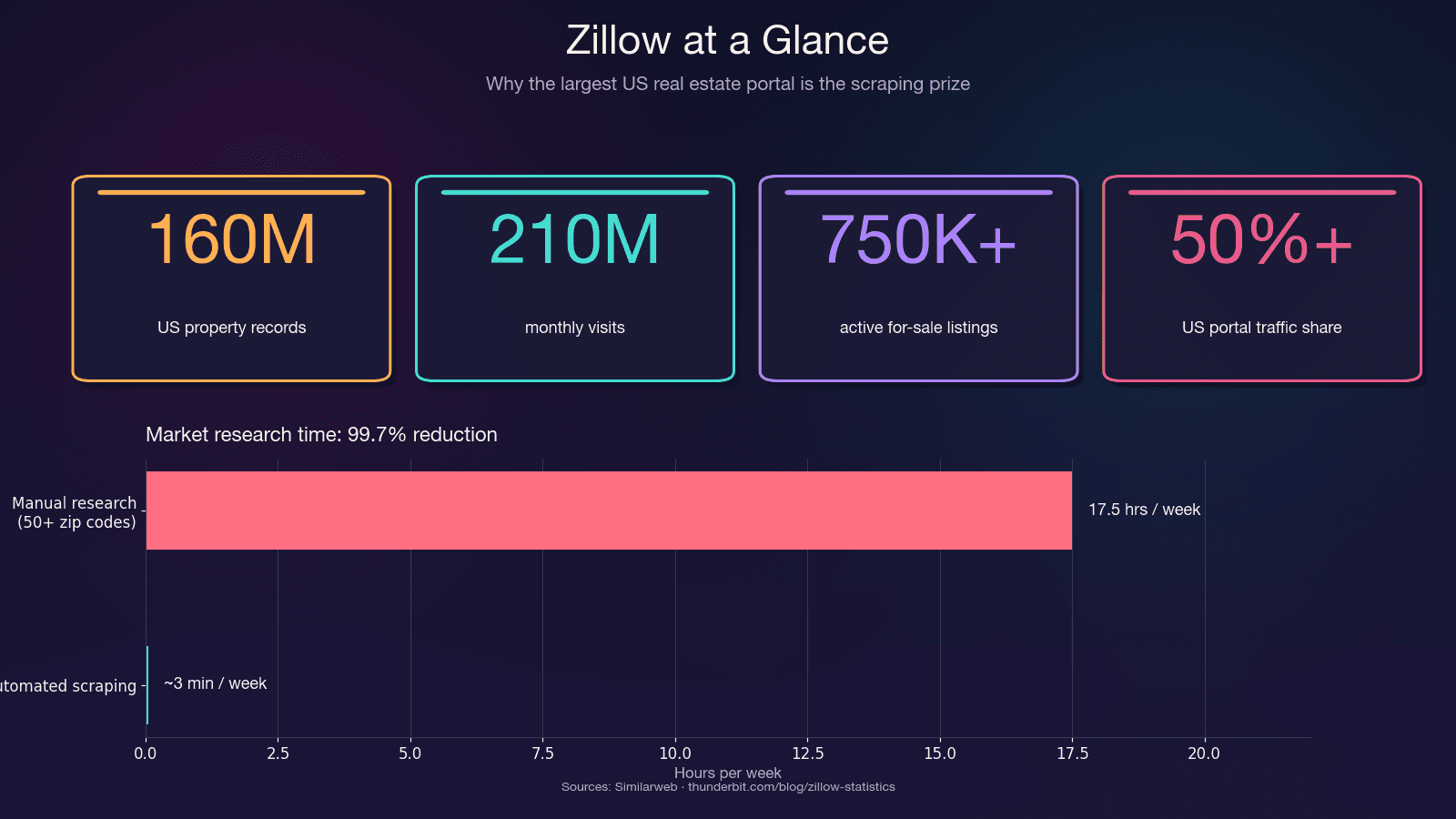
Zillow is the single largest repository of US residential real estate data. It pulls in 210 million monthly visits and hosts around 750,000+ active for-sale listings plus 1.9 million rental listings. The platform captures more than 50% of all US real estate portal traffic — more than double the next competitor.
Before jumping into Python code, it’s important to know that scraping Zillow with Python isn’t the only option, and choosing the wrong method can waste hours. Python tools like httpx and BeautifulSoup require intermediate skills, manual handling of headers and proxies, run at moderate speeds (1–3 seconds per page), and need frequent maintenance, though they’re free; Selenium or Playwright improve anti-bot handling by rendering JavaScript but are slower (5–15 seconds per page) and still high-maintenance; scraping APIs such as ScraperAPI or ScrapFly are faster with built-in anti-bot support and moderate upkeep, but cost $30–599 per month; Zillow’s official API via Bridge Interactive is fast and low-maintenance but limited and costs around $500 per month; and no-code tools like Thunderbit are beginner-friendly, fast, require no maintenance thanks to AI adaptation, and typically offer a freemium model.
The time savings alone are significant. Manual research across 50+ zip codes can eat 15–20 hours a week. Automated scraping does the same job in minutes — a 99.7% reduction in time spent.
Every Way to Scrape Zillow: Python vs. API vs. No-Code (Compared)
Before jumping into Python code, know that "scrape Zillow with Python" isn't the only option. Choosing the wrong method wastes hours. Here's a side-by-side comparison so you can self-select:
| Method | Skill Level | Anti-Bot Handling | Speed | Maintenance | Cost |
|---|---|---|---|---|---|
| Python + httpx/BeautifulSoup | Intermediate | Manual (headers, proxies) | Moderate (1–3s/page) | High (selectors break) | Free |
| Python + Selenium/Playwright | Intermediate | Better (renders JS) | Slow (5–15s/page) | High | Free |
| Scraping API (ScraperAPI, ScrapFly) | Intermediate | Built-in | Fast | Medium | $30–599/mo |
| Zillow Official API (Bridge Interactive) | Beginner–Intermediate | N/A | Fast | Low | ~$500/mo, limited access |
| No-Code Tool (Thunderbit) | Beginner | Built-in (AI adapts) | Fast | None (AI re-reads page) | Freemium |
If you need data right now without writing code, start with Thunderbit. If you want to understand the plumbing or need full customization, keep reading for the Python walkthrough.
The 2-Minute Way: Scrape Zillow with Thunderbit (No Code Needed)
Before the Python deep-dive, here's the path for anyone who just needs Zillow data fast — no Python setup, no proxy configuration, no selector maintenance. We built this workflow at Thunderbit specifically for getting structured real estate data without engineering overhead.
Difficulty: Beginner Time Required: ~2 minutes What You'll Need: Chrome browser, Thunderbit Chrome Extension (free tier works)
Step 1: Install Thunderbit and Open Zillow
Install the Thunderbit extension from the Chrome Web Store. Navigate to a Zillow search results page — for example, search for homes in Houston, TX.
Step 2: Click "AI Suggest Fields"
Open the Thunderbit sidebar and click "AI Suggest Fields." The AI reads the page and auto-suggests columns: price, address, beds, baths, square footage, Zestimate, listing URL, and more. In my testing, it typically detects 20+ fields without any manual configuration.
Step 3: Click "Scrape"
Hit the Scrape button. Data populates in a structured table inside the extension. Thunderbit handles Zillow's pagination automatically — both click-based and infinite scroll.
Step 4: Enrich with Subpage Scraping
Want detail-page data like tax history, school ratings, or price history? Use "Scrape Subpages" to enrich your table. Thunderbit follows each listing URL and pulls the additional fields — no extra code required.
Step 5: Export
Export to Google Sheets, Excel, Airtable, or Notion. The export is free.
Why Thunderbit Works Well for Zillow
The real advantage here is resilience. Thunderbit's AI reads the page structure fresh every time you scrape. When Zillow changes its layout (which happens frequently), there are no brittle CSS selectors to fix. The AI adapts automatically. This genuinely solves the "inherently fragile" nature of coded scrapers that frustrates so many users.
What Data Can You Scrape from Zillow? (20+ Fields)
Most guides grab price and address, then stop. Zillow listings actually contain far more extractable data than people realize — here's a reference table:
| Field | Where It's Found | Extraction Difficulty |
|---|---|---|
| List Price | Search + Detail | Easy |
| Address / Zip | Search + Detail | Easy |
| Zestimate | Search + Detail | Easy |
| Price History (each event) | Detail | Hard (nested JSON) |
| Tax History | Detail | Hard (nested JSON) |
| Beds / Baths / Sqft | Search + Detail | Easy |
| Year Built | Detail | Easy |
| HOA Fee | Detail | Medium |
| Walk Score / Transit Score | Detail (iframe) | Hard (requires JS rendering) |
| School Ratings | Detail | Medium |
| Lot Size | Detail | Easy |
| Days on Zillow | Search | Easy |
| Listing Agent / Brokerage | Search + Detail | Medium |
| MLS # | Detail | Easy |
| Property Type | Search + Detail | Easy |
| Latitude / Longitude | __NEXT_DATA__ JSON | Medium |
| Description Text | Detail | Easy |
| Photo URLs | Search + Detail | Medium |
| Rent Zestimate | Detail | Medium |
| Nearby Comparable Sales | Detail | Hard |
The "hard" fields — price history, tax history, comparable sales — live in nested JSON on detail pages. The Python section below shows exactly how to extract them. And if you'd rather skip the code, Thunderbit's AI Suggest Fields auto-detects most of these columns, and its Subpage Scraping pulls the detail-page fields automatically.
Setting Up Your Python Environment to Scrape Zillow
Difficulty: Intermediate Time Required: ~5 minutes for setup, ~30 minutes for the full tutorial What You'll Need: Python 3.8+, Chrome browser (for inspecting pages), a text editor or IDE
Install the required libraries:
pip install httpx beautifulsoup4 pandas lxml
Here's what each does:
- httpx — HTTP client with better performance than
requestsand async support - beautifulsoup4 + lxml — HTML parsing
- pandas — Data export to CSV/Excel
- Optionally: selenium or playwright if you need to render JavaScript-heavy pages
Understanding Zillow's Page Structure Before You Scrape
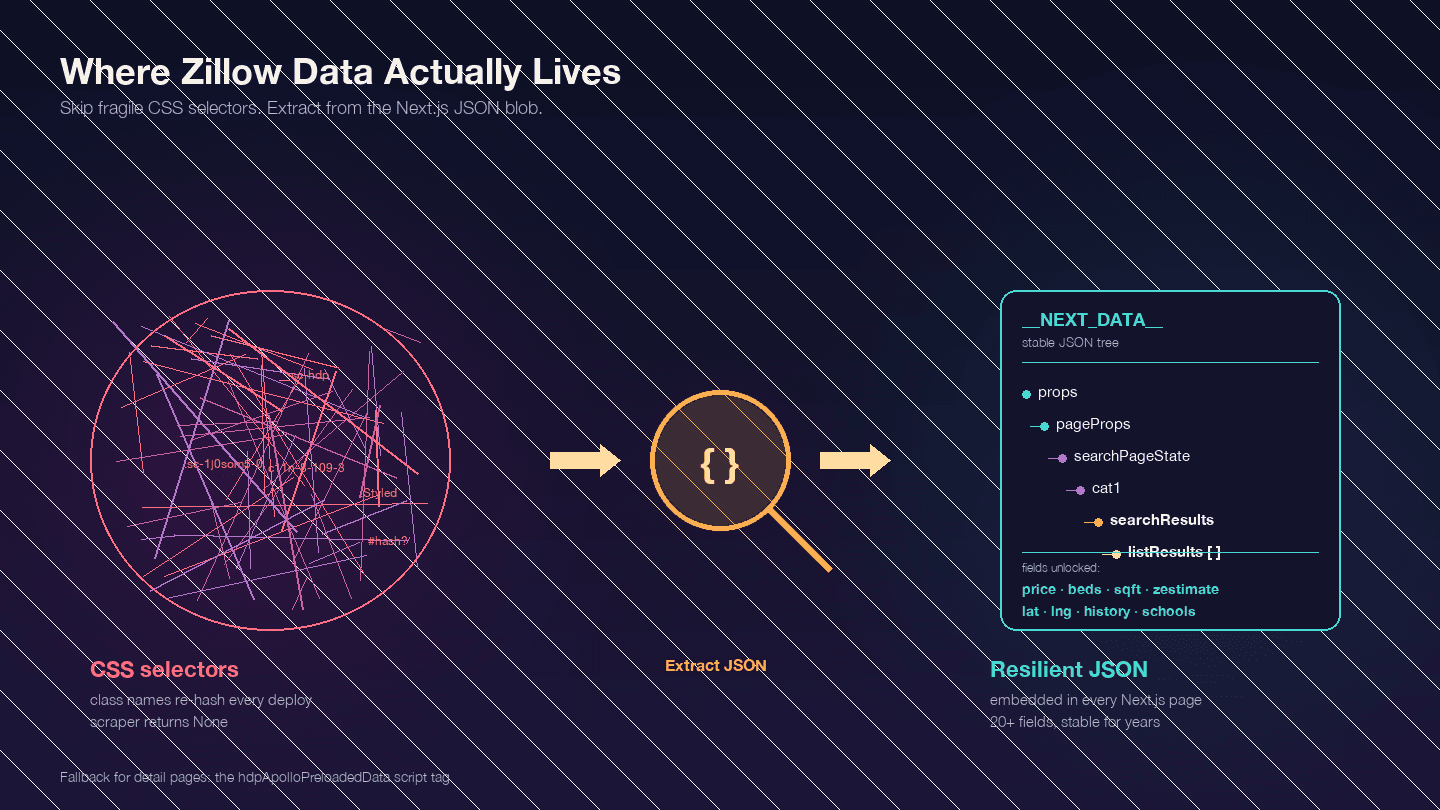
This is the most important thing to understand before writing any code. Zillow is a Next.js application — confirmed by engineering posts from Zillow employees. That means most of the data you want isn't in the visible HTML elements. It's embedded in a <script id="__NEXT_DATA__"> JSON blob.
Open any Zillow property page, press F12, go to Elements, and search for __NEXT_DATA__. You'll find a massive JSON object containing all the listing data — prices, coordinates, property details, price history, tax records, school ratings, and more.
Why does this matter? Zillow's CSS class names are hashed (generated by styled-components) and change with every deployment. A class like StyledPropertyCardHomeDetailsList-c11n-8-109-3__sc-1j0som5-0 will have a completely different hash next week. Any scraper using CSS selectors will break regularly.
The __NEXT_DATA__ JSON approach is far more stable because it doesn't depend on HTML structure at all.
Key JSON paths for search results:
| Path | Content |
|---|---|
props.pageProps.searchPageState.cat1.searchResults.listResults | Array of search results |
props.pageProps.searchPageState.cat1.searchResults.mapResults | Map-view results |
props.pageProps.searchPageState.cat1.searchList.totalPages | Total pages available |
For detail pages, some use __NEXT_DATA__ and some use an alternative hdpApolloPreloadedData script tag. The code below handles both.
Step-by-Step: How to Scrape Zillow with Python
Step 1: Set Up HTTP Headers to Avoid Instant Blocks
Sending a bare httpx.get() to Zillow returns a CAPTCHA page, not listing data. Zillow uses PerimeterX (HUMAN Security) alongside Cloudflare — both rated 8/10 difficulty by scraping benchmarks. The system checks your TLS fingerprint, HTTP headers, and IP reputation.
Here are the minimum headers that work as of 2025:
import httpx

headers = {
    "User-Agent": "Mozilla/5.0 (Windows NT 10.0; Win64; x64) AppleWebKit/537.36 "
                   "(KHTML, like Gecko) Chrome/124.0.0.0 Safari/537.36",
    "Accept": "text/html,application/xhtml+xml,application/xml;q=0.9,"
              "image/avif,image/webp,*/*;q=0.8",
    "Accept-Language": "en-US,en;q=0.9",
    "Accept-Encoding": "gzip, deflate, br",
    "Sec-Ch-Ua": '"Chromium";v="124", "Google Chrome";v="124", "Not-A.Brand";v="99"',
    "Sec-Ch-Ua-Platform": '"Windows"',
    "Sec-Fetch-Dest": "document",
    "Sec-Fetch-Mode": "navigate",
    "Sec-Fetch-Site": "none",
    "Sec-Fetch-User": "?1",
    "Upgrade-Insecure-Requests": "1",
}
The Sec-Ch-Ua headers are critical. Many tutorials omit them — that's exactly why those tutorials' code doesn't work against PerimeterX.
Step 2: Scrape Zillow Search Results
Zillow search URLs follow a predictable pattern. For Houston, TX:
- Page 1:
https://www.zillow.com/houston-tx/ - Page 2:
https://www.zillow.com/houston-tx/2_p/ - Page 3:
https://www.zillow.com/houston-tx/3_p/
Each page contains about 41 listings. Zillow caps results at 20 pages (~820 listings). For larger datasets, you'll need to split by geography (more on that later).
Here's the code to scrape search results by extracting data from the __NEXT_DATA__ JSON:
from bs4 import BeautifulSoup
import json
import time
import random

def scrape_zillow_search(url):
    """Scrape listing data from a Zillow search results page."""
    response = httpx.get(url, headers=headers, timeout=15)

    if response.status_code != 200:
        print(f"Got status {response.status_code} for {url}")
        return []

    soup = BeautifulSoup(response.text, "lxml")
    script_tag = soup.find("script", {"id": "__NEXT_DATA__"})

    if not script_tag:
        print("No __NEXT_DATA__ found — likely blocked by CAPTCHA")
        return []

    next_data = json.loads(script_tag.string)

    try:
        results = (
            next_data["props"]["pageProps"]["searchPageState"]
            ["cat1"]["searchResults"]["listResults"]
        )
    except KeyError:
        print("Unexpected JSON structure — Zillow may have changed its format")
        return []

    listings = []
    for item in results:
        listing = {
            "zpid": item.get("zpid"),
            "address": item.get("addressStreet"),
            "city": item.get("addressCity"),
            "state": item.get("addressState"),
            "zipcode": item.get("addressZipcode"),
            "price": item.get("unformattedPrice") or item.get("price"),
            "beds": item.get("beds"),
            "baths": item.get("baths"),
            "sqft": item.get("area"),
            "zestimate": item.get("zestimate"),
            "days_on_zillow": item.get("daysOnZillow"),
            "listing_url": item.get("detailUrl"),
            "img_src": item.get("imgSrc"),
            "property_type": item.get("hdpData", {}).get("homeInfo", {}).get("homeType"),
            "latitude": item.get("latLong", {}).get("latitude"),
            "longitude": item.get("latLong", {}).get("longitude"),
        }
        listings.append(listing)

    return listings
To scrape multiple pages, loop with delays:
all_listings = []
base_url = "https://www.zillow.com/houston-tx/"

for page in range(1, 6):  # First 5 pages
    url = base_url if page == 1 else f"{base_url}{page}_p/"
    print(f"Scraping page {page}...")

    page_listings = scrape_zillow_search(url)
    all_listings.extend(page_listings)

    # Random delay between 3-7 seconds
    delay = random.uniform(3, 7)
    time.sleep(delay)

print(f"Total listings scraped: {len(all_listings)}")
You should see structured listing data accumulating in all_listings. If you get empty results, check the "Why Scrapers Break" section below.
Step 3: Scrape Zillow Property Detail Pages
Search results give you the basics. Detail pages contain the deeper data: price history, tax history, school ratings, agent info, and property descriptions. Each listing URL from Step 2 points to a detail page.
Zillow detail pages use two possible data formats. Here's code that handles both:
def scrape_zillow_detail(url):
    """Scrape detailed property data from a Zillow listing page."""
    response = httpx.get(url, headers=headers, timeout=15)

    if response.status_code != 200:
        return None

    soup = BeautifulSoup(response.text, "lxml")

    # Try __NEXT_DATA__ first (most common)
    script_tag = soup.find("script", {"id": "__NEXT_DATA__"})
    if script_tag:
        next_data = json.loads(script_tag.string)
        try:
            cache_str = next_data["props"]["pageProps"]["componentProps"]["gdpClientCache"]
            cache = json.loads(cache_str)
            first_key = next(iter(cache))
            prop = cache[first_key]["property"]
            return extract_property_fields(prop)
        except (KeyError, StopIteration):
            pass

    # Fallback: hdpApolloPreloadedData
    apollo_tag = soup.find("script", {"id": "hdpApolloPreloadedData"})
    if apollo_tag:
        raw = json.loads(apollo_tag.string)
        api_cache = json.loads(raw["apiCache"])
        for key, value in api_cache.items():
            if "ForSale" in key or "property" in str(value)[:100]:
                prop = value.get("property", value)
                return extract_property_fields(prop)

    return None


def extract_property_fields(prop):
    """Extract structured fields from a Zillow property JSON object."""
    return {
        "zpid": prop.get("zpid"),
        "zestimate": prop.get("zestimate"),
        "rent_zestimate": prop.get("rentZestimate"),
        "description": prop.get("description"),
        "year_built": prop.get("yearBuilt"),
        "lot_size": prop.get("lotSize"),
        "hoa_fee": prop.get("monthlyHoaFee"),
        "mls_id": prop.get("mlsid"),
        "broker_name": prop.get("brokerName") or prop.get("attributionInfo", {}).get("brokerName"),
        "price_history": [
            {
                "date": event.get("date"),
                "event": event.get("event"),
                "price": event.get("price"),
            }
            for event in prop.get("priceHistory", [])
        ],
        "tax_history": [
            {
                "year": record.get("time"),
                "tax_paid": record.get("taxPaid"),
                "value": record.get("value"),
            }
            for record in prop.get("taxHistory", [])
        ],
        "schools": [
            {
                "name": school.get("name"),
                "rating": school.get("rating"),
                "distance": school.get("distance"),
            }
            for school in prop.get("schools", [])
        ],
    }
Loop through your listing URLs with delays:
detail_data = []
for listing in all_listings[:10]:  # Start with 10 to test
    detail_url = listing.get("listing_url")
    if not detail_url:
        continue

    if not detail_url.startswith("http"):
        detail_url = f"https://www.zillow.com{detail_url}"

    print(f"Scraping detail: {detail_url}")
    detail = scrape_zillow_detail(detail_url)

    if detail:
        detail_data.append({**listing, **detail})

    time.sleep(random.uniform(3, 8))
After this step, you should have a list of dictionaries containing both search-level and detail-level data for each property.
Step 4: Handle Pagination to Scrape Multiple Pages
For areas with more than 820 listings (the 20-page cap), you need to split by geography. Zillow's internal API accepts mapBounds parameters. The strategy: divide the map into quadrants and scrape each one separately.
def split_bounds(bounds):
    """Split map bounds into 4 quadrants."""
    mid_lat = (bounds["north"] + bounds["south"]) / 2
    mid_lng = (bounds["east"] + bounds["west"]) / 2

    return [
        {"north": bounds["north"], "south": mid_lat, "east": bounds["east"], "west": mid_lng},
        {"north": bounds["north"], "south": mid_lat, "east": mid_lng, "west": bounds["west"]},
        {"north": mid_lat, "south": bounds["south"], "east": bounds["east"], "west": mid_lng},
        {"north": mid_lat, "south": bounds["south"], "east": mid_lng, "west": bounds["west"]},
    ]
For most use cases — monitoring 50–200 listings in a specific area — the standard URL pagination is sufficient. The quadrant approach is for city-wide or state-wide scrapes.
Step 5: Export Your Scraped Zillow Data
Save everything to CSV with pandas:
import pandas as pd

df = pd.DataFrame(detail_data)
df.to_csv("zillow_houston_listings.csv", index=False)
print(f"Exported {len(df)} listings to zillow_houston_listings.csv")
For JSON export:
with open("zillow_houston_listings.json", "w") as f:
    json.dump(detail_data, f, indent=2)
If you want to skip the export step entirely, Thunderbit exports to Google Sheets, Airtable, and Notion for free — useful if you want the data in a collaborative format right away.
Why Zillow Scrapers Break (and How to Build Resilient Ones)
This is the survival guide.
In my experience, scrapers break on Zillow for three specific reasons — and each has a concrete fix.
PerimeterX and CAPTCHAs: Why Your Requests Return Empty Data
Zillow's PerimeterX integration checks multiple signals simultaneously: TLS fingerprint, HTTP headers, IP reputation, and request patterns. When it detects automation, it returns a "Press & Hold" CAPTCHA page instead of listing data.
The exact failure scenario: You send a request with default Python headers. The response HTML contains PerimeterX challenge scripts instead of property data — and your BeautifulSoup parse finds no __NEXT_DATA__ tag.
The fix: Use the full browser-mimicking headers from Step 1. If you're making more than a few dozen requests, you also need proxy rotation (covered below). For heavy-duty scraping, consider a library like curl_cffi with impersonate="chrome" — it's the only Python HTTP client that can match a real Chrome TLS fingerprint.
Dynamic CSS Selectors: Why BeautifulSoup Returns None
If you're using CSS selectors like .list-card-price or class names with hashes, your scraper will break every time Zillow deploys new code.
Zillow uses styled-components, which generate class names like StyledPropertyCardHomeDetailsList-c11n-8-109-3__sc-1j0som5-0. The hash portion changes with every build.
The fix: Don't use CSS selectors at all. Extract data from the __NEXT_DATA__ JSON blob as shown in the code above. This approach has been stable for years because the JSON structure changes far less frequently than the HTML markup.
If you must use HTML parsing, look for data-test attributes (e.g., data-test="property-card") or use substring class matching like [class*="PropertyCard"]. But JSON extraction is the more reliable path.
Proxy Rotation and Exponential Backoff: Code That Survives IP Bans
Datacenter IPs are immediately blocklisted by Zillow. You need residential proxies for reliable access. Safe rate: 1 request per 3–8 seconds per IP, staying under ~500 requests/hour.
Here's a retry decorator with exponential backoff and jitter:
import random
import time

def backoff_with_jitter(attempt, base_delay=2, max_delay=60):
    """AWS-style full jitter exponential backoff."""
    delay = min(max_delay, base_delay * (2 ** attempt))
    return random.uniform(0, delay)

def fetch_with_retry(url, max_retries=5):
    for attempt in range(max_retries):
        try:
            response = httpx.get(url, headers=headers, timeout=15)
            if response.status_code == 200:
                return response
            if response.status_code in (403, 429):
                delay = backoff_with_jitter(attempt, base_delay=5)
                print(f"Blocked ({response.status_code}). Retrying in {delay:.1f}s...")
                time.sleep(delay)
                continue
        except Exception as e:
            if attempt == max_retries - 1:
                raise
            time.sleep(backoff_with_jitter(attempt))
    return None
And a simple proxy rotation pool:
class ProxyPool:
    def __init__(self, proxies):
        self.proxies = proxies
        self.index = 0
        self.failures = {}

    def get_next(self):
        proxy = self.proxies[self.index % len(self.proxies)]
        self.index += 1
        return {"http://": proxy, "https://": proxy}

    def report_failure(self, proxy):
        self.failures[proxy] = self.failures.get(proxy, 0) + 1
        if self.failures[proxy] > 3:
            self.proxies.remove(proxy)

# Usage:
pool = ProxyPool(proxies=[
    "http://user:pass@residential1.example.com:8080",
    "http://user:pass@residential2.example.com:8080",
])
For proxy providers, DataImpulse offers residential proxies at ~$1/GB (the cheapest option), while IPRoyal and Smartproxy are solid mid-range choices at $4–7/GB.
The Zero-Maintenance Alternative
If you're scraping Zillow regularly and tired of fixing broken selectors or managing proxy pools, Thunderbit's AI reads page structure fresh each scrape. No selectors to maintain, no proxy configuration. It genuinely solves the fragility problem that makes coded scrapers a recurring headache.
Automate Zillow Scraping: Scheduling and Price Monitoring
Every real estate investor I've talked to wants this, and no other Zillow scraping guide covers it: recurring automated scrapes for price tracking.
For Python Users: Cron Jobs and Price Change Detection
Set up a cron job that runs your scraper weekly and flags price changes:
import pandas as pd
from datetime import datetime

def detect_price_changes(new_data, historical_file, threshold=0.05):
    """Compare new scrape with historical data, flag changes > threshold."""
    try:
        old = pd.read_csv(historical_file)
    except FileNotFoundError:
        new_data.to_csv(historical_file, index=False)
        print("First run — saved baseline data.")
        return pd.DataFrame()

    merged = new_data.merge(old, on="zpid", suffixes=("_new", "_old"))
    merged["price_change_pct"] = (
        (merged["price_new"] - merged["price_old"]) / merged["price_old"]
    )
    alerts = merged[merged["price_change_pct"].abs() > threshold]

    # Append new data with timestamp
    new_data["scraped_at"] = datetime.now().isoformat()
    new_data.to_csv(historical_file, mode="a", header=False, index=False)

    return alerts
Add this to your crontab for weekly Monday runs at 6 AM:
0 6 * * 1 cd /path/to/scraper && python zillow_monitor.py
A practical example: monitor 50 Austin, TX listings weekly. Each Monday, the script scrapes current prices, compares them to the previous week, and outputs a CSV highlighting any price drop greater than 5%.
For Non-Coders: Thunderbit Scheduled Scraper
Thunderbit's Scheduled Scraper lets you describe the interval in plain language ("every Monday at 9am"), input your Zillow search URLs, and click Schedule. Data auto-exports to Google Sheets on each run. No Python, no cron, no server to maintain. This is particularly useful for real estate agents or operations teams who need consistent price monitoring without engineering support.
Tips for Scraping Zillow Responsibly
A few notes on staying on the right side of the line:
- Scrape publicly available data only. Don't access pages behind login walls or authentication.
- Use reasonable request rates. 3–8 seconds between requests. Don't hammer the server.
- Don't scrape personal/private user data. Agent names and brokerage info on listings are public; user account data is not.
- Store and use data ethically. Market research, investment analysis, and lead generation are legitimate uses. Spam is not.
- Legal context: The hiQ v. LinkedIn ruling established that scraping publicly accessible data doesn't violate the CFAA. The Meta v. Bright Data (2024) ruling upheld similar principles. That said, Zillow's ToS restricts automated access, and they enforce via IP bans and CAPTCHAs rather than legal action. Always check current guidance and respect robots.txt.
Pick the Right Approach to Scrape Zillow with Python
Your best path depends on your situation:
Need data fast, no code? Thunderbit gets you from a Zillow search page to a structured spreadsheet in about 2 minutes. The AI adapts to layout changes, handles pagination, and exports for free. Install the Chrome Extension and try it on a Zillow search page.
Want full control? Use the Python code in this guide. Extract from __NEXT_DATA__ JSON (not CSS selectors) for stability. Set proper browser-mimicking headers. Rotate residential proxies and use exponential backoff for reliability.
Scaling up? Scraping APIs like ScrapFly (99% success rate on Zillow) or ScraperAPI handle the proxy and CAPTCHA infrastructure for you, at $30–599/month depending on volume.
Tracking prices over time? Set up a cron job with the price change detection script, or use Thunderbit's Scheduled Scraper for a zero-maintenance approach.
The data is there. The only question is how much engineering time you want to spend getting it out. For more on getting web data into spreadsheets, check out our guide on scraping data from websites into Excel or our Zillow statistics roundup for the latest platform data. You can also watch tutorials on the Thunderbit YouTube Channel.
Try Thunderbit for Zillow Scraping Get Started Free
FAQs
Can you scrape Zillow with Python for free?
Yes — httpx, BeautifulSoup, and pandas are all free and open-source. The trade-off is time: you'll need to manage headers, proxy rotation, and selector maintenance yourself. Expect to invest 4–8 hours on initial setup and 4–10 hours per month on maintenance when Zillow changes its site. Thunderbit also offers a free tier if you want to avoid the coding overhead entirely.
Does Zillow have an official API?
Zillow deprecated its free public API in September 2021. Access now goes through Bridge Interactive, which requires approval, costs approximately $500/month, and is geared toward licensed real estate professionals. For most users — investors, researchers, agents doing market analysis — scraping is the practical alternative. Zillow does still publish free research data as downloadable CSVs at zillow.com/research/data/, including the Zillow Home Value Index and Zillow Observed Rent Index.
How do I avoid getting blocked when scraping Zillow?
Three things: (1) use realistic browser headers including Sec-Ch-Ua — this is the header most tutorials miss, and it's what PerimeterX checks first; (2) rotate residential proxies — datacenter IPs are immediately blocklisted; (3) extract data from __NEXT_DATA__ JSON instead of HTML selectors to avoid breakage from layout changes. Keep request rates at 1 per 3–8 seconds per IP. Or use a tool like Thunderbit that handles anti-bot protection automatically.
What's the best way to scrape Zillow without coding?
Thunderbit's AI Web Scraper is the fastest path. Install the Chrome Extension, navigate to a Zillow search page, click "AI Suggest Fields" to auto-detect columns, then click "Scrape." Export to Google Sheets, Excel, Airtable, or Notion with no code required. The AI reads the page fresh each time, so it doesn't break when Zillow updates its layout.
How often does Zillow change its website structure, and how does that affect scrapers?
Zillow deploys updates frequently — sometimes weekly. Because they use styled-components, CSS class names change with every deployment, and scrapers built on CSS selectors break regularly. The most resilient approach for Python is extracting from the __NEXT_DATA__ JSON blob, which changes structure far less often. For a zero-maintenance approach, Thunderbit's AI re-reads the page structure on every scrape and adapts automatically to layout changes.
Learn More




