

Yelp holds 330 million cumulative reviews across 8.4 million active business pages — and getting that data into a usable format has never been harder. Yelp's 2024–2025 anti-bot crackdown has quietly broken most existing Python scraping tutorials.
If you've tried running a Yelp scraper recently and hit a wall of 403 errors, empty HTML responses, or CAPTCHAs that weren't there six months ago, you're not imagining things. Yelp now runs TLS/JA3 fingerprinting, rotating obfuscated CSS class names, and aggressive IP reputation scoring — meaning the old requests + BeautifulSoup approach that every tutorial still recommends dies on the first request. I've spent weeks testing different approaches against Yelp's current stack, and this guide covers everything that actually works in 2025: the official Fusion API (and why it probably won't be enough), a full Python scraping workflow with a layered anti-blocking strategy, and a 2-click no-code alternative with Thunderbit for readers who just want the data without the debugging marathon.
Try Thunderbit for Yelp Scraping
Why Scrape Yelp with Python (and Who Actually Benefits)
Before writing a single line of code, what's the actual business case for Yelp data? The platform isn't just a restaurant review site — it's effectively a live database of local businesses with structured contact info, ratings, categories, hours, and hundreds of millions of customer reviews.
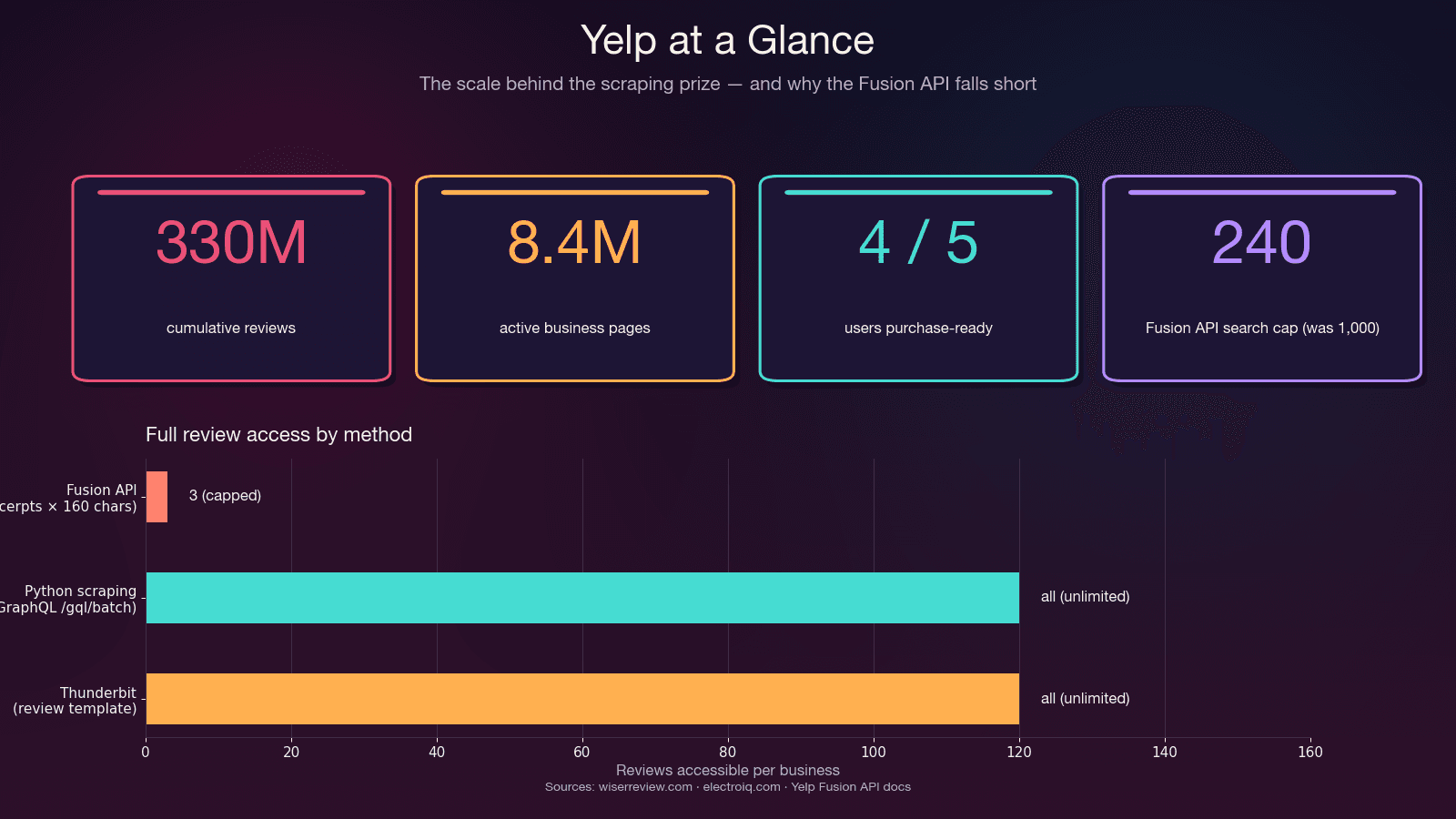
Here's who benefits most and what they're extracting:
| Use Case | Key Data Fields | Why It Matters |
|---|---|---|
| Sales & lead generation | Business name, phone, website, address, category, rating | Build targeted prospect lists of local SMBs — 4 of 5 Yelp users are purchase-ready on arrival |
| Competitive intelligence | Reviews, star ratings, review volume, sentiment | Monitor competitor reputation, identify service gaps, track trends |
| Market research & NLP | Full review text, dates, reviewer metadata | Sentiment analysis, topic modeling — Yelp reviews are one of the most-used NLP corpora in academic research |
| Real estate & site selection | Business density, category mix, review quality by area | Franchise and retail site selection — Yelp sells Location Intelligence as a licensed B2B product for exactly this |
| Ecommerce & operations | Pricing signals, customer complaints, service hours | Track how competitors are reviewed, identify operational patterns |
The common thread: the real goal is structured data, and Python is just one vehicle to get there. Some readers will want full programmatic control. Others just need a spreadsheet of plumber contact info in Austin. Both paths are covered here.
Yelp Fusion API vs. Python Web Scraping: Which Should You Use?
Most guides skip this decision entirely and jump straight into code without evaluating whether the official Yelp Fusion API (now rebranded as the "Yelp Places API") would have been sufficient. In my experience, that evaluation saves hours of wasted effort — because the API is great for some things and completely inadequate for others.
What the Fusion API Actually Gives You
The Fusion API provides structured business search, business details, autocomplete, and a reviews endpoint. It's authorized, well-documented, and doesn't require anti-bot gymnastics.
But the reviews endpoint is where things fall apart. Here's what Yelp staff have confirmed on GitHub:
"The Yelp API does not return full review text. Three review excerpts of 160 characters are provided by default." — Yelp staff reply, GitHub Issue #163
That's not a bug — it's by design. The API physically caps at 3 review excerpts (7 on Premium), each truncated to ~160 characters. No review metadata (useful/funny/cool votes), no reviewer history, no owner replies. And the daily rate limit for new clients dropped to 300–500 calls/day after May 2023 — down from 5,000. Entry pricing starts at $29/month.
The Decision Framework
| Factor | Yelp Fusion API | Python Web Scraping | Thunderbit (No-Code) |
|---|---|---|---|
| Full reviews | ❌ Only 3 excerpts (~160 chars each) | ✅ All reviews via GraphQL | ✅ All visible reviews |
| Rate limits | 300–500/day (new); 5,000 (legacy) | Self-managed (proxy budget) | Credit-based |
| Setup effort | ~15 min (API key + SDK) | Hours to days | ~2 minutes |
| Business fields | ~20 structured fields | Unlimited (parse HTML/JSON) | AI-suggested fields |
| Anti-bot handling | N/A (authorized) | Must build yourself | Handled automatically |
| Legal risk | ✅ Authorized | ⚠️ ToS gray area | ⚠️ Same as scraping |
| Cost | $29/mo minimum | Free (+ proxy costs $0.75–$4/GB) | Free tier available |
| Maintenance | Low (API stable) | High (selectors rot, anti-bot escalates) | Low (AI re-adapts) |
Use the Fusion API if: you need basic business info, small-scale lookups, or an authorized integration — and 3 review snippets per business is enough.
Use Python scraping if: you need full review text, all reviews for a business, review metadata, more than 240 results per search, or your budget is below $29/month.
Use Thunderbit if: you want the data fast without writing or maintaining code. More on this in the no-code section below.
The No-Code Shortcut: Scrape Yelp with Thunderbit (No Python Needed)
Before the Python deep-dive, here's the fastest path for readers whose real goal is the data, not the coding exercise. Every competitor guide assumes Python proficiency, but in my work at Thunderbit, I've seen that a huge chunk of people searching "scrape Yelp" are sales reps, ops managers, and small business owners who just want a spreadsheet of local businesses — not a crash course in TLS fingerprinting.
Thunderbit already ships pre-built Yelp templates:
- Yelp Business Web Scraper — extracts business name, rating, contact details, address, hours, category
- Yelp Review Scraper — extracts reviewer username, review content, rating, date, reviewer location
How It Works in Practice
- Open a Yelp search results page or business page in Chrome
- Click AI Suggest Fields in the Thunderbit extension — the AI reads the page and proposes columns (business name, rating, review count, price range, category, address, phone, URL)
- Click Scrape — done
For the pre-built Yelp templates, it's even simpler: open the template, click Scrape.
Subpage scraping handles the enrichment loop automatically — start from a Yelp search results page, enable subpage scraping, and Thunderbit visits each business page to pull hours, full reviews, website, photos, and amenities. No additional setup.
Pagination is automatic — both click-based and scroll-based, handled out of the box. (For more on how this works, see our pagination guide.)
Exports are free on every tier — Excel, Google Sheets, Airtable, Notion, CSV, JSON. No pandas, no CSV-writing code.
Time Comparison
| Time | Python Scraper | Thunderbit |
|---|---|---|
| First run | Hours to days (write selectors, handle pagination, proxies, retry logic) | ~30 seconds with the pre-built Yelp template |
| When Yelp changes markup | Manually rewrite selectors | Click AI Suggest Fields again — re-adapts automatically |
| When IP gets banned | Debug, rotate proxy pools, re-test | Cloud mode handles IP rotation |
| Export to Google Sheets | Write OAuth + pandas glue | One click, free |
If you try Thunderbit first and find it covers your needs, you can skip the rest of this article. If you need full programmatic control, custom fields, or scale beyond a few thousand records per month — read on.
Python Libraries for Scraping Yelp: Which One to Pick
"Should I use Scrapy, BS4+requests, or Selenium?" is one of the most common questions in r/webscraping threads about Yelp. And yet every tutorial just picks their favorite library and moves on without explaining why. Here's the honest breakdown.
The 2025 Reality: requests + BeautifulSoup Is Broken for Yelp
The stack that every canonical Yelp tutorial recommends — pip install requests beautifulsoup4 — gets you blocked on the first request in 2025. Not the 50th. The first.
The reason: Python's requests library ships a TLS/JA3 fingerprint that doesn't match any real browser. Yelp's anti-bot layer flags it at the TLS-handshake level, before your User-Agent header is even read. I tested this repeatedly — fresh IP, realistic headers, randomized delays — and still hit 403 Forbidden immediately with vanilla requests.
The Library Decision Matrix
| Library | Best For | Handles JS? | Anti-Bot? | Learning Curve | Speed |
|---|---|---|---|---|---|
requests + BeautifulSoup | ❌ | ❌ | Very low | Fast (until blocked) | |
httpx async + parsel | Large-scale async scraping | ❌ | ❌ | Low | Very fast |
curl_cffi + parsel | Yelp-specific: TLS impersonation | ❌ | ✅ TLS/JA3/HTTP2 | Low | Very fast |
Scrapy 2.14 | Full crawl pipelines with pagination | Partial (via scrapy-playwright) | AutoThrottle, retry middleware | Medium-High | Fast |
Selenium 4.43 / Playwright 1.58 | JS-heavy pages, CAPTCHA workarounds | ✅ | Partial | Medium | Slow (~10–30 pages/min) |
| Thunderbit | Non-coders, quick extraction | ✅ (browser) | Built-in (Cloud mode) | Very low | Fast |
The curl_cffi Revelation
The library that changed my Yelp scraping workflow is curl_cffi — a Python binding for curl-impersonate. It emits the exact same TLS/JA3 + HTTP/2 fingerprint as real Chrome, and its API is a drop-in replacement for requests:
from curl_cffi import requests

r = requests.get(
    "https://www.yelp.com/biz/some-restaurant",
    impersonate="chrome131",
)
print(r.status_code, len(r.text))
That single change — from curl_cffi import requests plus impersonate="chrome131" — bypasses Yelp's largest anti-bot layer without spinning up a browser. In my testing, it's the difference between instant 403s and clean 200 responses.
My recommended stack for Yelp in 2025: curl_cffi + parsel + jmespath + residential proxies. If you need a full crawl pipeline with scheduling, wrap it in Scrapy 2.14 with a curl_cffi-based downloader middleware.
Setting Up Your Python Environment to Scrape Yelp
- Difficulty: Intermediate
- Time Required: ~15 minutes for setup, 1–2 hours for a working scraper
- What You'll Need: Python 3.10+ (3.12 recommended), a terminal, and optionally a residential proxy provider
Step 1: Create a Virtual Environment and Install Packages
python3.12 -m venv .venv
source .venv/bin/activate  # On Windows: .venv\Scripts\activate
pip install "curl_cffi>=0.11" "parsel>=1.9" "jmespath>=1.0" pandas
What each package does:
curl_cffi— makes HTTP requests with Chrome's TLS fingerprint (the anti-bot bypass)parsel— CSS/XPath selectors for parsing HTML (same engine Scrapy uses, lighter weight)jmespath— declarative JSON querying (cleaner than nested dict access for Yelp's embedded JSON)pandas— data export to CSV/Excel
Optional but useful:
pip install fake-useragent # Note: repo archived April 2026 but still installable
Step-by-Step: How to Scrape Yelp with Python
This is the core tutorial. The key insight that makes everything more resilient: skip CSS selectors, pull hidden JSON instead. Yelp randomizes CSS class names at build time (y-css-14xwok2 one week, y-css-hcq7b9 the next), so any scraper pinned to them breaks within weeks. The embedded JSON payloads — application/ld+json schema and react-root-props — are stable.
Step 2: Scrape Yelp Search Results
Yelp search URLs follow a predictable pattern: https://www.yelp.com/search?find_desc={term}&find_loc={location}. The search results data is embedded in a <script data-id="react-root-props"> tag as JSON — not rendered in the CSS-class soup.
import re, json, jmespath
from curl_cffi import requests
from parsel import Selector

HEADERS = {
    "user-agent": "Mozilla/5.0 (Windows NT 10.0; Win64; x64) "
                  "AppleWebKit/537.36 (KHTML, like Gecko) "
                  "Chrome/124.0.0.0 Safari/537.36",
    "accept": "text/html,application/xhtml+xml,application/xml;q=0.9,"
              "image/avif,image/webp,image/apng,*/*;q=0.8",
    "accept-language": "en-US,en;q=0.9",
    "accept-encoding": "gzip, deflate, br",
    "cookie": "intl_splash=false",
}

def scrape_search(term: str, location: str, max_pages: int = 3):
    results = []
    for page in range(max_pages):
        url = (f"https://www.yelp.com/search?"
               f"find_desc={term}&find_loc={location}&start={page * 10}")
        r = requests.get(url, headers=HEADERS, impersonate="chrome131")
        if r.status_code != 200:
            print(f"Blocked on page {page}: {r.status_code}")
            break
        sel = Selector(text=r.text)
        script = sel.xpath(
            "//script[@data-id='react-root-props']/text()"
        ).get() or ""
        m = re.search(r"react_root_props\s*=\s*(\{.*?\});", script, re.S)
        if not m:
            print(f"No react-root-props found on page {page} — possible soft block")
            break
        data = json.loads(m.group(1))
        businesses = jmespath.search(
            "legacyProps.searchAppProps.searchPageProps"
            ".mainContentComponentsListProps"
            "[?searchResultBusiness].searchResultBusiness.{"
            "name: name, url: businessUrl, rating: rating, "
            "reviews: reviewCount, phone: phone, "
            "neighborhoods: neighborhoods}",
            data,
        ) or []
        results.extend(businesses)
        import time, random
        time.sleep(random.uniform(3, 7))
    return results
You should get back a list of dicts with business names, URLs, ratings, and review counts. If react-root-props is missing from the response, you've been served a block shell — rotate your IP and retry.
The Cookie: intl_splash=false header is a standard workaround for Yelp's country-splash redirect. Without it, non-US IPs hit a splash page that looks like a soft block but isn't.
Step 3: Scrape Yelp Business Pages
Each business URL from the search results leads to a detail page with richer data. The most stable extraction target is the <script type="application/ld+json"> block — it contains structured schema.org data that Yelp maintains for SEO and doesn't obfuscate.
def scrape_business(biz_url: str) -> dict:
    url = f"https://www.yelp.com{biz_url}" if biz_url.startswith("/") else biz_url
    r = requests.get(url, headers=HEADERS, impersonate="chrome131")
    if r.status_code != 200:
        return {"url": url, "error": r.status_code}
    sel = Selector(text=r.text)
    biz_id = sel.css('meta[name="yelp-biz-id"]::attr(content)').get()
    for raw in sel.css('script[type="application/ld+json"]::text').getall():
        try:
            data = json.loads(raw)
        except json.JSONDecodeError:
            continue
        for node in (data if isinstance(data, list) else [data]):
            if node.get("@type") in (
                "Restaurant", "LocalBusiness", "FoodEstablishment",
                "HealthAndBeautyBusiness", "HomeAndConstructionBusiness",
            ):
                return {
                    "biz_id": biz_id,
                    "name": node.get("name"),
                    "rating": (node.get("aggregateRating") or {}).get("ratingValue"),
                    "review_count": (node.get("aggregateRating") or {}).get("reviewCount"),
                    "address": node.get("address"),
                    "telephone": node.get("telephone"),
                    "price_range": node.get("priceRange"),
                    "hours": node.get("openingHours"),
                    "url": url,
                }
    return {"biz_id": biz_id, "url": url}
The meta[name="yelp-biz-id"] value is the encoded business ID you'll need for the reviews endpoint. Grab it here — you'll use it in the next step.
Step 4: Scrape Yelp Reviews with Pagination
This is where the Fusion API falls short and scraping shines. Yelp's internal GraphQL batch endpoint returns full review text, reviewer info, dates, ratings, and vote counts — everything the API withholds.
The endpoint is https://www.yelp.com/gql/batch, and it uses a static documentId for the GetBusinessReviewFeed operation. Pagination works via a base64-encoded cursor.
import base64

GQL_URL = "https://www.yelp.com/gql/batch"
DOC_ID = "ef51f33d1b0eccc958dddbf6cde15739c48b34637a00ebe316441031d4bf7681"

def fetch_reviews(enc_biz_id: str, num_pages: int = 5):
    all_reviews = []
    for page in range(num_pages):
        offset = page * 10
        cursor = base64.b64encode(
            json.dumps({"version": 1, "offset": offset}).encode()
        ).decode()
        payload = [{
            "operationName": "GetBusinessReviewFeed",
            "variables": {
                "encBizId": enc_biz_id,
                "reviewsPerPage": 10,
                "after": cursor,
                "sortBy": "DATE_DESC",
                "language": "en",
            },
            "extensions": {
                "operationType": "query",
                "documentId": DOC_ID,
            },
        }]
        r = requests.post(
            GQL_URL,
            json=payload,
            headers={
                **HEADERS,
                "content-type": "application/json",
                "x-apollo-operation-name": "GetBusinessReviewFeed",
                "apollographql-client-name": "yelp-main-frontend",
            },
            impersonate="chrome131",
        )
        if r.status_code != 200:
            print(f"Review fetch failed at offset {offset}: {r.status_code}")
            break
        data = r.json()
        # Navigate the response structure to extract reviews
        try:
            reviews = data[0]["data"]["business"]["reviews"]["edges"]
            for edge in reviews:
                node = edge.get("node", {})
                all_reviews.append({
                    "reviewer": node.get("author", {}).get("displayName"),
                    "rating": node.get("rating"),
                    "date": node.get("localizedDate"),
                    "text": node.get("text", {}).get("full"),
                })
        except (KeyError, IndexError, TypeError):
            break
        import time, random
        time.sleep(random.uniform(3, 7))
    return all_reviews
Each page returns 10 reviews. Increment the offset in the base64 cursor to paginate. The sortBy parameter accepts DATE_DESC (newest first), RATING_ASC, RATING_DESC, and others.
Step 5: Export Your Scraped Yelp Data
import pandas as pd

# Assuming you've collected businesses and reviews
df_businesses = pd.DataFrame(businesses)
df_businesses.to_csv("yelp_businesses.csv", index=False)

df_reviews = pd.DataFrame(all_reviews)
df_reviews.to_csv("yelp_reviews.csv", index=False)

# Or save as JSON for flexibility
import json
with open("yelp_data.json", "w") as f:
    json.dump({"businesses": businesses, "reviews": all_reviews}, f, indent=2)
For readers on the no-code path, Thunderbit exports the same data straight to Excel, Google Sheets, Airtable, or Notion — no pandas or file-writing code needed.
The Anti-Blocking Playbook: How to Scrape Yelp Without Getting Blocked
This section is the whole reason the article exists. Yelp's anti-bot measures have gotten significantly tougher since late 2024 — TLS fingerprinting, IP reputation checks, CAPTCHAs, and behavioral analysis are all in play. Most existing guides are outdated because they were written before this crackdown.
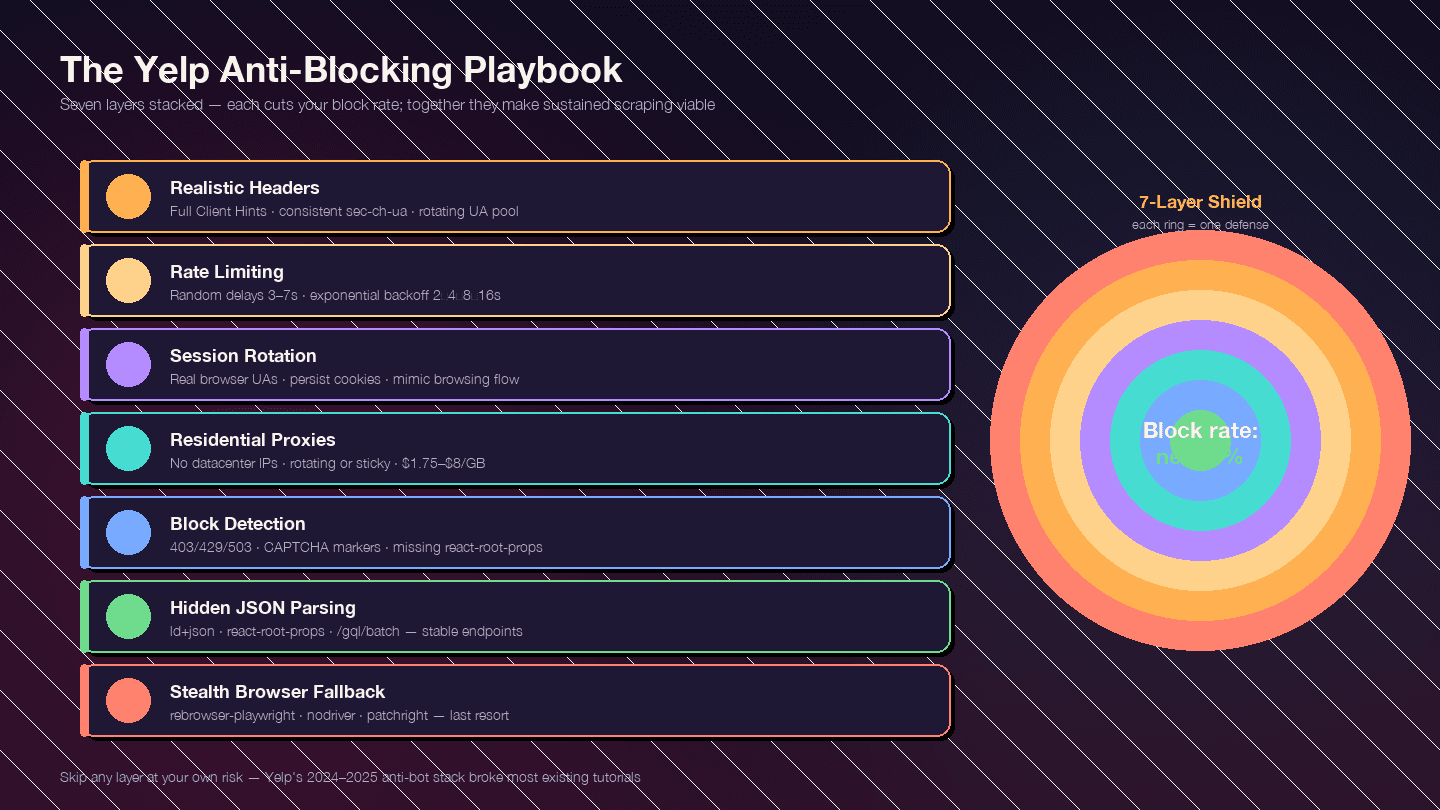
The strategy is layered. Each layer reduces your block rate; together, they make sustained scraping viable.
Layer 1: Realistic Request Headers
Default Python requests headers send User-Agent: python-requests/2.x — blocked instantly. But even a realistic User-Agent isn't enough. Yelp checks the full Client Hints header set for consistency.
FULL_HEADERS = {
    "authority": "www.yelp.com",
    "user-agent": "Mozilla/5.0 (Windows NT 10.0; Win64; x64) "
                  "AppleWebKit/537.36 (KHTML, like Gecko) "
                  "Chrome/124.0.0.0 Safari/537.36",
    "accept": "text/html,application/xhtml+xml,application/xml;q=0.9,"
              "image/avif,image/webp,image/apng,*/*;q=0.8",
    "accept-language": "en-US,en;q=0.9",
    "accept-encoding": "gzip, deflate, br",
    "sec-ch-ua": '"Chromium";v="124", "Google Chrome";v="124", "Not-A.Brand";v="99"',
    "sec-ch-ua-mobile": "?0",
    "sec-ch-ua-platform": '"Windows"',
    "sec-fetch-dest": "document",
    "sec-fetch-mode": "navigate",
    "sec-fetch-site": "same-origin",
    "sec-fetch-user": "?1",
    "upgrade-insecure-requests": "1",
    "referer": "https://www.yelp.com/",
    "cookie": "intl_splash=false",
}
Three mistakes that get you flagged:
- UA claims Chrome but
sec-ch-uais missing or contradicts the UA version sec-ch-ua-platformsays "Windows" but the UA string says macOS- Same exact UA across thousands of requests from one IP — rotate a pool of 10–20 recent Chrome/Firefox/Safari strings
Layer 2: Rate Limiting and Random Delays
Predictable timing patterns are a red flag. Add randomized sleep intervals and implement exponential backoff on error responses.
import random, time

def polite_get(client_get, url, attempt=0):
    r = client_get(url, headers=FULL_HEADERS, impersonate="chrome131")
    if r.status_code in (403, 429, 503):
        if attempt >= 4:
            raise RuntimeError(f"Blocked after {attempt + 1} attempts on {url}")
        backoff = 2 ** (attempt + 1) + random.random()
        print(f"  Got {r.status_code}, backing off {backoff:.1f}s (attempt {attempt + 1})")
        time.sleep(backoff)
        return polite_get(client_get, url, attempt + 1)
    time.sleep(random.uniform(3, 7))
    return r
| Parameter | Recommended Value |
|---|---|
| Random sleep between requests | random.uniform(3, 7) seconds |
| Backoff on 429/403/503 | 2 → 4 → 8 → 16s, max 5 attempts |
| Concurrent workers per IP | 1 (serialize per IP; use proxies for parallelism) |
| Max sustained rate per residential IP | ~1 req / 5s (~12 rpm) |
Layer 3: User-Agent and Session Rotation
Rotate through a pool of real browser User-Agent strings. Persist sessions and cookies to mimic real browsing behavior — Yelp uses cookie-based detection, so creating a fresh session for every request is itself suspicious.
UA_POOL = [
    "Mozilla/5.0 (Windows NT 10.0; Win64; x64) AppleWebKit/537.36 Chrome/124.0.0.0 Safari/537.36",
    "Mozilla/5.0 (Macintosh; Intel Mac OS X 14_4_1) AppleWebKit/537.36 Chrome/124.0.0.0 Safari/537.36",
    "Mozilla/5.0 (Windows NT 10.0; Win64; x64; rv:125.0) Gecko/20100101 Firefox/125.0",
    "Mozilla/5.0 (Macintosh; Intel Mac OS X 14.4; rv:125.0) Gecko/20100101 Firefox/125.0",
    "Mozilla/5.0 (Macintosh; Intel Mac OS X 14_4_1) AppleWebKit/605.1.15 Safari/17.4.1",
    # Add 5-10 more recent strings
]
Layer 4: Proxy Rotation
At any real volume, you need residential proxies. Datacenter and free proxies do not work on Yelp — Yelp's IP-reputation layer preemptively 403s AWS, GCP, and DigitalOcean IP ranges.
| Provider | Entry $/GB | Notes |
|---|---|---|
| IPRoyal | $1.75/GB | Cheapest; runs the most-cited Yelp tutorial |
| Decodo (ex-Smartproxy) | $3.20–$3.50 | Best GB/$ ratio at volume |
| Bright Data | $4.00 (PAYG) | 150M+ IP pool; dedicated Yelp Proxies page |
| Oxylabs | $6.00–$8.00 | Premium; 10M+ IPs |
| Aluvia (mobile SIM) | $3.00 | Real US carrier mobile IPs, positioned for Yelp |
Rotating residential (new IP per request) works best for high-volume search crawls. Sticky sessions (hold one IP for 10 minutes) are better when persisting cookies across a business-page → reviews → pagination flow.
Layer 5: Detecting and Handling Blocks
Not every block looks the same. Yelp often serves a generic "page not available" shell rather than a CAPTCHA, which is why naive scrapers think they're getting data when they're actually getting empty responses.
BLOCK_MARKERS = (
    "captcha", "px-captcha", "page not available",
    "access denied", "unusual traffic",
)

def is_blocked(resp):
    if resp.status_code in (401, 403, 429, 503):
        return True
    body = resp.text.lower()
    if any(m in body for m in BLOCK_MARKERS):
        return True
    # If this is a search/business page but react-root-props is missing,
    # Yelp served a stripped block response
    if "react-root-props" not in body and "/biz/" in str(resp.url):
        return True
    return False
| Signal | Meaning |
|---|---|
| HTTP 403 | Hard block — IP/header/TLS burned |
| HTTP 429 | Rate limited — often recoverable with backoff |
| HTTP 503 | Generic block or load shedding |
Redirect to /error or "page not available" body | Soft block |
| Empty with only | Challenge page waiting for JS |
captcha / g-recaptcha / px-captcha in body | Escalated — CAPTCHA required |
Missing react-root-props on a listing page | Stripped block response |
Layer 6: The Resilient Parsing Trick — Hidden JSON over CSS Selectors
Worth repeating: Yelp randomizes CSS class names at build time. A scraper pinned to h3.y-css-14xwok2 will break within weeks when Yelp redeploys with h3.y-css-hcq7b9.
The payloads that don't move:
<script type="application/ld+json">— schema.org structured data (name, address, phone, rating, hours)<script data-id="react-root-props">— full search results data as JSONhttps://www.yelp.com/gql/batch— GraphQL reviews endpoint with a stabledocumentId
If you're parsing CSS classes, you're building on sand. Parse the JSON instead.
Layer 7: The Stealth Browser Fallback
Escalate to a headless browser only when curl_cffi + residential proxies can't get through — typically when Yelp serves a JavaScript challenge page or CAPTCHA.
For 95% of business/search/review scraping, curl_cffi + hidden JSON + residential proxies is faster, cheaper, and more reliable than a browser. But when you do need a browser:
| Tool | Status (2025) | Notes |
|---|---|---|
| rebrowser-playwright | Recommended starting point | Drop-in Playwright patched to fix CDP leaks |
| nodriver | Best-in-class for Chrome stealth | Successor to undetected-chromedriver; avoids WebDriver protocol entirely |
| patchright | Actively maintained Playwright fork | Passes modern detection tests |
| playwright-stealth | Mature | Patches navigator.webdriver, strips HeadlessChrome from UA |
Skip vanilla Selenium for Yelp. It's too easily fingerprinted.
Yelp Fusion API vs. Python Scraping vs. Thunderbit: Full Comparison
| Dimension | Yelp Fusion API | Python Scraping | Thunderbit |
|---|---|---|---|
| Full review text | ❌ 3 excerpts × ~160 chars | ✅ Unlimited (GraphQL) | ✅ Built-in review template |
| Review metadata (votes, owner replies) | ❌ | ✅ | ✅ Via AI-suggested fields |
| Photos | ❌ (0 on Base) | ✅ Unlimited | ✅ |
| Max results per search | 240 (was 1,000 pre-2024) | Unlimited (paginated) | Unlimited |
| Daily rate limit | 300–500 (new) / 5,000 (legacy) | Proxy budget only | Credit-based (3,000/mo on Pro) |
| Setup effort | ~15 min | Hours to days | ~2 minutes |
| Anti-bot handling | N/A | Your problem | Handled (Cloud mode) |
| Legal risk | Low (authorized) | Medium (ToS gray area) | Medium (same as scraping) |
| Cost (entry) | $29/mo | ~$0.75–$4/GB proxies + dev time | Free tier |
| Cost (heavy use) | $643+/mo | $50–$500/mo proxies + dev time | $38–$49/mo |
| Data export | JSON | CSV/JSON (you write it) | Excel / Sheets / Airtable / Notion — free |
| Maintenance | Low | High (selectors rot, anti-bot escalates) | Low (AI re-adapts) |
Legal and Ethical Tips for Scraping Yelp
I'm not a lawyer, and this isn't legal advice. But the legal landscape has shifted enough in the last two years that you should know the basics before investing time in a Yelp scraping project.
What Yelp's Terms of Service say: The October 2025 ToS update explicitly prohibits using "any robot, spider... or other automated device" to "access, retrieve, copy, scrape, or index any portion of the Service." It also added language about "AI Technologies and/or other automated tools."
Yelp Support reiterates: "Yelp does not allow any scraping of the site."
What robots.txt says: Yelp's robots.txt has a wildcard User-agent: * / Disallow: / and specifically blocks GPTBot, ClaudeBot, PerplexityBot, CCBot, and Meta-ExternalAgent. Only Googlebot, Bingbot, and a few social-media crawlers are whitelisted.
The legal precedent that matters: In Meta v. Bright Data (N.D. Cal. Jan 2024), the court ruled that scraping publicly available, logged-out data did not violate Meta's Terms of Service. The key distinction: logged-out public data vs. logged-in data. The hiQ v. LinkedIn case established that scraping public data likely doesn't violate the CFAA, but hiQ still lost on state tort claims (trespass to chattels, misappropriation) and was hit with a $500,000 judgment.
Practical guidelines:
- Scrape only publicly available, logged-out pages
- Rate-limit your requests (the delays in this guide serve double duty as ethical rate limits)
- Don't resell raw review text attributed to named users — respect reviewer privacy
- Comply with local data protection laws (CCPA, GDPR)
- Don't log in to scrape — that crosses the authorization line
- Treat business info (name/address/phone/rating) as public factual data; treat review text as more sensitive
Consult a legal professional for your specific situation.
Wrapping Up
Three paths, one goal.
The Yelp Fusion API is the authorized, low-maintenance option — but it caps at 3 review excerpts and starts at $29/month. Python scraping gives you full control over every data point on Yelp, but it requires real investment: curl_cffi for TLS impersonation, residential proxies, randomized delays, hidden JSON parsing, and ongoing maintenance as Yelp's defenses evolve. Thunderbit gets you from "I need Yelp data" to "here's my spreadsheet" in about 30 seconds, with no code and no proxy configuration.
The anti-blocking essentials that actually work in 2025: realistic headers with full Client Hints, curl_cffi for TLS fingerprint impersonation, randomized delays with exponential backoff, residential proxy rotation, and — above all — parsing hidden JSON (application/ld+json and react-root-props) instead of fragile CSS selectors.
Not sure which path fits? Try Thunderbit's free tier first. If it covers your needs, you've saved yourself hours. If you need more control — full programmatic pipelines, custom fields, tight CRM integration — the Python guide above has you covered. And for a deeper look at the scraping tools landscape, check out our roundup of the best web scraper Chrome extensions or our guide to scraping data from websites into Excel.
Try Thunderbit for Yelp Data Extraction Get Started Free
FAQs
Can I scrape Yelp for free with Python?
Yes — using free libraries like curl_cffi, parsel, and jmespath. But at any real volume (more than a few dozen pages), you'll need paid residential proxies, which start around $1.75/GB with IPRoyal. Thunderbit also offers a free tier with 6 pages/month for quick, no-code extraction.
Does Yelp block scrapers?
Yes, aggressively. Yelp uses TLS/JA3 fingerprinting, IP reputation scoring, CAPTCHAs, behavioral analysis, and rotating obfuscated CSS classes. Vanilla requests gets blocked on the first hit. The layered anti-blocking strategy in this guide — curl_cffi for TLS impersonation, realistic headers, random delays, and residential proxies — is what works in 2025.
Is the Yelp Fusion API better than scraping?
Depends on your needs. The API is authorized and low-risk, but it only returns 3 review excerpts of ~160 characters each, caps search results at 240, and starts at $29/month. If you need full review text, review metadata, or more than a few hundred records per day, scraping is the only option.
How do I scrape Yelp reviews with Python?
Use curl_cffi with impersonate="chrome131" to fetch the business page, pull the encoded business ID from <meta name="yelp-biz-id">, then POST to https://www.yelp.com/gql/batch with the GetBusinessReviewFeed operation and paginate via a base64-encoded after cursor. The step-by-step code is in the tutorial section above. The Scrapfly Yelp scraper repo is also a solid reference implementation.
Can I scrape Yelp without coding?
Yes — Thunderbit's AI Web Scraper ships pre-built Yelp business and review templates. Open a Yelp page, click AI Suggest Fields, click Scrape. Exports to Google Sheets, Excel, Airtable, and Notion are free on every tier, including the free plan.
Learn More




