
Walmart changes its prices on some items multiple times per day. If you've ever tried to track that programmatically, you know the pain: your script works for 20 minutes, then quietly starts returning CAPTCHA pages disguised as normal 200 OK responses.
I've spent a lot of time working through Walmart's anti-bot defenses as part of our data extraction work at Thunderbit, and I want to share everything I've learned — the methods that actually work in 2025, the silent failures that poison your data, and the honest trade-offs between writing your own scraper, paying for a scraping API, and just using a no-code tool. This guide covers three extraction methods (HTML parsing, __NEXT_DATA__ JSON, and internal API interception), production-ready error handling that most tutorials skip entirely, and a candid decision framework for choosing the right approach. There's something here whether you're writing Python or just want a spreadsheet full of prices by lunch.
Why Scrape Walmart with Python?
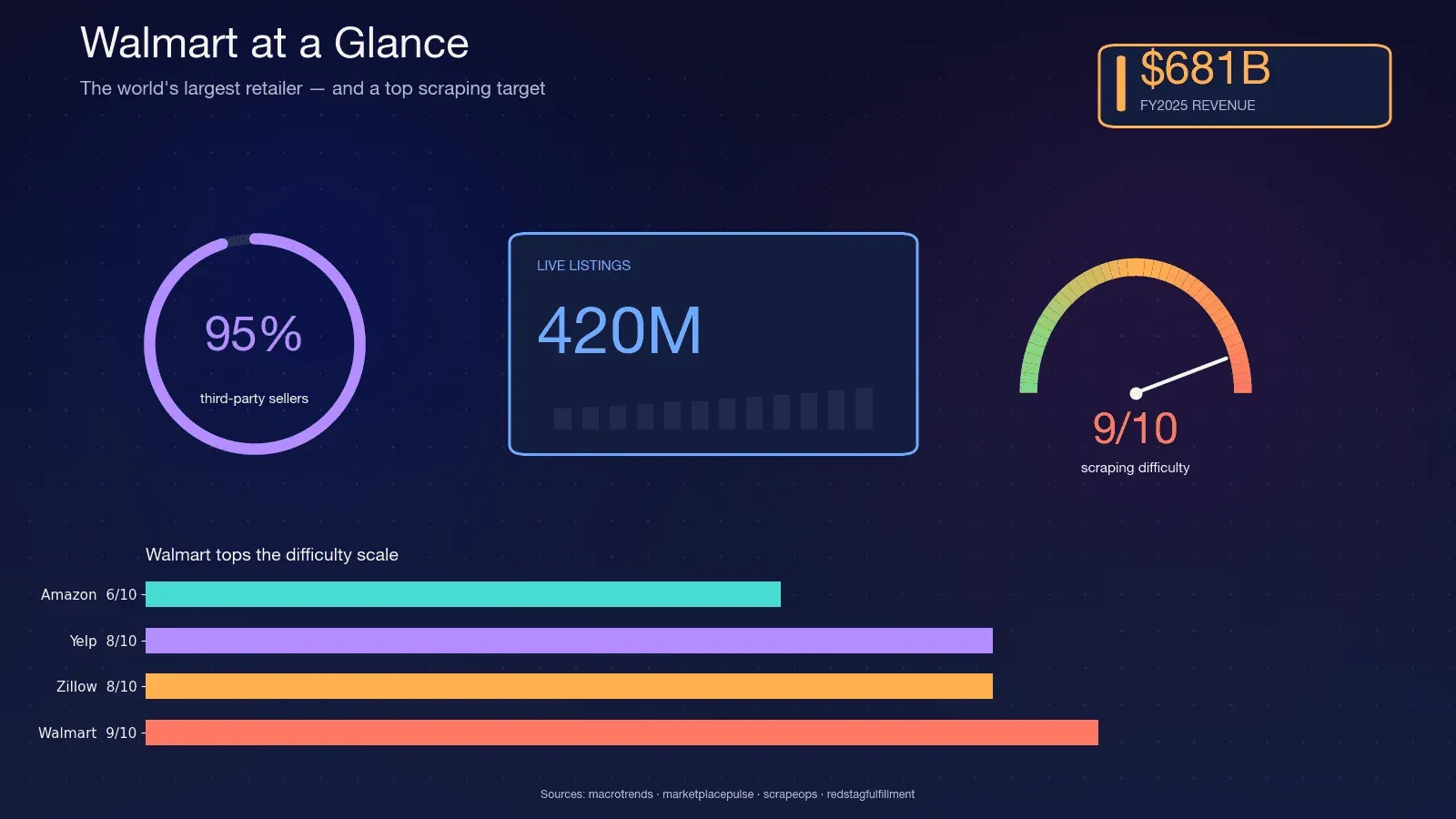
Walmart is the world's largest retailer by revenue — $680.985 billion in FY2025, holding the #1 spot on the Fortune Global 500 for 12 consecutive years. The site hosts roughly 420 million live listings, with Walmart's CFO citing "half a billion SKUs" on the marketplace. About 95% of those listings come from third-party sellers, which means the catalog is volatile — sellers churn, variants change, and stock flips daily.
That volatility is why scraping matters. A quarterly report can't capture what a nightly scrape can. Here are the most common use cases I see:
| Use Case | Who Needs It | What They Extract |
|---|---|---|
| Competitor price monitoring | E-commerce ops, repricing tools | Prices, promotions, MAP compliance |
| Product catalog enrichment | Sales & merchandising teams | Descriptions, images, specs, variants |
| Stock availability tracking | Supply chain, dropshippers | Inventory status, seller info |
| Market research & trend analysis | Marketing, product managers | Ratings, reviews, category assortment |
| Lead generation | Sales teams | Seller names, product counts, categories |
The competitor price monitoring software market alone hit $1.92 billion in 2025 and is forecast to reach $5.09 billion by 2033. Consumer behavior drives the spend: 94% of customers compare prices while shopping online, and 83% comparison shop across multiple sites.
Python is the default language for this work. Apify's 2026 Infrastructure Report pegs Python at 71.7% of all web scraping, and the core library (requests) pulls ~30 million downloads per week. If you're scraping at any scale, you're almost certainly doing it in Python.
Why Walmart Is One of the Hardest Sites to Scrape
Walmart is specifically hard because it runs two commercial anti-bot products in series: Akamai Bot Manager as the edge WAF and TLS fingerprinting layer, and PerimeterX (rebranded HUMAN Security) as the behavioral JavaScript challenge layer. Scrape.do calls this combination "rare and extremely difficult to bypass."
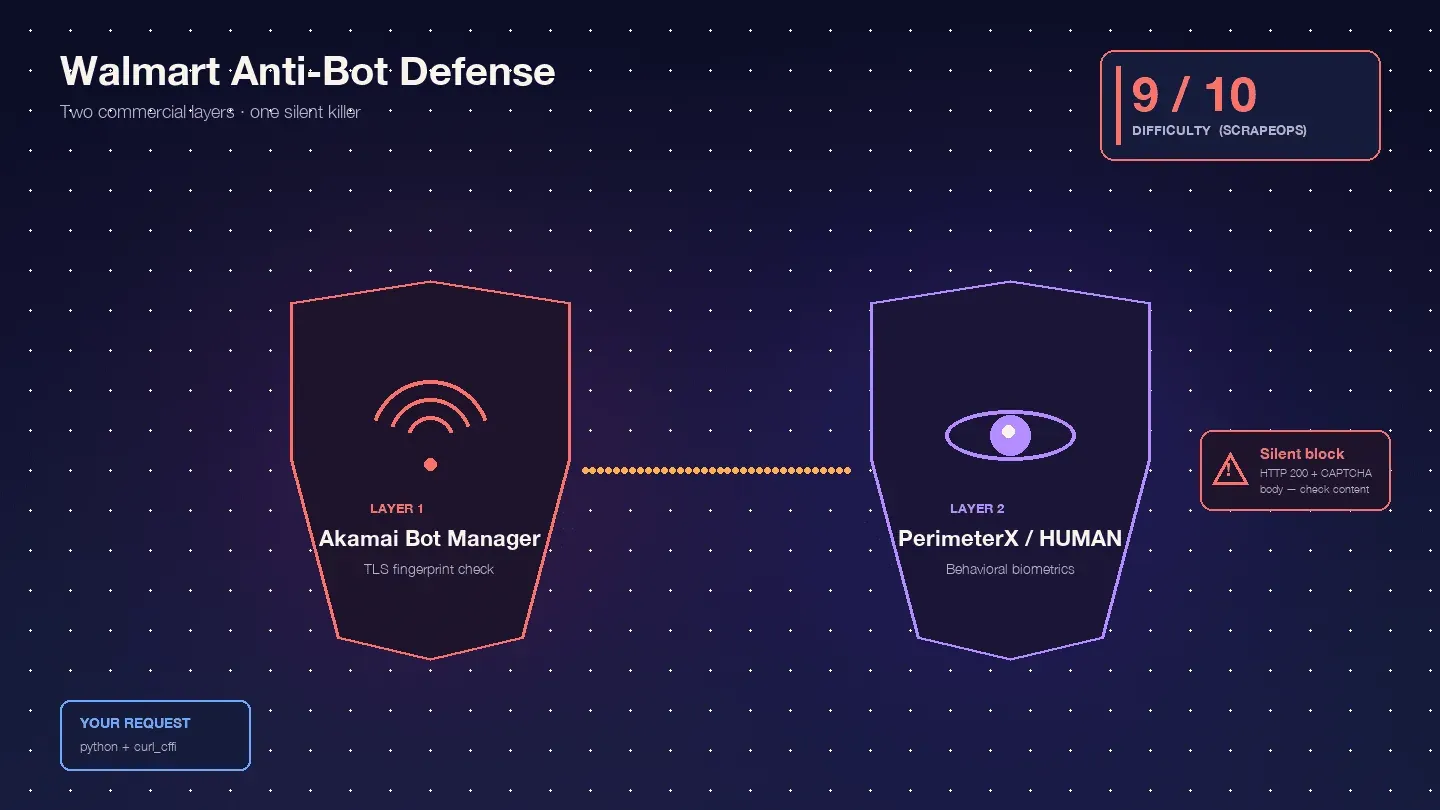
ScrapeOps rates Walmart 9/10 in overall scraping difficulty, with Akamai alone at 9/10. In my experience, that's about right.
Here's what you're actually up against:
Akamai Bot Manager inspects your TLS fingerprint (JA3/JA4 hash), HTTP/2 frame ordering, header order and casing, and session cookies (_abck, ak_bmsc). A stock Python requests call emits a TLS fingerprint that no real browser produces — Akamai flags it before your request even reaches Walmart's servers.
PerimeterX/HUMAN runs after Akamai, executing JavaScript fingerprinting (px.js) that checks navigator properties, canvas rendering, WebGL, audio context, and behavioral biometrics (mouse movement, scroll velocity, keystroke dynamics). The visible failure is the infamous "Press & Hold" challenge — a button you must hold for ~10 seconds while behavioral signals are sampled. Oxylabs is blunt: "Walmart uses the 'Press & Hold' model of CAPTCHA, offered by PerimeterX, which is known to be almost impossible to solve from your code."
The truly dangerous behavior is the silent block. Walmart returns HTTP 200 with a CAPTCHA body instead of a 403. ScrapingBee confirms: "Walmart returns a 200 OK status code even when it serves a CAPTCHA page. You can't rely on the status code alone to know if your request succeeded." Your script happily parses the CAPTCHA HTML as "product not found" and moves on. Half your dataset is garbage, and you don't know it.
Then there's the store-scoped data problem. Walmart prices and inventory are location-specific, controlled by cookies like locDataV3 and assortmentStoreId. Without the right cookies, you get "default national" data that may look complete but doesn't match what real shoppers see. Missing cookies don't produce a block page — they produce wrong data with no visible failure, which is worse.
Three Methods to Extract Data from Walmart (and How They Compare)
Before the step-by-step, here are the three primary extraction approaches. Most competitor tutorials only cover one or two. I'll walk through all three so you can pick the one that fits your situation.
| Method | Reliability | Data Completeness | Anti-Bot Difficulty | Maintenance Burden |
|---|---|---|---|---|
| HTML + BeautifulSoup | ⚠️ Low (selectors break per deploy) | Moderate | High | High |
__NEXT_DATA__ JSON | ✅ Good | High | Medium-High | Medium |
| Internal API interception | ✅ Best | Highest (variants, stock, reviews) | Medium-High | Low (structured JSON) |
| Thunderbit (no-code) | ✅ Good | High | Low (handled by AI) | None |
HTML parsing is the worst option for Walmart — the site ships Next.js bundles with hashed CSS class names that change on every deploy. The __NEXT_DATA__ JSON method is the pragmatic choice used by every serious 2024–2026 open-source Walmart scraper. Internal API interception is the most powerful but comes with caveats that most tutorials gloss over. And Thunderbit is the right call when you don't need a custom pipeline at all.
Try Thunderbit for Walmart scraping
Setting Up Your Python Environment to Scrape Walmart
Here's what you need:
- Difficulty: Intermediate
- Time Required: ~30 minutes for setup, plus coding time
- What You'll Need: Python 3.10+, pip, a code editor, and (for production use) a proxy service or scraping API
Create your project folder and virtual environment:
mkdir walmart-scraper && cd walmart-scraper
python -m venv venv
source venv/bin/activate  # On Windows: venv\Scripts\activate
Install the required libraries:
pip install curl_cffi parsel beautifulsoup4 lxml
curl_cffi is the 2025 standard for scraping hard targets. It's a libcurl binding that can impersonate exact browser TLS fingerprints. Bright Data explains: "Walmart uses TLS fingerprinting as part of its bot detection, and even setting the User-Agent to simulate a real browser won't bypass it." Plain requests or httpx cannot pass Akamai regardless of what headers you set. curl_cffi with impersonate="chrome124" is what makes the difference.
You'll also want json (built-in), csv (built-in), time, random, and logging for the production patterns we'll cover later.
Step-by-Step: Scrape Walmart Product Pages with Python
Step 1: Fetch the Walmart Product Page
Your first job is making an HTTP request that doesn't immediately get blocked. Here's the canonical header set used across Scrapfly, Scrapingdog, Oxylabs, and ScrapeOps in 2024–2026:
from curl_cffi import requests

HEADERS = {
    "User-Agent": (
        "Mozilla/5.0 (Windows NT 10.0; Win64; x64) "
        "AppleWebKit/537.36 (KHTML, like Gecko) "
        "Chrome/124.0.0.0 Safari/537.36"
    ),
    "Accept": (
        "text/html,application/xhtml+xml,application/xml;q=0.9,"
        "image/avif,image/webp,*/*;q=0.8"
    ),
    "Accept-Language": "en-US,en;q=0.9",
    "Accept-Encoding": "gzip, deflate, br",
    "Upgrade-Insecure-Requests": "1",
    "Sec-Fetch-Dest": "document",
    "Sec-Fetch-Mode": "navigate",
    "Sec-Fetch-Site": "none",
    "Sec-Fetch-User": "?1",
    "Referer": "https://www.google.com/",
}

session = requests.Session(impersonate="chrome124")
url = "https://www.walmart.com/ip/Apple-AirPods-Pro-2nd-Generation/1752657021"
response = session.get(url, headers=HEADERS)
The impersonate="chrome124" parameter is doing the heavy lifting here. It tells curl_cffi to match Chrome 124's exact TLS ClientHello, HTTP/2 frame ordering, and pseudo-header sequence. Without it, Akamai sees a Python-specific JA3 hash and blocks you before your request even reaches Walmart's application layer.
What a blocked response looks like: If you see "Robot or human?" in the response HTML title, or if the response redirects to walmart.com/blocked, you've been caught. The tricky part is that Walmart often returns a 200 status code with the CAPTCHA body — so checking response.ok alone is not enough.
For any production or repeated use, you'll need residential proxies. Datacenter IPs are burned instantly by Akamai's IP reputation system. I'll cover the full error handling and proxy strategy in the production section below.
Step 2: Parse Product Data from __NEXT_DATA__ JSON
Walmart.com is a Next.js application, and the server-rendered HTML embeds the full hydration payload inside a single script tag: <script id="__NEXT_DATA__" type="application/json">. This is the goldmine.
Scrapfly's 2026 guide confirms: "In 2026, Walmart uses Next.js with structured JSON in __NEXT_DATA__ script tags, making hidden data extraction more reliable than traditional CSS selector parsing." Every high-profile open-source Walmart scraper — Scrapfly's, Oxylabs', python-scrapy-playbook's — uses this method.
Here's how to extract it:
import json
from parsel import Selector

sel = Selector(text=response.text)
raw = sel.xpath('//script[@id="__NEXT_DATA__"]/text()').get()
data = json.loads(raw)
product = data["props"]["pageProps"]["initialData"]["data"]["product"]
idml = data["props"]["pageProps"]["initialData"]["data"].get("idml", {})
Most tutorials stop here. Below is a complete JSON path map for the fields you actually care about — verified against live Walmart pages in 2024–2026:
| Data Field | JSON Path (under initialData) | Type | Notes |
|---|---|---|---|
| Product Name | data > product > name | String | — |
| Brand | data > product > brand | String | — |
| Current Price (number) | data > product > priceInfo > currentPrice > price | Float | May differ by store cookie |
| Current Price (string) | data > product > priceInfo > currentPrice > priceString | String | Formatted e.g. "$9.99" |
| Short Description | data > product > shortDescription | HTML String | Parse with BeautifulSoup for text |
| Long Description | data > idml > longDescription | HTML String | Lives on idml, NOT inside product — this is the trap older tutorials get wrong |
| All Images | data > product > imageInfo > allImages | Array | List of {id, url} objects |
| Average Rating | data > product > averageRating | Float | Key is averageRating, not legacy rating |
| Review Count | data > product > numberOfReviews | Integer | — |
| Variants | data > product > variantCriteria | Array | Option groups (size, color) |
| Availability | data > product > availabilityStatus | String | IN_STOCK, OUT_OF_STOCK, LIMITED_STOCK |
| Seller | data > product > sellerDisplayName | String | — |
| Manufacturer | data > product > manufacturerName | String | — |
The longDescription path is the one trap that catches people. A 2023 ScrapeHero post placed it at product.longDescription, but 2024+ sources consistently put it on the sibling idml key. Always read idml.longDescription first and fall back to product.longDescription for older pages.
Here's the safe extraction pattern using .get() chains:
def extract_product(data):
    product = data["props"]["pageProps"]["initialData"]["data"]["product"]
    idml = data["props"]["pageProps"]["initialData"]["data"].get("idml", {})

    price_info = product.get("priceInfo", {})
    current_price = price_info.get("currentPrice", {})
    image_info = product.get("imageInfo", {})

    return {
        "name": product.get("name"),
        "brand": product.get("brand"),
        "price": current_price.get("price"),
        "price_string": current_price.get("priceString"),
        "short_desc": product.get("shortDescription"),
        "long_desc": idml.get("longDescription", product.get("longDescription")),
        "images": [img.get("url") for img in image_info.get("allImages", [])],
        "rating": product.get("averageRating"),
        "review_count": product.get("numberOfReviews"),
        "variants": product.get("variantCriteria"),
        "availability": product.get("availabilityStatus"),
        "seller": product.get("sellerDisplayName"),
        "manufacturer": product.get("manufacturerName"),
    }
For users who don't want to deal with JSON path navigation at all, Thunderbit's AI automatically identifies and structures these fields — no manual path mapping needed. You click "AI Suggest Fields," it reads the page, and you get a table. But if you're building a custom pipeline, the map above is your reference.
Step 3: Intercept Walmart's Internal API Endpoints for Richer Data
No competitor article covers this method properly. It's the most powerful extraction path — and the most complicated.
Walmart's front end calls a federated GraphQL backend built on Apollo Gateway. The endpoints live under www.walmart.com/orchestra/*:
/orchestra/pdp/graphql/...— product detail hydration + variant switches/orchestra/snb/graphql/...— search-n-browse pagination/orchestra/reviews/graphql/...— paginated reviews
These return clean, structured JSON with data that __NEXT_DATA__ sometimes truncates — variant-level pricing, real-time stock counts, full review pagination.
The catch that blog posts dance around: Walmart uses Apollo persisted queries. The request body sends only a SHA-256 hash (persistedQuery.sha256Hash), not the query text. If the hash is unknown to the server, you get PersistedQueryNotFound. Walmart rotates these hashes on deploys. This is why none of the high-profile open-source Walmart scrapers publish copy-pasteable /orchestra/ code.
The practical, honest version of this method is a DevTools exercise:
- Open a Walmart product page in Chrome
- Open DevTools → Network tab, filter by "Fetch/XHR"
- Browse the page normally — click on variants, scroll to reviews, change store location
- Watch for requests to
/orchestra/*endpoints that return JSON with product data - Right-click the request → "Copy as cURL"
- Convert the cURL command to Python using
curl_cffi
Here's what a replayed API call looks like:
import json
from curl_cffi import requests

session = requests.Session(impersonate="chrome124")

# First, warm the session by visiting the product page
session.get("https://www.walmart.com/ip/some-product/1234567", headers=HEADERS)

# Then replay the internal API call (copied from DevTools)
api_url = "https://www.walmart.com/orchestra/pdp/graphql"
api_headers = {
    **HEADERS,
    "accept": "application/json",
    "content-type": "application/json",
    "referer": "https://www.walmart.com/ip/some-product/1234567",
    "wm_qos.correlation_id": "your-copied-correlation-id",
}
payload = {
    # Paste the exact request body from DevTools
    "variables": {"productId": "1234567"},
    "extensions": {
        "persistedQuery": {
            "version": 1,
            "sha256Hash": "the-hash-you-copied"
        }
    }
}

api_response = session.post(api_url, headers=api_headers, json=payload)
api_data = api_response.json()
The session warming step is critical. Walmart's PerimeterX cookies (_px3, _pxhd, ACID) must be set by the initial HTML fetch before the API call will succeed. Without them, you'll get a 412 or 403.
When to use this method: When you need data that __NEXT_DATA__ doesn't include — deep variant pricing, paginated reviews beyond the first batch, or real-time inventory counts. For most use cases, __NEXT_DATA__ is sufficient and far simpler.
Scraping Walmart Search Results and Multiple Pages
Search results follow a similar __NEXT_DATA__ pattern, but with a different JSON path:
search_url = "https://www.walmart.com/search?q=laptops&page=1"
response = session.get(search_url, headers=HEADERS)

sel = Selector(text=response.text)
raw = sel.xpath('//script[@id="__NEXT_DATA__"]/text()').get()
data = json.loads(raw)

search_result = data["props"]["pageProps"]["initialData"]["searchResult"]
items = search_result["itemStacks"][0]["items"]

# Filter out sponsored products
organic_items = [i for i in items if i.get("__typename") == "Product"]

for item in organic_items:
    print(item.get("name"), item.get("priceInfo", {}).get("currentPrice", {}).get("price"))
Pagination works by incrementing the page parameter: &page=1, &page=2, etc. But here's the undocumented cap: Walmart limits search results to 25 pages regardless of the actual total count. Scrapfly confirms: "Walmart sets the maximum number of result pages that can be accessed to 25 regardless of the total number of pages available."
Workarounds for getting deeper coverage:
- Sort-order flipping: Run the same query with
&sort=price_lowand then&sort=price_highto get ~50 pages of coverage - Price-range slicing: Add
&min_price=X&max_price=Yto break the catalog into smaller windows - Category slicing: Search within specific categories rather than site-wide
Note that itemStacks is an array. Scrapfly hardcodes [0] in their repo, but category and browse pages sometimes contain multiple stacks ("Top picks," "More results"). The robust pattern iterates all stacks:
for stack in search_result.get("itemStacks", []):
    for item in stack.get("items", []):
        if item.get("__typename") == "Product":
            # process item
            pass
Also worth noting: Walmart's robots.txt disallows /search. Product detail pages (/ip/...) and most category pages (/cp/...) are not disallowed. If you're concerned about compliance, start with product pages and category trees rather than search.
Don't Let Silent Blocks Ruin Your Data: Production-Ready Error Handling
Most tutorials fall apart here. They show you how to fetch one page, parse one product, and call it a day. In production, you're fetching thousands of pages, and Walmart is actively trying to stop you. The difference between a demo scraper and a scraper that actually works is how it handles failure.
Detect Silent Blocks Before They Corrupt Your Data
The single most important function in a Walmart scraper is the block detector. Based on vendor consensus across ScrapingBee, Scrapingdog, Oxylabs, and Decodo, you need four independent checks:
BLOCK_MARKERS = (
    "Robot or human",
    "Press & Hold",
    "Press & Hold",
    "px-captcha",
    "perimeterx",
)

def is_walmart_blocked(response) -> bool:
    # 1. Redirect to the dedicated block endpoint
    if "/blocked" in str(response.url):
        return True
    # 2. Hard status codes
    if response.status_code in (403, 412, 428, 429, 503):
        return True
    # 3. 200 OK with CAPTCHA body (the silent-block case)
    body = response.text or ""
    if any(m.lower() in body.lower() for m in BLOCK_MARKERS):
        return True
    # 4. Response length sanity — real PDPs are 300-900 KB
    if len(response.content) < 50_000 and "/ip/" in str(response.url):
        return True
    return False
That fourth check — response length — catches the cases where Walmart returns a stripped-down page that doesn't contain any obvious CAPTCHA markers but also doesn't contain the product data you need.
Retry Logic with Exponential Backoff and Jitter
When a request fails, you don't want to hammer Walmart immediately. The standard pattern uses exponential backoff with jitter to desynchronize retries:
import time
import random
import logging
from curl_cffi import requests as cffi_requests

log = logging.getLogger("walmart")

def fetch_with_retry(session, url, max_retries=5, base_delay=2, max_delay=60):
    for attempt in range(max_retries):
        try:
            response = session.get(url, headers=HEADERS, timeout=15)

            if response.status_code in (429, 503):
                raise Exception(f"Throttled: {response.status_code}")

            if is_walmart_blocked(response):
                raise Exception("Silent block detected")

            return response

        except Exception as e:
            if attempt == max_retries - 1:
                raise

            wait = min(max_delay, base_delay * (2 ** attempt)) + random.uniform(0, 3)
            log.warning(f"Attempt {attempt + 1} failed: {e}. Retrying in {wait:.1f}s")
            time.sleep(wait)

    return None
The jitter (random.uniform(0, 3)) isn't cosmetic — it desynchronizes workers so that a fleet of scrapers doesn't retry-pulse into the same second and trip Akamai's velocity detectors.
Rate Limiting
Both Thunderbit and Scrape.do converge on a 3–6 second randomized delay per request for Walmart: "throttle your requests by waiting 3–6 seconds between page loads and randomize your delays."
import time
import random

def rate_limited_fetch(session, url):
    response = fetch_with_retry(session, url)
    time.sleep(random.uniform(3.0, 6.0))
    return response
At scale, consider using aiolimiter for async rate limiting:
from aiolimiter import AsyncLimiter
limiter = AsyncLimiter(max_rate=10, time_period=60)  # 10 requests per minute
Data Validation
Even when the response isn't blocked, the parsed data might be wrong (wrong store, degraded payload). Validate before writing to output:
def validate_product(product):
    """Returns True if the product data looks legitimate."""
    if not product.get("name"):
        return False

    price = (product.get("priceInfo") or {}).get("currentPrice", {}).get("price")
    if not isinstance(price, (int, float)) or price <= 0:
        return False

    if product.get("availabilityStatus") not in ("IN_STOCK", "OUT_OF_STOCK", "LIMITED_STOCK"):
        return False

    return True
Session Logging
Track your success rate per session. When it drops below 80% for 10 minutes, something has changed — either your IP is burned, your cookies expired, or Walmart deployed a new anti-bot rule.
class ScrapeMetrics:
    def __init__(self):
        self.total = 0
        self.success = 0
        self.blocks = 0
        self.errors = 0

    def record(self, result):
        self.total += 1
        if result == "success":
            self.success += 1
        elif result == "blocked":
            self.blocks += 1
        else:
            self.errors += 1

    @property
    def success_rate(self):
        return (self.success / self.total * 100) if self.total > 0 else 0

    def check_health(self):
        if self.total > 20 and self.success_rate < 80:
            log.critical(f"Success rate dropped to {self.success_rate:.1f}% — consider rotating proxies or pausing")
Not glamorous. But it's what keeps your data clean.
DIY Python vs. Scraping API vs. No-Code: Choosing the Right Approach to Scrape Walmart
A lot of developers jump straight into writing a custom scraper without asking whether that's the right call. ScrapeOps rates Walmart 9/10 in difficulty. Forum users describe it as "basically 9/10" and wonder "if a dedicated web scraping API would be overkill." The answer depends on volume, budget, and engineering capacity.
| Factor | DIY Python (requests + proxies) | Scraping API (Oxylabs, Bright Data, etc.) | No-Code Tool (Thunderbit) |
|---|---|---|---|
| Setup time to first row | Hours | 15–60 min | ~2 min |
| Setup time to production | 40–80 hrs | 4–16 hrs | ~30 min |
| Anti-bot handling | You manage (hard) | Handled by provider | Handled automatically |
| Cost at small scale (<1K pages/mo) | Low (proxy costs ~$4–8/GB) | $40–$49/mo entry tiers | Free–$15/mo |
| Cost at scale (100K+ pages/mo) | Lower per-request | Higher per-request | Varies |
| Customization | Full control | API parameters | Limited by UI/fields |
| Ongoing maintenance | 4–8 hrs/month | Near-zero | None (AI adapts) |
| Best for | Developers building custom pipelines | Mid-scale production scraping | Business users, quick one-off extractions |
When DIY Python Makes Sense
DIY wins when you already own a proxy contract, need strict control over headers, zipcode targeting, or seller cohorts, you're indexing millions of pages per month where per-record API fees compound, or you need on-prem or compliance guarantees. The trade-off is real engineering time: a production-ready Scrapy spider with pagination, retries, proxy rotation, TLS impersonation, and multiple page-type schemas takes 40–80 hours of senior Python work, plus 4–8 hours per month of maintenance as Walmart rotates fingerprints.
When a Scraping API Saves You Time
Scraping APIs handle the anti-bot layer so you don't have to. ScrapeOps benchmarks show success rates of 99% for Zyte API and 98% for Scrape.do on Walmart. Entry-tier pricing runs $40–$49/month for tools like ScraperAPI, Oxylabs, and Scrapingdog. If you're a team of 2–5 engineers and your scraping volume is 10K–1M pages per month, an API is almost always the right call. You trade per-request cost for zero maintenance.
When No-Code Is the Right Call
Thunderbit fits a different profile entirely. If you're a PM, analyst, or e-commerce operator who needs Walmart product data in a spreadsheet this afternoon — not next sprint — a no-code tool is the honest answer.
The workflow: install the Thunderbit Chrome Extension, navigate to a Walmart product or search page, click "AI Suggest Fields," and Thunderbit's AI reads the page and suggests columns (product name, price, rating, etc.). Click "Scrape," and the data populates a table. Export to Excel, Google Sheets, Airtable, or Notion — all free, no paywall.
Thunderbit handles anti-bot in the cloud, so you don't deal with CAPTCHAs, proxies, or TLS fingerprinting. The AI adapts to layout changes automatically, so there's no maintenance. For users who don't want to deal with JSON path navigation at all, this is the path of least resistance.
Honest limitations: Thunderbit isn't built for 100K+ pages per day. Credit budgets and cloud caps make high-volume ingest uneconomical versus raw APIs. You also can't pin a specific zipcode or ASN unless the tool supports it. For ongoing, high-volume pipelines, DIY or a scraping API is still the way to go.
Back-of-envelope pricing: 1,000 Walmart product rows on Thunderbit costs roughly 2,000 credits (~$0.60–$1.10 on Starter/Pro plans). That's comparable to Oxylabs' Walmart API and cheaper than most hobby-tier scraping APIs at low volume. Check Thunderbit's pricing for current details.
Scrape Walmart product data with AI Get Started Free
Exporting Your Scraped Walmart Data
Once you have the data, you need it somewhere useful. Three formats cover most needs:
CSV — the lowest-common-denominator format that analysts actually open:
import csv

def export_csv(products, filename="walmart_products.csv"):
    fieldnames = ["name", "price", "availability", "rating", "review_count", "seller", "url"]
    with open(filename, "w", newline="", encoding="utf-8-sig") as f:
        writer = csv.DictWriter(f, fieldnames=fieldnames, quoting=csv.QUOTE_MINIMAL)
        writer.writeheader()
        for p in products:
            writer.writerow({k: p.get(k) for k in fieldnames})
Use utf-8-sig encoding for Excel compatibility. The BOM marker prevents Excel from mangling special characters.
JSONL — the production format for scraping pipelines:
import json
import gzip

def export_jsonl(products, filename="walmart_products.jsonl.gz"):
    with gzip.open(filename, "at", encoding="utf-8") as f:
        for p in products:
            f.write(json.dumps(p, ensure_ascii=False) + "\n")
JSONL is crash-safe (an interrupted write loses only the last line), streamable with constant memory, and keeps nested data like variants and reviews intact.
Excel — for one-shot analyst hand-offs:
from openpyxl import Workbook

def export_excel(products, filename="walmart_products.xlsx"):
    wb = Workbook(write_only=True)
    ws = wb.create_sheet("Products")
    ws.append(["Name", "Price", "Availability", "Rating", "Reviews", "Seller"])
    for p in products:
        ws.append([p.get("name"), p.get("price"), p.get("availability"),
                    p.get("rating"), p.get("review_count"), p.get("seller")])
    wb.save(filename)
Thunderbit covers the export story for non-Python users: one-click export to Google Sheets, Airtable, Notion, Excel, CSV, and JSON — all free on the base tier. For ongoing monitoring, Thunderbit's scheduled scraper feature can run recurring extractions automatically.
One caveat on scheduling: don't use GitHub Actions for Walmart scraping. GitHub Actions runners sit on Azure IP ranges that Walmart's anti-bot blocks instantly. Use APScheduler on a VPS, or route all traffic through residential proxies.
Legal and Ethical Guidelines for Scraping Walmart
Forum users explicitly voice this concern: "I'm fine with playing cat and mouse with developers, but wary of playing with their legal team."
Walmart's Terms of Use explicitly prohibit using "any robot, spider… or other manual or automatic device to retrieve, index, 'scrape,' 'data mine' or otherwise gather any Materials" without "express prior written consent."
Walmart's robots.txt disallows /search, /account, /api/, and dozens of internal endpoints. Product detail pages (/ip/...) and reviews (/reviews/product/) are not disallowed.
The hiQ v. LinkedIn precedent (9th Circuit, 2022) established that scraping publicly available data is unlikely to violate the federal CFAA. But the same court later ruled that hiQ breached LinkedIn's User Agreement and entered a $500,000 consent judgment against it. More recent 2024 decisions (Meta v. Bright Data, X Corp. v. Bright Data) further narrowed CFAA and created copyright-preemption defenses, but those rulings turned on specific ToU language that doesn't map cleanly onto Walmart.
Practical guidelines: Don't overload servers. Respect rate limits. Don't scrape personal or user data. Use data responsibly. Scraping public Walmart product pages at a modest rate for personal research is a very different risk profile from scraping at commercial scale against Walmart's Terms. If you're building a product on Walmart data, talk to a lawyer and look into Walmart's official affiliate and seller APIs.
Disclaimer: This is educational information, not legal advice.
Conclusion and Key Takeaways
Scraping Walmart with Python is a 9/10 difficulty challenge thanks to its dual Akamai + PerimeterX anti-bot stack. Not impossible — but you need the right tools and patterns.
Key takeaways:
__NEXT_DATA__JSON extraction is the pragmatic choice for most use cases. It's what every serious 2024–2026 open-source Walmart scraper uses. The base path isprops.pageProps.initialData.data.productfor PDPs andsearchResult.itemStacksfor search/browse.curl_cffiwithimpersonate="chrome124"is mandatory. Plainrequestsorhttpxcannot pass Akamai's TLS fingerprinting regardless of headers.- Silent blocks are the real danger. Walmart returns 200 OK with CAPTCHA bodies. Check response content, not just status codes.
- Production scrapers need more than happy-path code. Exponential backoff with jitter, block detection on four signals, rate limiting at 3–6 seconds per request, data validation, and session health monitoring are all essential.
- Internal API interception via
/orchestra/*is powerful but fragile. Use it as a DevTools exercise for specific data needs, not as your primary extraction method. - Walmart caps search results at 25 pages. Go wider with sort-order flipping and price-range slicing.
- Choose your approach honestly: DIY Python for developers with custom needs and high volume. Scraping APIs for mid-scale teams without a scraping engineer. Thunderbit for business users who want data in Google Sheets this afternoon.
If you want to try the no-code route, the Thunderbit Chrome Extension has a free tier — you can scrape a handful of Walmart pages and see the results for yourself. If you're going the Python route, the code patterns in this article are production-tested. Either way, you now have a map of Walmart's defenses and three paths through them.
For more on web scraping techniques, check out our guides on how to web scrape with Python, best automated web scraping tools, and web scraping without getting blocked. You can also watch tutorials on the Thunderbit YouTube Channel.
FAQs
Is it legal to scrape Walmart product data?
Walmart's Terms of Use prohibit automated scraping without written consent. The 9th Circuit's hiQ v. LinkedIn ruling (2022) established that the federal CFAA is unlikely to apply to scraping public pages, but the same case ended with a $500,000 breach-of-contract judgment against the scraper. Scraping public product pages at modest rates for personal research carries a very different risk profile than commercial-scale extraction. Consult a lawyer if you're building a business on Walmart data.
Why does my Walmart scraper keep getting blocked?
The most common causes are: using plain requests or httpx (which emit a Python-specific TLS fingerprint that Akamai flags instantly), missing or incorrect headers, no proxy rotation, request rates faster than 3–6 seconds per page, and missing session cookies (_px3, _abck, locDataV3). Switch to curl_cffi with impersonate="chrome124", use residential proxies, and implement the block detection and retry patterns described in this article.
What data can I scrape from Walmart with Python?
Product names, prices (current and rollback), images, short and long descriptions, ratings, review counts, stock availability status, seller names, manufacturer info, variant options (size, color), and category placement. Using the __NEXT_DATA__ method, all of these are available as structured JSON. Internal API interception can additionally return variant-level pricing, real-time inventory counts, and paginated review data.
Do I need proxies to scrape Walmart?
Yes, for any production or repeated use. Walmart's anti-bot systems block plain requests consistently — even with perfect headers, a non-residential IP will be flagged by Akamai's IP reputation system. Residential or mobile proxies are required. Datacenter IPs are burned almost immediately. Budget roughly $3–$17 per 1,000 pages depending on your proxy provider and tier.
Can I scrape Walmart without writing code?
Yes. Thunderbit is an AI-powered Chrome extension that scrapes Walmart in two clicks: "AI Suggest Fields" to auto-detect product data columns, then "Scrape" to extract the data. It handles anti-bot challenges in the cloud and exports directly to Excel, Google Sheets, Airtable, or Notion — all free. It's best suited for analysts, PMs, and business users who need data quickly without building a custom pipeline. For high-volume or highly customized scraping, Python or a scraping API is still the better fit.
Try Thunderbit for AI Walmart scraping Get Started Free
Learn More




