
Redfin updates 70% of new US MLS listings within five minutes of them hitting the wire. That kind of freshness is catnip for anyone building a real estate data pipeline — and it's exactly why so many scrapers target Redfin and get blocked within minutes.
I've spent years working on data extraction tools at Thunderbit, and I can tell you: the gap between "scrape Redfin" and "scrape Redfin without getting blocked" is where most tutorials fall apart. They show you the BeautifulSoup code, skip the part where Cloudflare eats your requests alive, and leave you staring at a 403 page wondering what went wrong. This guide is different. I'll walk you through three real approaches — HTML parsing, Redfin's hidden API, and a no-code path with Thunderbit — and spend serious time on the anti-bot defenses that actually matter. By the end, you'll know exactly which method fits your skill level, your scale, and your tolerance for maintenance headaches.
Try Thunderbit for Redfin scraping
What Is Redfin, and Why Does Its Data Matter?
Redfin is a technology-powered real estate brokerage with salaried agents who pull listings directly from MLS feeds. It covers 100+ US and Canadian metros across 42 states and serves nearly 50 million monthly visitors. Unlike aggregator-only portals, Redfin's data is agent-verified, and its proprietary Redfin Estimate AVM covers 95+ million properties with a median error of just 1.96% for on-market homes.
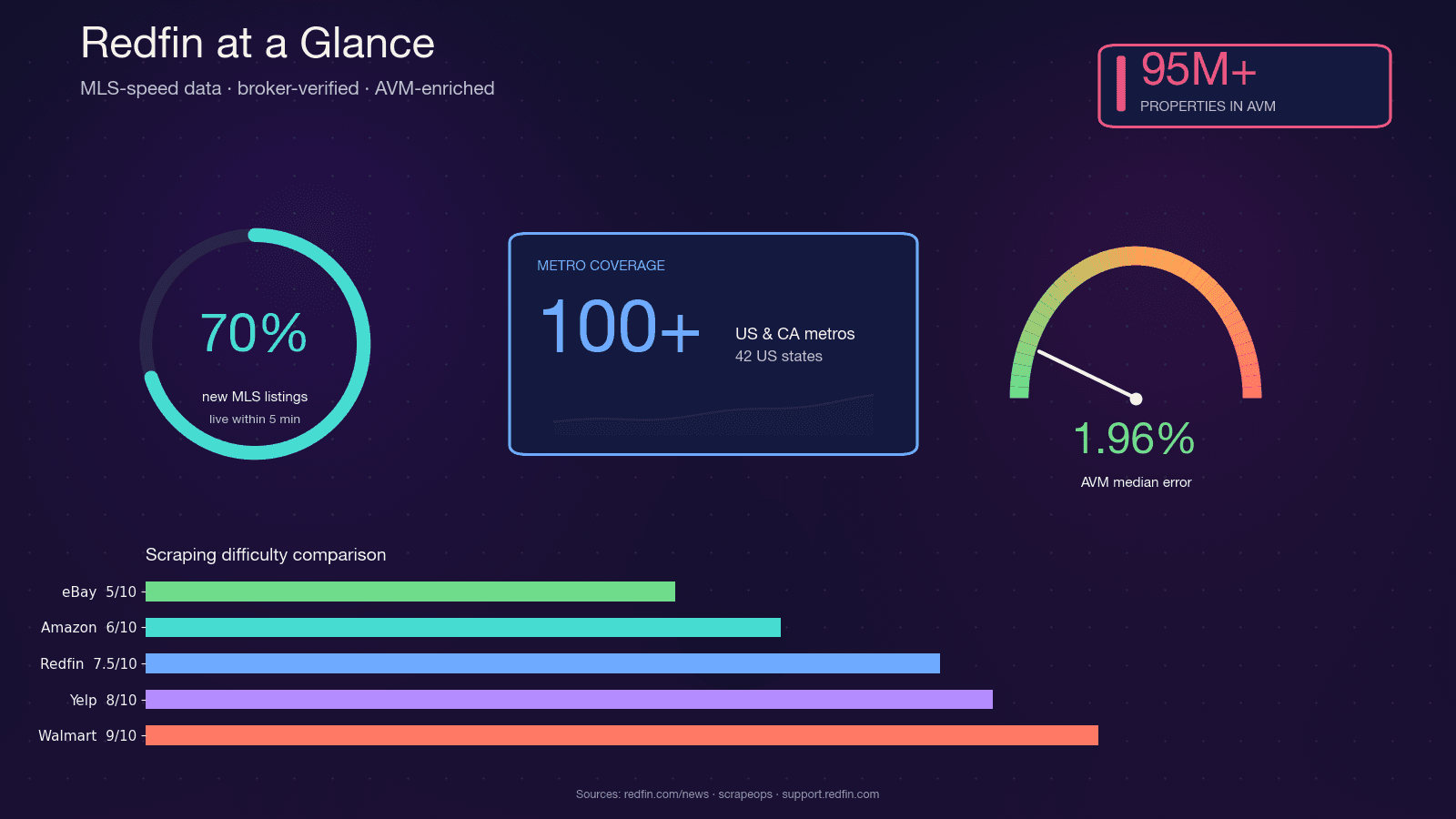
That combination — MLS-speed freshness, broker-verified quality, and a tight AVM — is why real estate investors, agents, proptech startups, and data analysts all want programmatic access to Redfin data. Python is the natural choice for the job: its scraping ecosystem (requests, BeautifulSoup, Selenium, Playwright) is mature, the community support is enormous, and it plugs directly into pandas and Jupyter for analysis.
Why Scrape Redfin with Python?
The use cases are as varied as the people who need the data. Here's how different audiences typically use scraped Redfin data:
| Audience | Primary Scraping Goal | Example Use Case |
|---|---|---|
| Real estate agents | Lead generation, market intel | New listings and expired listings in service area; agent directory for competitive benchmarking |
| Real estate investors | Deal flow, cap-rate analysis | Rental yield screens, undervalued property detection, daily new-listing alerts |
| Proptech startups | Product data pipelines | AVM training data, market dashboards, iBuyer acquisition engines |
| Data analysts | Market research, BI | ZIP-level median price trends, days-on-market time series, sale-to-list ratios |
| Wholesalers / flippers | Distressed property tracking | Price-cut detection, foreclosures, off-market comps |
The broader trend backs this up: over 72% of real estate firms now use predictive analytics to identify opportunities and manage risk. The PropTech market is projected to hit $47 billion in 2025 at a 16.4% CAGR. Structured real estate data isn't a nice-to-have anymore — it's table stakes.
Every Redfin Data Field You Can Scrape (Complete Reference)
Before writing a single line of code, you need to know what's actually available. I've audited Redfin's search results pages, property detail pages, and agent profiles — and cross-referenced with open-source Stingray API wrappers like the reteps/redfin and RedfinPlus projects. The total count comes to 117 distinct fields across page types.
This table is designed to be bookmarked. Knowing your data schema before you code saves hours of trial-and-error selector hunting.
Search Results Page Fields
These are the lightweight fields available on listing cards — often extractable without full JS rendering:
| Field | Data Type | Notes |
|---|---|---|
| Property ID | Number | Redfin internal int, parsed from /home/{id} in href |
| List price | Number | |
| Full address | Text | |
| Beds / Baths / SqFt | Number | Three values in sequence |
| Property type | Single Select | SFH, Condo, Townhouse, Multi |
| Status | Text | Active, Pending, Contingent |
| Days on market | Number | |
| Price cut indicator | Number | Delta from original list |
| Primary photo | Image URL | One photo per card |
| Hot Home badge | Boolean | |
| Open house date/time | Text | |
| Brokerage attribution | Text |
Property Detail Page Fields
The detail page is where the real depth lives. Many of these fields require JavaScript rendering or the Stingray API:
| Field | Data Type | Notes |
|---|---|---|
| Redfin Estimate (on-market) | Number | Via /stingray/api/home/details/avm |
| Redfin Estimate (off-market) | Number | Via /stingray/api/home/details/owner-estimate; 7.52% median error |
| Year built / renovated | Number | |
| Lot size | Number | |
| HOA dues | Number | Monthly, if applicable |
| Property tax (annual) | Number | |
| Tax assessed value | Number | |
| Sale history table | Table | Price, date, event type |
| Property description | Text | Marketing paragraph |
| Photo URLs (carousel) | Image URLs | 20+ per listing |
| Listing agent name, phone, email | Text / Phone / Email | Phone often masked |
| School ratings (elementary/middle/high) | Number | Plus district name |
| Walk / Transit / Bike Score | Number | |
| Climate risk scores | Number | Flood, fire, heat, wind |
| Similar active / sold / nearby homes | URLs | Carousel data |
| Parking, garage, heating, cooling | Text | Amenity groups |
Agent Profile Fields
| Field | Data Type | Notes |
|---|---|---|
| Agent name, photo, brokerage, bio | Text / Image | |
| Phone, contact form | Phone / Text | Click-to-reveal |
| Active listings count | Number | |
| Sales last 12 months / total volume | Number | |
| Avg list-to-sale ratio | Number | |
| Star rating / review count | Number | |
| Years of experience / license # | Text / Number |
When you use Thunderbit's AI Suggest Fields feature on a Redfin page, it auto-detects most of these columns and assigns the correct data types — no manual CSS selector mapping required. More on that later.
Redfin's Anti-Bot Defenses Decoded (Not Just "Use a Proxy")
This is where I want to plant a flag, because most tutorials hand-wave past the blocking problem and jump to "buy proxies from our sponsor." That's not helpful. If you don't understand what Redfin does to detect scrapers, you'll burn through proxy credits and still get blocked. ScrapeOps rates Redfin's anti-bot difficulty at 7.5 out of 10, and Scraperly classifies it as medium (3/5) — "less aggressive than Zillow's enterprise WAF, relying on custom rate limiting and JavaScript challenges."
Redfin runs a layered stack: Cloudflare at the edge (JS challenge, Turnstile, TLS/JA3 fingerprinting) plus a Redfin-specific application-layer rate limiter. There's no Crawl-delay directive in their robots.txt because enforcement happens at the WAF level.
Why Simple requests + BeautifulSoup Fails on Redfin
If you fire off a basic requests.get() to a Redfin property page with default headers, here's what typically happens:
- HTTP 403 — Cloudflare's JS challenge wasn't solved, so you get the challenge page instead of the listing.
- An interstitial challenge page — HTML body contains Cloudflare's Turnstile widget, not property data.
- HTTP 200 with partial HTML — You get a shell with a large embedded JSON blob under
root.__reactServerState.InitialContext, but no pre-rendered search cards, no price history, no school ratings.
Redfin uses its own React SSR framework (not Next.js), and the hydration key is Redfin-specific — root.__reactServerState.InitialContext with listing data nested under ReactServerAgent.cache.dataCache. This is not __NEXT_DATA__ or window.__INITIAL_STATE__.
The single most common cause of silent 403s? Missing Sec-Fetch-* headers. Redfin/Cloudflare explicitly validates Sec-Fetch-Site, Sec-Fetch-Mode, Sec-Fetch-Dest, and Sec-Fetch-User. If they're absent, you're flagged immediately.
The Mitigation Playbook: Delays, Headers, Proxies, and Sessions
Here's the full defense-by-defense breakdown, with specific mitigations for each:
| Redfin Defense | What It Does | Detection Signal | Mitigation Strategy |
|---|---|---|---|
| Cloudflare JS challenge | Interstitial that issues cf_clearance cookie | 403 + Cloudflare HTML body | curl_cffi with impersonate="chrome120"; warm session via homepage; US residential proxy |
| Cloudflare Turnstile | Interactive CAPTCHA on high-risk sessions | 403 + Turnstile widget | Headless browser with stealth + residential proxy |
| Cloudflare Error 1020 (ASN ban) | Blocks flagged IPs/ASNs at WAF | 403 body "Error 1020 Access Denied" | Rotate to residential/mobile proxy; never use datacenter ASNs |
| TLS/JA3 fingerprinting | Detects non-browser TLS stacks | Silent 403 even with perfect headers | curl_cffi impersonation or real browser |
| HTTP/2 fingerprinting | Checks HTTP/2 SETTINGS, HPACK order | Silent block | curl_cffi speaks HTTP/2 like Chrome |
| Header validation (UA, Sec-Fetch-*) | Browser-consistent header set | 403 on first request | Full Chrome header set including Sec-Fetch-Site/Mode/Dest/User, realistic Referer |
| Cookie/session continuity | Tracks cf_clearance, RF_BROWSER_ID | Challenges on cold deep-URL hits | Persistent Session; warm on homepage first |
| App-layer rate limit | Per-IP request limiter | 429 | 2–5s delay with jitter; exponential backoff |
| Datacenter IP reputation | Blocks known DC ASNs | Immediate 1020/403 | US residential or mobile proxies only |
| Concurrency detection | Multiple parallel requests from one IP | Sudden Turnstile escalation | ≤2 concurrent per IP |
Practical thresholds from community testing:
- Safe cadence: 1 request per 2–3 seconds per IP
- Sustained >20–30 req/min from a single datacenter IP triggers a challenge within minutes
- Soft rate-limits lift in 5–15 minutes if traffic stops
- Datacenter IP bans (AWS, GCP, Azure, OVH) can persist hours to days
Stock Python requests (urllib3 + OpenSSL) produces a JA3 fingerprint that doesn't match any browser — and gets blocked silently even with perfect headers. The industry fix is curl_cffi with impersonate="chrome120", which speaks Chrome-accurate TLS + HTTP/2.
Three Ways to Scrape Redfin with Python (and Which to Pick)
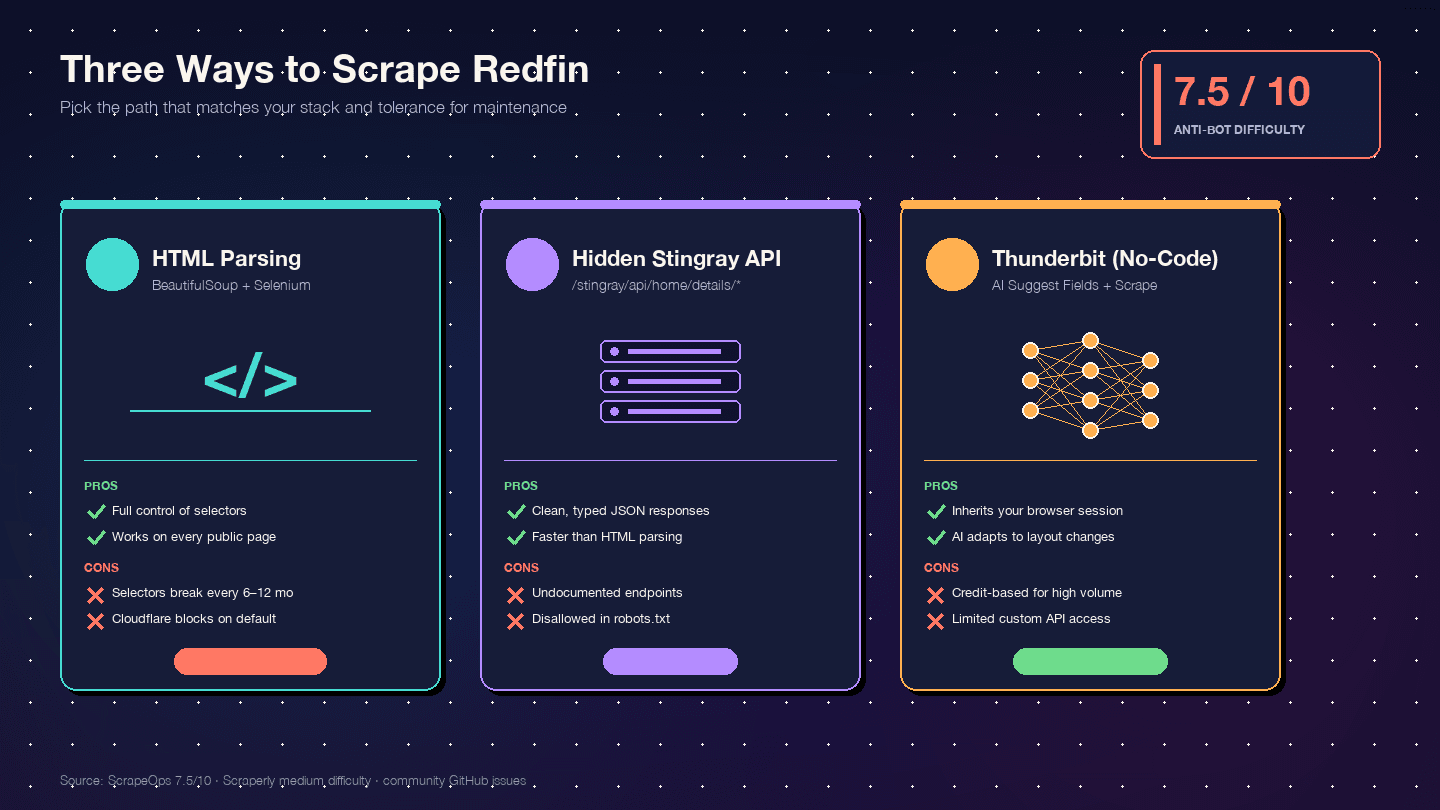
I haven't found a single competing tutorial that compares all three approaches side by side. Here's the decision matrix:
| Criteria | HTML Parsing (BS4 + Selenium) | Stingray Hidden API | Thunderbit (No-Code) |
|---|---|---|---|
| Setup difficulty | Medium (Python env + browser driver) | High (reverse-engineering endpoints) | Low (Chrome extension install) |
| Anti-bot risk | High (DOM requests are most visible) | Medium (API-like requests look cleaner) | Lowest (uses your real browser session) |
| Data structure quality | Medium (unstructured HTML → manual parsing) | Excellent (pre-structured JSON) | High (AI auto-detects fields + types) |
| Maintenance burden | High — one layout change breaks selectors | Medium — endpoints can change without notice | Lowest — AI adapts to layout changes |
| Scale | Low–medium (hundreds with proxies) | Medium–high (thousands, cleaner requests) | Medium (50 pages/batch via cloud scraping) |
| Best for | Developers wanting full control | Developers needing clean JSON | Non-devs, quick projects, ongoing data without dev resources |
The maintenance angle is worth emphasizing. Redfin has shipped two card DOM generations — legacy (homecardV2Price) and current (span.bp-Homecard__Price--value). Community GitHub issue history shows CSS-selector breakage roughly every 6–12 months. When that happens, a BeautifulSoup scraper breaks overnight. An AI-based field detector adapts.
Before You Start
- Difficulty: Intermediate (Approaches 1 & 2), Beginner (Approach 3)
- Time Required: ~30 minutes for Approach 1 or 2; ~5 minutes for Approach 3
- What You'll Need:
- Python 3.8+ with pip (Approaches 1 & 2)
- Chrome browser (all approaches)
- Thunderbit Chrome Extension (Approach 3)
- US residential proxies for large-scale scraping (Approaches 1 & 2)
Scrape Redfin data with AI Get Started Free
Approach 1: Scrape Redfin with Python Using HTML Parsing (BeautifulSoup + Selenium)
This is the "full control" path. You write the selectors, you manage the browser, you handle the errors.
It's the most educational approach. It's also the most fragile.
Step 1: Set Up Your Python Environment
Create a virtual environment and install the required libraries:
python -m venv redfin-scraper
source redfin-scraper/bin/activate  # On Windows: redfin-scraper\Scripts\activate
pip install requests beautifulsoup4 selenium webdriver-manager pandas curl_cffi
curl_cffi is essential here — it's what lets your HTTP requests impersonate a real Chrome TLS fingerprint instead of the stock Python requests fingerprint that Cloudflare blocks on sight.
Step 2: Configure Browser Headers and Session
This is where most beginners fail. You need the full Chrome header set, including the Sec-Fetch-* headers that Redfin/Cloudflare explicitly validates:
from curl_cffi import requests as curl_requests

HEADERS = {
    "User-Agent": "Mozilla/5.0 (Macintosh; Intel Mac OS X 10_15_7) "
                  "AppleWebKit/537.36 (KHTML, like Gecko) "
                  "Chrome/120.0.0.0 Safari/537.36",
    "Accept": "text/html,application/xhtml+xml,application/xml;q=0.9,*/*;q=0.8",
    "Accept-Language": "en-US,en;q=0.9",
    "Accept-Encoding": "gzip, deflate, br",
    "Sec-Fetch-Site": "none",
    "Sec-Fetch-Mode": "navigate",
    "Sec-Fetch-Dest": "document",
    "Sec-Fetch-User": "?1",
}

session = curl_requests.Session(impersonate="chrome120")
session.headers.update(HEADERS)

# Warm the session — collect cf_clearance and RF_BROWSER_ID cookies
session.get("https://www.redfin.com/")
The session warming step is critical — hitting a deep property URL cold (no prior cookies, no Referer) gets scored down by Cloudflare.
Always start with the homepage.
Step 3: Scrape Redfin Search Results
With your session warmed, you can fetch a city search page and parse the listing cards. Current-generation selectors (2024–2026):
import time
import random
from bs4 import BeautifulSoup

base_url = "https://www.redfin.com/city/17151/CA/San-Francisco"
listings = []

for page_num in range(1, 6):  # Pages 1-5
    url = f"{base_url}/page-{page_num}" if page_num > 1 else base_url
    resp = session.get(url)

    if resp.status_code != 200:
        print(f"Blocked on page {page_num}: HTTP {resp.status_code}")
        break

    soup = BeautifulSoup(resp.text, "html.parser")
    cards = soup.select("[data-rf-test-id='property-card'], a.bp-Homecard")

    for card in cards:
        price_el = card.select_one("span.bp-Homecard__Price--value")
        addr_el = card.select_one("a.bp-Homecard__Address")
        stats = card.select("span.bp-Homecard__LockedStat--value")

        listing = {
            "price": price_el.text.strip() if price_el else None,
            "address": addr_el.text.strip() if addr_el else None,
            "beds": stats[0].text.strip() if len(stats) > 0 else None,
            "baths": stats[1].text.strip() if len(stats) > 1 else None,
            "sqft": stats[2].text.strip() if len(stats) > 2 else None,
            "url": "https://www.redfin.com" + addr_el["href"] if addr_el else None,
        }
        listings.append(listing)

    # Random delay between 2-5 seconds
    time.sleep(random.uniform(2, 5))

print(f"Scraped {len(listings)} listings")
You should see a growing list of dictionaries, each containing a San Francisco listing's price, address, beds/baths/sqft, and detail URL. If you get 0 cards, check the HTTP status code — a 403 means Cloudflare caught you, and you likely need residential proxies.
Step 4: Scrape Individual Property Detail Pages
Search results give you the basics. Detail pages give you the Redfin Estimate, year built, HOA, sale history, agent info, and photos. These pages require JavaScript rendering, so switch to Selenium:
from selenium import webdriver
from selenium.webdriver.chrome.service import Service
from webdriver_manager.chrome import ChromeDriverManager
from selenium.webdriver.common.by import By
import time

options = webdriver.ChromeOptions()
options.add_argument("--headless=new")
options.add_argument("--disable-blink-features=AutomationControlled")
options.add_argument("user-agent=Mozilla/5.0 (Macintosh; Intel Mac OS X 10_15_7) "
                     "AppleWebKit/537.36 (KHTML, like Gecko) Chrome/120.0.0.0 Safari/537.36")

driver = webdriver.Chrome(service=Service(ChromeDriverManager().install()), options=options)

for listing in listings[:10]:  # Enrich first 10
    driver.get(listing["url"])
    time.sleep(random.uniform(3, 6))  # Wait for JS rendering

    try:
        estimate_el = driver.find_element(By.CSS_SELECTOR, "[data-rf-test-name='avmLdpPrice']")
        listing["redfin_estimate"] = estimate_el.text.strip()
    except:
        listing["redfin_estimate"] = None

    try:
        year_built = driver.find_element(By.XPATH, "//span[contains(text(),'Year Built')]/following-sibling::span")
        listing["year_built"] = year_built.text.strip()
    except:
        listing["year_built"] = None

driver.quit()
After this step, your first 10 listings should be enriched with Redfin Estimate values and year-built data. The XPath selectors are more resilient than CSS for these nested amenity fields, but they're still fragile — any DOM restructuring will break them.
Step 5: Handle Blocks and Errors
Implement retry logic with exponential backoff:
import time

def fetch_with_retry(session, url, max_retries=3):
    for attempt in range(max_retries):
        resp = session.get(url)
        if resp.status_code == 200:
            return resp
        elif resp.status_code in (403, 429, 503):
            wait = (2 ** attempt) + random.uniform(1, 3)
            print(f"Blocked ({resp.status_code}). Retrying in {wait:.1f}s...")
            time.sleep(wait)
        else:
            print(f"Unexpected status: {resp.status_code}")
            break
    return None
Signs you've been blocked: HTTP 403 with Cloudflare HTML in the body, HTTP 429 (explicit rate limit), empty response body, or "Error 1020 Access Denied" in the page content. If you're hitting these consistently, it's time to add residential proxies or switch to the API approach.
Approach 2: Scrape Redfin with Python Using the Hidden Stingray API
This is my favorite approach. Redfin's frontend talks to an internal JSON API at /stingray/api/home/details/*, and the responses come back as clean, typed JSON — no HTML parsing required.
How to Discover Redfin's Hidden API Endpoints
Open Chrome DevTools → Network tab → filter by Fetch/XHR → navigate to any Redfin property page. You'll see requests to endpoints like:
api/home/details/initialInfo— resolves URL → propertyId, listingIdapi/home/details/aboveTheFold— price, beds, baths, sqft, photos, status, agent, MLS#api/home/details/belowTheFold— amenities, HOA, taxes, parking, year built, lot, historyapi/home/details/avm— on-market Redfin Estimateapi/home/details/owner-estimate— off-market Redfin Estimateapi/home/details/descriptiveParagraph— marketing description
For rental pages, the rentalId (a 36-character UUID) is extracted from the <meta property="og:image"> tag URL.
Scraping Property Data via the Stingray API
There's a critical quirk: Stingray JSON responses are prefixed with the literal string {}&& as an anti-CSRF measure. You must strip this before parsing:
import json
from curl_cffi import requests as curl_requests

session = curl_requests.Session(impersonate="chrome120")
session.headers.update(HEADERS)

# Warm session
session.get("https://www.redfin.com/")

# Fetch a property page to get cookies and property ID
property_url = "https://www.redfin.com/CA/San-Francisco/123-Main-St-94102/home/12345678"
page_resp = session.get(property_url)

# Now hit the Stingray API
api_url = "https://www.redfin.com/stingray/api/home/details/aboveTheFold?propertyId=12345678"
api_resp = session.get(api_url, headers={"Referer": property_url})

# Strip the anti-CSRF prefix
payload = json.loads(api_resp.text.replace("{}&&", "", 1))

# Extract structured data
listing_data = payload.get("payload", {})
print(json.dumps(listing_data, indent=2))
The response includes typed fields: price as an integer, beds/baths as numbers, photo URLs as arrays, agent info as nested objects. No BeautifulSoup parsing, no CSS selectors, no guessing.
Pros and Limitations of the Hidden API Approach
Pros:
- Pre-structured JSON — dramatically cleaner than HTML parsing
- Faster per-request (smaller payloads, no rendering overhead)
- Lower block risk (API-like requests with proper headers look more natural)
Limitations:
- Endpoints can change without notice — there's no official documentation
robots.txtexplicitly disallows/stingray/for the wildcard user-agent- Requires reverse-engineering to discover new endpoints
- Still needs session warming and proper headers to avoid Cloudflare
The No-Code Alternative: Scrape Redfin with Thunderbit
If you need Redfin data and don't want to maintain Python scripts — or you just want results in five minutes — start here. We built Thunderbit for exactly this: structured data extraction from any website, no code required.
Step 1: Install Thunderbit and Navigate to Redfin
Install the Thunderbit Chrome Extension from the Chrome Web Store. Open Redfin and navigate to a search results page — say, San Francisco homes for sale.
Step 2: Click "AI Suggest Fields"
Click the Thunderbit icon in your browser toolbar, then click "AI Suggest Fields." The AI reads the Redfin page and auto-suggests columns like "Address," "Price," "Beds," "Baths," "SqFt," "Property Type," and "Listing Photo" — with correct data types assigned automatically.
You can remove columns you don't need or add custom ones by clicking "+ Add Column" and describing what you want in plain English (e.g., "listing agent name" or "days on market").
You should see a table preview with your configured columns, ready to populate.
Step 3: Click "Scrape" and Watch the Data Roll In
Click the "Scrape" button. Thunderbit processes the visible listings and populates your table. For paginated results, it handles pagination automatically — no loop logic required.
In my testing, a 50-row table fills in about 45 seconds. Structured data, ready to export.
How Thunderbit Handles Redfin's Anti-Bot Protections
Because Thunderbit runs in your own browser, it inherits your existing Redfin cookies, session, and browser fingerprint. To Cloudflare, it looks like a normal user browsing Redfin — because technically, it is. There's no headless browser, no datacenter IP, no mismatched TLS fingerprint. For publicly available pages, Thunderbit's cloud scraping mode can process 50 pages at a time.
That's a fundamentally different posture than firing requests from a Python script on a server.
Your browser session is already trusted.
Scraping Redfin Subpages with Thunderbit
After scraping search results, click "Scrape Subpages" to have the AI visit each property detail URL and enrich your table with additional fields — Redfin Estimate, year built, HOA dues, agent info, property photos, and sale history.
That's the equivalent of the 40-line Selenium loop from Approach 1 — except it takes one click and zero maintenance.
When Redfin changes its DOM from homecardV2Price to span.bp-Homecard__Price--value, the AI adapts. Your Python selectors don't.
Scrape Redfin subpages with AI Get Started Free
Beyond CSV: Export Redfin Data to Google Sheets, Airtable, and Notion
Most tutorials stop at df.to_csv(). That's fine for a one-off analysis. But if you're on a real estate team, you need collaborative, living data — not static files collecting dust on someone's desktop.
Exporting with Python (gspread + Airtable API)
Google Sheets via gspread:
import gspread
import pandas as pd
from gspread_dataframe import set_with_dataframe

df = pd.DataFrame(listings)
gc = gspread.service_account(filename="service_account.json")
sh = gc.open("Redfin Listings")
ws = sh.worksheet("Sheet1")
ws.clear()
set_with_dataframe(ws, df, include_index=False, resize=True)

# Render property photos inline via IMAGE() formula
image_col = df.columns.get_loc("image_url") + 1
for row_idx, url in enumerate(df["image_url"], start=2):
    ws.update_cell(row_idx, image_col, f'=IMAGE("{url}")')
Heads up: Sheets has a hard limit of 10 million cells per spreadsheet, and the API allows 300 read + 300 write requests per minute per project. Use ws.batch_update() instead of per-cell loops for anything over a few dozen rows.
Airtable via pyairtable:
Critical 2024 change: Airtable deprecated legacy API keys on February 1, 2024. You must use Personal Access Tokens (PATs) now — any tutorial still showing api_key=... is broken.
from pyairtable import Api

api = Api("patXXXXXXXXXXXXXX.yyyyyyyyyyyyyyyyyyyy")
table = api.table("appBaseId123", "Redfin Listings")

records = [
    {
        "Address": row["address"],
        "Price": row["price"],
        "Beds": row["beds"],
        "Photo": [{"url": row["image_url"]}],  # Airtable fetches & re-hosts
    }
    for row in listings
]
created = table.batch_create(records, typecast=True)
Airtable's rate limit is 5 requests/second per base, with a 30-second lockout on violation. The attachment field accepts [{"url": ...}] payloads — Airtable's servers fetch the URL, re-host it on their CDN, and generate thumbnails automatically.
Exporting with Thunderbit (1-Click to Sheets, Airtable, Notion)
Thunderbit has native 1-click export to Google Sheets, Airtable, and Notion — and here's the part I'm genuinely proud of: property photos are uploaded and rendered as inline images in Notion and Airtable. No =IMAGE() formula hacks, no broken CDN links. You click "Export to Airtable," and your team gets a visual property database with thumbnails they can browse on their phones.
For real estate teams doing visual listing triage, this is the difference between a useful tool and a pile of CSV rows.
Is It Legal to Scrape Redfin? What the ToS, robots.txt, and Case Law Say
I'm not a lawyer, and this isn't legal advice. But after years in the data extraction space, I can tell you: "is it legal?" is the question everyone asks and most tutorials dodge.
Redfin's robots.txt
Redfin's robots.txt is detailed. Key points:
- Fully blocked bots:
peer39_crawler/1.0,AmazonAdBot,FireCrawlAgent— Redfin is specifically naming the popular LLM-era scraping service - Wildcard
User-agent: *Disallow highlights:/stingray/(the entire internal API namespace),/myredfin/,/api/v1/rentals/,/api/v1/properties/,/owner-estimate/ - No
Crawl-delay:directive for any user agent - 50+ sitemaps declared — sitemaps are the cleanest, WAF-light way to enumerate URLs
Redfin's Terms of Use
Section 2.3.5 states: "You may not automatedly crawl or query the Services for any purpose or by any means... unless you have received prior express written permission."
This is a browsewrap agreement — acceptance by continued use, not a clickwrap. US courts have historically been skeptical of enforcing browsewrap against users who had no actual notice (see Nguyen v. Barnes & Noble, 9th Cir. 2014).
Relevant Case Law (Brief)
- Van Buren v. United States (Supreme Court, 2021): The CFAA's "exceeds authorized access" clause uses a "gates-up-or-down" test. Using an open door for an unwelcome purpose is not federal hacking.
- hiQ Labs v. LinkedIn (9th Cir., 2022): Scraping publicly available data is not a CFAA violation. But hiQ ultimately paid $500,000 in a settlement on breach-of-contract grounds — because hiQ had registered LinkedIn accounts and clicked "I agree."
- Meta Platforms v. Bright Data (N.D. Cal., Jan. 2024): Court granted summary judgment for Bright Data — logged-off scraping of public data did not make Bright Data a "user" bound by Meta's ToS.
- X Corp. v. Bright Data (N.D. Cal., May 2024): Judge Alsup dismissed X's claims, holding that state-law claims trying to control copying of public content were preempted by the Copyright Act.
Practical Guidance
- Scrape only publicly accessible data — never register an account and then scrape (that creates clickwrap contract exposure)
- Respect rate limits — aggressive volumes support trespass-to-chattels claims
- Do not republish raw data or photos at scale — the CoStar v. Zillow lawsuit (filed July 2025, potential damages exceeding $1 billion) is a reminder that photo copyright is serious
- Thunderbit's browser-based approach — running in your own authenticated session — is closer to "manual browsing at machine speed" than a headless datacenter bot, which is the most defensible posture short of a licensed API
Tips and Common Pitfalls
A few hard-won lessons from building extraction tools and watching thousands of users scrape real estate sites:
- Always warm your session. Hit
redfin.com/before any deep URL. Cold deep-URL hits are the #1 trigger for Cloudflare challenges. - Rotate User-Agent strings realistically. Don't just use one — rotate through 5–10 current Chrome/Firefox UAs. But don't rotate too aggressively (different UA every request looks suspicious).
- Deduplicate by property ID. Redfin's pagination sometimes overlaps. Parse the
/home/{id}from each listing URL and deduplicate before enriching. - Don't scrape during peak hours if you can avoid it. Late night / early morning US time sees less WAF scrutiny in my experience.
- If you get a 429, back off exponentially. Don't retry immediately — that's how you escalate from a soft rate-limit to a hard IP ban.
- For large-scale projects (1,000+ pages), budget for residential proxies. Datacenter IPs (AWS, GCP, Azure, OVH) are blacklisted by Cloudflare's ASN reputation system. You'll hit Error 1020 almost immediately.
Picking the Right Way to Scrape Redfin
So which approach should you pick? It depends on who you are and what you need.
HTML Parsing (BeautifulSoup + Selenium): Best for developers who want full control, are comfortable maintaining CSS selectors, and don't mind rebuilding when Redfin changes its DOM. Expect to revisit your code every 6–12 months.
Hidden Stingray API: Best for developers who need clean, structured JSON and can handle reverse-engineering undocumented endpoints. Lower maintenance than HTML parsing, but endpoints can change without notice. Remember that /stingray/ is explicitly disallowed in robots.txt.
Thunderbit (No-Code): Best for non-developers, quick projects, and teams that need ongoing Redfin data without developer resources. AI adapts to layout changes, subpage scraping enriches data with one click, and export to Google Sheets, Airtable, or Notion is built in. If you're a real estate team that needs a living property database — not a one-time CSV dump — this is the path of least resistance.
Whichever path you take: understand Redfin's anti-bot defenses before you start, know what fields you need, pick an export format that fits your team's workflow, and stay on the right side of legal guidelines.
Ready to try the no-code path? Thunderbit's free tier lets you experiment with Redfin scraping and see results in minutes. For the Python approaches, the code snippets above are a working starting point — just add proxies and patience.
Try Thunderbit for ongoing Redfin data
FAQs
Does Redfin have a public API?
No. Redfin does not offer an official public API. The hidden Stingray API (/stingray/api/home/details/*) returns structured JSON and is used by Redfin's own frontend, but it's unofficial, undocumented, subject to change without notice, and explicitly disallowed in Redfin's robots.txt. Open-source wrappers like reteps/redfin on PyPI provide Python access, but use them understanding the risks.
Can I scrape Redfin without Python?
Yes. Thunderbit is an AI Chrome extension that inherits your browser session for anti-bot resilience — install it, navigate to Redfin, click "AI Suggest Fields," and export to Excel, Google Sheets, Airtable, or Notion. There are also other no-code scraping tools and prebuilt dataset providers in the market if you want to explore alternatives.
How often does Redfin change its website layout?
Community GitHub issue history shows CSS-selector breakage roughly every 6–12 months. Redfin has shipped two card DOM generations — legacy (homecardV2Price, homeAddressV2) and current (bp-Homecard__Price--value, bp-Homecard__Address). Mature scrapers try both in sequence.
AI-based tools like Thunderbit adapt automatically because they detect fields by content rather than CSS selectors.
What's the best proxy type for scraping Redfin?
US residential proxies for large-scale scraping — community benchmarks put the success rate around 80%. Datacenter proxies hit Cloudflare Error 1020 almost immediately; AWS, GCP, Azure, and OVH IP ranges are blacklisted. Mobile proxies have the highest success rate but cost 5–10x more.
For small-scale personal scraping (<100 pages), proper headers + curl_cffi impersonation + 2–5 second delays may work without proxies at all.
Can I scrape sold or off-market property data from Redfin?
Yes. Sold property data and the off-market Redfin Estimate (median error 7.52%) are available on detail pages using the same scraping approaches. The fields differ from active listings: off-market pages expose sold price, sold date, property history, and the owner-estimate endpoint, but lack current list price, days on market, and open house info. The Stingray API endpoint for off-market estimates is api/home/details/owner-estimate rather than api/home/details/avm.
Try Thunderbit for Redfin scraping Get Started Free
Learn More




