
Somewhere around my fiftieth copy-paste of a job title from Indeed into a spreadsheet, I started questioning my career choices. If you've ever tried to pull structured data from Indeed programmatically, you already know the punchline: the 403 error is not a bug — it's a feature of Indeed's defense system.
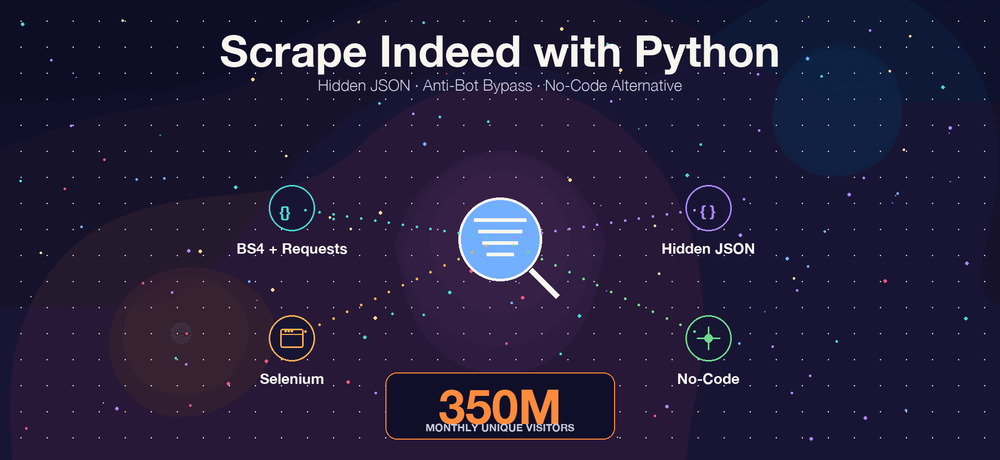
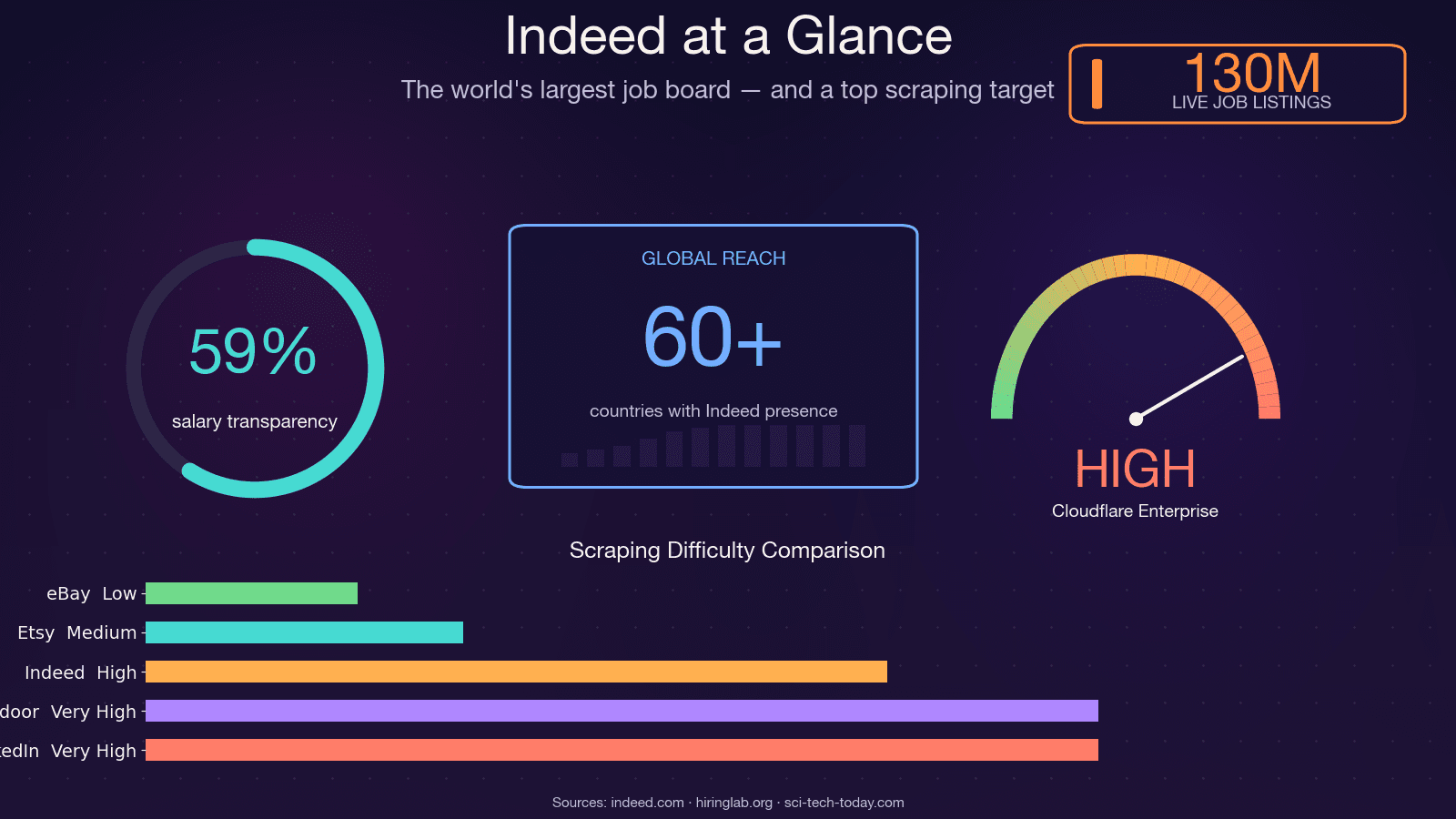
Indeed is the world's largest job board, with roughly 350 million unique monthly visitors, 130 million job listings at any given time, and operations across 60+ countries. That makes it one of the richest sources of job market data on the planet — and one of the hardest to scrape. The open-source scraper JobFunnel (thousands of GitHub stars) was literally archived by its maintainer in December 2025 after years of losing the anti-bot arms race. The maintainer's own words: "All users can scrape some jobs, but are quickly hit by captcha, and the scraping fails, yielding no jobs." Another contributor reported getting a CAPTCHA on the very first request. So yeah — this is not a trivial scraping target. In this guide, I'll walk through every practical method for scraping Indeed with Python, show you how to actually survive the 403 gauntlet, and — for those who'd rather skip the debugging entirely — demonstrate a no-code alternative using Thunderbit.
What Does It Mean to Scrape Indeed with Python?
Web scraping, at its core, is the automated extraction of structured data from web pages. When we talk about scraping Indeed with Python, we mean writing a script that visits Indeed's search results and job detail pages, reads the underlying HTML (or embedded data), and pulls out fields like job title, company, location, salary, and description into a usable format — a CSV, a database, a Google Sheet.
The typical Python libraries involved are Requests (for HTTP calls), BeautifulSoup (for HTML parsing), and Selenium or Playwright (for browser automation). But Indeed is not a simple static site. It's a hybrid: server-rendered HTML with an embedded JSON state blob, fronted by Cloudflare Bot Management. That means your scraper needs to handle JavaScript-rendered content, rotating CSS class names, and aggressive anti-bot protections — all before you parse a single job title.
There's also no official, free, read-only Indeed API in 2026. The old Publisher Jobs API was deprecated around 2020, and what remains is employer-side only (Job Sync, Sponsored Jobs). So scraping or paying a third-party data provider are the only realistic options.
Why Scrape Indeed Job Data?
The business case for scraping Indeed is straightforward: manual browsing of thousands of listings is impractical, and the data inside those listings is genuinely valuable.
| Use Case | Who Benefits | Example |
|---|---|---|
| Lead generation | Sales & recruiting teams | Build lists of hiring companies with contact info |
| Job market research | Analysts, HR teams | Identify trending skills, salary benchmarks by region |
| Competitive intelligence | Employers, staffing agencies | Monitor competitor hiring patterns and salary offers |
| Personal job search automation | Job seekers | Aggregate listings matching your criteria across locations |
| Training data for ML models | Data scientists | Build salary prediction models from historical job data |
Indeed Hiring Lab's own research validates that posting data closely tracks BLS JOLTS and can serve as a near-real-time proxy for US labor market conditions. Hedge funds use job-posting velocity as an alternative data signal. HR teams benchmark compensation using scraped salary ranges. And recruiters build prospect lists from companies that are actively hiring.
One practical note: salary data on Indeed is improving but still incomplete. As of mid-2025, roughly 59% of US postings include salary info, but only about 22% give an exact figure — the rest are ranges. Any salary analysis built on Indeed data should account for that sparsity.
Choosing Your Method to Scrape Indeed with Python
There's no single "right" way to scrape Indeed. The best approach depends on your skill level, how much data you need, and how much maintenance you're willing to tolerate. I've tested all four of the major approaches, and here's how they compare:
| Criteria | BS4 + Requests | Selenium | Hidden JSON (window.mosaic) | No-Code (Thunderbit) |
|---|---|---|---|---|
| Difficulty | Beginner | Intermediate | Intermediate-Advanced | None (2 clicks) |
| Speed | Fast | Slow (browser render) | Fast | Fast (cloud scraping) |
| JS-rendered content | No | Yes | Yes (embedded data) | Yes |
| Anti-bot resilience | Low | Medium (detectable) | Medium-High | High (handled automatically) |
| Maintenance when HTML changes | High (selectors break) | High | Medium (JSON structure more stable) | None (AI adapts) |
| Best for | Quick prototypes | Dynamic pages, login-gated | Bulk structured data | Non-developers, fast results |
This guide walks through each method. If you're a Python developer, you'll want to read the BS4, Hidden JSON, and Selenium sections. If you're a non-coder (or just tired of debugging 403s), skip ahead to the Thunderbit section.
Before You Start
- Difficulty: Beginner to Intermediate (Python sections); None (Thunderbit section)
- Time Required: ~20–60 minutes for Python setup and first scrape; ~2 minutes with Thunderbit
- What You'll Need: Python 3.9+, a code editor, Chrome browser, and (for the no-code path) the Thunderbit Chrome Extension
Setting Up Your Python Environment for Indeed Scraping
Before writing any scraping code, get your environment ready.
Install the Required Libraries
Create a virtual environment and install the packages you'll need:
python -m venv indeed_env
source indeed_env/bin/activate  # On Windows: indeed_env\Scripts\activate

# For the HTTP + parsing approach
pip install requests beautifulsoup4 lxml httpx

# For the hidden JSON approach (recommended)
pip install curl_cffi parsel tenacity

# For the browser automation approach
pip install selenium
A few notes:
curl_cffiis the 2026 default for scraping Cloudflare-protected sites. It impersonates real browser TLS fingerprints, which plainrequestsandhttpxcannot do. More on why this matters in the anti-bot section.- Selenium 4.6+ ships with Selenium Manager, so you no longer need to manually download ChromeDriver — it auto-manages the browser binary.
- Use
lxmlas your BeautifulSoup parser backend. It's roughly 1.5x faster than the stdlibhtml.parser.
Create Your Project Structure
Keep it simple:
indeed_scraper/
├── scraper.py
├── requirements.txt
└── output/
All code samples below build on scraper.py.
How to Scrape Indeed with Python Using BeautifulSoup
This is the beginner-friendly approach: use requests to fetch the page and BeautifulSoup to parse the HTML. It's the fastest to set up, but also the most fragile on Indeed.
Step 1: Build the Indeed Search URL
Indeed's search URLs follow a predictable pattern:
https://www.indeed.com/jobs?q=<query>&l=<location>&start=<offset>
For example, searching for "data analyst" in "Austin, TX" starting from the first page:
from urllib.parse import urlencode

params = {
    "q": "data analyst",
    "l": "Austin, TX",
    "start": 0,
}
url = f"https://www.indeed.com/jobs?{urlencode(params)}"
print(url)
# https://www.indeed.com/jobs?q=data+analyst&l=Austin%2C+TX&start=0
Indeed paginates in increments of 10, with a hard ceiling of 1,000 results (start <= 990). Any offset above 990 silently returns the same page.
Step 2: Send an HTTP Request with Proper Headers
Indeed blocks requests with default Python user-agent strings immediately. You need realistic headers:
import requests

headers = {
    "User-Agent": (
        "Mozilla/5.0 (Windows NT 10.0; Win64; x64) AppleWebKit/537.36 "
        "(KHTML, like Gecko) Chrome/145.0.0.0 Safari/537.36"
    ),
    "Accept": "text/html,application/xhtml+xml,application/xml;q=0.9,*/*;q=0.8",
    "Accept-Language": "en-US,en;q=0.9",
    "Accept-Encoding": "gzip, deflate, br",
    "Referer": "https://www.indeed.com/",
}

response = requests.get(url, headers=headers, timeout=30)
print(response.status_code)
If you get a 200, you're in — for now. If you get a 403, Cloudflare caught you. (More on surviving that below.)
Step 3: Parse Job Listings from the HTML
Use BeautifulSoup to select job card elements. Target data-testid attributes — they're more stable than Indeed's randomized CSS class names:
from bs4 import BeautifulSoup

soup = BeautifulSoup(response.text, "lxml")
cards = soup.find_all("div", attrs={"data-testid": "slider_item"})

jobs = []
for card in cards:
    title_el = card.find("h2", class_="jobTitle")
    title = title_el.get_text(strip=True) if title_el else None
    company = card.find(attrs={"data-testid": "company-name"})
    location = card.find(attrs={"data-testid": "text-location"})
    link = title_el.find("a")["href"] if title_el and title_el.find("a") else None

    jobs.append({
        "title": title,
        "company": company.get_text(strip=True) if company else None,
        "location": location.get_text(strip=True) if location else None,
        "url": f"https://www.indeed.com{link}" if link else None,
    })

print(f"Found {len(jobs)} jobs")
Step 4: Handle Pagination
Loop through pages by incrementing the start parameter:
import time, random

all_jobs = []
for page in range(0, 50, 10):  # First 5 pages
    params["start"] = page
    url = f"https://www.indeed.com/jobs?{urlencode(params)}"
    response = requests.get(url, headers=headers, timeout=30)
    # ... parse as above ...
    all_jobs.extend(jobs)
    time.sleep(random.uniform(3, 6))
Limitations of This Approach
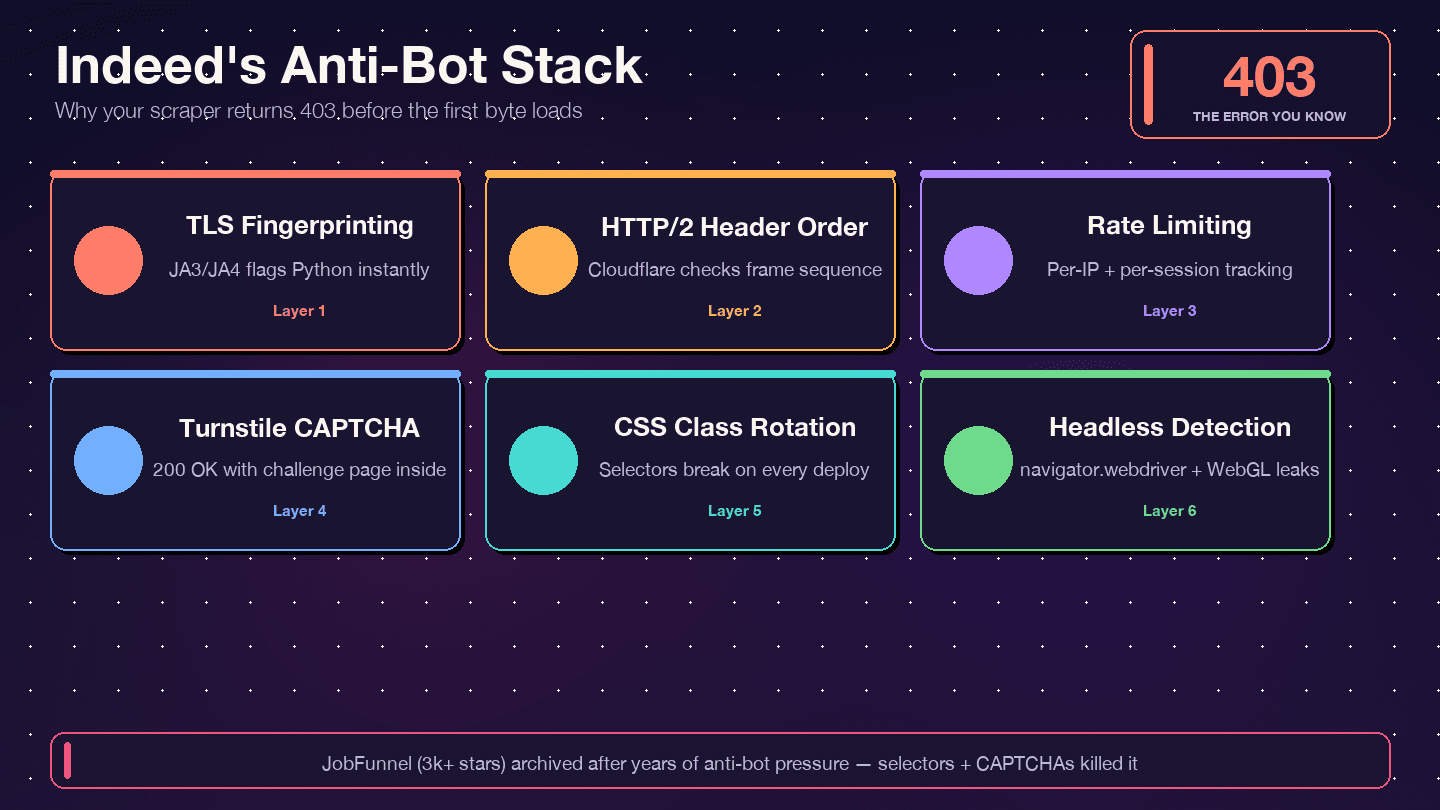
I'll be upfront: BS4 + Requests is the weakest method for Indeed in 2026. Plain requests uses Python's stdlib TLS library, which produces a JA3 fingerprint that Cloudflare instantly identifies as "not a browser." It also doesn't support HTTP/2, which Indeed serves. You'll likely get blocked after a handful of pages. And the CSS selectors? Indeed rotates class names like css-1m4cuuf and jobsearch-JobComponent-embeddedBody-1n0gh5s frequently — so any selector targeting them is a ticking time bomb.
Use this method for quick prototyping on a single page. For anything at scale, use the hidden JSON approach.
How to Scrape Indeed with Python Using Hidden JSON Data
This is the method I recommend for most Python developers. Instead of parsing fragile HTML elements, you extract structured data from a JavaScript variable embedded in Indeed's page source: window.mosaic.providerData["mosaic-provider-jobcards"].
Every field you care about — job title, company, location, salary, job key, posting date, remote flag — is already in this JSON blob. No JavaScript execution required. The schema has been stable since at least 2023, making it far more resilient than DOM selectors.
Step 1: Fetch the Page HTML
Use curl_cffi instead of requests — it impersonates real browser TLS fingerprints, which is critical for surviving Cloudflare:
from curl_cffi import requests as cffi_requests

response = cffi_requests.get(
    "https://www.indeed.com/jobs?q=python+developer&l=Remote&start=0",
    impersonate="chrome124",
    headers={
        "Accept-Language": "en-US,en;q=0.9",
        "Referer": "https://www.indeed.com/",
    },
    timeout=30,
)
print(response.status_code, len(response.text))
Why curl_cffi? It's a Python binding over curl-impersonate, which reproduces the exact TLS ClientHello, HTTP/2 SETTINGS frame, and header ordering of real browsers. It's the only actively-maintained Python HTTP client that defeats both JA3/JA4 and the Akamai H2 fingerprint in a single call. Supported impersonation targets include chrome120, chrome124, chrome131, Safari, and Edge variants.
Step 2: Extract the JSON with a Regular Expression
The JSON blob is embedded in a <script> tag. Pull it out with a regex:
import re, json

MOSAIC_RE = re.compile(
    r'window\.mosaic\.providerData\["mosaic-provider-jobcards"\]=(\{.+?\});',
    re.DOTALL,
)

match = MOSAIC_RE.search(response.text)
if match:
    data = json.loads(match.group(1))
    results = data["metaData"]["mosaicProviderJobCardsModel"]["results"]
    print(f"Found {len(results)} jobs in hidden JSON")
else:
    print("Hidden JSON not found — possible block or page change")
Step 3: Parse Job Fields from the JSON
Each item in results contains more data than what's visible on the page:
jobs = []
for job in results:
    jobs.append({
        "jobkey": job["jobkey"],
        "title": job["title"],
        "company": job.get("company"),
        "location": job.get("formattedLocation"),
        "remote": job.get("remoteLocation"),
        "salary": (job.get("salarySnippet") or {}).get("text"),
        "posted": job.get("formattedRelativeTime"),
        "job_type": job.get("jobTypes"),
        "easy_apply": job.get("indeedApplyEnabled"),
        "url": f"https://www.indeed.com/viewjob?jk={job['jobkey']}",
    })
The JSON often includes salary estimates, taxonomy attributes (skill tags), and company ratings that aren't always visible in the rendered HTML.
Step 4: Scrape Multiple Pages
Use tierSummaries in the JSON to understand total result counts, then loop:
import time, random

all_jobs = []
for start in range(0, 50, 10):  # First 5 pages
    url = f"https://www.indeed.com/jobs?q=python+developer&l=Remote&start={start}&sort=date"
    response = cffi_requests.get(
        url,
        impersonate="chrome124",
        headers={"Accept-Language": "en-US,en;q=0.9", "Referer": "https://www.indeed.com/"},
        timeout=30,
    )
    match = MOSAIC_RE.search(response.text)
    if match:
        data = json.loads(match.group(1))
        results = data["metaData"]["mosaicProviderJobCardsModel"]["results"]
        all_jobs.extend([{
            "jobkey": j["jobkey"],
            "title": j["title"],
            "company": j.get("company"),
            "location": j.get("formattedLocation"),
            "salary": (j.get("salarySnippet") or {}).get("text"),
            "url": f"https://www.indeed.com/viewjob?jk={j['jobkey']}",
        } for j in results])
    time.sleep(random.uniform(3, 7))

print(f"Total: {len(all_jobs)} jobs scraped")
Why Hidden JSON Is More Resilient
The window.mosaic.providerData structure changes less frequently than CSS class names. You get clean, structured data without parsing messy HTML. That said, you still need anti-bot mitigation (headers, delays, proxies) — which we'll cover next.
How to Scrape Indeed with Python Using Selenium
Selenium is the browser automation approach. It's useful when you need to interact with the page — clicking into job detail panels, handling login-gated content, or scraping dynamically loaded descriptions that aren't in the initial HTML.
When to Use Selenium Instead of HTTP Clients
- Indeed loads some content dynamically (full job descriptions in the right-side panel)
- You need to scrape pages that require session state or login
- You're doing small-scale scraping where speed isn't critical
Quick Walkthrough
from selenium import webdriver
from selenium.webdriver.common.by import By
from selenium.webdriver.chrome.options import Options
import time

options = Options()
options.add_argument("--disable-blink-features=AutomationControlled")
# options.add_argument("--headless=new")  # Headless is more detectable — use with caution

driver = webdriver.Chrome(options=options)
driver.get("https://www.indeed.com/jobs?q=data+engineer&l=New+York")
time.sleep(3)

cards = driver.find_elements(By.CSS_SELECTOR, "[data-testid='slider_item']")
for card in cards:
    try:
        title = card.find_element(By.CSS_SELECTOR, "h2.jobTitle").text
        company = card.find_element(By.CSS_SELECTOR, "[data-testid='company-name']").text
        location = card.find_element(By.CSS_SELECTOR, "[data-testid='text-location']").text
        print(f"{title} | {company} | {location}")
    except Exception:
        continue

driver.quit()
Limitations
Selenium is slow — each page requires full browser rendering. Headless Chrome is detectable by Indeed's anti-bot system (Cloudflare checks navigator.webdriver, WebGL vendor strings, plugin counts, and more). Even undetected-chromedriver only delays detection; it doesn't prevent it permanently. And like BS4, your selectors will break when Indeed updates its UI.
For most use cases, the hidden JSON approach gives you the same data faster and with less maintenance. Reserve Selenium for edge cases where you genuinely need a browser.
How to Avoid 403 Errors When Scraping Indeed with Python
This is the section that matters most. If you've landed here from a frustrated Google search, you're in the right place.
Why Indeed Blocks Your Scraper
Indeed uses Cloudflare Bot Management plus Cloudflare Turnstile — not DataDome, not PerimeterX. The response headers confirm it: server: cloudflare, cf-ray, and the __cf_bm bot-management cookie. Cloudflare inspects your TLS fingerprint (JA3/JA4), HTTP/2 header ordering, request patterns, and browser behavior signals. If any of those look non-human, you get a 403, a 429, a 503, or — the sneakiest case — a 200 OK with a Turnstile challenge page instead of actual job data.
Rotate User-Agent and Request Headers
A single, static User-Agent is the fastest way to get blocked. Rotate from a pool of current, realistic strings. Important: Chrome's minor-version fields are frozen at 0.0.0 since User-Agent Reduction — don't invent non-zero minor versions or anti-bots will flag you.
import random

USER_AGENTS = [
    "Mozilla/5.0 (Windows NT 10.0; Win64; x64) AppleWebKit/537.36 "
    "(KHTML, like Gecko) Chrome/145.0.0.0 Safari/537.36",
    "Mozilla/5.0 (Macintosh; Intel Mac OS X 10_15_7) AppleWebKit/537.36 "
    "(KHTML, like Gecko) Chrome/145.0.0.0 Safari/537.36",
    "Mozilla/5.0 (Windows NT 10.0; Win64; x64) AppleWebKit/537.36 "
    "(KHTML, like Gecko) Chrome/145.0.0.0 Safari/537.36 Edg/145.0.3800.97",
    "Mozilla/5.0 (Windows NT 10.0; Win64; x64; rv:128.0) Gecko/20100101 Firefox/128.0",
    "Mozilla/5.0 (Macintosh; Intel Mac OS X 10_15_7) AppleWebKit/605.1.15 "
    "(KHTML, like Gecko) Version/17.4 Safari/605.1.15",
]

headers = {
    "User-Agent": random.choice(USER_AGENTS),
    "Accept": "text/html,application/xhtml+xml,application/xml;q=0.9,*/*;q=0.8",
    "Accept-Language": "en-US,en;q=0.9",
    "Accept-Encoding": "gzip, deflate, br, zstd",
    "Referer": "https://www.indeed.com/",
    "Sec-Fetch-Dest": "document",
    "Sec-Fetch-Mode": "navigate",
    "Sec-Fetch-Site": "same-origin",
}
Also make sure your sec-ch-ua Client Hints match the UA version. A sec-ch-ua: "Chrome";v="131" next to a User-Agent claiming Chrome 145 is an instant red flag.
Add Random Delays Between Requests
Fixed intervals get flagged by pattern detection. Use random jitter:
import time, random

# Between each request
time.sleep(random.uniform(3, 6))

# On retry after a block
def backoff_sleep(attempt):
    base = 4
    sleep_time = base * (2 ** attempt) + random.uniform(0, 2)
    time.sleep(min(sleep_time, 60))
Field consensus from ScrapeOps and WebScraping.AI is 3–6 seconds between requests per IP, with a hard cap of ~100 requests per IP per session before rotating.
Use Proxy Rotation
This is the single biggest determinant of success. Datacenter proxies from AWS/GCP ranges hit roughly 5–15% success on Cloudflare Enterprise targets — effectively unusable on Indeed. Residential proxies plus correct TLS fingerprinting climb to 80–95% success.
PROXIES = [
    "http://user:pass@us.residential.example:7777",
    "http://user:pass@us.residential.example:7778",
    "http://user:pass@us.residential.example:7779",
]

proxy = random.choice(PROXIES)
response = cffi_requests.get(
    url,
    impersonate="chrome124",
    headers=headers,
    proxies={"https": proxy},
    timeout=30,
)
Residential proxy pricing in 2026 runs roughly $4–8.50 per GB depending on provider and commitment level. For Indeed specifically, start with a small pool and scale up as needed.
Handle 403, 429, and 503 Status Codes Gracefully
Don't just retry blindly. Different status codes mean different things:
def fetch_with_retry(url, proxy_pool, max_retries=5):
    for attempt in range(max_retries):
        proxy = random.choice(proxy_pool)
        headers["User-Agent"] = random.choice(USER_AGENTS)
        try:
            r = cffi_requests.get(
                url,
                impersonate=random.choice(["chrome124", "chrome120", "edge101"]),
                headers=headers,
                proxies={"https": proxy},
                timeout=30,
            )
            # Check for the sneaky "200 with challenge" case
            if r.status_code == 200 and "cf-turnstile" not in r.text and "Just a moment" not in r.text:
                return r

            if r.status_code == 403:
                print(f"403 — blocked. Rotating proxy, attempt {attempt + 1}")
            elif r.status_code == 429:
                print(f"429 — rate limited. Slowing down.")
            elif r.status_code == 503:
                print(f"503 — server overloaded or JS challenge.")

            backoff_sleep(attempt)
        except Exception as e:
            print(f"Request error: {e}")
            backoff_sleep(attempt)

    raise RuntimeError(f"Failed after {max_retries} retries: {url}")
The 200-with-challenge case is the trickiest. Always scan the response body for cf-turnstile or Just a moment markers before treating a 200 as success.
The Easier Alternative: Let Thunderbit Handle Anti-Bot for You
For users who don't want to build and maintain proxy pools, header rotation, and TLS fingerprint impersonation, Thunderbit's cloud scraping handles CAPTCHAs, proxy rotation, and anti-bot protections automatically. No proxy setup, no curl_cffi configuration, no CAPTCHA-solving libraries. It's the path of least resistance when you just need the data.
Why Your Indeed Scraper Keeps Breaking (And How to Fix It)
The 403 wall is the acute pain. The chronic pain is maintenance — scrapers that work today break next week, silently returning empty data or stale results.
How Indeed Breaks Your Selectors
Indeed rotates CSS class names aggressively. Bright Data's guide explicitly warns that classes like css-1m4cuuf and css-1rqpxry "appear to be randomly generated — likely at build time." A/B testing means different sessions see different page layouts. And DOM restructuring happens without notice.
The JobFunnel saga is instructive. One contributor reported: "CaptchaBuster has successfully mitigated the captcha, and the reason for still unsuccessfully scraping the page [is] due to outdated beautiful soup selectors." The scraper wasn't blocked — it was parsing the wrong elements.
Strategy: Prefer Hidden JSON Over DOM Parsing
The window.mosaic.providerData blob has been schema-stable since at least 2023. The metaData.mosaicProviderJobCardsModel.results[] path is still canonical in 2026. DOM selectors break monthly. JSON extraction breaks annually, if at all.
Strategy: Use Data Attributes Over Class Names
When you do need to touch the DOM, target functional attributes:
| Selector | Purpose |
|---|---|
[data-testid="slider_item"] | Each job card container |
[data-testid="job-title"] or h2.jobTitle > a | Job title anchor |
[data-testid="company-name"] | Employer name |
[data-testid="text-location"] | Location text |
data-jk="<jobkey>" on each card | The single most stable hook — unchanged since 2019 |
Add Assertion Checks to Detect Stale Selectors
Never let your scraper run silently with zero results. Add a check after every fetch:
results = parse_hidden_json(html)
assert len(results) > 0, (
    f"Indeed returned empty result set at start={start} — "
    "possible block, CAPTCHA, or selector drift. "
    f"First 500 chars of response: {html[:500]}"
)
Log the first 500–2000 characters of the raw response on failure. That way you can immediately tell whether you got a Turnstile challenge, a sign-in wall, or a schema change. Run a daily CI-level smoke test against a fixed query (e.g., q=python&l=remote) that asserts non-zero results.
The AI Alternative: Scrapers That Never Break
Thunderbit's AI reads the page structure fresh each time — it doesn't rely on hardcoded selectors or regex patterns. When Indeed changes its HTML, Thunderbit adapts automatically. This directly addresses the maintenance burden that forum users consistently cite as their top frustration. If you've ever woken up to a Slack message saying "the scraper is returning empty rows again," you know the value of not having to fix it.
Scrape Indeed Without Writing Python: The No-Code Alternative
Every competing guide assumes you'll write Python code. But the forum data tells a different story. Users say things like "it's just so difficult with constant bugs and errors" and some suggest hiring someone on Fiverr just to get the data. If that sounds like you, this section is your escape hatch.
How to Scrape Indeed with Thunderbit (Step-by-Step)
Step 1: Install the Thunderbit Chrome Extension from the Chrome Web Store. It's free to start.
Step 2: Navigate to an Indeed search results page in your browser — for example, https://www.indeed.com/jobs?q=data+analyst&l=Austin%2C+TX.
Step 3: Click the Thunderbit icon in your browser toolbar, then click "AI Suggest Fields." Thunderbit's AI scans the page and auto-detects columns like Job Title, Company, Location, Salary, Job URL, and Posted Date. You can review and adjust the suggested fields — remove columns you don't need, or add custom ones by describing what you want in plain English.
Step 4: Click "Scrape." Thunderbit extracts data from the page and displays it in a structured table. You should see rows of job listings with the fields you configured.
Enrich with Subpage Scraping
After scraping the listing page, click "Scrape Subpages" to have Thunderbit visit each individual job detail page. It pulls full job descriptions, qualifications, benefits, and application links — no additional setup needed. This is the equivalent of writing a second Python scraper to visit each /viewjob?jk=<jobkey> URL, except it takes one click.
Handle Pagination Automatically
Thunderbit auto-handles Indeed's click-based pagination. No need to manually construct offset URLs or write pagination loops. It clicks through pages and aggregates the results.
Export to Your Favorite Tools
Export scraped data to CSV, Excel, Google Sheets, Airtable, or Notion — completely free. No need to write csv.writer() or pandas.to_csv() code.
When to Use Python vs. Thunderbit
| Scenario | Best Tool |
|---|---|
| Custom data pipelines, scheduled automation via cron/Airflow | Python |
| Integration into a larger codebase | Python |
| Highly customized parsing logic | Python |
| One-off research or market analysis | Thunderbit |
| Non-technical team members need data | Thunderbit |
| Getting data now without debugging 403s | Thunderbit |
| Subpage enrichment with zero setup | Thunderbit |
Time comparison: Python setup + anti-bot debugging = hours to days (especially your first time). Thunderbit = under 2 minutes for the same data. I'm not saying Python is wrong — I'm saying it depends on what you need.
Is Scraping Indeed Legal? What You Need to Know
None of the top-ranking Indeed scraping guides address legality, which is surprising given how often "Is scraping Indeed legal?" comes up in forums. This isn't legal advice, but here's the landscape.
Indeed's Terms of Service
Indeed's ToS (indeed.com/legal) does not contain a blanket "no scraping" clause. The only explicit automation prohibition is Section A.3.5, which bans "use of any automation, scripting, or bots to automate the Indeed Apply process." That's narrowly scoped to the Apply flow, not passive reading of public job listings. Indeed's primary enforcement tool is technical — Cloudflare challenges, IP bans, device fingerprinting — not the courtroom.
Relevant Legal Precedent
The most-cited US case is hiQ Labs v. LinkedIn. The 9th Circuit held in April 2022 that scraping publicly accessible data "likely does not violate the CFAA" (Computer Fraud and Abuse Act). However, hiQ was later found liable for breach of contract because its employees had created fake LinkedIn profiles and accepted the ToS.
More recently, Meta v. Bright Data (N.D. Cal., Jan 2024) produced an even clearer ruling. Judge Chen held that Facebook and Instagram's Terms "do not bar logged-off scraping of public data." Meta voluntarily dismissed the remaining claims the following month.
Indeed's robots.txt
Indeed's robots.txt broadly disallows /jobs/ and /job/ for the default User-agent: *, but explicitly allows Googlebot and Bingbot to access /viewjob? — the individual job detail pages. AI training crawlers (GPTBot, CCBot, anthropic-ai) are heavily restricted. robots.txt is not legally binding in the US, but respecting it is a best practice and evidence of good faith.
Practical Guidelines for Responsible Scraping
- Scrape only publicly available data — never log in, never create fake accounts
- Respect rate limits: 1 request every 3–6 seconds per IP, single-digit concurrency
- Don't republish scraped data as your own job board
- Use data for personal or internal research, not commercial resale without permission
- Discard or hash PII you don't need; set a retention ceiling on personal-adjacent data
- If you operate at scale or in the EU/UK, consult a lawyer — GDPR's Article 14 transparency obligations apply to scraped personal data
The risk spectrum: personal job search automation sits at the low end. Large-scale commercial resale of Indeed's data sits at the high end.
Conclusion and Key Takeaways
Scraping Indeed with Python is doable, but it's not a weekend project you set and forget. Indeed's Cloudflare protection, rotating selectors, and aggressive anti-bot measures mean you need to approach this with the right tools and the right expectations.
Here's what I'd take away from all of this:
- Indeed is the richest source of job market data on the web — 350M monthly visitors, 130M listings — but it fights back hard against scrapers.
- Hidden JSON extraction (
window.mosaic.providerData) is the most resilient Python approach. The schema has been stable for years, while CSS selectors break monthly. curl_cffiwith browser impersonation is the 2026 default HTTP client for Cloudflare-protected sites. Plainrequestsandhttpxget blocked on TLS fingerprint alone.- Always use rotating headers, random delays, and residential proxies to avoid 403 errors. Datacenter proxies are near-useless against Cloudflare Enterprise.
- Add assertion checks so you know immediately when selectors break or when you're getting served a challenge page instead of job data.
- For non-technical users or anyone who just wants results fast, Thunderbit provides a no-code, AI-powered path that adapts to site changes automatically — no proxies, no debugging, no maintenance.
If you want to try the no-code route, Thunderbit offers a free tier so you can test it on Indeed without any commitment. And if you're going the Python route, the code samples above are a solid starting point — just remember to treat anti-bot resilience as a first-class concern, not an afterthought.
For more on web scraping approaches and tools, check out our guides on how to web scrape with Python, best automated web scraping tools, and web scraping without getting blocked. You can also watch tutorials on the Thunderbit YouTube Channel.
Try Thunderbit to Scrape Indeed Data Faster Get Started Free
FAQs
What Python libraries are best for scraping Indeed?
For HTTP requests, curl_cffi is the strongest choice in 2026 — it impersonates real browser TLS fingerprints, which is essential for bypassing Cloudflare. httpx with HTTP/2 is a decent fallback for less-protected targets. For HTML parsing, BeautifulSoup4 with lxml remains the standard. For browser automation, Playwright (with playwright-stealth) or undetected-chromedriver work, though both are increasingly detectable. The hidden JSON regex approach (window.mosaic.providerData) avoids the need for heavy parsing altogether.
Why do I keep getting 403 errors when scraping Indeed?
Indeed uses Cloudflare Bot Management, which inspects your TLS fingerprint (JA3/JA4), HTTP/2 header ordering, request patterns, and browser behavior. If you're using plain requests, your TLS fingerprint immediately identifies you as a Python script — the 403 comes before your headers are even read. Fix it by switching to curl_cffi with browser impersonation, rotating realistic User-Agent strings, adding random delays (3–6 seconds), and using residential proxies. Also check for the "200 with Turnstile challenge" case — scan response bodies for cf-turnstile markers.
Can I scrape Indeed without coding?
Yes. Tools like Thunderbit let you extract Indeed job listings in a few clicks — install the Chrome extension, navigate to an Indeed search page, click "AI Suggest Fields," then "Scrape." Thunderbit's AI auto-detects fields like job title, company, location, and salary. It handles pagination, subpage enrichment (full job descriptions), and anti-bot protections automatically. Export to CSV, Google Sheets, Airtable, or Notion for free.
How often does Indeed change its HTML structure?
Indeed regularly rotates CSS class names (e.g., css-1m4cuuf, randomized hashed strings) and restructures DOM elements without notice. A/B testing means different users may see different layouts simultaneously. The hidden JSON approach (window.mosaic.providerData) is significantly more stable — the schema has been consistent since at least 2023. When you must use DOM selectors, target data-testid attributes and data-jk (job key) rather than CSS classes.
Is it legal to scrape Indeed?
Logged-out scraping of publicly accessible Indeed job URLs is unlikely to create CFAA liability in the US, based on the 9th Circuit's hiQ v. LinkedIn ruling (2022) and the Meta v. Bright Data decision (2024). Indeed's ToS prohibits automating the Apply process specifically, not passive reading of public listings. That said, always scrape responsibly: don't log in, don't create fake accounts, respect rate limits, don't republish data as your own job board, and handle any personal data (recruiter names, emails) carefully under GDPR/CCPA. For commercial-scale operations, consult a lawyer.
Learn More




