

A few months ago, I wanted to build a daily digest of top Hacker News stories for our team at Thunderbit. My first instinct was to just bookmark the site and scroll through it every morning. That lasted about three days before I realized I was spending 20 minutes a day just reading headlines and copy-pasting links into a spreadsheet.
Hacker News is one of the richest, most concentrated sources of tech intelligence on the internet — roughly 13 million monthly visits, about 1,300 new stories submitted every day, and around 13,000 comments generated daily. Whether you're tracking emerging tech trends, monitoring your brand, building a recruiting pipeline from "Who's Hiring" threads, or just trying to stay on top of what the developer world cares about, manually keeping up with all of that is a losing battle.
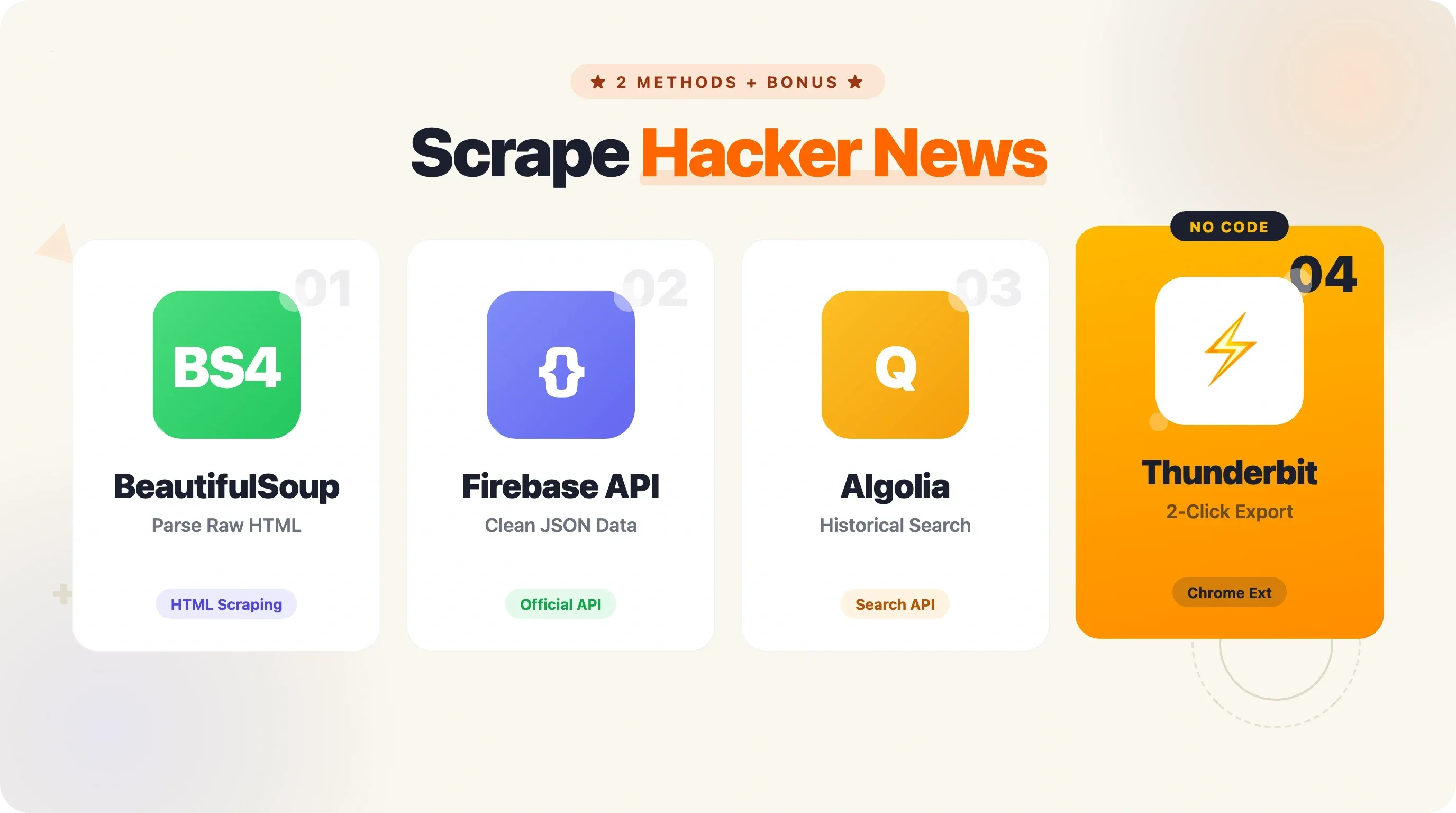
The good news: scraping Hacker News with Python is surprisingly straightforward, and in this guide, I'll walk you through two complete methods — HTML scraping with BeautifulSoup and the official HN Firebase API — along with pagination, data export, production-ready patterns, and a no-code shortcut for when Python feels like overkill.
Why Scrape Hacker News with Python?
Hacker News isn't just another link aggregator. It's a curated, community-driven feed where the most interesting tech stories rise to the top through upvotes and active discussion. The audience skews heavily toward technology professionals (about 76% male, primary age group 25-34), and the site's 66% direct traffic rate tells you this is a loyal, habitual readership — not casual browsers.
Here's why people scrape HN data:
| Use Case | What You Get |
|---|---|
| Daily tech digest | Top stories, scores, and links delivered to your inbox or Slack |
| Brand/competitor monitoring | Alerts when your company or product is mentioned |
| Trend analysis | Track which technologies, languages, or topics are gaining traction over time |
| Recruiting | Parse "Who's Hiring" threads for job postings, tech stacks, and salary signals |
| Content research | Find high-performing topics to write about or share |
| Sentiment analysis | Gauge community opinion on products, launches, or industry shifts |
Companies worth over $400 billion combined — Stripe, Dropbox, Airbnb — attribute crucial early feedback and users to Hacker News. Drew Houston posted Dropbox's demo on HN in April 2007, it hit #1, and the beta waitlist exploded from 5,000 to 75,000 users in a single day. HN data isn't just interesting — it's commercially valuable.
The data is publicly available, but the site's structure makes manual collection tedious. Automation with Python is the practical solution.
Two Ways to Scrape Hacker News with Python: Overview
This guide covers two complete, runnable approaches:
- HTML scraping with
requests+ BeautifulSoup — fetch the raw HTML of news.ycombinator.com and parse it to extract story data. Great for learning scraping fundamentals and grabbing exactly what's on the page. - The official Hacker News Firebase API — hit JSON endpoints directly, no HTML parsing needed. Better for reliable data pipelines, accessing comments, and historical data.
Here's a side-by-side comparison to help you decide which fits your needs:
| Criteria | HTML Scraping (requests + BS4) | HN Firebase API | Thunderbit (No-Code) |
|---|---|---|---|
| Setup complexity | Medium (parse HTML selectors) | Low (JSON endpoints) | None (2-click Chrome extension) |
| Data freshness | Real-time front page | Real-time (any item by ID) | Real-time |
| Rate limit risk | Medium (robots.txt says 30s crawl delay) | Low (official, generous) | Managed by Thunderbit |
| Comments access | Hard (nested HTML) | Easy (recursive item IDs) | Subpage scraping feature |
| Historical data | Limited | Via Algolia Search API | N/A |
| Best for | Learning scraping fundamentals | Reliable data pipelines | Non-developers, quick exports |
Both methods include full, runnable Python code. And if you just want the data without writing any code at all, I'll cover that too.
Before You Start
- Difficulty: Beginner to Intermediate
- Time Required: ~15–20 minutes for each method
- What You'll Need:
- Python 3.11+ installed
- A terminal or code editor
- Chrome browser (if you want to inspect HN's HTML or try the no-code option)
- Thunderbit Chrome Extension (optional, for the no-code method)
Setting Up Your Python Environment
Before we touch any HN data, let's get the environment ready. I recommend creating a virtual environment so your project dependencies stay clean.
# Create and activate a virtual environment
python3 -m venv hn-scraper
# macOS/Linux:
source hn-scraper/bin/activate
# Windows:
hn-scraper\Scripts\activate

# Install the packages we'll need for both methods
pip install requests==2.33.1 beautifulsoup4==4.14.3 pandas==3.0.2 openpyxl==3.1.5
For production patterns later (caching, retries), you'll also want:
pip install requests-cache==1.3.1 tenacity==9.1.4
No special API keys, no authentication tokens. HN's data is open.
Method 1: Scrape Hacker News with Python Using BeautifulSoup
This is the classic approach — fetch the HTML, parse it, and pull out the data you want. It's how most people learn web scraping, and HN's simple table-based layout makes it a great training ground.
Step 1: Fetch the Hacker News Front Page
Open your editor and create a file called scrape_hn_bs4.py. Here's the starting code:
import requests
from bs4 import BeautifulSoup

url = "https://news.ycombinator.com/news"
headers = {"User-Agent": "Mozilla/5.0 (educational HN scraper)"}
response = requests.get(url, headers=headers)
soup = BeautifulSoup(response.text, "html.parser")

print(f"Status: {response.status_code}, Page length: {len(response.text)} chars")
Run it. You should see Status: 200 and a page length around 40,000–50,000 characters. That's the raw HTML of HN's front page sitting in memory, ready to parse.
Step 2: Understand the HTML Structure
HN uses a table-based layout — no modern CSS grid or flexbox. Each story on the page consists of two key <tr> rows:
- The story row (
<tr class="athing submission">): contains the rank, title, and link - The metadata row (the next
<tr>): contains points, author, time, and comment count
The important selectors:
span.titleline > a— the story title and URLspan.score— the vote count (e.g., "118 points")a.hnuser— the author's usernamespan.age— the time posted- The last
<a>in.subtextwith "comment" in the text — the comment count
If you right-click on any story title in Chrome and choose "Inspect," you'll see something like this:
<span class="titleline">
  <a href="https://darkbloom.dev">Darkbloom – Private inference on idle Macs</a>
</span>
And the metadata row below it:
<span class="score" id="score_47788542">118 points</span>
by <a href="user?id=twapi" class="hnuser">twapi</a>
<span class="age" title="2026-04-16T04:06:39 1776312399">
<a href="item?id=47788542">2 hours ago</a>
</span>
| <a href="item?id=47788542">65 comments</a>
Understanding these selectors is critical — if HN ever changes its markup, you'll need to update them. (Spoiler: the API method avoids this problem entirely.)
Step 3: Extract Titles, Links, and Scores
Now for the real work. We'll loop through every story row, grab the title and link from the story row, then grab the score from the metadata row immediately below it.
import requests
from bs4 import BeautifulSoup
from pprint import pprint

url = "https://news.ycombinator.com/news"
headers = {"User-Agent": "Mozilla/5.0 (educational HN scraper)"}
response = requests.get(url, headers=headers)
soup = BeautifulSoup(response.text, "html.parser")

stories = []
story_rows = soup.select("tr.athing")

for row in story_rows:
    # Title and URL from the story row
    title_tag = row.select_one("span.titleline > a")
    if not title_tag:
        continue
    title = title_tag.get_text()
    link = title_tag.get("href", "")

    # Metadata from the next sibling row
    meta_row = row.find_next_sibling("tr")
    score = 0
    author = ""
    comments = 0

    if meta_row:
        if score_tag := meta_row.select_one("span.score"):
            score = int(score_tag.get_text().replace(" points", ""))
        if author_tag := meta_row.select_one("a.hnuser"):
            author = author_tag.get_text()
        # Comment count: last <a> with "comment" in text
        for a_tag in meta_row.select("a"):
            text = a_tag.get_text()
            if "comment" in text:
                comments = int(text.split("\xa0")[0])

    stories.append({
        "title": title,
        "url": link,
        "score": score,
        "author": author,
        "comments": comments,
    })

# Filter to stories with 50+ points, sorted by score
top_stories = sorted(
    [s for s in stories if s["score"] >= 50],
    key=lambda x: x["score"],
    reverse=True,
)

pprint(top_stories[:10])
A few notes on the code:
- The walrus operator (
:=) works in Python 3.8+. It lets us assign and check in one line — handy for optional elements likespan.scorethat may not exist on every row (e.g., job posts have no score). - HN uses
\xa0(non-breaking space) between the number and "comments," so we split on that. - Stories that link to other HN pages (like "Ask HN" posts) will have relative URLs starting with
item?id=. You might want to prependhttps://news.ycombinator.com/for those.
Step 4: Run It and See Results
Save and run:
python scrape_hn_bs4.py
You should see output like:
[{'author': 'twapi',
  'comments': 65,
  'score': 118,
  'title': 'Darkbloom – Private inference on idle Macs',
  'url': 'https://darkbloom.dev'},
 {'author': 'sebg',
  'comments': 203,
  'score': 247,
  'title': 'Show HN: I built an open-source Perplexity alternative',
  'url': 'https://github.com/...'},
 ...]
That's 30 stories from page 1. But HN has hundreds of active stories at any given time. We'll cover pagination in a later section.
Method 2: Scrape Hacker News with Python Using the Official API
The HN Firebase API is the officially sanctioned way to access Hacker News data. No authentication, no API keys, no HTML parsing. You get clean JSON responses. I use this method for anything that needs to run reliably in production.
Key API Endpoints You Need to Know
The base URL is https://hacker-news.firebaseio.com/v0/. Here are the endpoints that matter:
| Endpoint | Returns | Example |
|---|---|---|
/v0/topstories.json | Array of up to 500 top story IDs | [47788542, 47787901, ...] |
/v0/newstories.json | Up to 500 newest story IDs | Same format |
/v0/beststories.json | Up to 500 best story IDs | Same format |
/v0/askstories.json | Up to 200 "Ask HN" story IDs | Same format |
/v0/showstories.json | Up to 200 "Show HN" story IDs | Same format |
/v0/jobstories.json | Up to 200 job story IDs | Same format |
/v0/item/{id}.json | Full details for any item (story, comment, poll) | JSON object |
/v0/user/{username}.json | User profile | JSON object |
/v0/maxitem.json | Current max item ID | Integer (e.g., 47789427) |
A story item looks like this:
{
  "by": "twapi",
  "descendants": 65,
  "id": 47788542,
  "kids": [47789171, 47788769, 47788762],
  "score": 118,
  "time": 1776312399,
  "title": "Darkbloom – Private inference on idle Macs",
  "type": "story",
  "url": "https://darkbloom.dev"
}
The kids field contains the IDs of direct child comments. Each comment is itself an item that may have its own kids — that's how the comment tree is structured.
Step 1: Fetch Top Story IDs
Create a file called scrape_hn_api.py:
import requests
import time
from pprint import pprint

API_BASE = "https://hacker-news.firebaseio.com/v0"

# Fetch top story IDs
response = requests.get(f"{API_BASE}/topstories.json")
story_ids = response.json()

print(f"Got {len(story_ids)} top story IDs")
# Output: Got 500 top story IDs
500 story IDs in a single request — no parsing, no selectors, just a JSON array.
Step 2: Fetch Story Details by ID
Now we need the actual story data. This is where the fan-out problem shows up: 500 stories means 500 individual API calls. In my benchmarking, each item request takes about 1.2 seconds sequentially. For 500 stories, that's roughly 10 minutes.
For most use cases, you don't need all 500. Here's code to fetch the top 30:
def fetch_story(story_id):
    """Fetch a single story's details from the HN API."""
    resp = requests.get(f"{API_BASE}/item/{story_id}.json")
    return resp.json()

# Fetch details for the top 30 stories
stories = []
for sid in story_ids[:30]:
    story = fetch_story(sid)
    if story and story.get("type") == "story":
        stories.append({
            "title": story.get("title", ""),
            "url": story.get("url", ""),
            "score": story.get("score", 0),
            "author": story.get("by", ""),
            "comments": story.get("descendants", 0),
            "time": story.get("time", 0),
            "id": story.get("id"),
        })
    time.sleep(0.1)  # Be polite — small delay between requests

# Sort by score, show top 10
top = sorted(stories, key=lambda x: x["score"], reverse=True)[:10]
pprint(top)
The time.sleep(0.1) adds a small courtesy delay. The Firebase API doesn't have a stated rate limit, but hammering any API without pauses is bad practice.
Step 3: Scrape Comments (Recursive Tree Walk)
This is where the API really shines compared to HTML scraping. Comments on HN are deeply nested — replies to replies to replies. In HTML, that means parsing complex nested table structures. With the API, each comment's kids field gives you the IDs of its children, and you just walk the tree recursively.
def fetch_comments(item_id, depth=0, max_depth=3):
    """Recursively fetch comments up to max_depth."""
    item = requests.get(f"{API_BASE}/item/{item_id}.json").json()
    if not item or item.get("type") != "comment":
        return []

    comments = [{
        "author": item.get("by", "[deleted]"),
        "text": item.get("text", ""),
        "depth": depth,
        "id": item.get("id"),
    }]

    if depth < max_depth and item.get("kids"):
        for kid_id in item["kids"]:
            comments.extend(fetch_comments(kid_id, depth + 1, max_depth))
            time.sleep(0.05)

    return comments

# Example: fetch comments for the top story
if stories:
    top_story = stories[0]
    top_story_full = requests.get(f"{API_BASE}/item/{top_story['id']}.json").json()
    if top_story_full.get("kids"):
        print(f"\nComments for: {top_story['title']}")
        all_comments = []
        for kid_id in top_story_full["kids"][:5]:  # First 5 top-level comments
            all_comments.extend(fetch_comments(kid_id, depth=0, max_depth=2))
            time.sleep(0.1)

        for c in all_comments[:15]:
            indent = "  " * c["depth"]
            preview = c["text"][:80].replace("\n", " ") if c["text"] else "[no text]"
            print(f"{indent}[{c['author']}] {preview}...")
This recursive approach is significantly easier than trying to parse nested HTML comment threads. If you need full comment trees, the API is the way to go.
Step 4: Run and View Results
python scrape_hn_api.py
You'll see structured story data followed by a nested comment preview. The data is cleaner, the comment access is trivial, and there's no risk of your scraper breaking because HN changed a CSS class name.
Going Beyond Page 1: Pagination and Historical Data
Most HN scraping tutorials stop at page 1 — 30 stories. That's fine for a quick demo, but real use cases often need more depth.
Scraping Multiple Pages with BeautifulSoup
HN's pagination uses a simple URL pattern: ?p=2, ?p=3, etc. Each page returns 30 stories, and the site serves up to about page 20 (roughly 600 stories total). Beyond that, you get empty pages.
import time

def scrape_hn_pages(num_pages=5):
    """Scrape multiple pages of HN front page stories."""
    all_stories = []

    for page in range(1, num_pages + 1):
        url = f"https://news.ycombinator.com/news?p={page}"
        response = requests.get(url, headers=headers)
        soup = BeautifulSoup(response.text, "html.parser")

        story_rows = soup.select("tr.athing")
        if not story_rows:
            print(f"Page {page}: no stories found, stopping.")
            break

        for row in story_rows:
            title_tag = row.select_one("span.titleline > a")
            if not title_tag:
                continue
            meta_row = row.find_next_sibling("tr")
            score = 0
            if meta_row and (score_tag := meta_row.select_one("span.score")):
                score = int(score_tag.get_text().replace(" points", ""))

            all_stories.append({
                "title": title_tag.get_text(),
                "url": title_tag.get("href", ""),
                "score": score,
            })

        print(f"Page {page}: scraped {len(story_rows)} stories")

        # Respect the robots.txt crawl-delay of 30 seconds
        if page < num_pages:
            time.sleep(30)

    return all_stories

stories = scrape_hn_pages(5)
print(f"\nTotal stories scraped: {len(stories)}")
That time.sleep(30) is important. HN's robots.txt explicitly requests a 30-second crawl delay. Ignore it and you'll get rate-limited (HTTP 429) or temporarily blocked. Five pages at 30-second intervals takes about 2.5 minutes — not instant, but respectful.
For users who don't want to manage pagination code, Thunderbit handles click-based and infinite-scroll pagination automatically. It clicks the "More" button at the bottom of HN pages without any configuration.
Scrape Hacker News Pages with AI
Accessing Historical Hacker News Data with the Algolia API
The Firebase API gives you current data. For historical analysis — "What were the top Python stories in 2023?" or "How has AI coverage changed over the past 5 years?" — you need the HN Algolia Search API.
import requests

ALGOLIA_BASE = "https://hn.algolia.com/api/v1"

def search_hn(query, tags="story", page=0, hits_per_page=20):
    """Search HN via Algolia API."""
    params = {
        "query": query,
        "tags": tags,
        "page": page,
        "hitsPerPage": hits_per_page,
    }
    resp = requests.get(f"{ALGOLIA_BASE}/search", params=params)
    return resp.json()

# Example: find Python scraping stories with 10+ points since Jan 2024
results = search_hn(
    query="python scraping",
    tags="story",
)
print(f"Found {results['nbHits']} total results")

for hit in results["hits"][:5]:
    print(f"  [{hit.get('points', 0)} pts] {hit['title']}")
For date-filtered queries, use numericFilters:
import calendar, datetime

# Stories since January 1, 2024
start_date = datetime.datetime(2024, 1, 1)
start_ts = int(calendar.timegm(start_date.timetuple()))

params = {
    "query": "python web scraping",
    "tags": "story",
    "numericFilters": f"created_at_i>{start_ts},points>10",
    "hitsPerPage": 50,
}
resp = requests.get(f"{ALGOLIA_BASE}/search_by_date", params=params)
data = resp.json()
print(f"Found {data['nbHits']} stories about Python web scraping since 2024 with >10 points")
The Algolia API is fast (5–9 ms server processing time), requires no API key, and supports pagination up to 500 pages. For bulk historical analysis, it's the best option available.
Exporting Scraped Hacker News Data to CSV, Excel, and Google Sheets
Every HN scraping tutorial I've seen ends with pprint() output in the terminal. That's great for debugging, but if you're building a daily digest or doing trend analysis, you need the data in a file. Here's how to get it there.
Export to CSV with Python
import csv

def export_to_csv(stories, filename="hn_stories.csv"):
    """Save scraped stories to a CSV file."""
    fieldnames = ["title", "url", "score", "author", "comments"]
    with open(filename, "w", newline="", encoding="utf-8") as f:
        writer = csv.DictWriter(f, fieldnames=fieldnames)
        writer.writeheader()
        writer.writerows(stories)
    print(f"Saved {len(stories)} stories to {filename}")

export_to_csv(stories)
Export to Excel with Python
import pandas as pd

def export_to_excel(stories, filename="hn_stories.xlsx"):
    """Save scraped stories to an Excel file."""
    df = pd.DataFrame(stories)
    df.to_excel(filename, index=False, engine="openpyxl")
    print(f"Saved {len(stories)} stories to {filename}")

export_to_excel(stories)
Make sure openpyxl is installed — pandas uses it as the Excel engine. If it's missing, you'll get an ImportError.
Push to Google Sheets (Optional)
For automated workflows, you might want to push data directly to Google Sheets using the gspread library. This requires setting up a Google Cloud service account (a one-time process):
import gspread

gc = gspread.service_account(filename="service_account.json")
sh = gc.open("HN Daily Digest")
worksheet = sh.sheet1

# Convert stories to rows
header = list(stories[0].keys())
rows = [list(s.values()) for s in stories]

worksheet.clear()
worksheet.update([header] + rows)
print("Pushed to Google Sheets")
The No-Code Export Alternative
If setting up service accounts and writing export code sounds like more work than the actual scraping, I get it. At Thunderbit, we built free data export that lets you send scraped data directly to Excel, Google Sheets, Airtable, or Notion — no code, no credentials, no pipeline to maintain. For a one-off data pull, it's genuinely faster. More on that below.
Making Your Scraper Production-Ready: Error Handling, Caching, and Scheduling
If you're running a scraper once for fun, the code above is fine. If you're running it daily as part of a workflow, you need a few more pieces.
Error Handling and Retry Logic
Networks fail. Servers throttle. A single bad request shouldn't crash your entire scrape. Here's a retry function with exponential backoff:
from tenacity import retry, stop_after_attempt, wait_exponential_jitter
import requests

@retry(stop=stop_after_attempt(5), wait=wait_exponential_jitter(initial=1, max=60))
def fetch_with_retry(url):
    """Fetch a URL with automatic retries and exponential backoff."""
    response = requests.get(url, timeout=10)
    response.raise_for_status()
    return response

# Usage:
try:
    resp = fetch_with_retry("https://hacker-news.firebaseio.com/v0/topstories.json")
    story_ids = resp.json()
except Exception as e:
    print(f"Failed after retries: {e}")
The tenacity library handles the retry logic cleanly. It will retry up to 5 times with jittered exponential backoff — starting at 1 second, maxing at 60 seconds. This handles HTTP 429 (rate limited), 503 (service unavailable), and transient network errors gracefully.
Caching Responses to Avoid Re-Crawling
During development, you'll run your scraper many times while tweaking the parsing logic. Without caching, every run hits HN's servers again for the same data. The requests-cache library fixes this in two lines:
import requests_cache

requests_cache.install_cache("hn_cache", expire_after=3600)  # Cache for 1 hour
After adding those lines at the top of your script, all requests.get() calls are automatically cached in a local SQLite database. Re-run your script 10 times in an hour, and only the first run actually hits the network. This is a tool forum users frequently recommend, and for good reason.
Separating Crawling from Parsing
A pattern that experienced scrapers swear by: download the raw data first, parse it second. This way, if your parsing logic has a bug, you fix it and re-parse without re-fetching.
import os, json

def crawl_and_save(story_ids, output_dir="raw_data"):
    """Fetch story data and save raw JSON to disk."""
    os.makedirs(output_dir, exist_ok=True)
    for sid in story_ids:
        filepath = os.path.join(output_dir, f"{sid}.json")
        if os.path.exists(filepath):
            continue  # Skip already-fetched items
        resp = fetch_with_retry(f"{API_BASE}/item/{sid}.json")
        with open(filepath, "w") as f:
            json.dump(resp.json(), f)

def parse_saved_data(input_dir="raw_data"):
    """Parse saved JSON files into structured story list."""
    stories = []
    for filename in os.listdir(input_dir):
        with open(os.path.join(input_dir, filename)) as f:
            item = json.load(f)
        if item and item.get("type") == "story":
            stories.append({
                "title": item.get("title", ""),
                "url": item.get("url", ""),
                "score": item.get("score", 0),
                "author": item.get("by", ""),
                "comments": item.get("descendants", 0),
            })
    return stories
This two-phase approach is especially valuable when you're scraping hundreds of items and want to iterate quickly on how you process the data.
Automating Your Scraper on a Schedule
For a daily HN digest, you need your scraper to run automatically. Two common options:
Option 1: cron (Linux/Mac)
# Run every day at 8:30 AM UTC
30 8 * * * /usr/bin/python3 /home/user/scrape_hn.py >> /home/user/scrape.log 2>&1
Option 2: GitHub Actions (free, no server needed)
name: Scrape Hacker News

on:
  schedule:
    - cron: '30 8 * * *'  # Daily at 8:30 AM UTC
  workflow_dispatch:        # Manual trigger button

jobs:
  scrape:
    runs-on: ubuntu-latest
    steps:
      - uses: actions/checkout@v4
      - uses: actions/setup-python@v6
        with:
          python-version: '3.12'
      - run: pip install requests beautifulsoup4 pandas openpyxl
      - run: python scrape_hn.py
      - run: |
          git config user.name "GitHub Actions Bot"
          git config user.email "actions@github.com"
          git add -A
          git diff --staged --quiet || git commit -m "Update HN data $(date -u +%Y-%m-%dT%H:%M:%SZ)"
          git push
A few gotchas with GitHub Actions scheduling: all cron times are UTC, delays of 15–60 minutes are common (use off-minute times like :30 instead of :00), and GitHub may disable scheduled workflows on repos with no activity for 60 days. Always include workflow_dispatch so you can trigger manually for testing.
For a simpler option, Thunderbit's Scheduled Scraper feature lets you describe the schedule in plain English — something like "scrape every morning at 8am" — without any server or cron setup.
When Python Is Overkill: The No-Code Way to Scrape Hacker News
I'm going to be honest here, even though I'm a Python enthusiast and my team builds developer tools. If you just need today's top 100 HN stories in a spreadsheet — right now, one time — writing, debugging, and running a Python script is unnecessary overhead. The setup alone (virtual environment, installing packages, figuring out selectors) takes longer than the actual data collection.
This is where Thunderbit fits in. Here's the workflow:
- Open
news.ycombinator.comin Chrome - Click the Thunderbit extension icon, then "AI Suggest Fields"
- The AI reads the page and proposes columns: Title, URL, Score, Author, Comment Count, Time Posted
- Adjust the fields if you want (rename, remove, or add custom ones — you can even add an AI prompt like "Categorize as AI/DevTools/Web/Other")
- Click "Scrape" — data appears in a structured table
- Export to Excel, Google Sheets, Airtable, or Notion
Two clicks to structured data. No selectors, no code, no maintenance.
A real advantage here: Thunderbit's AI adapts to layout changes automatically. Traditional CSS-selector scrapers break when a site changes its markup — and while HN's HTML is fairly stable, it has changed (the class="athing submission" class was updated, span.titleline replaced the older a.storylink). An AI-powered scraper reads the page fresh each time, so it doesn't care about class name changes.
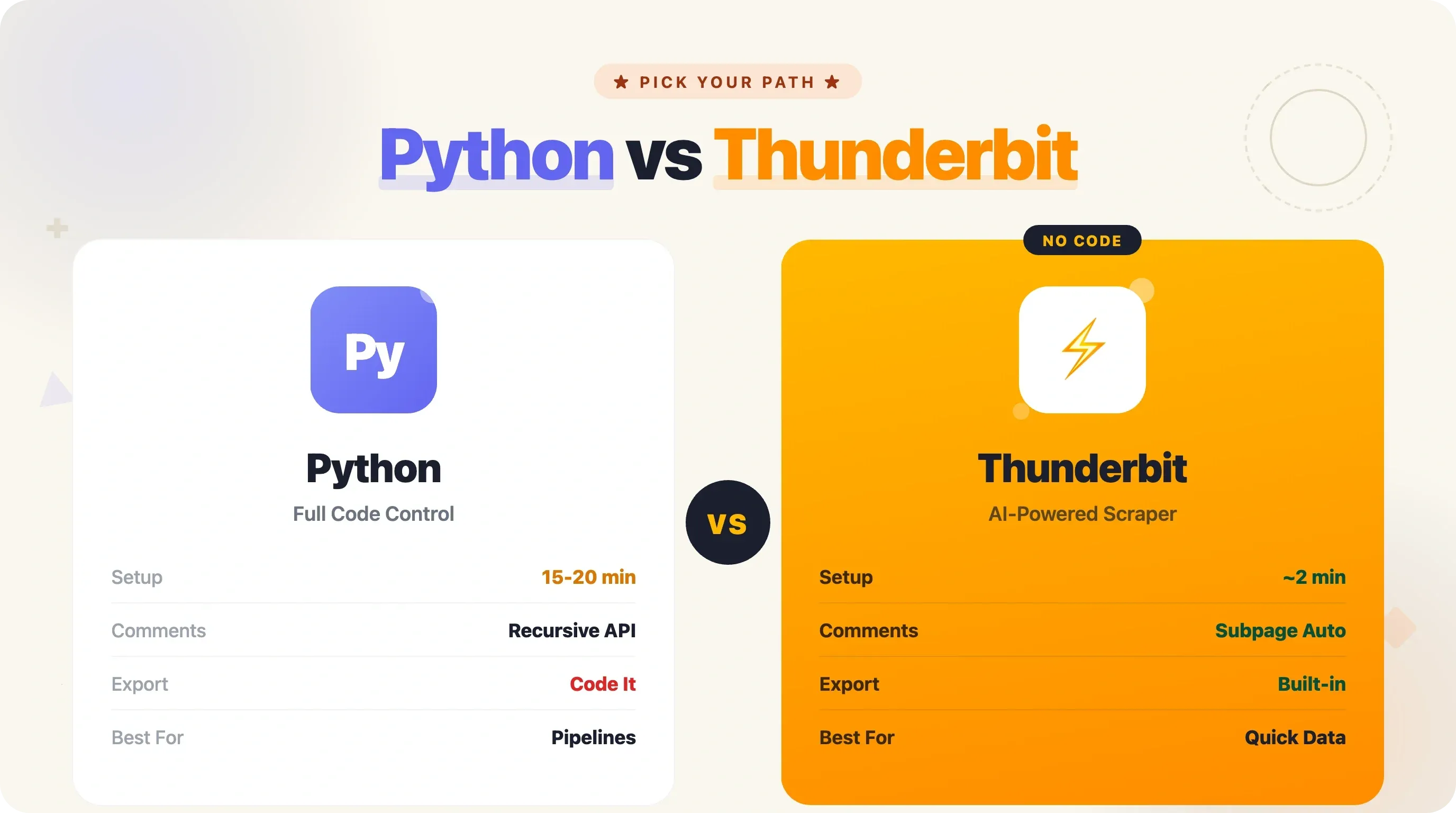
Thunderbit also handles pagination (clicking HN's "More" button automatically) and subpage scraping (visiting each story's comment page to pull in discussion data). For the comment enrichment use case, that's the equivalent of the recursive API code in Method 2 — but without writing a single line.
The tradeoffs are straightforward: Python is the right choice when you need custom logic, complex data transformations, scheduled automation pipelines, or you're learning to code. Thunderbit is the right choice when you need data fast, don't want to maintain code, or you're not a developer. Pick the tool that matches your situation.
Python vs. API vs. No-Code: Which Method Should You Pick?
Here's the full decision framework:
| Criteria | BeautifulSoup (HTML) | Firebase API | Algolia API | Thunderbit (No-Code) |
|---|---|---|---|---|
| Technical skill needed | Intermediate Python | Beginner Python | Beginner Python | None |
| Setup time | 10–15 min | 5–10 min | 5–10 min | 2 min |
| Maintenance burden | Medium (selectors break) | Low (stable JSON) | Low (stable JSON) | None |
| Data depth | Front page only | Any item, users | Search + historical | Front page + subpages |
| Comments | Hard | Easy (recursive) | Easy (nested tree) | Subpage scraping |
| Historical data | No | No | Yes (full archive) | No |
| Export options | Code it yourself | Code it yourself | Code it yourself | Built-in (Excel, Sheets, etc.) |
| Scheduling | cron / GitHub Actions | cron / GitHub Actions | cron / GitHub Actions | Built-in scheduler |
| Best for | Learning scraping | Reliable pipelines | Research & analysis | Quick data pulls |
If you're learning Python or building something custom, go with Method 1 or 2. If you need historical analysis, add the Algolia API. If you just want the data without the code, try Thunderbit.
Try Thunderbit for Hacker News Scraping
Conclusion and Key Takeaways
Here's what you now have in your toolkit:
- Two complete Python methods to scrape Hacker News — BeautifulSoup for HTML parsing and the Firebase API for clean JSON data
- Pagination techniques for scraping beyond page 1, including the Algolia API for historical data going back to 2007
- Export code for CSV, Excel, and Google Sheets — because data in a terminal isn't useful to anyone else on your team
- Production patterns — retry logic, caching, crawl/parse separation, and scheduled automation via cron or GitHub Actions
- A no-code alternative for when Python is more tool than you need
My recommendation: start with the Firebase API (Method 2) for most use cases. It's cleaner, more reliable, and gives you comment access without the headache of parsing nested HTML. Add the Algolia API when you need historical data. And keep Thunderbit bookmarked for those times when you just need a quick spreadsheet and don't want to spin up a whole Python project.
If you want to go deeper, try scraping HN comments for sentiment analysis, build a daily digest pipeline with GitHub Actions, or explore the Algolia API to track how technology trends have shifted over the past decade.
Try Thunderbit for Fast Hacker News Scraping Get Started Free
FAQs
Is it legal to scrape Hacker News?
HN's data is publicly available, and Y Combinator provides an official API specifically for programmatic access. The site's robots.txt allows scraping of read-only content (front page, item pages, user pages) but requests a 30-second crawl delay. Respect the delay, don't scrape interactive endpoints (voting, login), and you're on solid ground. For more on scraping ethics, see our web scraping legal implications guide.
Does Hacker News have an official API?
Yes. The HN Firebase API at hacker-news.firebaseio.com/v0/ is free, requires no authentication, and provides access to stories, comments, user profiles, and all feed types (top, new, best, ask, show, jobs). It returns clean JSON and has no stated rate limit, though being polite with request frequency is always recommended.
How do I scrape Hacker News comments with Python?
Using the Firebase API, fetch a story item to get its kids field (an array of top-level comment IDs). Each comment is itself an item with its own kids field for replies. Walk the tree recursively with a function that fetches each comment and its children. See the "Scrape Comments (Recursive Tree Walk)" section above for complete code. Alternatively, the Algolia API's /items/<id> endpoint returns the full nested comment tree in a single request — much faster for comment-heavy stories.
Can I scrape Hacker News without writing code?
Yes. Thunderbit's AI web scraper works as a Chrome extension — open HN, click "AI Suggest Fields," and it automatically identifies columns like title, URL, score, and author. Click "Scrape" and export directly to Excel, Google Sheets, Airtable, or Notion. It handles pagination and can even visit subpages to pull in comment data. No Python, no selectors, no maintenance.
How do I get historical Hacker News data?
The HN Algolia Search API is the best tool for this. Use the search_by_date endpoint with numericFilters=created_at_i>TIMESTAMP to filter by date range. You can search by keyword, filter by story type, and paginate through up to 500 pages of results. For bulk historical analysis, public datasets are also available on Google BigQuery (full archive), ClickHouse (28 million records), and Hugging Face (4 million stories).
Learn More




