
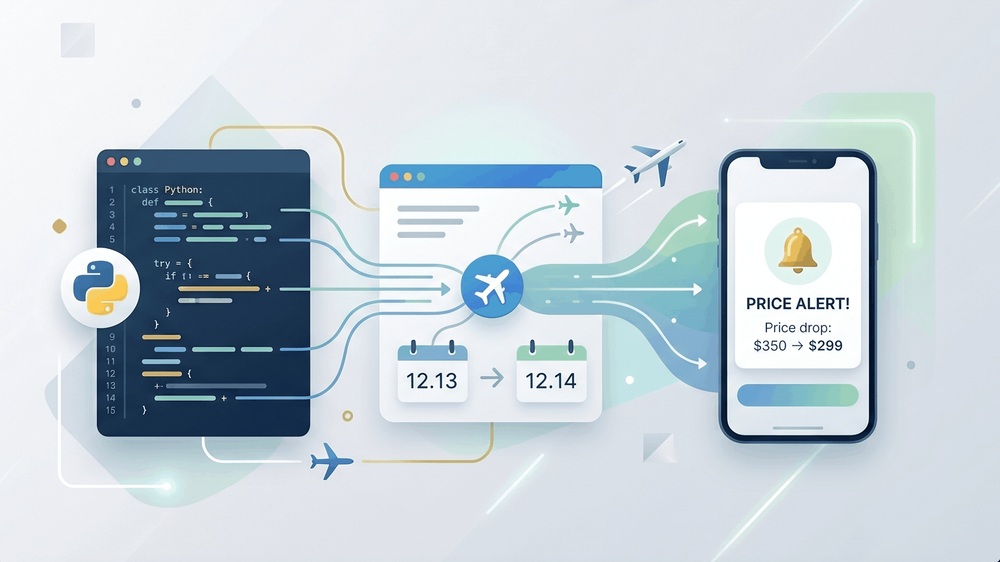
Google killed its Flights API back in 2018, but flight prices keep changing — up to 17 times in 48 hours for a single domestic route. If you want programmatic access to that data, scraping is basically the only game in town.
I've spent a lot of time testing different approaches to pulling flight data from Google, and the landscape has shifted dramatically — especially after Google deployed SearchGuard in January 2025. In this guide, I'll walk you through building a working Python scraper for Google Flights using Playwright, show you how to handle the anti-bot measures that trip up most people, and then extend the whole thing into an automated price tracker with alerts. If you'd rather skip the code entirely, I'll also cover a no-code shortcut using Thunderbit that gets you to the same result in about two minutes.
Why Scrape Google Flights with Python?
Google Flights dominates flight search. Its US mobile visibility surged to 47.6%, overtaking every major OTA. The travel metasearch market behind it is valued at $8.33 billion in 2024, growing at 30.2% CAGR. Yet since the QPX Express API was permanently shut down on April 10, 2018, there's no official way to access this data programmatically.
Meanwhile, flight prices fluctuate up to 50% for the same itinerary, with an average spread of about $20 between the lowest and highest price. Airlines like Delta use 77 fare buckets for dynamic pricing. The average US round-trip in early 2026 sits at $408, with airfares 14.9% higher year-over-year.
Dominant platform, no API, volatile pricing. That's why scraping Google Flights with Python has become one of the most popular projects on GitHub and travel forums alike.
Here's who benefits and how:
| User Type | Use Case | Key Benefit |
|---|---|---|
| Individual travelers | Track prices for specific routes over time | Save $50 per flight on average |
| Travel agencies | Competitive pricing intelligence | Real-time fare parity monitoring |
| Corporate travel teams | Cost optimization across routes | 10–30% savings on corporate travel |
| Developers | Build fare comparison apps | Programmatic access to pricing data |
| Researchers | Airline pricing volatility analysis | Academic and market research |
Users on forums are blunt about why they turned to scraping: "Google Flights API was discontinued and I should use web scraping instead" is a sentiment that comes up repeatedly. And the ROI is real — Hopper claims 95% prediction accuracy analyzing 5 billion+ price quotes daily, while Expedia's 2026 data shows booking 8–15 days ahead saves about $25 on domestic flights.
What Data Can You Scrape from Google Flights?
A Google Flights results page contains a surprisingly rich set of data fields. Here's what's typically available:
- Airline name (and logo)
- Departure time and airport code
- Arrival time and airport code
- Total flight duration
- Number of stops and layover details (airport, duration, overnight status)
- Ticket price (currency-specific)
- CO2 emissions (kg CO2e, with percentage difference vs. typical flights)
- Travel class, flight number, airplane model
- Legroom specifications
- Extensions (Wi-Fi, power outlets, media streaming)
- Price level indicator (low/typical/high)
- Delay warnings ("Often delayed by over 30 min")
Data availability varies by route, date, and ticket type (one-way vs. round-trip). Here's what a single scraped flight record looks like as JSON:
{
  "search_date": "2026-04-16",
  "route": "SFO-JFK",
  "departure_date": "2026-05-15",
  "flights": [
    {
      "airline": "United Airlines",
      "flight_number": "UA123",
      "departure_time": "08:00",
      "departure_airport": "SFO",
      "arrival_time": "16:35",
      "arrival_airport": "JFK",
      "duration_minutes": 335,
      "stops": 0,
      "price_usd": 287,
      "price_level": "low",
      "co2_kg": 156,
      "co2_vs_typical": "-12%",
      "travel_class": "Economy"
    }
  ]
}
Setting Up Your Python Environment
Before we write any scraping code, you'll need a few things in place.
Prerequisites:
- Difficulty: Intermediate
- Time Required: ~1–2 hours for the full tutorial
- What You'll Need: Python 3.7+, basic Python knowledge, a Chrome-based browser
Install the Required Libraries
We're using Playwright for browser automation (Google Flights is 100% JavaScript-rendered — static HTTP requests return nothing useful), plus a few helpers:
pip install playwright playwright-stealth pandas
playwright install chromium
- Playwright — headless browser automation, handles JavaScript rendering, built-in wait mechanisms
- playwright-stealth — patches common bot detection signals
- pandas — for data analysis and CSV export later
Why Playwright Over Selenium or Requests
Google Flights won't work with requests + BeautifulSoup alone — the page content is rendered entirely by JavaScript. You need a real browser.
| Feature | Playwright | Selenium | requests + BS4 |
|---|---|---|---|
| JS rendering | Full support | Full support | None |
| Speed | 42% faster overall | Baseline | N/A for this use case |
| Async support | Native | Sequential only | N/A |
| Memory usage | 30% less | Higher | Minimal |
| Bot detection evasion | Good (with stealth) | Easier to detect | N/A |
Playwright is faster, more modern, and has better async support. For Google Flights specifically, it's the clear winner.
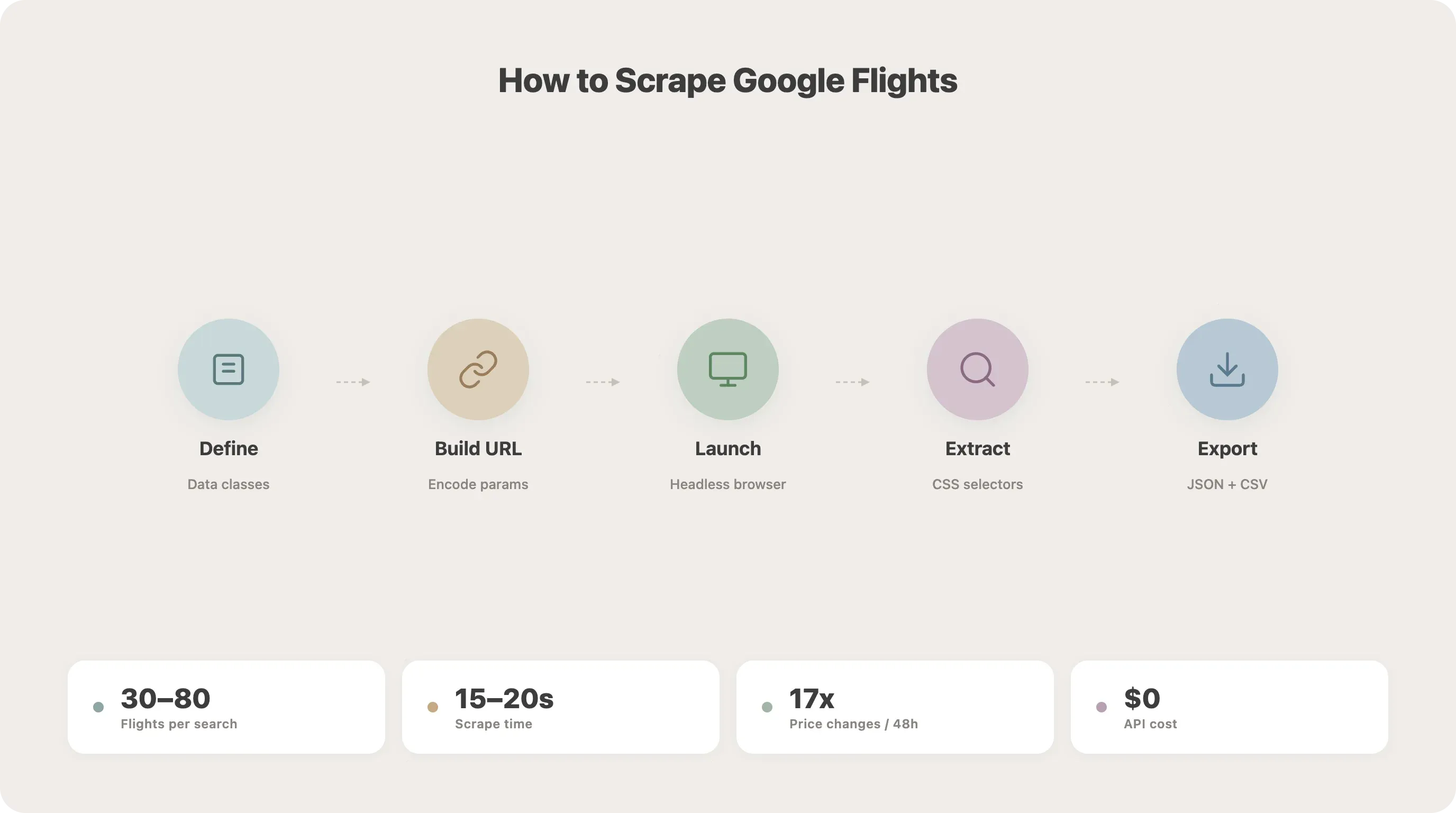
Step-by-Step: How to Scrape Google Flights with Python
This is the core of the tutorial. We'll build the scraper piece by piece.
Step 1: Define Your Data Classes
Start by structuring your search parameters and flight data with Python dataclasses. This keeps things clean and makes the code easier to extend later.
from dataclasses import dataclass, field
from typing import Optional, List

@dataclass
class SearchParams:
    origin: str          # e.g., "SFO"
    destination: str     # e.g., "JFK"
    departure_date: str  # e.g., "2026-05-15"
    return_date: Optional[str] = None
    trip_type: str = "one-way"  # "one-way" or "round-trip"
    travel_class: str = "economy"

@dataclass
class FlightData:
    airline: str = ""
    departure_time: str = ""
    arrival_time: str = ""
    duration: str = ""
    stops: str = ""
    price: str = ""
    co2_emissions: str = ""
Each field maps directly to what we'll extract from the page. Having this structure upfront means you won't be passing around messy dictionaries later.
Step 2: Understand the Google Flights URL Structure
Google Flights encodes search parameters using Base64-encoded Protobuf in the tfs URL parameter. You can either reverse-engineer this encoding or take the simpler approach: construct a natural-language query URL.
The simplest method is using the search query format:
https://www.google.com/travel/flights?q=flights+from+SFO+to+JFK+on+2026-05-15&curr=USD
For more control, you can build URLs programmatically:
def build_flights_url(origin: str, destination: str, date: str) -> str:
    base = "https://www.google.com/travel/flights"
    query = f"flights from {origin} to {destination} on {date}"
    return f"{base}?q={query.replace(' ', '+')}&curr=USD"
The alternative — reverse-engineering the Protobuf encoding — gives you more precise control but breaks when Google changes the internal format. Libraries like fast-flights on GitHub use Protobuf decoding to bypass HTML parsing entirely, but that's a more advanced approach.
Step 3: Launch the Browser and Navigate to Google Flights
Here's the Playwright setup. We're using playwright-stealth to reduce detection risk from the start.
import asyncio
from playwright.async_api import async_playwright
from playwright_stealth import Stealth

async def scrape_flights(params: SearchParams) -> List[FlightData]:
    async with Stealth().use_async(async_playwright()) as pw:
        browser = await pw.chromium.launch(
            headless=True,
            args=[
                "--disable-blink-features=AutomationControlled",
                "--disable-dev-shm-usage",
                "--no-first-run",
            ]
        )
        context = await browser.new_context(
            viewport={"width": 1920, "height": 1080},
            user_agent=(
                "Mozilla/5.0 (Windows NT 10.0; Win64; x64) "
                "AppleWebKit/537.36 (KHTML, like Gecko) "
                "Chrome/125.0.0.0 Safari/537.36"
            ),
            locale="en-US",
            timezone_id="America/New_York",
        )
        # Pre-set cookie consent to skip the popup
        await context.add_cookies([{
            "name": "SOCS",
            "value": "CAESHwgBEhJnd3NfMjAyNTAyMjctMF9SQzIaBXpoLUNOIAEaBgiAy6O-Bg",
            "domain": ".google.com",
            "path": "/"
        }])
        page = await context.new_page()
We're running headless for production (switch to headless=False for debugging), setting a realistic viewport and user agent, and pre-setting the SOCS cookie to skip the consent popup — more on that in the anti-bot section.
Step 4: Navigate to the Search Results
Load the constructed URL and wait for flight results to appear:
        url = build_flights_url(
            params.origin, params.destination, params.departure_date
        )
        await page.goto(url, wait_until="networkidle")

        # Wait for flight results to load
        await page.wait_for_selector(
            "li.pIav2d", timeout=15000
        )
If you see a timeout here, it usually means either the consent popup blocked the page (see Step 3's cookie fix) or Google is serving a CAPTCHA. We'll cover both scenarios in the anti-bot section.
Step 5: Load All Flight Results
Google Flights hides additional results behind a "Show more flights" button. You need to click it repeatedly until all flights are visible:
        # Click "Show more flights" until all results are loaded
        while True:
            try:
                more_button = page.locator(
                    'button:has-text("Show more flights")'
                )
                if await more_button.is_visible(timeout=3000):
                    await more_button.click()
                    await page.wait_for_timeout(2000)
                else:
                    break
            except Exception:
                break
This loop clicks the button, waits 2 seconds for new results to render, and stops when the button is no longer visible. In my testing, most routes have 1–3 pages of results.
Step 6: Extract Flight Data with CSS Selectors
Now we parse the actual flight data from the loaded page. Here are the selectors (verified as of April 2026 — see the maintenance section below for why this date matters):
        flights = []
        cards = await page.query_selector_all("li.pIav2d")

        for card in cards:
            flight = FlightData()

            # Airline name
            airline_el = await card.query_selector(
                "div.sSHqwe span:not([class])"
            )
            if airline_el:
                flight.airline = (await airline_el.inner_text()).strip()

            # Departure time
            dep_el = await card.query_selector(
                'span[aria-label*="Departure time"]'
            )
            if dep_el:
                flight.departure_time = (await dep_el.inner_text()).strip()

            # Arrival time
            arr_el = await card.query_selector(
                'span[aria-label*="Arrival time"]'
            )
            if arr_el:
                flight.arrival_time = (await arr_el.inner_text()).strip()

            # Duration
            dur_el = await card.query_selector("div.gvkrdb")
            if dur_el:
                flight.duration = (await dur_el.inner_text()).strip()

            # Stops
            stops_el = await card.query_selector("div.EfT7Ae span")
            if stops_el:
                flight.stops = (await stops_el.inner_text()).strip()

            # Price
            price_el = await card.query_selector(
                "div.FpEdX span"
            )
            if price_el:
                flight.price = (await price_el.inner_text()).strip()

            # CO2 emissions
            co2_el = await card.query_selector("div.O7CXue")
            if co2_el:
                flight.co2_emissions = (
                    await co2_el.get_attribute("aria-label") or ""
                ).strip()

            flights.append(flight)

        await browser.close()
        return flights
Fair warning: class names like pIav2d, sSHqwe, and FpEdX are generated by Google's Closure Compiler and can change on any build. The aria-label selectors are more stable. I'll cover a full maintenance strategy below.
Step 7: Save Results to JSON or CSV
Finally, save the scraped data with a timestamp (critical for price tracking later):
import json
from datetime import datetime
from dataclasses import asdict

async def main():
    params = SearchParams(
        origin="SFO",
        destination="JFK",
        departure_date="2026-05-15"
    )
    flights = await scrape_flights(params)

    output = {
        "search_date": datetime.now().isoformat(),
        "params": asdict(params),
        "flights": [asdict(f) for f in flights],
    }

    with open("flights.json", "w") as f:
        json.dump(output, f, indent=2)

    # Also save as CSV
    import pandas as pd
    df = pd.DataFrame([asdict(f) for f in flights])
    df["search_date"] = datetime.now().isoformat()
    df["route"] = f"{params.origin}-{params.destination}"
    df.to_csv("flights.csv", index=False)

    print(f"Scraped {len(flights)} flights")

asyncio.run(main())
Run this and you should see a flights.json and flights.csv with your results. In my tests, a SFO-JFK search typically returns 30–80 flight options and takes about 15–20 seconds to complete.
The Anti-Bot Survival Guide for Scraping Google Flights
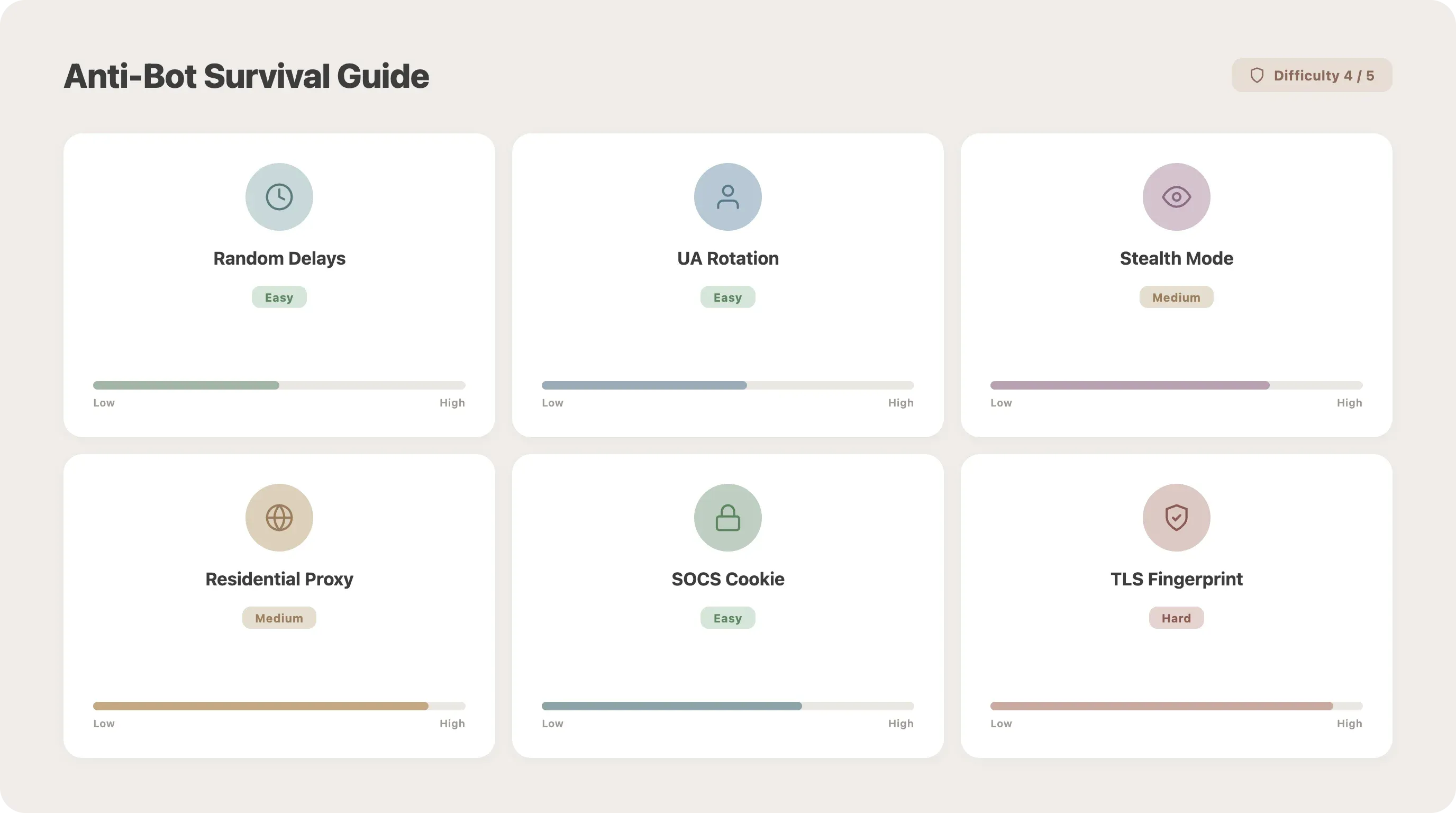
Most tutorials stop here. Most scrapers fail here. Google deployed SearchGuard in January 2025, which broke nearly every SERP scraper overnight. Google describes it as "the product of tens of thousands of person hours and millions of dollars of investment." Google Flights is rated 4/5 difficulty for scraping.
No competitor article covers this in depth, yet it's the #1 reason people's scrapers stop working. Here's what you're up against and how to handle it.
Random Delays Between Requests
The simplest defense against rate limiting. Two lines of code, medium effectiveness:
import time
import random

time.sleep(random.uniform(3, 7))
Add this between page navigations. Fixed intervals (like exactly 5 seconds every time) are a red flag — randomize.
User-Agent Rotation
Sending the same user-agent string on every request is an easy tell. Rotate from a list:
import random

USER_AGENTS = [
    "Mozilla/5.0 (Windows NT 10.0; Win64; x64) AppleWebKit/537.36 Chrome/125.0.0.0 Safari/537.36",
    "Mozilla/5.0 (Macintosh; Intel Mac OS X 14_5) AppleWebKit/605.1.15 Safari/605.1.15",
    "Mozilla/5.0 (X11; Linux x86_64) AppleWebKit/537.36 Chrome/124.0.0.0 Safari/537.36",
    "Mozilla/5.0 (Windows NT 10.0; Win64; x64; rv:126.0) Gecko/20100101 Firefox/126.0",
]

user_agent = random.choice(USER_AGENTS)
Headless Detection Bypass
Google checks for the navigator.webdriver flag and other automation signals. The playwright-stealth library handles most of these, but you should also set the launch arguments shown in Step 3. The key flags:
args=[
    "--disable-blink-features=AutomationControlled",
    "--disable-dev-shm-usage",
    "--no-first-run",
]
This gets you past basic detection. SearchGuard goes deeper — monitoring mouse velocity, keyboard timing, and scroll patterns — but for moderate-volume scraping, stealth mode plus realistic delays is usually enough.
Proxy Rotation: Datacenter vs. Residential
For anything beyond a handful of searches, you'll need proxies. The difference matters:
| Feature | Datacenter Proxies | Residential Proxies |
|---|---|---|
| Speed | 100–1,000 Mbps | 10–100 Mbps |
| Success rate (Google) | 20–40% | 85–95% |
| Cost | $0.10–$0.50/IP/month | $5–$15/GB |
| Detection risk | High | Very low |
Residential proxies are roughly 180x cheaper per successful request when scraping protected sites. Provider pricing in 2026: Smartproxy from $7/GB, Bright Data $8.40/GB, Oxylabs $8/GB.
Add a proxy to Playwright like this:
browser = await pw.chromium.launch(
    proxy={"server": "http://proxy-host:port",
           "username": "user", "password": "pass"}
)
Cookie Consent Popup Handling
Users consistently report the "I agree to terms" popup as a blocker: "first google will show you the 'I agree to terms and conditions' popup." The cleanest fix is pre-setting the SOCS cookie (shown in Step 3). If that doesn't work, click through it:
try:
    accept_btn = page.locator('button:has-text("Accept all")')
    if await accept_btn.is_visible(timeout=3000):
        await accept_btn.click()
        await page.wait_for_timeout(1000)
except Exception:
    pass  # No popup present
Note: the button text varies by locale — "Alle akzeptieren" in German, "Tout accepter" in French.
Anti-Bot Quick Reference
| Technique | Difficulty | Effectiveness | Code Needed? |
|---|---|---|---|
| Random delays (2–7s) | Low | Medium | 2 lines |
| User-agent rotation | Low | Medium | 5 lines |
| Headless detection bypass | Medium | High | Playwright launch args |
| playwright-stealth plugin | Medium | 60–80% on basic sites | pip install |
| Proxy rotation (datacenter) | Medium | Medium | Config |
| Proxy rotation (residential) | Medium | 85–95% success | Config |
| Cookie consent pre-set (SOCS) | Low | Required | 1 line |
For recommended safe rates: keep delays at 10–20 seconds between requests with IP rotation. Google's thresholds are roughly 100 requests/minute per IP before you get a 429, and sustained volumes above 1,000 requests/day per IP can trigger temporary bans.
Why Your Google Flights Selectors Keep Breaking (and How to Fix Them)
The #1 pain point, by a wide margin. Forum threads are full of variations on "all I get back is 14 empty lists." Every tutorial gives you selectors. None explain why they break.
Why Google Flights Selectors Change
It comes down to three things:
-
Closure Compiler obfuscation. Google uses Closure Stylesheets to generate class names like
BVAVmfandYMlIzviagoog.setCssNameMapping(). These change on every build — sometimes weekly. -
A/B testing. Different users see different HTML structures simultaneously. Your scraper might work on your machine but fail for someone in a different region.
-
Locale differences. EU users see different terms, layouts, and even data fields than US users.
Write Resilient Selectors
Prefer selectors tied to meaning rather than appearance:
# Fragile — breaks on every build
price_el = await card.query_selector("div.BVAVmf > div.YMlIz")

# More resilient — tied to accessibility labels
dep_el = await card.query_selector('span[aria-label*="Departure time"]')

# Also resilient — text-based matching
more_btn = page.locator('button:has-text("Show more flights")')
Selector stability hierarchy (most to least stable):
aria-labelattributes — tied to accessibility, rarely changeddata-*attributes — explicitly added for functionalityroleattributes — ARIA roles are semantic- Text-based selectors — match visible content
- Substring class matching — e.g.,
[class*="price"] - Full obfuscated class names — avoid these when possible
Add a Validation Function
Don't let broken selectors silently produce empty data. Catch it early:
import logging

logger = logging.getLogger(__name__)

def validate_flight(data: FlightData) -> bool:
    required = ["airline", "price", "departure_time",
                "arrival_time", "duration"]
    valid = True
    for field_name in required:
        if not getattr(data, field_name, ""):
            logger.warning(
                f"Missing '{field_name}' — selectors may need updating"
            )
            valid = False
    return valid
Run this on every scraped flight. If you start seeing warnings, it's time to inspect the page and update your selectors.
Selector Maintenance Strategy
- Check selectors monthly, or immediately when output quality drops
- Keep selectors in a separate config dictionary for easy updates
- Selectors in this article were last verified: April 2026
- Consider the fast-flights library as an alternative — it uses Protobuf decoding instead of CSS selectors, sidestepping this problem entirely (though it has its own fragility when Google changes internal data formats)
From One-Off Scrape to Automated Google Flights Price Tracker
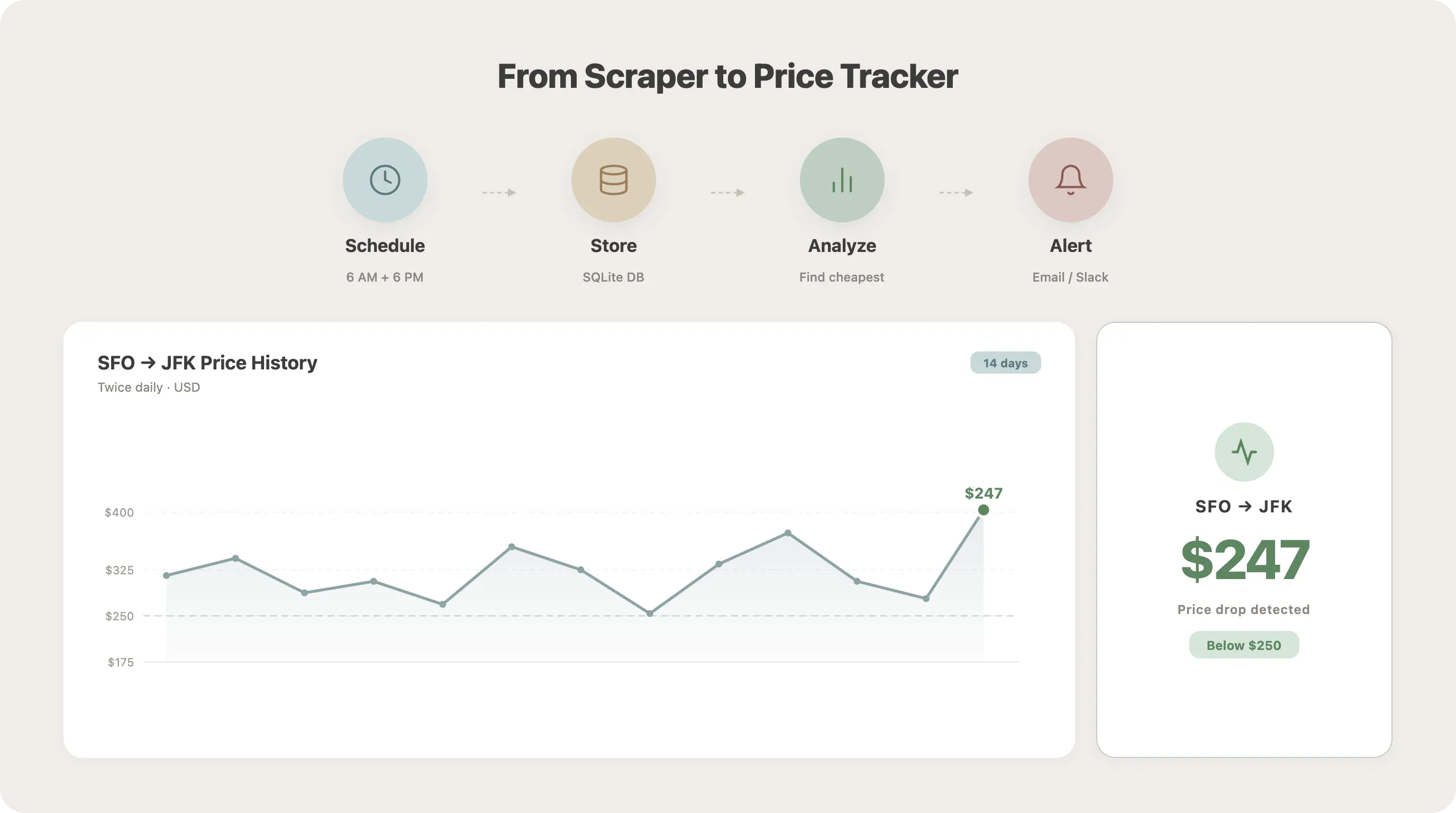
Most tutorials end at "save to JSON." The title of this article says "Price Alerts." Time to deliver.
Schedule Your Scraper to Run Automatically
Option 1: Python schedule library (simplest, cross-platform):
import schedule
import time

def run_scraper():
    asyncio.run(main())

schedule.every().day.at("06:00").do(run_scraper)
schedule.every().day.at("18:00").do(run_scraper)

while True:
    schedule.run_pending()
    time.sleep(60)
Option 2: cron job (Linux/Mac):
# Run at 6 AM and 6 PM daily
0 6,18 * * * cd /path/to/scraper && python scraper.py
Option 3: Windows Task Scheduler — create a basic task that runs python scraper.py on your preferred schedule.
The trade-off: all of these require a machine that's always on. If you're running this on a laptop that sleeps, you'll miss scrapes.
Store Historical Price Data
Switch from overwriting a JSON file to appending to a SQLite database:
import sqlite3
from datetime import datetime

def init_db():
    conn = sqlite3.connect("flights.db")
    conn.execute("""
        CREATE TABLE IF NOT EXISTS flights (
            id INTEGER PRIMARY KEY AUTOINCREMENT,
            scrape_date TEXT NOT NULL,
            route TEXT NOT NULL,
            airline TEXT,
            departure_time TEXT,
            arrival_time TEXT,
            duration TEXT,
            stops TEXT,
            price_usd REAL,
            co2_emissions TEXT
        )
    """)
    conn.execute(
        "CREATE INDEX IF NOT EXISTS idx_route_date "
        "ON flights(route, scrape_date)"
    )
    conn.commit()
    return conn

def save_flight(conn, route: str, flight: FlightData):
    price_num = float(
        flight.price.replace("$", "").replace(",", "")
    ) if flight.price else None
    conn.execute(
        "INSERT INTO flights "
        "(scrape_date, route, airline, departure_time, "
        "arrival_time, duration, stops, price_usd, co2_emissions) "
        "VALUES (?, ?, ?, ?, ?, ?, ?, ?, ?)",
        (datetime.now().isoformat(), route, flight.airline,
         flight.departure_time, flight.arrival_time,
         flight.duration, flight.stops, price_num,
         flight.co2_emissions)
    )
    conn.commit()
After a week of twice-daily scrapes, you'll have enough data to start spotting trends.
Analyze Price Trends and Set Alerts
Find the cheapest option from your historical data:
import pandas as pd
import sqlite3

conn = sqlite3.connect("flights.db")
df = pd.read_sql_query(
    "SELECT * FROM flights WHERE route = 'SFO-JFK'", conn
)
summary = df.groupby("scrape_date")["price_usd"].agg(
    ["min", "max", "mean"]
)
cheapest = df.loc[df["price_usd"].idxmin()]
print(
    f"Cheapest: ${cheapest['price_usd']:.0f} on "
    f"{cheapest['scrape_date']} ({cheapest['airline']})"
)
Trigger an email alert when a price drops below your threshold:
import smtplib
from email.mime.text import MIMEText

def send_price_alert(route, price, threshold, recipient):
    msg = MIMEText(
        f"Price drop alert! {route}: ${price:.0f} "
        f"(below your ${threshold:.0f} threshold)"
    )
    msg["Subject"] = f"Flight Deal: {route} at ${price:.0f}"
    msg["From"] = "alerts@example.com"
    msg["To"] = recipient

    with smtplib.SMTP_SSL("smtp.gmail.com", 465) as server:
        server.login("alerts@example.com", "your_app_password")
        server.send_message(msg)

# After each scrape, check for deals
min_price = df["price_usd"].min()
threshold = 250
if min_price < threshold:
    send_price_alert("SFO-JFK", min_price, threshold,
                     "you@email.com")
For recommended scraping frequency: twice daily is sufficient for personal price watching (random timing reduces detection risk). Every 4–6 hours if you're monitoring for a business. Hourly only during peak sale periods, and only temporarily.
The Easy Path: Thunderbit's Scheduled Scraper
If managing cron jobs, a running server, and proxy configs sounds like more infrastructure than you want to maintain, Thunderbit's Scheduled Scraper handles the same use case without any of that overhead. You describe the scraping interval in plain language, input your Google Flights URLs, and the scraper runs automatically on Thunderbit's cloud infrastructure — with anti-bot handling built in and results exported directly to Google Sheets, Excel, or Airtable. It's not a replacement for the full Python approach (you lose customization), but for the specific "I want a price-tracking spreadsheet" use case, it's the fastest path. You can try it on the free tier.
When Python Is Overkill: No-Code Ways to Scrape Google Flights
After building all of the above, I'll be honest: it's a lot of moving parts. Not everyone needs this level of control. Selectors break, proxies need rotating, cron jobs need monitoring. If your goal is "get flight prices into a spreadsheet regularly," there are faster options.
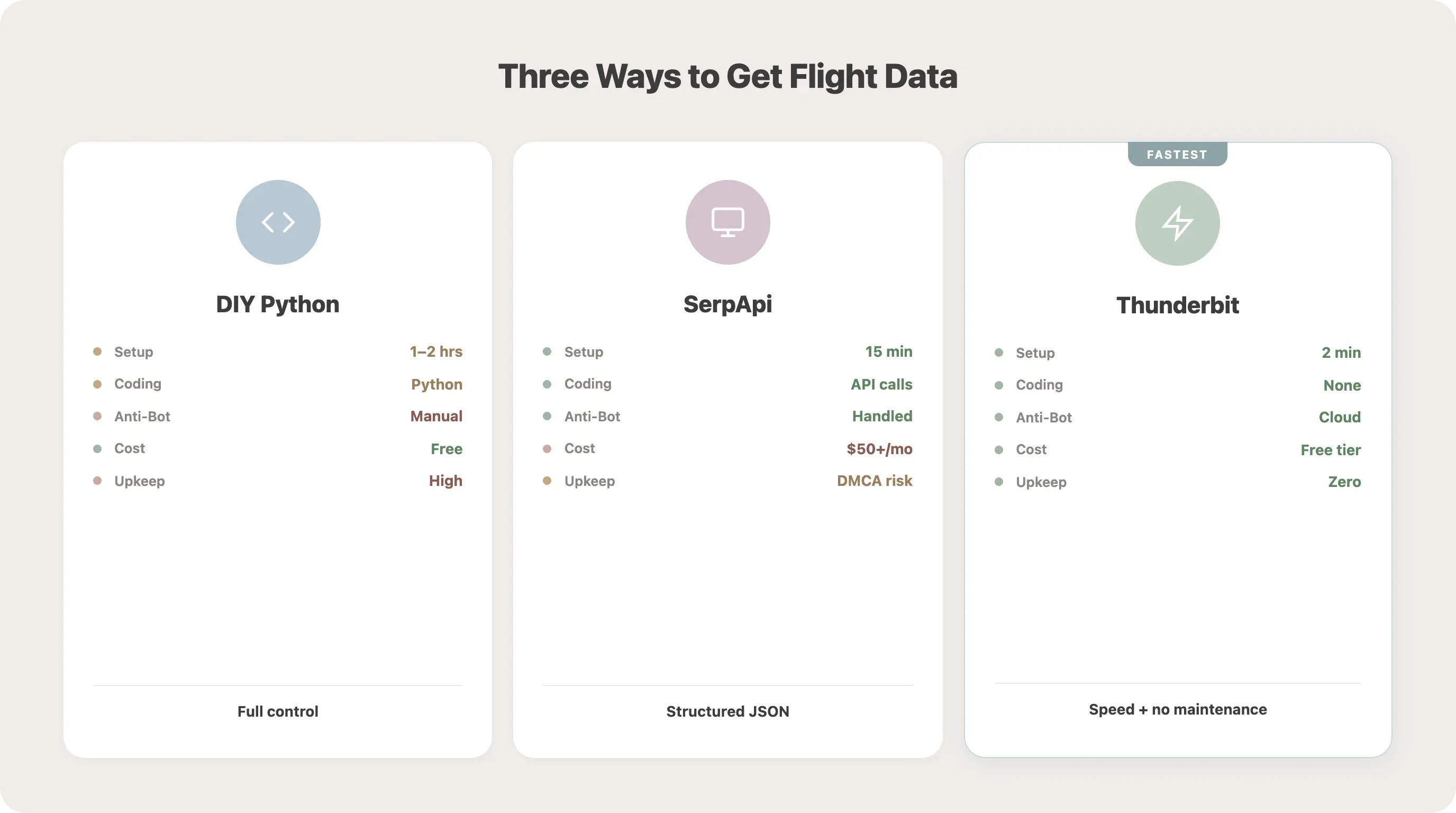
Comparison: DIY Python vs. API Services vs. Thunderbit
| Approach | Setup Time | Coding Required | Handles Anti-Bot | Scheduling | Cost |
|---|---|---|---|---|---|
| DIY Playwright (this tutorial) | 1–2 hours | Python (intermediate) | Manual config | Manual (cron) | Free + proxy costs |
| SerpApi Google Flights endpoint | 15 min | API calls only | Handled | Via API | ~$50+/mo |
| Thunderbit Chrome Extension | 2 min | None | Cloud scraping | Built-in scheduler | Free tier available |
A note on SerpApi: Google filed a DMCA lawsuit against SerpApi in December 2025, alleging their requests increased 25,000% over two years. That legal uncertainty is worth considering if you're evaluating API providers.
How Thunderbit Scrapes Google Flights
Open your Google Flights search results in Chrome, click Thunderbit's "AI Suggest Fields" button — the AI reads the page and suggests columns like airline, price, departure time, stops — review the suggested fields, and click "Scrape." Results appear in a table you can export to Excel, Google Sheets, Airtable, or Notion — all on the free tier.
For the price tracking use case specifically, Thunderbit's Scheduled Scraper and Cloud Scraping (which can handle 50 pages concurrently) replace the entire cron + proxy + server infrastructure.
Python gives you full control and unlimited customization. Thunderbit gives you speed and zero maintenance. Pick based on your actual goal. If you want to learn more about no-code scraping approaches, check out our guide on top no-code web scrapers.
Is Scraping Google Flights Legal? What You Need to Know
Forum users raise this regularly: "scraping Google Flights directly violates the TOS that Google has." Fair concern — especially since the API was discontinued and there's no sanctioned alternative.
TOS Violation vs. Legal Liability
Google's Terms of Service (updated May 22, 2024) state that users must not "access or use the Services or any content through the use of any automated means (such as robots, spiders or scrapers)." Violating ToS is a breach of contract (civil matter) — it's not the same as breaking the law.
The key legal precedent: hiQ v. LinkedIn (Ninth Circuit, 2022) established that scraping publicly available data does not violate the Computer Fraud and Abuse Act (CFAA). However, the case ended in settlement, and Google's December 2025 lawsuit against SerpApi uses a different legal theory — DMCA Section 1201 (circumvention of technological protection measures) — which is potentially more serious.
Best Practices for Responsible Scraping
- Rate-limit your requests — 10–20 second delays with IP rotation
- Don't scrape personal data — flight prices are publicly displayed aggregate data
- Don't circumvent CAPTCHAs programmatically (this is the DMCA risk area)
- Use the data for personal research, not to build a competing commercial product without proper licensing
- Consider official APIs where available
Alternative Data Sources
If scraping feels too risky for your use case, there are legitimate API options:
| Provider | Cost | Free Tier | Notes |
|---|---|---|---|
| SerpApi | $75–$3,750+/mo | 250 searches/mo | Direct Google Flights JSON (under legal scrutiny) |
| Kiwi Tequila | Free (affiliate model) | Unlimited | Best for startups and testing |
| Amadeus | Pay-as-you-go | 2,000 req/mo | 400+ airlines, booking capability |
| Skyscanner | Custom | Requires approval | 52 markets, 30 languages |
We wrote a deeper breakdown of web scraping legal implications if you want the full picture.
Conclusion and Key Takeaways
That was a lot. Here's what matters:
- Python + Playwright is the most flexible approach for scraping Google Flights, but it requires ongoing maintenance
- Anti-bot measures (delays, user-agent rotation, residential proxies) are not optional — they're essential for reliability, especially post-SearchGuard
- Selectors break often — use
aria-labeland text-based selectors where possible, validate your output, and keep a maintenance schedule - Automate with
scheduleor cron to turn a one-off scrape into a real price tracker with historical data and email alerts - Thunderbit offers a no-code alternative with built-in scheduling, cloud scraping, and anti-bot handling — ideal if your goal is a price-tracking spreadsheet rather than a coding project
- Respect legal boundaries — rate-limit, scrape only public data, and consider API alternatives for commercial use
Grab the code from this tutorial, or install the Thunderbit Chrome extension for the quick path. Either way, you'll be tracking flight prices instead of manually refreshing Google Flights.
For more Python scraping techniques, check out our guides on how to web scrape with Python and best Python web scraping tools.
FAQs
1. Can I scrape Google Flights without Python?
Yes. API services like SerpApi and Kiwi Tequila provide structured flight data via API calls (no browser automation needed). For a fully no-code approach, Thunderbit's Chrome extension can scrape Google Flights results directly from your browser with AI-suggested fields and one-click export.
2. Does Google block flight scraping?
Google uses bot detection (SearchGuard), CAPTCHAs, and rate limiting. With proper anti-bot measures — random delays, user-agent rotation, residential proxies, and stealth browser settings — you can maintain reliable scraping at moderate volumes. See the anti-bot section above for specific techniques and thresholds.
3. How often should I scrape Google Flights for price tracking?
Twice daily (at random times) is sufficient for personal price watching and keeps detection risk low. For business monitoring, every 4–6 hours with proxy rotation. Avoid hourly scraping except during short-term fare sales — it significantly increases the chance of getting blocked.
4. Is there a free Google Flights API?
The official Google QPX Express API was discontinued in April 2018. There is no free official replacement. The closest free option is the Kiwi Tequila API (affiliate model, unlimited searches). SerpApi offers 250 free searches per month. For most users, scraping or a no-code tool like Thunderbit is the practical path.
5. Why do my Google Flights CSS selectors keep returning empty data?
Google uses Closure Compiler to generate obfuscated class names that change on every build. A/B testing and locale differences also cause HTML structure to vary between users. The fix: use aria-label attributes and text-based selectors instead of class names, add a validation function to catch breakage early, and check your selectors monthly. See the selector maintenance section for a detailed strategy.
Learn More




