
If your Glassdoor scraper worked great in 2022 and now returns nothing but 403s, you're not alone. Forum after forum is littered with the same question: "Does anyone know why this scraper does not work anymore?"
The short answer: Glassdoor changed everything. Recruit Holdings folded Glassdoor into Indeed in July 2025, laid off 1,300 employees, and tightened the anti-bot stack to the point where vanilla Selenium and requests-based scrapers get blocked before the first byte of HTML loads. As of February 2026, Glassdoor logins are handled entirely through Indeed Login — so any tutorial that hard-codes a Glassdoor-specific login form is structurally broken at the source. Meanwhile, the platform still holds 180 million+ combined reviews, salaries, and insights across 2.5 million employers. That data is incredibly valuable for HR benchmarking, competitive intelligence, and sales prospecting — if you can actually get to it. This guide is the version that works after all those changes happened, and it covers all three Glassdoor data types (jobs, reviews, AND salaries) in a single place. I'll walk you through the Python approach with working 2025 code, explain exactly what blocks you and how to beat it, and show a no-code shortcut for anyone who'd rather skip the engineering entirely.
Why Scrape Glassdoor with Python in 2025?
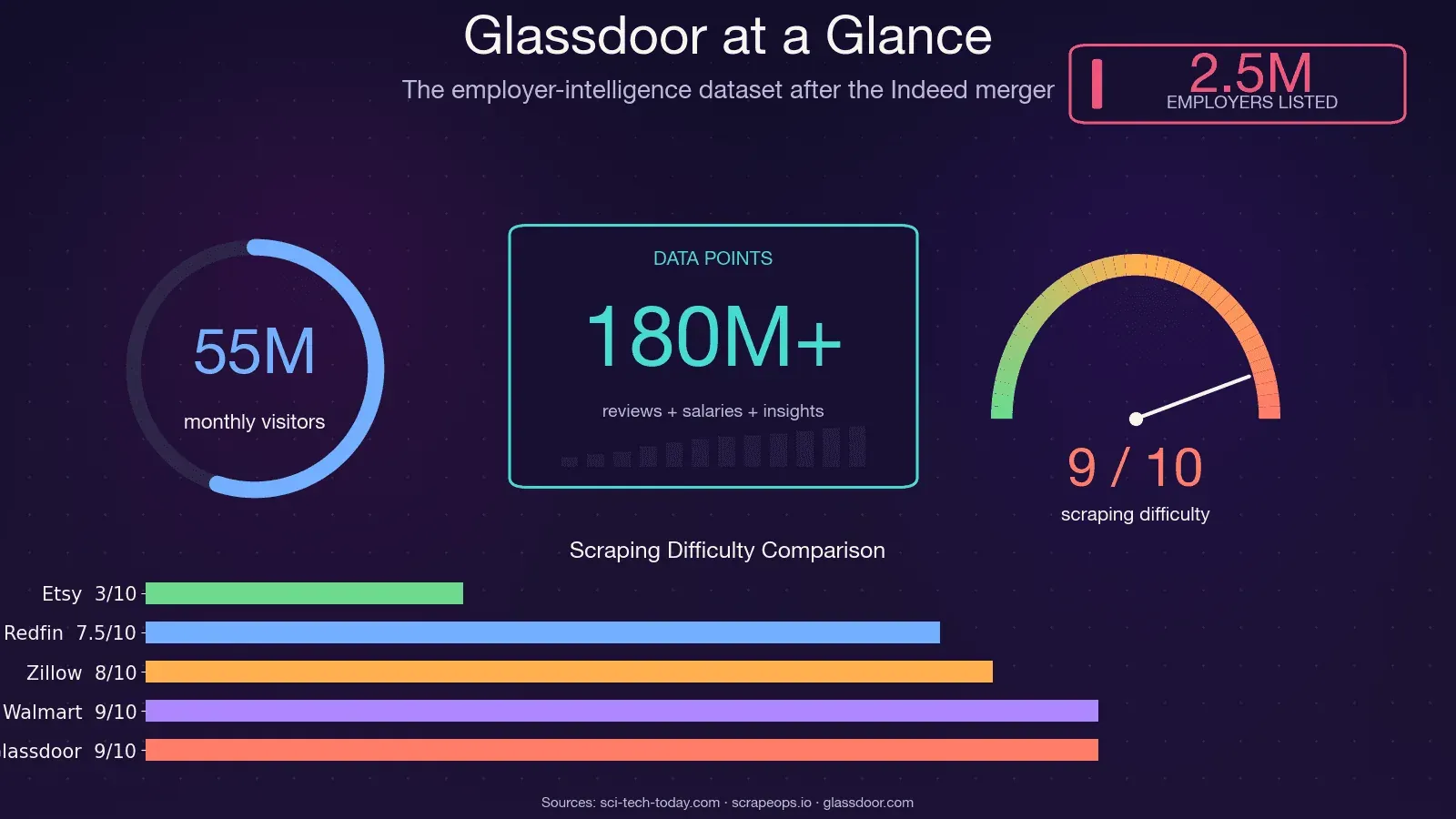
Glassdoor isn't just a job board. It's one of the richest employer-intelligence datasets on the web — used by roughly one-third of Fortune 500 companies and drawing about 55 million monthly unique visitors. The data sitting behind those pages fuels real business decisions across multiple teams.
Here's how different teams actually use Glassdoor data:
| Use Case | Data Type Needed | Who Benefits |
|---|---|---|
| Salary benchmarking | Salary distributions, sample sizes | HR, Total Rewards, Operations |
| Competitor hiring tracking | Job listings, posting velocity | Sales, Strategy, VC/Corp Dev |
| Employer brand monitoring | Review text, rating trends, CEO approval | HR, Marketing, Comms |
| Lead generation (growing companies) | Job listings + company info | Sales teams, SDRs |
| Market/academic research | All three | Analysts, Consultants, Researchers |
When the BLS couldn't publish jobs data during the October 2025 government shutdown, Glassdoor's own Economic Research team published an alternative jobs report from their dataset. That's how seriously institutional analysts treat this data now.
Python remains the go-to language because the ecosystem is unmatched — Playwright for browser automation, parsel/lxml for parsing, curl_cffi for TLS fingerprint bypass, and a massive community that shares working patterns. The problem isn't Python. The problem is that Glassdoor got a lot harder to scrape.
Scrape Glassdoor data with AI Get Started Free
If you want a no-code fallback for Glassdoor data extraction, Thunderbit can help you scrape jobs, reviews, and salary pages without building and maintaining a custom Python stack.
What Glassdoor Data Can You Actually Scrape?
Most tutorials only cover job listings. But user demand — based on forum threads, GitHub issues, and Reddit questions I've tracked — is highest for the two data types nobody teaches: reviews and salaries. Here's the full breakdown of what's extractable across all three categories.
Job Listings
The most accessible data type. You can pull: job title, company name, location, salary estimate, company rating, posted date, easy-apply badge, and job link. Job listings are partially available without logging in, though Glassdoor may throw a login popup after several pages.
Company Reviews
This is where it gets interesting for employer brand analysis. Extractable fields include: overall rating, sub-ratings (work-life balance, culture & values, diversity & inclusion, career opportunities, comp & benefits, senior management), pros text, cons text, reviewer job title, review date, and employment status. Full review text is login-gated — you'll see a snippet, but the complete pros/cons require authentication.
Salary Data
The most requested and most frustrating data type. You can extract: job title, base pay range, total compensation range, number of salary reports, and location. But salary pages are fully login-gated, and Glassdoor sometimes layers on a "contribute to unlock" flow where you need to submit your own salary before seeing others. No competing tutorial provides working code for this — we'll fix that.
What Requires Login vs. What Doesn't
This table saves you from discovering the hard way which pages will return empty data:
| Data Type | Available Without Login? | Notes |
|---|---|---|
| Job listing titles & basic info | Mostly yes | Popup may appear after several pages |
| Full job descriptions | Partial | Often gated after 2–3 views |
| Company reviews (full text) | No — login required | Snippet visible, full text gated |
| Salary data | No — login required | May also require "contribute to unlock" |
Why Your Old Glassdoor Scraper Is Probably Broken
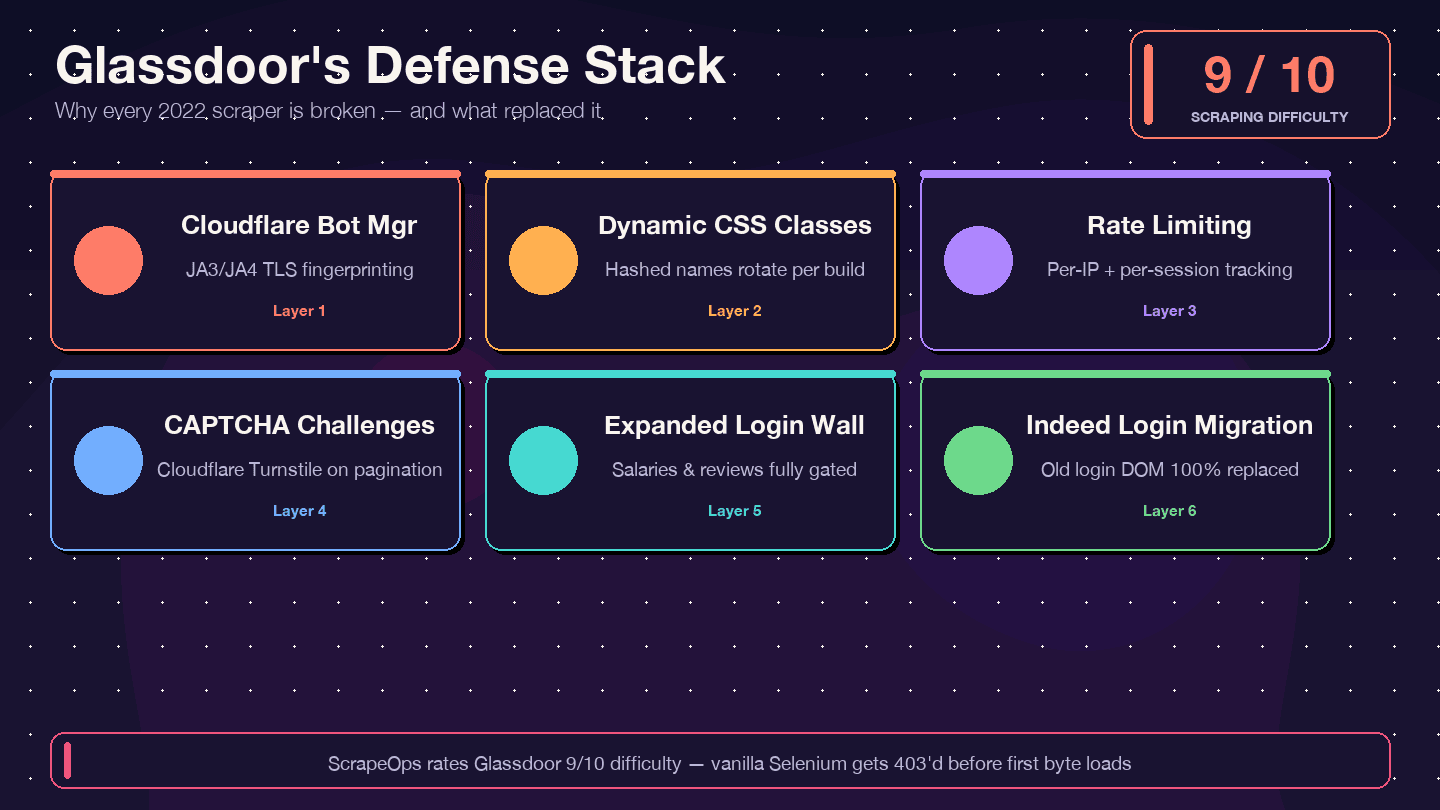
I want to be direct about this: if you're copying code from a 2021–2023 tutorial, it will not work. The most-starred legacy Glassdoor Selenium scraper on GitHub (MatthewChatham/glassdoor-review-scraper, ~1.4k stars) has 12+ open, unresolved issues — including "Glassdoor new UI design," "Cloudflare anti-bot protection," and "NoSuchElementException." The repo is effectively abandoned. Apify's glassdoor-jobs-scraper actor is marked DEPRECATED. ScrapeOps rates Glassdoor 9/10 overall scraping difficulty and 8/10 bypass difficulty.
Here's what changed and why old code breaks:
| Defense Layer | What Changed | Impact on Old Scrapers |
|---|---|---|
| Cloudflare Bot Management | Stricter JA3/JA4 fingerprinting since 2024 | Basic requests/Selenium scripts get 403'd immediately |
| Dynamic CSS class names | Class names randomized on each build | Old CSS selectors from tutorials break silently |
| Rate limiting + session tracking | Tighter per-IP and per-session limits | Scrapers get blocked after fewer pages |
| CAPTCHA challenges (likely Cloudflare Turnstile) | More frequent, especially during pagination | Headless browsers trigger challenges |
| Expanded login wall | More page types require authentication | Salary and review pages return empty data |
| Indeed Login migration (Feb 2026) | Glassdoor login form replaced entirely | Any code targeting old login DOM is dead |
Scrapfly's 2026 guide carries an explicit warning: "Glassdoor is known for its high blocking rate, so if you get None values while running the Python code, it's likely you're getting blocked." And a DEV.to post from March 2026 puts it bluntly: "Simple HTTP requests with requests or httpx get blocked instantly."
The countermeasures I'll show you — Patchright (a stealth Playwright fork), data-test attribute selectors, rotating residential proxies, and authenticated persistent sessions — are specifically designed to handle each of these layers.
Glassdoor API vs. Python Scraping: Pick the Right Approach First
Multiple forum threads ask "Should I just use the Glassdoor API?" — and the answer is: you can't.
The legacy Glassdoor Partner API is closed to new applicants. The developer portal still technically exists but returns HTTP 403. There was never a public reviews endpoint — MatthewChatham's scraper was created explicitly "because Glassdoor doesn't have an API for reviews." And there's no migration path for reviews or salaries under Indeed's Publisher API.
Here's the honest comparison:
| Factor | Glassdoor Partner API v1 | Python Scraping | Thunderbit (no-code) |
|---|---|---|---|
| Access | Closed to new applicants | Open (you implement) | Chrome extension |
| Job listings | Limited/sunset | Available with effort | Available |
| Company reviews | Never existed publicly | Yes (login needed) | Yes (via Browser Mode) |
| Salary data | Never existed publicly | Yes (login needed) | Yes |
| Rate limits | Undocumented | You control pacing | Credit-based |
| Setup effort | Can't register new apps | Hours to days | ~2 minutes |
| Maintenance burden | N/A | High (HTML changes break code) | Low (AI re-suggests fields) |
If you need reviews or salary data — and most people reading this do — Python scraping or a no-code tool is your only realistic option.
Before You Start
- Difficulty: Intermediate (you should be comfortable with Python and the terminal)
- Time Required: ~30–60 minutes for the full setup; ~10 minutes per data type after that
- What You'll Need:
- Python 3.10+ (3.11 or 3.12 recommended)
- Chrome browser installed
- A Glassdoor account (free — needed for salary and review data)
- Rotating residential proxies (for scraping more than a handful of pages)
- Optional: Thunderbit Chrome Extension if you want the no-code path
Tools and Libraries for Scraping Glassdoor with Python in 2025
The tooling landscape has shifted dramatically. Here's what actually works against Glassdoor's current defenses.
Why Patchright Is the Best Choice for Glassdoor
Patchright is a stealth fork of Playwright that patches the Runtime.Enable CDP leak — the specific technical reason vanilla Playwright fails on Cloudflare-protected sites. It uses the exact same API as Playwright, so if you know Playwright, you know Patchright. Version 1.58.2 (March 2026) is current and actively maintained.
Compared to the alternatives:
- Vanilla Playwright: Gets detected on Glassdoor's login page due to the Runtime.Enable leak
- Selenium + undetected-chromedriver: undetected-chromedriver's last release was February 2024 — it's effectively legacy. Scrapfly's benchmark found it "failed on every domain in our test"
- requests + BeautifulSoup: Can't render JavaScript, blocked immediately by Cloudflare's TLS fingerprinting
- curl_cffi: Excellent for the fast path (10–20x faster than a browser) when pages ship
__NEXT_DATA__in the initial HTML, but can't handle login or interstitial challenges
Supporting Libraries
- parsel (1.11.0) or lxml (6.0.4): Fast HTML/XPath parsing
- csv or pandas: Data export
- asyncio: Async scraping for faster pagination
Proxies: Residential Only
Glassdoor's Cloudflare layer aggressively challenges datacenter ASNs. Residential proxies reportedly drop block rates from 20–30% to under 5%. Entry pricing is around $1.75/GB from IPRoyal (promotional) or $3.00/GB from Decodo. For production scraping, budget $3–8/GB depending on volume.
Random delays between requests (3–8 seconds minimum, 5–15 seconds for longer runs) are essential regardless of proxy quality.
Step 1: Set Up Your Python Environment
Create your project folder and install the recommended stack:
mkdir glassdoor-scraper && cd glassdoor-scraper
python3.11 -m venv .venv
source .venv/bin/activate
pip install --upgrade pip

# Core stack
pip install patchright==1.58.2 parsel==1.11.0

# Install browser binaries
patchright install chromium

# Optional: fast path for __NEXT_DATA__ extraction
pip install "curl_cffi==0.15.0"
You should see Patchright download a Chromium binary. If patchright install chromium fails, check that you have sufficient disk space (~300MB) and that your Python version is 3.10+.
Step 2: Launch Patchright and Navigate to Glassdoor
Here's the baseline launch pattern that works against Glassdoor's Cloudflare layer:
from patchright.sync_api import sync_playwright
import random, time

with sync_playwright() as p:
    browser = p.chromium.launch(
        headless=False,          # headless is still more detectable
        channel="chrome",        # use real Chrome, not bundled Chromium
    )
    context = browser.new_context(
        viewport={"width": 1440, "height": 900},
        locale="en-US",
        timezone_id="America/New_York",
        user_agent=(
            "Mozilla/5.0 (Macintosh; Intel Mac OS X 10_15_7) "
            "AppleWebKit/537.36 (KHTML, like Gecko) "
            "Chrome/134.0.0.0 Safari/537.36"
        ),
    )
    page = context.new_page()
    page.goto(
        "https://www.glassdoor.com/Job/new-york-data-engineer-jobs-"
        "SRCH_IL.0,8_IC1132348_KO9,22.htm"
    )

    # Dismiss the login overlay — content is still in the DOM
    page.add_style_tag(content="""
        #HardsellOverlay, .LoginModal { display: none !important; }
        body { overflow: auto !important; position: initial !important; }
    """)

    page.wait_for_selector("[data-test='jobListing']")
    print("Page loaded — job listings visible.")
A few things to note here. The channel="chrome" flag tells Patchright to use your installed Chrome binary rather than its bundled Chromium — this produces a more authentic browser fingerprint. The add_style_tag trick hides Glassdoor's login modal (called #HardsellOverlay) without clicking anything. Scrapfly confirms that "all of the content is still there, it's just covered up by the overlay" — the HTML contains the data regardless of whether the modal is showing.
You should see a Chrome window open, navigate to the Glassdoor job search page, and display job listing cards without the login popup blocking the view.
Step 3: Scrape Glassdoor Job Listings
Identify Stable Selectors
Glassdoor randomizes CSS class names on every build — so the .jobCard_xyz123 selector from a 2023 tutorial will silently return nothing today. Instead, use data-test attributes, which are Glassdoor's internal QA convention and remain stable across deploys.
Here's the selector reference for job listing fields:
| Field | Selector |
|---|---|
| Job card container | [data-test="jobListing"] |
| Job title | [data-test="job-title"] |
| Job link | a[data-test="job-link"] |
| Company name | [data-test="employer-name"] |
| Location | [data-test="emp-location"] |
| Salary range | [data-test="detailSalary"] |
| Company rating | [data-test="rating"] |
| Posted date | [data-test="job-age"] |
| Pagination next | [data-test="pagination-next"] |
Extract Job Data
from parsel import Selector
import csv, random, time

def scrape_jobs(page, max_pages=5):
    all_jobs = []

    for page_num in range(1, max_pages + 1):
        html = page.content()
        sel = Selector(text=html)
        cards = sel.css('[data-test="jobListing"]')

        if not cards:
            print(f"Page {page_num}: No cards found — possible block or selector change.")
            break

        for card in cards:
            job = {
                "title": card.css('[data-test="job-title"]::text').get("").strip(),
                "company": card.css('[data-test="employer-name"]::text').get("").strip(),
                "location": card.css('[data-test="emp-location"]::text').get("").strip(),
                "salary": card.css('[data-test="detailSalary"]::text').get("").strip(),
                "rating": card.css('[data-test="rating"]::text').get("").strip(),
                "link": card.css('a[data-test="job-link"]::attr(href)').get(""),
                "posted": card.css('[data-test="job-age"]::text').get("").strip(),
            }
            if job["link"] and not job["link"].startswith("http"):
                job["link"] = "https://www.glassdoor.com" + job["link"]
            all_jobs.append(job)

        print(f"Page {page_num}: scraped {len(cards)} jobs")

        # Pagination
        next_btn = page.query_selector('[data-test="pagination-next"]')
        if next_btn and page_num < max_pages:
            next_btn.click()
            time.sleep(random.uniform(3, 8))
            page.wait_for_selector("[data-test='jobListing']")
        else:
            break

    return all_jobs
Save to CSV
def save_to_csv(jobs, filename="glassdoor_jobs.csv"):
    if not jobs:
        print("No jobs to save.")
        return
    keys = jobs[0].keys()
    with open(filename, "w", newline="", encoding="utf-8") as f:
        writer = csv.DictWriter(f, fieldnames=keys)
        writer.writeheader()
        writer.writerows(jobs)
    print(f"Saved {len(jobs)} jobs to {filename}")
A note on pagination limits: Glassdoor caps search results at roughly 30 pages regardless of total count. If you need more coverage, use filters (location, job type, salary range) to narrow each search rather than trying to paginate past the cap.
In my testing, scraping 5 pages of job listings (about 75 jobs) took around 45 seconds with random delays. Doing the same manually would take at least 20 minutes of copy-pasting.
Step 4: Scrape Glassdoor Company Reviews
This is the section no other tutorial provides working code for. Reviews are where the real employer intelligence lives — sentiment analysis, culture signals, management red flags.
Navigate to the Reviews Page
Review URLs follow this pattern: /Reviews/{Company}-Reviews-E{id}.htm. You can find the employer ID by searching for a company on Glassdoor and checking the URL.
def navigate_to_reviews(page, company_reviews_url):
    page.goto(company_reviews_url)
    page.add_style_tag(content="""
        #HardsellOverlay, .LoginModal { display: none !important; }
        body { overflow: auto !important; position: initial !important; }
    """)
    page.wait_for_selector('[data-test="review"]', timeout=15000)
The Hidden BFF Endpoint (the Cleanest Path)
Here's the biggest finding from my research: Glassdoor reviews have a working internal JSON API that bypasses HTML parsing entirely. The Scrapfly scrapers repo documents this endpoint, and it's far more reliable than DOM scraping.
import json, re, requests

def get_review_ids(page):
    """Extract employerId and dynamicProfileId from the reviews page HTML."""
    html = page.content()
    sel = Selector(text=html)
    script_text = sel.xpath(
        "//script[contains(text(), 'profileId')]/text()"
    ).get("")
    employer_match = re.search(r'"employer"\s*:\s*(\{[^}]+\})', script_text)
    if employer_match:
        meta = json.loads(employer_match.group(1))
        return meta.get("id"), meta.get("profileId")
    return None, None

def fetch_reviews_bff(page, employer_id, profile_id, max_pages=5):
    """Call Glassdoor's internal BFF endpoint for structured review data."""
    all_reviews = []
    cookies = {c["name"]: c["value"] for c in page.context.cookies()}

    for pg in range(1, max_pages + 1):
        payload = {
            "applyDefaultCriteria": True,
            "employerId": employer_id,
            "dynamicProfileId": profile_id,
            "employmentStatuses": ["REGULAR", "PART_TIME"],
            "language": "eng",
            "onlyCurrentEmployees": False,
            "page": pg,
            "pageSize": 10,
            "sort": "DATE",
            "textSearch": "",
        }
        resp = requests.post(
            "https://www.glassdoor.com/bff/employer-profile-mono/employer-reviews",
            json=payload,
            cookies=cookies,
            headers={"Content-Type": "application/json"},
        )
        if resp.status_code != 200:
            print(f"BFF returned {resp.status_code} on page {pg}")
            break

        data = resp.json()
        reviews = data.get("data", {}).get("employerReviews", {}).get("reviews", [])
        total_pages = data.get("data", {}).get("employerReviews", {}).get("numberOfPages", 1)

        for r in reviews:
            all_reviews.append({
                "title": r.get("summary", ""),
                "rating": r.get("ratingOverall"),
                "pros": r.get("pros", ""),
                "cons": r.get("cons", ""),
                "author_role": r.get("jobTitle", {}).get("text", ""),
                "date": r.get("reviewDateTime", ""),
                "recommend": r.get("isRecommend"),
            })

        print(f"Reviews page {pg}/{total_pages}: got {len(reviews)} reviews")
        if pg >= total_pages:
            break
        time.sleep(random.uniform(3, 6))

    return all_reviews
The BFF endpoint gives you clean JSON with all review fields — no HTML parsing, no CSS selector breakage. You need session cookies from an authenticated Playwright context (covered in Step 6 below), and you need to extract the employerId and dynamicProfileId from the reviews page HTML first.
HTML Fallback Selectors for Reviews
If the BFF endpoint changes or you prefer DOM parsing, here are the stable data-test selectors:
| Field | Selector |
|---|---|
| Review container | [data-test="review"] |
| Headline | [data-test="review-title"] |
| Overall rating | [data-test="overall-rating"] |
| Pros | [data-test="pros"] |
| Cons | [data-test="cons"] |
| Date | [data-test="review-date"] |
| Author role | [data-test="author-jobTitle"] |
Step 5: Scrape Glassdoor Salary Data
Salary pages are fully login-gated. You must have an authenticated session (Step 6) before any of this code will return real data.
Navigate to the Salary Page
Salary URLs follow: /Salary/{Company}-Salaries-E{id}.htm, paginated as _P{n}.htm.
def scrape_salaries(page, salary_url, max_pages=3):
    all_salaries = []

    for pg in range(1, max_pages + 1):
        url = salary_url if pg == 1 else salary_url.replace(".htm", f"_P{pg}.htm")
        page.goto(url)
        page.add_style_tag(content="""
            #HardsellOverlay { display: none !important; }
            body { overflow: auto !important; position: initial !important; }
        """)
        time.sleep(random.uniform(3, 7))

        html = page.content()
        sel = Selector(text=html)
        items = sel.css('[data-test="salary-item"]')

        if not items:
            print(f"Salary page {pg}: No items — possible login gate or block.")
            break

        for item in items:
            salary = {
                "job_title": item.css('[class*="SalaryItem_jobTitle__"]::text').get("").strip(),
                "salary_range": item.css('[class*="SalaryItem_salaryRange__"]::text').get("").strip(),
                "count": item.css('[class*="SalaryItem_salaryCount__"]::text').get("").strip(),
            }
            all_salaries.append(salary)

        print(f"Salary page {pg}: scraped {len(items)} entries")

    return all_salaries
Notice the [class*="SalaryItem_jobTitle__"] prefix-match pattern. Glassdoor's salary page uses CSS-module-hashed class names (e.g., SalaryItem_jobTitle__XWGpT) where the hash suffix rotates on every deploy. The prefix stays stable — the hash doesn't. Never hardcode the full class name.
Step 6: Get Past Glassdoor's Login Wall
This is the critical piece that unlocks salary data and full review text. The approach: log in once manually in a visible browser, save the authenticated session state, then reuse it for all subsequent scraping runs.
Save Your Authenticated Session
Run this script once. It opens a Chrome window, navigates to Glassdoor's login page (which now redirects to Indeed Login), and waits for you to log in manually:
import asyncio
from pathlib import Path
from patchright.async_api import async_playwright

STATE_FILE = Path("glassdoor_state.json")

async def login_and_save():
    async with async_playwright() as p:
        browser = await p.chromium.launch(headless=False, channel="chrome")
        context = await browser.new_context(
            viewport={"width": 1366, "height": 800},
            locale="en-US",
        )
        page = await context.new_page()
        await page.goto("https://www.glassdoor.com/profile/login_input.htm")
        print("Log in in the browser window, then press Enter here...")
        input()
        await context.storage_state(path=str(STATE_FILE))
        print(f"Session saved to {STATE_FILE}")
        await browser.close()

asyncio.run(login_and_save())
After you log in and press Enter, Patchright saves all cookies and local storage to glassdoor_state.json. This file contains your gdId, GSESSIONID, cf_clearance, and auth tokens.
Reuse the Session for Scraping
Every subsequent scraping run loads the saved state — no manual login needed:
async def scrape_with_auth(target_url):
    async with async_playwright() as p:
        browser = await p.chromium.launch(headless=True, channel="chrome")
        context = await browser.new_context(
            storage_state="glassdoor_state.json"
        )
        page = await context.new_page()
        await page.goto(target_url)
        await page.add_style_tag(
            content="#HardsellOverlay{display:none!important}"
        )
        await page.wait_for_load_state("networkidle")
        html = await page.content()
        await browser.close()
        return html
The saved session typically lasts 20–30 minutes of active use before Glassdoor re-challenges. For longer scraping runs, build in a check: if you get zero results from a page that should have data, re-run the login script to refresh your state file.
Detecting and Dismissing the Login Popup
For partially gated pages (job listings that show data but overlay a modal), the CSS injection approach from earlier steps works:
page.add_style_tag(content="""
    #HardsellOverlay, .LoginModal { display: none !important; }
    body { overflow: auto !important; position: initial !important; }
""")
This only works when the HTML already contains the data underneath the overlay. For fully server-side-gated pages (salaries, deep review pages), the authenticated session from Step 6 is the only path.
Tips to Keep Your Glassdoor Scraper Running
Glassdoor updates its frontend frequently. Here's how to build resilience into your scraper.
Prefer data-test Attributes Over Class Names
Glassdoor randomizes CSS class names but tends to keep data-test attributes stable. Always prefer [data-test="jobListing"] over .jobCard_abc123. When data-test isn't available (as with salary field classes), use the prefix-match pattern: [class*="SalaryItem_jobTitle__"].
Rotate Proxies and Randomize Delays
Use rotating residential proxies — datacenter IPs get challenged almost immediately. Add random delays of 3–8 seconds between page loads (5–15 seconds for longer runs). Avoid scraping during US business hours if possible, when Cloudflare's behavioral detection is most aggressive.
Monitor for Breakage
Build a simple check into your scraper: if a page that should contain data returns zero extracted records, treat it as a selector failure (not an empty result set) and alert yourself. Run a small test scrape weekly to catch breakage early — Glassdoor deploys frontend changes without announcement.
Use the __NEXT_DATA__ Fast Path When Possible
Glassdoor is a Next.js + Apollo GraphQL app. Many pages ship a <script id="__NEXT_DATA__"> tag containing the full GraphQL cache as JSON. Parsing this is far more resilient than DOM scraping and completely bypasses the Hardsell overlay:
import json

def extract_next_data(html):
    sel = Selector(text=html)
    raw = sel.css("script#__NEXT_DATA__::text").get()
    if raw:
        return json.loads(raw)["props"]["pageProps"].get("apolloCache", {})
    return None
This returns the structured Apollo cache with all job, review, and salary fields — no CSS selectors needed. It's the most resilient extraction strategy available, since it's the same data that powers Glassdoor's React frontend.
Skip the Code: Scrape Glassdoor with Thunderbit (No Python Required)
Not everyone reading this is a developer. HR teams, recruiters, sales ops analysts, and market researchers need Glassdoor data too — and they shouldn't have to manage Playwright contexts and proxy rotation to get it.
Thunderbit is an AI Web Scraper Chrome Extension that can extract the same jobs, reviews, and salary data without writing a line of code. I work on the Thunderbit team, so I'll be upfront about that — but the reason I'm including it here is that it genuinely solves the two hardest problems in Glassdoor scraping.
How Thunderbit Works on Glassdoor
The workflow is two clicks:
- Open any Glassdoor page in Chrome (job search, company reviews, salary page)
- Click AI Suggest Fields in the Thunderbit sidebar — the AI reads the page DOM and proposes columns (job title, company, rating, salary range, pros, cons, etc.)
- Click Scrape — data is extracted into a table without CSS selectors or browser automation code
Thunderbit has a pre-built Glassdoor company scraper template that extracts 23+ fields per company in a single run. For job listings, reviews, or salaries, the generic AI Suggest Fields workflow handles any Glassdoor URL.
Handling the Login Wall Without Code
This is Thunderbit's structural advantage for Glassdoor specifically. Browser Mode runs inside your own Chrome session — if you're logged into Glassdoor in Chrome, Thunderbit inherits those cookies automatically. The salary and review login wall that blocks server-side scrapers simply doesn't apply. No cookie management, no persistent contexts, no session code.
Subpage Scraping for Enrichment
Start from a list page (e.g., 30 companies from a search), let Thunderbit enumerate the rows, then enable subpage scraping to visit each company's review or salary page and enrich the table with full descriptions, review text, or salary details.
Export to Business Tools
Unlike Python scripts that output CSV or JSON, Thunderbit exports directly to Google Sheets, Airtable, Notion, or Excel — free on every plan. Particularly useful for teams who need to share and analyze data collaboratively.
Python vs. Thunderbit: When to Use Which
| Scenario | Recommended Approach |
|---|---|
| Building a recurring data pipeline | Python + Patchright |
| One-off research or small team project | Thunderbit |
| Need programmatic control over every field | Python |
| Non-developer who needs Glassdoor data today | Thunderbit |
| Scraping 1,000+ pages in a single run | Python + proxies |
| Scraping 30 companies with enrichment | Either works — Thunderbit is faster to set up |
Thunderbit pricing starts at free (6 pages/month), with the Pro plan at $38/month for 3,000 credits. At 1 credit per output row (2 credits for subpage scraping), that's enough for roughly 33 runs of 30 enriched companies per month.
Try Thunderbit for Glassdoor scraping
Is It Legal to Scrape Glassdoor?
I'll keep this brief and factual. Glassdoor's Terms of Service explicitly prohibit automated scraping: "You may not use any robot, spider, scraper... to access the Services for any purpose without our express written permission."
The legal landscape, however, is more nuanced than a single ToS clause:
- Meta v. Bright Data (N.D. Cal., Jan 2024): The court held that if you never log in, you never agreed to the ToS, and public logged-off scraping doesn't violate it
- hiQ Labs v. LinkedIn (9th Cir.): The CFAA doesn't apply to automated collection of publicly accessible data — but fake accounts and logged-in scraping are a different story
- Van Buren v. United States (Supreme Court, 2021): Narrowed "exceeds authorized access" under the CFAA
The practical takeaway: scraping public job listings without logging in sits in a comparatively safer legal zone. Scraping with a logged-in session means you accepted the ToS at signup, and they explicitly prohibit it. This applies equally to Python scripts and Thunderbit's Browser Mode.
Ethical guidelines worth following regardless:
- Rate-limit well below human browsing speed
- Don't scrape or resell personally identifying reviewer information
- Respect robots.txt directives
- Pull only the fields you actually need
Conclusion: Which Method Is Right for You?
This guide covered all three Glassdoor data types — jobs, reviews, and salaries — with working 2025 code that accounts for the Indeed Login migration, Cloudflare Bot Management, and the CSS-module class name rotation that broke every older tutorial.
Here's the decision framework:
| Your Situation | Best Path |
|---|---|
| Developer building a data pipeline | Python + Patchright (follow the step-by-step above) |
| One-off research or recurring small pulls | Thunderbit (no code, browser-based) |
| Only need basic job listings at small scale | Check if Glassdoor API access is still available first (probably not) |
| Need salary or review data specifically | Must use Python scraping or Thunderbit — the API never covered these |
| Team of non-developers who need shared data | Thunderbit → export to Google Sheets |
Glassdoor's defenses will continue evolving. Selectors will break. New challenges will appear. Bookmark this guide — and if you want a deeper look at web scraping tools and techniques, check out our posts on best automated web scraping tools, how to scrape data from a website with Python, and best job scraping tools. You can also watch walkthroughs on the Thunderbit YouTube Channel.
Try Thunderbit for Glassdoor data extraction Get Started Free
FAQs
1. Can you scrape Glassdoor without logging in?
Yes, for most job listing data and top-line company ratings. No, for full salary breakdowns or complete review text beyond the first few pages. The #HardsellOverlay is a CSS-only modal — the underlying HTML still contains first-page data — but deeper content is server-side gated behind Glassdoor's "give-to-get" wall.
2. What Python library works best for scraping Glassdoor in 2025?
Patchright (a stealth Playwright fork) is the default recommendation. It patches the Runtime.Enable CDP leak that vanilla Playwright has and that Cloudflare explicitly checks for. For listing pages that ship __NEXT_DATA__ in the initial HTML, curl_cffi with impersonate="chrome124" is 10–20x faster but can't handle login-gated pages.
3. How do I avoid getting blocked when scraping Glassdoor?
Use Patchright or rebrowser-playwright (not vanilla Playwright or Selenium). Rotate residential proxies — datacenter IPs get challenged immediately. Add random delays of 3–8 seconds between pages. Persist cookies (gdId, cf_clearance, GSESSIONID) across requests. Expect a 20–30 minute session window before re-challenge.
4. Is there a Glassdoor API I can use instead of scraping?
Effectively no. The legacy Partner API is closed to new applicants, a public reviews endpoint never existed, and there's no migration path under Indeed's Publisher API. Scraping or a no-code tool like Thunderbit is the only practical option for reviews and salary data.
5. How often do Glassdoor scrapers break?
Frequently. Glassdoor deploys frontend changes without announcement, and CSS-module class name hashes rotate on every build. The most stable extraction strategies are: (1) data-test attribute selectors, (2) the __NEXT_DATA__ JSON blob, and (3) the internal BFF reviews endpoint. Build in a zero-results check and run a small test scrape weekly to catch breakage early.
Learn More




