
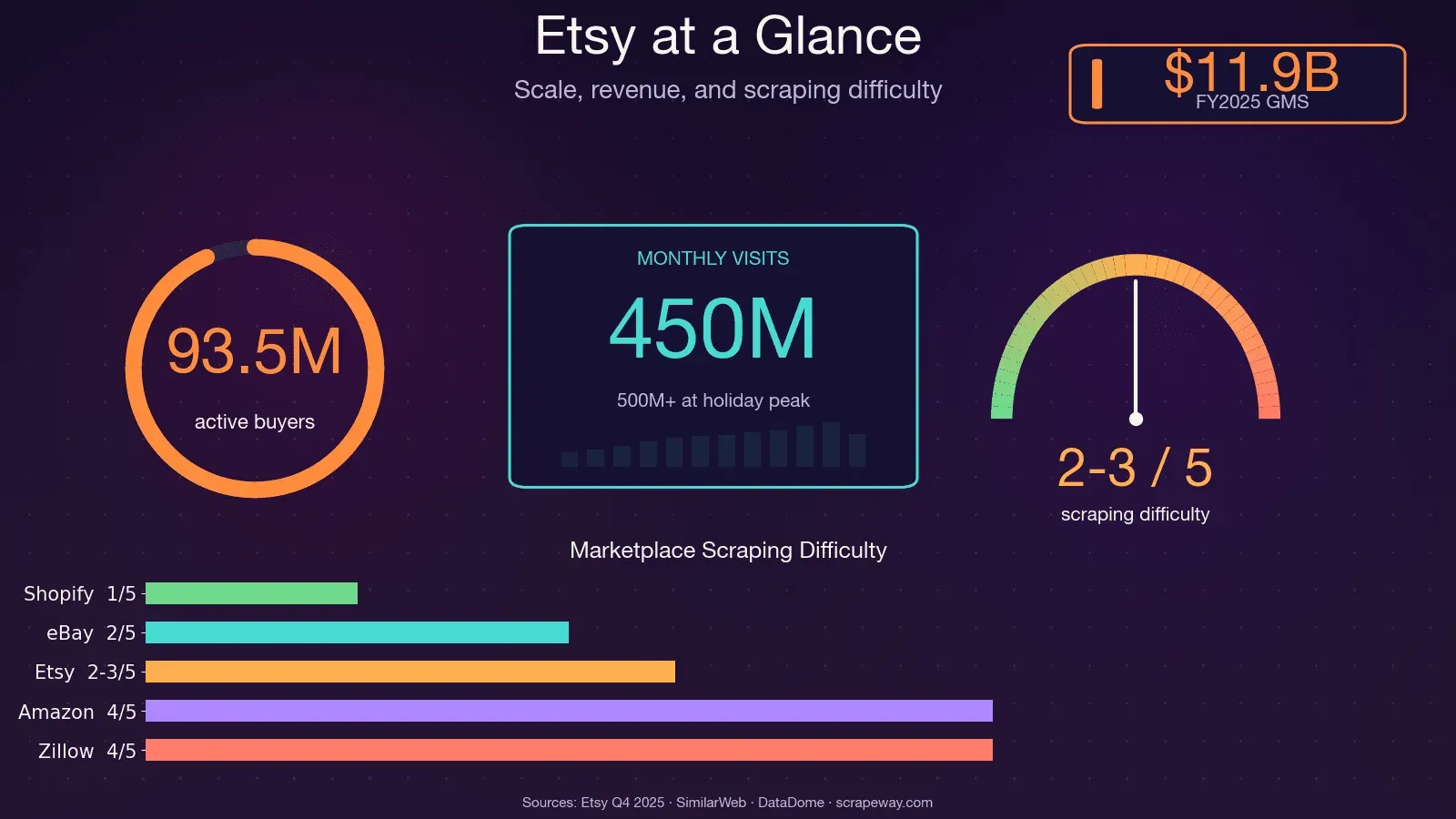
Etsy has over 100 million active listings, 5.6 million sellers, and roughly 450 million monthly visits. That's a lot of publicly available data on pricing, trends, reviews, and competitors — and if you've ever tried to collect it by hand, you know the pain.
I spent a weekend once trying to manually catalog competitor products for a market research project. By product number 30, I was questioning every life choice that led me to that spreadsheet. The thing is, Etsy data is incredibly valuable for pricing analysis, product development, niche discovery, and seller benchmarking — but only if you can actually get it at scale. That's what this guide is about: a single tutorial that covers how to scrape Etsy with Python across all four major page types (search results, product pages, shop pages, and reviews), plus honest guidance on Etsy's anti-bot defenses and a no-code alternative for folks who'd rather skip the scripting entirely.
What Does It Mean to Scrape Etsy with Python?
Web scraping, in plain terms, means writing code that visits web pages and automatically extracts the data you care about — product names, prices, descriptions, images, ratings, reviews, shop details — and organizes it into a structured format like a spreadsheet or database.
Python is the go-to language for this kind of work. It's beginner-friendly, has a huge community, and offers a deep library ecosystem built for scraping: Requests (for fetching pages), BeautifulSoup (for parsing HTML), Selenium and Playwright (for browser automation), and pandas (for organizing and exporting data). Python consistently ranks among the top 3 most popular languages in Stack Overflow's annual developer survey, and its scraping libraries are among the most downloaded on PyPI.
When you scrape Etsy, you're pulling data from the HTML (and sometimes hidden JSON) that Etsy serves to your browser. The kinds of data you can extract include:
- Product names, prices, descriptions, images, and variations
- Seller/shop info (name, sales count, location, rating)
- Ratings and full review text
- Search result listings, categories, and trend signals
Why Scrape Etsy? Real-World Use Cases That Drive ROI
Scraping Etsy isn't just a technical exercise — it's a competitive advantage. Whether you're a seller, a product manager, or a data analyst, having structured Etsy data at your fingertips can directly impact your bottom line.
| Use Case | What You Scrape | Who Benefits | Business Impact |
|---|---|---|---|
| Competitive Pricing Analysis | Search results + product prices | E-commerce ops, sellers | Dynamic pricing can boost revenue 5–22% on average |
| Niche & Trend Discovery | Search results, trending listings | Founders, analysts | Spot trending niches early (e.g., "preppy pajamas" saw +1,112% search growth) |
| Product Development & Improvement | Reviews, product details | Product teams | One kitchenware brand reclaimed #1 Best Seller in 60 days using review sentiment data |
| SEO & Keyword Research | Search results, product titles/tags | Marketing teams | Identify high-demand, low-competition keywords |
| Seller Benchmarking | Shop pages, sales counts | Sales teams, analysts | Build qualified lead lists at $0.01–0.10/record vs. purchased lists |
| Inventory & Stock Monitoring | Product availability | E-commerce ops | React faster to competitor stock changes |
Each of these use cases requires data from different Etsy page types — which is exactly why this tutorial covers all four.
Time savings: manual vs. automated
- Manual Etsy research: 30–45 minutes per product (50–75 hours for 100 products)
- Automated scraping: 100 listings in 2–5 minutes
- AI-powered scraping is 30–40% faster with up to 99.5% accuracy
Etsy API vs. Web Scraping: Which Should You Choose?
Before you write a single line of code, it's worth asking: should I use Etsy's official API or scrape the site directly? This is a question I see come up constantly in forums, and the answer depends on what data you need.
What the Etsy API Can and Can't Do
Etsy offers an API v3 with OAuth 2.0 authentication. It works for accessing your own shop's data — listings, orders, receipts. But it has real limitations:
- Competitor data: The API is mostly restricted to your own shop. You can't pull another seller's pricing, sales, or listings.
- Reviews: There's no robust endpoint for full review text in bulk.
- Rate limits: 10 requests/second, 10,000 requests/day by default. The offset ceiling is 12,000 records.
- AI/ML use: Explicitly rejected in app review.
- Documentation: Community complaints are widespread — poor examples, deprecated endpoints, slow support.
When Web Scraping Is the Better Path
If you need competitor intelligence, review sentiment, cross-shop analysis, or data beyond what the API exposes, scraping is the way to go. The tradeoff: you'll face Etsy's anti-bot defenses (more on that below), and you'll need to invest in setup.
Comparison Table: API vs. Scraping vs. No-Code
| Criteria | Etsy Official API | Python Web Scraping | Thunderbit (No-Code) |
|---|---|---|---|
| Access to product prices | ✅ (limited fields) | ✅ Full HTML/JSON-LD | ✅ AI extracts any visible field |
| Reviews data | ❌ Not available in bulk | ✅ Via reviews endpoint/HTML | ✅ Subpage scraping |
| Competitor shop data | ❌ Own shop only | ✅ Any public shop | ✅ Any public shop |
| Auth required | ✅ OAuth 2.0 | ⚠️ Cookies for logged-in data | ⚠️ Browser scraping for login |
| Anti-bot risk | None | HIGH (DataDome) | Handled (browser-native) |
| Setup time | Medium (API keys, OAuth) | High (code + proxies) | ~2 minutes |
If you need competitor data, reviews, or cross-shop analysis, the API simply doesn't cover it. That's the honest picture.
Pick Your Python Scraping Approach Before Writing a Line of Code
A question I see on Reddit and Stack Overflow all the time: "Should I use Requests + BeautifulSoup, Selenium, a proxy API, or something else entirely?" The right answer depends on your skill level, budget, and use case.
| Approach | Best For | Learning Curve | Handles JS? | Anti-Bot Handling | Cost |
|---|---|---|---|---|---|
| Requests + BeautifulSoup | Devs wanting full control | Medium | ❌ | Manual (headers, proxies) | Free + proxy costs |
| Selenium / Playwright | JS-heavy pages, login flows | High | ✅ | Partial (browser fingerprint) | Free + proxy costs |
| Proxy API services | Scale + anti-bot bypass | Medium | ✅ (via API) | ✅ Built-in | $49+/mo |
| Thunderbit (no-code) | Non-devs, quick extraction | Very Low | ✅ (browser-native) | ✅ (browser session) | Free tier available |
If you want full control and are comfortable with Python, go with Requests + BeautifulSoup. If you need JS rendering or login flows, use Selenium. If you want anti-bot bypass at scale, consider a proxy service. And if you want Etsy data without writing or maintaining code, Thunderbit is worth a look — more on that later.
How Etsy Fights Back: Understanding DataDome Anti-Bot Protection
Most scraping guides will tell you "just use a proxy" and move on. That's not enough for Etsy. Etsy uses DataDome, one of the most aggressive anti-bot systems on the web. DataDome's own case study highlights Etsy as a success story, noting that scrapers once accounted for ~1% of Etsy's computing costs.
What Is DataDome and How Does It Work?
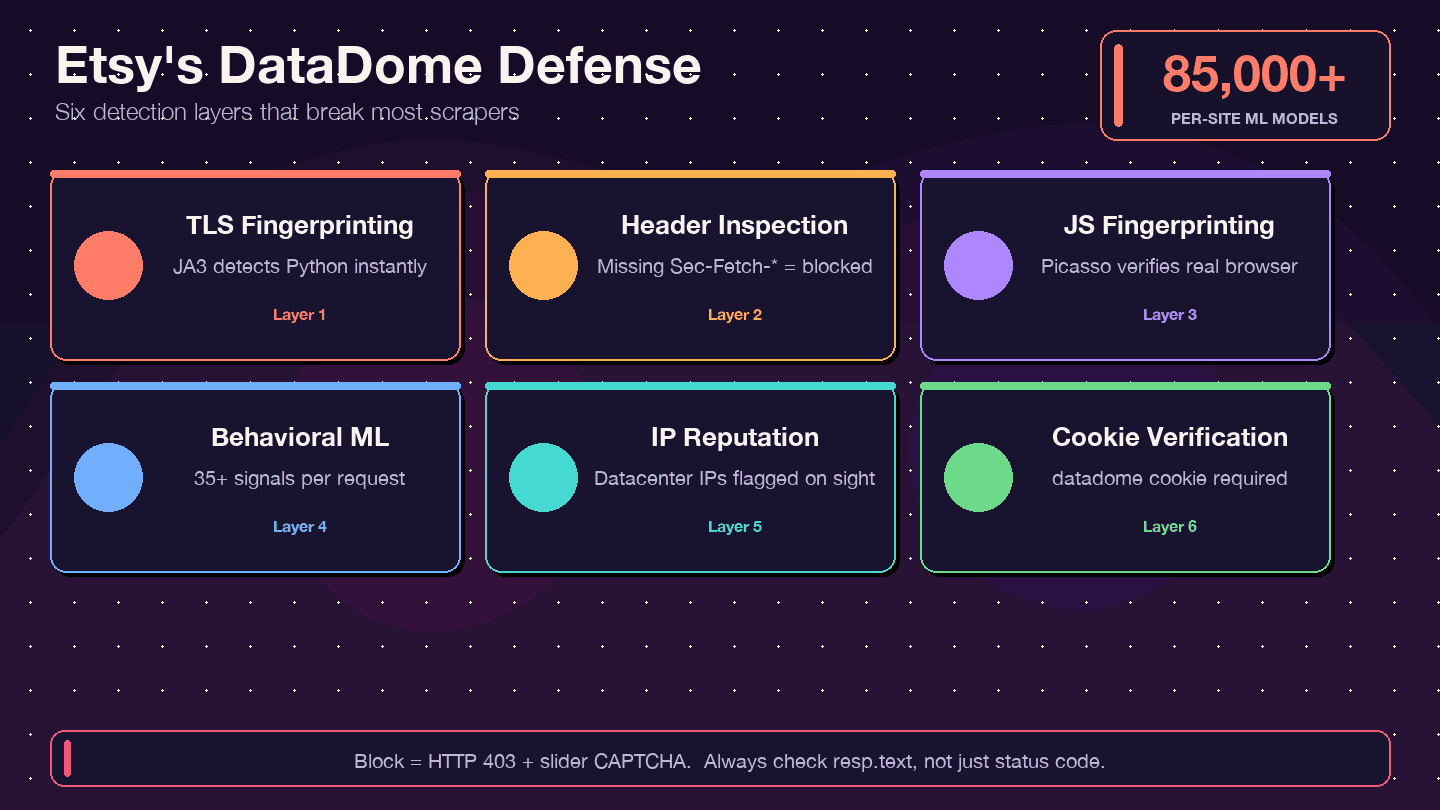
DataDome doesn't just check your IP address. It runs a multi-layered detection stack:
- TLS fingerprinting (JA3): Python's
requestslibrary has a distinctive TLS signature that DataDome can spot instantly. - HTTP header/protocol inspection: Checks for complete, consistent browser headers — missing or misordered headers are a red flag.
- JavaScript fingerprinting (Picasso protocol): Runs JS challenges in the browser to verify you're a real user.
- Behavioral ML: Analyzes 35+ signals per request, with 85,000+ per-site models.
- IP reputation scoring: Datacenter IPs are flagged immediately.
- Cookie verification: The
datadomecookie must be present and valid.
Signs You've Been Blocked (and How to Check)
One of the most common gotchas: you get a 200 OK response, but the HTML is actually a CAPTCHA page, not the data you wanted. Other signs:
- 403 Forbidden errors
- Redirect loops
- The response body contains a
ddJavaScript object or slider CAPTCHA HTML
Always inspect your response body, not just the status code. A quick check:
if "captcha" in resp.text.lower() or "datadome" in resp.text.lower():
    print("Blocked! Got a CAPTCHA page instead of data.")
Headers and Cookies That Reduce Detection
You can't guarantee you won't get blocked, but realistic headers and cookie management go a long way:
session = requests.Session()
session.headers.update({
    "User-Agent": "Mozilla/5.0 (Windows NT 10.0; Win64; x64) AppleWebKit/537.36 Chrome/133.0.0.0 Safari/537.36",
    "Accept": "text/html,application/xhtml+xml,application/xml;q=0.9,image/avif,image/webp,*/*;q=0.8",
    "Accept-Language": "en-US,en;q=0.9",
    "Accept-Encoding": "gzip, deflate, br",
    "Sec-Ch-Ua": '"Chromium";v="133", "Not-A.Brand";v="99", "Google Chrome";v="133"',
    "Sec-Ch-Ua-Mobile": "?0",
    "Sec-Ch-Ua-Platform": '"Windows"',
    "Sec-Fetch-Dest": "document",
    "Sec-Fetch-Mode": "navigate",
    "Sec-Fetch-Site": "none",
    "Upgrade-Insecure-Requests": "1",
})
Also important:
- Persist cookies across requests using a
requests.Session(). - Add random delays (2–7 seconds) between requests.
- Simulate a referrer chain: Visit the homepage first, then search, then product pages.
- At scale, residential proxy rotation is essential. Datacenter IPs get flagged almost instantly.
These techniques reduce detection but don't eliminate it. For high-volume scraping, you'll likely need a proxy service or a browser-based approach.
Setting Up Your Python Environment to Scrape Etsy
Before You Start:
- Difficulty: Intermediate
- Time Required: ~30–60 minutes (setup + first scrape)
- What You'll Need: Python 3.8+, pip, a code editor, Chrome browser (for DevTools inspection)
Install Dependencies
Create a project folder, set up a virtual environment, and install the libraries you'll need:
mkdir etsy-scraper && cd etsy-scraper
python -m venv venv
source venv/bin/activate  # On Windows: venv\Scripts\activate

pip install requests beautifulsoup4 lxml pandas
- requests — fetches web pages
- beautifulsoup4 — parses HTML
- lxml — faster HTML parser (optional but recommended)
- pandas — structures and exports data to CSV/Excel
If you need browser automation later (for login or JS-heavy pages), also install:
pip install selenium
Understand Etsy's Page Structure Before You Code
Here's a tip that saves a ton of time: Etsy embeds structured product data inside <script type="application/ld+json"> tags on most pages. This JSON-LD data is already organized — product name, price, rating, images — so you don't have to wrestle with fragile CSS selectors for every field.
Open any Etsy product page, right-click, "View Page Source," and search for application/ld+json. You'll find a block with @type: Product containing most of the data you need. Search result pages have @type: ItemList.
CSS selectors are still useful as a fallback (for data not in JSON-LD, like shipping details or review text), but JSON-LD should be your first stop.
Step 1: Scrape Etsy Search Results with Python
Search results are the starting point for most Etsy scraping projects — whether you're monitoring a niche, tracking competitor pricing, or building a product database.
Build the Search URL
Etsy search URLs follow this pattern:
https://www.etsy.com/search?q={keyword}&ref=pagination&page={page_number}
For multi-word queries, URL-encode the spaces (e.g., handmade+jewelry or handmade%20jewelry). The ref=pagination parameter makes the request look more like a real browser navigation.
Additional useful parameters: order (most_relevant, price_asc, price_desc, date_desc), min_price, max_price, ship_to, free_shipping=true. Each page returns 48 items.
Send the Request and Parse HTML
import requests
from bs4 import BeautifulSoup
import json
import time
import random

headers = {
    "User-Agent": "Mozilla/5.0 (Windows NT 10.0; Win64; x64) AppleWebKit/537.36 Chrome/124.0.0.0 Safari/537.36",
    "Accept-Language": "en-US,en;q=0.9",
    "Accept": "text/html,application/xhtml+xml,application/xml;q=0.9,*/*;q=0.8",
}

def scrape_etsy_search(query, max_pages=3):
    all_products = []
    for page in range(1, max_pages + 1):
        url = f"https://www.etsy.com/search?q={query}&ref=pagination&page={page}"
        resp = requests.get(url, headers=headers, timeout=30)
        if "captcha" in resp.text.lower():
            print(f"Blocked on page {page}. Try adding delays or proxies.")
            break
        soup = BeautifulSoup(resp.text, "lxml")
        for script in soup.find_all("script", type="application/ld+json"):
            data = json.loads(script.string)
            if data.get("@type") == "ItemList":
                for item in data.get("itemListElement", []):
                    all_products.append({
                        "name": item.get("name"),
                        "url": item.get("url"),
                        "image": item.get("image"),
                        "price": item.get("offers", {}).get("price"),
                        "currency": item.get("offers", {}).get("priceCurrency"),
                        "position": item.get("position"),
                    })
        time.sleep(random.uniform(2, 5))
    return all_products
Extract Listing Data from JSON-LD
The itemListElement array gives you each listing's name, URL, image, price, and currency. If you also need star ratings or result counts (not always in JSON-LD), fall back to CSS selectors:
- Listing card:
.v2-listing-card - Title:
h3.v2-listing-card__title - Price:
span.currency-value - Link:
a.listing-link(href)
Handle Pagination
Loop through pages and add a random delay between each request. Etsy typically returns up to 20–250 pages depending on the query.
results = scrape_etsy_search("handmade+jewelry", max_pages=5)
print(f"Scraped {len(results)} products.")
For a 5-page scrape, this took about 20 seconds in my testing — compared to 30+ minutes of manual copy-paste.
Step 2: Scrape Etsy Product Pages with Python
Once you have a list of product URLs from search, the next step is pulling detailed data from each listing page.
Fetch the Product Page
def scrape_etsy_product(url):
    resp = requests.get(url, headers=headers, timeout=30)
    soup = BeautifulSoup(resp.text, "lxml")
    for script in soup.find_all("script", type="application/ld+json"):
        data = json.loads(script.string)
        if data.get("@type") == "Product":
            offers = data.get("offers", {})
            price = offers.get("price") or offers.get("lowPrice")
            rating_data = data.get("aggregateRating", {})
            return {
                "name": data.get("name"),
                "description": data.get("description", "")[:500],
                "brand": data.get("brand", {}).get("name") if isinstance(data.get("brand"), dict) else data.get("brand"),
                "category": data.get("category"),
                "price": price,
                "currency": offers.get("priceCurrency"),
                "availability": offers.get("availability"),
                "rating": rating_data.get("ratingValue"),
                "review_count": rating_data.get("reviewCount"),
                "images": data.get("image", []),
                "sku": data.get("sku"),
                "material": data.get("material"),
            }
    return None
Handle Price Variations
Some products have a single offers.price. Others (with variations like size or color) use offers.lowPrice and offers.highPrice. The code above handles both by falling back from price to lowPrice.
Parse Additional Fields via CSS Selectors
For data not in JSON-LD — shipping info, variation options, full seller details — you'll need CSS selectors:
- Title:
h1[data-buy-box-listing-title] - Variations:
select[data-selector-id]ordiv[data-option-set] - Shipping:
div.wt-text-captionnear the shipping section
The tradeoff: JSON-LD is cleaner and more stable across layout changes. CSS selectors are fragile but cover more fields.
Step 3: Scrape Etsy Shop Pages with Python
This is the section most competitor guides skip entirely — and it's arguably the most valuable for sales teams and competitive analysts.
Build the Shop URL and Fetch the Page
def scrape_etsy_shop(shop_name):
    url = f"https://www.etsy.com/shop/{shop_name}"
    resp = requests.get(url, headers=headers, timeout=30)
    soup = BeautifulSoup(resp.text, "lxml")

    # Shop metadata from HTML (not in JSON-LD)
    sales_el = soup.select_one("div.shop-sales-reviews a")
    rating_el = soup.find("input", {"name": "initial-rating"})
    location_el = soup.select_one("div.shop-location")

    shop_data = {
        "name": shop_name,
        "sales": sales_el.text.strip() if sales_el else None,
        "rating": rating_el["value"] if rating_el else None,
        "location": location_el.text.strip() if location_el else None,
    }

    # Listings from JSON-LD
    listings = []
    for script in soup.find_all("script", type="application/ld+json"):
        data = json.loads(script.string)
        if data.get("@type") == "ItemList":
            for item in data.get("itemListElement", []):
                listings.append({
                    "name": item.get("name"),
                    "url": item.get("url"),
                    "price": item.get("offers", {}).get("price"),
                })
    shop_data["listings"] = listings
    return shop_data
What You Can Extract from Shop Pages
JSON-LD on shop pages is @type: ItemList — it covers the product listings, but not shop-level metadata like sales count, location, or rating. For those, you need CSS selectors:
| Data Point | Selector | Notes |
|---|---|---|
| Shop name | h1 or meta title | Usually in page title |
| Total sales | div.shop-sales-reviews a | Text like "12,345 sales" |
| Star rating | input[name="initial-rating"] value | Numeric 1–5 |
| Location | div.shop-location | City, Country |
| Member since | div.shop-info | Date text |
Shop data is uniquely valuable for building lead lists, benchmarking competitors, or identifying top sellers in a niche.
Step 4: Scrape Etsy Reviews with Python
Reviews are among the most valuable — and trickiest — data points on Etsy. The full review text, ratings, and dates aren't in the initial page HTML; they load via an internal API endpoint.
Approach 1: Discover Etsy's Internal Reviews API Endpoint
Open a product page in Chrome, open DevTools (F12), go to the Network tab, and scroll down to the reviews section. You'll see a POST request to something like:
https://www.etsy.com/api/v3/ajax/bespoke/member/neu/specs/deep_dive_reviews
This endpoint returns HTML fragments containing the review cards. To use it, you need:
- listing_id — the numeric ID from the product URL
- shop_id — extract from the product page HTML using regex
- csrf_nonce — extract from a
<meta>tag on the page
Extract IDs and CSRF Token
import re

def get_review_params(product_url):
    resp = requests.get(product_url, headers=headers)
    html = resp.text
    listing_id = product_url.split("/")[-1].split("?")[0]
    shop_id_match = re.search(r'"shopId"\s*:\s*(\d+)', html)
    shop_id = shop_id_match.group(1) if shop_id_match else None
    soup = BeautifulSoup(html, "lxml")
    csrf_meta = soup.find("meta", {"name": "csrf_nonce"})
    csrf = csrf_meta["content"] if csrf_meta else None
    return listing_id, shop_id, csrf
Scrape Reviews with Pagination
def scrape_reviews(listing_id, shop_id, csrf, max_pages=5):
    session = requests.Session()
    session.headers.update(headers)
    all_reviews = []
    for page in range(1, max_pages + 1):
        payload = {
            "specs": {
                "deep_dive_reviews": {
                    "module_path": "neu/specs/deep_dive_reviews",
                    "listing_id": listing_id,
                    "shop_id": shop_id,
                    "page": page,
                }
            }
        }
        resp = session.post(
            "https://www.etsy.com/api/v3/ajax/bespoke/member/neu/specs/deep_dive_reviews",
            json=payload,
            headers={"x-csrf-token": csrf, "Content-Type": "application/json"},
        )
        data = resp.json()
        html_fragment = data.get("output", {}).get("deep_dive_reviews", "")
        review_soup = BeautifulSoup(html_fragment, "lxml")
        for card in review_soup.select("div.review-card"):
            rating_el = card.find("input", {"name": "rating"})
            text_el = card.select_one("div.wt-text-body")
            user_el = card.select_one("a[data-review-username]")
            date_el = card.select_one("p.wt-text-body-small")
            all_reviews.append({
                "rating": rating_el["value"] if rating_el else None,
                "text": text_el.text.strip() if text_el else None,
                "reviewer": user_el.text.strip() if user_el else None,
                "date": date_el.text.strip() if date_el else None,
            })
        time.sleep(random.uniform(2, 5))
    return all_reviews
Approach 2: Parse Reviews from HTML (Fallback)
If the API approach fails (e.g., due to CSRF token issues), you can parse the first page of reviews directly from the product page HTML. The limitation: only the initial batch of reviews is in the static HTML. For more, you need the API or a browser automation tool like Selenium.
Handling Login-Required Data: Scraping Your Own Etsy Shop
This is a gap no other tutorial covers, but it's a real need — especially for Etsy sellers who want to extract their own orders, revenue, and stats.
The problem: requests alone can't access your Etsy dashboard because it doesn't carry your login session cookies.
Option 1: Selenium with Manual Login and Cookie Capture
Use Selenium to open a browser, log in manually (or automate the login), then continue scraping while authenticated:
from selenium import webdriver

driver = webdriver.Chrome()
driver.get("https://www.etsy.com/signin")
# Log in manually in the browser window, then:
input("Press Enter after logging in...")

cookies = driver.get_cookies()
# Now use driver.get() to navigate to your dashboard pages and scrape
You can also save cookies from the Selenium session and reuse them with requests.Session() for faster, lighter scraping after the initial login.
Option 2: Export Browser Cookies to Use with Requests
Use a browser extension (like "EditThisCookie") to export your active Etsy session cookies, then load them into a Requests session:
import requests

session = requests.Session()
# Add cookies exported from your browser
session.cookies.set("uaid", "YOUR_UAID_VALUE", domain=".etsy.com")
session.cookies.set("user_prefs", "YOUR_USER_PREFS_VALUE", domain=".etsy.com")
# ... add other session cookies as needed

resp = session.get("https://www.etsy.com/your/orders", headers=headers)
The Easy Path: Thunderbit's Browser Scraping Mode
Since Thunderbit runs inside your Chrome browser, it inherits your active Etsy session automatically. No authentication code, no cookie export — just navigate to your Etsy dashboard and scrape. This is genuinely useful for extracting orders, revenue, stats, and other seller-only data without any scripting.
Scrape Your Etsy Dashboard with AI
Exporting and Using Your Scraped Etsy Data
Save to CSV or JSON
import pandas as pd

df = pd.DataFrame(results)
df.to_csv("etsy_products.csv", index=False, encoding="utf-8")
df.to_json("etsy_products.json", orient="records", indent=2)
Best practices: include timestamps in your filenames, use UTF-8 encoding, and handle special characters in product names (Etsy sellers love emojis and accented characters).
Export to Google Sheets, Airtable, or Notion
For Python users, libraries like gspread (Google Sheets) or the Airtable API let you push data programmatically. But if you're using Thunderbit, all exports — to Google Sheets, Excel, Airtable, and Notion — are free and one-click. No API keys, no OAuth setup.
Skip the Code: How to Scrape Etsy with Thunderbit (No-Code Alternative)
Not everyone wants to write Python scripts, maintain proxy configs, or debug CSS selectors at 2am. If that's you, here's how to get Etsy data with Thunderbit.
Install the Thunderbit Chrome Extension
Head to the Chrome Web Store and install Thunderbit. Create a free account — the free tier gives you 6 pages/month and all exports are free.
Use AI Suggest Fields on Any Etsy Page
Navigate to an Etsy search, product, or shop page. Click "AI Suggest Fields" in the Thunderbit sidebar. The AI scans the page and recommends columns — product name, price, rating, images, shop name, tags, shipping info. Adjust or add columns as needed.
Click Scrape and Export
Click "Scrape" to extract data from the current page. For multi-page results, use Thunderbit's pagination scraping. For enriching a list of product URLs with detail from each product page (descriptions, reviews, shipping), use subpage scraping — Thunderbit visits each link and pulls the extra data automatically.
Export to Excel, Google Sheets, Airtable, or Notion — all for free.
When Thunderbit Beats Python for Etsy Scraping
- No proxy setup or anti-bot code needed. Thunderbit runs in your real Chrome browser, so it inherits your session and looks like a normal user to DataDome.
- AI adapts to layout changes automatically. No broken selectors to fix when Etsy updates its frontend.
- Great for one-off research, competitive analysis, or non-technical team members. If you just need a quick dataset, you don't need a Python environment.
- Subpage scraping lets you enrich a list of product URLs with detailed data without writing nested loops.
For a walkthrough, check out the Thunderbit YouTube channel.
Python vs. Thunderbit: 6-Month Cost Comparison
| Factor | Python DIY | Thunderbit |
|---|---|---|
| Setup time | 8–20 hours | Under 5 minutes |
| 6-month cost (incl. labor, proxies) | $2,720–9,450 | $90–228 |
| Monthly maintenance | 4–10+ hours (selector updates = 80%+ overhead) | 0–1 hours |
| Anti-bot handling | Residential proxies at 85x normal credit cost | Browser-based, natively bypasses DataDome |
| Data quality | High (with effort) | High (AI-driven) |
I'm not saying Python is the wrong choice — if you need full control, custom logic, or integration into a larger pipeline, code is king. But for most business users who just need Etsy data, the ROI math favors a no-code tool.
Legal and Ethical Tips for Scraping Etsy
I get asked about legality on every scraping post, so here's the short version:
- Etsy's Terms of Use explicitly prohibit automated access. That said, Etsy relies on technical enforcement (DataDome) rather than litigation — there are no known Etsy-specific lawsuits targeting scrapers.
- Scrape only publicly available data. Don't circumvent authentication or access private seller dashboards you don't own.
- Use reasonable request rates. 2–7 second delays between requests, and don't hammer Etsy's servers.
- Respect
robots.txt. Etsy allows search pages but restricts some paths. - Handle personal data responsibly under privacy laws like GDPR.
- Consult legal counsel for commercial-scale scraping projects.
For more background, see our post on web scraping legal implications — including Meta v. Bright Data (2024), where public data scraping was upheld.
Wrapping Up: Key Takeaways
We covered a lot of ground here. Here's what I want you to walk away with:
- Etsy's JSON-LD structured data makes extraction cleaner than raw HTML parsing for most fields.
- DataDome is a real obstacle — use proper headers, delays, cookie management, and residential proxies for Python scraping at scale.
- The Etsy API is limited. If you need reviews, competitor shops, or cross-seller analysis, scraping is the practical path.
- Thunderbit offers a no-code alternative that handles anti-bot and authentication natively — worth trying if you want Etsy data without maintaining scripts.
- Always scrape responsibly and respect Etsy's terms.
If you want to get started without writing code, try Thunderbit for free. Or use the Python code from this tutorial to build your own custom scraper — and may your selectors never break on a Friday afternoon.
For more scraping guides, check out our Etsy scraper guide and the best AI web scrapers roundup.
Try Thunderbit to Scrape Etsy Data Faster Get Started Free
FAQs
1. Is it legal to scrape Etsy with Python?
Scraping publicly available data is generally permissible under recent legal precedents (e.g., Meta v. Bright Data, hiQ v. LinkedIn). However, Etsy's Terms of Use prohibit automated access, so always review their ToS and robots.txt before scraping. For large-scale or commercial use, consult legal counsel.
2. Can I scrape Etsy without getting blocked?
Etsy uses DataDome, one of the toughest anti-bot systems around. Realistic headers, request delays, cookie persistence, and residential proxy rotation all help reduce blocks. Thunderbit's browser-native approach avoids most detection since it operates within your real Chrome session.
3. Does Etsy have an API I can use instead of scraping?
Yes — Etsy offers an API v3, but it's mostly limited to your own shop's data and lacks robust review access. Most competitive intelligence and cross-shop analysis use cases require scraping.
4. What Python libraries do I need to scrape Etsy?
At minimum: requests, beautifulsoup4, pandas (for export), and json (built-in). For JS-heavy or login-required pages, add selenium. For faster HTML parsing, use lxml.
5. How do I scrape Etsy reviews specifically?
Etsy reviews load via an internal API endpoint (/api/v3/ajax/bespoke/member/neu/specs/deep_dive_reviews). You'll need to extract the listing ID, shop ID, and CSRF token from the product page, then POST to the endpoint with pagination. As a fallback, you can parse the first batch of reviews from the product page HTML — both approaches are covered step by step in this tutorial.
Learn More




