
Most eBay scraping tutorials have a shelf life of about three months. I know because our team at Thunderbit has watched developers cycle through broken code snippets, outdated CSS selectors, and "working" GitHub repos that quietly stopped working two eBay redesigns ago.
eBay sits on ~2.5 billion live listings — the largest long-tail pricing dataset on the open web after Amazon. That data powers everything from reseller pricing to competitive intelligence. But getting at it programmatically is a moving target: eBay's React-based frontend churns CSS class names, A/B tests serve different DOM structures to different users, and Akamai Bot Manager sits between you and the HTML. This guide gives you Python code that works today, explains why scrapers break so you can build resilient ones, covers the eBay API vs. scraping decision honestly, and shows a no-code escape hatch for when Python isn't worth the setup.
What Does It Mean to Scrape eBay with Python?
Web scraping eBay with Python means writing scripts that programmatically download eBay web pages, parse the HTML (or hidden JSON), and extract structured data — titles, prices, seller info, sold dates, variant details — into a format you can actually use, like a CSV, spreadsheet, or database.
You can scrape several types of eBay pages:
- Search results (e.g., all "AirPods Pro" listings)
- Individual product detail pages (full specs, images, seller info)
- Sold/completed listings (actual transaction prices and dates)
- Seller profiles and reviews
Python is the go-to language for this work. Its ecosystem — Requests, BeautifulSoup, lxml, pandas — makes it straightforward to fetch pages, parse HTML, and wrangle data. There's a meaningful difference between scraping the website HTML and using eBay's official API, though — which I'll cover next.
Why Scrape eBay? Real-World Use Cases for Business Teams
If you're reading this, you probably already have a reason. Still, grounding the discussion in concrete business value, because the ROI of eBay data is genuinely impressive. Bain found that a 1% improvement in realized price translates to an 11.1% profit uplift across thousands of businesses. McKinsey attributes up to 5% sales lift and 2–7% margin improvement to dynamic pricing in retail.
The use cases I see most often:
| Use Case | Data Needed | Business Outcome |
|---|---|---|
| Price monitoring & repricing | Active listing prices, shipping, condition | Competitive pricing, margin protection |
| Competitor analysis | Product assortments, promotions, shipping terms | Strategic positioning, assortment gaps |
| Market research & trend spotting | Listing velocity, category trends, demand patterns | New product identification, demand forecasting |
| Reseller pricing / appraisals | Sold prices, sold dates, condition | Fair market value, buy-box decisions |
| Sentiment analysis | Reviews, ratings, return policy | Product quality insights, customer satisfaction |
| Lead generation | Seller profiles, store info, contact details | B2B outreach to high-GMV sellers |
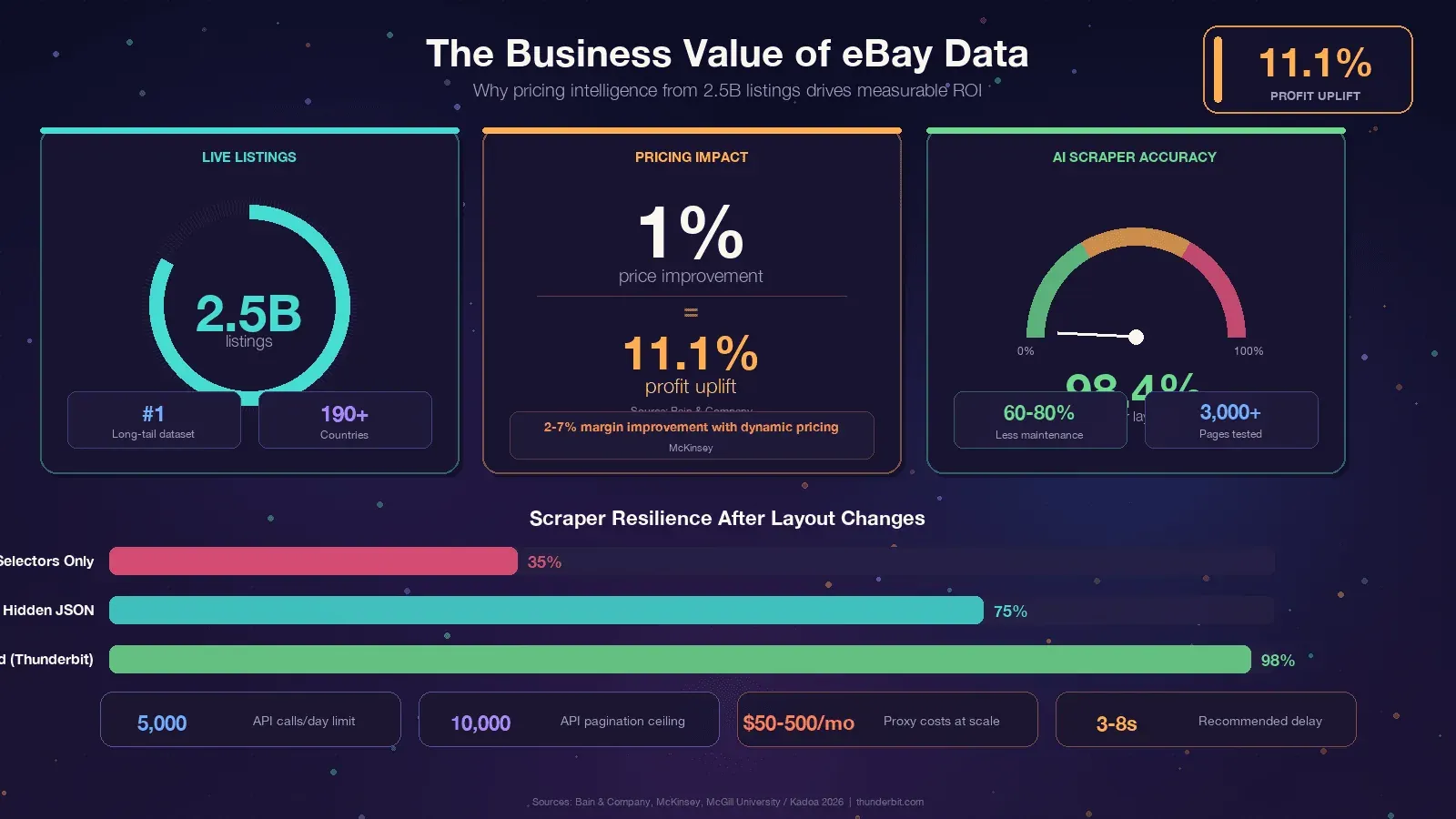
The common thread: eBay has the data, but it's locked in web pages.
Scraping is how you turn it into a competitive advantage.
eBay Official API vs. Python Web Scraping: Which Should You Choose?
This is the question I wish more tutorials answered honestly. eBay offers official APIs — primarily the Browse API — and many users wonder whether to use them or scrape directly. The answer depends entirely on what data you need.
| Criteria | eBay Browse/Finding API | Python Web Scraping |
|---|---|---|
| Sold/completed listings | Limited — Marketplace Insights API exists but access is commonly rejected | Full access via LH_Sold=1&LH_Complete=1 URL params |
| Rate limits | 5,000 calls/day on basic tier | Self-managed (proxy-dependent) |
| Data fields | Pre-defined (title, price, category, seller basics) | Anything visible on the page (reviews, full specs, variant matrix) |
| Setup complexity | OAuth 2.0, app registration, API keys | pip install + code |
| Stability | Stable endpoints | Breaks when HTML changes |
| Cost | Free tier available, paid for volume | Free code, but proxy costs at scale |
| Variant/MSKU data | Partial — parent SKU only in many cases | Full (via hidden JSON parsing) |
| Pagination depth | 10,000-item hard ceiling | Unlimited in theory |
A quick note: the old Finding API (which had findCompletedItems) was fully decommissioned in February 2025. If you're using ebaysdk-python or any library that hits the Finding module, it's broken in production right now.
My recommendation: Use the Browse API for stable, moderate-volume, structured catalog queries on active listings. Use Python scraping when you need sold prices, reviews, variant data, or any field the API doesn't expose. Many teams use both.
Tools and Libraries You Need to Scrape eBay with Python
Before we write any code, here's the toolkit. You don't need a headless browser for most eBay pages — the data is embedded in the server-rendered HTML.
| Library | Purpose |
|---|---|
requests or httpx | HTTP client to download eBay pages |
curl_cffi | HTTP client with real browser TLS fingerprinting (critical for bypassing Akamai) |
beautifulsoup4 | HTML parser for CSS selector extraction |
lxml | Fast parser backend for BeautifulSoup |
jmespath | Query language for parsing nested JSON blobs |
pandas | Data manipulation and CSV/Excel export |
gspread | Google Sheets integration |
Install everything in one line:
pip install requests httpx curl_cffi beautifulsoup4 lxml jmespath pandas gspread
Use Python 3.11+ — pandas 3.0 requires 3.10+, and 3.11 gives you 10–60% speed gains on I/O-bound work.
One library deserves special mention: curl_cffi is the single most impactful upgrade a 2026 eBay scraper can make. eBay uses Akamai Bot Manager, and Akamai's primary detection vector is TLS fingerprinting. Plain requests emits a Python-shaped JA3 fingerprint that gets flagged instantly. curl_cffi impersonates a real Chrome browser's TLS handshake, which handles roughly 90% of Akamai-protected targets without needing a headless browser.
Try Thunderbit for any website
Step-by-Step: How to Scrape eBay Search Results with Python
This is the core tutorial. We'll scrape eBay search result pages for product listings.
- Difficulty: Beginner–Intermediate
- Time Required: ~30 minutes for first working scrape
- What You'll Need: Python 3.11+, the libraries above, a terminal, and a target eBay search URL
Step 1: Set Up Your Python Project
Create a project directory and install dependencies:
mkdir ebay-scraper && cd ebay-scraper
python -m venv venv
source venv/bin/activate  # Windows: venv\Scripts\activate
pip install requests curl_cffi beautifulsoup4 lxml pandas
Create a file called scrape_ebay.py. That's your workspace.
Step 2: Build the eBay Search URL
eBay's search URL structure is straightforward. The key parameter is _nkw (keyword):
import urllib.parse

keyword = "airpods pro"
base_url = "https://www.ebay.com/sch/i.html"
params = {
    "_nkw": keyword,
    "_ipg": "120",    # items per page: 60, 120, or 240 (240 can trigger bot flags)
    "_pgn": "1",      # page number
}
url = f"{base_url}?{urllib.parse.urlencode(params)}"
print(url)
# https://www.ebay.com/sch/i.html?_nkw=airpods+pro&_ipg=120&_pgn=1
Other useful parameters:
LH_BIN=1— Buy It Now only_sacat=175673— specific category_sop=12— sort by best match (10 = price+shipping lowest, 13 = newly listed)LH_Complete=1&LH_Sold=1— sold/completed listings (covered in a dedicated section below)
Step 3: Send a Request and Handle the Response
This is where curl_cffi earns its keep. A plain requests.get() will often return a 403 from Akamai. With curl_cffi, we impersonate a real Chrome browser:
from curl_cffi import requests as cffi_requests
import random, time

USER_AGENTS = [
    "Mozilla/5.0 (Macintosh; Intel Mac OS X 10_15_7) AppleWebKit/537.36 (KHTML, like Gecko) Chrome/143.0.0.0 Safari/537.36",
    "Mozilla/5.0 (Windows NT 10.0; Win64; x64) AppleWebKit/537.36 (KHTML, like Gecko) Chrome/143.0.0.0 Safari/537.36",
    "Mozilla/5.0 (X11; Linux x86_64; rv:124.0) Gecko/20100101 Firefox/124.0",
]

HEADERS = {
    "User-Agent": random.choice(USER_AGENTS),
    "Accept-Language": "en-US,en;q=0.9",
    "Accept-Encoding": "gzip, deflate, br",
}

def fetch_page(url, max_retries=5):
    delay = 2
    for attempt in range(max_retries):
        try:
            r = cffi_requests.get(url, impersonate="chrome124", headers=HEADERS, timeout=30)
            if r.status_code == 200:
                return r.text
            if r.status_code in (403, 429, 503):
                retry_after = r.headers.get("Retry-After")
                sleep_for = float(retry_after) if retry_after else delay + random.uniform(0, 1)
                print(f"  Status {r.status_code}, retrying in {sleep_for:.1f}s...")
                time.sleep(sleep_for)
                delay *= 2
                continue
            r.raise_for_status()
        except Exception as e:
            print(f"  Request error: {e}, retrying...")
            time.sleep(delay)
            delay *= 2
    raise RuntimeError(f"Failed after {max_retries} retries: {url}")
The exponential backoff with jitter is important — fixed sleep intervals are themselves a bot fingerprint.
Step 4: Parse Product Listings from the Search Page
eBay is currently mid-migration between two search-result layouts. A resilient scraper must handle both:
| Field | Legacy Layout | New Layout |
|---|---|---|
| Card container | li.s-item | li.s-card or div.su-card-container |
| Title | .s-item__title | .s-card__title |
| URL | a.s-item__link[href] | a.su-link[href] |
| Price | span.s-item__price | .s-card__price |
The parsing code that handles both layouts:
from bs4 import BeautifulSoup

def parse_search_results(html):
    soup = BeautifulSoup(html, "lxml")
    cards = soup.select("li.s-item, li.s-card, div.su-card-container")
    results = []

    for card in cards:
        # Title — try both layouts
        title_el = card.select_one(".s-item__title, .s-card__title")
        title = title_el.get_text(strip=True) if title_el else None

        # Skip the phantom "Shop on eBay" placeholder card
        if not title or "Shop on eBay" in title:
            continue

        # Price
        price_el = card.select_one("span.s-item__price, .s-card__price")
        price = price_el.get_text(strip=True) if price_el else None

        # URL
        link_el = card.select_one("a.s-item__link[href], a.su-link[href]")
        url = link_el["href"].split("?")[0] if link_el else None

        # Image
        img_el = card.select_one("img.s-item__image-img, .s-card__image img")
        image = None
        if img_el:
            image = img_el.get("src") or img_el.get("data-src")

        # Shipping
        ship_el = card.select_one("span.s-item__shipping, span.s-item__logisticsCost, .s-card__attribute-row")
        shipping = ship_el.get_text(strip=True) if ship_el else None

        results.append({
            "title": title,
            "price": price,
            "url": url,
            "image": image,
            "shipping": shipping,
        })

    return results
That first-card phantom trap is a classic gotcha. The first li.s-item on many eBay search pages is a hidden placeholder with the title "Shop on eBay" and no real price. Always filter it out.
Step 5: Handle Pagination to Scrape Multiple Pages
eBay paginates via the _pgn parameter. The next-page link uses a.pagination__next:
import urllib.parse

def scrape_ebay_search(keyword, max_pages=5):
    all_results = []

    for page_num in range(1, max_pages + 1):
        params = {"_nkw": keyword, "_ipg": "120", "_pgn": str(page_num)}
        url = f"https://www.ebay.com/sch/i.html?{urllib.parse.urlencode(params)}"
        print(f"Scraping page {page_num}: {url}")

        html = fetch_page(url)
        results = parse_search_results(html)

        if not results:
            print(f"  No results on page {page_num}, stopping.")
            break

        all_results.extend(results)
        print(f"  Found {len(results)} listings (total: {len(all_results)})")

        # Polite delay — 3 to 8 seconds with jitter
        time.sleep(random.uniform(3, 8))

    return all_results
The 3–8 second random jitter is not optional.
eBay's Akamai layer flags sustained >1 req/s from a single IP.
Step 6: Export Your Scraped Data to CSV or JSON
import pandas as pd

results = scrape_ebay_search("airpods pro", max_pages=3)
df = pd.DataFrame(results)
df.to_csv("ebay_airpods.csv", index=False)
df.to_json("ebay_airpods.json", orient="records", indent=2)
print(f"Exported {len(df)} listings to CSV and JSON.")
You should now have a clean spreadsheet of eBay listings. On my machine, scraping 3 pages (360 listings) took about 45 seconds including delays.
How to Scrape eBay Product Detail Pages with Python
Search results give you a summary. Product detail pages have the good stuff: full descriptions, seller feedback scores, item specifics, image carousels, and variant data.
Parsing a Single Product Listing Page
eBay item pages live at /itm/<ITEM_ID>. The most stable extraction path is JSON-LD — eBay embeds a Product schema block that survives almost all CSS reshuffles:
import json

def parse_item_page(html):
    soup = BeautifulSoup(html, "lxml")
    item = {}

    # 1. JSON-LD — most stable extraction path
    for tag in soup.find_all("script", type="application/ld+json"):
        try:
            data = json.loads(tag.string or "")
        except (json.JSONDecodeError, TypeError):
            continue
        if isinstance(data, dict) and data.get("@type") == "Product":
            item["title"] = data.get("name")
            item["brand"] = (data.get("brand") or {}).get("name")
            item["images"] = data.get("image")
            offers = data.get("offers") or {}
            item["price"] = offers.get("price")
            item["currency"] = offers.get("priceCurrency")
            break

    # 2. CSS fallbacks for fields not in JSON-LD
    def first_text(selectors):
        for sel in selectors:
            el = soup.select_one(sel)
            if el and el.get_text(strip=True):
                return el.get_text(strip=True)
        return None

    item.setdefault("title", first_text([
        "h1.x-item-title__mainTitle",
        "h1.x-item-title__mainTitle .ux-textspans--BOLD",
    ]))
    item["condition"] = first_text([
        ".x-item-condition-text .ux-textspans",
    ])
    item["seller"] = first_text([
        ".x-sellercard-atf__info__about-seller a .ux-textspans",
    ])
    item["shipping"] = first_text([
        "div.ux-labels-values--shipping .ux-textspans--BOLD",
    ])

    # 3. Item specifics
    specifics = {}
    for dl in soup.select(".ux-layout-section-evo__item--table-view dl.ux-labels-values"):
        k = dl.select_one(".ux-labels-values__labels-content .ux-textspans")
        v = dl.select_one(".ux-labels-values__values-content .ux-textspans")
        if k and v:
            specifics[k.get_text(strip=True).rstrip(":")] = v.get_text(strip=True)
    item["specifics"] = specifics

    return item
The pattern here — JSON-LD first, CSS fallbacks second — is the key to building scrapers that don't break every quarter. More on that below.
Scraping eBay Product Variants (MSKU Data)
Some eBay listings have multiple variants — different colors, sizes, storage capacities. The visible DOM only shows a price range like "$899 to $1,099" until the user clicks an option. The actual per-variant pricing lives in a hidden JavaScript object called MSKU.
This is one area where the eBay API only provides partial data (parent SKU), making scraping the better approach.
import re, json

def extract_variants(html):
    # Non-greedy match is critical — greedy .+ swallows the entire page
    m = re.search(r'"MSKU"\s*:\s*(\{.+?\})\s*,\s*"QUANTITY"', html, re.DOTALL)
    if not m:
        return []

    try:
        msku = json.loads(m.group(1))
    except json.JSONDecodeError:
        return []

    item_labels = {str(k): v["displayLabel"] for k, v in msku.get("menuItemMap", {}).items()}
    skus = []

    for combo_key, variation_id in msku.get("variationCombinations", {}).items():
        option_ids = combo_key.split("_")
        options = [item_labels.get(oid, oid) for oid in option_ids]
        var = msku.get("variationsMap", {}).get(str(variation_id), {})
        bin_model = var.get("binModel", {})
        price_spans = bin_model.get("price", {}).get("textSpans", [{}])
        price = price_spans[0].get("text") if price_spans else None
        qty = var.get("quantity")

        skus.append({
            "options": options,
            "price": price,
            "quantity_available": qty,
            "variation_id": variation_id,
        })

    return skus
That non-greedy (.+?) in the regex is where every eBay scraper gets tripped up. Greedy .+ swallows everything up to the last "QUANTITY" on the page, producing malformed JSON. I've seen this bug in at least three "working" tutorials.
How to Scrape eBay Sold and Completed Listings with Python
This is the use case that justifies scraping over the API. Sold-item data — what actually transacted, at what price, on what date — is the gold standard for market research, reseller pricing, and appraisals. The eBay Browse API explicitly does not provide this. The Marketplace Insights API technically does, but access is a "Limited Release" that's commonly rejected.
The URL parameters you need are LH_Complete=1 (completed listings) and LH_Sold=1 (restrict to actually sold). You must pass both. Passing LH_Sold=1 alone silently falls back to active listings on some categories — this is the #1 community pitfall.
def scrape_sold_listings(keyword, max_pages=3):
    all_sold = []

    for page_num in range(1, max_pages + 1):
        params = {
            "_nkw": keyword,
            "_ipg": "120",
            "_pgn": str(page_num),
            "LH_Complete": "1",
            "LH_Sold": "1",
        }
        url = f"https://www.ebay.com/sch/i.html?{urllib.parse.urlencode(params)}"
        print(f"Scraping sold page {page_num}...")

        html = fetch_page(url)
        soup = BeautifulSoup(html, "lxml")
        cards = soup.select("li.s-item")

        for card in cards:
            title_el = card.select_one(".s-item__title")
            title = title_el.get_text(strip=True) if title_el else None
            if not title or "Shop on eBay" in title:
                continue

            # Only include actually sold items (green POSITIVE price)
            sold_tag = card.select_one(
                ".s-item__title--tag .POSITIVE, .s-item__caption--signal.POSITIVE"
            )
            if sold_tag is None:
                continue  # Unsold completed listing — skip

            price_el = card.select_one("span.s-item__price")
            price = price_el.get_text(strip=True) if price_el else None

            # Parse sold date
            sold_date = None
            import re, datetime as dt
            card_text = card.get_text()
            m = re.search(r"Sold\s+([A-Z][a-z]{2}\s+\d{1,2},\s*\d{4})", card_text)
            if m:
                sold_date = dt.datetime.strptime(m.group(1), "%b %d, %Y").strftime("%Y-%m-%d")

            link_el = card.select_one("a.s-item__link[href]")
            url = link_el["href"].split("?")[0] if link_el else None

            all_sold.append({
                "title": title,
                "sold_price": price,
                "sold_date": sold_date,
                "url": url,
            })

        if not cards:
            break
        time.sleep(random.uniform(3, 8))

    return all_sold
The key difference in the HTML: sold items show the price in green (inside a .POSITIVE wrapper), while unsold completed listings show the price in red strikethrough. Always filter on that .POSITIVE class.
Why eBay Scrapers Break (And How to Build Resilient Ones)
If your eBay scraper stopped working, you're in good company. This is the #1 pain point in every eBay scraping forum thread I've read. The question isn't if your scraper will break — it's when.
Why it happens:
- eBay uses React-based rendering with dynamically generated class names that change on deploys
- A/B tests serve different DOM structures to different users (the dual
s-item/s-cardlayout is a live example right now) - Periodic site redesigns change HTML nesting, even when the data stays the same
- Old selectors like
#itemTitleand#prcIsumwere removed years ago but still appear in tutorials
As Scrapfly's 2026 guide puts it: "The real challenge with eBay web scraping is handling eBay's CSS selector changes. eBay updates their frontend regularly, breaking scrapers that rely on specific class names."
Defense Strategies for Long-Lasting eBay Scrapers
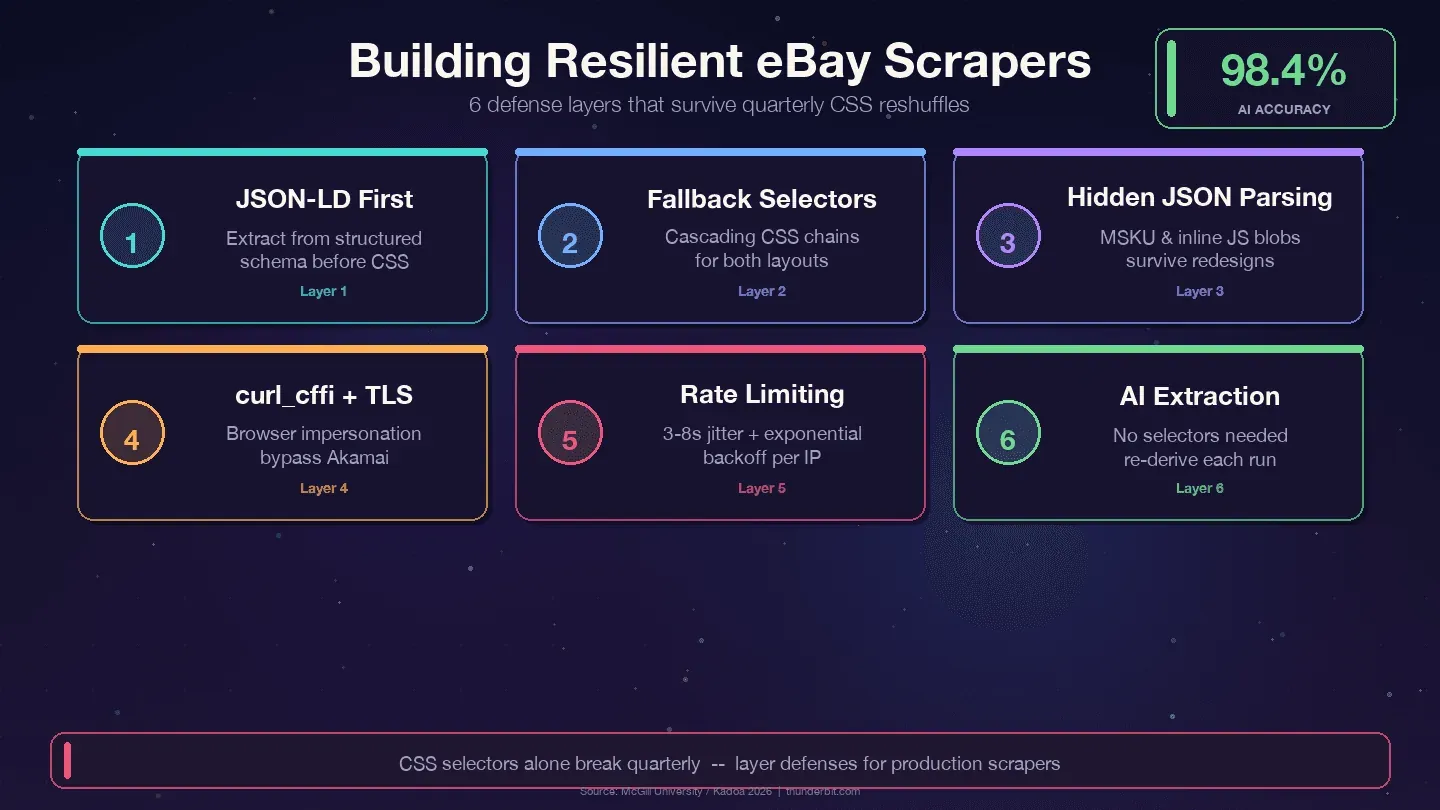
Four strategies that survive eBay's quarterly reshuffles:
1. Prioritize JSON-LD over CSS selectors. eBay embeds structured Product schema data in every item page. The data layer changes far less than the presentation layer — designers refactor CSS classes every quarter, but backend field names like price, name, and seller map to internal APIs and rarely rename.
2. Use cascading fallback selectors. Never rely on a single CSS selector. Always provide alternatives:
def first_text(soup, selectors):
    for sel in selectors:
        el = soup.select_one(sel)
        if el and el.get_text(strip=True):
            return el.get_text(strip=True)
    return None

title = first_text(soup, [
    "h1.x-item-title__mainTitle",
    "h1.x-item-title__mainTitle .ux-textspans--BOLD",
    "[data-testid='x-item-title'] h1",
])
3. Parse hidden JSON blobs. The MSKU variant object and inline JavaScript data survive CSS changes because they're generated server-side. Regex extraction from <script> tags is more work upfront but dramatically reduces maintenance.
4. Log selector failures. Add monitoring so you know when a selector stops matching, not just that your data is empty:
if title is None:
    print(f"WARNING: title selector failed for {url}")
5. Use curl_cffi with browser impersonation. This handles Akamai's TLS fingerprinting without a headless browser.
The AI-Powered Alternative: No Selector Maintenance
If you're tired of patching selectors every few months, there's a fundamentally different approach. Tools like Thunderbit use AI to read the page fresh each time and derive the extraction logic on the fly. A McGill University study tested AI vs. selector-based scrapers across 3,000 pages and found AI methods held 98.4% accuracy even after layout changes, with industry benchmarks citing 60–80% reduction in scraper maintenance.
| Approach | Breaks when eBay changes HTML? | Maintenance effort |
|---|---|---|
| Hardcoded CSS selectors | Yes, quarterly | High — ongoing patches |
| Hidden JSON / JSON-LD extraction | Rarely | Low |
| AI-based scraping (Thunderbit) | No — AI re-derives selectors each run | None |
Scrape eBay data with AI Get Started Free
I'll cover the Thunderbit workflow in detail later. For now, the takeaway: if you're building a scraper you plan to run for months, invest in JSON-first extraction and fallback selectors. If you don't want to maintain selectors at all, the AI approach is worth a look.
Automating Recurring eBay Scrapes for Price Monitoring
A one-time scrape is useful. But price monitoring, stock tracking, and competitor analysis require recurring data collection. Every competitor article I've read mentions price monitoring as a use case, but almost none show how to actually automate it.
Option 1: Cron Jobs (Linux/macOS) or Task Scheduler (Windows)
The simplest approach. Wrap your Python script in a cron job. Always use the absolute path to your venv's Python — cron runs with a minimal environment:
crontab -e
# Daily at 08:15
15 8 * * * /Users/me/ebay/venv/bin/python /Users/me/ebay/scrape_ebay.py >> /Users/me/ebay/scrape.log 2>&1
On Windows, use PowerShell:
$A = New-ScheduledTaskAction -Execute "C:\Users\me\ebay\venv\Scripts\python.exe" -Argument "C:\Users\me\ebay\scrape_ebay.py"
$T = New-ScheduledTaskTrigger -Daily -At 8:15am
Register-ScheduledTask -TaskName "eBayScraper" -Action $A -Trigger $T
This requires an always-on machine, and you manage proxies and anti-bot measures yourself.
Option 2: Cloud Functions (Serverless)
AWS Lambda or Google Cloud Functions let you run scrapers without a dedicated server. Higher setup effort — you need to package dependencies, handle timeouts (Lambda caps at 15 minutes), and still manage proxies. But no server maintenance.
Option 3: No-Code Scheduling with Thunderbit
Thunderbit's Scheduled Scraper feature lets you describe the interval in plain language (e.g., "every day at 8am"), input eBay URLs, and click Schedule. It runs in the cloud with built-in anti-bot handling.
| Approach | Setup Effort | Needs Server? | Handles Anti-Bot? |
|---|---|---|---|
| Cron + Python script | Medium | Yes (always-on machine) | You manage proxies |
| Cloud function (Lambda) | High | No (serverless) | You manage proxies |
| Thunderbit Scheduled Scraper | Low (describe in words) | No (cloud-based) | Built-in |
For storing recurring scrape data, a local SQLite database is the right answer for price history. Use ON CONFLICT ... DO UPDATE (not INSERT OR REPLACE, which breaks foreign keys and wipes columns):
CREATE TABLE IF NOT EXISTS listings (
    item_id       TEXT PRIMARY KEY,
    title         TEXT NOT NULL,
    price         REAL,
    last_price    REAL,
    first_seen_at TEXT DEFAULT (datetime('now')),
    last_seen_at  TEXT DEFAULT (datetime('now'))
);

CREATE TABLE IF NOT EXISTS price_history (
    item_id     TEXT NOT NULL,
    observed_at TEXT NOT NULL DEFAULT (datetime('now')),
    price       REAL NOT NULL,
    PRIMARY KEY (item_id, observed_at)
);
Try Thunderbit Scheduled Scraper
Don't Want to Code? How to Scrape eBay in 2 Minutes with Thunderbit
I've spent 2,000 words on Python code. Now I want to be honest about when you don't need it.
If you're a business user doing one-off market research, a reseller checking comps, or an ecommerce team that needs data today without a dev sprint, Python is overkill. The setup, the selector maintenance, the proxy management — it's a lot of overhead for "I just need these 200 listings in a spreadsheet."
How Thunderbit Scrapes eBay (Step by Step)
- Install the Thunderbit Chrome Extension — no credit card required.
- Navigate to any eBay search results or product page in Chrome.
- Click "AI Suggest Fields" in the Thunderbit sidebar. The AI reads the page and proposes columns: Title, Price, Condition, Shipping, Seller, Rating.
- Click "Scrape." The extension walks through pagination and fills the data table. For eBay specifically, Thunderbit has pre-built instant scraper templates that work in one click.
- Export to Google Sheets, Airtable, Notion, CSV, JSON, or Excel — for free.
The whole process takes under 2 minutes.
I timed it.
Subpage Enrichment: Get Detail-Page Data Without Extra Code
After scraping a search results page, Thunderbit can visit each listing's detail page and append additional fields — full specs, seller info, description, all images. This replaces the 20+ lines of Python subpage-scraping code we wrote earlier with a single click.
When to Still Use Python
Python wins when you need:
- Large-scale scraping (tens of thousands of pages per run)
- Deeply customized parsing logic or data transformation
- Integration into existing data pipelines (Airflow, dbt, Kafka)
- Fine-grained TLS/session control for advanced anti-bot work
- Unit economics — at millions of rows, a maintained stack beats credit-based SaaS
For most one-off or mid-scale projects, Thunderbit is faster and easier. For production pipelines at scale, Python gives you full control.
Tips to Avoid Getting Blocked When You Scrape eBay with Python
eBay's Akamai layer is real. What actually works in practice:
- Use
curl_cffiwithimpersonate="chrome124"— this is the biggest single improvement over plainrequests - Rotate User-Agent strings from a list of current browser versions (Chrome 143, Firefox 124, Safari 26)
- Add random delays of 3–8 seconds between requests — fixed intervals are a fingerprint
- Use residential or rotating proxies for anything beyond a few dozen pages. Datacenter IPs (AWS, GCP, DigitalOcean) get flagged quickly by Akamai.
- Respect
robots.txt— most filtered browse URLs are explicitly Disallowed; item-detail pages (/itm/<id>) are not - Handle CAPTCHAs gracefully — detect them and retry with a different IP, or use a CAPTCHA-solving service
- Don't hammer the server. The eBay v. Bidder's Edge precedent says trespass to chattels applies when scraping actually degrades servers. Staying at 1 req/s per IP keeps you far from that threshold.
For high-volume commercial use, consider using the Browse API for active listings and targeted scraping only for sold comps and data the API doesn't expose. That hybrid approach is cleaner both technically and legally.
Is It Legal to Scrape eBay with Python?
I'm not a lawyer, and this blog post isn't legal advice. So I'll keep this brief.
The legal landscape has shifted in favor of scraping publicly available data. The key precedents:
- hiQ v. LinkedIn (9th Cir., 2022): scraping publicly accessible data doesn't violate the CFAA
- Van Buren v. United States (SCOTUS, 2021): narrowed the CFAA's "exceeds authorized access" provision
- Meta v. Bright Data (N.D. Cal., 2024): logged-out scraping doesn't breach platform TOS because the scraper isn't a "user"
That said, eBay's February 2026 User Agreement update explicitly prohibits "buy-for-me agents, LLM-driven bots, or any end-to-end flow that attempts to place orders without human review." The line is clear: read-only scraping of public pages is on solid ground; automating checkout is not.
Best practices: scrape only publicly visible data. Don't create fake accounts or bypass login walls. Don't resell copyrighted listing images wholesale. And consult legal counsel for commercial-scale projects.
Conclusion and Key Takeaways
Python is the most flexible way to scrape eBay, but it requires ongoing maintenance as the site's HTML changes. The decision framework:
- Use the eBay Browse API for stable, moderate-volume, structured queries on active listings
- Use Python scraping for sold listings, reviews, variant data, and anything the API doesn't expose
- Use Thunderbit if you want eBay data without writing or maintaining code
The code in this guide prioritizes resilience: JSON-LD extraction first, cascading CSS fallbacks second, hidden JSON parsing for variants. That layered approach means your scraper won't die the next time eBay's frontend team ships a redesign.
If you want to try the no-code route, Thunderbit's free tier lets you test it on eBay pages right now. And if you want to see how the eBay scraper template works, it's one click away.
For more on web scraping tools, check out our guides on best automated web scraping tools, scraping data from websites to Excel, and best Python web scraping tools. You can also watch tutorials on the Thunderbit YouTube Channel.
Try Thunderbit for eBay scraping Get Started Free
FAQs
1. Can I scrape eBay for free with Python?
Yes. All the libraries (Requests, BeautifulSoup, curl_cffi, pandas) are free and open source. The costs come at scale — residential proxies for high-volume scraping typically run $50–500/month depending on bandwidth. For small projects (a few hundred pages), you can scrape from your home IP with careful rate limiting.
2. How do I scrape eBay sold items and completed listings with Python?
Add LH_Complete=1&LH_Sold=1 to your search URL parameters. You must pass both — LH_Sold=1 alone silently falls back to active listings on some categories. Filter results by checking for the .POSITIVE CSS class on the price element, which indicates an actual sale rather than an unsold expired listing.
3. Does eBay block web scraping?
eBay uses Akamai Bot Manager, which detects scrapers primarily through TLS fingerprinting and behavioral analysis. Plain requests calls often get 403 responses. Using curl_cffi with browser impersonation, rotating User-Agents, and adding 3–8 second random delays between requests handles most blocking. Residential proxies help at scale.
4. Should I use the eBay API or web scraping?
Use the Browse API for stable, moderate-volume queries on active listings (up to 5,000 calls/day). Use scraping when you need sold-price history, full variant/MSKU data, reviews, or any field the API doesn't expose. The Marketplace Insights API technically provides sold data, but access is restricted and commonly rejected.
5. What's the easiest way to scrape eBay without coding?
The Thunderbit Chrome extension uses AI to read eBay pages, suggest data columns, and extract listings with one click. It handles pagination, subpage enrichment, and exports to Google Sheets, Excel, Airtable, or Notion. Pre-built eBay scraper templates make it even faster for common use cases.
Learn More




