
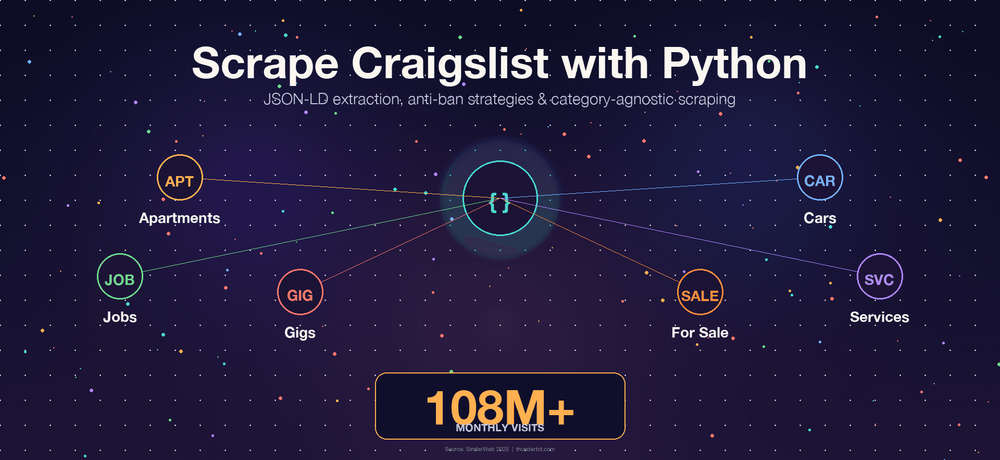
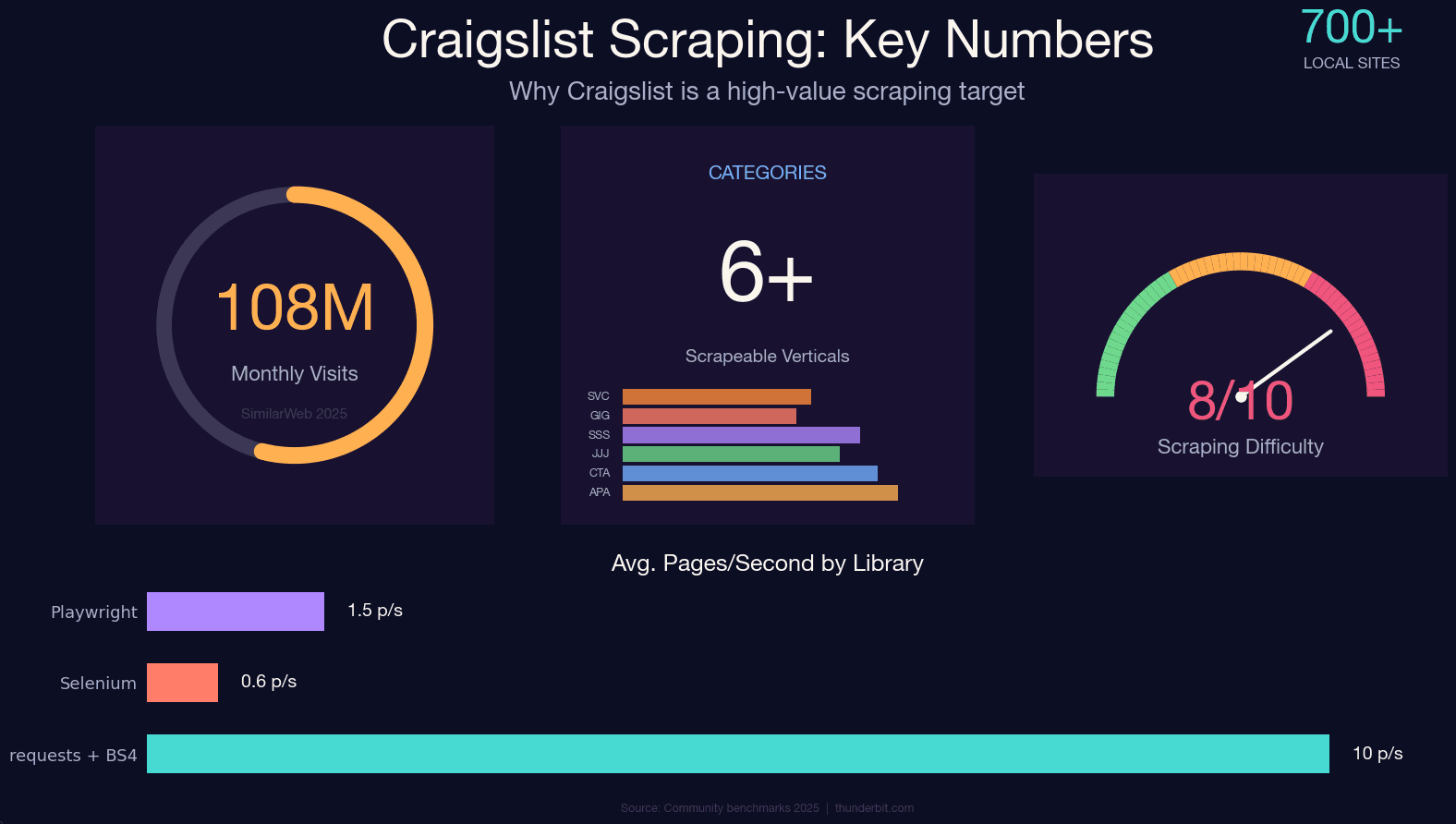
Craigslist still pulls in roughly 108 million monthly visits across ~700 local sites — and it still has no public API. If you want structured data from those apartment listings, used cars, job posts, or gig ads, scraping is basically your only option.
Craigslist's custom anti-bot system is ruthless, though. It doesn't use Cloudflare or DataDome — it runs its own nginx-based rate limiter that's been refined for over a decade. Hit it wrong and you'll get a flat 403 before your second cup of coffee. I've spent a lot of time testing different approaches against Craigslist's defenses, and this guide is the result: a 2025-current, category-agnostic Python tutorial that covers the JSON-LD extraction method (the single biggest improvement over outdated guides), honest anti-ban strategies, the legal landscape, and a no-code alternative for anyone who just wants the data without writing a line of code.
What Does It Mean to Scrape Craigslist with Python?
Web scraping Craigslist means using Python scripts to programmatically visit Craigslist pages, extract the structured data you care about — titles, prices, descriptions, images, locations, posting dates — and save it to a spreadsheet, database, or JSON file.
Python is the go-to language for this because of its library ecosystem. Between requests, BeautifulSoup, lxml, and curl_cffi, you can build a working Craigslist scraper in under 100 lines. The community is enormous, so when Craigslist changes something (and it does), someone's already figured out the fix.
The key thing to know: Craigslist does not offer a public read API. The only official programmatic interface is the Bulk Posting Interface (BAPI), which is write-only — it lets approved paid posters submit listings, not retrieve them. Every "Craigslist API" product you see on third-party platforms is an unofficial scraper, not a sanctioned endpoint. If you want bulk data, you scrape.
Why Scrape Craigslist? Real-World Use Cases
Craigslist isn't just a place to find a used couch. It's a massive, continuously updated dataset across dozens of verticals. Here's who actually benefits from scraping it:
| Use Case | Who Benefits | What You Extract |
|---|---|---|
| Apartment & rental price monitoring | Real estate agents, renters, PropTech companies | Price, sqft, bedrooms, neighborhood, lat/long |
| Used car market analysis | Dealerships, consumer apps, researchers | Price, make, model, year, odometer, condition |
| Job market research | Recruiters, labor economists, workforce analysts | Title, compensation, employment type, posted date |
| Lead generation | Sales teams, service providers | Contact info, business names, service area |
| Competitive pricing | Local service providers, ecommerce ops | Service pricing, descriptions, areas served |
The most cited academic example is the Kaggle "Used Cars Dataset" — roughly 500,000 US used-car listings with 26 variables, which has been the basis for dozens of papers, including a 2024 ResearchGate study on US used car market dynamics. Hedge funds have purchased aggregated Craigslist rental data for rent-trend research. And sales teams routinely scrape services and gigs categories for lead gen.
The math is simple: 8 hours of manual copy-pasting versus about 10 minutes with a well-built scraper.
Scrape Craigslist with Python: Every Category, Not Just Cars
Almost every Craigslist scraping guide I've found only covers cars-for-sale — which is like writing a Google tutorial that only covers image search. Craigslist has dozens of categories, and the URL patterns differ for each.
The structure is always: https://{city}.craigslist.org/search/{category_slug}
Swap the city subdomain and the slug, and you're scraping a completely different vertical. Here's a reference table of the most popular categories (verified April 2025):
| Category | URL Slug | Typical Fields to Extract |
|---|---|---|
| Apartments / Housing | /search/apa | Price, sqft, bedrooms, location, pet policy |
| Cars & Trucks | /search/cta | Price, make, model, year, odometer |
| Jobs | /search/jjj | Title, company, salary, employment type |
| Services | /search/bbb | Title, description, phone number, area |
| Gigs | /search/ggg | Title, compensation, date, category |
| For Sale (general) | /search/sss | Title, price, condition, location |
You can also stack query parameters for filtering:
| Parameter | Purpose | Example |
|---|---|---|
query | Full-text keyword | ?query=studio |
min_price / max_price | Price range | &min_price=1500&max_price=3000 |
hasPic | Only posts with images | &hasPic=1 |
postedToday | Last 24 hours | &postedToday=1 |
sort | Ordering | &sort=priceasc |
s | Pagination offset (120 per page) | ?s=120 |
So a URL like https://newyork.craigslist.org/search/apa?min_price=1500&max_price=3000&hasPic=1 gives you New York apartments between $1,500 and $3,000 with photos. Every Python scraper in this guide works across all these categories — just swap the slug.
2025 Craigslist HTML Selectors: Old vs. New (and the JSON Shortcut)
The number one reason Craigslist scrapers break is HTML structure changes. If you're following a tutorial from 2022 that tells you to target .result-row or .result-info, your scraper is already dead.
Craigslist rewrote its search results markup in 2023–2024. The old class names are nested inside new wrappers, but targeting them at the top of the DOM tree returns an empty list. Here's what changed:
| Element | Legacy Selector (pre-2024) | Current Selector (2025) |
|---|---|---|
| Listing container | .result-info | .cl-search-result |
| Title link | .result-title | .posting-title a |
| Price | .result-price | .priceinfo |
| Metadata (area) | .result-hood | .meta |
But here's the real insight — and the one that separates a 2025-current scraper from everything else: you don't need to parse HTML at all for search results.
Craigslist now embeds every visible listing inside a <script id="ld_searchpage_results"> tag as structured JSON-LD data. A single requests.get() call returns the full schema.org ItemList with every listing on the page — title, price, currency, location, image URL, detail page link. No JavaScript rendering required. No CSS selector fragility.
The JSON-LD approach is faster, more stable, and dramatically less likely to break when Craigslist tweaks its UI. It's what every actively maintained GitHub repo uses, and it's what we'll use in the tutorial below.
One caveat: the JSON-LD block is present for categories with pricing — apartments (apa), for sale (sss), cars (cta), housing (hhh). It's often absent or sparse for jobs (jjj), gigs (ggg), community (ccc), and services (bbb) because those listings don't have schema.org/Offer pricing. For those categories, fall back to the .cl-search-result HTML path.
Choosing Your Python Stack: Requests + BS4 vs. Selenium vs. Playwright
This is the question that comes up in every scraping forum: "Which library should I use?" For Craigslist specifically, the answer is more clear-cut than for most sites.
| Factor | requests + BeautifulSoup | Selenium | Playwright |
|---|---|---|---|
| Speed | 5–15 pages/sec (network-bound) | 0.3–1 pages/sec | 0.5–2 pages/sec |
| JS-rendered content | No | Yes | Yes |
| Memory | ~30–60 MB | ~400–700 MB | ~300–500 MB |
| Setup complexity | Low | Medium | Medium |
| Anti-bot resilience | Low (needs headers/proxies) | Medium (real browser) | Medium-High |
| Best Craigslist use case | Search results (JSON-LD) | Detail pages with dynamic content | Large-scale async scraping |
| Learning curve | Beginner-friendly | Moderate | Moderate |
Craigslist's pages are server-rendered. The JSON-LD blob is in the initial HTML. There's no JavaScript challenge on read paths. Every actively maintained Craigslist scraper on GitHub uses requests + BeautifulSoup or Scrapy. Zero use Selenium or Playwright. That's not a coincidence — a browser automation framework adds hundreds of MB of memory, a 10–100× speed penalty, and a more visible fingerprint for no benefit.
My recommendation:
- requests + BS4: Start here. It pairs perfectly with the JSON-LD extraction method and handles 95% of Craigslist scraping needs.
- Selenium: Only if you need to interact with dynamic content on specific detail pages (rare on Craigslist).
- Playwright: If you're scaling to thousands of pages with async concurrency — but honestly, Craigslist's rate limiter is the bottleneck, not your library's throughput.
We've covered the Playwright vs. Puppeteer comparison and a roundup of the best Python web scraping tools in separate posts if you want the full breakdown.
Scrape Craigslist without writing Python Get Started Free
The No-Code Alternative: Scrape Craigslist Without Writing Python
Quick detour before the code — this section is for everyone who isn't a developer. Real estate agents, sales teams, operations managers — if you just want the data and don't care about writing Python, there's a faster path.
Thunderbit is an AI web scraper that works as a Chrome extension. It can scrape Craigslist in about 2 clicks, no code required. Here's the workflow:
- Navigate to any Craigslist search results page (apartments, cars, jobs — any category).
- Click "AI Suggest Fields" in the Thunderbit sidebar. The AI reads the page and auto-detects columns like listing title, price, location, and link.
- Click "Scrape" — data is extracted in seconds.
- Use Subpage Scraping to visit each listing's detail page and enrich your data with full descriptions, phone numbers, images, and attributes.
- Export directly to Google Sheets, Excel, Airtable, or Notion — completely free.
For recurring needs — say, daily apartment price monitoring or weekly job listing snapshots — Thunderbit's Scheduled Scraper lets you describe the schedule in plain English and it runs automatically. No cron jobs, no server setup.
Thunderbit also handles anti-bot measures through its Cloud Scraping mode, so you don't need to worry about rotating proxies or crafting headers. If you want to try it, grab the Thunderbit Chrome Extension and see for yourself.
If you want full control and customization, keep reading for the Python step-by-step.
Step-by-Step: How to Scrape Craigslist with Python (Full Tutorial)
- Difficulty: Intermediate
- Time Required: ~30 minutes (setup + first scrape)
- What You'll Need: Python 3.8+, Chrome browser (for inspecting pages), a terminal
Step 1: Set Up Your Python Environment
Install the required libraries:
pip install requests beautifulsoup4 lxml
lxml is optional but speeds up BeautifulSoup parsing noticeably. If you run into TLS fingerprinting issues later (more on that in the anti-ban section), you can also install curl_cffi:
pip install curl_cffi
Your import block:
import requests
from bs4 import BeautifulSoup
import json
import csv
import time
import random
You should now have a clean Python environment with all dependencies installed.
Step 2: Build the Craigslist URL for Any Category
Construct the target URL dynamically using city + category slug + optional filters:
from urllib.parse import urlencode

BASE = "https://{city}.craigslist.org/search/{slug}"

def build_url(city, slug, **params):
    return f"{BASE.format(city=city, slug=slug)}?{urlencode(params)}"

# Example: New York apartments, $1500-$3000, with photos
url = build_url("newyork", "apa", min_price=1500, max_price=3000, hasPic=1)
print(url)
# https://newyork.craigslist.org/search/apa?min_price=1500&max_price=3000&hasPic=1
Swap "apa" for "cta" (cars), "jjj" (jobs), "bbb" (services), or any slug from the category table above. Swap "newyork" for "sfbay", "chicago", "losangeles", etc.
Step 3: Fetch the Page and Extract Embedded JSON
Send a GET request with proper headers, then parse the JSON-LD block:
HEADERS = {
    "User-Agent": (
        "Mozilla/5.0 (Windows NT 10.0; Win64; x64) "
        "AppleWebKit/537.36 (KHTML, like Gecko) "
        "Chrome/124.0.0.0 Safari/537.36"
    ),
    "Accept": "text/html,application/xhtml+xml,application/xml;q=0.9,*/*;q=0.8",
    "Accept-Language": "en-US,en;q=0.9",
    "Accept-Encoding": "gzip, deflate, br",
    "Referer": "https://www.craigslist.org/",
    "Sec-Fetch-Dest": "document",
    "Sec-Fetch-Mode": "navigate",
    "Sec-Fetch-Site": "same-origin",
    "Upgrade-Insecure-Requests": "1",
}

session = requests.Session()
r = session.get(url, headers=HEADERS, timeout=20)
r.raise_for_status()

soup = BeautifulSoup(r.text, "html.parser")
tag = soup.select_one("script#ld_searchpage_results")
data = json.loads(tag.text) if tag else {"itemListElement": []}
If tag is None, the JSON-LD block isn't present for that category — fall back to HTML parsing (see the selector table above). For apartments, cars, and for-sale categories, the JSON-LD block is reliably there.
Step 4: Parse Listing Data Into Structured Records
Iterate through the JSON items and extract the fields you need:
listings = []
for entry in data["itemListElement"]:
    item = entry["item"]
    offers = item.get("offers", {}) or {}
    addr = (offers.get("availableAtOrFrom") or {}).get("address", {})
    listings.append({
        "name":     item.get("name"),
        "url":      offers.get("url"),
        "price":    offers.get("price"),
        "currency": offers.get("priceCurrency"),
        "locality": addr.get("addressLocality"),
        "region":   addr.get("addressRegion"),
        "image":    item.get("image"),
    })

print(f"Found {len(listings)} listings")
You should see something like "Found 120 listings" (Craigslist shows 120 results per page). Some listings may have None for price if the poster didn't include one — handle that gracefully in your downstream logic.
Step 5: Scrape Detail Pages for Richer Data
Search results only give you summary info. For full descriptions, attributes (bedrooms, sqft, pet policy), lat/long coordinates, and images, you need to visit each listing's detail URL.
def fetch_detail(url, session):
    r = session.get(url, headers=HEADERS, timeout=20)
    r.raise_for_status()
    s = BeautifulSoup(r.text, "html.parser")
    body = s.select_one("#postingbody")
    mp = s.select_one("#map")
    return {
        "description": body.get_text("\n", strip=True) if body else None,
        "attributes":  [x.get_text(" ", strip=True)
                        for x in s.select("p.attrgroup span, div.attrgroup .attr")],
        "lat": mp.get("data-latitude") if mp else None,
        "lng": mp.get("data-longitude") if mp else None,
        "images": [img["src"] for img in s.select("div.gallery img")],
    }

for item in listings:
    item.update(fetch_detail(item["url"], session))
    time.sleep(random.uniform(3, 6))  # critical: anti-ban jitter
The time.sleep(random.uniform(3, 6)) is not optional. Skip it and you'll hit a 403 within a few dozen requests. Detail pages are server-rendered with stable selectors (#titletextonly, #postingbody, #map) that haven't changed since ~2017 — one of the few things about Craigslist that's actually reliable.
Step 6: Handle Pagination to Scrape All Results
Craigslist uses a ?s=120 offset parameter for pagination. Each page shows 120 results, and the max offset is typically 2999.
def iter_all(city, slug, max_pages=25, **filters):
    for page in range(max_pages):
        offset = page * 120
        url = build_url(city, slug, s=offset, **filters)
        r = session.get(url, headers=HEADERS, timeout=20)
        r.raise_for_status()
        soup = BeautifulSoup(r.text, "html.parser")
        tag = soup.select_one("script#ld_searchpage_results")
        if not tag:
            break
        data = json.loads(tag.text)
        items = data.get("itemListElement", [])
        if not items:
            break
        for entry in items:
            item = entry["item"]
            offers = item.get("offers", {}) or {}
            yield {
                "name": item.get("name"),
                "url": offers.get("url"),
                "price": offers.get("price"),
            }
        time.sleep(random.uniform(2.5, 5.0))
Don't try to scrape thousands of pages in rapid succession. Craigslist's rate limiter is per-IP, and sustainable single-IP throughput tops out at roughly 0.3–0.5 requests/second regardless of which library you use. That ceiling is set by Craigslist, not by Python.
Step 7: Export Your Craigslist Data to CSV, JSON, or Google Sheets
Save your results:
# CSV
with open("craigslist.csv", "w", newline="", encoding="utf-8") as f:
    w = csv.DictWriter(f, fieldnames=listings[0].keys())
    w.writeheader()
    w.writerows(listings)

# JSON
with open("craigslist.json", "w", encoding="utf-8") as f:
    json.dump(listings, f, indent=2, ensure_ascii=False)
If you'd rather skip the export code entirely, Thunderbit offers free export to Google Sheets, Excel, Airtable, or Notion directly from the browser. But for Python pipelines, CSV and JSON are the standard outputs. You can also pipe the data directly into pandas for analysis or into a database with sqlite3.
How to Avoid Getting Banned When You Scrape Craigslist with Python
Most tutorials hand-wave through this part. Craigslist's anti-bot system is custom-built, not off-the-shelf, and it has some specific quirks.
Use Realistic Request Headers
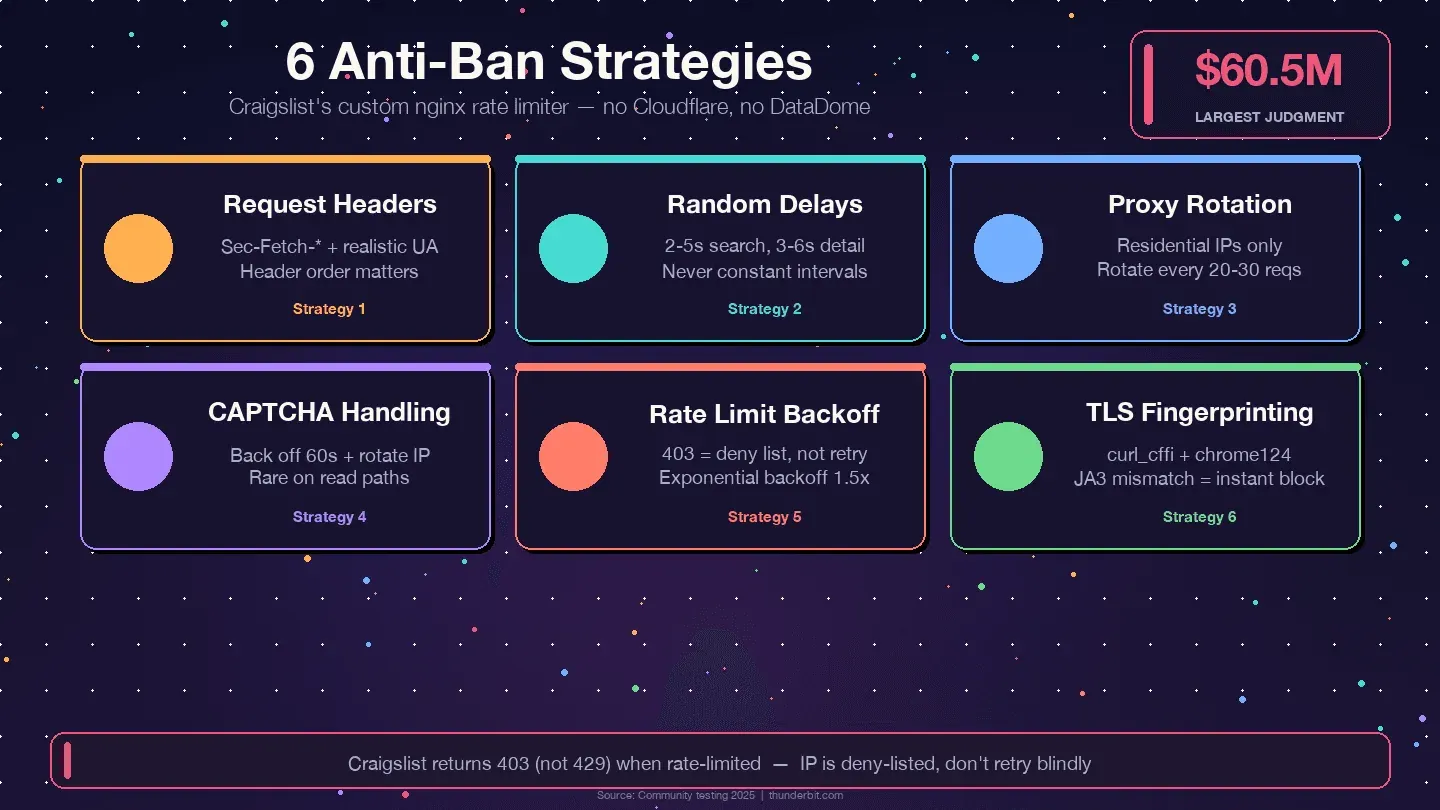
Craigslist validates header order and completeness. A request missing Sec-Fetch-Dest or with an outdated User-Agent will be flagged before it hits the content. The full Chrome 120+ header set (shown in Step 3 above) is the minimum. Rotate User-Agent per session among 5–10 recent Chrome/Firefox desktop strings — but don't change it mid-session, because that looks unnatural.
Missing Sec-Fetch-* headers is the single most common reason first-time scrapers get instant blocks.
Add Random Delays Between Requests
Community consensus from multiple sources (ScrapingBee, Scraperly, Oxylabs, Multilogin) converges on random 2–5 seconds between search page fetches and 3–6 seconds between detail page fetches. Constant intervals look bot-like. Use time.sleep(random.uniform(2, 5)) — never time.sleep(2).
Rotate Proxies (If Scraping at Scale)
Craigslist pre-blocks entire AWS, GCP, and Azure IP ranges. Datacenter proxies are often dead on arrival. For anything beyond a few hundred pages, you need residential rotating proxies, rotated every 20–30 requests. Mobile proxies have the lowest detection risk but cost $8–30/GB.
| Proxy Type | Detection Risk on Craigslist | Cost (2025) |
|---|---|---|
| Datacenter | Very high — often blocked on first request | $0.50–2/GB |
| Residential rotating | Low — recommended | $5–15/GB |
| Mobile | Lowest | $8–30/GB |
Thunderbit's Cloud Scraping mode handles proxy rotation automatically if you'd rather not manage this yourself.
Handle CAPTCHAs Gracefully
CAPTCHAs on Craigslist are rare on read paths — they mostly appear on posting/reply flows. If one surfaces: back off at least 60 seconds, rotate IP, clear cookies, and reduce speed. Persistent CAPTCHAs are a sign your cadence is too aggressive, not a puzzle to brute-force with a solver.
Respect Rate Limits and Implement Backoff
Craigslist returns 403 (not 429) when you hit its rate limit. A 403 means the current IP is on a deny list — don't retry blindly. Rotate IP, change UA, and wait.
from requests.adapters import HTTPAdapter
from urllib3.util.retry import Retry

retry = Retry(
    total=5,
    backoff_factor=1.5,  # 1.5, 3, 6, 12, 24s
    status_forcelist=[429, 500, 502, 503, 504],
    allowed_methods={"GET"},
    respect_retry_after_header=True,
)
adapter = HTTPAdapter(max_retries=retry)
session.mount("https://", adapter)
One more tip: community reports consistently cite 2–6 AM target-city local time as the safest scraping window, with ~30–40% lower block rates than daytime.
TLS Fingerprinting — the Hidden Trap
Craigslist's bot layer inspects the TLS ClientHello. Python's requests library (built on OpenSSL) has a JA3 fingerprint that doesn't match any real browser. A perfect User-Agent header paired with a non-browser TLS fingerprint is a detectable mismatch. The workaround is curl_cffi with impersonate="chrome124", which emulates Chrome's TLS handshake:
from curl_cffi import requests as cffi_requests

r = cffi_requests.get(url, headers=HEADERS, impersonate="chrome124")
If you're getting unexplained 403s with clean residential IPs and correct headers, TLS fingerprinting is almost certainly the cause.
Craigslist robots.txt, Terms of Service, and Ethical Scraping
Most guides either skip this entirely or bury a one-liner in the FAQ. Given that Craigslist has won a $60.5 million judgment against a scraper (RadPad, 2017), it deserves more than a footnote.
What Craigslist's robots.txt Actually Says
The robots.txt file is surprisingly short. It has a single User-agent: * block with only seven disallowed paths:
Disallow: /reply
Disallow: /fb/
Disallow: /suggest
Disallow: /flag
Disallow: /mf
Disallow: /mailflag
Disallow: /eaf
All seven are interactive/mutating endpoints: reply, flag, suggest, email-a-friend. Listing pages (/search/..., individual post URLs) are not disallowed. There's no Crawl-delay directive, though Craigslist enforces one anyway via IP blocks.
City subdomains do publish sitemaps — e.g., https://newyork.craigslist.org/sitemap/index.xml — which are the officially discoverable path to listings.
Legal Precedent: The Cases That Matter
Craigslist v. 3Taps (2013, settled 2015): 3Taps scraped Craigslist listings and resold them. When Craigslist sent a cease-and-desist and blocked their IPs, 3Taps routed around the block with rotating proxies. The court held that circumventing IP blocks after explicit revocation constituted "without authorization" under the CFAA. 3Taps settled for $1M.
Meta v. Bright Data (2024): A more recent ruling found that Meta's TOS cannot prohibit logged-off scraping of publicly available data. The court held that a logged-off scraper was "in the same shoes as a visitor." This is the most important ruling for 2024–2025 scrapers — if you never create a Craigslist account, never log in, and only access publicly visible pages, the TOS may not be enforceable against you as a contract.
The practical takeaway: CFAA risk is substantially reduced post-Van Buren (2021) and hiQ v. LinkedIn (2022) for publicly accessible pages. But state-law tort claims (trespass-to-chattels, misappropriation) remain live — that's what drove both the 3Taps settlement and the $60.5M RadPad judgment.
This is informational, not legal advice. If you're scraping Craigslist commercially, talk to a lawyer.
Practical Ethical Scraping Checklist
- ✅ Honor every
Disallowin robots.txt — especially the seven action endpoints - ✅ Stay well under 1,000 pages per 24-hour period per IP (Craigslist's TOS assigns $0.25 per page above that threshold as liquidated damages)
- ✅ Stay logged-off — never create a Craigslist account for scraping
- ✅ Never circumvent IP bans with proxies after an explicit block (that's what sank 3Taps)
- ✅ Add delays between requests — 2–5 seconds minimum
- ✅ Don't scrape personal contact info for spam
- ✅ Don't redistribute raw Craigslist data or present it as your own platform
- ✅ Use data for legitimate research, analysis, or personal-use purposes
- ✅ Prefer published sitemaps over brute-force crawling where possible
- ✅ Strip PII (emails, phone numbers) on ingestion if you're storing data
We've written a deeper guide on the legal implications of web scraping if you want the full picture.
Python vs. No-Code: Which Approach Is Right for You?
| Factor | Python (requests + BS4) | Thunderbit (No-Code) |
|---|---|---|
| Setup time | 30–60 min (install, write code) | 2 minutes (install Chrome extension) |
| Technical skill needed | Intermediate Python | None |
| Customization | Full control over logic, fields, flow | AI auto-detects fields; user can adjust |
| Scale | Unlimited (with proxies, scheduling) | Scheduled Scraper for recurring tasks |
| Anti-ban handling | Manual (headers, delays, proxies, TLS) | Built-in (Cloud Scraping) |
| Export options | CSV, JSON (code it yourself) | Google Sheets, Excel, Airtable, Notion — free |
| Best for | Developers, data scientists, custom pipelines | Sales teams, real estate agents, ops managers |
Use Python if you need full customization, plan to integrate with a larger data pipeline, or want to understand exactly what's happening under the hood. Use Thunderbit if you want results fast without writing or maintaining code. Both are valid. It comes down to your use case and whether you'd rather spend time in a terminal or a browser.
Wrapping Up
Craigslist is a rich, continuously updated data source across housing, cars, jobs, services, gigs, and more — and with no public API, scraping is the only way to get structured data at scale. The 2025 approach that actually works: extract the embedded JSON-LD from search results (not fragile CSS selectors), use requests + BeautifulSoup (not Selenium), add realistic headers with Sec-Fetch-* fields, randomize delays, and use residential proxies if you're going beyond a few hundred pages.
The JSON-LD method is the single biggest improvement over outdated guides. It's faster, more resilient to layout changes, and requires zero JavaScript rendering. Pair it with the anti-ban strategies above and you'll avoid the 403s that trip up most scrapers.
If you'd rather skip the code entirely, the Thunderbit Chrome Extension can scrape any Craigslist category in a couple of clicks and export directly to your preferred spreadsheet or database. If you want to go deeper, our guides on how to web scrape with Python and web scraping best practices cover the fundamentals in more detail.
Try Thunderbit for Craigslist Scraping
Try AI Web Scraper for Craigslist Data Get Started Free
FAQs
Is it legal to scrape Craigslist?
Craigslist's Terms of Use prohibit automated scraping and include a liquidated-damages clause ($0.25/page over 1,000/day). However, recent court rulings — particularly Meta v. Bright Data (2024) and hiQ v. LinkedIn (2022) — have narrowed CFAA liability for logged-off scraping of publicly available data. State-law tort claims (trespass-to-chattels) remain a risk, especially for commercial redistribution. Respect robots.txt, stay logged-off, add delays, and don't redistribute raw data. This is general information, not legal advice.
Does Craigslist have a public API?
No. Craigslist offers only a write-only Bulk Posting Interface (BAPI) for approved paid posters. There is no public read API, no developer portal, and no rate-limited tier for data retrieval. Every "Craigslist API" product you see on third-party platforms is an unofficial scraper.
Why does my Craigslist scraper keep breaking?
Almost always because of HTML structure changes. Craigslist rewrote its search results markup in 2023–2024, and guides using legacy selectors like .result-row or .result-info no longer work. Switch to the embedded JSON-LD method (parsing script#ld_searchpage_results) for a much more resilient approach. Also check that your headers include Sec-Fetch-* fields — missing them triggers instant blocks.
Can I scrape Craigslist without Python?
Yes. Thunderbit's AI web scraper Chrome extension works on any Craigslist page — apartments, cars, jobs, services. Click "AI Suggest Fields" to auto-detect columns, click "Scrape" to extract data, and export to Google Sheets, Excel, Airtable, or Notion for free. No coding, no setup, no proxy management.
How often can I scrape Craigslist without getting banned?
With a single residential IP, sustainable throughput is roughly 0.3–0.5 requests per second with random 2–5 second delays between pages. Stay under 1,000 pages per 24-hour period per IP to avoid both bans and the liquidated-damages threshold in Craigslist's TOS. Scraping during off-peak hours (2–6 AM target-city local time) reduces block rates by roughly 30–40%. For larger volumes, rotate residential proxies every 20–30 requests.
Learn More




