

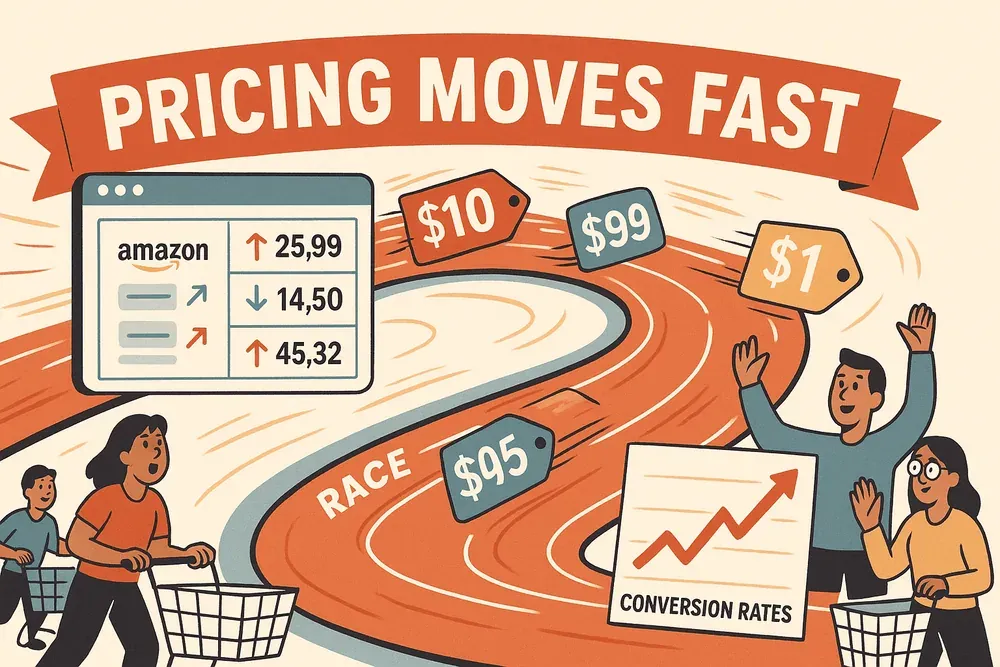
The days of “set it and forget it” pricing are long gone. In today’s ecommerce and retail world, prices move faster than a New York minute—Amazon alone tweaks millions of prices every few minutes, and a $1 difference can swing conversion rates by double digits during peak shopping events. With 70–75% of online shoppers ranking competitive pricing as their top priority, the pressure is on for businesses to not just keep up, but to outsmart the market entirely (Intelligence Node, Pricefy). As someone who’s spent years in SaaS and automation, I’ve seen firsthand how the old ways—manual checks, spreadsheets, and guesswork—just can’t keep up with the pace or complexity of modern pricing.
Scrape competitor pricing data with AI Get Started Free
That’s where price intelligence comes in. But let’s clear something up: price intelligence isn’t just about watching your competitors’ prices and playing catch-up. It’s about using big data, AI, and predictive analytics to turn a flood of market information into actionable, strategic decisions. In this guide, I’ll break down what price intelligence really means, why it’s become a competitive must-have, and how tools like Thunderbit are making it accessible—even if you’re not a data scientist or a coding wizard.
Price Intelligence: Beyond Simple Price Monitoring
So, what exactly is price intelligence? In plain English, price intelligence is the process of collecting, analyzing, and acting on data about competitor pricing, market trends, and consumer behavior to inform your own pricing strategy (Shopify). It’s a big leap from traditional price monitoring, which is mostly about tracking price changes and maybe getting an alert when a competitor drops their price by $5.
Here’s the key difference: price intelligence doesn’t just tell you what’s happening—it tells you what to do next (Intelligence Node). It leverages AI and big data to:
- Clean and standardize raw pricing data from all over the web
- Enrich that data with context (like product details, promotions, and stock levels)
- Apply predictive analytics to spot trends and forecast competitor moves
- Factor in consumer sentiment (think reviews and ratings) to gauge perceived value
- Deliver strategic recommendations, not just raw numbers
For example, a basic price monitor might tell you that Competitor X dropped their price from $100 to $95. A price intelligence system, on the other hand, might reveal that Competitor X is clearing out old stock, predict how customers will react, and recommend whether you should match the drop, hold your price, or even raise it if your product has better reviews.
In short, price intelligence turns pricing data into strategic, proactive decisions—not just reactive price changes.
Why Price Intelligence Is a Competitive Advantage for Modern Businesses

Let’s get real: in today’s hyper-competitive landscape, price intelligence isn’t just a nice-to-have—it’s a survival tool. Here’s why:
- Optimal Pricing and Higher Margins: By analyzing market data and price sensitivity, businesses can pinpoint the sweet spot that maximizes profit without losing sales. One European DIY retailer saw a 14.2% increase in sales and a 23.9% jump in profit margins after refining prices with data-driven insights.
- Dynamic Market Responsiveness: With prices changing daily (or hourly), price intelligence lets you react in near-real-time. Amazon and Walmart are famous for this, but smaller players can join the game with the right tools (Retail TouchPoints).
- Inventory Management: By monitoring competitor stock and prices, you can decide when to raise prices (if competitors are out of stock) or lower them to move inventory, reducing markdown losses and increasing sell-through rates (MetricsCart).
- Market Trend Analysis: Price intelligence reveals patterns—like seasonal shifts or aggressive promotions—so you can plan ahead, not just react (Impact Analytics).
- Enhanced Customer Perception: Strategic pricing on key items boosts price perception and customer trust, leading to loyalty and higher lifetime value (Clear Demand).
Here’s a quick table of ROI-focused use cases:
| Use Case | Role of Price Intelligence | ROI/Benefit Example |
|---|---|---|
| Dynamic Pricing | Adjust prices in real-time based on demand and competition | Amazon’s dynamic pricing credited with ~27% sales growth; 2–5%+ revenue lift for adopters |
| Margin Optimization | Identify optimal price points for profit | Double-digit margin gains; 23.9% increase for a European retailer |
| Inventory Management | Align prices with stock and demand | Reduced markdown losses, higher sell-through, less dead stock |
| Competitive Win Rate | Monitor competitors to capitalize on market gaps | Raise prices when competitors are out of stock, improving profit per sale without losing volume |
The bottom line? Companies using price intelligence enjoy higher profitability, faster decision-making, and stronger market positioning.
Price Intelligence vs. Traditional Price Monitoring: What’s the Difference?
It’s easy to confuse price intelligence with basic price monitoring, but the gap is huge. Here’s how they stack up:
| Feature | Traditional Price Monitoring | Price Intelligence |
|---|---|---|
| What it does | Tracks competitor price changes | Analyzes, predicts, and recommends actions |
| Data enrichment | Minimal (just price points) | Adds context: stock, promos, reviews, product details |
| Predictive analytics | No | Yes—forecasts competitor moves and demand |
| Consumer sentiment analysis | No | Yes—integrates reviews/ratings |
| Actionable recommendations | No—leaves decisions to humans | Yes—suggests or automates pricing changes |
| Automation | Rare | Common (scheduled scraping, real-time alerts) |
Think of it this way: monitoring is seeing the road, intelligence is knowing how to drive on it. The best teams use both, but price intelligence is what turns data into a real competitive edge.
How Thunderbit Empowers Price Intelligence with Data Extraction
Now, let’s talk about the elephant in the room: getting the data. Price intelligence is only as good as the information you feed it. That’s where Thunderbit comes in—and yes, I’m a little biased, but for good reason.
Thunderbit is an AI-powered web scraper Chrome Extension that makes it dead simple to collect real-time pricing, competitor data, and even consumer reviews from any website. Here’s how it helps power price intelligence:
- AI-Powered Scraping: Just click “AI Suggest Fields” and Thunderbit reads the page, suggesting what data to pull—product names, prices, ratings, stock status, you name it. No coding, no templates, no headaches (Thunderbit Blog).
- Subpage Extraction: Need more than just list prices? Thunderbit can visit each product’s subpage to grab specs, reviews, or technical details, and append them to your dataset. This means you get a multi-dimensional view—perfect for price intelligence (Thunderbit).
- Instant Templates: For popular sites (Amazon, eBay, Shopify stores, etc.), Thunderbit offers one-click templates. Just select the template and start scraping—no setup required.
- Scheduled Scraping: Price intelligence is an ongoing job. Thunderbit lets you schedule scrapes (hourly, daily, weekly) with plain English instructions, so your data is always fresh (Thunderbit Blog).
- Data Export: Instantly export your data to Excel, Google Sheets, Airtable, Notion, or download as CSV/JSON. Many teams set up live dashboards that update with every scheduled scrape (Thunderbit).
- AI Data Processing: Thunderbit can format, categorize, and even translate data as it scrapes, so your output is ready for analysis—no more cleaning up messy spreadsheets.
And the best part? Thunderbit is built for non-technical users. If you can use a browser, you can use Thunderbit. That's why it's trusted by over 100,000 users worldwide.
Try Thunderbit for Price Intelligence
The Three Key Steps to Building an Effective Price Intelligence Strategy
Ready to put price intelligence into action? Here’s the roadmap:
Step 1: Data Collection with Price Intelligence Tools
Start by gathering accurate, up-to-date data on competitor prices, promotions, stock, and consumer sentiment. This means scraping:
- Competitor websites (product and category pages)
- Online marketplaces (Amazon, eBay, etc.)
- Price comparison engines
- Customer reviews and ratings
Manual checks are slow, error-prone, and impossible to scale. Automated tools like Thunderbit let you collect data from hundreds of pages in minutes, not hours. With features like subpage scraping and scheduled jobs, you can build a rich, multi-dimensional dataset without breaking a sweat (Thunderbit Blog).
Step 2: Analysis and Predictive Modeling
Once you have the data, it’s time to turn numbers into insights. For non-technical users, this can be as simple as:
- Comparing your prices to competitors
- Calculating a price index (your price vs. market average)
- Segmenting products to spot overpriced or underpriced items
- Plotting historical trends to see how competitors react to sales or seasons
More advanced teams might use AI or statistical models to analyze price elasticity (how sensitive sales are to price changes), forecast demand, or simulate “what if” scenarios. But even basic analysis—especially when automated with tools like Google Sheets or BI dashboards—can reveal big opportunities (Unikie).
Top Pricing Tracking Tools Get Started Free
Step 3: Strategy Implementation and Automation
Here’s where the rubber meets the road. Use your insights to:
- Adjust prices, promotions, or inventory in real time
- Set up rules for dynamic pricing (e.g., always price 1% below the lowest competitor, as long as you’re above cost)
- Automate alerts or even price changes with integrated tools
Thunderbit’s scheduled scraping and instant exports make it easy to keep your data—and your decisions—up to date. The faster you can go from data to action, the more competitive you’ll be (Clear Demand).
Real-World Applications: From Historical Data to Predictive Adjustments
Let’s bring this to life with a real-world example. Imagine a mid-sized online fashion retailer heading into the holiday season. Last year, they lost sales because they didn’t react fast enough to competitor discounts. This year, they use price intelligence:
- Historical Analysis: They review last year’s sales and competitor pricing. Turns out, they under-discounted on jackets (losing price-sensitive customers) and over-discounted on premium boots (giving away margin for no reason).
- Data Collection: Using Thunderbit, they set up scheduled scrapes of competitor sites—tracking prices, stock, and reviews for key products.
- Responsive Analytics: When a competitor drops jacket prices by 25%, Thunderbit’s data triggers an alert. The retailer matches the price immediately and sends out a “Holiday Price Drop” email. For boots, they hold prices steady, knowing their customers are less price-sensitive.
- Strategic Adjustments: When a competitor sells out of a popular boot, the retailer actually raises their price slightly, capturing extra margin from customers who still want the product.
The result? Sales in jackets are up 20% year-over-year, margins on boots are higher, and customer feedback is better—fewer “I found it cheaper elsewhere” complaints. Thunderbit made it possible to move from hindsight to foresight, and from slow reactions to proactive strategy (Thunderbit Blog).
Key Benefits of Implementing Price Intelligence
Let’s recap the main advantages:
- Increased Profitability: Set optimal prices to maximize profit without losing sales (Unikie).
- Competitive Advantage: Stay ahead of market moves, never get blindsided by a competitor’s price drop (Clear Demand).
- Faster Decision-Making: Move from monthly pricing meetings to daily or even real-time adjustments (DealHub).
- Improved Customer Trust: Consistent, fair pricing builds loyalty and reduces complaints (Clear Demand).
- Better Inventory Management: Use pricing as a lever to avoid stockouts or clearance gluts (Impact Analytics).
- Risk Reduction: Avoid price wars, MAP violations, and costly mistakes with data-backed decisions (Intelligence Node).
- Operational Efficiency: Automate grunt work, freeing your team to focus on strategy (Product Hunt).
Choosing the Right Price Intelligence Tools for Your Business
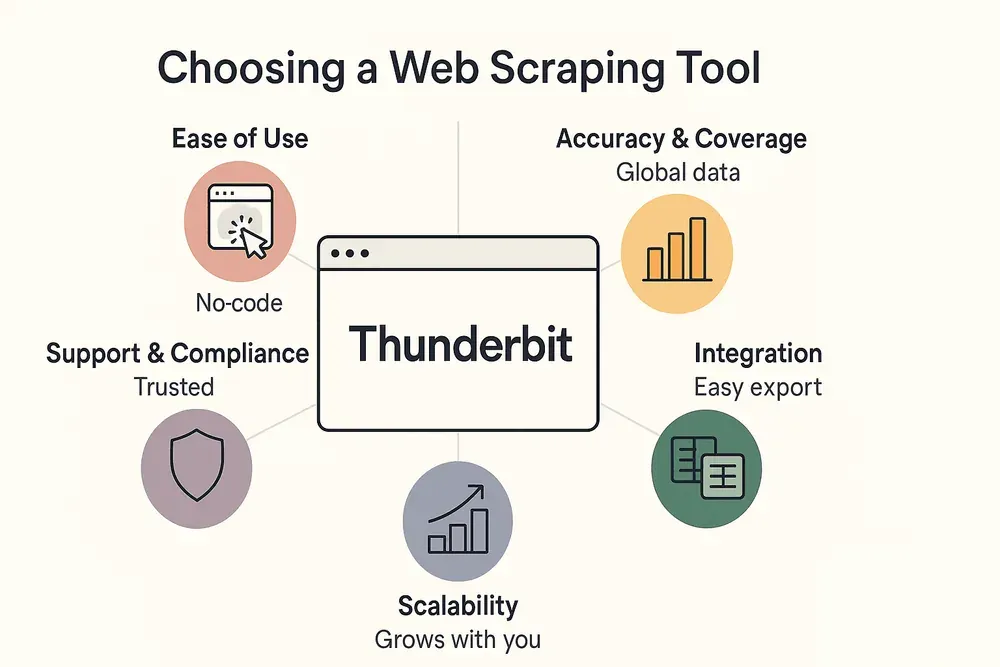
With so many options out there, how do you pick the right tool? Here’s what to look for:
- Ease of Use: No-code tools like Thunderbit are ideal for teams without technical backgrounds. If your team can use a browser, they can use Thunderbit (Thunderbit Blog).
- Data Accuracy and Coverage: Make sure the tool can scrape the sites you care about, handle different currencies and regions, and update frequently.
- Feature Set: Do you need just raw data, or built-in analytics, dashboards, and alerts? Thunderbit is great for flexible data collection; more advanced platforms may offer automated repricing or deeper analytics.
- Integration: Can you export to Excel, Google Sheets, or your BI tool? Thunderbit supports all of these out of the box (Thunderbit).
- Scalability: Will it grow with your business? Thunderbit’s pricing starts at $15/month for small teams, with free tiers for trying it out (Thunderbit Pricing).
- Support and Compliance: Choose a reputable vendor with good support and a track record of compliance.
For many businesses, starting with a tool like Thunderbit makes sense—easy onboarding, low cost, and no technical hurdles. As your needs grow, you can always layer on more advanced analytics or automation.
Conclusion: Unlocking Smarter Pricing with Data-Driven Insights
Pricing is no longer just about gut instinct or copying the competition. In a world where markets move at lightning speed and customers are more price-savvy than ever, price intelligence is your secret weapon. It’s about turning overwhelming amounts of data into clear, confident decisions—boosting profits, staying competitive, and building customer trust.
The best part? You don’t need a PhD in data science or a team of engineers to get started. With tools like Thunderbit, advanced pricing strategies are finally within reach for sales, ecommerce, and operations teams of any size. All it takes is a willingness to move from guesswork to data-driven action.
Ready to unlock the power of price intelligence? Download the Thunderbit Chrome Extension, set up your first scrape, and see what insights you can uncover. For more tips and deep dives, check out the Thunderbit Blog.
Try Thunderbit for Price Intelligence Get Started Free
FAQs
1. What is price intelligence, and how is it different from price monitoring?
Price intelligence is the practice of collecting, analyzing, and acting on data about competitor pricing, market trends, and consumer behavior to inform your pricing strategy. Unlike basic price monitoring, which just tracks price changes, price intelligence uses AI and analytics to deliver actionable recommendations and predictive insights (Shopify).
2. Why is price intelligence important for ecommerce and retail businesses?
It helps businesses optimize pricing for higher profits, respond quickly to market changes, manage inventory more effectively, and build stronger customer trust. Companies using price intelligence often see double-digit increases in sales and margins (Unikie).
3. How does Thunderbit support price intelligence strategies?
Thunderbit enables easy, AI-powered web scraping to collect real-time pricing, competitor, and review data from any website. Features like subpage scraping, scheduled jobs, and instant templates make it accessible for non-technical users and powerful enough for complex workflows (Thunderbit Blog).
4. What are the key steps to implementing price intelligence?
The process involves: 1) Automated data collection (using tools like Thunderbit), 2) Analysis and modeling (to turn data into insights), and 3) Strategy implementation (adjusting prices, promotions, or inventory in real time and automating where possible).
5. How do I choose the right price intelligence tool for my business?
Look for ease of use, data accuracy, integration with your workflow, scalability, and strong support. Thunderbit is a great starting point for teams that want to get up and running quickly without technical barriers (Thunderbit Pricing).
Ready to get smarter about pricing? Dive into the world of price intelligence and let data drive your next big win.
Learn More Top 10 Best Online Price Tracker Tools for 2026 Shopping Home Depot Price Tracker: Build One Without Coding Skills How to Check Price History on Amazon: 5 Effective Tools Build a Price Tracker Best Buy Tool Using Python




