
Oxylabs has been one of the most-discussed proxy providers in the enterprise space for years — and in 2026, the conversation is more polarized than ever. Enterprise users on Capterra give it a 4.7/5, while smaller operators on Reddit and Trustpilot tell a very different story.
I've spent a lot of time digging through independent benchmarks, community forums, and pricing pages to put together the Oxylabs review that most articles skip: one that covers not just the features, but the real-world friction, hidden costs, and the honest question of whether you even need a proxy provider in the first place. If you're evaluating Oxylabs for your team — or just trying to figure out if there's a simpler way to get the data you need — this is the guide.
What Is Oxylabs and What Does It Actually Offer?
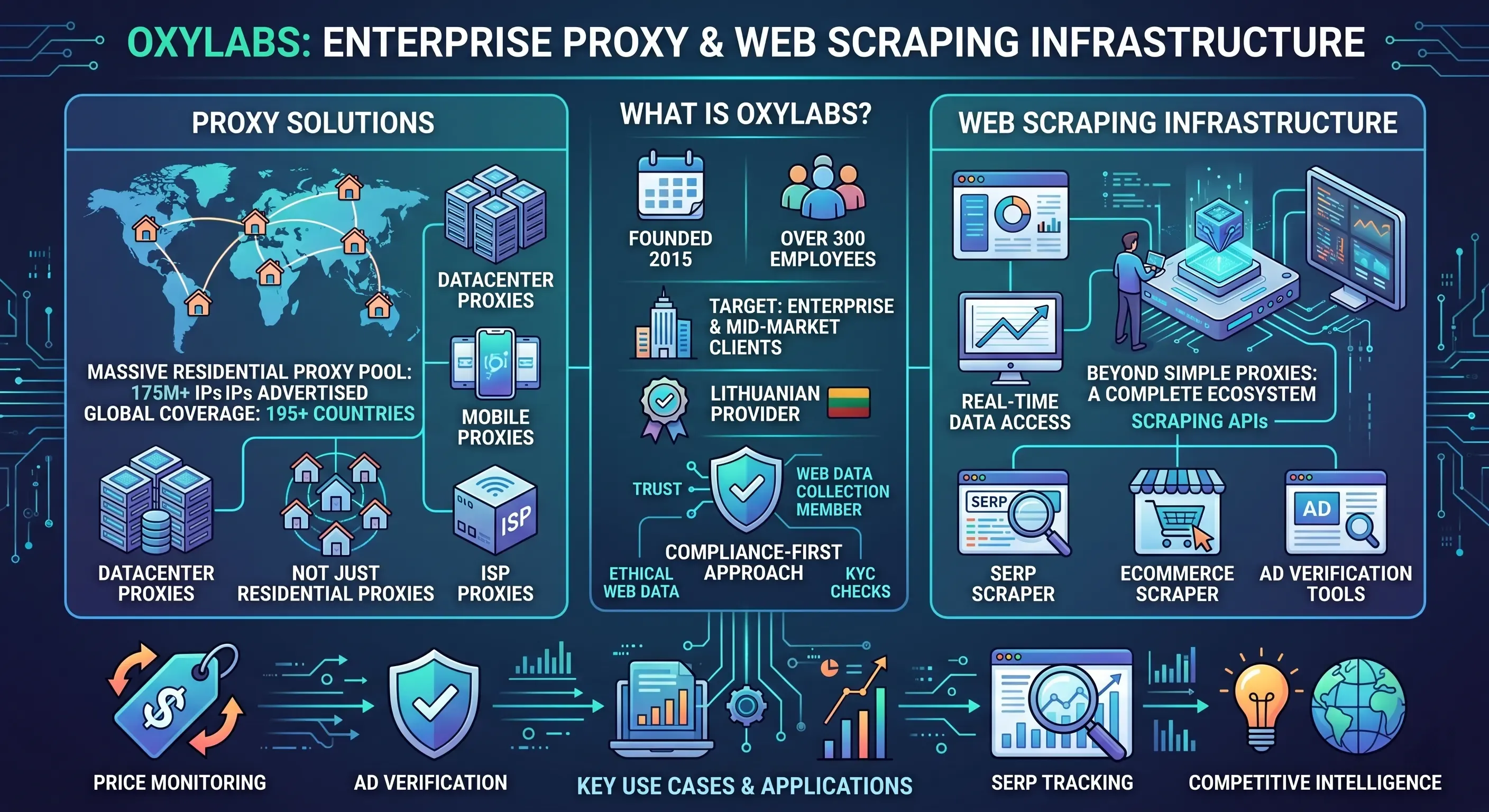
Oxylabs is a Lithuanian proxy and web scraping infrastructure provider, founded in 2015. It's primarily aimed at enterprise and mid-market business clients who need large-scale access to web data — think price monitoring, ad verification, SERP tracking, and competitive intelligence.
The company employs over 300 people and has built its reputation on a massive residential proxy pool (now advertised at 175M+ IPs), coverage in 195+ countries, and a compliance-first approach (they're a member of the Ethical Web Data Collection Initiative and run KYC checks on new accounts). If you've seen Proxyway's annual research, Oxylabs regularly shows up as one of the top-rated enterprise providers.
What makes Oxylabs different from a simple proxy reseller is the breadth of its product lineup. It's not just residential proxies — the platform spans multiple product types, each targeting a different use case and technical profile.
Oxylabs Product Suite at a Glance
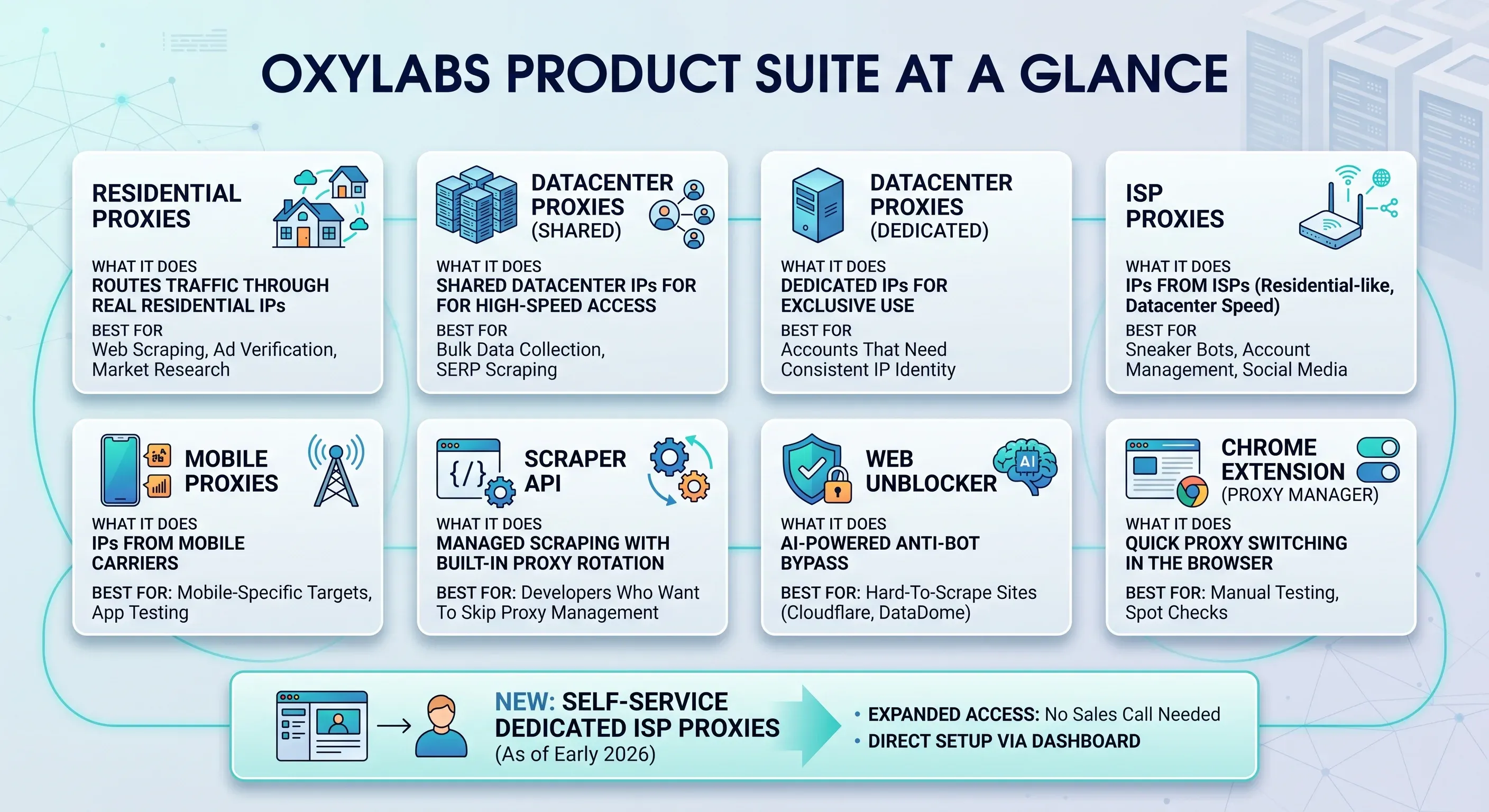
| Product | What It Does | Best For |
|---|---|---|
| Residential Proxies | Routes traffic through real residential IPs | Web scraping, ad verification, market research |
| Datacenter Proxies (Shared) | Shared datacenter IPs for high-speed access | Bulk data collection, SERP scraping |
| Datacenter Proxies (Dedicated) | Dedicated IPs for exclusive use | Accounts that need consistent IP identity |
| ISP Proxies | IPs from ISPs (residential-like, datacenter speed) | Sneaker bots, account management, social media |
| Mobile Proxies | IPs from mobile carriers | Mobile-specific targets, app testing |
| Scraper API | Managed scraping with built-in proxy rotation | Developers who want to skip proxy management |
| Web Unblocker | AI-powered anti-bot bypass | Hard-to-scrape sites (Cloudflare, DataDome) |
| Chrome Extension (Proxy Manager) | Quick proxy switching in the browser | Manual testing, spot checks |
As of early 2026, Oxylabs also launched dedicated ISP proxies in self-service — a sign they're gradually expanding access beyond the traditional "talk to sales" model.
The Real Cost of Oxylabs: A Transparent Pricing Breakdown
Pricing is the single most common concern I see in user reviews and community threads. And honestly, most competitor reviews either reference outdated rates or skip entire product lines. So here's the most current, complete breakdown I could put together.
Oxylabs Pricing Across All Products (2026)
| Product | Starting Price | Billing Model | Min Commitment | Free Trial |
|---|---|---|---|---|
| Residential Proxies | ~$4/GB (PAYG), drops at volume | Per GB, pay-as-you-go or subscription | Varies by plan | 7-day trial |
| Datacenter Proxies (Shared) | ~$0.08/IP | Per IP/month | Varies | Limited |
| Datacenter Proxies (Dedicated) | ~$0.20/IP | Per IP/month | Varies | Limited |
| ISP Proxies | ~$3.60/10 IPs | Per IP or per GB | Varies | Limited |
| Mobile Proxies | ~$9/GB (PAYG) | Per GB | Higher minimums | Contact sales |
| Scraper API | From $49/mo | Per request | Varies | Trial available |
| Web Unblocker | ~$3.50/1K requests | Per request | Varies | Trial available |
A few things to flag. The pay-as-you-go residential rate (~$4–8/GB depending on the tier) looks steep compared to budget providers. But at 1TB+ monthly volumes, Oxylabs' per-GB rate drops significantly and becomes competitive with Bright Data and Decodo. The catch: there's no convenient mid-tier between small and enterprise — if you're at 50GB/month, you're stuck in an awkward pricing gap.
Also, PAYG plans are non-refundable. That's not unique to Oxylabs, but it's worth knowing before you commit.
How Oxylabs Pricing Compares to Competitors
| Provider | Residential $/GB (PAYG) | Residential $/GB (1TB tier) | Free Trial | PAYG Option |
|---|---|---|---|---|
| Oxylabs | ~$4–8 | ~$2–3 | 7-day | ✅ |
| Bright Data | ~$5–8 | ~$2–3 | 7-day | ✅ |
| Decodo (Smartproxy) | ~$4–7 | ~$2.50 | Limited | ✅ |
| SOAX | ~$6–7 | ~$3 | Limited | ✅ |
| Webshare | ~$2–4 | ~$1.50 | Free plan | ✅ |
| IPRoyal | ~$3–5 | ~$2 | Limited | ✅ |
The takeaway: Oxylabs is not the cheapest option at any volume, but it's not wildly out of line at enterprise scale. If you're under 50GB/month, you'll almost certainly find better value elsewhere.
The Hidden Costs Most Reviews Don't Mention
Beyond the per-GB rate, there are a few costs that catch people off guard:
- Minimum commitments: Some plans have monthly minimums that aren't always obvious on the pricing page.
- Bandwidth overage: There's no 500GB tier — if you outgrow a smaller plan, you may have to top off at a higher per-GB rate until you hit the next tier.
- KYC as a time cost: The verification process can delay onboarding by days (or, in some cases, weeks).
- Non-refundable PAYG: If you buy bandwidth and don't use it, that money is gone.
- Fair usage caps on datacenter proxies: Both Oxylabs and Bright Data apply bandwidth caps on datacenter plans that aren't always prominently disclosed.
Oxylabs Performance: Speed, Success Rates, and Pool Quality
Performance is where Oxylabs genuinely shines — at least according to independent benchmarks. The Proxyway 2025 Proxy Market Research report is the gold standard here, and Oxylabs consistently ranks near the top.
Success Rates and Response Times
| Metric | Oxylabs | Decodo (Smartproxy) | Bright Data |
|---|---|---|---|
| Infrastructure success rate | 99.9% | 99.5% | 99.8% |
| Amazon success rate | ~93% | ~90% | ~92% |
| Google success rate | ~93% | ~91% | ~93% |
| Average response time | 0.65s | 0.63s | 0.70s |
Sub-second response times are solid for automated scraping. Proxied connections are still roughly 50x slower than a direct connection — something that matters for interactive use but barely registers in batch scraping workflows.
Proxy Pool Size and IP Quality
Oxylabs claims the largest residential proxy pool in the industry at 175M+ IPs. Proxyway's data backs this up: Oxylabs had the highest number of unique IPs in the global pool, and its IPs scored well on IPQualityScore fraud checks (third-highest percentage of IPs below the 75% fraud score threshold).
Large pool size doesn't automatically mean every IP you get is clean. Which brings us to the section most Oxylabs reviews pretend doesn't exist.
The IP Quality Controversy: What Users Say vs. What Oxylabs Claims
If you spend any time on Reddit or Trustpilot reading about Oxylabs, you'll notice a pattern: the benchmarks say one thing, and a vocal subset of users says another. I wanted to lay this out as clearly as possible, because I think both sides have a point.
| User Claim | What Oxylabs Says | What the Evidence Shows |
|---|---|---|
| Datacenter IPs labeled as residential | Ethically sourced residential pool | Independent IP fingerprint checks (e.g., ipinfo.io) can verify — worth running during trial |
| IPs already blacklisted by target sites | 175M+ pool with constant rotation | Large pools can still overlap with known proxy ranges; some users report immediate bans on fresh IPs |
| Geo-targeting delivers wrong country | Country/city/ASN-level targeting available | One Trustpilot user reported receiving Brazilian IPs after purchasing U.S. proxies; accuracy varies by region |
| Recycled IPs that trigger immediate bans | Constantly refreshed pool | Some users in niche geos report stale or recycled IPs |
My honest take: Oxylabs' pool quality is genuinely strong in aggregate benchmarks. But benchmarks measure averages. Individual experiences — especially for smaller accounts or less popular geo-targets — can diverge significantly.
Don't take the marketing at face value. Run your own checks during the trial.
Geo-Targeting Accuracy: Does It Actually Work?
Oxylabs offers country, state, city, ASN, ZIP, and even coordinate-level targeting. In my experience, country-level targeting is reliable for major markets (US, UK, Germany). But as you get more granular — city-level in smaller countries, for example — accuracy drops.
The specific complaint I keep seeing: "I purchased 12 proxies from the U.S., but they gave me Brazil instead." That's not a universal experience, but it's not an isolated one either. If geo-accuracy is critical for your use case, test it rigorously during the trial.
What the Oxylabs Free Trial Actually Looks Like
PCMag mentions the free trial exists. Nobody else walks you through what actually happens when you sign up. Here's what to expect.
Step 1: Sign up and provide business details. Oxylabs runs KYC checks, so you'll need to share your company name, use case, and sometimes additional verification. This is standard for enterprise proxy providers, but it's a real barrier if you're a solo developer or small team. Some users report being flagged or blocked during this step — one Trustpilot reviewer said they were "blocked because their system shows I'm in Russia — I'm in Turkey."
Step 2: Wait for approval. Most accounts are approved within a day or two, but some users have reported delays of a week or more, especially if the automated system flags something.
Step 3: Access the dashboard. Once approved, you get access to the Oxylabs dashboard — project management, proxy list generation, traffic monitoring. It's clean and enterprise-grade, but it can be overwhelming if you've never configured proxies before.
Step 4: Test your use case. The trial typically includes limited bandwidth across residential and datacenter proxies. Some targets (like Google Search) may be restricted during the trial period.
What's included: 7-day access, limited bandwidth, access to most (but not all) proxy types. The exact limits vary and aren't always clearly stated upfront.
Common pitfalls during trial:
- Geo-flagging issues (account blocked due to location mismatch)
- Restricted targets (some popular sites may not be available during trial)
- Slower support response for trial accounts vs. paying enterprise clients
Dashboard and Usability: First Impressions
The Oxylabs dashboard is functional and well-organized — you can manage projects, monitor traffic in real time, generate proxy lists, and control session settings. There's also a Chrome extension ("Proxy Manager") for quick proxy switching.
The interface is clearly designed for technical users. If you're not comfortable with proxy configuration, SOCKS5 vs. HTTP, or session rotation settings, the learning curve is steep. Documentation exists, but it's less beginner-friendly than what you'll find from Decodo or Smartproxy.
Customer Support: What to Expect
Oxylabs offers live chat with real humans (not just bots), dedicated account managers for enterprise clients, and a knowledge base. Support quality is generally praised in reviews — but there's a noticeable gap between the experience of large accounts (fast, personalized) and smaller ones (slower, more generic).
During a trial, expect decent but not instant support. If support responsiveness is a dealbreaker for you, test it early: submit a ticket on day one and time the response.
Who Should — and Who Should NOT — Use Oxylabs
This is the section most Oxylabs reviews skip — and it's the one I think matters most.
| Persona | Verdict | Why |
|---|---|---|
| Enterprise data team (50K+ req/day, 100GB+/mo) | ✅ Strong fit | Massive pool, dedicated account manager, SLAs, advanced integrations |
| Mid-size e-commerce (price monitoring, 20–100GB/mo) | ⚠️ Evaluate carefully | Performs well but pricing is steep vs. Decodo or SOAX at this volume |
| Solo developer / side project | ❌ Likely overkill | High minimum spend, KYC friction, slower support for small accounts |
| Non-technical business user (just needs data) | ❌ Wrong tool category | Proxies are infrastructure — consider an AI scraper like Thunderbit instead |
| Privacy / anonymous browsing | ❌ Wrong tool | Use a VPN or Tor |
When Oxylabs Is the Right Choice
If you're running a large-scale data operation — hundreds of thousands of requests per day, across multiple targets, with a team that knows how to configure and maintain proxy infrastructure — Oxylabs is hard to beat. The pool size, IP quality, and enterprise support are genuinely best-in-class at that scale.
When You Should Look Elsewhere
If you're under 50GB/month, non-technical, or just need structured data (not raw proxy access), Oxylabs is probably not the best use of your budget. Decodo (Smartproxy) is a better fit for mid-market proxy needs. Webshare is the budget pick. And if you're a business user who just wants data — leads, prices, contact info — without managing proxy pools or writing code, you're looking at a fundamentally different tool category.
Oxylabs vs. Alternatives: The Head-to-Head Feature Comparison
I couldn't find a single competitor article that puts all the major alternatives side by side in one table. So here it is.
| Feature | Oxylabs | Bright Data | Decodo (Smartproxy) | SOAX | Webshare | Thunderbit |
|---|---|---|---|---|---|---|
| Residential Pool Size | 175M+ | 72M+ | 55M+ | 191 countries | 30M+ | N/A (AI-based) |
| Scraper API | ✅ | ✅ | ✅ | ❌ | ❌ | ✅ (Extract API) |
| No-Code Scraping | ❌ | ❌ | ❌ | ❌ | ❌ | ✅ (Chrome extension) |
| Free Tier | 7-day trial | 7-day trial | Limited | Limited | Free plan | ✅ 6 pages free |
| Anti-Bot Handling | Web Unblocker | Unlocker | ✅ | ✅ | ❌ | ✅ Built-in AI |
| Export to Sheets/Airtable | Manual | Manual | Manual | Manual | Manual | ✅ 1-click free |
| Minimum Spend | ~$70+/mo | ~$70+/mo | ~$30+/mo | ~$99/mo | Free | Free tier |
| Best For | Enterprise proxy infra | Enterprise data | Mid-market proxy | Niche targeting | Budget proxy | Business users needing data |
Thunderbit is a different category here — not a proxy provider, but an AI-powered data extraction tool that eliminates proxy management entirely.
Oxylabs vs. Bright Data
Both are enterprise-focused, with similar pricing at scale and comparable performance benchmarks. Bright Data has a slightly higher Trustpilot rating and a broader self-service offering. Oxylabs counters with the largest residential pool and (as of August 2025) successfully invalidated several Bright Data patents — a legal win that signals confidence in their IP sourcing approach.
If you're choosing between the two, it often comes down to account management experience and which dashboard you prefer. Performance is a wash.
Oxylabs vs. Decodo (Smartproxy)
Decodo is more beginner-friendly, has better documentation, and is cheaper at lower volumes. Oxylabs wins on pool size, IP quality, and enterprise features. If you're under 100GB/month and don't need a dedicated account manager, Decodo is probably the smarter buy. For more on how these compare, see our Brightdata Review And Alternative.
When an AI Scraper Like Thunderbit Is the Better Fit
A significant chunk of people searching for "Oxylabs review" don't actually need proxy infrastructure. They need data — leads, product prices, contact info, competitor intel.
Proxies are just a means to that end.
If your goal is to scrape 1,000 Amazon product pages, here's what the two paths look like:
| Step | Oxylabs Scraper API | Thunderbit |
|---|---|---|
| 1. Sign up | KYC, account approval (days) | Install Chrome extension (seconds) |
| 2. Configure | Set up API keys, proxy rotation, headers, target URLs | Open Amazon, click "AI Suggest Fields" |
| 3. Scrape | Write/run script, handle errors, manage bandwidth | Click "Scrape" — AI handles anti-bot, pagination, subpages |
| 4. Export | Parse JSON, build pipeline to spreadsheet/CRM | 1-click export to Google Sheets, Excel, Airtable, Notion |
| 5. Estimated cost | ~$3.50/1K requests + bandwidth | Credits per output row; free tier covers small jobs |
| 6. Maintenance | Scripts break when site layout changes | AI adapts automatically |
For a business user who needs 500 product listings or a batch of leads, the cost and effort calculation is fundamentally different. Thunderbit's instant templates for popular sites — including Amazon — mean you can go from zero to structured data in under a minute. No KYC, no proxy configuration, no code.
This isn't about Thunderbit being "better" than Oxylabs — they solve different problems. But if you need data, not infrastructure, there's a much shorter path. For a broader look at your options, see our Best AI Web Scrapers roundup.
Try Thunderbit for No-Code Data Extraction
Oxylabs Review: Pros, Cons, and Common Pitfalls
Pros
- Massive residential IP pool (175M+) — the largest in the industry by most independent counts
- Strong performance benchmarks: 99.9% infrastructure success rate, sub-second response times
- Enterprise-grade support with dedicated account managers and SLAs
- Robust integrations (30+ third-party tools, including Selenium, Playwright, Multilogin)
- Ethical sourcing efforts and compliance certifications
- Multiple product lines covering nearly every proxy use case
Cons
- Expensive at low volumes — PAYG rates are among the highest in the market
- Steep learning curve for beginners; documentation is less beginner-friendly than competitors
- KYC friction and slow onboarding for some users
- Non-refundable PAYG plans
- Some reports of IP quality inconsistencies (datacenter IPs labeled as residential, geo-targeting errors)
- Trial restrictions: limited bandwidth, some targets restricted, support may be slower for trial accounts
Common Pitfalls
- The marketing-vs-reality gap: Aggregate benchmarks look great. Individual experiences for smaller accounts or niche geos? Not always.
- Fair usage bandwidth cap on datacenter plans: Not always prominently disclosed.
- No convenient mid-tier pricing: The jump from small plans to enterprise tiers is steep, with no 500GB option in between.
- Assuming you need proxies when you actually need data: A surprisingly common mistake. Many users pay for infrastructure when a no-code AI scraper would get them the same output in minutes (see the Thunderbit comparison above).
Final Verdict: Is Oxylabs Worth It in 2026?
Oxylabs is a top-tier enterprise proxy provider — one of the strongest options on the market for massive-scale infrastructure, IP quality, and dedicated support.
"Top-tier" doesn't mean "right for everyone."
- Enterprise data teams (100GB+/month): Oxylabs is a strong fit. The pool size, performance, and support justify the premium.
- Mid-size operations (20–100GB/month): Evaluate carefully. Oxylabs works well, but you may get better value from Decodo or SOAX at this volume.
- Solo developers and side projects: Likely overkill. The minimum spend, KYC friction, and learning curve aren't worth it for small-scale work.
- Non-technical business users who just need data: Wrong tool category. If you want leads, prices, or contact info without managing proxies, an AI scraper like Thunderbit is a faster, simpler, and often cheaper path. You can try the free tier or watch a walkthrough on the Thunderbit YouTube channel.
The best Oxylabs review is the one you conduct yourself. Use the trial playbook and scoring rubric in this guide to make a data-driven decision — and don't be afraid to conclude that proxies aren't what you need at all.
Try AI Web Scraping with Thunderbit Get Started Free
FAQs
Is Oxylabs legit?
Yes. Oxylabs was founded in 2015, employs 300+ people, is a member of the Ethical Web Data Collection Initiative, and serves enterprise clients across finance, e-commerce, and cybersecurity. It runs KYC checks on new accounts, which is a sign of a compliance-oriented provider.
How much does Oxylabs cost?
Residential proxies start at roughly $4/GB on pay-as-you-go, with prices dropping significantly at 1TB+ volumes. Datacenter proxies start around $0.08–$0.20/IP depending on shared vs. dedicated. Scraper API starts at $49/month. See the full pricing table above for all product lines.
Does Oxylabs offer a free trial?
Yes — a 7-day trial is available for companies, but it requires KYC verification and comes with bandwidth and product restrictions. Some users report friction during signup (geo-flagging, delayed approval). Use the trial playbook in this guide to get the most out of it.
Is Oxylabs good for beginners?
Oxylabs is built for enterprise users with technical expertise. Beginners may find the dashboard, documentation, and proxy configuration overwhelming. If you're looking for a simpler proxy setup, Decodo (Smartproxy) is more beginner-friendly. If you just need to extract data from websites without managing proxies, an AI scraper like Thunderbit requires no coding and no proxy configuration — just install the Chrome extension and start scraping.
What are the best Oxylabs alternatives?
For proxy services: Bright Data (enterprise), Decodo/Smartproxy (mid-market), SOAX (niche targeting), Webshare (budget). For structured data extraction without proxy management: Thunderbit (AI-powered, no-code, free tier available). For a deeper comparison, see our Best Data Extraction Tools guide.
Learn More




