

Optimizing Apollo list queries isn’t just a technical exercise—it’s a survival skill for anyone who depends on real-time news data, automated news extraction, or high-velocity sales and operations workflows. I’ve seen firsthand how a sluggish list query can turn a slick dashboard into a bottleneck, leaving sales teams staring at spinning loaders and ops folks scrambling for workarounds in spreadsheets. In a world where 60% of sales reps’ time is already lost to non-selling tasks, every millisecond counts.
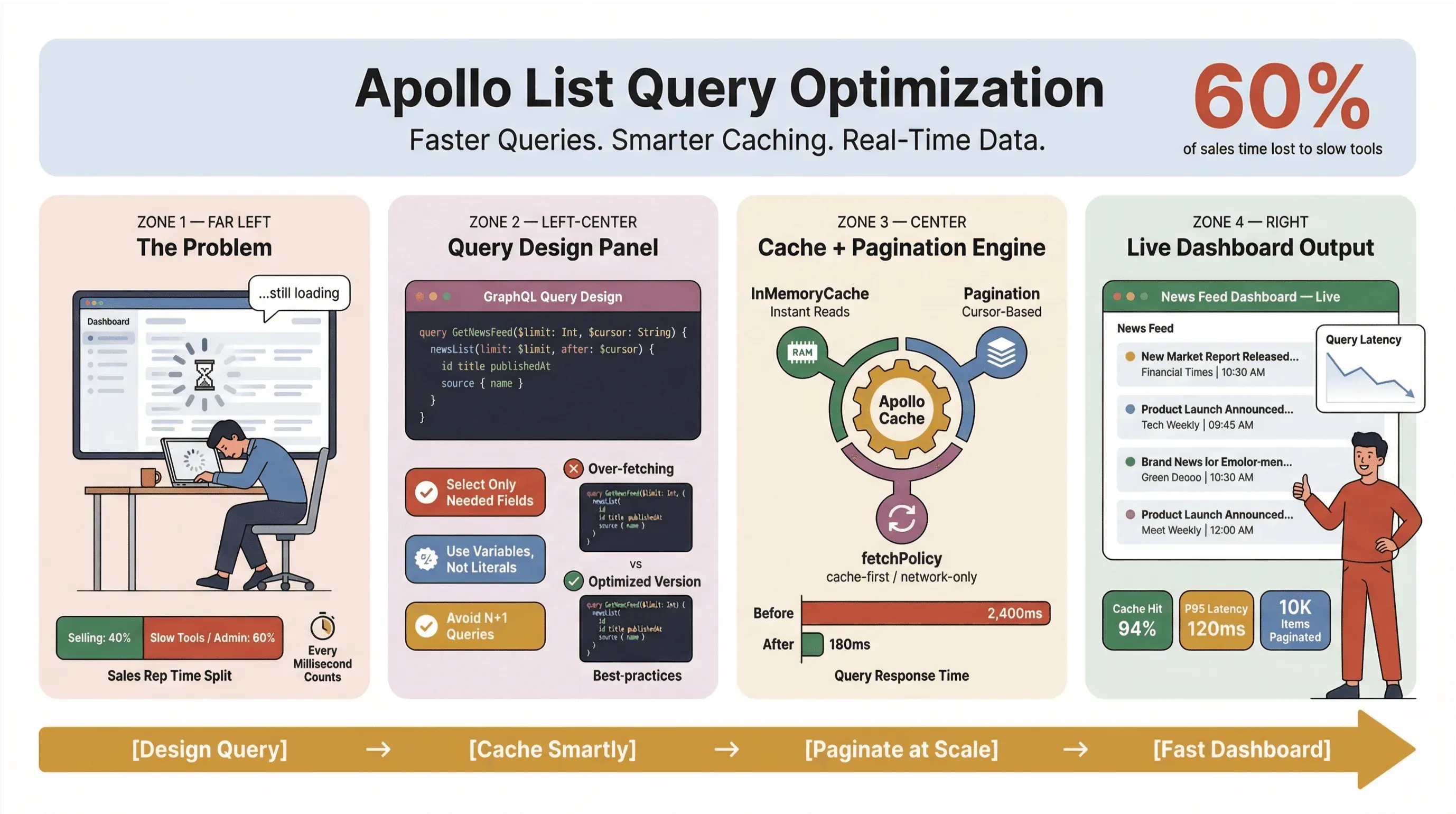
So, how do you keep Apollo Client list queries fast, reliable, and consistent at scale — especially when you're scraping news, tracking leads, or powering mission-critical dashboards? In this guide, I'll walk through the practices that have held up in production: query design, caching, pagination, and integrating no-code tools like Thunderbit to automate the grunt work of news extraction.
Whether you’re a developer, a product manager, or just the person everyone blames when the dashboard is slow, this is your playbook for Apollo GraphQL list performance.
Try Thunderbit for Automated News Extraction
Why Optimize Apollo List Queries? (apollo client list performance, optimize apollo list queries)
Let's get real: nobody wants to wait for news headlines or sales leads to load. In business environments — especially those relying on automated news extraction or real-time data — slow Apollo list queries don't just annoy users; they cost money, delay decisions, and push people back to manual work. Recurring Slack Workforce Lab research has consistently shown desk workers spending roughly a third — and in more recent reports, closer to 40% — of their day on low-value, repetitive tasks, often because their tools fragment work across slow surfaces.
Here’s what happens when list queries aren’t optimized:
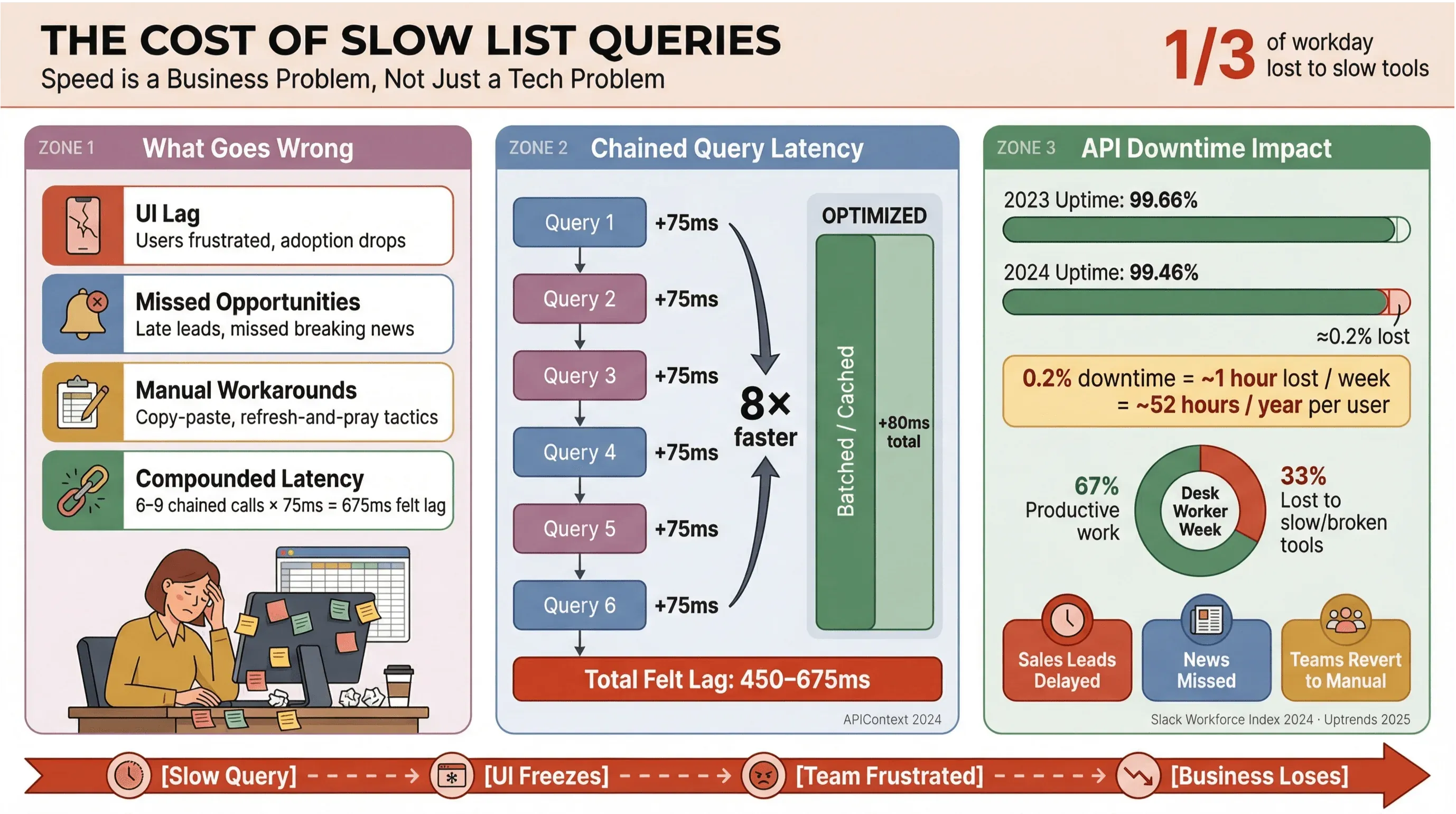
- UI Lag: Users experience delays, leading to frustration and lower adoption.
- Missed Opportunities: In sales or news monitoring, even a few seconds of delay can mean missing a hot lead or breaking news.
- Manual Workarounds: Teams revert to copy-paste, spreadsheets, or “refresh and pray” tactics.
- Compounded Latency: Each slow API call adds up—if your workflow triggers 6–9 dependent queries, a modest 75ms delay per call can balloon into a 450–675ms “felt” lag (APIContext).
And it’s not just about speed. API downtime is on the rise, with average uptime dropping from 99.66% to 99.46% in just a year—translating to nearly an hour of lost productivity per week for list-heavy apps. When your business depends on real-time news data, that’s a risk you can’t afford.
Choosing the Right Data Structure and Fields (apollo graphql list best practices)
One of the most common mistakes I see (and, yes, I’ve made it myself) is treating every list query like a detail query. In GraphQL, you have the power to fetch exactly what you need—so use it. Overfetching is the enemy of performance, especially in news scraping tools and real-time dashboards.
Tailoring Fields for Automated News Extraction
Let’s say you’re building a news feed. Do you really need the full article body, all tags, comments, and author bios in your list query? Probably not. Here’s the difference:
Efficient List Query:
query NewsFeed($after: String, $first: Int) {
  newsFeed(after: $after, first: $first) {
    edges {
      cursor
      node {
        id
        title
        url
        sourceName
        publishedAt
      }
    }
    pageInfo { endCursor hasNextPage }
  }
}
Inefficient List Query (Don’t Do This):
query NewsFeedTooHeavy($after: String, $first: Int) {
  newsFeed(after: $after, first: $first) {
    edges {
      node {
        id title url publishedAt
        fullText
        summary
        entities { ... }
        relatedArticles { ... }
      }
    }
  }
}
The first query is lean and mean—perfect for ranking, filtering, and rendering rows. The second one? It’s a detail query in disguise, pulling huge payloads and slowing everything down (GraphQL spec, Apollo best practices).
Pro tip: Use a two-tier approach—fetch only lightweight fields in your list, and load heavy details (like full text or NLP enrichment) only when the user opens an item or hovers over it.
Leveraging Apollo Client Cache for Faster Queries (apollo client list performance)
The Apollo Client cache is the single biggest lever you have for list-query performance. When configured well, it lets you:
- Serve repeated queries instantly (no network round-trips)
- Reduce server load and API costs
- Enable smooth back/forward navigation and filter changes
But caching isn’t magic—it requires a bit of setup and discipline.
Setting Effective Cache Policies
Apollo supports several fetch policies:
| Policy | What It Does | Best Use Case for News Lists |
|---|---|---|
| cache-first | Reads from cache, fetches from network if missing | Revisiting lists, switching filters, back/forward navigation |
| network-only | Always fetches from network | Manual refresh, “latest headlines” |
| cache-and-network | Returns cache first, then updates with network response | Fast initial paint + background update (great for news feeds) |
| no-cache | Always fetches, never stores in cache | One-off sensitive queries (rare for lists) |
For real-time news data, I like cache-and-network—it gives users instant results, then updates in the background. Just be careful with UI flicker if your data reorders on refresh (GitHub issue).
Cache configuration tips:
- Use stable IDs (
idor_id) for normalization (Apollo cache docs). - Tune cache size and garbage collection for large lists (memory management).
- Avoid storing huge unnormalized blobs under
ROOT_QUERY—it can stall your app (community report).
Implementing Pagination and Limiting Item Counts (apollo graphql list best practices)
If you’re loading hundreds or thousands of news articles or sales leads at once, you’re asking for trouble. Pagination isn’t just a UX feature—it’s a performance necessity.
Apollo supports both offset-based and cursor-based pagination. Here’s how they stack up:
| Pagination Type | Pros | Cons | Best For |
|---|---|---|---|
| Offset-based | Simple, easy to implement | Can skip/duplicate items if data shifts | Immutable or small lists |
| Cursor-based | Stable, handles data changes well | Slightly more complex | News feeds, large lists |
For most real-time news or lead lists, cursor-based pagination is the way to go. It keeps your data consistent even as new items arrive or old ones are deleted (GraphQL Foundation).
Apollo pagination tips:
- Configure
keyArgsto control cache keys for paginated fields (docs). - Implement a
mergefunction to combine pages in the cache. - Use
fetchMoreto load additional pages without overwriting previous results.
Practical Pagination Patterns for News Scraping Tools
A typical news scraping UI will:
- Show the latest 20–50 headlines (lean fields only)
- Load more on scroll or “next page” click
- Fetch details only when needed
This keeps your UI fast, your API happy, and your users productive.
Integrating Thunderbit for Automated News Extraction
Now, let’s talk about the elephant in the room: where does all this structured news data come from in the first place? That’s where Thunderbit comes in.
Get Thunderbit Chrome Extension Get Started Free
Thunderbit is a no-code AI web scraper Chrome Extension that can extract news headlines, URLs, sources, authors, publication dates, summaries, and images from virtually any website—no coding required. I’ve seen teams use Thunderbit to automate the entire news extraction process, turning unstructured web pages into clean, structured data that can be fed directly into a database or GraphQL API.
Combining Thunderbit with Apollo for Real-Time News Data
Here’s a workflow I love for sales and ops teams who need up-to-date news:
- Extraction Layer: Use Thunderbit’s News Scraper template to pull structured news data from target sites on a schedule.
- Storage Layer: Store the scraped data in a database optimized for fast retrieval.
- GraphQL Layer: Expose a
newsFeedlist field and anewsArticle(id)detail field via your API. - Client Layer: Use Apollo Client to fetch the list (lean fields, paginated), and fetch details only when needed.
This “scrape → store → query” pipeline means your Apollo queries are always working with fresh, structured data—without manual copy-paste or brittle scripts.
Bonus: Thunderbit can also enrich your lists with extra fields (like sentiment or category) using its AI-powered field suggestions, making your news feed even smarter.
Step-by-Step Guide: Optimizing Apollo List Queries
Ready to put this into action? Here’s my go-to checklist for Apollo list query optimization:
-
Slim Down Your Queries
- Only request fields needed to render the list (title, URL, timestamp, etc.).
- Move heavy fields (full text, images, enrichment) to detail queries.
-
Implement Pagination
- Use cursor-based pagination for large or dynamic lists.
- Configure
keyArgsandmergefunctions for cache correctness.
-
Leverage Apollo Cache
- Normalize entities with stable IDs.
- Choose the right fetch policy (
cache-and-networkis great for news). - Tune cache size and garbage collection for your data volume.
-
Integrate Automated Extraction
- Use Thunderbit to automate news scraping and keep your data fresh.
- Export structured data directly to your database or spreadsheet.
-
Monitor and Troubleshoot
- Use Apollo Client Devtools to inspect queries, cache, and performance.
- Watch for large cache writes, excessive watched queries, and UI stutter.
- Track p95/p99 latency and error rates (New Relic, Uptrends).
Monitoring and Troubleshooting Query Performance
Apollo’s Devtools are a lifesaver here. You can:
- Inspect active queries and cache state
- Spot duplicate queries or excessive watchers
- Identify large cache blobs or normalization issues
If you see UI lag or slow updates, check for:
- Overly large list queries (slim them down)
- Poor cache normalization (fix your IDs)
- Pagination merge issues (audit your
keyArgsandmerge)
And don’t forget to measure tail latency—not just averages. That’s where the real user pain hides.
Comparing Traditional vs. AI-Driven News Scraping Approaches
Let’s be honest: scraping news data used to mean writing custom scripts, wrangling headless browsers, and praying the site layout didn’t change overnight. Now, with AI-driven tools like Thunderbit, you can automate the whole process—no code, no drama.
| Approach | Strengths | Limitations for Business Users |
|---|---|---|
| Scripted scraping | Fully customizable, cheap at scale | High maintenance, needs engineering time |
| Managed scraping platforms | Fast to start, offloads anti-bot handling | Still needs config, costs scale with usage |
| AI-driven extraction (Thunderbit) | Handles messy layouts, no code needed | Output needs QA, integration with your schema |
| No-code visual scrapers | Accessible for non-engineers | Can break with UI changes, limited scale |
| Proxy/unlocker infra | Bypasses blocks, supports high throughput | Still needs extraction logic, compliance risks |
Legal note: Scraping public data is generally legal, but always respect terms of service and rate limits (Reuters).
Key Takeaways for Apollo GraphQL List Best Practices
Let’s recap the essentials:
- Optimize for speed and clarity: Slim list queries, paginate, and cache aggressively.
- Structure matters: Only fetch what you need—move heavy fields to detail queries.
- Cache is your friend: Use Apollo’s normalization and fetch policies to serve data instantly.
- Automate extraction: Tools like Thunderbit make news scraping and list enrichment accessible to everyone.
- Monitor and iterate: Use Devtools and observability dashboards to catch bottlenecks early.
For sales, ops, and news teams, these best practices mean less time waiting, more time acting—and a lot fewer “why is this so slow?” Slack messages.
Conclusion: Next Steps for Optimizing Your Apollo List Queries
If you’re still running heavy, unpaginated, or cache-unfriendly list queries, now’s the time to audit and upgrade. Start small: trim your fields, add pagination, and tune your cache. Then, level up by integrating automated extraction tools like Thunderbit to keep your data fresh and actionable.
Want to go deeper? Check out the Apollo docs, the Thunderbit Blog, or join the Apollo Community for real-world tips and troubleshooting. And if you’re ready to automate your news extraction, give Thunderbit’s News Scraper template a spin—it’s a game-changer for anyone who needs real-time data without the headaches.
Use the Thunderbit News Scraper Template
If you do nothing else after reading this: trim your list-query field selection, add cursor-based pagination, and pick a sensible fetch policy. Those three changes alone usually take a list query from "noticeable" lag to "imperceptible" — and free you up to focus on the data, not the loading state.
FAQs
1. Why do Apollo list queries slow down in real-time news or sales dashboards?
List queries can become slow if they fetch too much data, lack pagination, or aren’t properly cached. In high-frequency workflows like news monitoring, even small delays add up, leading to UI lag and lost productivity.
2. What’s the best way to structure Apollo list queries for automated news extraction?
Request only the fields needed to render your list (e.g., title, URL, timestamp). Move heavy fields (like full article text or images) to detail queries, and paginate your results to keep payloads small and fast.
3. How does Apollo Client’s cache improve list performance?
Apollo’s cache stores previously fetched data, allowing instant responses for repeated queries. Proper cache normalization and fetch policies (like cache-and-network) can dramatically speed up list views and reduce server load.
4. How can Thunderbit help with news scraping and Apollo integration?
Thunderbit is a no-code AI web scraper that extracts structured news data from any website. You can use it to automate news extraction, then feed that data into your database or GraphQL API for use with Apollo Client.
5. What tools can I use to monitor and troubleshoot Apollo list query performance?
The Apollo Client Devtools let you inspect queries, cache state, and performance in real time. Combine this with observability dashboards (like New Relic or Uptrends) to track latency and error rates, and iterate on your query design for optimal results.
Want more tips on web scraping, automation, and real-time data workflows? Check out the Thunderbit Blog for deep dives, tutorials, and the latest in AI-powered productivity.
Try Thunderbit AI Web Scraper Get Started Free
Learn More




