
If you've spent any time in the AI world lately, you know it's not just about who has the flashiest chatbot anymore—it's about which AI agent can actually deliver results for your business, reliably and securely, without giving your IT team a collective heart attack. In 2026, the OpenClaw vs ChatGPT debate is everywhere: in boardrooms, on Reddit, and, yes, in my own inbox (I get at least three "Which should I use?" emails a week).
So, let's cut through the hype and get real about performance, privacy, and practical business value. I've spent years building automation tools at Thunderbit, and I've watched both OpenClaw and ChatGPT evolve from buzzwords to serious contenders for business workflows. In this post, I'll break down what makes each tool tick, how they stack up in real-world scenarios, and what the latest industry data actually says about their strengths and weaknesses. And, of course, I'll show you how Thunderbit can help you make a data-driven decision—because, let's face it, nobody wants to pick their next AI agent based on vibes alone.
Try Thunderbit for AI web scraping
What Are OpenClaw and ChatGPT?
Before we get into the nitty-gritty, let's get our definitions straight—because I've seen more than a few people mix these up.
OpenClaw is an open-source, self-managed AI agent framework. Think of it as a highly customizable "operating system" for AI agents that you run on your own hardware (or self-hosted cloud). You pick the models, you pick the tools, and you control the data. It's popular with teams that want maximum privacy, flexibility, and the ability to connect to a wide range of chat apps and business systems (OpenClaw).
ChatGPT, on the other hand, is OpenAI's managed, cloud-based AI workspace. With its new "agent mode," it can browse the web, run code, edit spreadsheets, and connect to third-party apps—all from a familiar chat interface. It's designed for business users who want powerful AI without the hassle of running their own infrastructure (OpenAI).
Here's a quick side-by-side:
| Feature | OpenClaw | ChatGPT |
|---|---|---|
| Deployment | Self-hosted/local | Cloud (OpenAI-managed) |
| Privacy | Private by default; you control data | Vendor-managed; business privacy controls |
| Model Choice | Bring your own (OpenAI, Anthropic, local) | Fixed to OpenAI's models |
| Tool Integration | Highly customizable via plugins/skills | Built-in tools + connectors |
| User Experience | Chat apps, local UIs, persistent automations | ChatGPT UI, agent mode, workflow tools |
| Setup Complexity | Higher (requires technical setup) | Lower (SaaS onboarding) |
If you're thinking, "Wait, so OpenClaw is like building your own pizza, and ChatGPT is ordering from Domino's?"—you're not far off.
OpenClaw vs ChatGPT Performance: 2026 Benchmark Insights
Let's talk numbers. Because, as much as I love a good analogy, performance is where the rubber meets the road.
ChatGPT Agent: Published Benchmarks
OpenAI has been pretty transparent about ChatGPT's agent mode performance. Here are some highlights from their 2026 benchmarks (OpenAI):
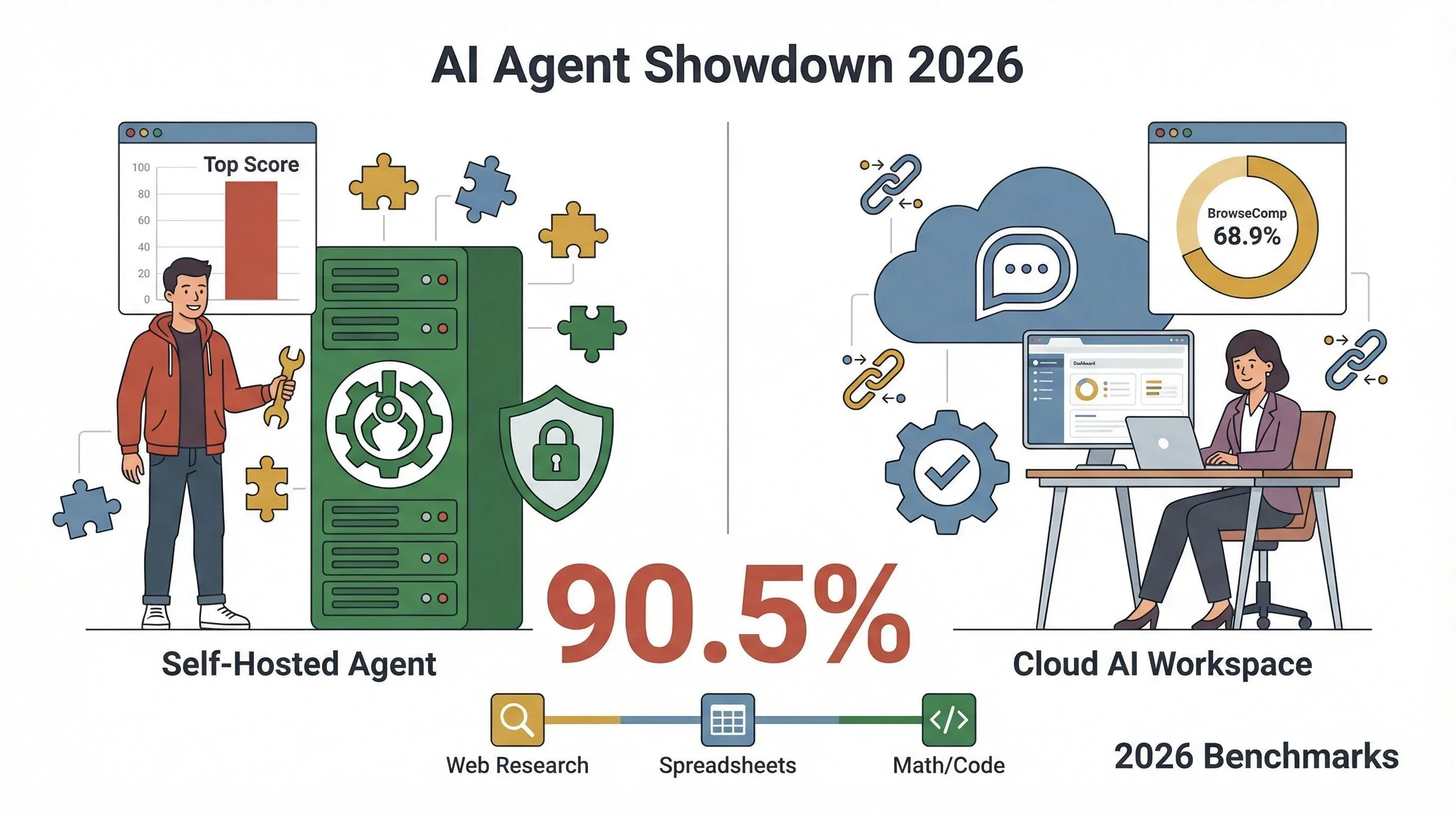
- BrowseComp (web research tasks): 68.9% success rate—17.4 percentage points higher than previous deep research models.
- SpreadsheetBench (editing tasks): 45.5% accuracy at launch. As of 2026, on the full 912-task SpreadsheetBench leaderboard, Microsoft Copilot in Excel has overtaken ChatGPT Agent at 57.2%, with ChatGPT Agent at 45.5% and Claude at 42.9% — so this is no longer a category where ChatGPT leads (SpreadsheetBench).
- FrontierMath (complex math/code): 27.4% accuracy with tool use.
- Humanity's Last Exam: Pass@1 of 41.6, rising to 44.4 with parallel strategies.
For business users, this means ChatGPT agent mode is strong in browsing, research, and spreadsheet-heavy workflows—especially when compared to other managed AI tools.
OpenClaw: PinchBench and Real-World Variability
OpenClaw's performance depends on which model you plug in and how you configure your agent. The best public benchmark is PinchBench, which now ships as PinchBench 2.0 with 147 tasks across categories ranging from sanity checks and calendar event creation through competitive market research and knowledge persistence (PinchBench).
As of May 2026, the top scorers on the live leaderboard are:
- Anthropic's Claude Opus 4.7 — 91.6% success rate (avg 73.7%)
- Anthropic's Claude Haiku 4.5 — 90.3% (avg 64.8%)
- OpenAI's GPT-5.5 — 89.0% (avg 75.5%, leads "Core Agent" category)
Cost per task still varies widely by model and run length — efficient models complete some tasks for cents, while heavier reasoning runs cost meaningfully more. Check pinchbench.com directly before quoting numbers, since the leaderboard updates as new models ship.
The takeaway? OpenClaw's performance is highly dependent on your model and setup. You can optimize for speed, cost, or accuracy—but you have to do the tuning yourself.
Reliability: Beyond Just "Success Rate"
A 2026 research thread is clear: "accuracy" isn't enough. You need to consider reliability—consistency, robustness, and error handling (arxiv.org). ChatGPT's managed stack offers more predictable results for most users, while OpenClaw gives you the freedom (and responsibility) to tweak for your own needs.
Visual Comparison: Task Performance (2026)
| Task Type | ChatGPT Agent (Success Rate) | OpenClaw (Best Model) |
|---|---|---|
| Web Research | 68.9% | Up to 90.5% |
| Spreadsheet Edit | 45.5% | Varies (model-dependent) |
| Math/Code | 27.4% | Varies (model-dependent) |
| Cost (per task) | Fixed (per plan) | $0.03–$0.50+ (model/API) |
| Reliability | High (managed) | Varies (setup-dependent) |
Core Technology Differences: How OpenClaw and ChatGPT Work
Here's where things get interesting—and, honestly, a little nerdy (but I'll keep it light).
OpenClaw: The Agent Operating System
OpenClaw is like a Swiss Army knife for AI agents. You install it on your own machine (or server), connect it to your favorite chat apps, and plug in whatever models and tools you want. It's built for persistent automation—think always-on bots that can handle emails, files, web scraping, and even shell commands (OpenClaw).
- Plugin/Skill Model: You can add new "skills" (plugins) from the ClawHub marketplace or npm. These can do anything from sending emails to scraping websites.
- Gateway Service: Acts as a secure WebSocket server, managing channels, sessions, and hooks.
- Model Routing: You can route tasks to different models (OpenAI, Anthropic, local LLMs), optimizing for speed, cost, or privacy.
- Strict Configs: OpenClaw rejects any configuration that doesn't match its schema—so you can't accidentally open up security holes (unless you really try).
ChatGPT: Managed AI Workspace
ChatGPT is more like a luxury hotel for AI. You get a polished interface, built-in tools (browser, spreadsheet editor, code terminal), and everything runs in OpenAI's cloud. You don't worry about the plumbing—just the results (OpenAI).
- Agent Mode: Uses a virtual computer to run multi-step workflows, with explicit user control before taking actions.
- Tooling: Visual browser, text browser, terminal, connectors to third-party apps (email, docs, etc.).
- Enterprise Controls: Admin dashboards, SSO/MFA, user analytics, and data residency options for compliance.
Analogy Time
If OpenClaw is like building your own smart home (custom lights, locks, sensors), ChatGPT is moving into a smart apartment where everything just works—but you can't knock down walls or rewire the place.
Real-World Use Cases: Where OpenClaw and ChatGPT Shine
Let's get practical. Here's how these tools play out in real business scenarios:
| Business Need | Best Fit Tool | Why? |
|---|---|---|
| Automating repetitive workflows (email, file ops, web scraping) | OpenClaw | Persistent automation, customizable plugins, local data control |
| Quick content generation (emails, reports, blog posts) | ChatGPT | Fast, natural language generation, rich context understanding |
| Data extraction and summarization | Both (depends on setup) | OpenClaw for custom scraping; ChatGPT for summarizing large docs |
| Complex multi-step tasks (research, analysis, spreadsheet work) | ChatGPT | Built-in agent mode, strong benchmarks for research tasks |
| Industry-specific integrations (custom APIs, legacy systems) | OpenClaw | Custom skills, direct integration with business systems |
Example 1: Sales Team Automation
- OpenClaw: Set up an agent to monitor inbound emails, extract leads, and update your CRM—without sending anything to the cloud.
- ChatGPT: Draft personalized outreach emails, summarize meeting notes, and generate follow-up tasks—all in one chat.
Example 2: Operations & Data Teams
- OpenClaw: Scrape competitor pricing from dozens of sites, process the data locally, and trigger alerts if prices change.
- ChatGPT: Analyze and visualize sales data, generate reports, and answer ad-hoc questions about trends.
Example 3: Marketing & Content
- OpenClaw: Automate the collection of customer reviews from multiple platforms, categorize sentiment, and push to your dashboard.
- ChatGPT: Generate blog outlines, social posts, and campaign ideas in seconds.
OpenClaw vs ChatGPT: Strengths and Weaknesses by Industry
Every industry has its quirks. Here's how OpenClaw and ChatGPT stack up in a few key sectors:
E-commerce
- OpenClaw: Great for scraping product data, automating inventory checks, and integrating with custom order systems.
- ChatGPT: Strong for generating product descriptions, customer support responses, and analyzing reviews.
Real Estate
- OpenClaw: Used for scraping property listings, automating lead capture, and syncing with local databases.
- ChatGPT: Excels at summarizing property info, drafting client emails, and creating market reports.
SaaS & Tech
- OpenClaw: Perfect for teams needing deep integration with internal APIs, custom workflows, or on-prem data.
- ChatGPT: Ideal for documentation, code explanation, and onboarding new team members.
Privacy & Compliance
- OpenClaw: Favored by industries with strict data residency or compliance needs (finance, healthcare), since you control where data lives.
- ChatGPT: Trusted by many enterprises for its managed compliance features, but some regulated industries still prefer local control.
Adoption Trends (2026)
- Professional services: 40% org-wide AI usage in 2026, with 15% using agentic AI tools (Thomson Reuters).
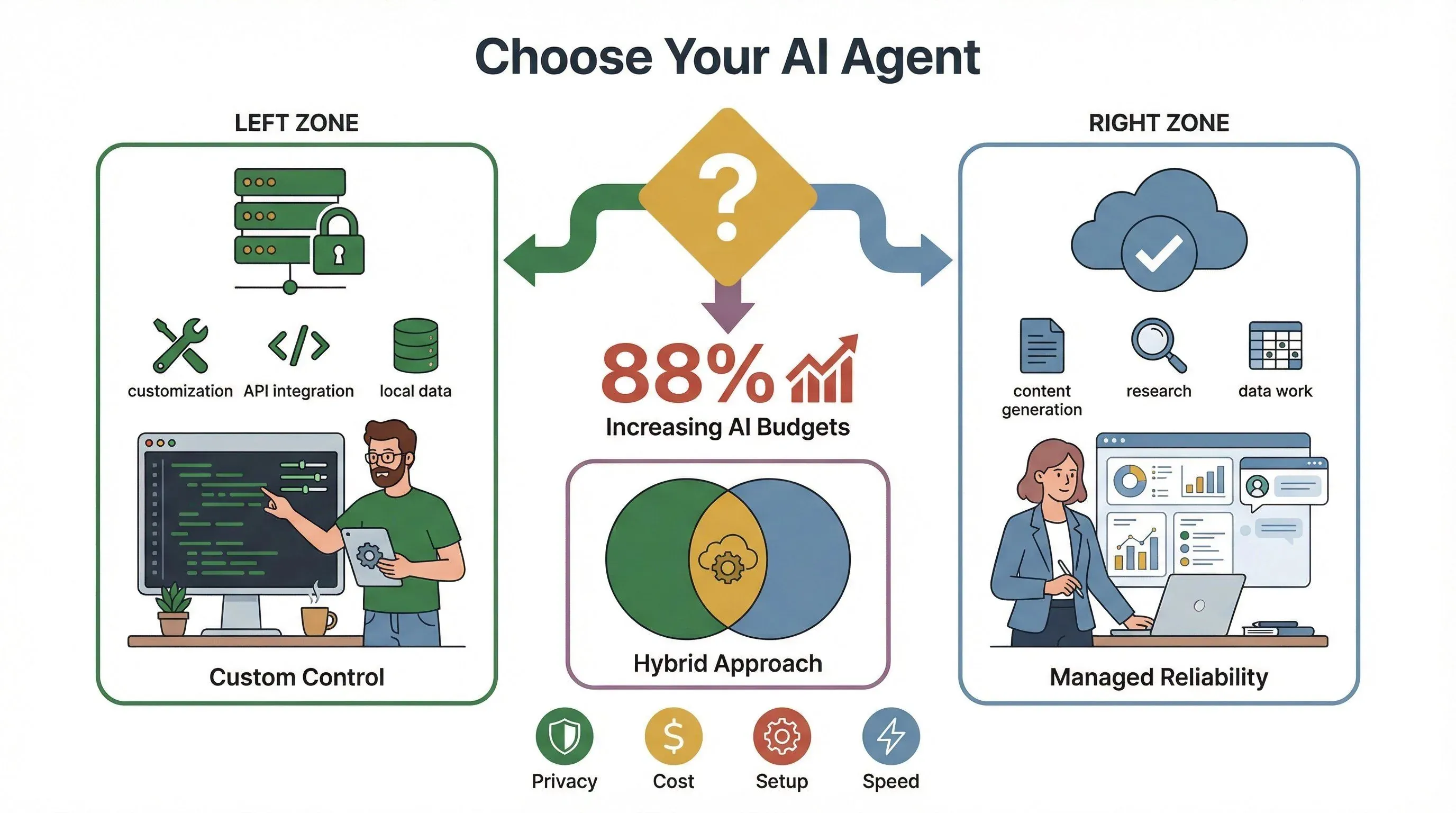
- Enterprise AI budgets: 88% of companies plan to increase AI budgets due to agentic AI (PwC).
- Deep integration: Only 13% of employees report agents "deeply integrated" into daily workflows (BCG)—so there's still plenty of room to grow.
Key Factors Impacting Performance: What Makes Each Tool Unique?
Let's peel back the curtain and look at what really drives performance.
OpenClaw: Customization and Control
- Memory Handling: You decide how much context your agent keeps—great for persistent tasks, but you need to manage memory limits.
- Tool Integration: Add any skill or plugin you want, but you're responsible for vetting and sandboxing (watch out for supply chain risks).
- Security: Local control means you're in charge of security—good news for privacy, but more work for IT.
ChatGPT: Managed Reliability and Natural Language Power
- Deep Learning: OpenAI's models are state-of-the-art for language understanding and generation—great for nuanced, context-rich tasks.
- Workflow Automation: Agent mode can handle multi-step tasks, with user confirmation before taking real-world actions.
- Consistency: Managed stack means fewer surprises—what works today will likely work tomorrow.
- Enterprise Features: SSO, admin controls, analytics, and compliance baked in.
What's New in 2026?
- OpenClaw: Marketplace for skills (ClawHub) exploded, but also brought new security risks (The Verge).
- ChatGPT: Agent mode matured, with more connectors and improved spreadsheet/math capabilities (OpenAI).
Cost, Setup, and Accessibility: What to Expect in 2026
Let's talk dollars, setup time, and who's going to be pulling their hair out.
ChatGPT
- Pricing: $20/seat/month (annual) or $25/seat/month (monthly), minimum 2 standard seats. OpenAI dropped Business pricing by $5/seat in April 2026 (ChatGPT Pricing).
- Setup: SaaS onboarding, workspace creation, user invites. If you've set up Slack or Notion, you'll be fine.
- Maintenance: Minimal—OpenAI handles updates, security, and scaling.
OpenClaw
- Pricing: Open-source (free to use), but you pay for model/API usage (OpenAI, Anthropic, etc.). Costs can be as low as $0.03/task if you optimize, but can spike for heavy workloads (PinchBench).
- Setup: Requires Node.js, CLI onboarding, gateway configuration, plugin management, and security hardening (OpenClaw Docs).
- Maintenance: You're responsible for updates, plugin vetting, and operational security.
Setup Comparison Table
| Factor | ChatGPT | OpenClaw |
|---|---|---|
| Initial Setup | 10–30 min | 1–3 hours |
| Technical Skill | Low | Medium–High |
| Ongoing Updates | Automatic | Manual |
| Security | Vendor-managed | User-managed |
| Cost Predictability | High | Variable |
Advice for Non-Technical Users
- ChatGPT: If you want to get started today and don't have a dedicated IT team, ChatGPT is the safer bet.
- OpenClaw: If you have technical resources and need deep customization or local control, OpenClaw is worth the investment.
Choosing the Right Tool: A Practical Guide for Business Teams
I get this question all the time: "Which should I use?" Here's my step-by-step framework:
-
Do you need to keep data 100% private/on-prem?
- Yes: Lean OpenClaw.
- No: ChatGPT is fine.
-
Is your main use case persistent automation or custom integrations?
- Yes: OpenClaw.
- No: ChatGPT.
-
Are you focused on content generation, research, or spreadsheet tasks?
- Yes: ChatGPT.
-
Do you have technical staff to manage setup and security?
- Yes: OpenClaw is an option.
- No: ChatGPT is easier.
-
Is cost predictability important?
- Yes: ChatGPT.
- No: OpenClaw (but monitor usage closely).
-
Do you want to mix and match?
- Many teams use ChatGPT for writing/analysis and OpenClaw for automation—just keep security boundaries clear.
Quick Checklist
- Choose ChatGPT: Managed, reliable, fast to deploy, best for writing, research, and spreadsheet work.
- Choose OpenClaw: Customizable, private, best for persistent automations and integrations, but needs more setup.
- Hybrid: Use both for different workflows.
Thunderbit's Role: Accelerating OpenClaw vs ChatGPT Performance Analysis
Now, here's where I get to brag a little. At Thunderbit, we've built an AI Web Scraper that makes it ridiculously easy to gather the data you need to compare tools like OpenClaw and ChatGPT—without writing a single line of code.
How Thunderbit Helps
- Automate Benchmark Collection: Use Thunderbit to scrape public benchmark tasks, documentation, and user reviews for both tools.
- Quantitative Comparison: Export scraped data to Excel, Google Sheets, or Notion for side-by-side analysis.
- Workflow Integration: Schedule recurring scrapes to monitor performance changes as new updates roll out.
- Non-Technical Friendly: Just click "AI Suggest Fields," pick what you want to extract, and let Thunderbit do the rest.
Example: Evaluating Agent Performance
Suppose you want to compare how OpenClaw and ChatGPT handle a set of real-world business tasks. With Thunderbit, you can:
- Scrape benchmark task descriptions and results from PinchBench and OpenAI's agent reports.
- Extract completion times, error rates, and cost data.
- Visualize the results in a spreadsheet—no manual copy-pasting required.
This kind of automated, structured data collection is exactly why we built Thunderbit. It's like having your own research assistant—minus the coffee breaks.
Want to see it in action? Download the Thunderbit Chrome Extension and try scraping benchmark data for yourself.
Try Thunderbit for benchmark data scraping
OpenClaw vs ChatGPT: Side-by-Side Comparison Table (2026 Edition)
Here's the cheat sheet you've been waiting for:
| Criteria | OpenClaw | ChatGPT |
|---|---|---|
| Deployment | Self-hosted/local | Cloud (OpenAI-managed) |
| Privacy | Private by default; full user control | Managed; business privacy controls |
| Model Choice | Bring your own (OpenAI, Anthropic, local) | Fixed to OpenAI's models |
| Tool Integration | Customizable plugins/skills | Built-in tools + connectors |
| Performance | Highly variable (model/setup dependent) | Consistent (per plan/benchmarks) |
| Reliability | Depends on setup/security | High (managed stack) |
| Cost | Free software; pay per API/model usage | $20–$25/seat/month (Business, May 2026) |
| Setup Complexity | Medium–High (technical) | Low (SaaS onboarding) |
| Maintenance | User-managed | Vendor-managed |
| Best For | Persistent automation, custom integrations | Content generation, research, spreadsheets |
| Security Risks | Marketplace/plugin supply chain | Prompt injection, web actions |
| Support | Community-driven | Vendor support (Business/Enterprise) |
Conclusion: Matching the Right AI Agent to Your Business Needs
So, what's the bottom line in the OpenClaw vs ChatGPT debate?
- OpenClaw gives you ultimate control, privacy, and customization—but you need technical chops and a willingness to manage your own security and updates. It shines in persistent automation and deep integrations, especially for teams with strict compliance needs.
- ChatGPT offers a polished, reliable, and easy-to-deploy experience, with strong performance in content generation, research, and spreadsheet tasks. It's the go-to for most business users who want results without the operational overhead.
- Hybrid approaches are increasingly common—using ChatGPT for writing and analysis, and OpenClaw for automation and integrations.
No matter which path you choose, the key is to align your AI agent with your business goals, privacy requirements, and available resources. And if you want to make that decision based on real data—not just vendor promises—give Thunderbit a try. We're here to help you collect, compare, and act on the insights that matter. A practical note for May 2026: the leaderboard picture keeps moving — Microsoft Copilot has pulled ahead of ChatGPT Agent on SpreadsheetBench, Anthropic's Claude Opus 4.7 currently tops PinchBench, and OpenAI dropped ChatGPT Business pricing in April. Re-run your numbers before locking in a vendor decision.
Curious to learn more about web scraping, automation, or AI agent evaluation? Check out the Thunderbit Blog for more guides and deep dives.
Try Thunderbit for AI web scraping Get Started Free
References
- OpenClaw Official Site
- OpenClaw Documentation
- ChatGPT Agent Introduction (OpenAI)
- OpenAI ChatGPT Business FAQ
- PinchBench Agent Benchmarks
- PwC AI Agent Survey 2025
- McKinsey State of AI 2025
- Boston Consulting Group AI at Work 2025
- Thomson Reuters AI in Professional Services 2026
- OpenAI Enterprise AI Report 2025
- arXiv: Towards a Science of AI Agent Reliability (2026)
- The Verge: OpenClaw Skill Marketplace Security
- Thunderbit Official Website
- Thunderbit Chrome Extension Download
FAQs
1. What is the main difference between OpenClaw and ChatGPT?
OpenClaw is a self-hosted, open-source agent framework that you run and customize yourself, giving you full control over models, tools, and data privacy. ChatGPT is a managed, cloud-based AI workspace from OpenAI, offering a polished interface and strong performance for content generation, research, and workflow automation.
2. Which tool is better for privacy and compliance?
OpenClaw offers more privacy by default, since you control where data is stored and processed. It's favored by teams with strict compliance needs. ChatGPT provides strong business privacy controls, but data is managed by OpenAI in the cloud.
3. How do performance and reliability compare?
ChatGPT delivers consistent, benchmarked performance for most business tasks, with minimal setup. OpenClaw's performance depends on your model choice and configuration—offering more flexibility, but also more variability and responsibility for reliability.
4. What are the main setup and cost considerations?
ChatGPT is easy to set up (like any SaaS product) and costs $25–$30 per user per month. OpenClaw is free to use, but you pay for API/model usage and need technical skills for setup and maintenance.
5. How can Thunderbit help me compare these tools?
Thunderbit's AI Web Scraper lets you automate the collection of benchmark data, user reviews, and documentation for both OpenClaw and ChatGPT. You can quickly export and analyze performance metrics, making it easier to choose the right tool for your business needs.
Want more insights on AI, automation, and business productivity? Subscribe to the Thunderbit Blog or check out our YouTube Channel for tutorials and deep dives. Happy scraping—and may your AI agents always be fast, reliable, and (mostly) drama-free.
Learn More




