
If you’ve ever tried to build a high-quality sales pipeline, you know the feeling: spreadsheets everywhere, tabs multiplying like rabbits, and hours lost to manual prospecting that feels more like digital archaeology than modern sales. The truth is, in today’s market, the difference between a pipeline that fizzles and one that fuels real growth isn’t just the tool you pick—it’s how you use it, and whether your whole process is built for the world we’re actually selling in.
Master Lead Prospecting with Thunderbit Get Started Free
I’ve spent years in SaaS and automation, and I’ve seen firsthand how the right approach to lead prospecting tools can turn a team from “just getting by” to “crushing quota.” But here’s the kicker: it’s not about chasing every new feature or shiny dashboard. It’s about strategy, data, and making AI work for you—without losing the human touch. Let’s dig into the five best practices that separate the pros from the rest, and I’ll show you how we’re doing it at Thunderbit (and why it’s changing the game for sales and ops teams everywhere).
Rethink Lead Prospecting Tools: From Features to Strategy
Let’s start with a reality check: only about 10% of leads make it to qualified status, and just 1–6% become customers. That means most of your effort is wasted—unless you’re strategic from the start.
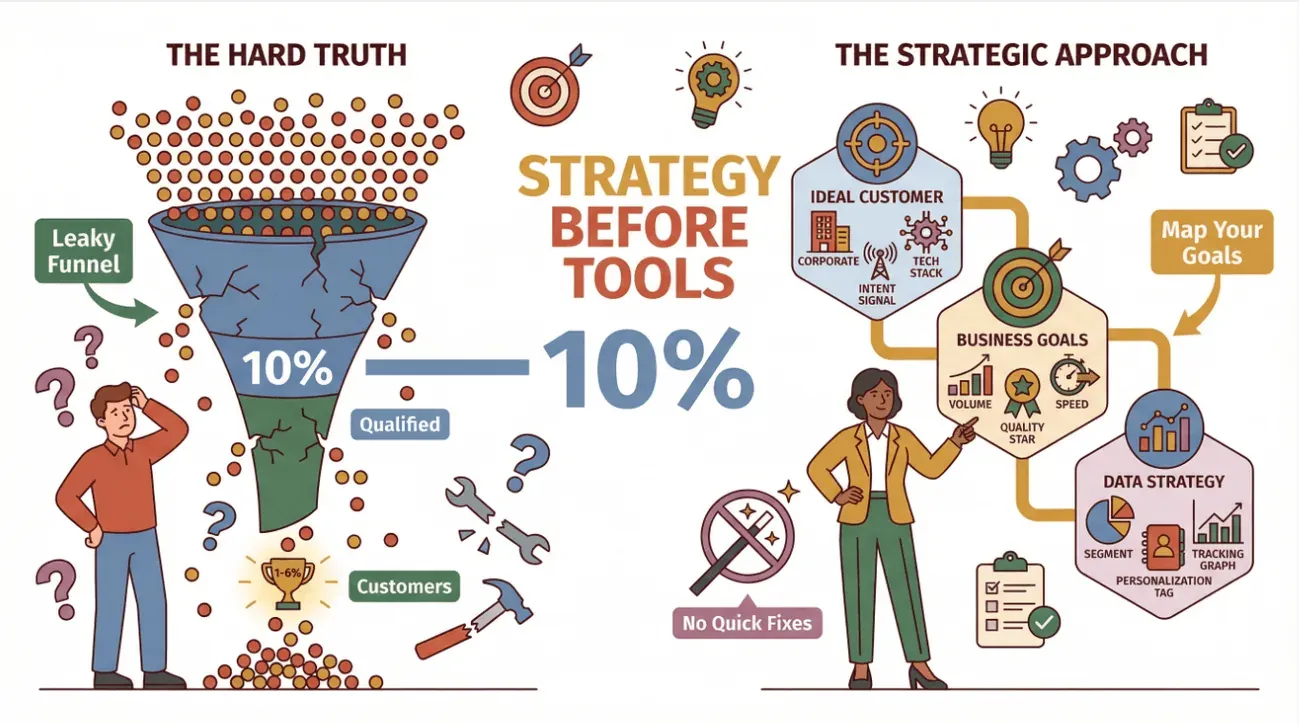
Too many teams treat lead prospecting tools like a magic wand: buy the tool, push the button, and hope for the best. But the real winners map their tools to their business goals, customer profiles, and data strategy. Before you even touch a tool, ask:
- Who is our ideal customer (firmographics, technographics, intent signals)?
- What are our core business objectives—volume, quality, speed, or a mix?
- How will we use data to segment, personalize, and track every lead?
I’ve seen companies triple their conversion rates just by aligning their prospecting workflows with their ICP and sales funnel—not by adding more features, but by getting the basics right (SalesHandy). Think of your prospecting tool as one leg of a relay race: it’s powerful, but only if the baton (your data and strategy) is handed off cleanly at every stage (Thunderbit Blog).
Pro tip: Use frameworks like Account-Based Marketing (ABM) or a “sales funnel relay” to map out how your tool fits into the bigger picture. Don’t let the tool drive your process—let your strategy drive the tool.
Why Data Source Breadth Beats Feature Overload in Lead Prospecting Tools
Here’s a hot take: the most important thing about your lead prospecting tool isn’t the number of features—it’s the breadth and quality of data sources it can access. I’ve seen teams get dazzled by endless feature lists, only to realize their tool can’t actually pull leads from the places that matter most.
Think about it: most traditional tools rely on fixed databases (like ZoomInfo or Apollo) or a handful of integrations. That’s fine if your prospects all hang out in the same places. But what if your next big customer is buried in a niche industry blog, a public directory, or a PDF roster from last month’s trade show?
That’s where Thunderbit stands out. Our AI web scraper can extract leads from any web page, PDF, or even image—no code, no templates, just two clicks. Whether it’s LinkedIn, Crunchbase, a government vendor list, or the wild west of industry forums, Thunderbit turns it all into structured, actionable data (Thunderbit Blog).
When you’re evaluating tools, ask yourself:
- Can it handle unconventional or less-structured sites?
- Does it auto-detect and structure fields, or do you have to build templates for every new source?
- How quickly can you go from “I found a new data source” to “I have a lead list in my CRM”?
The reality is, only about half of marketers are satisfied with their multichannel lead sources (Warmly). The teams that win are the ones who diversify—pulling from LinkedIn, blogs, directories, press releases, and more. And with B2B contact data decaying anywhere from ~22% to 70% per year depending on sector, you need a tool that can keep your lists fresh and comprehensive.
Expanding Lead Coverage with Thunderbit: Practical Steps
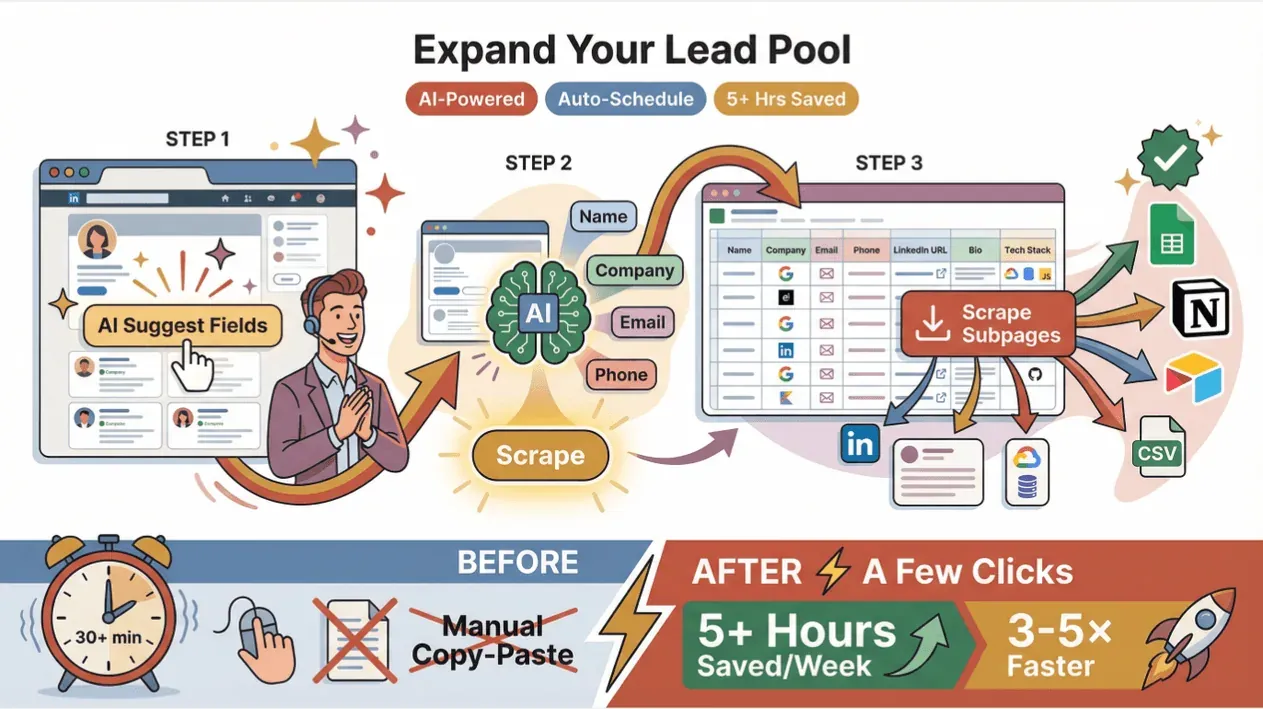
Let’s get tactical. Here’s how Thunderbit helps you expand your lead coverage (and save your team a ton of time):
- Open your target page (directory, LinkedIn search, blog, whatever).
- Click “AI Suggest Fields”—Thunderbit’s AI reads the page and suggests columns like Name, Company, Email, Phone.
- Adjust columns if needed, then hit “Scrape”. Thunderbit pulls all visible leads into a table.
- For deeper data, click “Scrape Subpages”—Thunderbit visits each profile link and grabs extra details (LinkedIn URLs, bios, technographics).
- Export directly to Google Sheets, Notion, Airtable, or CSV. Done.
This workflow turns what used to be 30+ minutes of copy-paste into a couple of clicks. Our users report saving 5+ hours per rep per week, and expanding their lead pools 3–5× faster than before. And because you can schedule scrapes, your lists stay up-to-date automatically (Thunderbit Blog).
Real-world example: A SaaS sales rep targets vendors on Crunchbase, uses AI-Suggest to grab names and titles, then subpage-scrapes company profiles for emails and phones. The result? A richer, more actionable lead list in a fraction of the time.
Try Thunderbit for Lead Prospecting
Case Study: Turning LinkedIn and Industry Blogs into a Unified Lead List
Let’s look at a real scenario. One of our B2B software customers needed both executive leads (from LinkedIn) and subject-matter experts (from industry blogs). Here’s what they did:
- Used Thunderbit to scrape LinkedIn profiles for org charts and emails.
- Scraped blog author pages and comment lists for additional contacts.
- Combined both sources into a single, unified lead list—tagged by source.
The result? They uncovered an extra 25–40% high-intent contacts by mining blogs—contacts that would have been invisible in traditional databases. And because each lead was tagged by source, their outreach could be hyper-personalized (e.g., referencing a recent article for blog leads).
This approach paid off: content marketing now accounts for over 51% of B2B leads, and 72.5% of marketers say blogs are increasingly effective. By combining sources, the team gained deeper insights and saw higher open/reply rates—tailored emails see roughly 32% higher response rates, and campaigns with multi-field personalization can lift reply rates well beyond that compared to generic blasts.
AI-Powered Data Analysis: Making Lead Prospecting Tools Smarter
Collecting leads is just the start. The real magic happens when your tool helps you analyze, clean, and enrich your data—automatically.
How to Enrich Leads with AI Get Started Free
Thunderbit’s AI features go way beyond scraping:
- Field AI Prompts: Add instructions like “categorize this product,” “format date,” or “translate text” to each field. Thunderbit labels, formats, and even translates your data as it scrapes (Thunderbit Blog).
- Automatic Field Detection: Emails, phones, URLs, and more are recognized and formatted cleanly—no more weird data or manual cleanup (Thunderbit Blog).
- Subpage Enrichment: Pull hidden details (LinkedIn URLs, bios, technographics) into your main table, so every lead is rich and ready for outreach.
This isn’t just about saving time (though it does that, too). It’s about data quality. AI enrichment fills in missing info, catches stale data, and enables true personalization. Teams using advanced enrichment report that what used to take 15–30 minutes per lead now takes seconds (SmartLead).
Practical tip: Use AI prompts to segment leads by industry, tag by source, or even summarize recent activity. The more context you add, the more targeted (and effective) your outreach becomes.
Integrating Lead Prospecting Tools with Your Sales Workflow
A great lead list is useless if it doesn’t flow smoothly into your sales process. The best practice? Integrate your prospecting tool with your CRM and other systems from day one.
Thunderbit makes this easy:
- Export directly to Google Sheets, Airtable, Notion, Excel, CSV, or JSON (Thunderbit Blog).
- Tag each lead with source and date, then assign to reps or nurture tracks.
- Use CRM deduplication rules to avoid spamming contacts twice.
- Enrich existing CRM records by scraping missing fields and syncing back.
Pro tip: Schedule regular re-scrapes for fast-changing data (like vendors or pricing), and track lead response dates in your CRM to avoid chasing cold contacts. The more you automate the flow, the more time your team spends selling—not wrangling spreadsheets.
Measuring Success: KPIs for Lead Prospecting Tools
How do you know your prospecting tool is actually working? Track the right KPIs:
- Lead Quality: MQL→SQL conversion, SQL→deal rates. (Average deal win rate is 20–30%.)
- Efficiency: Time spent per lead/meeting, hours saved by automation (Thunderbit Blog).
- Cost and Conversion: Cost per Lead (CPL), Customer Acquisition Cost (CAC), pipeline coverage.
- Funnel Health: Track funnel leakage—if your scraped list is big but few become SQLs, improve qualification or messaging.
Segment your KPIs by source and campaign. Double down on what’s working, cut what’s not, and keep iterating. Companies that prioritize lead gen are over 14× more likely to outperform rivals.
Common Pitfalls to Avoid When Using Lead Prospecting Tools
Even the best tools can’t save you from a bad process. Watch out for these traps:
- Over-reliance on Automation: Don’t send generic blasts. Personalization matters—76% of buyers get frustrated by impersonal outreach (UnboundB2B).
- Ignoring Data Quality: Always verify and clean your data. Remember, contact data typically decays 22%+ annually, faster in high-churn sectors.
- Neglecting Personalization: Use your enriched data to craft specific messages. Tailored outreach lifts reply rates by ~32% in 2026 benchmarks, with multi-field personalization compounding further.
- Tool Tunnel Vision: Don’t assume the tool fixes strategy. Always align your scraping criteria to your ICP or campaign goal.
- Poor CRM Hygiene: Tag leads, note quality, and schedule next steps. A messy CRM means a messy pipeline.
- One-Off Thinking: Prospecting isn’t a batch activity—it’s a daily discipline. Make lead capture and data refresh part of your regular cadence.
Conclusion: Building a Sustainable Lead Prospecting Engine
Let’s recap the five best practices for mastering lead prospecting tools:
- Start with strategy: Align your tools to your business goals and ICP.
- Prioritize data source breadth: Choose tools that access rich, diverse data—not just feature overload.
- Leverage AI for enrichment: Use AI to clean, label, and enrich your data for smarter outreach.
- Integrate with your workflow: Make sure your leads flow seamlessly into your CRM and sales stack.
- Measure and iterate: Track KPIs, avoid common pitfalls, and keep refining your process.
The payoff? A self-sustaining lead engine that fills your pipeline with high-value prospects and drives steady revenue growth. At Thunderbit, we’re obsessed with making this not just possible, but easy—even for teams without a single line of code.
Ready to take your lead prospecting to the next level? Download Thunderbit’s Chrome Extension and see how fast you can go from “where do I find leads?” to “here’s my next big deal.” And if you want to dive deeper, check out the Thunderbit Blog for more guides, tips, and real-world success stories.
Try Thunderbit Free for Lead Prospecting
FAQs
1. What’s the biggest mistake teams make with lead prospecting tools?
The most common mistake is treating the tool as a silver bullet—focusing on features instead of aligning with business goals and customer profiles. Always start with strategy, then pick the tool that fits.
2. How does Thunderbit differ from traditional lead prospecting tools?
Thunderbit uses AI to extract leads from any web page, PDF, or image—no code or templates required. It can handle complex, unstructured sources and automates data cleaning, enrichment, and export to your favorite platforms.
3. Why is data source diversity so important?
Relying on a single database or channel means you’ll miss high-value leads hiding in niche blogs, directories, or unconventional sources. The best results come from combining multiple data sources for a richer, more accurate lead pool.
4. How can I keep my lead data fresh and accurate?
Schedule regular re-scrapes, use AI enrichment to fill in missing info, and always verify emails and phone numbers. Remember, B2B data decays quickly—automation helps keep your lists up-to-date.
5. What KPIs should I track to measure prospecting success?
Focus on lead quality (MQL→SQL, SQL→deal rates), efficiency (time saved, cost per lead), funnel health (conversion rates, leakage), and integration (how smoothly leads flow into your sales process). Regularly review and adjust based on what’s working.
Try AI Lead Prospecting with Thunderbit Get Started Free
Learn More




