
If you’ve ever tried to get just the right data out of a website—maybe it’s a list of competitor prices, a catalog of products, or a fresh batch of sales leads—you know the feeling: standard scraping tools get you 80% of the way, but that last 20%? That’s where the magic (and frustration) happens. In today’s data-driven world, businesses can’t afford to settle for “almost right.” Custom extraction and data extraction services have become the backbone of modern operations, with the global web scraping market projected to soar from $754 million in 2024 to $2.87 billion by 2034. Teams whose data strategy still leans on standard, one-template-fits-all scraping are leaving the most useful data behind.
I’ve spent years helping teams—from scrappy startups to established enterprises—move beyond copy-paste marathons and brittle, one-size-fits-all tools. The difference? Mastering custom data extraction. In this guide, I’ll walk you through what custom extraction really means, why it’s essential, how Thunderbit (the AI web scraper my team and I built) makes it radically simple, and how to choose the right data extraction service for your business. I’ll even share a few war stories—because let’s face it, every data nerd has a few.
What Is Custom Extraction? Unlocking the Power of Tailored Data Extraction Services
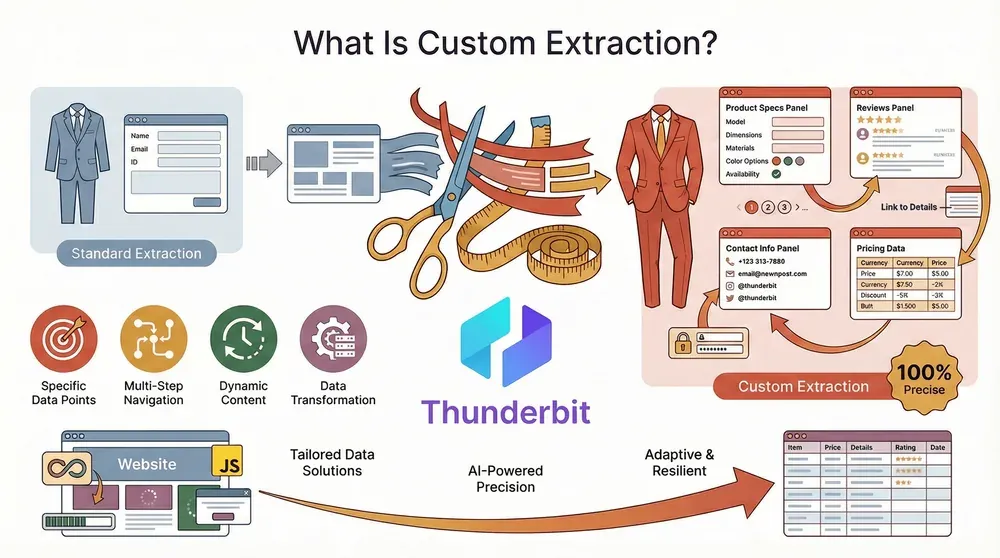 Let’s start with the basics: custom extraction is all about getting exactly the data you need, in the format you want, from the websites that matter to your business. Unlike standard scraping tools that grab whatever’s easy or visible, custom data extraction is precise, adaptable, and resilient—even when websites are complex, dynamic, or change their layouts every other week.
Think of it like ordering a bespoke suit instead of buying off the rack. With custom extraction, you’re not limited to the “default” fields or templates. You can:
- Pick out specific data points (like product specs, reviews, or contact info)
- Handle multi-step navigation (pagination, subpages, logins)
- Adapt to dynamic content (infinite scroll, JavaScript-loaded data)
- Format, clean, or transform data as you extract it
Why does this matter? Because real business needs are rarely simple. Maybe you need to scrape product listings, then follow each link to grab detailed specs and reviews. Or perhaps you want to monitor competitor pricing across dozens of pages, but only for certain SKUs. Standard tools break, miss data, or require you to become an amateur HTML detective. Custom extraction services, on the other hand, are built to handle these scenarios—often with the help of AI and natural language processing.
For a deeper dive into the difference between custom and standard scraping, check out From Clicks to Columns: Understanding Custom Data Extraction.
Why Custom Data Extraction Services Matter for Business Growth
Let’s get practical. Why should you care about custom data extraction? Because it’s not just a tech upgrade—it’s a business accelerator. Here’s how custom extraction services drive real-world results:
| Business Need | Custom Data Scraping Solution | Typical Outcome |
|---|---|---|
| Lead Generation | Scrape up-to-date contacts from directories, LinkedIn, or review sites | Far less manual research; larger, better-qualified lead lists |
| Competitor Price Monitoring | Track prices and stock across competitor sites, even with dynamic layouts | Faster reaction to competitor moves; meaningful margin lift when feeding dynamic pricing |
| Market Intelligence & Research | Aggregate news, reviews, or regulatory filings at scale | Broader data coverage across teams; faster, better-informed decisions |
| Product Catalog Updates | Pull product info from multiple sources, handle subpages and variants | Always up-to-date catalogs; fewer errors and manual updates |
| Operational Automation | Schedule recurring scrapes for reports, compliance, or inventory | 85% faster time-to-market for new data sources; 73% lower collection cost compared with development-heavy approaches |
(ScrapeGraphAI: Economics of Web Scraping, Apr 2026)
The bottom line: custom extraction isn’t a luxury—it’s a competitive necessity. Companies that master it are outmaneuvering rivals, reacting faster to market changes, and uncovering insights that drive growth.
Thunderbit’s Approach: Custom Data Extraction Made Simple
Scrape data from any website using AI Get Started Free
Now, I’ll be honest: I built Thunderbit because I was tired of seeing teams struggle with clunky, code-heavy scrapers that broke every time a website sneezed. Thunderbit is an AI-powered web scraper Chrome Extension designed to make custom data extraction accessible to everyone—not just developers.
Here’s what makes Thunderbit different:
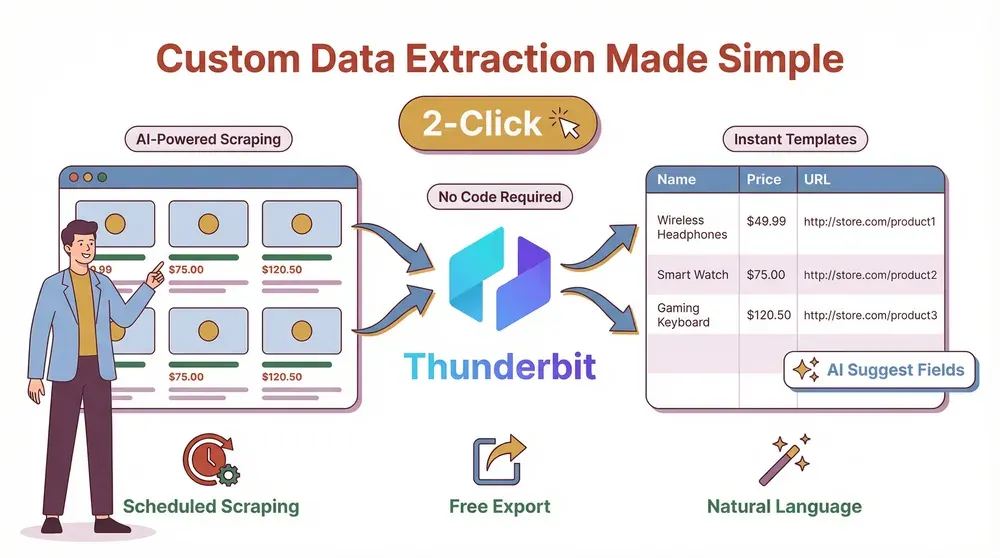
- AI-Driven Field Suggestions: Click “AI Suggest Fields” and Thunderbit scans the page, recommending the best columns to extract—like “Product Name,” “Price,” “Image URL,” or “Email.” No more guessing or fiddling with selectors.
- Natural Language Prompting: Want to extract a date, translate a description, or categorize items? Just tell Thunderbit in plain English. The AI figures out how to do it.
- 2-Click Scraping: Navigate to your target site, open Thunderbit, and hit “Scrape.” That’s it. No coding, no templates (unless you want them), no headaches.
- Handles Complex Pages: Thunderbit can tackle pagination, infinite scroll, subpages, and even dynamic content loaded by JavaScript. It adapts as websites change.
- Subpage Scraping: Need more details from each item? Thunderbit can automatically visit each subpage (like product detail pages) and enrich your table.
- Scheduled Scraping: Set up recurring scrapes with natural language (“every Monday at 9am”) and let Thunderbit handle the rest.
- Instant Templates: For popular sites like Amazon, Zillow, or LinkedIn, Thunderbit offers 1-click templates—no setup required.
- Free Data Export: Export your data to Excel, Google Sheets, Airtable, Notion, CSV, or JSON—no paywalls, no limits.
Thunderbit’s mission is simple: let business users describe what they want, and let AI handle the technical heavy lifting. It’s like having an AI-powered research assistant that never gets tired (and never complains about coffee).
Step-By-Step: Using Thunderbit for Custom Data Scraping
Let’s walk through a real-world custom extraction workflow with Thunderbit. I’ll use a product catalog example, but the steps are similar for leads, reviews, or anything else.
Step 1: Install Thunderbit
Head to the Thunderbit Chrome Extension page and add it to your browser. Sign up for a free account—no credit card required for the free tier.
Step 2: Open Your Target Website
Navigate to the page you want to scrape (e.g., a category page with product listings).
Step 3: Launch Thunderbit and Use AI Suggest Fields
Click the Thunderbit icon. Hit “AI Suggest Fields”—Thunderbit’s AI will scan the page and suggest columns like “Product Name,” “Price,” “Image URL,” etc. You can rename, add, or remove fields as needed.
Step 4: Customize with Field AI Prompts
Want to extract something specific? For each field, you can add a custom instruction—like “extract the date in YYYY-MM-DD format” or “translate description to Spanish.” Thunderbit’s AI will apply your rule during extraction.
Step 5: Enable Pagination or Subpage Scraping (If Needed)
If your data spans multiple pages, turn on Pagination. If you need details from subpages (like product detail pages), use Subpage Scraping—Thunderbit will visit each link and pull extra info into your table.
Step 6: Click “Scrape” and Watch the Data Flow
Thunderbit will extract your data, handling navigation and formatting automatically. You’ll see a preview table as it works.
Step 7: Export Your Data
Once you’re happy with the results, export directly to Google Sheets, Excel, Airtable, or Notion. You can also download as CSV or JSON.
How to Scrape Website Data into Excel using AI Get Started Free
That’s it. No code, no templates (unless you want them), and no “why is this not working?” moments. For more details, check out Thunderbit’s documentation.
Comparing Thunderbit to Other Data Extraction Services
Let’s get nerdy for a second. How does Thunderbit stack up against other data extraction services like Azure AI Document Intelligence or traditional scrapers?
| Feature / Criteria | Thunderbit | Azure AI Document Intelligence | Traditional Scrapers (e.g., Octoparse, Scrapy) |
|---|---|---|---|
| Ease of Use | No-code, AI-driven, 2-click setup | Developer-oriented, API-based | Steep learning curve, often requires coding |
| Custom Extraction | Natural language prompts, field AI | Custom ML models for documents | Manual config, selectors, scripts |
| Handles Web Pages | Yes (HTML, dynamic, subpages) | No (focused on documents/PDFs) | Yes, but struggles with dynamic sites |
| Handles Documents/PDFs | Yes (via browser/PDF mode) | Yes (OCR, ML) | Sometimes, but limited |
| Adaptability | AI adapts to layout changes | ML adapts to new docs | Breaks on site changes, needs updates |
| Scheduling | Built-in, natural language | Via API, needs integration | Sometimes, but complex |
| Export Options | Sheets, Excel, Airtable, Notion, CSV, JSON | API/JSON, needs dev integration | CSV, Excel, DB, varies |
| Support | Modern SaaS, responsive | Enterprise, formal support | Community or vendor, varies |
| Pricing | Free tier, pay-as-you-go credits | Usage-based, enterprise focus | Free (open source) or monthly plans |
Thunderbit’s sweet spot is web data extraction for business users who want power without pain. Azure is fantastic for document processing at scale, but not for crawling websites. Traditional scrapers are powerful in the right hands, but require technical skills and constant maintenance.
For a deeper comparison, see From Clicks to Columns: Understanding Custom Data Extraction.
How to Choose the Right Custom Data Extraction Service for Your Needs
Picking a data extraction service isn’t just about features—it’s about fit. Here’s a checklist to guide your decision:
- Data Quality & Reliability: Does it deliver accurate, clean, and complete data? Can you test it on your target sites?
- Flexibility & Customization: Can it handle your specific websites, dynamic content, logins, or subpages? Can you define custom fields or transformations?
- Compliance & Ethics: Does it follow legal and ethical guidelines? Does it respect privacy laws and site terms?
- Scalability & Performance: Can it handle your data volume and frequency? Does it offer cloud scraping or parallel processing?
- Integration & Workflow: Can you export data to your tools (Sheets, Excel, CRM, etc.)? Does it support scheduling or automation?
- Support & Documentation: Is there responsive support and clear documentation? Are there tutorials or a knowledge base?
- Security: Does it handle your data securely? Is login info encrypted? Are there compliance certifications?
- Cost: Is the pricing transparent and cost-effective for your needs? Are there hidden fees or paywalls?
Take each candidate for a test drive. Scrape a real site, export the data, and see how it fits your workflow. For more tips, check out How to Choose the Right Web Scraping Service.
Try Thunderbit for Custom Data Extraction
Integrating Custom Data Scraping into Your Business Workflows
Extracting data is only half the battle—the real value comes from making it part of your daily operations. Here’s how to embed custom data extraction into your business:
- Automate Recurring Tasks: Use scheduled scraping to keep your data fresh—daily price checks, weekly lead updates, etc.
- Feed Data into Your Tools: Export directly to Google Sheets, Airtable, Notion, or Excel. Use Zapier, Make, or n8n to automate further (e.g., push new leads into your CRM).
- Set Up Alerts: Integrate with Slack or email to get notified of key changes—like a competitor dropping prices or a new product launch.
- Collaborate in the Cloud: Use shared databases (Airtable, Notion) to make scraped data accessible across teams.
- Automate End-to-End: Combine scraping with BI tools (Tableau, Power BI) for live dashboards, or trigger actions (like repricing) based on scraped data.
For inspiration, check out Web Scraping with n8n: 8 Powerful Workflow Templates.
Start Custom Data Extraction with Thunderbit
Best Practices for Maximizing Value from Custom Data Extraction Services
Want to get the most out of your custom extraction efforts? Here’s what I’ve learned (sometimes the hard way):
- Define Clear Goals: Know exactly what data you need and why. Don’t scrape just because you can—scrape with purpose.
- Start Small, Test Often: Run small pilots, check the data, and scale up once you’re confident.
- Monitor Data Quality: Spot-check results regularly. Set up validation rules or alerts for anomalies.
- Optimize Frequency: Scrape as often as needed, but not more. Too much scraping can get you blocked (and annoy your IT team).
- Stay Ethical & Compliant: Respect site terms, privacy laws, and ethical guidelines. Don’t scrape sensitive or restricted data.
- Leverage Field Prompts: Use AI prompts to clean, format, or enrich data during extraction.
- Secure Your Data: Treat credentials and scraped data with care—use encryption and access controls.
- Document Your Process: Keep track of what you’re scraping, from where, and how often. It’ll save you headaches later.
- Iterate & Improve: Treat custom extraction as an evolving process. Refine your approach as needs change.
For more on best practices, see From Clicks to Columns: Understanding Custom Data Extraction.
Conclusion & Key Takeaways: Elevate Your Data Strategy with Custom Extraction
Custom data extraction and data scraping services aren’t just for data geeks—they’re must-have tools for any business that wants to move fast, stay competitive, and make smarter decisions. The days of manual copy-paste and brittle scripts are over. With AI-powered tools like Thunderbit, anyone can master custom extraction—no coding required.
Here’s what to remember:
- Custom extraction = relevant extraction. Get the right data, not just more data.
- Business value is proven. From sales to ops to market research, custom scraping delivers real ROI.
- Ease-of-use is here. Tools like Thunderbit democratize data extraction for everyone.
- Integration is everything. Make scraped data part of your daily workflow, not a silo.
- Choose wisely. Match the tool to your needs—test, compare, and iterate.
- Best practices win. Clear goals, quality checks, and ethical standards keep your data strategy strong.
Ready to level up your data game? Download Thunderbit and try a custom scrape on a real business problem. Or, if you want to geek out even more, check out the Thunderbit Blog for deep dives, tutorials, and the latest in AI-powered data extraction.
The web is a goldmine of insights—custom extraction is your pickaxe. Happy scraping!
Try AI Web Scraper for Custom Data Extraction Get Started Free
FAQs
1. What is custom data extraction, and how is it different from standard scraping?
Custom data extraction means tailoring your scraping to pull exactly the data you need, in the format you want, from any website—even if it’s complex or dynamic. Unlike standard tools that grab whatever’s easy, custom extraction adapts to your business needs and changing site layouts.
2. Who benefits most from custom data extraction services?
Sales teams (for leads), marketing (for competitor tracking), operations (for automation), product managers (for catalog updates), and market researchers (for intelligence) all see huge gains from custom extraction—especially when standard tools fall short.
3. How does Thunderbit make custom extraction easier?
Thunderbit uses AI to suggest fields, handle complex navigation (pagination, subpages), and let you describe what you want in plain English. No coding, no templates (unless you want them), and instant export to your favorite tools.
4. What should I look for when choosing a data extraction service?
Focus on data quality, flexibility, compliance, scalability, integration options, support, security, and cost. Test each service on your real-world needs before committing.
5. How can I integrate custom data scraping into my business workflows?
Automate recurring tasks, export data to Sheets/Excel/Notion, set up alerts, and use workflow tools like Zapier or n8n. The goal: make web data a living part of your daily operations, not a one-off project.
Ready to see what custom extraction can do for your business? Try Thunderbit for free and start turning web chaos into business clarity.
Learn More




