
There’s something almost magical about watching a city’s pulse in real time—traffic flowing, delivery vans zigzagging, crowds gathering for a concert, or a storm rolling in. But behind that magic is some seriously powerful map monitoring software, quietly crunching data and turning it into actionable insights for businesses, city planners, marketers, and emergency responders. In 2026, as the world becomes even more connected and location data floods in from every direction, the demand for intuitive, real-time, and customizable map monitoring tools is skyrocketing.
I’ve spent years in SaaS and automation, and I’ve seen firsthand how the right map monitoring software can transform a business—whether it’s a sales team optimizing territories, a logistics manager tracking shipments, or a city planner rerouting traffic on the fly. In this guide, I’ll break down the top 7 map monitoring software solutions for 2026, focusing on what really matters for business users: ease of use, real-time updates, visualization, and the ability to customize and scale. Let’s dive in and find the tool that’ll put your operations on the map—literally.
Why Map Monitoring Software Is Essential for Modern Businesses
Scrape map data from any website using AI Get Started Free
Map monitoring software isn’t just for techies or GIS pros anymore. In 2026, it’s a must-have for any business that needs to track, analyze, or respond to what’s happening in the real world—right now. Whether you’re managing a delivery fleet, monitoring foot traffic at retail locations, or keeping tabs on social media chatter during a major event, real-time map tracking gives you the operational visibility to make smarter, faster decisions.
Take logistics, for example. With real-time map monitoring, companies can reroute trucks to avoid traffic jams, monitor delivery progress, and even predict delays before they happen. In sales, territory managers can visualize customer clusters and optimize routes for field reps. And in public safety, emergency responders can see incidents unfold on the map, allocate resources, and coordinate responses in minutes instead of hours.
 The numbers back this up: Mordor Intelligence pegs the global GIS market at roughly $16.6 billion in 2026, growing to about $31.8 billion by 2031 (CAGR ~13.9 %). Other research firms run lower — Precedence Research puts the 2026 figure closer to $12.6 B — but every major forecast points the same way: up and to the right, driven by IoT sensor sprawl and the steady move of location data from "GIS team owns it" to "every operations dashboard expects it." Businesses that fold real-time geospatial signals into their workflow tend to report faster response times and tighter coordination between field and back-office teams — though how much of that gain is actually attributable to the map layer (versus the broader operational overhaul that usually comes with it) is harder to isolate than vendor case studies suggest.
How We Chose the Best Map Monitoring Software
With so many tools out there, picking the right map monitoring software can feel like navigating a maze. Here’s how I narrowed down the top 7 for 2026:
- User Interface & Ease of Use: The best tools are intuitive—even for non-technical users. A steep learning curve is a dealbreaker for busy business teams.
- Real-Time Data Update Frequency: Seconds matter. We prioritized software that delivers reliable, minute-by-minute (or better) updates.
- Data Visualization: Great map monitoring software turns raw data into clear, actionable visuals—think heatmaps, clusters, and live dashboards.
- Customization & Scalability: Every business is different. The top tools let you tailor dashboards, integrate with your workflow, and scale as you grow.
- Export & Integration Options: Whether you need to export data to Excel, Google Sheets, Notion, or connect via API, flexibility is key.
Now, let’s get into the list—each tool brings something unique to the table, and I’ll break down where they shine.
1. Thunderbit
Thunderbit is my top pick for business users who want to extract, monitor, and analyze map data—without the headaches. It’s an AI-powered Chrome extension that makes map monitoring and data extraction as easy as clicking a button. What sets Thunderbit apart is its focus on usability: you don’t need to be a GIS expert or a developer. Just open the extension, use natural language prompts (like “extract all business names and reviews from this map”), and let the AI do the rest.
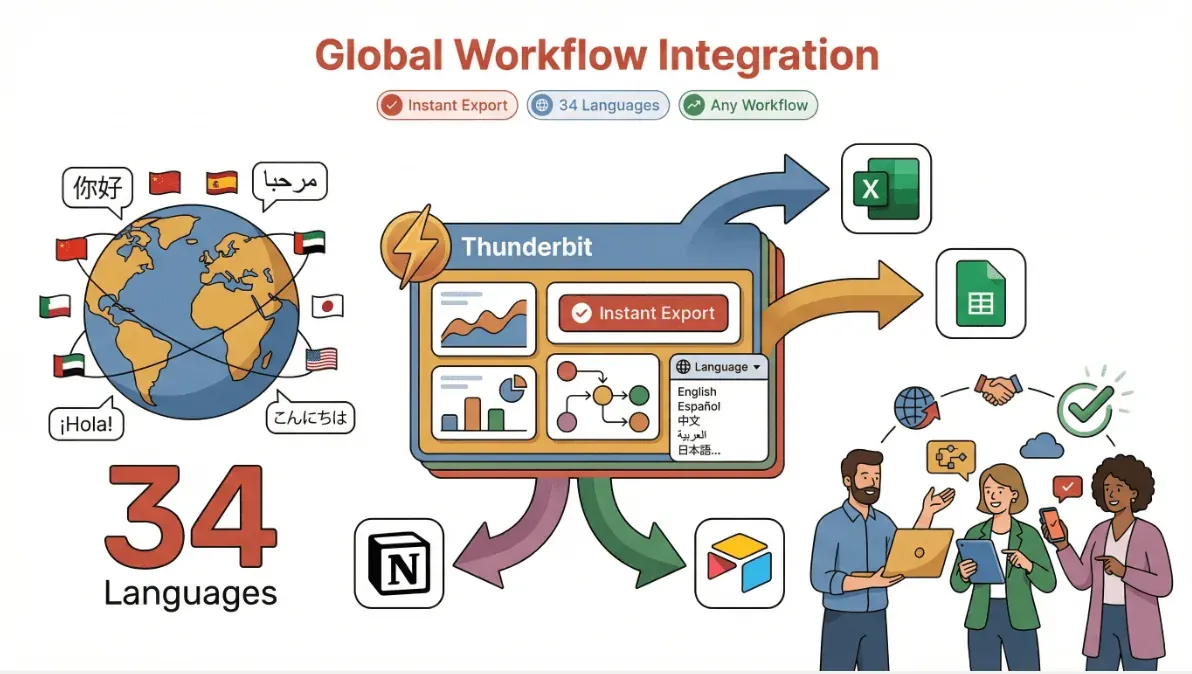
Thunderbit isn’t just about static map data. Its AI can automatically extract long-tail information from any map-based website—think reviews, prices, geotagged data, or even regional trends. This makes it a favorite for sales, marketing, and urban planning teams who need to gather and analyze location-specific data fast. And with support for 34 languages and instant export to Excel, Google Sheets, Airtable, or Notion, Thunderbit fits right into any workflow, anywhere in the world.
Thunderbit’s Key Features for Real-Time Map Monitoring
- AI Suggest Fields: Click once, and Thunderbit’s AI scans the map or listing page, recommending the best data columns to extract—like business names, addresses, ratings, or even custom tags.
- Subpage Scraping: Need more details? Thunderbit can automatically visit each subpage (like individual business or property profiles) and enrich your dataset with deeper insights.
- Scheduled Scraping: Set it and forget it—Thunderbit can monitor map data at regular intervals, alerting you to changes in real time.
- Instant Data Export: Export your results directly to Excel, Google Sheets, Airtable, or Notion with a single click.
- Multi-Language Support: With 34 languages, Thunderbit is ready for global teams and cross-border projects.
- No-Code, No Maintenance: The AI adapts to website changes, so you’re never stuck fixing broken scrapers.
Thunderbit in Action
I’ve seen Thunderbit used to monitor Google Maps for new business openings, scrape real estate listings by neighborhood, and even track competitor locations for retail expansion. One urban planning team used Thunderbit to extract and visualize foot traffic data from dozens of city map sources—cutting their research time from weeks to hours.
Want to see how it works? Download the Chrome extension and try scraping a map page or directory for yourself. You’ll see why so many teams are making Thunderbit their go-to for map monitoring and data extraction.
Try Thunderbit for Map Monitoring
2. ArcGIS
ArcGIS by Esri is the heavyweight champion of GIS and map monitoring software. If you need advanced data visualization, spatial analysis, and real-time tracking for city planning, infrastructure management, or environmental monitoring, ArcGIS is the gold standard. Its dashboards are incredibly customizable, letting you layer live data feeds (traffic, weather, IoT sensors) on top of detailed maps.
ArcGIS shines in scenarios where you need to combine multiple data sources, run complex spatial queries, or create interactive visualizations for stakeholders. It’s widely used by governments, utilities, and large enterprises for everything from disaster response to zoning analysis.
Key Features:
- Advanced GIS data visualization and analytics
- Real-time data integration (traffic, weather, sensors)
- Customizable dashboards and reporting
- Robust API and integration options
Best For: City planners, infrastructure managers, environmental analysts, and anyone who needs deep GIS capabilities.
3. Google Maps API
Google Maps API is the backbone of real-time map tracking for thousands of businesses worldwide. Its biggest strengths? Lightning-fast data updates, global coverage, and seamless integration with business apps. If you need to build a custom dashboard for tracking deliveries, optimizing routes, or geofencing locations, Google Maps API is a reliable and scalable choice.
Businesses use Google Maps API to power everything from ride-sharing platforms to retail store locators. The data is always fresh, and the developer documentation is top-notch.
Key Features:
- Real-time location tracking and route optimization
- Global map coverage and high update frequency
- Geofencing and location-based triggers
- Easy integration with business systems
Best For: Logistics, delivery, field service, and any business needing up-to-date, reliable map data.
4. Mapbox
Mapbox is all about customization and beautiful, interactive maps. It’s a favorite among developers and business teams who want to build branded dashboards, monitor assets in real time, or visualize data in creative ways. Mapbox offers fast data refresh rates and flexible APIs, making it easy to tailor maps to your exact needs.
Retailers use Mapbox to track in-store activity, logistics teams use it for fleet monitoring, and marketers use it for location-based campaign analysis. The visual customization options are some of the best in the industry.
Key Features:
- Highly customizable, visually stunning maps
- Real-time data overlays and tracking
- Flexible APIs for custom dashboards
- Strong developer and business support
Best For: Businesses wanting tailored map dashboards, retail analytics, and field operations.
5. Geofeedia
Geofeedia takes map monitoring to the next level by combining real-time social media data with geospatial analysis. It’s a powerful tool for marketing, security, and event management teams who need to monitor what’s happening in a specific area—right now. Geofeedia aggregates posts, photos, and videos from social platforms, mapping them to precise locations for instant situational awareness.
For example, marketers can track brand mentions at a live event, while security teams can monitor for incidents or crowd surges. It’s also used by public safety agencies to spot emerging threats or trends.
Key Features:
- Real-time social media aggregation and mapping
- Geofencing and location-based alerts
- Visual dashboards for trend and incident analysis
- Integration with security and marketing platforms
Best For: Marketing, event management, security, and public safety teams.
6. Carto
Carto is a flexible, analytics-driven map monitoring platform built for data-driven teams. It excels at spatial analysis, custom dashboards, and integrating business data with geospatial insights. Carto’s API and extension options make it a great fit for companies with complex, evolving needs—think sales territory planning, market analysis, or multi-source data integration.
Carto stands out for its ability to handle custom workflows and advanced analytics, all while keeping the interface accessible for non-technical users.
Key Features:
- Customizable map dashboards and spatial analytics
- Integration with business data and APIs
- Advanced geospatial modeling and visualization
- Scalable for large, complex projects
Best For: Sales ops, market analysts, and teams needing tailored, data-rich map monitoring.
7. HERE Technologies
HERE Technologies is the go-to for enterprise-grade real-time tracking, routing, and event response. With a global footprint and robust data infrastructure, HERE powers logistics, fleet management, and emergency services for some of the world’s biggest organizations. Its real-time data feeds, routing algorithms, and event monitoring tools are trusted by companies that can’t afford to miss a beat.
HERE’s platform is built for scale, reliability, and integration—perfect for businesses with complex, mission-critical tracking needs.
Key Features:
- Real-time tracking, routing, and event response
- Global map data and high reliability
- Enterprise integration and scalability
- Advanced analytics for logistics and emergency ops
Best For: Large enterprises, logistics providers, emergency services, and any organization needing bulletproof real-time tracking.
Map Monitoring Software Comparison Table
Here’s a quick side-by-side to help you compare the top 7 tools:
| Software | Ease of Use | Real-Time Updates | Data Visualization | Customization | Export Options | Best For | Pricing (2026 est.) |
|---|---|---|---|---|---|---|---|
| Thunderbit | ⭐⭐⭐⭐⭐ | ⭐⭐⭐⭐ | ⭐⭐⭐⭐ | ⭐⭐⭐⭐ | Excel, Sheets, Notion, Airtable | Sales, marketing, urban planning | Free tier, from $15/mo |
| ArcGIS | ⭐⭐⭐ | ⭐⭐⭐⭐ | ⭐⭐⭐⭐⭐ | ⭐⭐⭐⭐⭐ | CSV, Excel, APIs | City planning, infrastructure | From $100/mo (varies) |
| Google Maps API | ⭐⭐⭐⭐ | ⭐⭐⭐⭐⭐ | ⭐⭐⭐⭐ | ⭐⭐⭐⭐ | JSON, APIs | Logistics, delivery, dev teams | Pay-as-you-go, starts free |
| Mapbox | ⭐⭐⭐⭐ | ⭐⭐⭐⭐ | ⭐⭐⭐⭐⭐ | ⭐⭐⭐⭐⭐ | APIs, CSV, custom | Retail, custom dashboards | Free tier, paid plans vary |
| Geofeedia | ⭐⭐⭐ | ⭐⭐⭐⭐ | ⭐⭐⭐⭐ | ⭐⭐⭐ | CSV, APIs | Marketing, security, events | Custom pricing |
| Carto | ⭐⭐⭐⭐ | ⭐⭐⭐⭐ | ⭐⭐⭐⭐⭐ | ⭐⭐⭐⭐⭐ | CSV, APIs, custom | Sales ops, analytics teams | Custom / by usage |
| HERE Technologies | ⭐⭐⭐ | ⭐⭐⭐⭐⭐ | ⭐⭐⭐⭐ | ⭐⭐⭐⭐ | APIs, CSV | Enterprise, logistics, emergency | Custom/enterprise pricing |
Legend: ⭐⭐⭐⭐⭐ = Best in class
Choosing the Right Map Monitoring Software for Your Business
What Is Data Scraping and How to Do It in 2025 Get Started Free
So, how do you pick the right tool? Here’s my cheat sheet:
- For non-technical teams who want fast, no-code extraction and analysis: Thunderbit is your best bet. Its AI-driven interface and export options make it perfect for sales, marketing, and urban planning.
- For deep GIS and city-scale projects: ArcGIS is the industry leader, especially if you need advanced analytics and custom dashboards.
- For logistics and real-time tracking at scale: Google Maps API and HERE Technologies deliver unmatched reliability and global coverage.
- For beautiful, branded dashboards and custom visualizations: Mapbox and Carto are top choices, with Carto offering more analytics muscle.
- For social media-driven monitoring and event response: Geofeedia is uniquely positioned to turn social data into actionable insights.
When evaluating, consider your team’s technical skills, the complexity of your data, and how much customization you need. Most of these tools offer free trials or demos—so don’t be afraid to experiment.
Conclusion: Unlocking Real-Time Insights with Map Monitoring Software
Adopting map monitoring software in 2026 isn’t just about seeing dots on a map—it’s about unlocking real-time insights that drive business growth, operational efficiency, and smarter decision-making. Whether you’re tracking assets, analyzing customer behavior, or planning the next big event, the right tool can make all the difference.
Ready to see what’s possible? Try Thunderbit’s free Chrome extension or explore demos from the other tools on this list. And if you want to stay ahead of the curve, keep an eye on the Thunderbit Blog for the latest in map monitoring trends, tips, and tutorials.
Try Thunderbit for Real-Time Map Monitoring Get Started Free
FAQs
1. What is map monitoring software and who needs it?
Map monitoring software lets you track, visualize, and analyze real-time location data—great for businesses in logistics, sales, marketing, urban planning, and public safety.
2. How does Thunderbit differ from traditional map monitoring tools?
Thunderbit uses AI to automate map data extraction and analysis from any website, with a no-code Chrome extension and instant export to Excel, Google Sheets, Notion, and Airtable. It’s designed for business users, not just GIS pros.
3. Which map monitoring software is best for real-time tracking?
For pure real-time tracking and global coverage, Google Maps API and HERE Technologies are top picks. For easy extraction and analysis, Thunderbit stands out.
4. Can I use map monitoring software for social media analysis?
Yes! Geofeedia specializes in aggregating and mapping real-time social media data for marketing, security, and event management.
5. What should I look for when choosing map monitoring software?
Focus on ease of use, real-time update frequency, visualization features, customization, export options, and how well the tool fits your team’s technical skills and business needs.
Ready to take your map monitoring to the next level? Explore these tools and see how real-time location intelligence can transform your business.




