
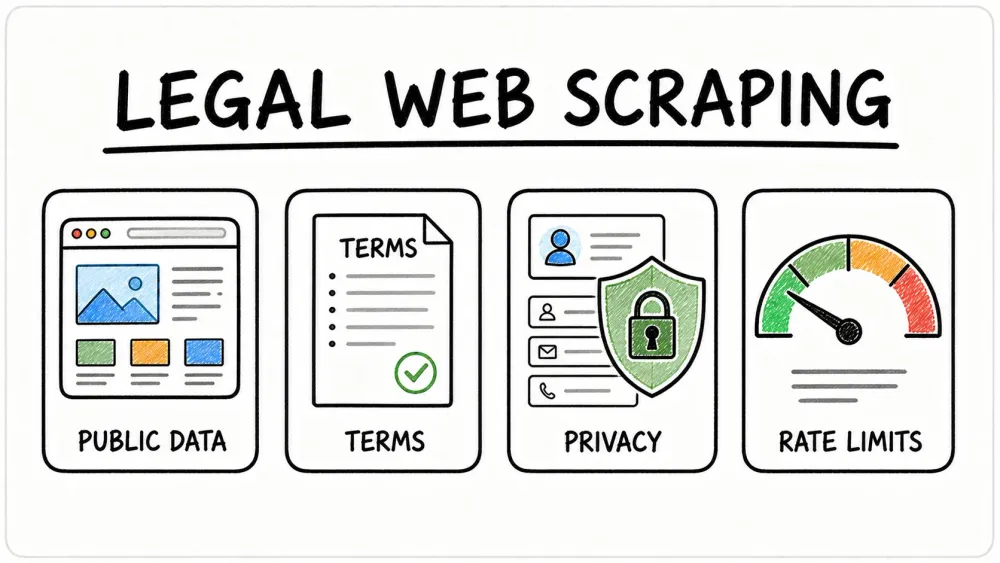
“Is it legal to scrape data from websites?”—that’s the million-dollar question I hear from sales, ops, and marketing teams almost every week. With web scraping now powering everything from lead generation to competitive intelligence, it’s no wonder everyone wants a clear answer. But the reality? The legal landscape is about as clear as a cup of day-old coffee. Just look at the headlines: one court says scraping public data is fair game, while another warns of “unlawful data harvesting.” No wonder so many teams are nervous about crossing the line.
Here’s the thing: over two-thirds of organizations now use web scraping to fuel analytics and AI projects, and a whopping 78% of e-commerce companies rely on it for pricing intelligence. But with high-profile lawsuits like LinkedIn vs. hiQ Labs making headlines, the stakes have never been higher. So, how do you tap into the value of web data—without ending up in legal hot water? Let’s break down the legal frameworks, compliance checks, and best practices that every business user needs to know. And yes, I’ll show you how Thunderbit is making compliant scraping a whole lot easier.
Understanding the Legal Landscape: Is It Legal to Scrape Data from Websites?
Try Thunderbit's Compliant Web Scraper Thunderbit's agentic web scraper reads public pages itself and extracts data in one click, built with compliance-conscious teams in mind. Get Started Free
Let’s get straight to the point: the legality of web scraping depends on what you scrape, how you scrape it, and where you are. There’s no single, universal law that says “scraping is legal” or “scraping is illegal.” Instead, you’re dealing with a patchwork of rules—think anti-hacking laws, privacy regulations, copyright, and even website terms of service (Thunderbit Blog).
Here are the big factors that determine if your scraping project is on the right side of the law:
- Public vs. Private Data: Scraping data that’s open to everyone (no login, no paywall) is generally safer. If you’re trying to access content behind a login, you’re likely crossing into illegal territory.
- Type of Data: Personal data (like names, emails, or social profiles) and copyrighted content (articles, images) are much riskier than scraping factual information (prices, product specs, business listings).
- Intended Use: Using scraped data internally (for analysis or research) is much less risky than republishing or selling it.
- Compliance with Website Rules: Violating a site’s terms of service or ignoring its robots.txt file can get you into trouble—even if the data is public.
- Technical Approach: Scraping at a human-like pace and not bypassing security measures (like CAPTCHAs or IP blocks) keeps you on firmer ground.
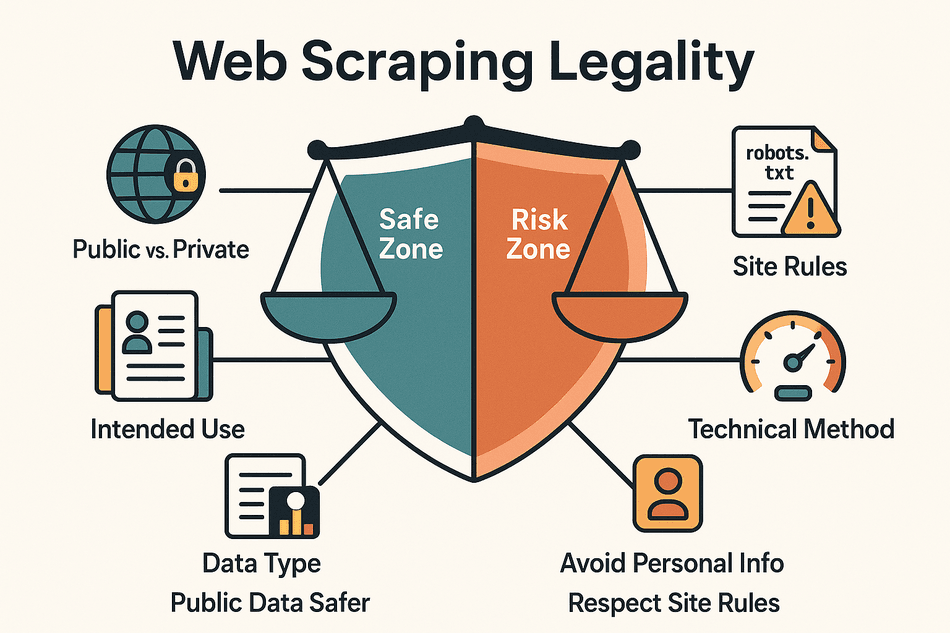
 The bottom line? Scraping public, non-personal data for internal use is broadly accepted in many regions, but there are big caveats—especially when it comes to privacy, copyright, and how aggressively you scrape (Thunderbit Blog).
Legal Framework of Data Scraping: An Overview of Major Global Regulations
 Let’s take a quick tour of the world’s main legal frameworks for web scraping:
United States: CFAA, Copyright, and Contracts
- Computer Fraud and Abuse Act (CFAA): This anti-hacking law makes it illegal to access computer systems “without authorization.” But courts have clarified that scraping public websites doesn’t violate the CFAA, since there’s no “authorization” required (California Lawyers Association).
- Landmark Case: In hiQ Labs v. LinkedIn, the Ninth Circuit ruled that scraping public LinkedIn profiles was not a CFAA violation. However, LinkedIn could still sue for breach of contract (violating terms of service) or copyright infringement.
- Other Risks: If you scrape aggressively (like the bot in eBay v. Bidder’s Edge that made 100,000 requests/day), you could be liable for “trespass to chattels”—basically, interfering with someone else’s servers (Wikipedia).
European Union: GDPR and Database Rights
- GDPR: The EU’s General Data Protection Regulation applies even to public personal data. If you scrape anything that can identify an individual, you need a lawful basis (like consent or legitimate interest) and must follow strict privacy rules.
- Database Directive: The EU also protects databases as a whole. Scraping a “substantial part” of a structured database (like all listings from a real estate site) could violate database rights—even if the individual facts aren’t copyrighted (Thunderbit Blog).
United Kingdom: UK GDPR and Data Protection Act
- UK GDPR: Post-Brexit, the UK’s rules mirror the EU’s. Scraping public, non-personal data is generally fine, but personal data scraping is tightly regulated.
- Computer Misuse Act: Similar to the CFAA, this law can make unauthorized access a criminal offense.
China: PIPL and Data Security Law
- Personal Information Protection Law (PIPL): Requires consent for collecting personal data. Scraping Chinese websites for personal info without permission is a big no-no.
- Data Security Law: Used to crack down on scraping that harms data owners or creates unfair competition.
Other Regions
- Canada, Australia, APAC: Most have anti-hacking laws and privacy rules similar to the EU/UK. Always check local laws before scraping.
Key takeaway: The safest bet is to scrape public, non-personal data for internal use, and always check the rules in your region (Thunderbit Blog).
Compliance Checklist: How to Ensure Your Data Scraping Is Legal?
Before you start scraping, run through this compliance checklist:
- Read the Website’s Terms of Service: If the ToS says “no scraping,” consider stopping or get permission first (Thunderbit Blog).
- Stick to Public Data: Don’t scrape anything behind a login or paywall unless you have explicit authorization.
- Check robots.txt: Visit
site.com/robots.txtto see if bots are disallowed from certain sections. While not legally binding, it’s good etiquette to respect it. - Avoid Personal Data: Don’t scrape names, emails, or other PII unless you have a lawful basis and a privacy plan.
- Don’t Copy Creative Content: Stick to facts and data points. Republishing articles, images, or large chunks of content can trigger copyright claims.
- Use Official APIs When Available: If the site offers an API, use it—it’s safer and often more stable.
- Scrape Gently: Don’t overload servers. Scrape at human-like speeds and avoid bypassing technical protections.
- Document Your Process: Keep records of what you scraped, when, and why. This helps if questions arise later.
- Be Ready to Stop: If you get a cease-and-desist letter, stop scraping immediately and reassess.
Thunderbit’s Compliant Scraping Practices: Making Data Extraction Safer and More Reliable
When we built Thunderbit, compliance was front and center. Here’s how Thunderbit helps you stay on the right side of the law:
- Browser-Based Scraping: Thunderbit only scrapes what you can see in your browser—no hidden API calls, no hacking around logins. If you can’t see it, Thunderbit can’t scrape it (Thunderbit Blog).
- Built-In Warnings: If you try to scrape a site with strict anti-scraping policies, Thunderbit will flash a warning. It’s like having a compliance expert looking over your shoulder.
- One Click Extract: Thunderbit’s AI scans the page and recommends only the relevant fields—helping you avoid accidentally scraping sensitive or unnecessary data (Thunderbit Blog).
- Human-Like Speeds: Whether you’re scraping locally or in the cloud, Thunderbit paces itself to avoid overwhelming servers.
- No Data Stored on Our Servers: Your scraped data goes straight to you—Thunderbit doesn’t keep a copy, which is great for privacy compliance.
- Compliance-Friendly Exports: Export data directly to Google Sheets, Excel, Airtable, or Notion—perfect for internal use.
- Subpage & Pagination Handling: Thunderbit navigates sites like a real user, clicking through pages and subpages without brute-forcing endpoints.
- Scheduled Scraping with Restraint: Set up scheduled scrapes at responsible intervals, so you’re not hammering a site every minute.
- Multi-Language Support: Thunderbit's UI now ships in 55 languages on the Chrome Web Store, so compliance prompts and field hints stay readable for non-English teams (Chrome Web Store listing).
In short, Thunderbit “bakes compliance into the product,” so you’re guided to scrape responsibly—even if you’re not a legal expert (Thunderbit Blog).
Try Thunderbit for Compliant Web Scraping Install Thunderbit's free Chrome extension and extract data from any public page in one click. Get Started Free
Data Scraping vs. Data Reuse: Where Are the Legal Boundaries?
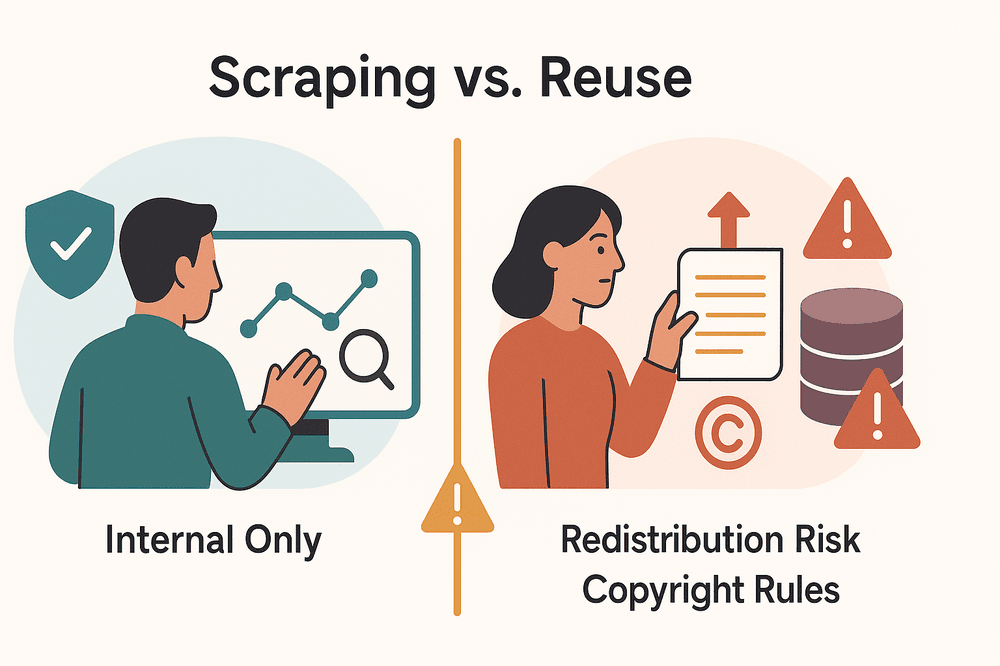 It’s one thing to scrape data for your own internal use, and another to republish, resell, or otherwise reuse that data. Here’s where the legal line gets sharp:
- Internal Use: Scraping public data for internal analysis (like sales leads or price monitoring) is generally safe—assuming you’re not scraping personal data or violating privacy laws.
- Redistribution or Resale: Republishing scraped data (on your website, in a product, or selling it) can trigger copyright, database rights, or breach of contract claims.
- Copyright & Database Rights: In the US, facts aren’t copyrightable, but the selection or arrangement of data might be. In the EU/UK, scraping a “substantial part” of a database can violate sui generis database rights.
- Fair Use: US law allows for “fair use” in some cases (like commentary or analysis), but simply copying and pasting large chunks of content is almost never fair use.
- Attribution: Always cite your sources if you use scraped data publicly—but remember, attribution doesn’t make it legal if you’re violating other rights.
- Don’t Sell Raw Data: Selling unmodified scraped datasets is especially risky. Use scraped data to generate insights, not as a product in itself.
Pro tip: Use scraped data for internal intelligence and decision-making. If you need to share it externally, aggregate or transform it, and always check if you need permission (Thunderbit Blog).
Industry Case Studies: How to Mitigate Legal Risks
Let’s look at some real-world cases—because nothing teaches compliance like seeing what went wrong for others:
LinkedIn vs. hiQ Labs
- What happened: hiQ Labs scraped public LinkedIn profiles to build analytics about employee attrition. LinkedIn tried to block them, but the court ruled that scraping public data wasn’t a CFAA violation.
- Lesson: Scraping public data is legally defensible in the US, but you still need to watch out for terms of service and privacy claims (California Lawyers Association).
eBay vs. Bidder’s Edge
- What happened: Bidder’s Edge scraped eBay’s auction listings aggressively (100,000 requests/day), violating eBay’s terms and robots.txt. The court issued an injunction for “trespass to chattels.”
- Lesson: Even public data scraping can be unlawful if it’s aggressive or violates explicit site rules (Wikipedia).
Facebook (Meta) vs. Power Ventures
- What happened: Power Ventures scraped Facebook data with user consent, but after Facebook revoked access and blocked their IPs, Power Ventures kept scraping. The court ruled this was “unauthorized access.”
- Lesson: If a site owner tells you to stop scraping, you must stop—or risk violating anti-hacking laws.
Compliance Success Stories
Many price comparison sites in the EU operate legally by scraping only factual data, respecting opt-outs, and not scraping entire databases. The absence of lawsuits against these companies shows that sticking to public, non-personal data and obeying site rules works.
How Thunderbit Helps
Thunderbit’s built-in warnings, rate limits, and browser-based approach would have helped prevent many of these legal missteps—by alerting users to risky sites and enforcing polite scraping by default.
Compliance Self-Checklist for Data Scraping in Business Scenarios
Here’s a practical self-audit checklist for your next scraping project:
- Is the data public? (No login required)
- What do the site’s terms say? (Any anti-scraping clauses?)
- Have you checked robots.txt? (Is your target section disallowed?)
- Are you scraping personal data? (If yes, do you have a privacy plan?)
- Are you scraping a large portion of the site? (Avoid scraping entire databases)
- What’s your purpose? (Internal use = safer; public reuse = more risk)
- Are you scraping gently? (Human-like speeds, no technical circumvention)
- Did you check for an API? (Use it if available)
- Are you ready to stop if asked? (Have a plan for cease-and-desist)
- How will you store and secure the data? (Limit access, protect privacy)
- Are you documenting your process? (Keep records for compliance)
If you answer “no” or feel unsure about any of these, pause and get clarity before moving forward (Thunderbit Blog).
Sample Workflow for Compliant Data Scraping by Thunderbit Users
 Let’s walk through a typical, compliance-friendly Thunderbit workflow:
- Pre-scrape check: Visit the site’s robots.txt and terms of service. No anti-scraping language? Green light.
- Open Thunderbit: Navigate to the target page and launch the Thunderbit Chrome Extension.
- One Click Extract: Let Thunderbit’s AI recommend relevant, non-sensitive fields. Double-check that no personal data is included unless you have a lawful basis.
- Customize fields: Adjust columns and data types as needed—only collect what you truly need.
- Scrape: Click “Scrape.” Thunderbit extracts data at a human-like pace, respecting site structure.
- Subpage scraping: If needed, use Thunderbit’s subpage feature to enrich your data—again, only for public info.
- Export: Send your data directly to Google Sheets, Excel, Airtable, or Notion for internal analysis.
- Schedule (optional): Set up scheduled scrapes at reasonable intervals—never too frequent.
- Document: Keep a record of what you scraped, when, and why.
Thunderbit’s interface will prompt you at each step if there are compliance considerations—so you’re never flying blind.
Learn More About Thunderbit Compliance Features Free plan covers 6 pages a month, no credit card required — a low-risk way to test extraction on public pages. Get Started Free
Conclusion & Key Recommendations: Unlocking Data Value Safely and Compliantly
Web scraping is a powerful tool for business growth—but it’s not a free-for-all. The legal landscape is complex, but the core principles are clear:
- Scrape public, non-personal data for internal use whenever possible.
- Always check site terms, robots.txt, and relevant laws before you start.
- Avoid scraping personal data or creative content unless you have a lawful basis and a privacy plan.
- Use compliance-friendly tools like Thunderbit to guide your workflow and minimize risk.
- Document your process and be ready to stop if asked.
By making compliance a habit, you can unlock the value of web data—without the legal headaches. And if you want to see how easy compliant scraping can be, give Thunderbit a try. Your legal team (and your future self) will thank you.
For more deep dives on web scraping, compliance, and automation, check out the Thunderbit Blog.
Try Agentic Web Scraper for Compliant Data Extraction Get Started Free
FAQs
1. Is it legal to scrape data from any website?
Not always. Scraping public, non-personal data for internal use is generally legal in many regions, but scraping personal data, copyrighted content, or data behind logins can be risky or outright illegal. Always check the site’s terms and local laws before scraping (Thunderbit Blog).
2. What’s the difference between scraping and reusing data?
Scraping is the act of collecting data; reusing means publishing, selling, or otherwise distributing that data. Internal use is much safer. Republishing or selling scraped data can trigger copyright, database rights, or breach of contract claims (Thunderbit Blog).
3. How does Thunderbit help ensure compliance?
Thunderbit only scrapes what’s visible in your browser, warns you about risky sites, suggests relevant (non-sensitive) fields, and paces requests to avoid overloading servers. It also doesn’t store your data, and its export options are designed for internal use (Thunderbit Blog).
4. What should I do if I receive a cease-and-desist letter?
Stop scraping immediately and reassess your project. Continuing after a direct request to stop can turn a legal gray area into a clear violation of anti-hacking laws or contract terms (Thunderbit Blog).
5. Can I scrape personal data if it’s public?
Not without a lawful basis. Privacy laws like GDPR and CCPA apply even to public personal data. You’ll need consent or a strong legitimate interest, and you must handle the data responsibly (Thunderbit Blog).
This guide is for informational purposes only and does not constitute legal advice. For complex or high-stakes projects, consult a qualified attorney familiar with data and privacy law in your jurisdiction.
Read More




