
Web crawlers are the unsung heroes of the internet. Every time you search for a new recipe, check the latest prices on your favorite sneakers, or compare hotels for your next vacation, there’s a good chance a web crawler has already been there, quietly gathering and organizing the information you see. In fact, it's estimated that roughly half of all internet traffic is now generated by bots and crawlers, not humans — recent industry surveys put the bot share at 49–51%. That’s right—while you’re sleeping, these digital scouts are tirelessly mapping the web, making sure the world’s information is just a click away.
But what exactly are web crawlers? Why are they so important for businesses, researchers, and anyone who relies on up-to-date data? And how have modern tools like Thunderbit made web crawling accessible to everyone, not just programmers or tech giants? As someone who’s spent years building automation and AI tools, I’ve seen firsthand how web crawlers have transformed from mysterious “spiders” into everyday business essentials. Let's dive in and demystify the world of web crawlers—what they are, how they work, and why they're the backbone of smarter data access in 2026.
Web Crawlers Are the Internet’s Data Scouts
Scrape data from any website using AI Get Started Free
So, what are web crawlers, really? At their core, web crawlers (also known as spiders or bots) are automated programs that systematically browse the internet, visiting one webpage after another, collecting information as they go. Think of them as the world’s most tireless research interns—except they never sleep, never complain, and can visit millions of pages in a single day.
A web crawler starts with a list of web addresses (called “seeds”), visits each one, and then follows the links it finds to discover new pages. As it explores, it copies content, indexes data, and builds a map of the web’s ever-changing landscape (Cloudflare). This is how search engines like Google know what’s out there, and how price comparison sites or market research tools keep their data fresh.
To put it simply: web crawlers are the scouts that make the internet searchable, comparable, and actionable.
The Many Faces of Web Crawlers: Types and Core Functions
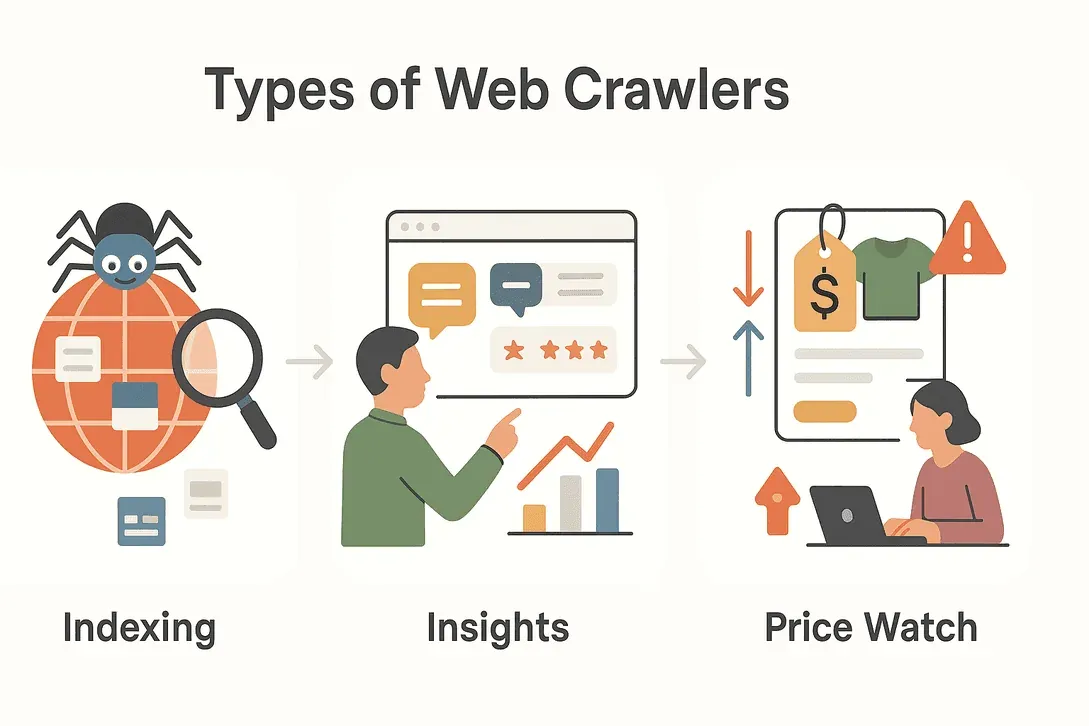 Not all web crawlers wear the same hat. Depending on their mission, crawlers come in several flavors, each with its own specialty. Here’s a quick tour of the main types you’ll encounter:
| Type | Core Function | Typical Use Case |
|---|---|---|
| Search Engine Crawlers | Index the web for search results | Googlebot, Bingbot indexing new websites |
| Data Mining Crawlers | Gather large datasets for analysis | Market research, academic studies |
| Price Monitoring Crawlers | Track product prices and availability | E-commerce price comparison, dynamic pricing |
| Content Aggregation Crawlers | Collect articles, news, or posts for aggregation | News portals, content curation |
| Lead Generation Crawlers | Extract contact info and business data | Sales prospecting, B2B directories |
Let’s break down a few of these in more detail:
Search Engine Crawlers
When you type a question into Google, you’re relying on the work of search engine crawlers. These bots roam the web 24/7, discovering new pages, updating old ones, and indexing content so it can be found in search results. Without crawlers, search engines would be flying blind—no way to know what’s new, what’s changed, or what’s even out there (TechTarget).
Data Mining and Market Research Crawlers
Businesses and researchers use crawlers to gather massive amounts of data for analysis. Want to know how many times a competitor’s brand is mentioned online? Or track sentiment around a new product launch? Data mining crawlers can scan forums, reviews, social media, and more, turning the chaotic web into structured insights (DataHut).
Price Monitoring and Product Tracking Crawlers
In the fast-paced world of e-commerce, prices and product details change constantly. Price monitoring crawlers keep tabs on competitors, alerting businesses to price drops, stock changes, or new product launches. This enables dynamic pricing strategies and helps companies stay competitive (AIMultiple).
Why Web Crawlers Are Essential for Modern Data Access
Let’s face it: the internet is just too big for humans to keep up with manually. There are now more than 1.4 billion websites (and counting), with around a million new ones added every day. Web crawlers make it possible to:
- Scale up data collection: Visit millions of pages in hours, not months.
- Stay up-to-date: Continuously monitor for changes, new content, or breaking news.
- Access dynamic, real-time information: Respond to market shifts, price changes, or trending topics as they happen.
- Enable data-driven decisions: Power everything from search engines to market research, risk management, and financial modeling (DEV Community).
In a world where data is the backbone of digital business strategy, web crawlers are the engines that keep the data flowing.
Common Use Cases for Web Crawlers Across Industries
Web crawlers aren’t just for tech giants or search engines. Here’s how different industries put them to work:
| Industry | Use Case | Benefit |
|---|---|---|
| Sales | Lead generation | Build targeted prospect lists from directories |
| E-commerce | Price monitoring | Track competitor prices, stock, and product changes |
| Marketing | Content aggregation | Curate news, articles, and social media mentions |
| Real Estate | Property listing aggregation | Combine listings from multiple sources |
| Travel | Fare and hotel comparison | Monitor prices, availability, and policies |
| Finance | Risk monitoring | Track news, filings, and sentiment for investments |
Real-world example:
A real estate agency uses crawlers to pull property details, photos, and amenities from multiple listing sites, giving their clients a unified, up-to-date view of the market (DataHut).
An e-commerce team sets up crawlers to monitor competitor SKUs and pricing, adjusting their own strategy in real time (AIMultiple).
How Web Crawlers Work: A Step-by-Step Overview
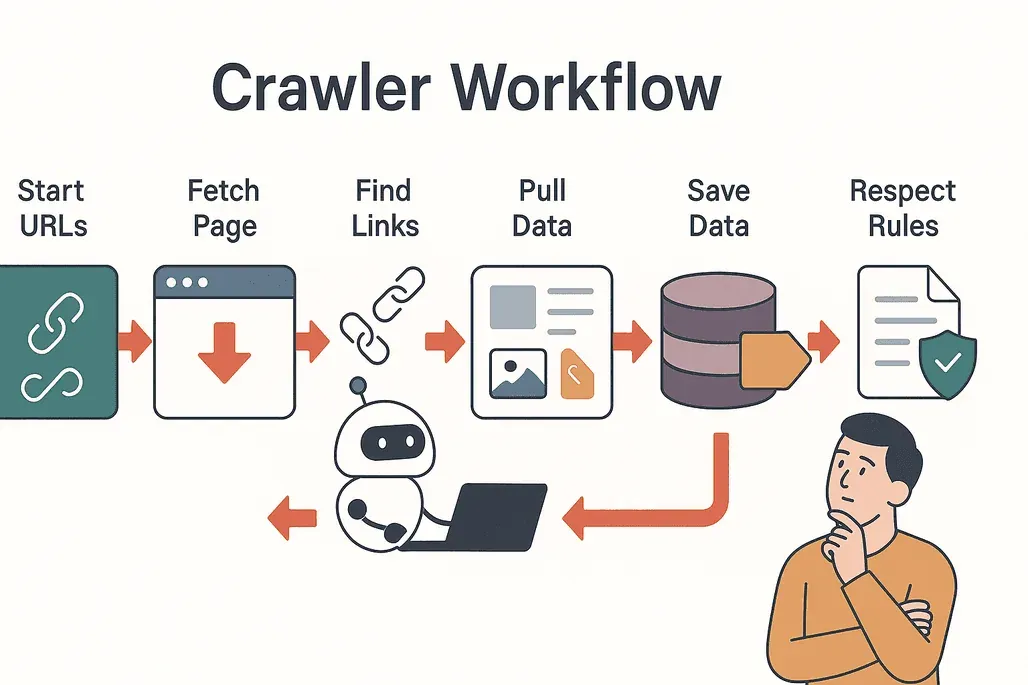 Let’s demystify the process. Here’s how a typical web crawler operates:
- Start with seeds: The crawler begins with a list of starting URLs.
- Visit and fetch: It visits each page, downloading the content.
- Extract links: The crawler finds all the links on the page.
- Follow links: It adds new, unvisited links to its queue.
- Extract data: Relevant information (text, images, prices, etc.) is copied and structured.
- Store results: Data is saved to a database or exported for analysis.
- Respect rules: The crawler checks each site’s
robots.txtfile to see what’s allowed, avoiding restricted areas (Cloudflare).
Best practices:
- Crawl politely (don’t overload servers).
- Respect privacy and legal boundaries.
- Avoid duplicate content and unnecessary requests.
Challenges and Considerations When Using Web Crawlers
Web crawling isn’t all smooth sailing. Here are some common hurdles:
- Server load: Too many requests can slow down or crash a website.
- Duplicate content: Crawlers may revisit the same pages or get stuck in loops.
- Privacy and legality: Not all data is fair game—always check terms of service and privacy laws.
- Technical barriers: Some sites use CAPTCHAs, dynamic content, or anti-bot measures to block crawlers (DEV Community).
Tips for success:
- Use respectful crawl rates.
- Monitor for changes in website structure.
- Stay up-to-date on data privacy regulations.
Thunderbit: Making Web Crawlers Accessible for Everyone
Here’s where things get exciting. Traditionally, setting up a web crawler meant writing code, configuring settings, and spending hours troubleshooting. But with Thunderbit, we’ve flipped the script.
Thunderbit is an AI-powered web scraper Chrome Extension designed for business users—no coding required. Here’s what makes it stand out:
- Natural language instructions: Just describe what data you want (“Grab all product names and prices from this page”), and Thunderbit’s AI figures out the rest.
- AI-powered field suggestions: Click “AI Suggest Fields” and Thunderbit reads the page, recommending the best columns to extract.
- Subpage scraping: Need more details? Thunderbit can visit each subpage (like product details or LinkedIn profiles) and enrich your dataset automatically.
- Instant templates: For popular sites (Amazon, Zillow, Shopify, etc.), use pre-built templates for one-click data extraction.
- Easy export: Send your data directly to Excel, Google Sheets, Airtable, or Notion—no extra steps.
- Free data export: Download your results as CSV or JSON, completely free.
Thunderbit is trusted by over 100,000 users worldwide, from sales teams to e-commerce operators to real estate pros.
Try Thunderbit AI Web Scraper for Free
Thunderbit vs. Traditional Web Crawlers
Let’s see how Thunderbit stacks up against the old-school approach:
| Feature | Thunderbit | Traditional Crawlers |
|---|---|---|
| Setup Time | 2 clicks (AI handles setup) | Hours/days (manual config, coding) |
| Technical Skill Needed | None (plain English instructions) | High (coding, selectors, scripting) |
| Flexibility | Works on any site, adapts to changes | Breaks with layout changes |
| Subpage Scraping | Built-in, no extra setup | Manual scripting required |
| Export Options | Excel, Sheets, Airtable, Notion, CSV, JSON | Usually CSV/JSON only |
| Maintenance | AI adapts automatically | Frequent manual fixes |
With Thunderbit, you don’t need to be a developer or spend hours tweaking settings. Just point, click, and let the AI do the heavy lifting (Thunderbit Blog).
Getting Started with Web Crawlers Using Thunderbit
Ready to try it out? Here’s how to get started with Thunderbit in minutes:
- Install the Thunderbit Chrome Extension.
- Open the website you want to crawl.
- Click the Thunderbit icon and hit “AI Suggest Fields.” The AI will recommend columns based on the page’s content.
- Adjust fields if needed, then click “Scrape.” Thunderbit will extract the data, including from subpages if you choose.
- Export your results to Excel, Google Sheets, Airtable, Notion, or download as CSV/JSON.
What Is Data Scraping and How to Do It in 2025 Get Started Free
That's it — no scripts, no coding, no headaches. Whether you're tracking prices, building a lead list, or aggregating news, Thunderbit makes most everyday web crawling jobs something a non-developer can finish in a single afternoon.
Conclusion: Web Crawlers Are the Key to Smarter Data Access
Web crawlers are the invisible engines powering our digital world, making information accessible, searchable, and actionable for everyone. From search engines to sales teams, e-commerce to real estate, crawlers have become essential tools for anyone who needs reliable, up-to-date data.
And thanks to modern AI-powered tools like Thunderbit, you don’t need to be a programmer to harness their power. With just a few clicks, anyone can turn the web into a structured, actionable resource—fueling smarter decisions and new opportunities.
Curious to see what web crawlers can do for your business? Download Thunderbit and start exploring the web’s hidden data today. For more tips and deep dives, check out the Thunderbit Blog.
Try AI Web Scraper Get Started Free
FAQs
1. What exactly is a web crawler?
A web crawler is an automated program (sometimes called a spider or bot) that systematically browses the internet, visiting web pages, following links, and collecting information for indexing or analysis.
2. How are web crawlers different from web scrapers?
Web crawlers are designed to discover and map out large portions of the web, often following links from page to page. Web scrapers, on the other hand, focus on extracting specific data from targeted pages. Many modern tools (like Thunderbit) combine both functions.
3. Why are web crawlers important for businesses?
Web crawlers enable businesses to access up-to-date information at scale—whether it’s monitoring competitor prices, aggregating content, or building lead lists. They support real-time decision-making and help companies stay competitive.
4. Is it legal to use web crawlers?
Web crawling is generally legal when done responsibly and in accordance with a website’s terms of service and privacy policies. Always check a site’s robots.txt file and respect data privacy regulations.
5. How does Thunderbit make web crawling easier?
Thunderbit uses AI to automate setup, field selection, and data extraction. With natural language instructions and instant templates, anyone can crawl and extract data from websites—no coding or technical skills required. Data can be exported directly to Excel, Google Sheets, Airtable, or Notion for immediate use.
Learn More




