
The e-commerce world in the Middle East is booming, and Noon.com is right at the heart of it. With millions of products, countless sellers, and a user base growing by the day, Noon has become a goldmine for anyone looking to make data-driven decisions in retail, sales, or market research. But here’s the catch: trying to manually collect and organize Noon’s product data is about as fun as assembling IKEA furniture without instructions—tedious, confusing, and likely to leave you with a few missing pieces.
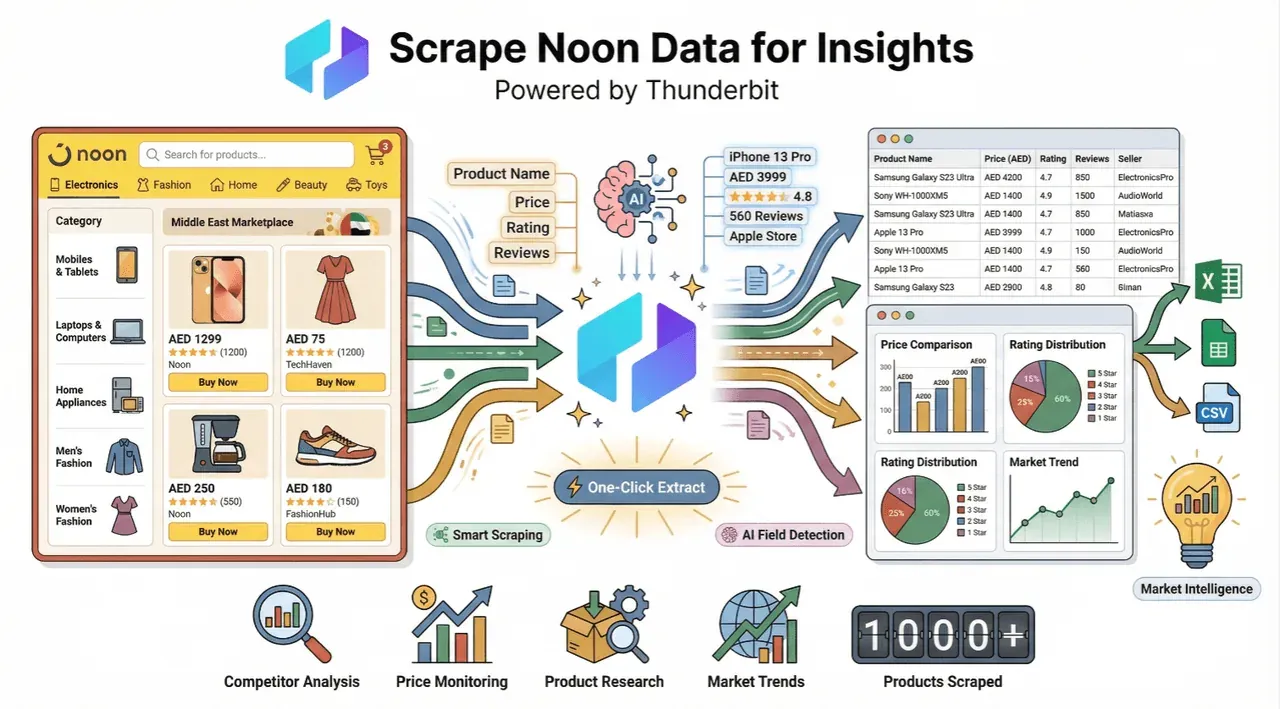 I’ve seen firsthand how much time teams waste copying and pasting prices, product names, and stock info from Noon. That’s why I’m excited to show you how Thunderbit—our AI-powered web scraper—can turn that marathon into a sprint. Whether you’re tracking competitors, monitoring inventory, or just trying to keep your pricing sharp, automating Noon data extraction is a game-changer for your workflow. Let’s break down how to do it, step by step, and why Thunderbit is the tool you’ll want in your corner.
Get to Know Noon: Laying the Groundwork for Data Scraping Success
Scrape data from any website using AI Get Started Free
Before you dive into scraping, it pays to get familiar with how Noon’s website is structured. Noon isn’t just a giant online store; it’s a labyrinth of categories, subcategories, product listings, and detail pages. If you want clean, complete data, you need to map out the lay of the land.
- Categories and Navigation: Noon’s main navigation splits products into major categories—electronics, fashion, home, beauty, and more. Each category branches into subcategories and filters (brand, price, rating, etc.).
- Product Listings: Category and search result pages display dozens (sometimes hundreds) of products, each with a thumbnail, price, and a link to the product detail page.
- Pagination: Listings are spread across multiple pages, using either classic “Next” buttons or infinite scroll. Missing a page means missing out on valuable SKUs.
- Product Detail Pages: Here’s where the gold is—detailed specs, descriptions, images, seller info, and real-time stock or price updates.
Understanding this structure is crucial. If you only scrape the first page of a category, you’ll leave most products behind. If you ignore subpages, you’ll miss out on rich product details. That’s why, when building a scraping strategy, I always recommend:
- Sketching out the navigation flow
- Identifying where your target data lives (listings vs. detail pages)
- Noting how pagination works for your chosen categories
This prep work ensures your data is both complete and accurate—no more “where did that product go?” surprises.
Why Scrape Noon Data? Unlocking Business Value
So why go through the trouble of scraping Noon? Because structured data is the secret weapon for e-commerce teams looking to outsmart the competition. Here are some of the most common use cases I see:
| Use Case | Description |
|---|---|
| Price Monitoring | Track competitor prices to adjust your own and stay competitive (Octoparse). |
| Assortment Analysis | See which products are trending or missing from your catalog. |
| Inventory Tracking | Monitor stock levels to spot shortages or overstock (Octoparse). |
| Competitor Benchmarking | Compare your listings, ratings, and reviews against rivals (Actowiz). |
| Trend Spotting | Identify fast-moving products or categories to inform marketing and buying decisions (Octoparse). |
| Enhanced Decision-Making | Use real-time data for smarter promotions, inventory planning, and sales forecasting (Octoparse). |
In a hyper-competitive market like the UAE, where Noon and Amazon are locked in a price and assortment battle, having up-to-date data isn’t just nice—it’s essential for survival (Actowiz).
Comparing Noon Data Scraping Tools: Why Thunderbit Stands Out
There are plenty of ways to get data out of Noon, but not all are created equal. Here’s how the main approaches stack up:
| Method | Pros | Cons |
|---|---|---|
| Manual Copy-Paste | No setup, anyone can do it | Slow, error-prone, impossible at scale |
| Code-Based Scrapers | Flexible, customizable | Requires programming, breaks with changes |
| Browser Extensions | Easier, some support for pagination | Often template-based, limited by layout |
| AI-Powered Tools | Fast, adapts to changes, no coding | Newer tech, but rapidly improving |
Thunderbit takes the best of all worlds: it’s as easy as a browser extension, but powered by AI that understands Noon’s complex layouts, handles pagination, and even suggests which fields to extract. Here’s why I think it’s the best fit for Noon scraping:
| Feature | Traditional Scrapers | Thunderbit (AI Web Scraper) |
|---|---|---|
| No-code setup | Sometimes | Always (2-click setup) |
| Handles pagination/infinite scroll | Sometimes | Yes (AI adapts, no manual setup) |
| AI field suggestion | No | Yes (“AI Suggest Fields” button) |
| Subpage scraping (detail pages) | Manual scripting | Yes (1-click, AI-driven) |
| Free templates for Noon | Rare | Yes (Noon Scraper Template) |
| Data export (Excel, Sheets, etc.) | Sometimes | Yes (free, instant) |
| Maintenance required | High | Low (AI adapts to site changes) |
| Data labeling/translation | No | Yes (built-in AI features) |
Thunderbit is designed for business users, not just developers. You don’t need to know XPath, CSS selectors, or how to debug a Python script. Just point, click, and get your data.
Step-by-Step: How to Scrape Noon Data Using Thunderbit
Ready to roll up your sleeves? Here’s how to get Noon data into your spreadsheet in minutes—no technical skills required.
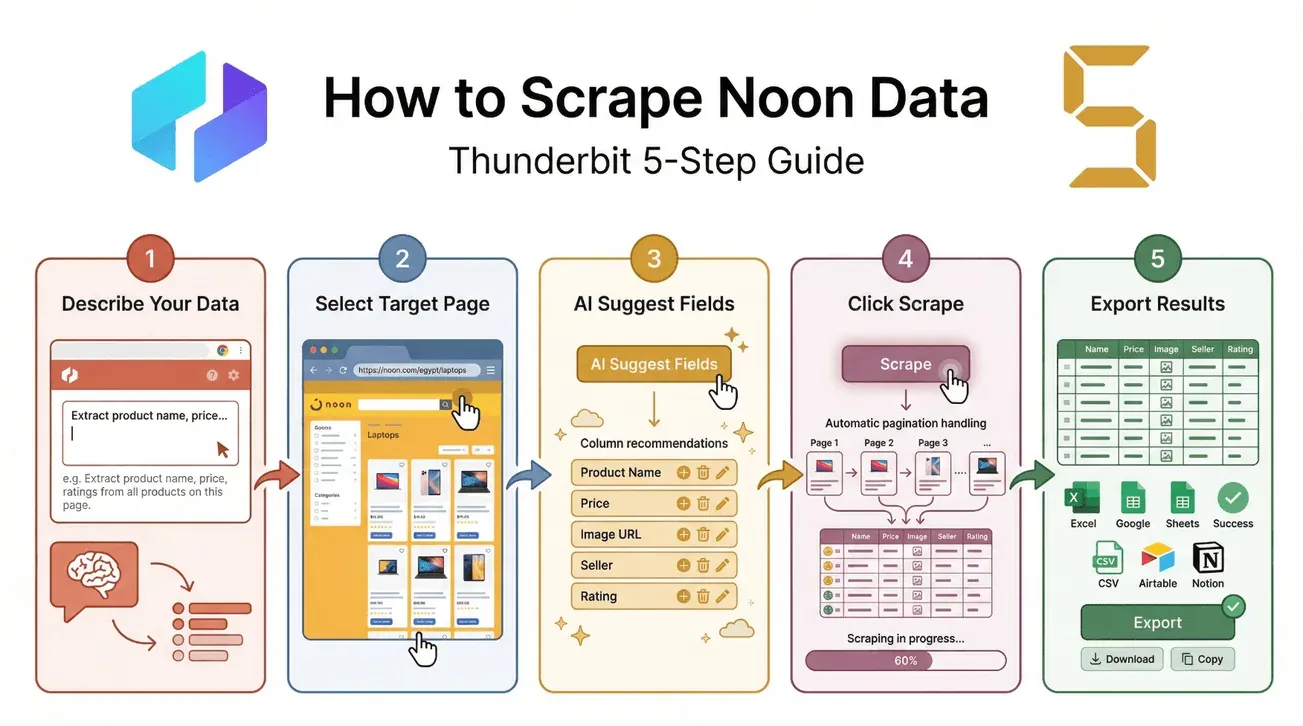
1. Describe Your Data Needs in Natural Language
Open the Thunderbit Chrome Extension. In the “Describe your data” box, just type what you want, like:
“Extract product name, price, rating, and seller from Noon’s electronics category.”
Thunderbit’s AI will use this as a starting point for field suggestions.
2. Select the Target Noon Page
Navigate to the Noon category or search results page you want to scrape. Make sure all the products you need are visible (or paginated).
3. Use “AI Suggest Fields” for Automatic Column Recommendations
Click the “AI Suggest Fields” button. Thunderbit will scan the page and recommend columns—like Product Name, Price, Image URL, Seller, and more. You can add, remove, or rename columns as needed.
4. Click “Scrape” to Extract Data
Hit the “Scrape” button. Thunderbit will:
- Automatically handle pagination (even infinite scroll)
- Visit each product listing and, if you want, each product detail page for more info
- Structure the data into a neat table
5. Export Results to Excel, Google Sheets, or Other Formats
Once the scrape is complete, export your data with one click:
- Download as CSV or Excel
- Export directly to Google Sheets, Airtable, or Notion
- Copy to clipboard for quick pasting
You can even use Thunderbit’s Noon Scraper Template for a pre-built setup—just apply it and go.
Download Thunderbit for Chrome
Visual Guide: Screenshots and Tips
- Screenshots: For a visual walkthrough, check out Thunderbit’s documentation or the Noon Scraper Template page.
- Troubleshooting:
- If Noon asks you to log in, make sure you’re logged in before scraping.
- For infinite scroll, let the page load all products before starting, or let Thunderbit handle scrolling.
- If you hit a snag, try switching between browser and cloud scraping modes.
Maximizing Insights: How Thunderbit’s AI Enhances Noon Data Analysis
What Is Data Scraping and How to Do It in 2025 Get Started Free
Scraping is just the first step. Thunderbit’s AI features take your Noon data from “raw” to “ready for action”:
- Labeling: Automatically tag products by category, brand, or custom rules.
- Formatting: Normalize prices, dates, and numbers for easy analysis.
- Translation: Instantly translate product descriptions or reviews into your preferred language.
- Categorization: Group products by type, price range, or seller for segmentation.
These built-in AI tools mean you can go from a messy data dump to a clean, actionable dataset—without extra software or manual cleanup.
Real-World Scenarios: From Raw Data to Business Insights
Here’s how teams are putting Thunderbit-enriched Noon data to work:
- Sales: Identify underpriced products or hot sellers to adjust your own pricing or inventory.
- Marketing: Spot trending categories for targeted campaigns.
- Operations: Monitor stockouts or price changes to optimize supply chain decisions.
- Analytics: Feed structured Noon data into BI dashboards for real-time market tracking.
One user told me they cut their weekly price monitoring time from 8 hours to 30 minutes using Thunderbit’s AI-powered scraping and labeling. That’s the kind of ROI that makes your morning coffee taste even better.
Ensuring Compliance: Scraping Noon Data Responsibly
Let’s talk about the elephant in the room: compliance. Scraping data from Noon (or any site) comes with responsibilities.
- Check Noon's Terms: Noon's terms and conditions explicitly prohibit scraping and automated access without permission. Review the current version of their policy before you start, and if you're scraping for anything beyond personal research, talk to legal first.
- Respect robots.txt: If Noon’s robots.txt disallows scraping certain pages, steer clear.
- Throttle Your Requests: Don’t overload Noon’s servers—Thunderbit lets you control scraping speed.
- Use Data Ethically: Only use scraped data for legitimate business purposes, and avoid collecting personal info unless you have consent.
Practical Compliance Checklist
- Review Noon’s terms of service
- Check robots.txt for disallowed paths
- Limit scraping frequency and volume
- Avoid collecting sensitive personal data
- Attribute data sources if required
- Stay updated on local data privacy laws
Being a good web citizen isn’t just polite—it keeps your business out of hot water (Thunderbit Blog).
Overcoming Common Challenges When Scraping Noon
Noon, like many modern e-commerce sites, throws a few curveballs at scrapers:
- Dynamic Content: Product listings may load via JavaScript or infinite scroll. Thunderbit’s browser mode can handle these cases (Thunderbit Blog).
- Anti-Bot Measures: Noon uses rate limiting and CAPTCHAs to filter out automated traffic. Thunderbit lets you switch between browser mode (runs in your logged-in tab, looks like normal browsing) and cloud mode (separate IPs, better for bulk), and you can throttle request speed if a category page starts returning empty results. None of this guarantees you won't get blocked on a high-volume run — if you do, slow down or split the job.
- Complex Pagination: Whether it’s “Next” buttons or endless scrolling, Thunderbit can follow the flow and grab every product (Thunderbit Blog).
- Changing Layouts: Noon updates its site regularly. Thunderbit’s AI reads the page fresh each time, so you’re not stuck fixing broken templates.
If you run into issues, try:
- Switching between browser and cloud scraping
- Adjusting your scraping speed
- Using Thunderbit’s “Custom Instruction” feature to clarify tricky fields
Exporting and Using Your Noon Data: Next Steps
Once you’ve scraped and enriched your Noon data, it’s time to put it to work:
- Export Options: Thunderbit lets you export to Excel, CSV, Google Sheets, Airtable, or Notion—whatever fits your workflow (Thunderbit Docs).
- Integration: Feed your data into BI dashboards, pricing tools, or inventory management systems.
- Automation: Schedule regular scrapes to keep your data fresh and your reports up to date.
For recurring tasks, save your Thunderbit scraper template and schedule it to run automatically. Your team will thank you for the time saved.
Conclusion & Key Takeaways
Scraping Noon data doesn’t have to be a headache. With Thunderbit, you can:
- Quickly extract structured data from Noon’s complex site—no coding required
- Leverage AI for field suggestions, subpage scraping, and data enrichment
- Export your results to the tools you already use (Excel, Sheets, Notion, Airtable)
- Stay compliant by following best practices and respecting Noon’s policies
- Turn raw data into actionable insights for pricing, inventory, marketing, and more
If you’re ready to ditch the manual grind and unlock the full potential of Noon data, try Thunderbit’s Noon Scraper template for your next project. The free tier lets you scrape up to 6 pages—enough to see the magic in action.
Want more tips on web scraping, e-commerce analytics, or AI-powered productivity? Check out the Thunderbit Blog and subscribe to our YouTube Channel for tutorials and walkthroughs.
Happy scraping—and may your data always be clean, complete, and one step ahead of the competition.
Try the Noon Scraper Template for Free Get Started Free
FAQs
1. Is it legal to scrape Noon data?
It depends on Noon’s terms of service and local data privacy laws. Always review Noon’s terms and conditions, check robots.txt, and use data responsibly. Thunderbit encourages ethical scraping and compliance.
2. What kind of data can I extract from Noon with Thunderbit?
You can extract product names, prices, ratings, images, descriptions, seller info, and more. Thunderbit’s AI suggests relevant fields and can even scrape detail pages for richer data.
3. How does Thunderbit handle Noon’s pagination and dynamic content?
Thunderbit’s AI automatically detects and handles both classic pagination and infinite scroll. It can also adapt to JavaScript-loaded content using browser mode.
4. Can I export Noon data to Excel or Google Sheets?
Absolutely. Thunderbit supports instant export to Excel, CSV, Google Sheets, Airtable, and Notion—no extra steps required.
5. What if Noon changes its website layout?
Because Thunderbit's AI reads the page on each run rather than relying on a hand-built template, small layout tweaks usually don't break the scrape — you just hit "AI Suggest Fields" again. The honest caveat: a full Noon redesign, a new CAPTCHA wall, or an A/B variant can still throw off any scraper. If something looks off, re-run "AI Suggest Fields," switch between browser and cloud mode, or sharpen your field with a Custom Instruction.
Ready to get started? Download Thunderbit for Chrome and see how easy Noon data scraping can be.
Learn More




