
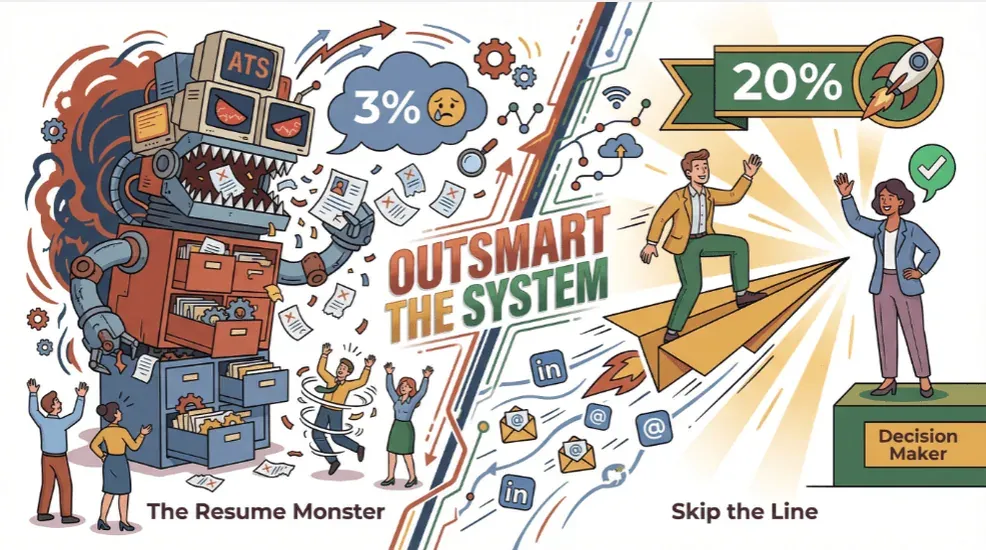
Ever felt like your resume just vanished into a black hole after clicking “Apply” on a job portal? You’re not alone. In today’s job market, most applications disappear into automated tracking systems, with only about 2–5% of applicants hearing back from company websites. Meanwhile, direct outreach—actually getting your message in front of the hiring manager—can boost your response rate to 15–25%. That’s a huge difference, and it’s why I’m borderline obsessed with helping people break through the noise and connect with real decision-makers.
I’ve spent years building SaaS and automation tools, and I’ve seen firsthand how a well-placed, personalized email can open doors that job portals slam shut. So, let’s get practical: I’m going to walk you through a step-by-step strategy for finding hiring manager emails—using a mix of classic networking, smart research, and AI-powered tools like Thunderbit. Whether you’re a job seeker, recruiter, or business development pro, this guide will help you reach the right inbox (not just the right algorithm).
Why Finding the Hiring Manager’s Email Matters for Your Job Search
What Is Data Scraping and How to Do It in 2025 Get Started Free
Let’s cut to the chase: applying through standard job portals is a numbers game, and the odds aren’t in your favor. With 88% of employers admitting their ATS filters out qualified candidates, and only 4–6 interviews coming from every 250 applications, it’s no wonder job seekers feel invisible.
But here’s the good news: direct communication with a hiring manager can dramatically increase your chances. Cold emails sent to specific contacts get 15–25% replies, compared to the 2% reply rate from generic job-board applications. Candidates sourced via recruiters or direct outreach are about 8× more likely to be hired.
In short, finding the hiring manager’s email isn’t just a “nice to have”—it’s a strategic edge that can turn a long shot into a real opportunity.
LinkedIn: Your First Stop to Find Hiring Manager Email
When it comes to identifying the right person to contact, LinkedIn is still the gold standard. Here’s how I approach it:
Step-by-Step: Using LinkedIn’s Advanced Search
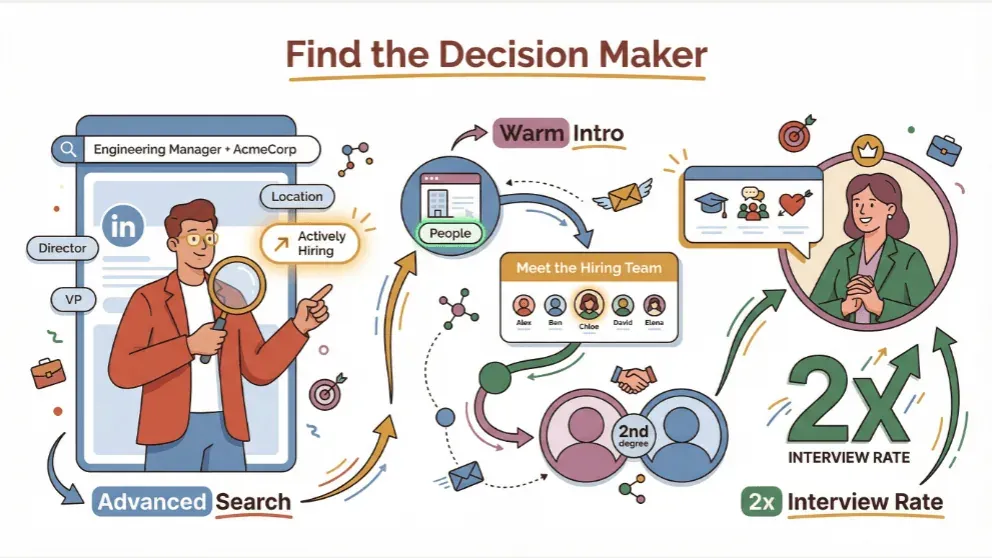
- Search by Role and Company: In the LinkedIn search bar, type the job title plus the company name (e.g., “Engineering Manager AcmeCorp”). Then filter by “People.”
- Refine with Filters: Use filters for location, seniority (Director, VP, etc.), and relevant keywords. If you have LinkedIn Premium, the “Actively Hiring” filter is a game-changer—it shows you who’s recruiting for open roles.
- Check the Company Page: Visit the company’s LinkedIn page. The “People” tab lists all employees, and the “Jobs” section sometimes has a “Meet the hiring team” box. That’s your shortcut to the decision-makers.
- Leverage Mutual Connections: Filter for 2nd-degree connections and ask for an introduction. A warm intro always beats a cold message.
- Personalize Your Message: When sending a connection request or InMail, reference a shared interest, group, or alma mater. According to LinkedIn research, mentioning a common value can double your interview chances.
Sample LinkedIn Message Template
Hi [Name],
I recently applied for the [Job Title] role at [Company] and noticed your impressive work on [specific project or value]. I’d love to connect and learn more about the team. If you’re open to it, I’d appreciate any advice or insights!
Keep it short, relevant, and always follow up once if you don’t get a reply—persistence pays off.
Extracting Hiring Manager Emails from Company Websites
Sometimes, the most direct route is the company’s own website. Here’s how I dig in:
Where to Look
- About Us / Team / Leadership Pages: Many companies list their leadership or department heads, sometimes with email addresses.
- Contact Pages: Occasionally, you’ll find direct emails or at least a contact form that routes to the right person.
- Press Releases or Blog Posts: These often include contact info for key staff.
Using Thunderbit’s AI Web Scraper
This is where Thunderbit really shines. Here’s my workflow:
- Open the Company Page in Chrome.
- Click the Thunderbit Extension.
- Use “AI Suggest Fields”: Thunderbit’s AI scans the page and suggests columns like Name, Title, and Email.
- Click “Scrape”: Instantly extract all visible emails into a structured table.
- Subpage & Pagination Scraping: If the team directory spans multiple pages, Thunderbit can automatically follow links or “Next” buttons to gather the entire list.
If emails aren’t listed, note the names and use common email patterns (like first.last@company.com). Email pattern analysis shows most companies stick to a handful of formats.
Pro Tip: Extracting Emails from PDFs and Images
Thunderbit’s OCR feature can pull emails from scanned documents or images—perfect for those “Meet the Team” PDFs or event brochures.
Try Thunderbit Email Extractor for Free
Tapping into Industry Directories and Professional Forums
If LinkedIn and company sites come up empty, it’s time to turn to specialized directories and forums.
Top Resources
- Hunter.io: Domain search to list all known addresses at a company. Free plan includes 50 credits per month, shared across Email Finder, Domain Search, and Email Verifier (so a single workflow can burn through them quickly).
- Lusha: 70 free credits/month for contact lookups.
- Apollo.io, ZoomInfo, RocketReach: Powerful for bulk searches, but most features are behind a paywall.
- Professional Forums & Associations: Trade groups, conference attendee lists, and even niche Slack communities can sometimes yield direct contacts.
How to Use These Tools
- Register for a free account.
- Search by company, job title, or name.
- Cross-check emails with LinkedIn or company sites for accuracy.
Always vet your sources—directories can have outdated info, so double-check before reaching out.
Thunderbit: AI-Powered Email Discovery for Targeted Outreach
Let’s talk about what makes Thunderbit a secret weapon for finding hiring manager emails:
What Sets Thunderbit Apart
- AI-Driven Field Suggestions: Click “AI Suggest Fields” and Thunderbit reads the page, proposing the best columns to extract—no coding needed.
- Subpage and Pagination Scraping: Automatically follows links and “Next” buttons to collect data from multi-page directories.
- OCR for PDFs and Images: Extracts emails from scanned documents, images, or embedded files.
- Role-Based Filtering: Use custom prompts to target only those with “Manager,” “Director,” or specific department keywords in their title.
- Free Data Export: Export your results to Google Sheets, Excel, Notion, or Airtable.
Thunderbit in Action: Real-World Example
A recruiter I know scraped a 200-person company directory in under 10 minutes, pulling names, titles, and emails into a spreadsheet—something that would’ve taken hours by hand. For job seekers, this means you can build a targeted list of hiring managers and reach out directly, instead of hoping your resume survives the ATS gauntlet.
For a step-by-step walkthrough, check out Thunderbit’s guide to email scraping.
Building a Personalized Email Strategy After Finding the Contact
Finding the right email is only half the battle. The real magic happens in your outreach.
Key Elements of a Compelling Email
- Subject Line: Clear and specific (e.g., “Application: Product Manager – Jane Doe”).
- Introduction: Briefly explain who you are and why you’re reaching out. Reference the role or a mutual connection.
- Value Proposition: In one or two sentences, highlight your most relevant achievement or skill. Show you’ve done your homework.
- Call to Action: Politely ask for a quick call, a review of your application, or advice on next steps.
- Personalization: Mention something unique about the company or the recipient—recent news, a shared value, or a project you admire.
Sample Email Template
Subject: Application: [Role] – [Your Name]
Hi [Name],
I recently applied for the [Role] at [Company] and was impressed by [specific project or value]. In my current role at [Current Company], I [brief achievement]. I’d love to discuss how I can contribute to your team. Would you be open to a quick call, or is there someone else I should speak with?Thank you for your time!
[Your Name]
[LinkedIn Profile]
[Phone Number]
Personalized emails get double the response rate of generic ones. Always proofread and keep it concise—nobody wants to read a novel in their inbox.
Comparing Email Discovery Tools and Resources
| Method | Strengths | Limitations | Cost/Use Case |
|---|---|---|---|
| LinkedIn Search | Professional network, advanced filters, mutual intros, messaging features | Limited export, InMail reply rates 10–25% average (top performers reach 30%+), no bulk scraping | Free (basic), paid Premium/Sales Navigator |
| Company Websites | Official info, can be scraped with Thunderbit, public data | Not standardized, may require guessing email patterns, manual work | Free to access, Thunderbit free tier for scraping |
| Directories/Tools | Bulk lookup, role-based search, built-in verification | Paid beyond free tier, credits shared across features, compliance varies | Hunter free 50 credits/mo (Starter $49/mo, $34/mo annual); Lusha free 70 credits/mo (Starter $49.90/mo); Apollo/ZoomInfo paid only |
| Thunderbit AI Scraper | AI-powered, no coding, auto-detects fields, subpage/pagination, OCR, free export | Credit system (free for 6–10 pages), needs Chrome, learning curve for prompts | Free tier, paid plans for more credits |
| Manual Research | No cost, high control, can uncover hidden info | Time-consuming, error-prone, not scalable | Only time cost, best for single high-value targets |
Often, the best results come from combining methods: identify managers on LinkedIn, verify emails with Hunter, and use Thunderbit to batch-extract contacts for future roles.
Ensuring Compliance and Professionalism in Outreach
Before you hit “send,” make sure your outreach is both legal and respectful.
Key Compliance Points
- GDPR (EU): You need a legitimate basis to email someone and must honor data subject rights. Keep your outreach relevant and non-deceptive.
- CAN-SPAM (US): Include a truthful subject line, your name and address, and a clear opt-out method (e.g., “Reply ‘unsubscribe’ to stop further messages”).
- Professionalism: Use a polite, concise tone. Never pressure or harass. If someone asks not to be contacted, respect it immediately.
For more details, check out this GDPR and CAN-SPAM best practices guide.
Step-by-Step Recap: Your Action Plan for Finding Hiring Manager Emails
Let’s bring it all together. Here’s your checklist:
- Identify Target Companies and Roles: Know who you want to reach.
- LinkedIn Research: Use advanced search and filters to find hiring managers. Leverage mutual connections.
- Check Company Websites: Look for About/Team/Leadership pages. Use Thunderbit to extract emails.
- Use Industry Directories: Search Hunter, Lusha, and others for verified emails.
- Thunderbit Scraping: Batch-extract emails from directories, PDFs, or images. Use role-based prompts for precision.
- Craft Personalized Emails: Write concise, tailored messages with a clear value proposition.
- Ensure Compliance: Include opt-out info and respect privacy laws.
- Send & Follow Up: Track replies, follow up after a week if needed, and iterate based on results.
Conclusion & Key Takeaways
The Best Email Scrapers in 2025 Get Started Free
Finding a hiring manager’s email isn’t just about clever Googling—it’s about building a multi-channel, strategic approach that combines networking, research, and the right tools. Direct outreach can make you 8× more likely to get hired, and personalized emails can double your response rate.
Don’t rely on job portals alone. Combine LinkedIn sleuthing, company website extraction, directory searches, and AI-powered scraping with Thunderbit to build your own pipeline of opportunities. And remember: the most effective outreach is always personal, respectful, and compliant.
Ready to supercharge your job search or sales prospecting? Download Thunderbit’s Chrome Extension and start building your custom contact list today. For more tips and tutorials, check out the Thunderbit Blog.
Start Finding Hiring Manager Emails with Thunderbit
Try AI Email Scraper for Free Get Started Free
FAQs
1. Why is it better to contact hiring managers directly instead of applying through job portals?
Direct outreach increases your visibility and response rate—cold emails to hiring managers get 15–25% replies, compared to 2–5% from job portals. You bypass the ATS and connect with the real decision-maker.
2. How can I find a hiring manager’s email if it’s not listed on the company website?
Use LinkedIn to identify the right person, then guess the email using common patterns (like first.last@company.com). Tools like Hunter.io and Thunderbit can help verify or extract emails from directories and documents.
3. What’s the best way to personalize my outreach email?
Reference something specific about the company or the recipient—a recent project, shared value, or mutual connection. Keep your message concise, highlight your value, and include a clear call to action.
4. Is it legal to email hiring managers directly?
Yes, but you must comply with privacy laws like GDPR (EU) and CAN-SPAM (US). Always include your name, a truthful subject, and an opt-out method. Be respectful and stop contact if requested.
5. How does Thunderbit help with finding hiring manager emails?
Thunderbit uses AI to scan web pages, directories, PDFs, and images to extract emails—no coding required. It can follow subpages, handle pagination, and filter by role keywords, making it easy to build targeted, up-to-date contact lists for your outreach.
Happy hunting—and may your next email land in the right inbox!
Learn More




