

The web is growing at a pace that makes my morning coffee look slow. Every day, businesses are scrambling to collect, analyze, and act on data from thousands of sources—whether it’s tracking competitor prices, finding new sales leads, or just keeping up with market trends. But here’s the catch: most business teams don’t have a squad of developers on speed dial, and hiring a freelancer for every new data project is like trying to build a spaceship out of IKEA parts—expensive, time-consuming, and likely to end with a few extra screws.
That’s why the idea of “hiring” an AI web scraper—bringing on a tool that acts like a tireless, code-free data assistant—has become so appealing. In fact, the demand for AI-powered web data extraction has skyrocketed, with businesses in sales, ecommerce, and operations leading the charge. But with so many options out there, how do you actually hire an AI web scraper that fits your business needs? And how do you make sure you’re getting real value, not just another shiny tool gathering digital dust?
Let’s break down what it means to “hire” an AI web scraper, why it’s a smarter move than ever, and how you can use platforms like Thunderbit to turn web data headaches into a competitive advantage—no coding or late-night freelancer wrangling required.
What Does It Mean to Hire an AI Web Scraper?
When I talk about “hiring” an AI web scraper, I don’t mean putting a robot on your payroll (though, let’s be honest, I’d love to see the HR paperwork for that). Instead, it’s about adopting a tool or service that automates the process of collecting, structuring, and exporting data from websites—without needing to write code or manage complex scripts.
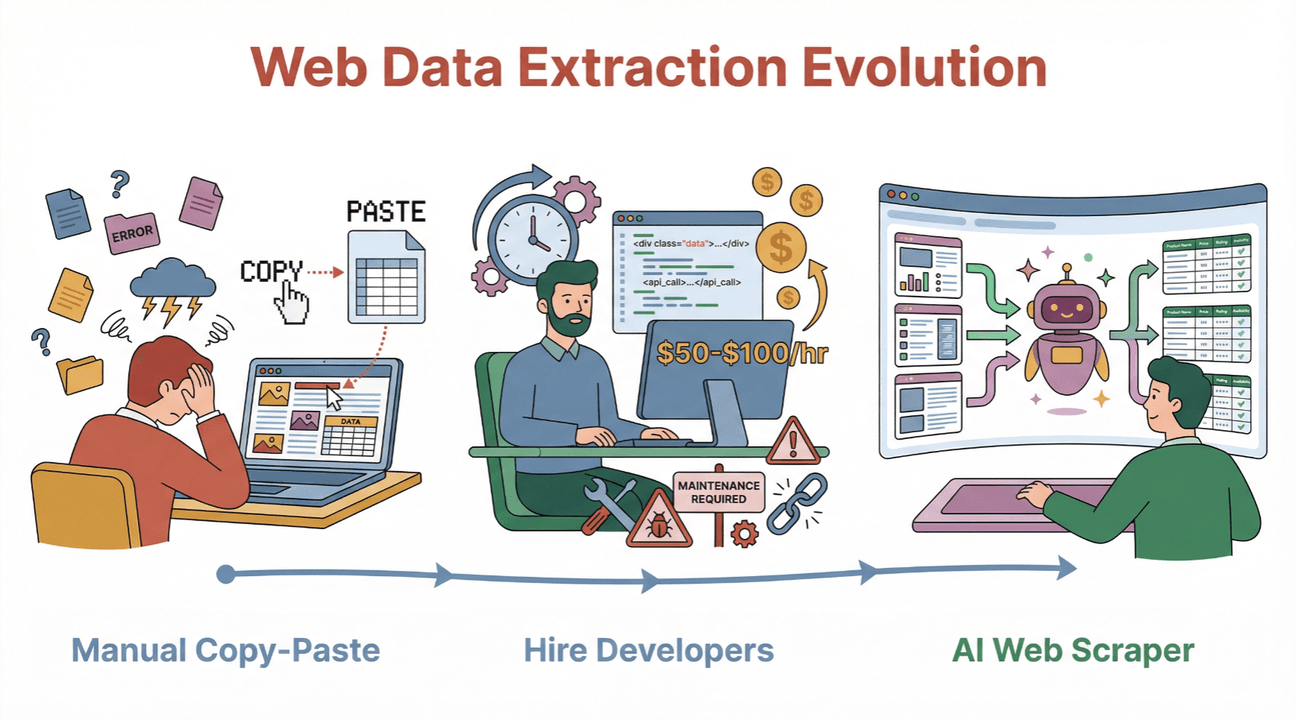 Traditionally, businesses faced three main options for web data extraction:
- Manual Copy-Paste: Open each page, grab the info, and paste it into a spreadsheet. Effective for three pages. Maddening for three hundred.
- Hiring Freelancers or Agencies: Outsource the scraping to a developer who builds a custom script for you. This can work, but comes with high costs (sometimes $50–$100/hour or more), slow turnaround, and ongoing maintenance headaches.
- Using AI Web Scraper Tools: Platforms like Thunderbit, Octoparse, or Apify that let you automate scraping with little or no code—often using AI to simplify setup and adapt to changing websites.
The big shift? AI web scrapers like Thunderbit are designed for business users, not just developers. You “hire” them by signing up, describing what you want (“extract all product names and prices from this site”), and letting the AI handle the heavy lifting.
Benefits for non-technical teams:
- No coding skills required
- Fast setup and results
- Lower costs and less maintenance
- Adaptable to new sites and changing layouts
In short, hiring an AI web scraper means bringing on a digital assistant that works 24/7, never asks for a raise, and doesn’t mind repetitive tasks.
Scrape data from any website using AI Get Started Free
Why Hire an AI Web Scraper for Your Business?
Let’s get real: web data is the fuel for modern business. But the old ways of getting it—manual entry or endless freelancer contracts—just don’t scale. Here’s why more teams are turning to AI web scrapers:
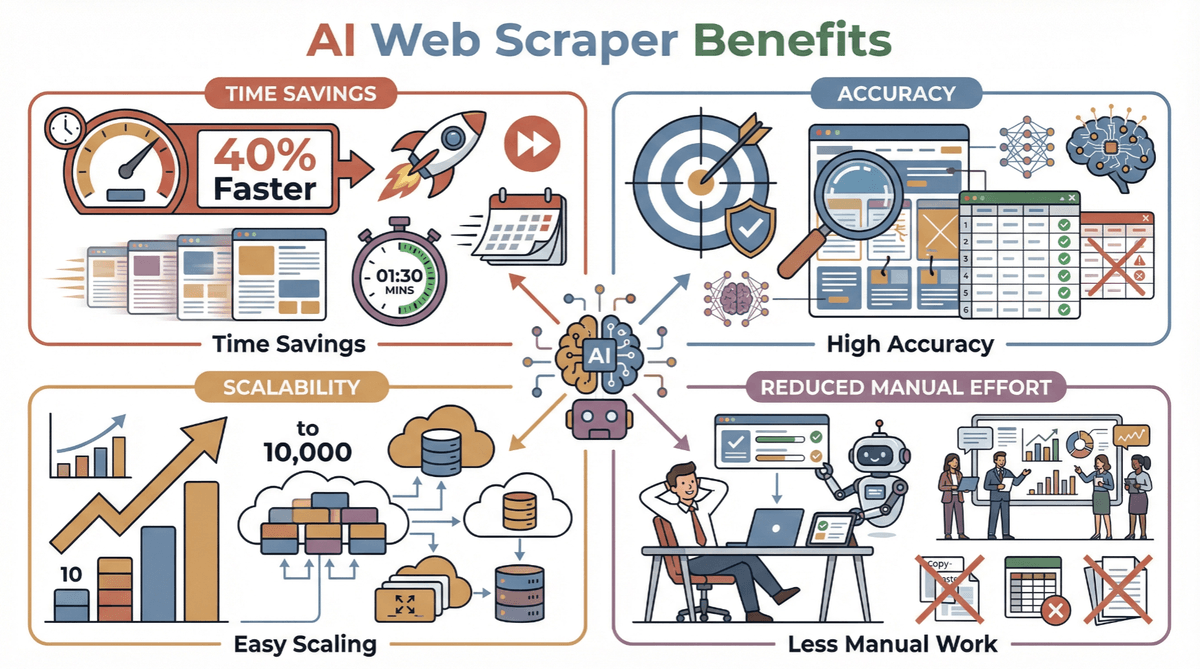
- Time Savings: AI scrapers can process hundreds or thousands of pages in minutes, not days. Businesses report up to 40% faster data extraction compared to manual or traditional methods.
- Accuracy: AI-driven tools adapt to complex layouts and changing sites, reducing errors and missing data (Scrapingdog).
- Scalability: Need to track 10 products today and 10,000 tomorrow? No problem. AI scrapers scale with your needs.
- Reduced Manual Effort: Free your team from copy-paste purgatory and let them focus on analysis, not collection.
Common Business Use Cases
| Team/Function | Use Case | Expected ROI/Benefit |
|---|---|---|
| Sales | Lead generation from directories, LinkedIn | Fill pipeline faster, higher conversion |
| Ecommerce | Competitor price monitoring, SKU tracking | Dynamic pricing, inventory optimization |
| Operations | Market research, supplier data collection | Faster decisions, improved negotiation |
| Marketing | Content aggregation, sentiment analysis | Better campaigns, trend spotting |
| Real Estate | Property listings, price trend analysis | Faster deals, market insights |
In one case study, a B2B sales team used an AI web scraper to automate lead list building, cutting their research time by 80% and increasing qualified leads by 3x. Another ecommerce platform boosted their SKU coverage from 312 to over 4,000 in a year—without hiring extra staff.
How to Choose the Right AI Web Scraper Service Provider
Not all AI web scrapers are created equal. Before you “hire” one, here’s what I recommend looking for:
- Ease of Use: Can non-technical users set up and run scrapes without training? Thunderbit’s natural language interface and “AI Suggest Fields” make it a top pick for business teams (PromptCloud).
- Feature Set: Look for must-haves like subpage/pagination scraping, instant templates, and AI-driven field suggestions. Thunderbit’s “2-Click Scraping” is a game changer for complex sites.
- Data Export Options: Can you send data directly to Excel, Google Sheets, Airtable, or Notion? Thunderbit supports all of these—no extra fees, no paywalls (Thunderbit Blog).
- Support & Documentation: Is there responsive support and clear guides? Thunderbit’s documentation and customer reviews are consistently strong (Trustpilot).
- Compliance: Does the tool address privacy and legal requirements (GDPR, CCPA)? More on this below.
- Pricing: Transparent, pay-as-you-go, and no surprise charges. Thunderbit starts at just $15/month, with a generous free tier.
Quick Comparison Table
| Feature/Criteria | Thunderbit | Octoparse | Apify |
|---|---|---|---|
| No-code setup | Yes | Yes | Partial |
| AI field suggestions | Yes | No | Partial |
| Subpage/pagination scraping | Yes | Yes | Yes |
| Direct export (Sheets, Notion) | Yes | CSV/Excel | API/CSV |
| Free tier | Yes | Yes | Yes |
| Pricing (entry) | $15/mo | $69/mo (annual) | $29/mo + usage |
| Compliance focus | Strong | Moderate | Moderate |
Try Thunderbit AI Web Scraper for Free
Streamlining Data Extraction with Thunderbit’s AI Features
Let’s get hands-on. Here’s how Thunderbit makes web scraping a breeze—even for folks who think “HTML” is a new sandwich at Subway.
Thunderbit’s Core Features
- AI Suggest Fields: Click once, and Thunderbit’s AI scans the page, recommending the best columns to extract (like “Product Name,” “Price,” “Email”). No more guessing or fiddling with selectors.
- 2-Click Scraping: After fields are set, just hit “Scrape.” Thunderbit grabs the data, handles pagination, and even follows subpage links to enrich your table (Thunderbit Blog).
- Subpage & Pagination Scraping: Need info from detail pages or infinite scrolls? Thunderbit’s AI navigates for you—no manual setup.
- Instant Templates: For popular sites (Amazon, Zillow, Shopify), just pick a template and go.
- Free Data Export: Send your data straight to Google Sheets, Notion, Airtable, or download as CSV/Excel—no extra charges.
Mini Walkthrough: Scraping a Product List
- Open Thunderbit on your target website.
- Click “AI Suggest Fields.” Thunderbit suggests columns like “Product Name,” “Price,” and “Image URL.”
- Review or adjust fields (add or remove as needed).
- Click “Scrape.” Thunderbit extracts the data, follows pagination, and compiles everything into a table.
- Export to your favorite tool with one click.
I’ve seen teams go from “we need a week to build this list” to “done in 10 minutes”—and that’s not an exaggeration.
Download Thunderbit Chrome Extension Start scraping data with AI in just 2 clicks. Get Started Free
Ensuring Data Privacy and Compliance When You Hire AI Web Scraper Tools
With great data comes great responsibility. Web scraping is legal when done right, but the rules are getting stricter—especially in the US and Europe (X-Byte, Medium).
What to look for:
- Respect robots.txt and site terms: Only scrape public data, and avoid sites that prohibit scraping.
- Minimize personal data: Don’t collect sensitive info unless you have a legitimate business reason and user consent.
- Data minimization: Only collect what you need, and store it securely.
- Clear documentation: Choose tools that explain their compliance approach. Thunderbit provides guidance and features to help users stay on the right side of the law.
Compliance Checklist
- Is the data public and non-sensitive?
- Does the tool respect robots.txt and site terms?
- Are you collecting only necessary data?
- Is your data storage secure?
- Are you prepared to respond to data subject requests (GDPR/CCPA)?
Thunderbit is designed with compliance in mind, and our team stays up to date on the latest regulations—so you can focus on insights, not lawsuits.
Integrating AI Web Scraper Solutions into Your Business Workflow
A scraper is only as good as the workflow it powers. Thunderbit makes it easy to plug data extraction into your existing processes:
- Scheduled Scraping: Set up recurring jobs (“scrape every Monday at 6am”) so your data is always fresh (Thunderbit Blog).
- Direct Export: Send results straight to Google Sheets, Airtable, Notion, or Excel—no manual uploads.
- API & Integrations: For advanced users, Thunderbit offers API access and hooks for custom workflows.
- Team Onboarding: The no-code interface means anyone can get started—just share a template or walkthrough.
Pro tip: Start with a pilot project (like competitor price monitoring), then expand to other teams as you see results.
Calculating the ROI of Hiring an AI Web Scraper
Let’s talk numbers. Is hiring an AI web scraper worth it? Here’s how to break it down:
ROI Calculation Template
- Estimate manual effort saved: (Hours per week) × (Hourly wage)
- Add value of faster insights: (Revenue or cost savings from quicker decisions)
- Subtract tool cost: (Thunderbit starts at $15/month; freelancers can run $2,000+/project)
- Factor in data quality improvements: (Fewer errors, better decisions)
Example:
- Manual data entry: 10 hours/week × $40/hr = $400/week
- Thunderbit cost: $15/month
- Time saved: 90% (now 1 hour/week)
- ROI: ($400 - $40) × 4 weeks - $15 = $1,365/month saved
Some businesses report monthly savings of $6,000+ after switching to AI-powered tools.
Step-by-Step Guide: How to Hire and Implement an AI Web Scraper
Ready to get started? Here’s my go-to process for bringing an AI web scraper into your business:
- Identify Your Data Needs: What info do you need? (e.g., product prices, contact emails, reviews)
- Research & Shortlist Tools: Compare platforms like Thunderbit, Octoparse, and Apify.
- Evaluate Features & Compliance: Check for ease of use, export options, and privacy safeguards.
- Sign Up & Set Up Your First Project: Install the Thunderbit Chrome Extension, use “AI Suggest Fields,” and run a test scrape.
- Integrate & Monitor: Export data to your workflow, set up scheduled jobs, and review results regularly.
- Onboard Your Team: Share templates, run a quick training, and encourage experimentation.
- Troubleshoot & Optimize: Use support resources and documentation to resolve issues and refine your process.
Start Scraping with Thunderbit Chrome Extension
Comparing AI Web Scraper Tools vs. Hiring Freelancers: Which Is Right for You?
Still debating between a tool and a freelancer? Here’s a side-by-side look:
| Factor | AI Web Scraper Tool (Thunderbit) | Freelance Developer/Agency |
|---|---|---|
| Cost | $15–$249/month (Thunderbit) | $2,000–$10,000+/project |
| Speed | Minutes to hours | Days to weeks |
| Scalability | High (add more pages anytime) | Limited by developer time |
| Maintenance | Handled by tool/AI | You pay for every update |
| Ease of Use | No code, business-friendly | Technical handoff required |
| Support | Built-in, ongoing | Project-based, extra cost |
| Compliance | Tool provides guidance | Varies, often unclear |
For most business teams, an AI tool like Thunderbit wins on cost, speed, and flexibility—especially if you need to adapt quickly or run multiple projects.
Conclusion & Key Takeaways: Making the Smart Choice When You Hire AI Web Scraper Tools
Web data is no longer a “nice to have”—it’s the backbone of modern business strategy. But the old ways of getting it are slow, costly, and just not built for today’s pace. Hiring an AI web scraper like Thunderbit means you can automate data collection, empower your team, and focus on what really matters: making smarter decisions, faster.
Key takeaways:
- AI web scrapers are accessible, affordable, and designed for business users—no coding required.
- Thunderbit stands out for its natural language interface, 2-click setup, subpage scraping, and seamless exports.
- Compliance and privacy matter—choose tools that help you stay on the right side of the law.
- The ROI is real: save time, reduce errors, and unlock new opportunities with automated data extraction.
- Getting started is as easy as signing up, running a test scrape, and plugging the results into your workflow.
Ready to see what an AI web scraper can do for your business? Download Thunderbit and try it for free—or check out the Thunderbit Blog for more tips, guides, and real-world success stories.
Try AI Web Scraper Get Started Free
FAQs
1. What does it mean to “hire” an AI web scraper for my business?
It means adopting a tool or service—like Thunderbit—that automates web data extraction, so you don’t need to code or hire a developer. The tool acts as a digital assistant, collecting and structuring data for you.
2. How is Thunderbit different from hiring a freelance web scraping developer?
Thunderbit is designed for business users, with no coding required, instant setup, and ongoing support. Freelancers can build custom scripts, but are more expensive, slower, and require ongoing maintenance.
3. Is web scraping legal and compliant with privacy laws?
Web scraping is legal when done responsibly—scraping public data, respecting site terms, and minimizing personal data collection. Tools like Thunderbit provide compliance guidance and features to help you stay safe.
4. How do I integrate an AI web scraper into my business workflow?
Thunderbit offers direct exports to Google Sheets, Notion, Airtable, and Excel, plus scheduled scraping and API access. You can plug scraped data directly into your existing processes with minimal setup.
5. What kind of ROI can I expect from hiring an AI web scraper?
Businesses typically see major time and cost savings—often 80–90% less manual effort, plus higher data quality and faster insights. With Thunderbit’s low pricing and free tier, the ROI is almost immediate for most teams.
Learn More
- Top 10 AI Web Scraper Tools to Enhance Productivity in 2025
- Top 8 Best AI Web Scrapers to Use for Smarter Data Extraction
- Top 10 Tools That Use AI to Scrape Websites Efficiently
- How to Scrape Any Website Using AI
- Top 15 AI Scrapers for Data Extraction in 2025
- Top 9 No Code Web Scrapers for Automated Solutions
- Top 15 AI Web Crawlers You Should Know in 2025
- Octoparse vs. Thunderbit: A 2025 Comparison for No-Code Web Scrapers
- Bright Data Is Powerful, But It's Time for an AI Alternative
- The Truth About AI Web Scraping Tools: A Deep Dive Into Kadoa




