

X still runs at a brutal scale. Its marketing site says the platform sees more than 500 million posts per day, which is exactly why Lists still matter for research, monitoring, and prospecting. In theory, Lists are your clean, curated layer inside that noise. In practice, actually searching them in 2026 still feels inconsistent enough that you need backup methods.
I spent time comparing what X officially documents against what its search experience actually delivers right now. The result is not a neat "this feature works" answer. It is a practical workflow: which methods are still usable, which ones are quietly unreliable, and what to do when native X search starts leaking irrelevant results or stops finding obvious matches.
What Are Twitter Lists and Why Search Them?
A Twitter List, now usually presented as an X List, is a curated group of accounts that produces its own separate timeline. Instead of reading your full home feed, you can open a list and see posts only from the accounts inside it. X's current help documentation still supports public and private lists, profile-level list following, and pinned list timelines on desktop and mobile.
Here are the X list limits that still matter in 2026:
| Limit | Current X help value |
|---|---|
| Lists per account | 1,000 |
| Accounts per list | 5,000 |
| Max list name length | 25 characters |
| First character rule | List names cannot begin with a number |
Why search lists instead of profiles or hashtags one by one? Because someone else already did the curation work. If a founder, analyst, community operator, or event organizer already built a high-quality list, you can shortcut straight into a pre-filtered prospect pool or monitoring feed.
| Use Case | What It Looks Like | Why It Matters |
|---|---|---|
| Sales prospecting | Find a "CMOs in B2B SaaS" list and export the roster | Replaces hours of manual profile hunting |
| Competitor monitoring | Keep a private list of competitor execs and analysts | One feed instead of 30 separate profile visits |
| Industry tracking | Follow public lists built by niche experts or event organizers | Faster discovery of credible voices |
| Content curation | Maintain lists of reporters and subject-matter experts | Lowers content-finding time for social teams |
| Ecosystem mapping | Use public lists to identify stakeholder networks | Faster stakeholder mapping than cold keyword search |
If you want a fast refresher on how list timelines and basic list management work before you start testing operators, this short walkthrough is still a useful orientation:
The list: Operator Reality Check
The list: operator still exists on paper. X's Search Recommendations page says X supports roughly 50 custom operators, explicitly including list queries as part of its search parsing layer. X's advanced X Pro features page also still documents list-based search filtering in 2026.
That does not mean the consumer search experience is stable.
What's Confirmed Working
| Syntax or Method | 2026 Status | Notes |
|---|---|---|
list:username/list-name keyword | Intermittent | Officially documented, but results can be noisy or incomplete |
| X Pro "By members of List" filter | Working | Still the most reliable native method; X documents it under X Pro and ties X Pro access to Premium+ |
What's Broken or Unreliable
| Syntax or Method | 2026 Status | Notes |
|---|---|---|
list:numericListID keyword | Dead or unsupported | No current X help page documents numeric list IDs for consumer search |
| Multi-word list names inside the operator | Unreliable | Parsing still fails often enough that single keywords are safer |
| Searching private lists owned by other users | Dead | X explicitly says private lists owned by other accounts are not visible to you |
The broad pattern is the real problem. X's search documentation still says list-aware search exists, but current user reports and current platform behavior still show the same reliability issues people have been complaining about since late 2025: incorrect matches, missed results, and inconsistent "Latest" behavior even when the query syntax is right.
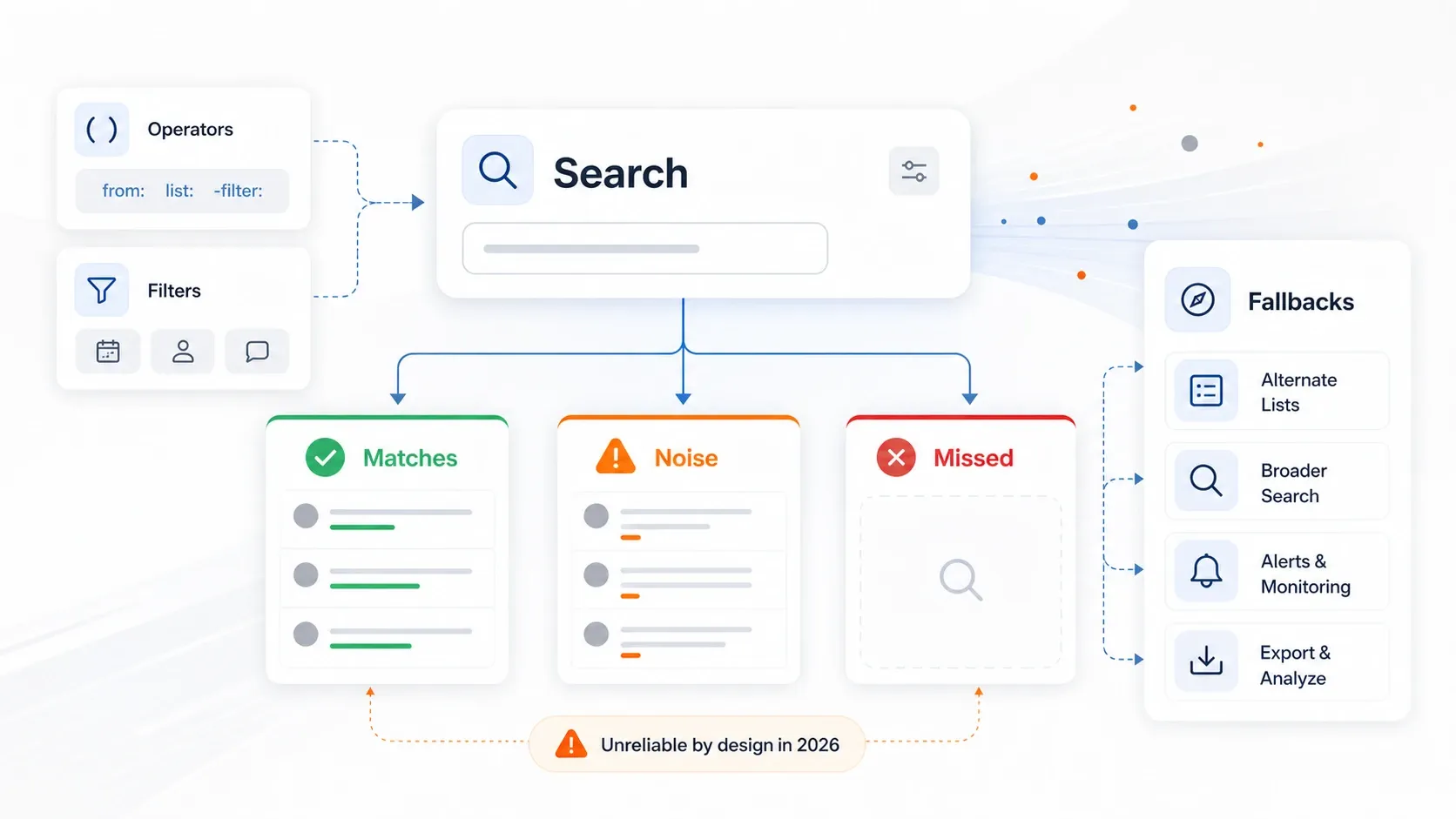
What to Do When the Operator Fails
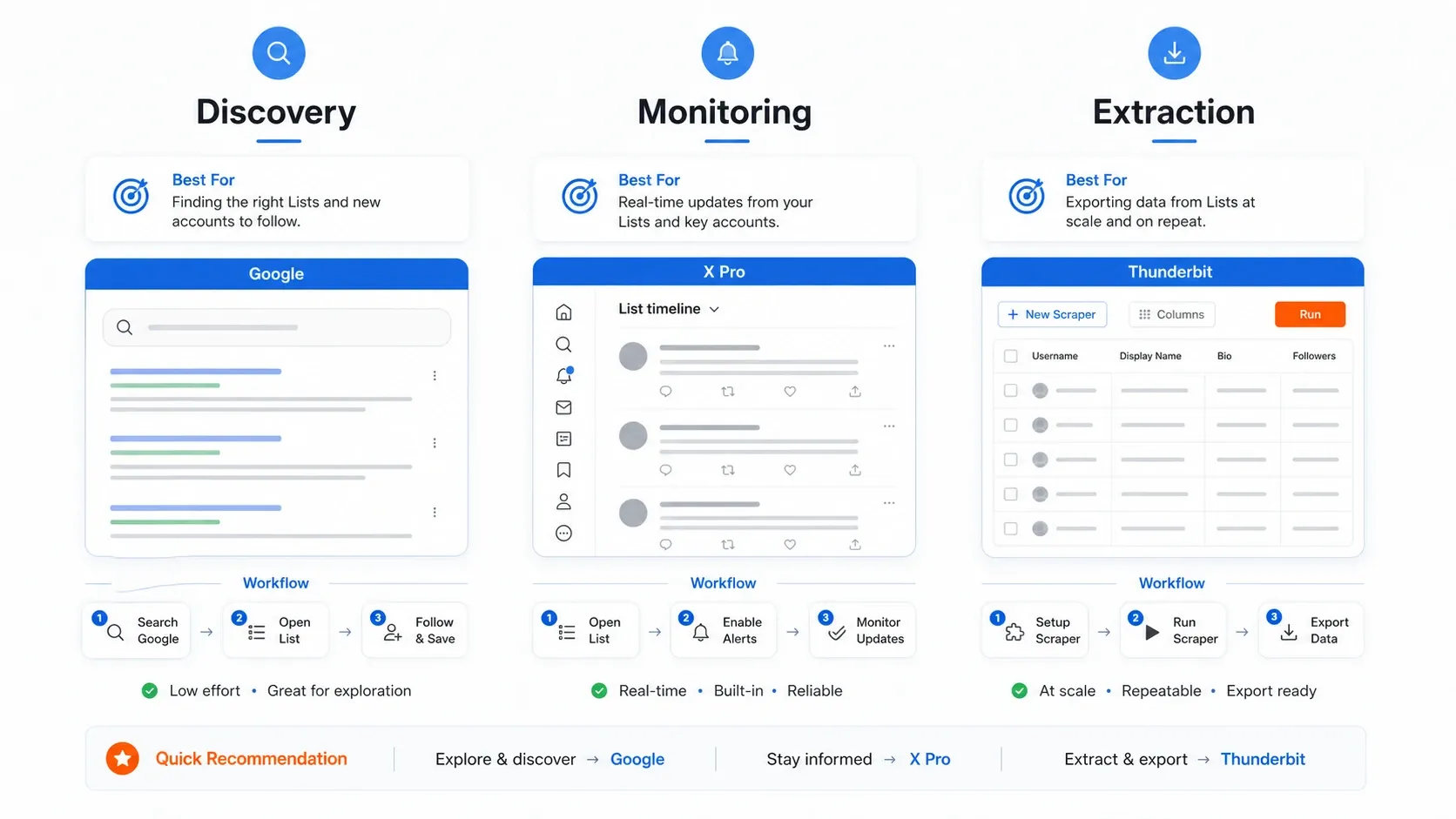
When the operator starts returning junk, there are only three fallback paths that consistently earn their keep:
- Google site search for list discovery
- X Pro list columns for real-time list monitoring
- Thunderbit extraction when what you actually need is the member roster, not just the feed
If you want a quick refresher on X's broader advanced search flow before troubleshooting list-specific queries, this recent walkthrough is a reasonable companion:
How to Search Twitter Lists Natively on X
Before you start:
- Difficulty: Beginner
- Time required: About 5 minutes
- You need: An X account and a desktop browser
Step 1: Open the Lists Hub
Click Lists in the left navigation sidebar on x.com. X's current Lists help page still documents the Lists hub as the place where you can create new lists, manage your own lists, and browse lists you already follow.
Step 2: Discover Lists by Keyword
Inside the Lists hub, use the search box to search a single keyword such as fintech, marketing, or cybersecurity. X's own search UX still exposes a dedicated Lists result category, but native list discovery remains shallow compared with general web search. In practice, single keywords still outperform longer phrases.
Step 3: Find Lists from a Specific User Profile
Go to a user's profile and use View Lists or the profile's Lists tab. X still documents profile-level list following, and this remains one of the cleanest ways to find curated public lists from a known operator, founder, journalist, or brand account.
Step 4: Search Posts Within a List
Use the main X search bar and try:
list:username/list-name keyword
Example:
list:jack/news AI
This still sometimes works. It also still sometimes leaks posts from outside the list or misses obvious in-list matches. Treat it as a first pass, not as a trustworthy final answer.
How to Search Twitter Lists on Mobile
Most guides ignore mobile, but plenty of business users still skim lists from their phones. The problem is not list reading. The problem is list filtering.
iPhone and iPad
- Tap your profile icon
- Tap Lists
- Browse your own lists, followed lists, or search for public lists
- Tap a list name to read its timeline
Android
- Tap the navigation menu or profile icon
- Tap Lists
- Browse or search public lists
- Open a list to read its timeline
Mobile Limits That Matter
- X's advanced search help page says advanced search is available when you're logged in on
X.com, not as a mobile-native flow. - X's search help page says web and mobile search behave differently.
- Mobile is fine for opening and reading lists.
- Mobile is poor for list-specific keyword filtering.
- X Pro is not a mobile-first workflow.
If you need real on-the-go monitoring, RSS is usually a better workaround than trying to force mobile search to behave like desktop.
Using Google to Discover Public Twitter Lists
Google is still one of the better ways to discover public Twitter lists because it bypasses X's built-in discovery limits and does not rely on X's own list parser.
Queries That Still Work Well
Try:
site:twitter.com/i/lists "fintech"site:twitter.com/i/lists "digital marketing"site:x.com/i/lists "SaaS founders"site:twitter.com/i/lists "real estate investors"
Search both twitter.com and x.com. Legacy twitter.com/i/lists/ URLs still resolve, and indexed list results can surface under either domain depending on how Google last saw the page.
What Google Is Good For
| Dimension | Reality in 2026 |
|---|---|
| Breadth | Better than native X for public list discovery |
| Freshness | Worse for brand-new or obscure lists because indexing lags |
| Privacy | Public lists only |
| Monitoring | Poor for real-time usage |
| Best use | Find candidate lists, then switch to X Pro or extraction tools |
Every Way to Search Twitter Lists Compared
No single method covers the whole workflow. Choose based on whether you need discovery, monitoring, or extraction.
| Method | Skill Level | Works for Private Lists? | Result Limit | Real-Time? | Cost | Best For |
|---|---|---|---|---|---|---|
| X native list discovery | Beginner | Only your own private lists | Limited | No | Free | Quick list discovery |
list: operator | Intermediate | Your own private lists plus public lists | Variable and buggy | Somewhat | Free | One-off keyword filtering |
| X Pro list column | Intermediate | Yes, for your own private lists | Streaming | Yes | Premium+ | Ongoing monitoring |
| Google site search | Beginner | No | Google-index dependent | No | Free | Broad public-list discovery |
| RSSHub list feed | Intermediate | No | Feed-dependent | Near-real-time with lag | Free or self-hosted | Passive monitoring |
| RSS.app | Beginner | No | Plan-dependent | Near-real-time with lag | Freemium | Simpler feed setup |
| Thunderbit | Beginner | What you can view while logged in | Page plus pagination | On-demand snapshot | Freemium | Exporting and enriching list members |
If your real job is to export the people in a curated list instead of watching the timeline live, skip ahead to the Thunderbit workflow. That is where the time savings are highest.

X Pro and RSS: The Best Monitoring Workarounds
X Pro List Columns
X Pro remains the most dependable native monitoring path if you already pay for Premium+. X's Premium help page currently lists Access to X Pro as a Premium+ feature, and X's advanced X Pro features page still documents list-based search filtering.
To use it:
- Open X Pro
- Click Add column
- Choose Lists
- Add the list you want to monitor
- If needed, add a Search column and use By members of List
This bypasses a lot of the messiness in the main consumer search bar because you are filtering a live stream rather than depending on the same flaky list operator behavior.
RSSHub for Passive Monitoring
RSSHub's docs still document a List timeline route:
- Route:
/twitter/list/:id/:routeParams? - Example:
https://rsshub.app/twitter/list/1502570462752219136
In live checks on May 9, 2026, the public rsshub.app example route still resolved in documentation, but the public instance itself can be inconsistent for public X list feeds. That is why RSSHub is best treated as a self-host or advanced-user path, not as a guaranteed plug-and-play method.
RSS.app for a Lighter-Weight Setup
If you want the RSS route without self-hosting, RSS.app is easier to test. It explicitly supports X and Twitter profile and search-feed generation. List support is less prominently documented, so you may need to test the exact public list URL you care about instead of assuming universal support.

Zapier or IFTTT for Alerts
Once you have a working RSS feed, automation gets much easier. Zapier still supports RSS-triggered workflows, and that is usually enough for "notify me when someone on this list posts about X" monitoring.
Practical chain:
RSS feed -> Zapier RSS trigger -> Slack or email alert
The hard part is not automation. The hard part is obtaining a feed URL that keeps working.

How to Extract Twitter List Members with Thunderbit
Reading a list is one thing. Exporting the member roster with names, bios, follower counts, websites, or handles is a different job entirely. If your goal is prospecting, ecosystem mapping, or research, extraction is usually the better outcome than staying inside X.
Thunderbit is the cleanest no-code option I found for that workflow because it turns the list members page into a structured table instead of a page you have to manually copy from.

Step-by-Step Workflow
- Difficulty: Beginner
- Time required: About 5 minutes for a normal-sized list
- You need: Chrome, an X account, and the Thunderbit Chrome Extension
Step 1: Install Thunderbit
Install the extension from the Chrome Web Store.
Step 2: Open the List Members Page
Go to the list you want to analyze and open the Members view. In many cases the URL will look like:
x.com/i/lists/<list-id>/members
Stay logged into X so member data can render properly.
Step 3: Click AI Suggest Fields
Thunderbit reads the page structure and proposes useful columns such as Name, Username, Bio, and Profile URL.
Step 4: Adjust the Output Fields
Keep the suggested columns or add custom ones like follower count, website URL, or location.
Step 5: Click Scrape
Thunderbit extracts all visible member data into a table. For bigger lists, use pagination or scrolling support to keep collecting results.
Step 6: Export
Send the results to Excel, Google Sheets, Airtable, or Notion.
If you want the visual quick-start version before you try it yourself, this current Thunderbit walkthrough is the most directly useful companion:
Try Thunderbit on an X List Members Page
Why This Workflow Matters
Once the member roster is in a table, you can do the higher-value work:
- enrich each profile with subpage scraping
- rank list members by fit
- group them by role or company type
- move the result into a CRM or research sheet
That is a much stronger outcome than trying to force native list search to behave like a database query tool.
Practical Use Cases After You Search Twitter Lists
| Use Case | Recommended Method | Expected Output |
|---|---|---|
| Build a prospect list from a curated founder list | Google discovery -> Thunderbit export | Spreadsheet of handles, bios, follower counts, and websites |
| Monitor competitor narratives daily | X Pro list column with keyword filter | Live monitoring feed |
| Track journalists covering your industry | Public list subscription -> X Pro or RSS | Ongoing signal feed |
| Map a niche ecosystem quickly | Google site search plus profile list browsing | Curated shortlist of relevant accounts |
| Research who competitors are watching | Find their public lists and inspect membership | Network intelligence |
Tips to Get Better Results
- Use single keywords first. Multi-word list-name or list-topic queries still fail too often inside native X search.
- Search both
twitter.comandx.com. Indexed public list pages can still appear under either domain. - Check the curator before trusting the list. A stale list with weak members is still a weak input, even if you found it quickly.
- Use private lists for sensitive monitoring. X still says private lists are visible only to their owner.
- Match the method to the job. Use Google for discovery, X Pro for monitoring, and Thunderbit for extraction.
- Re-test the workflow every quarter. X changes behavior faster than it updates its docs.
Conclusion
Searching Twitter lists in 2026 is still a patchwork, not a polished product.
The native feature set is real, but the experience is inconsistent enough that you should assume you will need a fallback. The best stack right now is still:
- Google for public-list discovery
- X Pro for real-time monitoring
- Thunderbit for structured member extraction
If all you need is to read a list, X can still do that. If you need dependable business outcomes such as prospecting, market mapping, or competitive monitoring, you will get better results when you combine methods instead of trusting one fragile search operator.
If you want to test the extraction path, Thunderbit's free tier is the fastest place to start. If you want the broader comparison context first, X's own help pages are still useful for understanding what the platform says Lists and search should do, even when real behavior drifts.
FAQs
Can you search within a specific Twitter list for keywords?
Yes, with list:username/list-name keyword, but the results are inconsistent in 2026. The more dependable native workaround is X Pro's By members of List filter, which X currently documents as part of its Premium+ X Pro feature set.
Does the list: operator work for private lists?
Only for your own private lists. X explicitly says private lists owned by other accounts are not visible to you.
How do I search Twitter lists on my phone?
Open the X app, go to Lists, and use it for browsing or reading. For deeper filtering, mobile is weak. X's advanced search flow is documented for X.com, not as a mobile-native feature.
Can I export Twitter list members to a spreadsheet?
Yes. Open the list's Members page, run Thunderbit's AI Suggest Fields, scrape the roster, and export it to Excel, Google Sheets, Airtable, or Notion.
Is there a limit to how many Twitter lists I can create?
Yes. X's current help page says an account can create up to 1,000 lists, and each list can hold up to 5,000 accounts.




