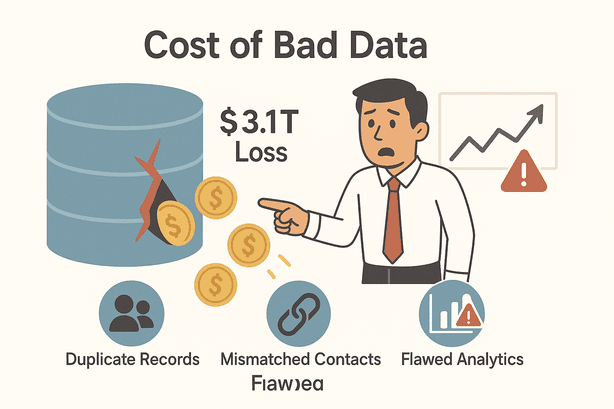
If you’ve ever found yourself staring at a spreadsheet wondering, “Wait, is this ‘Acme Inc.’ the same as ‘Acme Incorporated’?”—you’re not alone. In business, duplicate and inconsistent data is more than just an annoyance; it’s a costly problem. In fact, U.S. companies lose an estimated $3.1 trillion every year to bad data, with the average firm bleeding about $13 million annually to issues like duplicate records, mismatched contacts, and flawed analytics. As data pours in from more sources and systems, the challenge only grows—making data matching a must-have skill for anyone who wants to keep their business running smoothly (and their sanity intact).
Try Thunderbit for Effortless Data Matching Use AI to match, deduplicate, and standardize your business data in seconds. Get Started Free
So, what is data matching, and why should sales, marketing, and operations teams care? In this guide, I’ll break down the basics, share real-world examples, and show how modern tools like Thunderbit make data matching accessible—even if you’re not a data scientist. Let’s dive in and turn your data chaos into clarity.
What Is Data Matching? A Simple Explanation
At its core, data matching is the process of identifying and linking records that refer to the same real-world entity across different datasets (MatchDataPro). Think of it as detective work for your data: figuring out that “John Doe” in your sales CRM is the same person as “Jonathan Doe” in your support system—even if their details aren’t a perfect match.
In business, this means:
- Matching customer records across marketing, sales, and support databases.
- Unifying product listings that appear under slightly different names or SKUs.
- Linking vendor or supplier entries that might have been entered twice with minor variations.
Data matching isn’t just about finding exact matches. It’s about using rules and smart comparisons to spot similarities—even when there are typos, nicknames, or formatting differences. For example, “Jon Smith” and “Jonathan Smith” or “555-123-9988” and “(555) 123-9988” would be recognized as the same person or phone number through data matching (MatchDataPro).
The end goal? A single, unified view of each customer, product, or vendor—no more scattered, duplicate fragments.
Why Data Matching Matters for Business Users
Clean, unified data isn’t just a “nice-to-have”—it’s the backbone of effective business operations and smart decision-making. Here’s why data matching is so valuable:
- Saves Time and Money: Duplicate entries mean wasted marketing spend, redundant outreach, and manual cleanup. One study found that duplicate data can reduce revenue by an estimated 12% annually.
- Improves Customer Experience: Customers hate getting the same email twice or being treated as two different people. Over 70% will disengage if communications feel off-target.
- Enables Accurate Analytics: Bad data leads to bad decisions. 20% of analytics errors are caused by duplicate or mismatched records.
- Reduces Compliance Risks: Inconsistent data makes it tough to meet regulations like GDPR or HIPAA.
Here’s a quick look at where data matching delivers real business value:
| Use Case / Scenario | How Data Matching Helps |
|---|---|
| Lead Deduplication (Sales) | Merges duplicate leads so reps don’t call the same person twice, keeping the pipeline accurate. |
| Customer Profile Unification | Links customer records across systems for a 360° view, improving personalization and service. |
| Inventory & Product Data Cleaning | Consolidates duplicate product entries, ensuring consistent stock levels and pricing. |
| Vendor/Supplier Matching | Catches duplicate vendor entries or invoices, preventing double payments and simplifying spend analysis. |
| Contact Data Cleanup (Marketing) | Matches and standardizes contact data, lowering email costs and improving deliverability. |
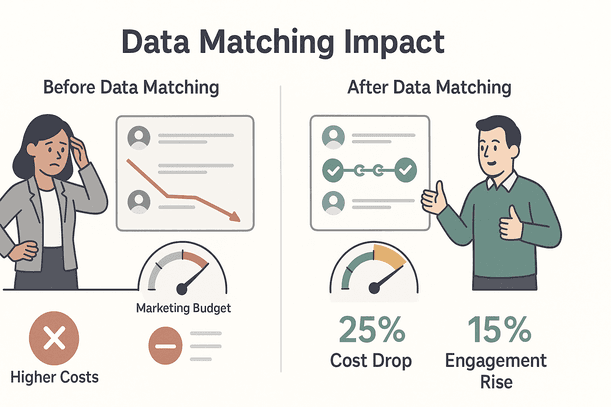
Businesses that invest in data matching have seen marketing costs drop by up to 25% and customer engagement rise by about 15% (Massive Rocket Insights). That’s not just a win for the data team—it’s a win for everyone.
How Does Data Matching Work? Key Principles and Techniques
Let’s break down how data matching actually happens, in plain English:
- Data Preparation: Clean and standardize your data. This means fixing typos, standardizing formats (like dates and phone numbers), and making sure fields are comparable (MatchDataPro).
- Defining Match Criteria: Decide which fields to compare (like name, email, or phone). Some fields are unique (like email), while others might need a “fuzzy” comparison.
- Comparison and Scoring: Use algorithms to compare records and assign a similarity score. For example, “Jonathan Smith” vs. “Johnathan Smithe” might score 0.92 out of 1.
- Decision Rules: Set thresholds—if the score is above 90%, it’s a match; below 50%, it’s not; in between, it might need a human review.
- Grouping and Merging: Link or merge matched records to create a single, unified entry.
Fuzzy Matching and Other Smart Methods
Real-world data is messy, so data matching uses some clever tricks:
- Fuzzy Matching: Finds near-matches, catching typos or spelling variations (like “Jon Smyth” and “John Smith”) (MatchDataPro).
- Phonetic Matching: Matches words that sound alike (e.g., “Katherine” and “Catherine”).
- Pattern/Regex Matching: Recognizes standard patterns (like phone numbers in different formats).
- Data Fingerprinting: Creates a digital “signature” for each record, making it easier to spot duplicates (like “123 Main St. Apt 5” and “123 Main Street Apartment #5”).
- AI-Assisted Matching: Uses machine learning to learn from examples and improve over time, catching tricky matches that rules might miss (WinPure).
The best data matching solutions combine these methods for maximum accuracy.
Typical Business Scenarios for Data Matching
Data matching isn’t just for the IT department—it powers real business outcomes across teams:
- Customer Data Integration: Merge customer records from website, app, and in-store systems for a single view. One retailer cut duplicate profiles by 40% and boosted email engagement by 15% (Massive Rocket Insights).
- Sales Lead Deduplication: Clean up leads from multiple sources so sales reps don’t chase the same person twice. World-class teams keep duplicate rates below 1% (Landbase).
- Marketing List Cleansing: Remove duplicates from email lists to avoid redundant outreach and improve campaign results.
- E-commerce Product Catalog Management: Match and unify product listings to prevent inventory errors and ensure accurate reporting.
- Financial Data Reconciliation: Match vendors and invoices to prevent double payments—SMBs risk over $12k in extra payments from duplicate invoices (Landbase).
- Healthcare Patient Record Matching: Ensure patient safety by matching records across providers—hospitals see around a 10% duplication rate in patient records (Top Analytics Tools).
No matter your industry, if you have data from more than one source, you need data matching.
How Data Matching Improves Decision-Making
You’ve probably heard the phrase “garbage in, garbage out.” If your reports are based on messy, duplicate-ridden data, your decisions will be off. Here’s how data matching changes the game:
- Trusted Analytics: With duplicates gone, your reports are accurate. No more thinking you have 100,000 customers when you really have 80,000.
- Better Strategic Planning: Unified data reveals real trends, so you invest in what actually works.
- Faster, More Agile Decisions: Clean data means you can react quickly to changes—like spotting a hot product or a customer at risk of churning.
- Improved Customer Insights: See the full picture of each customer, enabling smarter segmentation and cross-selling.
- Accurate KPI Tracking: Teams are measured on real numbers, not inflated by duplicates.
Companies that prioritize data matching have seen up to 15% boosts in campaign ROI and more confident, data-driven decisions (Massive Rocket Insights).
The Limitations of Traditional Data Matching Tools
If data matching is so great, why isn’t everyone doing it perfectly? Traditional tools have some big drawbacks:
- Manual Effort: Old-school matching (think Excel VLOOKUPs or custom scripts) is slow and doesn’t scale. Data teams spend 80% of their time just cleaning and reconciling data.
- Complex Rule Setup: Legacy tools require lots of technical rules and maintenance.
- Rigid and Error-Prone: They break easily when data formats change or new sources are added.
- Can’t Handle Big or Messy Data: Excel chokes on big files, and old tools struggle with unstructured data.
- Batch-Only Processing: Duplicates pile up between cleanups—no real-time matching.
- Not User-Friendly: Most tools are built for IT, not business users.
No wonder 92% of organizations say they struggle with duplicate data.
The Rise of AI in Data Matching: Smarter, Faster, More Accurate
Enter AI. Modern data matching tools use machine learning and natural language processing to automate the heavy lifting:
- Automates Tedious Work: AI can reduce duplicate records by 30–40% in just a few months (Landbase).
- Handles Messy Data: AI recognizes patterns and context, catching matches that rules would miss.
- Scales Easily: AI can process millions of records in minutes.
- Learns and Improves: AI models get better over time as they see more data and feedback.
- Works in Real Time: Many AI tools can match data as it comes in, not just in batches.
For example, WinPure found that AI-based entity resolution can match “John Smith” and “Jonathan S. Smith” in minutes, not days.
Thunderbit: Making Data Matching Easy for Everyone
At Thunderbit, we set out to make data matching accessible to everyone—not just data engineers. Here’s how Thunderbit helps you get clean, matched data with just a few clicks:
- AI Suggest Fields: When you open a web page, just click “AI Suggest Fields.” Thunderbit’s AI scans the page and recommends the best columns to extract (like Name, Company, Email, etc.), ensuring you capture all the important info in a consistent format (Thunderbit Blog).
- Subpage and Pagination Scraping: Thunderbit can automatically visit subpages (like detailed profiles) and merge that info back into your main table—no more manual joining or missing details (Thunderbit Blog).
- AI Field Recognition and Standardization: Thunderbit recognizes data types (like dates or phone numbers) and standardizes values on the fly—even across different languages (Thunderbit Blog).
- Natural Language Interface: Just describe what you want in plain English, and Thunderbit figures out the rest (iTechPost).
- One-Click Export: Export your clean, matched data directly to Excel, Google Sheets, Airtable, or Notion—no extra charges or hidden fees (Thunderbit Blog).
- Templates for Popular Sites: Thunderbit offers instant templates for sites like Amazon, Zillow, and Shopify, so you get consistent, ready-to-match data every time.
- Scheduled Scraping: Set up recurring scrapes to keep your data fresh and continuously matched (Thunderbit Blog).
Try Thunderbit for Data Matching
Mini-Guide: Matching Data with Thunderbit
- Open the Thunderbit Chrome Extension.
- Navigate to your target web page.
- Click “AI Suggest Fields” to let Thunderbit recommend columns.
- Click “Scrape”—Thunderbit will extract, standardize, and match data (even across subpages).
- Export your clean, deduplicated data to your favorite tool.
It’s that easy. And if you want to see Thunderbit in action, check out our YouTube Channel.
Choosing the Right Data Matching Solution for Your Team
When picking a data matching tool, keep these criteria in mind:
| Criteria | What to Look For |
|---|---|
| Ease of Use | Intuitive interface, natural language commands, no heavy coding. |
| Integration | Exports/imports to Excel, Google Sheets, CRMs, and other tools you already use. |
| Scalability | Handles both small lists and millions of records without slowing down. |
| AI Capabilities | Fuzzy matching, AI field suggestions, and learning from feedback. |
| Data Cleansing Features | Standardization, validation, and enrichment built in. |
| Customizability | Ability to tweak match rules and thresholds as needed. |
| Auditability & Compliance | Logs, undo/restore, and privacy-friendly features. |
| Support & Community | Helpful documentation, onboarding, and responsive support. |
Thunderbit checks all these boxes—especially for non-technical users who want to get started fast.
Explore More Data Matching Guides Learn more about data matching, web scraping, and data automation on the Thunderbit Blog. Get Started Free
Even with great tools, data matching comes with its own set of hurdles. Here’s how to tackle them:
- Inconsistent Data Formats: Standardize fields (like dates and phone numbers) before matching. Thunderbit does this automatically.
- Missing Data: Use multi-field matching and enrich missing info where possible.
- False Positives/Negatives: Tune your match thresholds and use human review for borderline cases.
- Multiple Source Systems: Use a master data management approach or tools that can handle cross-system matching.
- Privacy Concerns: Anonymize data during matching, keep audit trails, and follow privacy policies.
- Keeping Data Matched Over Time: Set up scheduled matching and encourage data quality best practices across teams.
Key Takeaways: Why Data Matching Is Essential for Modern Business
- Data matching is about creating a single source of truth—no more duplicate or fragmented records.
- Clean data drives better business outcomes: higher ROI, happier customers, and more confident decisions.
- Manual methods can’t keep up with today’s data scale and complexity—AI-powered tools like Thunderbit are the future.
- Thunderbit makes data matching accessible to everyone, with AI-driven field suggestions, subpage matching, and easy exports.
- Investing in data matching is a competitive advantage—turn your data from a liability into an asset.
Ready to see what clean, matched data can do for your business? Try Thunderbit for free or explore more guides on the Thunderbit Blog.
Get Started with AI Data Matching Get Started Free
FAQs
1. What is data matching in simple terms?
Data matching is the process of identifying and linking records that refer to the same real-world entity (like a customer or product) across different datasets—even if the details aren’t exactly the same.
2. Why is data matching important for businesses?
It helps eliminate duplicates, unify customer profiles, improve analytics, and reduce wasted effort—leading to better decisions and happier customers.
3. How does AI make data matching easier?
AI automates the tedious work, handles messy data, and improves accuracy by learning from examples—making matching faster and more reliable.
4. What makes Thunderbit different from other data matching tools?
Thunderbit uses AI to suggest fields, standardize data, and match records—even across subpages. It’s designed for non-technical users and integrates with popular business tools.
5. How can I get started with data matching in my team?
Start by identifying your key data sources, use a tool like Thunderbit to extract and standardize your data, and set up regular matching to keep your records clean and unified. For more tips, check out the Thunderbit Blog.