
The business world is moving at warp speed, and the companies that win are the ones that make decisions based on facts—not just gut feelings. I’ve seen firsthand how a single, well-timed data point can make or break a sales quarter, launch a new product, or help a team outmaneuver competitors. But here’s the catch: buying business data is often a mess. High prices, stale info, and integration headaches are enough to make even the most data-hungry teams throw up their hands. So, how do you actually buy business data efficiently in 2025? Let’s break it down, step by step, and see how modern tools like Thunderbit are changing the game for everyone—not just the data scientists.
Why Buying Business Data Is Essential for Modern Decision-Making
What Is Data Scraping and How to Do It in 2025 Get Started Free
Let’s get real: business data isn’t just a “nice-to-have” anymore—it’s the fuel for every smart decision. Whether you’re sizing up a new market, segmenting your customers, or keeping tabs on the competition, the right data can mean the difference between a big win and a costly misstep.
Why is business data so strategic? Because it powers:
- Market analysis: Spot trends, identify opportunities, and avoid nasty surprises.
- Customer segmentation: Understand who’s buying, why, and how to reach them.
- Competitive intelligence: Track rivals’ moves, pricing, and product launches in real time.
 And the numbers back it up: 90% of enterprises say data is becoming more important to their business. Companies that use data-driven decision-making are 23 times more likely to acquire customers and 19 times more likely to be profitable than their less data-savvy peers.
But here’s the rub: getting your hands on high-quality, up-to-date business data isn’t always easy—or cheap.
Traditional Ways to Buy Business Data—and Their Drawbacks
For years, most companies have relied on a handful of classic sources to buy business data:
- Industry reports from firms like Gartner, Forrester, or Nielsen
- Consulting companies that conduct custom research
- Data vendors (think Dun & Bradstreet, Experian, or InfoGroup)
- Lead databases like ZoomInfo, Apollo, or Lusha
While these channels can provide valuable insights, they come with some serious baggage:
- High costs: A single industry report can run $5,000–$10,000. Annual subscriptions to lead databases? Try $15,000–$40,000 (ZoomInfo pricing).
- Stale data: Many reports are updated annually (if you’re lucky). By the time you get the data, it might already be out of date.
- One-size-fits-all: Most data sets are generic—good luck finding info that matches your exact needs or niche market.
- Integration headaches: Getting that data into your CRM, spreadsheet, or workflow is often a manual, error-prone slog.
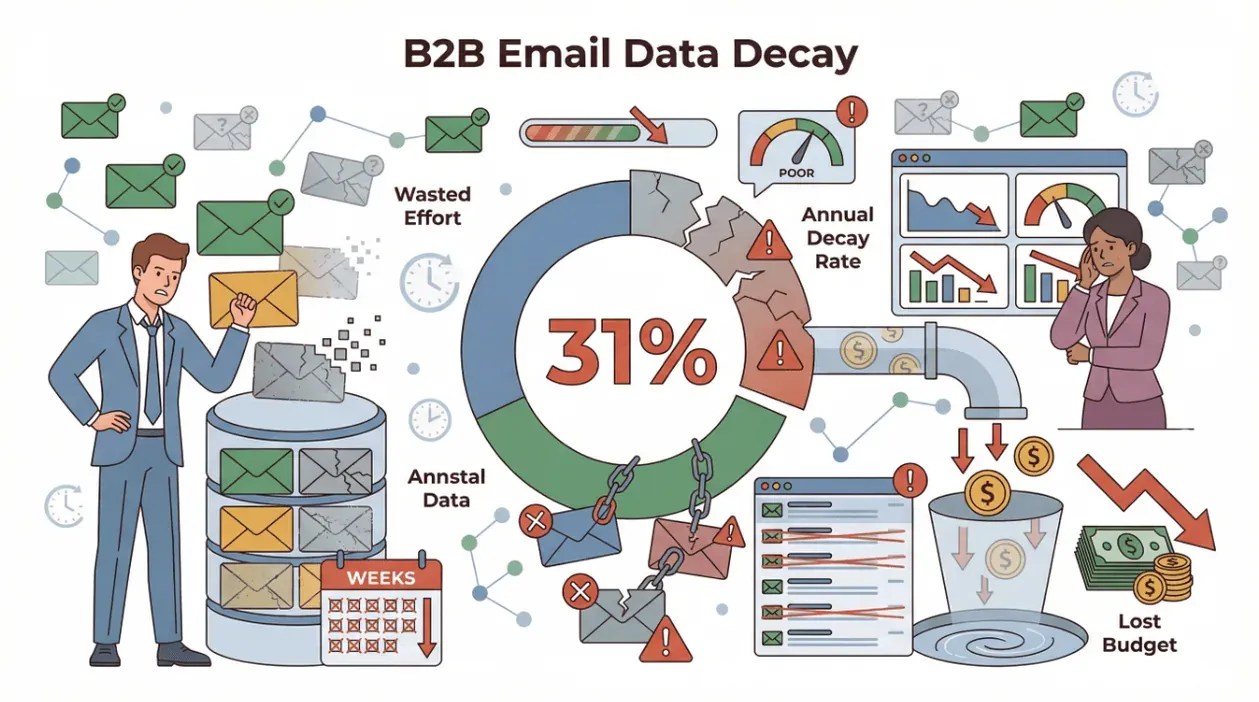 I've talked to sales and operations teams who spent weeks (and thousands of dollars) on a data set, only to find out that a meaningful share of B2B email records decay every year — vendor surveys (ZoomInfo, HubSpot) routinely put the figure in the 25–30% range. That's a lot of wasted effort — and budget.
Comparing Traditional and Modern Data Procurement
Let’s put it side by side:
| Factor | Traditional Data Buying | Modern AI-Powered Tools (Thunderbit) |
|---|---|---|
| Cost | High (thousands per report) | Low (starts free, $15–$249/mo plans) |
| Speed | Slow (days/weeks) | Fast (minutes to hours) |
| Customization | Limited | Fully customizable |
| Data Freshness | Often outdated | Real-time, always up-to-date |
| Integration | Manual, clunky | Direct export to Sheets, CRM, etc. |
No wonder more teams are ditching the old-school approach and looking for smarter, more flexible ways to buy business data.
Introducing Thunderbit: A Smarter Way to Buy Business Data
This is where things get exciting (and, yes, I’m a little biased). Thunderbit is an AI-powered web scraper Chrome Extension designed to help business users collect and structure data from any website—without coding, templates, or a PhD in data science.
Here’s what makes Thunderbit different:
- AI Suggest Fields: Just click, and Thunderbit’s AI scans the page, suggests the best columns to extract (like company name, email, phone, price, etc.), and even writes the extraction logic for you.
- Subpage Scraping: Need more details? Thunderbit can automatically visit each subpage (like product detail pages or LinkedIn profiles) and enrich your table with extra info.
- Scheduled Scraping: Set it and forget it—Thunderbit can monitor websites on a schedule, so your data is always fresh.
- Instant Export: Push your data directly to Excel, Google Sheets, Airtable, or Notion. No more copy-paste marathons.
- Low Cost: Thunderbit’s pricing starts free, with paid plans from just $15/month—way less than a single industry report.
Thunderbit is trusted by over 100,000 users worldwide, from sales teams to ecommerce operators to real estate pros.
Thunderbit vs. Traditional Data Buying: Key Advantages
Let’s break it down:
| Feature | Thunderbit | Traditional Data Vendors |
|---|---|---|
| Setup Time | Minutes (install & go) | Days/weeks (contracts, onboarding) |
| Data Freshness | Real-time, always current | Quarterly or annual updates |
| Customization | Extract any field, any site | Fixed fields, generic data |
| Cost | Free to $249/mo (see pricing) | $5,000–$40,000/year |
| Integration | 1-click export to Sheets, CRM, etc. | Manual import, custom dev needed |
| Maintenance | AI adapts to site changes | Manual updates, slow support |
Teams replacing a $20K+/year lead-database subscription with a usage-based scraping tool often report data-spend reductions in the order of 70–90% — exact savings depend on volume and the workflows being replaced.
Step-by-Step: How to Buy Business Data with Thunderbit
Ready to see how it works? Here’s a step-by-step guide to buying business data the Thunderbit way:
1. Install Thunderbit Chrome Extension
Head to the Thunderbit Chrome Extension page and click "Add to Chrome." Sign up for a free account and you'll get 10 free pages to try.
2. Find Your Target Data Source
Open the website you want to scrape—could be a business directory, competitor site, product listing, or even a PDF or image.
3. Use AI Suggest Fields
Click the Thunderbit icon in your browser. Hit “AI Suggest Fields,” and Thunderbit’s AI will scan the page, suggest the most relevant columns (like “Company Name,” “Contact Email,” “Revenue,” etc.), and set up the extraction logic. You can tweak or add fields as needed.
4. Scrape and Review Data
Click “Scrape.” Thunderbit will extract the data, handle pagination or subpages if needed, and show you a structured table. Preview the results, make any adjustments, and you’re ready to go.
5. Export to Your Favorite Tool
Export your data directly to Excel, Google Sheets, Airtable, or Notion. You can also download as CSV or JSON for custom workflows.
Using AI Suggest Fields for Fast Data Structuring
One of my favorite features is how Thunderbit’s AI Suggest Fields takes the guesswork out of data selection. Instead of fiddling with selectors or templates, you just let the AI do the heavy lifting. For example, if you’re scraping a list of companies, Thunderbit can automatically detect and extract names, websites, emails, phone numbers, and even categorize the data for you.
Pro tip: You can add custom AI instructions for each field—so if you want to label, format, or translate data on the fly, Thunderbit’s got your back.
Exporting Data to Excel, Google Sheets, Airtable, or Notion
Integration headaches? Not here. Thunderbit lets you export your purchased business data in one click to the tools your team already uses. Whether you’re managing leads in a CRM, tracking competitors in a spreadsheet, or building dashboards in Notion, Thunderbit makes it painless.
How to Scrape Website Data into Excel using AI Get Started Free
Automating Ongoing Business Data Collection with Thunderbit
Business data isn’t a “one and done” deal. Markets change, competitors launch new products, and prices shift overnight. That’s why Thunderbit’s scheduled scraping feature is a lifesaver.
- Set up scheduled scrapes for daily, weekly, or custom intervals.
- Monitor prices, stock levels, or new listings in real time.
- Keep your CRM, spreadsheet, or dashboard up to date—automatically.
For example, ecommerce teams use Thunderbit to monitor competitor prices across hundreds of SKUs, while real estate agents track new property listings as soon as they hit the market.
Setting Up Scheduled Scraping for Continuous Insights
It’s as easy as:
- Choose your target website and set up your scraper as usual.
- Click “Schedule,” and describe your desired interval (e.g., “every morning at 8am”).
- Thunderbit’s AI translates your words into a schedule, and your data will refresh automatically.
You can even combine scheduled scraping with subpage visits—so you’re always working with the latest, most detailed data.
Integrating Purchased Business Data into Your Business Processes
Getting the data is just step one. The real value comes from integrating it into your workflows:
- Import leads into your CRM for instant outreach.
- Feed competitor data into pricing dashboards for dynamic strategy.
- Push updated listings to your sales team for faster follow-up.
Thunderbit’s export options make this a breeze—no more manual reformatting or data wrangling.
Automating Data Updates and Workflow Integration
Want to go even further? Use automation tools like Zapier or Make to trigger actions when new data lands in your spreadsheet or CRM. For example:
- Send alerts to Slack or email when a competitor changes their price.
- Update dashboards automatically with the latest scraped data.
- Kick off sales sequences when new leads are added.
The possibilities are endless—and you don’t need an IT team to make it happen.
Best Practices for Buying Business Data Efficiently
Let’s wrap up with a quick checklist for efficient business data procurement:
- Define your objectives: Know what data you need and why.
- Choose the right tool: Look for flexibility, speed, and integration (hint: Thunderbit checks all the boxes).
- Validate data quality: Spot-check results, remove duplicates, and ensure accuracy.
- Ensure integration readiness: Make sure your systems (CRM, Sheets, etc.) are set up to receive new data.
- Automate where possible: Use scheduled scraping and workflow automation to keep data fresh and actionable.
Conclusion & Key Takeaways
Buying business data doesn’t have to be expensive, slow, or painful. The smartest teams in 2025 are ditching the old-school playbook and using AI-powered tools like Thunderbit to collect, structure, and integrate business data—faster and at a fraction of the cost.
- Data-driven decisions win: Companies that use fresh, accurate data outperform their peers.
- Traditional data buying is broken: It’s slow, costly, and often out of date.
- Thunderbit streamlines the process: AI-powered scraping, instant export, and scheduled updates make business data buying accessible to everyone.
- Integration is key: With Thunderbit, your data flows directly into your workflows—no manual effort required.
Ready to try it for yourself? Download Thunderbit and see how easy (and affordable) buying business data can be. And if you want more tips on web scraping, automation, and data-driven growth, check out the Thunderbit Blog.
Start Buying Business Data with Thunderbit
Try AI Web Scraper for Business Data Get Started Free
FAQs
1. What is the most efficient way to buy business data in 2025?
The most efficient way is to use AI-powered tools like Thunderbit that let you collect, structure, and export business data directly from any website. This approach is faster, more customizable, and much cheaper than buying static reports or lead lists.
2. How does Thunderbit ensure data accuracy and freshness?
Thunderbit scrapes data in real time, so you always get the latest information. Its AI adapts to website changes automatically, reducing the risk of stale or broken data.
3. Can I integrate Thunderbit data with my CRM or business tools?
Absolutely. Thunderbit exports data directly to Excel, Google Sheets, Airtable, Notion, and more. You can also use automation tools like Zapier to push data into your CRM or trigger workflows.
4. What types of business data can I buy with Thunderbit?
You can collect company info, contact details, pricing, product specs, competitor data, real estate listings, and more—from virtually any website, PDF, or image.
5. Is Thunderbit suitable for non-technical users?
Yes! Thunderbit is designed for business users. With features like AI Suggest Fields and instant export, anyone can buy business data efficiently—no coding or setup required.
Learn More
- Data Leads for Sale: Top 15 Sources to Buy Sales Leads in 2025
- How to Purchase Public Data Sets for Business Growth
- Top 8 Reliable Business Data Vendors for 2025 Efficiency
- Top 6 Business Data Providers for Smart Decision-Making
- Top 20 B2B Data Providers and Vendors to Know in 2025
- Top 20 Data Providers and Integrators to Know in 2025
- Top 15 Financial Data Delivery Solutions in 2025
- Top 7 Reliable Data Providers for Business Growth 2025
- Top 9 B2B Leads Databases in 2025: Boost Your Sales Pipeline
- Should You Still Buy Leads in 2025? Here’s a Better Alternative




