
The phrase “double-booked” used to make my heart race—and not in a good way. If you’ve ever juggled a calendar full of meetings, client calls, or resource reservations, you know the chaos that manual booking can unleash. Missed appointments, endless email chains, and the dreaded “Sorry, I thought this was available” reply… it’s enough to make anyone crave a better way. The good news? Booking automation has arrived, and it’s transforming how modern businesses operate—saving time, reducing errors, and making both teams and customers a whole lot happier.
Let’s dive into what booking automation really means, why it’s a must-have for any business that values efficiency, and how tools like Thunderbit can help you automate everything from meeting room scheduling to dynamic pricing on platforms like Airbnb and Booking.com. I’ll even walk you through a real-world example of automating meeting room bookings—no technical wizardry required.
What Is Booking Automation? A Clear Definition for Business Teams
Automate bookings and scheduling with AI Get Started Free
Booking automation is the use of software to handle the entire scheduling process—automatically. Instead of relying on sticky notes, spreadsheets, or endless back-and-forth emails, booking automation tools manage appointment scheduling, confirmations, reminders, and even cancellations or rescheduling, all without human intervention (GoodCall).
In practice, booking automation can handle:
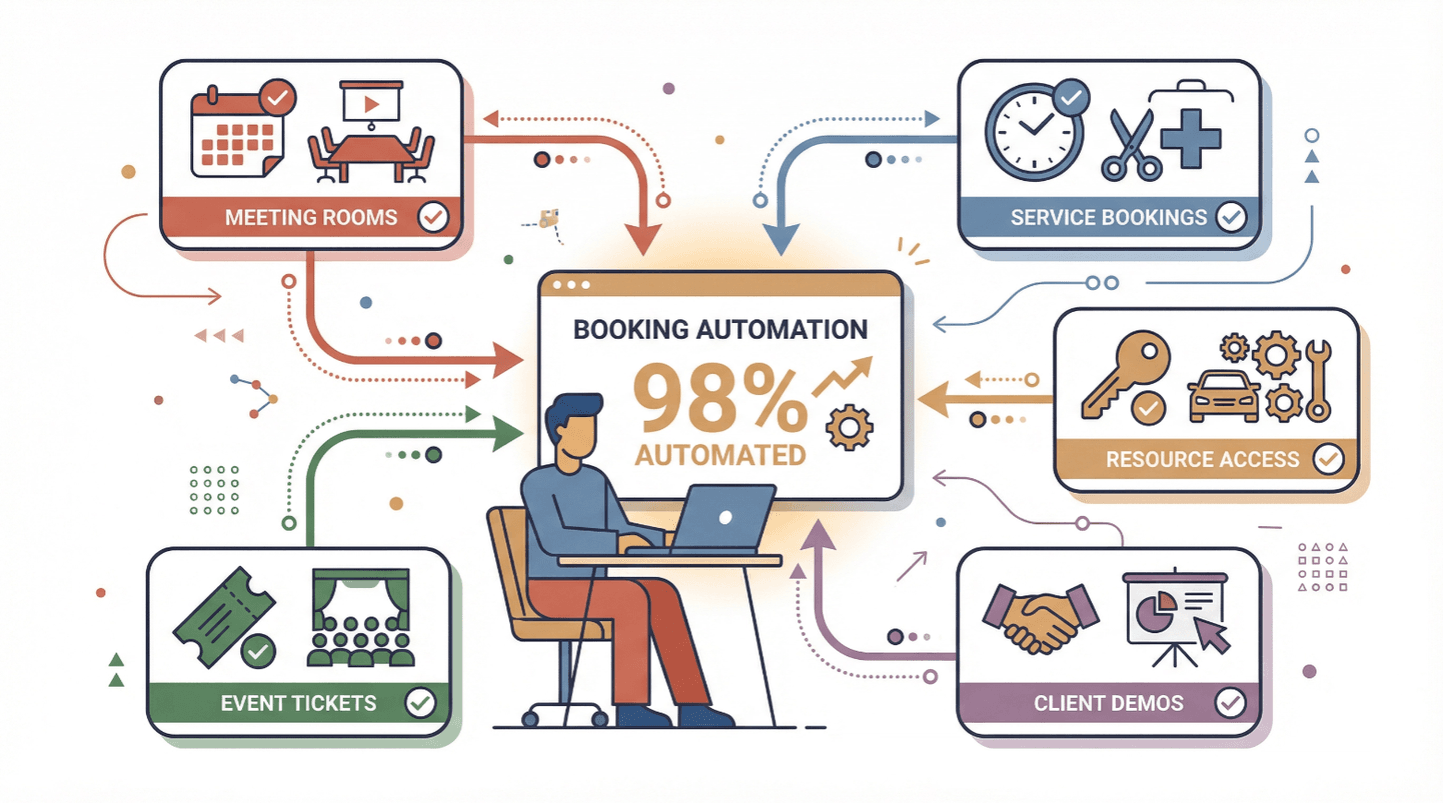
- Meeting and conference room reservations
- Service appointments (think salons, healthcare, consulting)
- Resource bookings (equipment, vehicles, hot desks)
- Customer appointments and demos
- Event registrations and ticketing
The magic is in the details: the system checks real-time availability, prevents double-bookings, sends reminders, and syncs with calendars—all while keeping a clean, auditable record (Octavius).
Why Booking Automation Matters for Operations and Sales
Let’s get real: manual booking is a productivity killer. Traditional scheduling methods can cost businesses hundreds of hours in lost productivity annually, not to mention the financial impact of missed appointments and unhappy customers.
The Business Value of Booking Automation
Here’s what booking automation brings to the table:
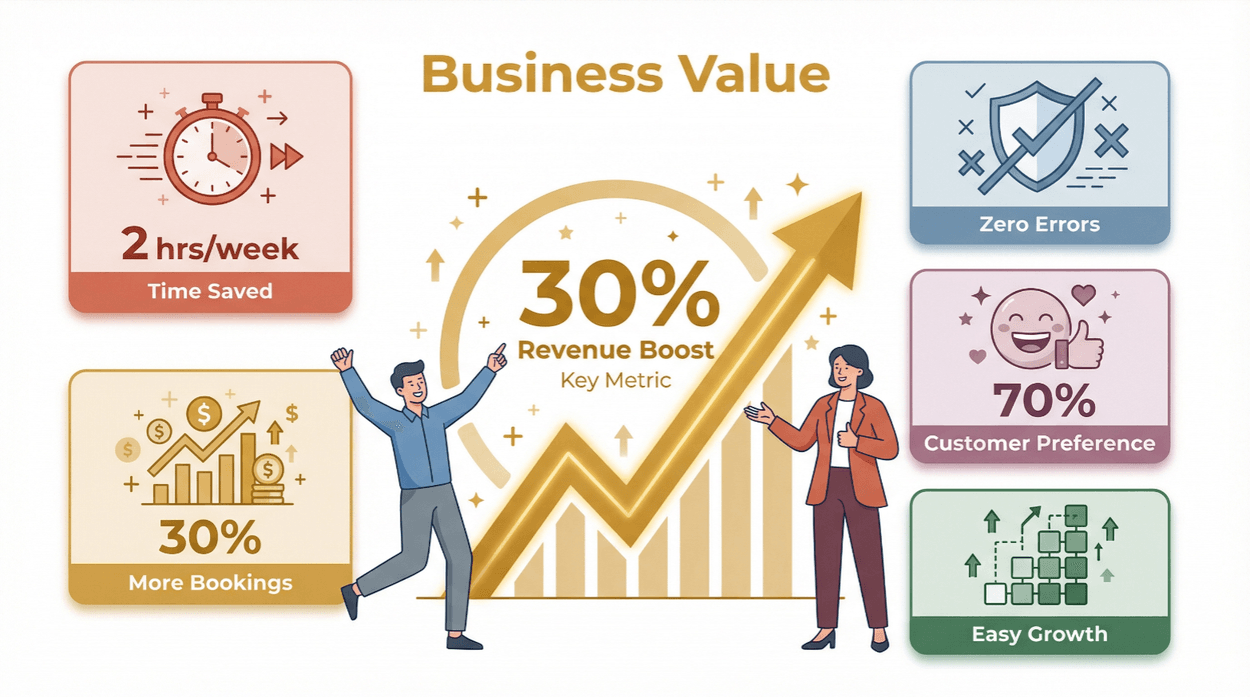
- Time Savings: Automation can save teams an average of 2 hours per week per employee (SuperAGI).
- Error Reduction: No more double-bookings, missed slots, or lost reservations (Octavius).
- Customer Satisfaction: Over 70% of customers prefer businesses that offer online booking and instant confirmations.
- Scalability: As your business grows, automation ensures you don’t need to hire an army of admins to keep up.
- Revenue Boost: Companies using automated booking systems report up to 30% more bookings and higher customer retention.
Booking Automation in Action: Use Cases
| Use Case | Manual Pain Point | Automation Benefit |
|---|---|---|
| Lead Generation | Missed follow-ups, slow response | Instant scheduling, higher close rate |
| Resource Management | Double-booked rooms/equipment | Real-time availability, no conflicts |
| Customer Support | Lost requests, slow replies | Automated confirmations & reminders |
| Sales Demos | Endless email chains | Self-serve booking, calendar sync |
The bottom line: booking automation isn’t just a nice-to-have—it’s a competitive advantage for operations and sales teams alike (Amra & Elma).
Comparing Booking Automation Solutions: How to Choose the Right Tool
There’s no shortage of booking automation tools out there, but not all are created equal. The best solution for your business depends on your unique needs, tech stack, and budget.
Mainstream Booking Automation Tools
Let’s take a quick look at a few popular options:
- Thunderbit: AI-powered web scraper that automates data extraction from booking platforms, enabling custom workflows and integrations.
- SimplyBook.me: Comprehensive scheduling platform for service providers, with automated reminders and payments.
- Calendesk: User-friendly, affordable, and packed with analytics and integrations.
- My AI Front Desk: AI-driven solution for appointment management, especially for salons and service businesses.
Comparison Table
| Feature | Thunderbit | SimplyBook.me | Calendesk | My AI Front Desk |
|---|---|---|---|---|
| AI Data Extraction | Yes | No | No | No |
| Multi-Platform Integration | Yes | Yes | Yes | Limited |
| Calendar Sync | Yes | Yes | Yes | Yes |
| Automated Reminders | Via export | Yes | Yes | Yes |
| Custom Workflow Automation | Yes | Limited | Limited | Limited |
| Pricing | Free tier, from $15/mo | Starts ~$10/mo | Affordable plans | Subscription |
| Ease of Use | Very high | High | Very high | High |
| Advanced Analytics | Yes (via export) | Yes | Yes | No |
Key Features to Look For in Booking Automation
- Calendar Syncing: Keeps all bookings up-to-date across Google, Outlook, and more.
- Automated Reminders: Reduces no-shows and keeps everyone in the loop.
- Multi-Channel Booking: Lets customers book via web, mobile, or even social media.
- Reporting & Analytics: Tracks booking trends, utilization, and ROI.
- Custom Integrations: Connects with your CRM, email, or workflow tools.
- User-Friendly Interface: Enables non-technical staff to manage bookings with ease.
These features aren’t just bells and whistles—they’re essential for maximizing efficiency and customer satisfaction (Calendesk).
Thunderbit for Booking Automation: Unlocking New Efficiencies
Now, let’s talk about where Thunderbit fits into the picture. While most booking automation tools focus on managing appointments within their own ecosystem, Thunderbit takes a different approach: it acts as your AI-powered data assistant, scraping and structuring booking data from any website—think Airbnb, Booking.com, or even your own internal portals.
How Thunderbit Supercharges Booking Automation
- AI-Powered Field Suggestions: Thunderbit’s AI reads booking pages and suggests the best fields to extract—like room availability, pricing, or customer info.
- Subpage Scraping: Need more details? Thunderbit can visit each listing or resource subpage and pull in extra data automatically.
- Instant Data Export: Push your structured data directly into Excel, Google Sheets, Airtable, or Notion—ready for analysis or integration with other tools.
- Dynamic Pricing & Availability Tracking: By scraping competitor or platform data, you can adjust your own pricing or resource allocation in real time (Thunderbit Booking.com Scraper).
- Personalized Customer Outreach: Use scraped data to trigger custom emails, reminders, or offers based on booking behavior.
Thunderbit isn’t just for coders or data geeks—it’s designed for business users who want results, not headaches. The setup is as simple as “AI Suggest Fields,” then “Scrape.”
Try Thunderbit for Booking Automation
Real-World Scenario: Thunderbit in Action
Imagine you’re managing a portfolio of vacation rentals. You want to monitor competitor pricing on Airbnb and Booking.com, adjust your rates dynamically, and ensure your listings are always up-to-date. With Thunderbit, you can:
- Scrape competitor listings for availability, pricing, and reviews.
- Export the data to Google Sheets for instant analysis.
- Set up alerts or automations to adjust your own pricing or send special offers to guests.
The result? Faster decision-making, higher occupancy rates, and less time spent on manual research (Thunderbit Booking.com Scraper).
Step-by-Step Guide: Automating Meeting Room Bookings with Thunderbit
Let’s get hands-on. Here’s how you can use Thunderbit to automate meeting room bookings—no IT degree required.
1. Scrape Meeting Room Availability Data
- Open your meeting room booking portal (internal or public).
- Launch the Thunderbit Chrome Extension.
- Click “AI Suggest Fields.” Thunderbit will scan the page and suggest columns like “Room Name,” “Available Times,” “Capacity,” etc.
- Adjust or add fields as needed (e.g., “Amenities,” “Location”).
- Click “Scrape.” Thunderbit pulls all available room data into a structured table.
2. Export to Your Calendar System
- Export the scraped data directly to Google Sheets or Excel.
- Use a tool like Zapier or native integrations to sync available slots with Google Calendar, Outlook, or your preferred scheduling tool (Zapier Template).
3. Set Up Automated Confirmation Emails
- Use your exported data to trigger confirmation emails when a booking is made.
- Many email platforms (like Gmail, Outlook, or Mailchimp) can send automated emails based on new calendar events or spreadsheet updates.
4. Monitor Changes and Keep Data Fresh
- Schedule Thunderbit to re-scrape the booking portal at regular intervals (daily, hourly, etc.).
- Automatically update your calendar and notify users of any changes or cancellations.
Pro Tips
- Use Thunderbit’s subpage scraping to pull in extra details (like floor plans or accessibility info).
- Set up conditional formatting in your spreadsheet to highlight rooms that are nearly fully booked.
Integrating Booking Data with Your Calendar and Email Tools
Thunderbit’s real power is in its integrations. By exporting data to Google Sheets, you can:
- Sync with Google Calendar: Use Google Apps Script or Zapier to create events automatically.
- Automate Email Reminders: Trigger emails to meeting organizers or attendees when a room is booked or released.
- Track Utilization: Build dashboards to monitor which rooms are most popular and optimize your space usage.
This isn’t just theory—I’ve seen teams go from “Who has the key to Room 3B?” to “Here’s the real-time schedule and confirmation email” in a single afternoon.
Best Practices for Implementing Booking Automation in Your Business
Explore more automation guides on Thunderbit Blog Get Started Free
Ready to make the leap? Here’s how to ensure a smooth transition:
- Document Your Current Process: Map out how bookings are handled today—where are the bottlenecks or error-prone steps?
- Start Small: Pilot automation with one team or resource before rolling out company-wide.
- Train Your Team: Even the best tool is useless if nobody knows how to use it. Offer quick training sessions or cheat sheets.
- Integrate Gradually: Connect your booking automation to calendars, email, and reporting tools one step at a time.
- Measure Success: Track KPIs like time saved, error reduction, and customer satisfaction (GoodCall).
- Gather Feedback: Ask users what’s working and what’s not. Iterate and improve.
Change management is key—automation should make life easier, not add confusion (GoodCall).
The Future of Booking Automation: AI-Driven Opportunities
We’re just scratching the surface of what’s possible with booking automation. The next wave? AI-powered systems that don’t just schedule, but predict and optimize.
What’s Next for Booking Automation?
- Predictive Scheduling: AI analyzes historical data to forecast peak times and suggest optimal booking slots (SuperAGI).
- Intelligent Customer Interactions: Chatbots and virtual assistants handle bookings, answer FAQs, and even upsell services (SuperAGI).
- Smart Resource Allocation: AI helps optimize room, staff, or equipment usage based on real-time demand.
- Personalized Experiences: Automated systems tailor reminders, offers, and follow-ups to each customer’s preferences.
Thunderbit is already paving the way with AI-driven data extraction and workflow automation. As AI gets smarter, expect even more powerful features—like demand forecasting, proactive maintenance scheduling, and hyper-personalized outreach.
Conclusion & Key Takeaways
Booking automation isn’t just a tech trend—it’s a business necessity for anyone tired of missed appointments, double-bookings, and endless admin work. Here’s what we covered:
- Booking automation streamlines scheduling, reduces errors, and delights customers.
- The right tool depends on your needs, but look for calendar sync, reminders, integrations, and ease of use.
- Thunderbit stands out by automating data extraction from any booking platform, enabling custom workflows and dynamic decision-making.
- You can start today: Automate meeting room bookings, sync with your calendar, and set up confirmation emails in just a few steps.
- The future is AI-driven: Predictive scheduling and intelligent automation are on the horizon—get ready to stay ahead.
Ready to leave manual booking chaos behind? Download Thunderbit, try out a free scrape, and see how much smoother your operations can run. And if you want to dive deeper into workflow automation, check out the Thunderbit Blog for more guides and real-world tips.
Try Thunderbit’s Free Tier for Booking Automation
FAQs
1. What is booking automation, and how does it work?
Booking automation uses software to handle scheduling, confirmations, and reminders automatically. It checks availability, prevents double-bookings, and syncs with calendars—saving time and reducing errors.
2. How does booking automation improve business operations?
It saves time, reduces administrative errors, improves customer satisfaction, and scales easily as your business grows. Teams can focus on value-added work instead of chasing down appointments.
3. What makes Thunderbit different from other booking automation tools?
Thunderbit uses AI to scrape and structure booking data from any website, enabling custom workflows, dynamic pricing, and integration with tools like Excel, Google Sheets, and Notion—no coding required.
4. Can I automate meeting room bookings with Thunderbit?
Absolutely! You can scrape room availability, export to your calendar system, and set up automated confirmation emails—all with a few clicks.
5. What’s the future of booking automation?
AI-driven features like predictive scheduling, smart resource allocation, and intelligent customer interactions are on the rise. Thunderbit is already integrating these capabilities, helping businesses stay ahead of the curve.
Ready to transform your booking process? Try Thunderbit’s free tier and see the difference for yourself.
Try AI Booking Automation with Thunderbit Get Started Free
Learn More




