

Broken links. Orphan pages. A “test” page from 2019 that Google somehow indexed. If you manage a website, you know the pain.
A good crawler catches all of that — and maps your entire site so you can actually fix things. But most people confuse “web crawler” with “web scraper.” They’re not the same thing.
I’ve tested 10 free crawlers across real sites. Some are great for SEO audits. Others are better for data extraction. Here’s what worked — and what didn’t.
What Is a Website Crawler? Understanding the Basics
Let’s clear the air first: a website crawler is not the same as a web scraper. I know, the terms get tossed around like pizza dough, but they’re fundamentally different. Think of a crawler as your site’s cartographer—it explores every nook and cranny, follows every link, and builds a map of all your pages. Its job is discovery: finding URLs, mapping site structure, and indexing content. This is what search engines like Google do with their bots, and what SEO tools use to audit your site’s health (Thunderbit Blog: What Is a Web Crawler?).
A web scraper, on the other hand, is the data miner. It doesn’t care about the whole map—it just wants to dig up the gold: product prices, company names, reviews, emails, you name it. Scrapers extract specific fields from the pages crawlers find (Thunderbit Blog: How to Web Crawl a Site?).
Analogy time:
- Crawler: The person who walks every aisle in a grocery store, making an inventory of all products.
- Scraper: The person who goes straight to the coffee shelf and writes down the price of every organic blend.
Why does this matter? Because if you’re just trying to find all the pages on your site (for an SEO audit, for example), you need a crawler. If you want to pull all the product prices from your competitor’s site, you need a scraper—or, ideally, a tool that does both.
Why Use an Online Web Crawler? Key Business Benefits
So, why bother with a web crawler? Well, the web isn’t getting any smaller. In fact, over 54% of enterprise brands use dedicated crawling platforms to optimize their sites, and some SEO tools crawl 7 billion pages daily.
Here’s what crawlers can do for you:
- SEO Audits: Find broken links, missing titles, duplicate content, orphan pages, and more (SEO.ai).
- Link Checking & QA: Catch 404s and redirect loops before your users do (Screaming Frog).
- Sitemap Generation: Automatically create XML sitemaps for search engines and planning (PowerMapper).
- Content Inventory: Build a list of all your pages, their hierarchy, and metadata.
- Compliance & Accessibility: Check every page for WCAG, SEO, and legal compliance (SiteOne Crawler).
- Performance & Security: Flag slow pages, oversized images, or security issues (SiteOne Crawler).
- Data for AI & Analysis: Feed crawled data into analytics or AI tools (Thunderbit Blog: Crawl4AI Review).
Here’s a quick table mapping use cases to business roles:
| Use Case | Ideal For | Benefit / Outcome |
|---|---|---|
| SEO & Site Auditing | Marketing, SEO, Small Biz Owners | Find technical issues, optimize structure, improve rankings |
| Content Inventory & QA | Content Managers, Webmasters | Audit or migrate content, catch broken links/images |
| Lead Generation (Scraping) | Sales, Biz Dev | Automate prospecting, fill CRM with fresh leads |
| Competitive Intelligence | E-commerce, Product Managers | Monitor competitor prices, new products, stock changes |
| Sitemap & Structure Cloning | Developers, DevOps, Consultants | Clone site structure for redesigns or backups |
| Content Aggregation | Researchers, Media, Analysts | Gather data from multiple sites for analysis or trend monitoring |
| Market Research | Analysts, AI Training Teams | Collect large datasets for analysis or AI model training |
(Thunderbit Blog: How to Web Crawl a Site?)
How We Chose the Best Free Website Crawler Tools
I’ve spent a lot of late nights (and more coffee than I care to admit) digging through crawler tools, reading docs, and running test crawls. Here’s what I looked for:
- Technical Capability: Can it handle modern sites (JavaScript, logins, dynamic content)?
- Ease of Use: Is it friendly for non-techies, or does it require command-line wizardry?
- Free Plan Limits: Is it truly free, or just a teaser?
- Online Accessibility: Is it a cloud tool, desktop app, or code library?
- Unique Features: Does it do something special—like AI extraction, visual sitemaps, or event-driven crawling?
I tested each tool, checked user feedback, and compared features side by side. If a tool made me want to throw my laptop out the window, it didn’t make the list.
Quick Comparison Table: 10 Best Free Website Crawlers at a Glance
| Tool & Type | Core Features | Best Use Case | Technical Needs | Free Plan Details |
|---|---|---|---|---|
| BrightData (Cloud/API) | Enterprise crawling, proxies, JS rendering, CAPTCHA solving | Large-scale data collection | Some tech skill helpful | Free trial: 3 scrapers, 100 records each (about 300 records total) |
| Crawlbase (Cloud/API) | API crawling, anti-bot, proxies, JS rendering | Devs needing backend crawl infra | API integration | Free: ~5,000 API calls for 7 days, then 1,000/month |
| ScraperAPI (Cloud/API) | Proxy rotation, JS rendering, async crawl, prebuilt endpoints | Devs, price monitoring, SEO data | Minimal setup | Free: 5,000 API calls for 7 days, then 1,000/month |
| Diffbot Crawlbot (Cloud) | AI crawl + extraction, knowledge graph, JS rendering | Structured data at scale, AI/ML | API integration | Free: 10,000 credits/month (about 10k pages) |
| Screaming Frog (Desktop) | SEO audit, link/meta analysis, sitemap, custom extraction | SEO audits, site managers | Desktop app, GUI | Free: 500 URLs per crawl, core features only |
| SiteOne Crawler (Desktop) | SEO, performance, accessibility, security, offline export, Markdown | Devs, QA, migration, documentation | Desktop/CLI, GUI | Free & open-source, 1,000 URLs in GUI report (configurable) |
| Crawljax (Java, OpenSrc) | Event-driven crawl for JS-heavy sites, static export | Devs, QA for dynamic web apps | Java, CLI/config | Free & open-source, no limits |
| Apache Nutch (Java, OpenSrc) | Distributed, plugin-based, Hadoop integration, custom search | Custom search engines, large-scale crawl | Java, command-line | Free & open-source, infra cost only |
| YaCy (Java, OpenSrc) | Peer-to-peer crawl & search, privacy, web/intranet indexing | Private search, decentralization | Java, browser UI | Free & open-source, no limits |
| PowerMapper (Desktop/SaaS) | Visual sitemaps, accessibility, QA, browser compatibility | Agencies, QA, visual mapping | GUI, easy | Free trial: 30 days, 100 pages (desktop) or 10 pages (online) per scan |
BrightData: Enterprise-Grade Cloud Website Crawler

BrightData is the “big iron” of web crawling. It’s a cloud platform with a massive proxy network, JavaScript rendering, CAPTCHA solving, and an IDE for custom crawls. If you’re running large-scale data collection—think monitoring hundreds of e-commerce sites for pricing—BrightData’s infrastructure is hard to beat (aimultiple.com).
Strengths:
- Handles tough sites with anti-bot measures
- Scalable for enterprise needs
- Pre-built templates for common sites
Limitations:
- No permanent free tier (just a trial: 3 scrapers, 100 records each)
- Can be overkill for simple audits
- Some learning curve for non-technical users
If you need to crawl the web at scale, BrightData is like renting a Formula 1 car. Just don’t expect it to be free after your test drive (BrightData Pricing).
Crawlbase: API-Driven Free Web Crawler for Developers
Crawlbase (formerly ProxyCrawl) is all about programmatic crawling. You call their API with a URL, and it returns the HTML—handling proxies, geotargeting, and CAPTCHAs behind the scenes (Capterra).
Strengths:
- High success rates (99%+)
- Handles JavaScript-heavy sites
- Great for integrating into your own apps or workflows
Limitations:
- Requires some API or SDK integration
- Free plan: ~5,000 API calls for 7 days, then 1,000/month
If you’re a developer who wants to crawl (and maybe scrape) at scale without managing proxies, Crawlbase is a solid choice (Crawlbase Pricing).
ScraperAPI: Simplifying Dynamic Web Crawling
ScraperAPI is the “just fetch it for me” API. You give it a URL, it handles proxies, headless browsers, and anti-bot measures, and gives you the HTML (or structured data for some sites). It’s especially good for dynamic pages and has a generous free tier (ScraperAPI Pricing).
Strengths:
- Super easy for developers (just an API call)
- Handles CAPTCHAs, IP bans, JavaScript
- Free: 5,000 API calls for 7 days, then 1,000/month
Limitations:
- No visual crawl reports
- You’ll need to script the crawl logic if you want to follow links
If you want to plug web crawling into your codebase in minutes, ScraperAPI is a no-brainer.
Diffbot Crawlbot: Automated Website Structure Discovery
Diffbot Crawlbot is where things get smart. It doesn’t just crawl—it uses AI to classify pages and extract structured data (articles, products, events, etc.) into JSON. It’s like having a robot intern who actually understands what they’re reading (Diffbot Free Plan).
Strengths:
- AI-powered extraction, not just crawling
- Handles JavaScript and dynamic content
- Free: 10,000 credits/month (about 10k pages)
Limitations:
- Developer-oriented (API integration)
- Not a visual SEO tool—more for data projects
If you need structured data at scale, especially for AI or analytics, Diffbot is a powerhouse.
Screaming Frog: Free Desktop SEO Crawler
Screaming Frog is the classic desktop crawler for SEO audits. It crawls up to 500 URLs per scan (free version) and gives you everything: broken links, meta tags, duplicate content, sitemaps, and more (Screaming Frog User Guide).
Strengths:
- Fast, thorough, and trusted in the SEO world
- No coding needed—just enter a URL and go
- Free for up to 500 URLs per crawl
Limitations:
- Desktop only (no cloud version)
- Advanced features (JS rendering, scheduling) require a paid license
If you’re serious about SEO, Screaming Frog is a must-have—just don’t expect it to crawl your 10,000-page site for free.
SiteOne Crawler: Static Site Export and Documentation

SiteOne Crawler is the Swiss Army knife for technical audits. It’s open-source, cross-platform, and can crawl, audit, and even export your site to Markdown for documentation or offline use (SiteOne Crawler).
Strengths:
- Covers SEO, performance, accessibility, security
- Exports sites for archiving or migration
- Free & open-source, with no usage limits
Limitations:
- More technical than some GUI tools
- Audit report in GUI limited to 1,000 URLs by default (configurable)
If you’re a developer, QA, or consultant who wants deep insight (and loves open source), SiteOne is a hidden gem.
Crawljax: Open Source Java Web Crawler for Dynamic Pages

Crawljax is a specialist: it’s designed to crawl modern, JavaScript-heavy web apps by simulating user interactions (clicks, form fills, etc.). It’s event-driven and can even output a static version of a dynamic site (Wikipedia: Crawljax).
Strengths:
- Unmatched for crawling SPAs and AJAX-heavy sites
- Open-source and extensible
- No usage limits
Limitations:
- Requires Java and some programming/config
- Not for non-technical users
If you need to crawl a React or Angular app like a real user, Crawljax is your friend.
Apache Nutch: Scalable Distributed Website Crawler
Apache Nutch is the granddaddy of open-source crawlers. It’s designed for massive, distributed crawls—think building your own search engine or indexing millions of pages (Martechvibe).
Strengths:
- Scales to billions of pages with Hadoop
- Highly configurable and extensible
- Free & open-source
Limitations:
- Steep learning curve (Java, command-line, configs)
- Not for small sites or casual users
If you want to crawl the web at scale and aren’t afraid of some command-line action, Nutch is your tool.
YaCy: Peer-to-Peer Web Crawler and Search Engine
YaCy is a unique, decentralized crawler and search engine. Each instance crawls and indexes sites, and you can join a peer-to-peer network to share indexes with others (TechRadar: YaCy).
Strengths:
- Privacy-focused, no central server
- Great for building private or intranet search
- Free & open-source
Limitations:
- Results depend on the network’s coverage
- Some setup required (Java, browser UI)
If you’re into decentralization or want your own search engine, YaCy is a fascinating option.
PowerMapper: Visual Sitemap Generator for UX and QA
PowerMapper is all about visualizing your site’s structure. It crawls your site and generates interactive sitemaps, plus it checks for accessibility, browser compatibility, and SEO basics (Slickplan Review).
Strengths:
- Visual sitemaps are great for agencies and designers
- Checks accessibility and compliance
- Easy GUI, no technical skills needed
Limitations:
- Free trial only (30 days, 100 pages desktop/10 pages online per scan)
- Full version is paid
If you need to present a site map to clients or check compliance, PowerMapper is a handy tool.
Choosing the Right Free Web Crawler for Your Needs
With so many options, how do you pick? Here’s my quick guide:
- For SEO audits: Screaming Frog (small sites), PowerMapper (visual), SiteOne (deep audits)
- For dynamic web apps: Crawljax
- For large-scale or custom search: Apache Nutch, YaCy
- For developers needing API access: Crawlbase, ScraperAPI, Diffbot
- For documentation or archiving: SiteOne Crawler
- For enterprise-scale with a trial: BrightData, Diffbot
Key factors to consider:
- Scalability: How big is your site or crawl job?
- Ease of use: Are you comfortable with code, or do you want point-and-click?
- Data export: Do you need CSV, JSON, or integration with other tools?
- Support: Is there a community or help docs if you get stuck?
When Web Crawling Meets Web Scraping: Why Thunderbit Is a Smarter Choice
Scrape data from any website using AI Get Started Free
Here’s the reality: most people don’t crawl websites just to make pretty maps. The real goal is usually to get structured data—whether it’s product listings, contact info, or content inventories. That’s where Thunderbit comes in.
Thunderbit isn’t just a crawler or a scraper—it’s an AI-powered Chrome extension that combines both. Here’s how it works:
- AI Crawler: Thunderbit explores the site, just like a crawler.
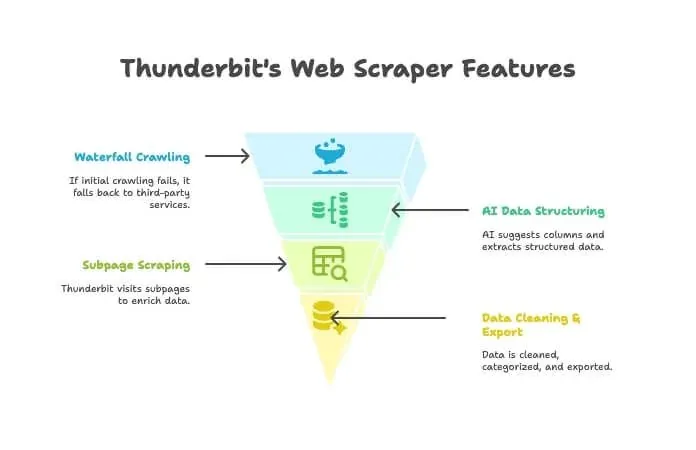
- Waterfall Crawling: If Thunderbit’s own engine can’t get the page (maybe there’s a tough anti-bot wall), it automatically falls back to third-party crawling services—no manual setup needed.
- AI Data Structuring: Once it has the HTML, Thunderbit’s AI suggests the right columns and extracts structured data (names, prices, emails, etc.) without you writing a single selector.
- Subpage Scraping: Need details from every product page? Thunderbit can automatically visit each subpage and enrich your table.
- Data Cleaning & Export: It can summarize, categorize, translate, and export your data to Excel, Google Sheets, Airtable, or Notion in one click.
- No-Code Simplicity: If you can use a browser, you can use Thunderbit. No coding, no proxies, no headaches.
When should you use Thunderbit over a traditional crawler?
- When your end goal is a clean, usable spreadsheet—not just a list of URLs.
- When you want to automate the whole process (crawl, extract, clean, export) in one place.
- When you value your time and sanity.
You can download Thunderbit’s Chrome extension here and see for yourself why so many business users are making the switch.
Try Thunderbit Free – AI Web Scraper
Conclusion: Getting the Most from Free Website Crawlers
What Is Data Scraping and How to Do It Get Started Free
Website crawlers have come a long way. Whether you’re a marketer, developer, or just someone who wants to keep their site healthy, there’s a free (or at least free-to-try) tool for you. From enterprise-grade platforms like BrightData and Diffbot, to open-source gems like SiteOne and Crawljax, to visual mappers like PowerMapper, the options are more diverse than ever.
But if you’re looking for a smarter, more integrated way to get from “I need this data” to “here’s my spreadsheet,” give Thunderbit a try. It’s built for business users who want results, not just reports.
Ready to start crawling? Download a tool, run a scan, and see what you’ve been missing. And if you want to go from crawling to actionable data in two clicks, check out Thunderbit.
For more deep dives and practical guides, visit the Thunderbit Blog.
Scrape Website Data with AI in 2 Clicks
Try AI Web Scraper Get Started Free
FAQ
What’s the difference between a website crawler and a web scraper?
A crawler discovers and maps all the pages on a site (think: building a table of contents). A scraper extracts specific data fields (like prices, emails, or reviews) from those pages. Crawlers find, scrapers dig (Thunderbit Blog: What Is a Web Crawler?).
Which free web crawler is best for non-technical users?
For small sites and SEO audits, Screaming Frog is user-friendly. For visual mapping, PowerMapper is great (during the trial). Thunderbit is the easiest if your goal is structured data and you want a no-code, browser-based experience.
Are there websites that block web crawlers?
Yes—some sites use robots.txt files or anti-bot measures (like CAPTCHAs or IP bans) to block crawlers. Tools like ScraperAPI, Crawlbase, and Thunderbit (with waterfall crawling) can often get around these, but always crawl responsibly and respect site rules (BrightData Pricing).
Do free website crawlers have page or feature limits?
Most do. For example, Screaming Frog’s free version is limited to 500 URLs per crawl; PowerMapper’s trial is 100 pages. API-based tools often have monthly credit limits. Open-source tools like SiteOne or Crawljax generally have no hard limits, but you’re constrained by your hardware.
Is using a web crawler legal and privacy-compliant?
Generally, crawling public web pages is legal, but always check a site’s terms of service and robots.txt. Never crawl private or password-protected data without permission, and be mindful of privacy laws if you’re extracting personal data (Crawlbase Guide).




