
A GitHub search for "tiktok scraper" returns 339 repositories. Roughly 48% of them haven't been pushed in over a year, and at least 4 are explicitly archived.
If you've ever cloned a popular TikTok scraper repo, spent an hour wrestling with dependencies, and then gotten zero output — you're not alone. The most-starred TikTok scraper on GitHub, drawrowfly/tiktok-scraper, still has over 5,000 stars. Its issue tracker, though, is littered with threads like #812: "is this amazing tool still working?" and #824: "Is this still working?" — both reporting zero output. I've been tracking the state of TikTok scraping repos at Thunderbit for months, and the pattern is unmistakable: these tools break fast, and most never get fixed. This article is the practical survival guide I wish existed when I first started evaluating these repos. We'll cover what's alive, what's dead, what to do instead, and how to stop wasting hours on code that stopped working before you even found it.
Why Most TikTok Scrapers on GitHub Break (and Keep Breaking)
TikTok is not a typical scraping target. Its web surface moves. Unlike a static e-commerce product page or a directory listing, TikTok rotates endpoints, updates anti-bot fingerprinting, changes page rendering methods, and introduces new session/token requirements — sometimes within weeks of the last change.
Open-source maintainers are volunteers. When TikTok pushes an update that breaks the scraper's request path, the repo may sit broken for days, weeks, or permanently. That's not a knock on the maintainers — it's a structural mismatch between a fast-moving, well-funded platform and unpaid developers who have day jobs.
Even the best TikTok scraper repos are on a break-fix treadmill. If you're going to use one, you need a strategy for evaluating, troubleshooting, and having a backup plan.
TikTok's Anti-Bot Defenses: What You're Up Against
- Rate limiting. TikTok's official developer docs explicitly document request quotas even for approved integrations. Unofficial scrapers hit these limits much faster.
- Cookie and session gating. Modern repos like davidteather/TikTok-Api require an
ms_token; older repos like drawrowfly/tiktok-scraper showtt_webid_v2in their examples; Evil0ctal/Douyin_TikTok_Download_API documentsmsToken,ttwid,X-Bogus, andA_Bogus. TikTok checks whether your request looks like it belongs to a real browsing session. - Browser fingerprinting. ScrapFly's anti-bot guidance explains why sites compare headers, cookies, TLS signatures, and JavaScript-exposed browser traits to real-user traffic. Their browser fingerprinting breakdown covers Canvas, WebGL, WebRTC, font, and runtime signals. Fingerprinting is like TikTok checking your browser's ID card — if the browser, cookies, timing, and network signature don't line up, the request looks fake before any content is returned.
- Behavioral detection. Reddit threads about TikTok scraping frequently mention that fresh Playwright sessions trigger CAPTCHA prompts. Community posts from 2025–2026 increasingly describe detection that looks at action timing and interaction quality, not just IP reuse.
- Encrypted/signed request parameters. Evil0ctal documents
X-BogusandA_Bogus; older community gists revolve around URL signing and token generation. TikTok increasingly expects requests to arrive with the same "stamps" its own browser/app traffic would carry. - CAPTCHA and verification flows. The existence of TikTok-specific CAPTCHA solver repos and Reddit threads about puzzle challenges confirms that CAPTCHA remains part of the anti-bot surface.
Why Open-Source Maintainers Can't Keep Up
The lifecycle is always the same. A developer builds a TikTok scraper. It goes viral on GitHub. TikTok patches it. The maintainer either fixes it or moves on.
Two repos illustrate the pattern perfectly:
- drawrowfly/tiktok-scraper still has 5,052 stars and 889 forks, but its last push was May 19, 2023. It's the most-starred exact-phrase TikTok scraper on GitHub, and it reads like a historical artifact: high visibility, high trust, no current maintenance.
- davidteather/TikTok-Api shows 6,301 stars, 1,177 forks, and a last push on April 1, 2026. Its release feed shows meaningful maintenance in April 2025, July 2025, October 2025, and April 2026 — including fixes for user video crawling and new proxy/session controls. But even this healthier project openly warns that TikTok blocks requests and that users may need proxies, Playwright, and custom session logic.
The pattern is simple:
- A stale TikTok scraper repo is probably dead.
- An active TikTok scraper repo is probably still fragile.
- The only real difference is whether someone is still around to patch the breakage this month.
The 60-Second Repo Vitals Checklist: How to Evaluate Any TikTok Scraper on GitHub
Before you clone anything, run this checklist. It takes under a minute and saves hours of frustration.
| Signal | 🟢 Healthy | 🟡 Risky | 🔴 Dead |
|---|---|---|---|
| Last meaningful push | < 3 months ago | 3–12 months ago | 12+ months ago |
| Open issue count | Low, recent issues get answers | Growing pile with some maintainer activity | Many unanswered "broken/blocked/not working" reports |
| Recent user complaints | Mostly setup questions | Mixed setup + breakage complaints | Repeated "zero output," "403," "still working?" |
| Current auth/session model | Session/cookie path documented | Token-heavy but documented | Relies on old web endpoints with no current auth guidance |
| Installation surface | Reproducible, tested setup | Some manual steps | Old dependencies, no modern setup notes |
| CI/tests | Tests exist and are current | Tests exist but unclear coverage | No tests or stale actions |
| Data scope fit | Matches your actual use case | Supports only part of the use case | Solves a different problem entirely |
How to Check Each Signal in Under 60 Seconds
- Last push date: Look at the repo header on GitHub. If it says "last pushed 2 years ago," you're done.
- Open issues: Click the Issues tab. Skim the most recent titles. Search for
not working,403,blocked,captcha, orzero output. - User complaints: If the top 5 open issues are all variations of "this doesn't work anymore," that's your answer.
- Auth/session model: Open the README. Look for current guidance like
ms_token, Playwright setup, or proxy notes. If the README references 2023 endpoints, move on. - Installation surface: Check for a requirements file, Docker support, or clear setup instructions. If the README says "npm install" and the last Node version tested was 14, expect trouble.
- CI/tests: Check the Actions tab. If tests are failing or absent, breakage is guesswork.
- Data scope: Does the repo actually describe the data types you need (profiles, video metadata, comments, hashtags)? Many repos only do video download, not structured data extraction.
Red Flags That Mean "Walk Away"
- The repo is archived.
- The README says "no longer maintained."
- The last commit references a TikTok API version from 2+ years ago.
- Issues are flooded with "doesn't work" reports and the maintainer hasn't responded in months.
- The repo has high stars but no recent forks or pull requests.
Pro tip: Search the Issues tab for is:issue is:open "not working" or is:issue is:open "403". If the results are dense and recent, the repo is probably broken.
Popular TikTok Scraper GitHub Repos: An Honest Status Check (2026)
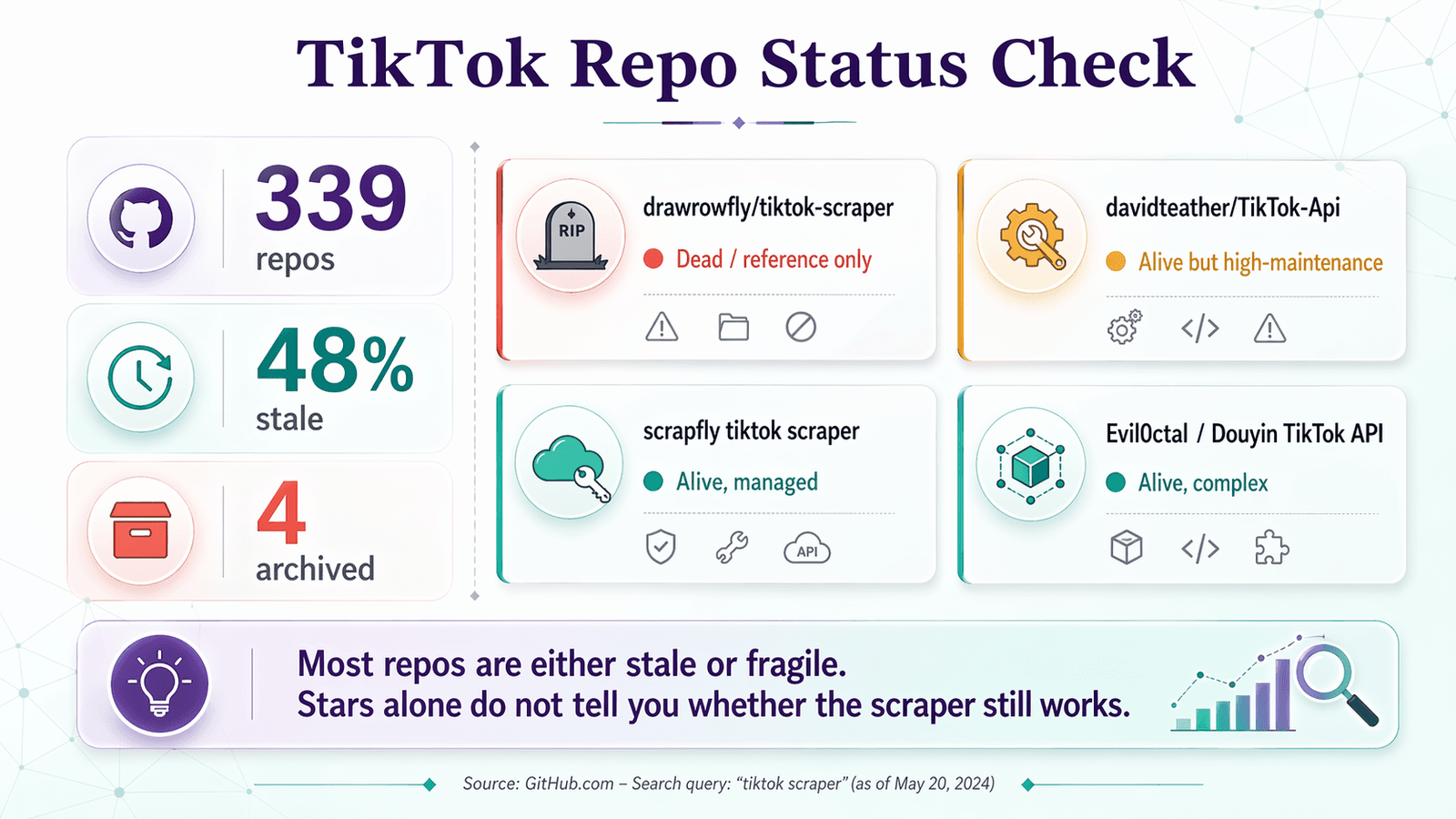
Here's the Repo Vitals Checklist applied to the repos you'll actually find when searching "tiktok scraper" on GitHub:
| Repo | Last Push | Stars | Open Issues | Verdict | Note |
|---|---|---|---|---|---|
| drawrowfly/tiktok-scraper | 2023-05-19 | 5,052 | 58 | 🔴 Dead / reference only | Still famous, but too stale for 2026 production use |
| davidteather/TikTok-Api | 2026-04-01 | 6,301 | 134 | 🟡 Alive but high-maintenance | Strongest OSS choice; expects Playwright, tokens, often proxies |
| scrapfly/scrapfly-scrapers/tiktok-scraper | 2026-04-21 | 938 (parent) | ~0 (monorepo) | 🟡 Alive, but not pure OSS | Current and useful, but requires ScrapFly API key |
| Evil0ctal/Douyin_TikTok_Download_API | 2025-10-12 | 17,397 | 135 | 🟡 Alive, broad, complex | Feature-rich multi-platform project; closer to a power-user platform |
| naseif/tiktok-scraper | 2024-07-26 | 107 | 13 | 🟡 Risky | Smaller repo with open complaints around user info and hashtag flows |
| loewehancara1rmyv/Tiktok-scraper | 2026-01-12 | 4 | 0 | 🔴 Too new to trust | Showcase repo, not community-proven |
drawrowfly/tiktok-scraper
For years, this TypeScript scraper/downloader was the default answer to "tiktok scraper github" — handling user, trend, hashtag, and music feeds. In 2026, it's best treated as historical documentation. The last push was May 2023, and the issue queue still contains unresolved "still working?" and "zero output" reports from 2023–2025. If you're reading this article because you cloned this repo and got nothing, you're in good company.
davidteather/TikTok-Api
The most credible open-source TikTok data wrapper still alive in 2026. It's active, has recent releases, and explicitly documents Playwright setup, async usage, token handling, proxy support, and session-recovery features. But it is not a "clone and go" tool. Its own README says EmptyResponseException usually means TikTok is blocking the request, and discussion history shows repeated pain around ms_token, broken comment extraction, KeyError: 'ItemModule', and endpoint-specific failures. Verdict: alive, useful, developer-only, and maintenance-heavy.
Other Notable Repos
- scrapfly/scrapfly-scrapers/tiktok-scraper: Current and technically relevant, but the README requires a
SCRAPFLY_KEY. This is a code example for a managed scraping platform, not a free standalone tool. - Evil0ctal/Douyin_TikTok_Download_API: Covers TikTok and Douyin, documents signing logic (
X-Bogus,A_Bogus,msToken), and supports comments, followers, playlists, and more. It's technically demanding and increasingly intertwined with paid API references. The issue tracker shows ongoing bug reports in 2026 around video links and user-info endpoints. Alive and feature-rich, but complex. - naseif/tiktok-scraper: Smaller, with open complaints. Risky for production use.
- loewehancara1rmyv/Tiktok-scraper: 4 stars, 0 issues, too new to trust. The Medium article that promoted it did so uncritically.
TikTok Official API vs. GitHub Scrapers vs. No-Code Tools: A Decision Framework
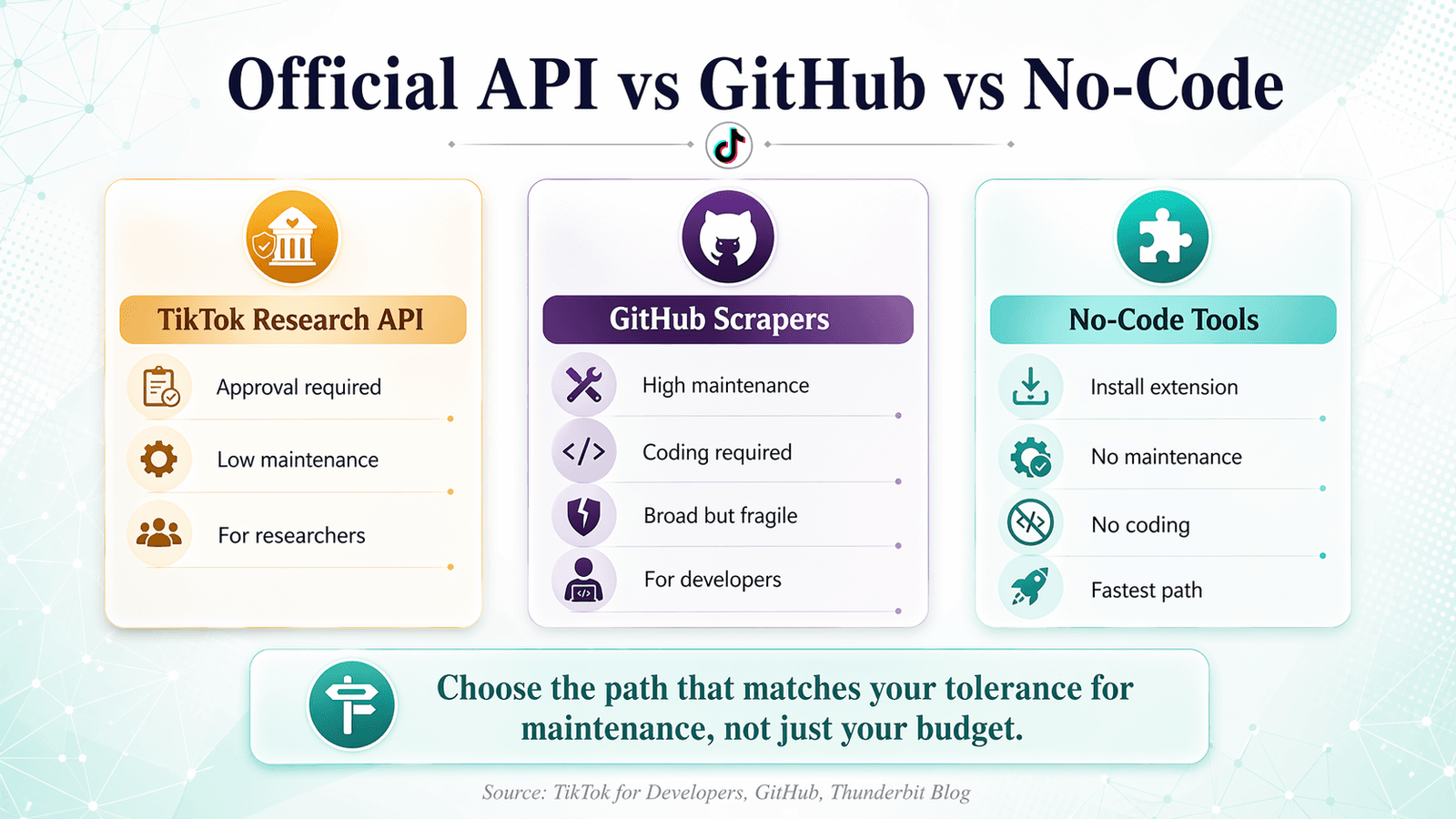
Most competitor articles either ignore TikTok's official access paths or jump straight from "use GitHub" to "buy our service." Here's a neutral comparison of all three paths:
| Factor | TikTok Research API | GitHub Scrapers | No-Code Tools (e.g., Thunderbit) |
|---|---|---|---|
| Access barrier | Academic/business application required; ~4 weeks for approval | Git clone + setup | Browser extension install |
| Data scope | Approved endpoints only (accounts, videos, comments, shops) | Broad (profiles, videos, comments, hashtags, shops) | Visible page data (profiles, videos, engagement, hashtags) |
| Maintenance burden | Low (official, stable) | High (repos break when TikTok updates) | None (AI adapts to layout changes) |
| Anti-ban risk | None (authorized) | High | Low (browser-based, mimics real user) |
| Cost | Free (if approved) | Free (but time-intensive) | Free tier available; credit-based plans from $15/mo |
| Coding required | Yes (Python/R) | Yes (Python/Node.js) | No |
| Best for | Researchers, academics, approved orgs | Developers comfortable with maintenance | Marketers, sales teams, ops, non-devs |
When the TikTok Research API Makes Sense
TikTok's Research API is the cleanest official path if you qualify. Eligible researchers in the U.S., Europe, and Brazil can apply to study public content and account data. Available data categories include accounts, followers/following, liked videos, pinned videos, reposted videos, content, comments, and shops. The codebook exposes fields like video_description, view_count, like_count, comment_count, share_count, and comment-level fields like text, reply_count, and create_time.
The downside: eligibility is limited to academic institutions and eligible nonprofit/independent researchers in specific regions, plus vetted researchers under the EU's DSA process. If you're a growth team or agency needing quick operational data, this isn't your path.
TikTok also offers a Commercial Content API for ads and advertiser content data, which is useful for transparency research but not general scraping.
When a GitHub Scraper Still Makes Sense
GitHub scrapers still make sense for developers who need unofficial access to public data beyond the official API's approval gate and are willing to maintain the stack. That includes use cases like scraping visible profile grids, hashtags, comments, playlists, or video metadata in a custom pipeline where forking the repo and patching it is acceptable.
The honest caveat: this is not a one-time setup. Even the most reliable 2026 repo, davidteather/TikTok-Api, is still telling users they may need Playwright, cookies/tokens, proxies, and custom page/session factories.
When a No-Code Tool Like Thunderbit Makes Sense
Scrape TikTok data with AI Get Started Free
Not a developer? Or a developer who's tired of the break-fix cycle? A browser-based AI tool is the fastest path to structured TikTok data.
We built Thunderbit as an AI web scraper that works as a Chrome extension. On TikTok, it reads any visible page (profile, video, hashtag, search results), suggests columns via "AI Suggest Fields," and lets you click "Scrape" to extract structured data. The TikTok scraper tool page documents fields like date posted, video duration, likes, shares, saves, comments, views, and hashtags. The image scraper template shows how to collect post thumbnails, URLs, captions, creator handles, and engagement signals from profile pages. The hashtag scraper template covers video URL, creator username, description, posted time, views, likes, comments, shares, sound/audio, and cover image URL.
Subpage scraping lets you visit each video page from a profile listing and enrich the table with engagement metrics, captions, and hashtags — useful for marketers building influencer databases or competitor content audits.
No maintenance, no installation triage, no anti-ban configuration. AI adapts to layout changes automatically. Export is free to Google Sheets, Excel, Airtable, Notion, CSV, or JSON.
If you've burned hours on broken GitHub repos, this is a legitimate alternative — not a forced product pitch.
Try Thunderbit for TikTok Scraping
Installation Triage: Fixing the 5 Most Common TikTok Scraper GitHub Setup Failures
Installation failures are the third most-mentioned pain point in TikTok scraping forums, and no major guide actually helps you fix them. Here's what goes wrong.
Node.js Version Conflicts
Problem: Many older TikTok scraper repos (especially drawrowfly/tiktok-scraper) were built for Node.js 14–16. If you're running Node 20+, npm install may fail silently or produce incompatible binaries.
Fix: Use nvm (Node Version Manager) to install and switch to the correct version:
nvm install 16
nvm use 16
npm install
If the repo doesn't specify a Node version, check the engines field in package.json or look at the CI config.
Python Dependency Issues and Playwright Setup
Problem: davidteather/TikTok-Api requires Python 3.9+ and Playwright with specific browser binaries. Users get errors like "browser not found" or dependency conflicts.
Fix: Always use a virtual environment, then install Playwright browsers explicitly:
python -m venv .venv
source .venv/bin/activate   # On Windows: .venv\Scripts\activate
pip install TikTokApi
python -m playwright install
If playwright install fails, check your system's package manager for missing system dependencies (e.g., libnss3 on Ubuntu).
Linux/Ubuntu Permission Errors
Problem: Running sudo pip install corrupts the system Python environment and leads to cascading dependency issues.
Fix: Never use sudo pip install. Always create a virtual environment first:
python3 -m venv .venv
source .venv/bin/activate
pip install -r requirements.txt
This isolates the scraper's dependencies from your system Python.
Windows Path and Encoding Problems
Problem: Windows CMD has encoding issues and path length limitations that break scraper installations, especially when Playwright downloads browser binaries to deeply nested directories.
Fix: Use WSL (Windows Subsystem for Linux) or Git Bash instead of CMD. WSL gives you a full Linux environment inside Windows:
wsl --install
# Then open a WSL terminal and follow the Linux setup steps
The Docker Shortcut: Skip Dependency Issues Entirely
Problem: All of the above.
Fix: If you're comfortable with Docker, containerize the scraper environment. A basic Dockerfile for a Python-based TikTok scraper looks like this:
FROM python:3.11-slim
RUN apt-get update && apt-get install -y libnss3 libatk-bridge2.0-0 libdrm2 libxcomposite1 libxdamage1 libxrandr2 libgbm1 libasound2
RUN pip install TikTokApi playwright && python -m playwright install --with-deps chromium
WORKDIR /app
COPY . .
CMD ["python", "scrape.py"]
This guarantees a reproducible environment regardless of your host OS. If the scraper works in Docker, any failure outside Docker is an environment issue, not a code issue.
Troubleshooting flowchart:
- Can the repo run its own example successfully? → If no, check runtime version.
- Runtime version correct? → Check browser/Playwright install.
- Browser installed? → Check tokens/cookies.
- Tokens/cookies valid? → Check whether TikTok is blocking the session.
- All of the above fail? → Assume repo breakage, not user error. Switch tools.
Anti-Ban Best Practices for TikTok Scraping (Without Paying for Proxies)
Forum users repeatedly complain about bans and detection: "they get your accounts banned, which is an added expense" and "without using Apify or expensive paid APIs." Here are free, practical workarounds that don't require a paid proxy subscription.
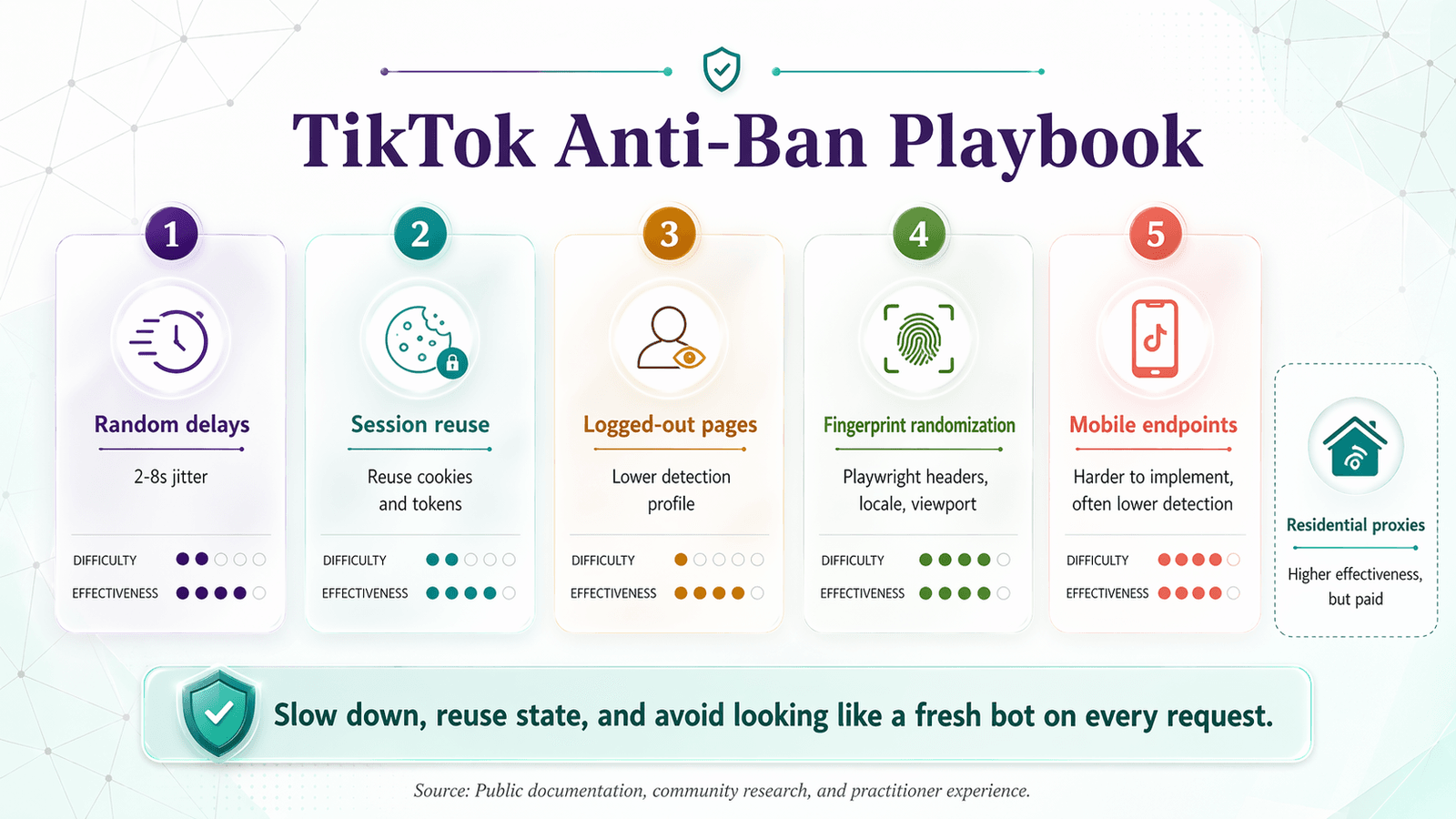
| Practice | Difficulty | Cost | Effectiveness |
|---|---|---|---|
| Random request delays (2–8s jitter) | Easy | Free | Moderate |
| Session/cookie rotation | Medium | Free | Moderate |
| Scraping logged-out public pages only | Easy | Free | Moderate |
Respecting robots.txt + rate-limit headers | Easy | Free | Baseline |
| Headless browser fingerprint randomization (Playwright) | Medium | Free | High |
| Using TikTok's mobile API endpoints (lower detection) | Hard | Free | High |
| Residential proxy rotation | Medium | $20–100/mo | High |
Free Techniques That Actually Help
Random request delays. Don't fire requests in a tight loop. Add 2–8 seconds of random jitter between requests. This is the single easiest thing you can do:
import time, random
time.sleep(random.uniform(2, 8))
Session and cookie reuse. Don't create a brand-new session for every request. Reuse cookies and session state across a batch of requests, then rotate. This is exactly why modern repos ask for ms_token rather than promising stateless scraping.
Scrape logged-out public pages. TikTok-Api explicitly says it does not support user-authenticated routes and only works on data visible when logged out. Logged-out scraping has a lower detection profile than authenticated sessions.
Respect robots.txt. TikTok's current robots.txt blocks many agents entirely and only allows a limited set of public paths for general crawling. It's not a green light for aggressive scraping, but respecting it reduces the chance of immediate IP blacklisting.
Intermediate Techniques for Higher Success Rates
Headless browser fingerprint randomization. If you're using Playwright, randomize the viewport size, user-agent string, timezone, and locale for each session. This makes your scraper look like a different real user each time, rather than the same bot with a fresh IP.
Using TikTok's mobile API endpoints. Some community members report lower detection rates when targeting mobile-style endpoints rather than the web frontend. This is harder to implement and less documented, but it's a real technique for advanced users.
When You Do Need a Proxy (and Affordable Options)
At scale, free techniques aren't enough. Residential proxy rotation is the standard approach for large-volume TikTok scraping. I won't endorse a specific paid proxy service here, but the general advice is: avoid datacenter proxies (TikTok flags them aggressively) and look for residential or mobile proxy pools with per-request rotation.
Alternatively, browser-based tools like Thunderbit sidestep the proxy question entirely because they run in your own browser session, mimicking a real user. That doesn't make them immune to detection at scale, but for typical marketing or research use cases (dozens to hundreds of pages, not millions), it's a much simpler path.
What Data Do You Actually Get? Real Output Samples from TikTok Scrapers
Users want to know what data they'll actually get before committing to a tool — and most guides skip this entirely. Here are representative field structures grounded in source documentation.
Profile Data
| Username | Display Name | Followers | Following | Total Likes | Bio | Verified | Profile URL |
|---|---|---|---|---|---|---|---|
| @examplecreator | Jane Doe | 1,240,000 | 312 | 48,700,000 | "Cooking + comedy 🍳" | ✅ | tiktok.com/@examplecreator |
| @travelwithmark | Mark S. | 890,000 | 150 | 22,100,000 | "Travel vlogger 🌍" | ❌ | tiktok.com/@travelwithmark |
| @fitnessmaya | Maya L. | 2,100,000 | 88 | 91,300,000 | "Workouts & wellness" | ✅ | tiktok.com/@fitnessmaya |
Available from: GitHub scrapers (TikTok-Api, Evil0ctal), Research API, Thunderbit (from visible profile pages).
Video Metadata
| Video URL | Caption | Views | Likes | Comments | Shares | Music | Hashtags | Post Date | Duration |
|---|---|---|---|---|---|---|---|---|---|
| tiktok.com/@ex/video/123 | "Best pasta trick ever 🍝" | 4,200,000 | 312,000 | 8,400 | 21,000 | "Italian Vibes – DJ Marco" | #pasta #cooking #hack | 2026-03-15 | 0:42 |
| tiktok.com/@ex/video/456 | "POV: your cat judges you" | 9,100,000 | 1,100,000 | 23,000 | 55,000 | "Original Sound" | #cat #pov #funny | 2026-04-01 | 0:18 |
| tiktok.com/@ex/video/789 | "Morning routine nobody asked for" | 1,800,000 | 98,000 | 3,200 | 7,500 | "Chill Morning – LoFi" | #routine #morning | 2026-04-10 | 1:02 |
Available from: GitHub scrapers (TikTok-Api, Evil0ctal), Research API (fields include video_description, view_count, like_count, comment_count, share_count, music_id, hashtag_names, video_duration), Thunderbit (video-level fields).
Comments Data
| Commenter | Comment Text | Likes | Timestamp | Replies |
|---|---|---|---|---|
| @user_abc | "I tried this and it actually works 😂" | 1,200 | 2026-03-16T08:12:00Z | 14 |
| @chef_dan | "Add garlic next time, trust me" | 890 | 2026-03-16T09:45:00Z | 7 |
| @randomfan99 | "This is the content I'm here for" | 340 | 2026-03-16T11:30:00Z | 2 |
Available from: GitHub scrapers (TikTok-Api, Evil0ctal), Research API (fields include text, like_count, reply_count, create_time), Thunderbit (from visible comment sections).
Hashtag and Search Data
| Hashtag | Top Video URL | Aggregate Views | Trending |
|---|---|---|---|
| #pasta | tiktok.com/@ex/video/123 | 4,200,000 | Yes |
| #cooking | tiktok.com/@chef/video/321 | 11,000,000 | Yes |
| #hack | tiktok.com/@tips/video/654 | 2,900,000 | No |
Available from: GitHub scrapers (varies by repo), Thunderbit (hashtag scraper template).
Note: No single repo guarantees all fields all the time. TikTok response structures shift, and even maintainers warn about that. Treat these as representative, not guaranteed.
How to Scrape TikTok Data in 2 Clicks with Thunderbit (Step-by-Step)
Tired of the break-fix cycle? Here's the no-code path — the escape hatch for anyone who's tried and failed with GitHub repos.
- Install the Thunderbit Chrome Extension.
- Navigate to the TikTok page you want to scrape — a profile, search results page, hashtag page, or individual video.
- Click "AI Suggest Fields." Thunderbit's AI reads the page and suggests columns: username, followers, video caption, likes, hashtags, etc.
- Adjust fields if needed, then click "Scrape." Data populates in a structured table.
- Use Subpage Scraping to enrich data. Click into each video from a profile listing and pull additional fields: full caption, music details, comment count, share count.
- Export to Google Sheets, Excel, Airtable, or Notion — completely free.
No maintenance, no installation triage, no anti-ban configuration. The AI adapts to TikTok layout changes automatically.
Enriching TikTok Data with Subpage Scraping
After scraping a list of videos from a profile or hashtag page, click "Scrape Subpages" to have the AI visit each video page and pull additional fields. This is especially useful for marketers building influencer databases or running competitor content audits — you get a full table of video-level engagement data without manually clicking through dozens of pages.
Exporting and Using Your TikTok Data
Thunderbit exports to Google Sheets, Excel, Airtable, Notion, CSV, or JSON — all free. Common use cases:
- Drop data into a spreadsheet for engagement analysis.
- Send to Airtable for a CRM-style influencer tracker.
- Push to Notion for team collaboration on content research.
For a deeper look at how Thunderbit handles web data extraction, check out our web scraping beginners guide or watch tutorials on the Thunderbit YouTube Channel.
Staying Legal: TikTok Terms of Service and Scraping Compliance
TikTok's legal position is clear. The platform's privacy blog on scraping says its Terms of Service prohibit automated scripts collecting information or interacting with the service in unauthorized ways, and explicitly mentions bypassing access restrictions. TikTok's Community Guidelines also prohibit deceptive attempts to obtain information via automated scripts or web crawling.
Practical guidance:
- Stick to publicly available data. Don't scrape private or login-gated content.
- Respect rate limits. Don't hammer TikTok's servers.
- Comply with data privacy laws. GDPR and CCPA still apply if you're collecting, storing, or analyzing personal data.
- Use the Research API when eligible. It's the safest path from a compliance perspective.
- This is not legal advice. Consult a professional for your specific situation.
For more on the legal landscape, see our web scraping legal implications guide.
What to Do When Your TikTok Scraper GitHub Repo Dies
The short version:
- Always run the 60-second Repo Vitals Checklist before cloning any TikTok scraper from GitHub. Most repos are already dead.
- Understand your options. Official API, GitHub scrapers, and no-code tools each serve different users and use cases.
- If you go the GitHub route, budget time for installation troubleshooting and anti-ban configuration. Expect ongoing maintenance.
- Know what data you'll actually get before committing to a tool. Check the output fields, not just the star count.
- If you're not a developer (or you're tired of broken repos), try a no-code tool like Thunderbit — two clicks, structured data, free export.
The TikTok data you need is accessible. The question is whether you want to spend your time maintaining a scraper or actually using the data. Pick the approach that fits your skill level and use case, and don't let a dead GitHub repo waste another afternoon.
Try Thunderbit for TikTok Data
FAQs
Are there any TikTok scrapers on GitHub that still work in 2026?
Yes, but the list is short. davidteather/TikTok-Api is the most credible open-source option with active maintenance as of April 2026. Evil0ctal/Douyin_TikTok_Download_API is also alive but more complex. The most-starred repo, drawrowfly/tiktok-scraper, has not been updated since May 2023 and is effectively dead. Always run the Repo Vitals Checklist before investing time in any repo.
Is it legal to scrape TikTok?
TikTok's Terms of Service explicitly prohibit automated scraping. Publicly visible data occupies a legal gray area that varies by jurisdiction. The safest path is the official Research API for eligible researchers. If you scrape public data, stick to publicly accessible content, respect rate limits, and comply with GDPR/CCPA. This is not legal advice — consult a professional for your situation.
Can I scrape TikTok without coding?
Yes. Browser-based AI tools like Thunderbit let you extract structured TikTok data (profiles, video metadata, hashtags, engagement metrics) without writing any code. The TikTok Research API also requires minimal coding for approved applicants. For non-developers, no-code tools are the fastest and most reliable path.
What data can I get from a TikTok scraper?
Common data types include profile information (username, followers, bio, verified status), video metadata (caption, views, likes, comments, shares, music, hashtags, duration, post date), comments (text, likes, timestamp, replies), and hashtag/search data (top videos, aggregate views, trending status). The exact fields depend on the tool and method — see the output samples section above for details.
Why does my TikTok scraper keep getting blocked?
TikTok uses multiple layers of anti-bot defense: rate limiting, cookie/session gating, browser fingerprinting, behavioral detection, encrypted request parameters, and CAPTCHA flows. Common causes of blocking include sending requests too fast, using a clean/new session for every request, running a headless browser with default fingerprints, or using datacenter proxies. See the anti-ban best practices section above for free and paid workarounds.




