
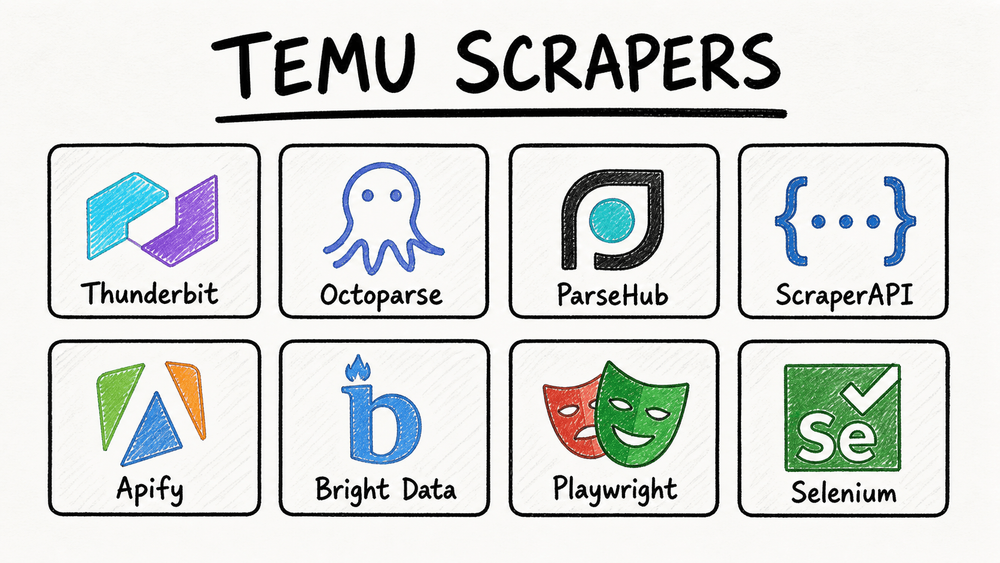
Temu now reaches over 416 million monthly active users across more than 50 markets. Its product catalog touches everything from kitchen gadgets to pet accessories to LED strips. If you're in ecommerce, dropshipping, or competitive intelligence, you've probably wanted to pull Temu data into a spreadsheet — and then discovered that Temu really, really doesn't want you to.
I've spent a lot of time researching and testing scraping tools for protected ecommerce sites. Temu is one of the trickiest targets out there. Most online guides either hand you a Python tutorial that breaks within a week or point you toward enterprise APIs that cost more than your monthly ad budget.
The reality is that most business users — dropshippers, solo operators, marketing teams — just want a clean spreadsheet of product names, prices, images, ratings, and seller info. They don't want to debug Playwright scripts at 2am.
This guide is built around that gap: a practical, skill-level-organized breakdown of the best Temu scrapers that actually work in 2026, plus the best practices that turn a raw scrape into ongoing competitive intelligence. Whether you're a total beginner or a developer building a data pipeline, there's a section here for you.
Try Thunderbit for Temu Scraping
Why Scrape Temu? Top Use Cases for Business Teams
Temu data isn't just interesting — it's strategically useful.
The platform has become a price-setting force in low- and mid-ticket product categories. Even if you don't sell on Temu, your customers are comparing your prices against what they see there. Here's how different teams use Temu data:
| Use Case | Data Needed | Why It Matters |
|---|---|---|
| Dropshipping product research | Title, price, image, rating, review count, sold count, variants | Finds low-cost products with demand signals for comparison across Amazon, Shopify, AliExpress, TikTok Shop |
| Competitive pricing | Current price, original price, discount %, currency, shipping, timestamp | Builds a baseline for pricing strategy and promotion planning |
| Product sourcing | Specs, images, variants, seller/shop, item ID, category | Identifies product types and supplier-style listings worth deeper verification |
| Market trend analysis | Search keyword, category, sold count, review count, rating | Shows which products are gaining traction across categories |
| Marketing and creative research | Title, image, review count, rating, descriptions, category labels | Reveals messaging, visual hooks, bundles, and claims used by high-volume listings |
| Stock and availability monitoring | Product URL, availability, shipping estimate, price, timestamp | Captures stock-outs, local warehouse changes, and price moves over time |
The audience searching "best Temu scrapers" tends to split into three groups. Non-technical users want a Chrome extension that outputs a spreadsheet. Semi-technical operators want a visual tool with templates and scheduling. Developers want an API, a Playwright script, and a proxy strategy.
This article covers all three — but it starts with the biggest group: people who need data, not code.
What Makes the Best Temu Scrapers Stand Out in 2026
A scraper that handles Amazon or Shopify won't necessarily survive Temu. The evaluation criteria for this article are:
- Reliability on Temu — Does it actually return clean data, or does it get blocked, return empty rows, or break after a layout change?
- Ease of use — Can a non-technical business user start without writing code?
- Data completeness — Does it support subpage enrichment (visiting each product detail page for specs, variants, seller info)?
- Maintenance burden — Does it adapt when Temu changes its page structure?
- Scheduling and monitoring — Can it run recurring scrapes and export to a living data destination?
- Export destinations — CSV, Excel, Google Sheets, Airtable, Notion, JSON?
- Cost clarity — What does a realistic Temu scraping workflow actually cost per month?
Community reports on Reddit's r/webscraping consistently describe Temu as one of the hardest ecommerce sites to scrape. One user wrote that they "can't even get a price as a buyer," while another noted that Temu and Shopee have teams continuously strengthening anti-bot mechanisms. Temu-specific failure-rate data isn't publicly benchmarked, but the 2025 Imperva Bad Bot Report found that automated traffic overtook human traffic, with bots making up 51% of all internet traffic. That's the environment Temu is defending against.
Temu's Anti-Bot Defenses: Why Most Scrapers Fail
Most articles about Temu scraping spend one sentence on anti-bot measures: "Temu uses anti-bot." That's not helpful.
If you're choosing a tool, you need to know which defenses Temu uses and which tool capabilities defeat each one. Here's the practical map:
| Temu Defense | What It Does | Tool Capability Needed | Example Tools |
|---|---|---|---|
| Cloudflare WAF / browser checks | Blocks automated user-agents, fingerprints bots, returns challenge pages | Cloud infrastructure with rotating residential IPs and real browser fingerprints | Thunderbit (cloud scraping), Bright Data, Oxylabs, ScraperAPI |
| Heavy JavaScript rendering | Product data loads via JS; raw HTML is empty | Headless browser or full browser rendering | Thunderbit (browser scraping mode), Playwright, Selenium, ParseHub, Apify browser actors |
| Dynamic CSS selectors | Class names change between deployments, breaking CSS-based scrapers | AI-based field detection (not reliant on fixed selectors) | Thunderbit (AI reads page fresh each time), Bright Data AI scraper builder |
| Rate limiting | Throttles rapid sequential requests | Concurrent cloud requests with intelligent throttling | Thunderbit (up to 50 pages at a time via cloud), ScraperAPI, Bright Data |
| CAPTCHA challenges | Interrupts sessions after suspicious behavior | Built-in CAPTCHA solving or lower-trigger strategy | Bright Data, Oxylabs, ScraperAPI premium/ultra-premium |
| Infinite scroll / lazy loading | Only first products appear without interaction | Smart scrolling, pagination detection, interaction automation | Thunderbit pagination, Apify smart scrolling, Octoparse workflow builder |

Cloudflare WAF and IP Blocking
Temu's front door is guarded by Cloudflare-style browser integrity checks. Basic HTTP requests — the kind a simple Python requests.get() call makes — get challenged, 403'd, or served incomplete data.
Tools that work here need rotating residential or mobile IPs and real browser fingerprints. Cloudflare's 2025 Radar review reported that non-AI bots started 2025 responsible for roughly half of HTML page requests. That's the scale of automation platforms like Temu are defending against.
JavaScript Rendering and Dynamic Selectors
This is where most beginner scrapers fail silently.
If you view Temu's page source, you'll often find an empty shell — the actual product cards, prices, and images are injected by JavaScript after the page loads. A scraper that only reads raw HTML will return nothing useful. On top of that, Temu's CSS class names and DOM structures change between deployments. A scraper that relies on a fixed CSS selector like .product-card__price will work today and return empty columns tomorrow.
AI-based scrapers (like Thunderbit) read the page semantically each time, so they don't depend on specific class names staying the same.
Rate Limiting and CAPTCHA Challenges
Hit Temu too fast or too many times from one IP, and you'll trigger rate limits or CAPTCHA challenges. Some tools handle this with intelligent throttling and built-in CAPTCHA solving. Others leave it to you — which, for a non-technical user, is basically a dead end.
For cloud scraping, the key is concurrent requests spread across clean IPs with automatic retry logic.
Best Temu Scrapers by Skill Level: A Complete Breakdown
Find your row and jump to the section that fits:
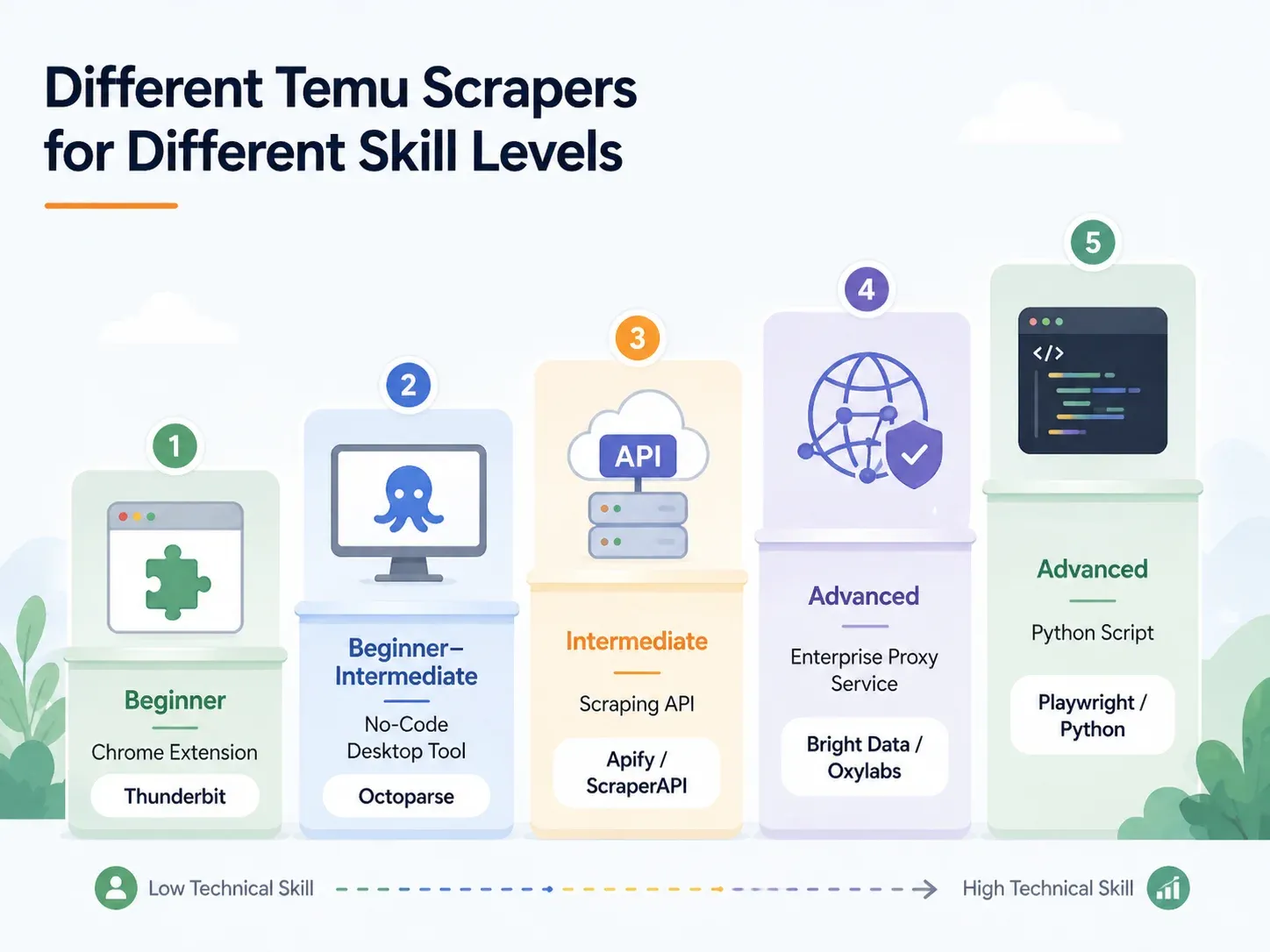
| Approach | Skill Level | Setup Time | Anti-Bot Handling | Best For |
|---|---|---|---|---|
| AI Chrome Extension (e.g., Thunderbit) | Beginner | < 2 min | Handled (cloud or browser) | Dropshippers, marketers, ecommerce ops |
| No-Code Desktop Tool (e.g., Octoparse, ParseHub) | Beginner–Intermediate | 10–60 min | Partial (proxy config needed) | Regular scraping with templates |
| Scraping API/Service (e.g., ScraperAPI, Apify) | Intermediate | 15–45 min | Built-in | Developers integrating into pipelines |
| Managed Proxy/Enterprise (e.g., Bright Data, Oxylabs) | Advanced/Enterprise | Hours–Days | Full infrastructure | High-volume, warehouse delivery |
| Custom Python Script (Playwright/Selenium) | Advanced | 1–4 hrs+ | Manual (proxy + CAPTCHA setup) | Full control, edge-case customization |
Thunderbit: Best Temu Scraper for Non-Technical Users
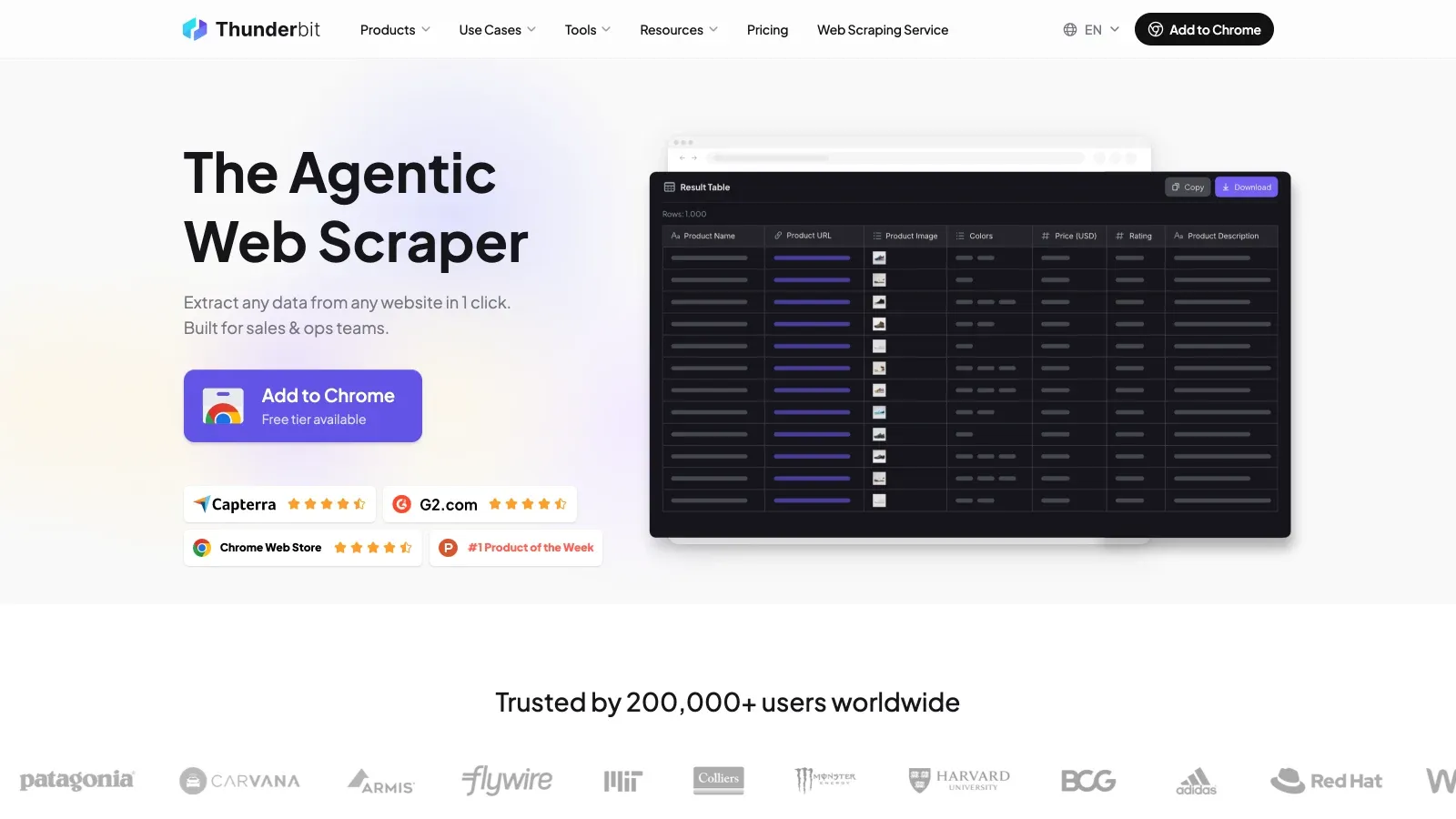
Thunderbit is an AI-powered Chrome extension built for business users — sales teams, ecommerce operators, dropshippers, marketers — who need structured data from websites without writing code. I work on the Thunderbit team, so I know the product well. I'll be straightforward about what it does and where it fits.
The core workflow is one click: open a Temu page and click One-Click Extract — AI Suggest Fields proposes the columns (product name, price, image, rating, etc.) and the run proceeds on its own unless you step in.
Thunderbit's AI reads the page structure and proposes column names and data types automatically. It doesn't rely on fixed CSS selectors, so when Temu changes its class names or card layout, the scraper adapts.
Key features for Temu:
- Cloud scraping mode: Faster for public pages, processes up to 50 pages at a time. Best for category pages, search results, and product listings that don't require a login.
- Browser scraping mode: Uses your current Chrome session, including cookies, locale, and login state. Best when region, popups, or logged-in content affects what the page shows.
- Scrape Subpages: After scraping a listing page, click "Scrape Subpages" to visit each product detail page and append columns like full description, variants, seller info, shipping estimate, and specs — with zero extra configuration.
- Field AI Prompts: Categorize, translate, or reformat data during the scrape. For example: "Categorize this product into Kitchen Utensils, Small Appliances, Storage, or Other."
- Scheduled scraping: Set a natural-language schedule ("every Monday at 9am"), input URLs, and Thunderbit runs the scrape in the cloud and exports to Google Sheets, Airtable, or another destination.
- Free exports: Excel, CSV, Google Sheets, Airtable, Notion, JSON — no paywall on export. Images export as actual attachments in Airtable and Notion.
Pricing: free tier with up to 6 pages per month; paid plans start around $15/month (monthly) or $9/month (yearly) for 500 credits, with 1 credit = 1 output row.
Scrape Temu Data with AI Get Started Free
Side-by-Side: Thunderbit vs. Python Script on the Same Temu Page
The contrast is stark:
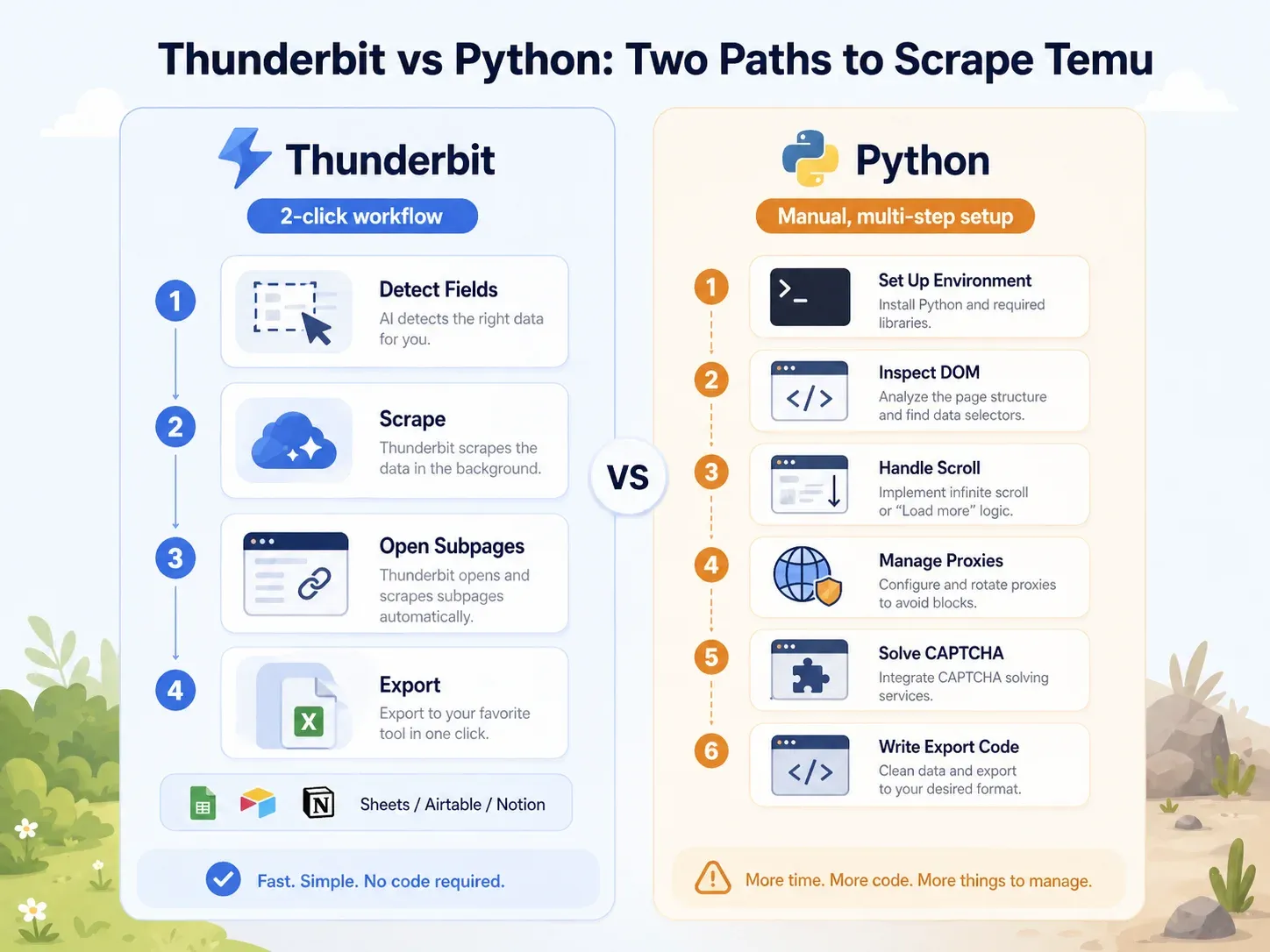
| Task | Thunderbit | Python (Playwright) |
|---|---|---|
| Open Temu category page | Open page in Chrome | Set up Python env, install Playwright, install browsers |
| Identify fields | Click "AI Suggest Fields" | Inspect DOM, network calls, JSON payloads |
| Handle dynamic loading | Browser/cloud mode + pagination | Write scroll/wait logic, intercept requests |
| Handle blocks | Try cloud mode or browser mode | Add proxies, headers, fingerprinting, retries, CAPTCHA |
| Extract listing fields | Click "Scrape" | Write selectors or API parsing logic |
| Enrich product pages | Click "Scrape Subpages" | Build a separate PDP crawler |
| Export | Click Sheets/Airtable/Notion/Excel | Write CSV/JSON/Sheets integration code |
| Typical setup for a business user | Under 2 minutes | 1–4 hours minimum; ongoing maintenance |
A minimal Playwright prototype for Temu might look like this (pseudocode — not production-ready):
from playwright.sync_api import sync_playwright

with sync_playwright() as p:
    browser = p.chromium.launch(headless=False)
    page = browser.new_page()
    page.goto("https://www.temu.com/search_result.html?search_key=kitchen+organizer")
    page.wait_for_load_state("networkidle")
    for _ in range(8):
        page.mouse.wheel(0, 2000)
        page.wait_for_timeout(1200)
    cards = page.locator("[data-product-id], a[href*='goods.html']")
    # Production code still needs selectors, proxies, retries,
    # CAPTCHA handling, PDP crawling, and export logic.
    print(cards.count())
That's 10+ lines before you've extracted a single field, and you haven't touched proxies, CAPTCHA, PDP enrichment, or export. For a non-technical user, Thunderbit compresses that entire workflow into a couple of clicks. For a developer, the Python route offers more control — but at a much higher maintenance cost.
Octoparse and ParseHub: No-Code Desktop Temu Scrapers
If you want more control than a Chrome extension but don't want to write code, Octoparse and ParseHub are the main options.
Octoparse has a public Temu Details Scraper template. Its sample output includes product IDs, titles, prices, seller/shop data, image URLs, discounts, shop URLs, and detailed specifications. That's a real advantage — you can start with a template rather than building a workflow from scratch. Octoparse also supports cloud extraction, scheduling, and visual workflow building.
The caveats for Temu:
- Anti-bot add-ons (residential proxies at $3/GB, CAPTCHA solving at $1–$1.50 per thousand) can add up.
- Templates can break when Temu changes its layout. You may need to update selectors or wait for Octoparse to maintain the template.
- Setup takes 10–60 minutes depending on page complexity.
Octoparse pricing: free plan with 10 tasks and 50K monthly data export; Standard from $69/month and Professional $249/month, both billed annually (month-to-month costs more). Add-ons for proxies, CAPTCHA, and managed services are extra.
ParseHub is a visual desktop/web scraper that handles dynamic pages well (it runs a full Chromium browser). However, paid plans start at $189/month, which is steep for a solo operator. No strong public Temu-specific template was found in my research. ParseHub is a better fit for teams already comfortable building visual scraping projects.
| Tool | Strengths for Temu | Weaknesses on Temu | Pricing |
|---|---|---|---|
| Octoparse | Public Temu template, visual workflow, cloud extraction, scheduling | Template maintenance, anti-bot add-ons add cost | Free; from $69/mo Standard and $249/mo Pro (billed annually); add-ons extra |
| ParseHub | Dynamic page handling, project workflow builder, IP rotation on paid plans | Higher entry price, no public Temu template found | Paid plans from $189/mo |
Scraping APIs: ScraperAPI, Apify, and Bright Data for Temu
API-based scraping services handle proxies, rendering, and anti-bot logic so developers can focus on parsing and storing data. They fit when you're building a pipeline, not running a one-off spreadsheet export.
ScraperAPI is a developer API for proxy rotation and rendering. Its pricing page lists a 7-day trial with 5,000 credits, Hobby at $49/month for 100,000 credits, and higher tiers from there. The catch for Temu: JavaScript rendering and premium proxy pools cost 10–75 credits per request depending on the tier. That credit multiplication means your effective cost per row can be much higher than the headline price.
Apify is a platform with a marketplace of pre-built "actors" (scrapers). Multiple Temu actors exist. One community-maintained Temu Scraper lists pay-per-event pricing around $5 per 1,000 products on the free tier. Another Temu Products Scraper lists $4 per 1,000 results. The risk: actor quality varies, maintenance is community-dependent, and some actors may be deprecated or break when Temu updates. Always check the "last modified" date and user ratings before committing.
Bright Data is the enterprise option. Its Temu scraper page says jobs run on Bright Data infrastructure with proxy rotation, geo-targeting, CAPTCHA/unblocking logic, and autoscaling. Output formats include JSON, CSV, Parquet, and direct delivery to S3, GCS, Azure Blob, BigQuery, and Snowflake. Industry reviews report Web Scraper API pay-as-you-go around $1.5 per 1,000 records, with committed plans beginning around $499/month. Powerful, but priced for teams with real budgets.
Oxylabs also has a dedicated Temu Scraper API page. Plans start at $49/month, with a free trial of up to 2,000 results. It's a strong alternative to Bright Data for developer teams who want structured Temu data via API.
| API/Platform | Temu-Specific Evidence | Strength | Weakness | Best For |
|---|---|---|---|---|
| ScraperAPI | No Temu-specific page found, but ecommerce anti-bot features documented | Simple endpoint, JS rendering, premium proxies | Credit multipliers for premium features; developers must parse data | Developer pipelines |
| Apify | Multiple Temu actors in marketplace | Fastest developer path if actor matches and is maintained | Actor quality varies; some deprecated | Developers who want actor marketplace + scheduling |
| Bright Data | Dedicated Temu scraper page | Enterprise infrastructure, unblocking, warehouse delivery | Expensive; web-scraping concepts still required | Enterprise-scale data teams |
| Oxylabs | Dedicated Temu Scraper API page | Clear per-result pricing, JS handling, IP/CAPTCHA claims | Developer API workflow | Developer teams needing Temu API access |
Custom Python Scripts (Playwright/Selenium): Full Control, High Effort
Custom Python scrapers offer maximum flexibility — that's the upside. Playwright is generally a better starting point than Selenium for Temu because of its auto-waiting model and better handling of JavaScript-heavy pages.
But the tradeoff is brutal.
A prototype takes 1–4 hours. A production scraper needs proxy rotation, realistic browser fingerprints, CAPTCHA strategy, retries, schema validation, output storage, monitoring, alerting, and legal review.
And it breaks. Reddit scraping communities repeatedly describe modern ecommerce scraping as unstable when sites use Cloudflare, JavaScript rendering, and anti-bot fingerprints.
| Failure Mode | Typical Cause | Mitigation |
|---|---|---|
| Empty HTML / missing products | JS loads product cards after initial HTML | Use Playwright, wait for network and DOM |
| Only first few products | Infinite scroll / lazy loading | Scroll loop, network idle waits, card-count thresholds |
| Prices missing or inconsistent | Region/session/currency state or anti-bot response | Set locale, cookies, geotargeted proxy |
| 403 / challenge / CAPTCHA | IP reputation, headless fingerprint, request rate | Residential proxies, stealth browser, lower rate |
| Selector breakage | DOM/class changes, A/B tests | Semantic extraction or API parsing if available |
Custom scripts are not the "free" option. They shift cost from subscription fees to developer time, proxy bills, CAPTCHA costs, and maintenance risk. If you have a scraping engineer on staff and need unusual logic, this is the right path. For everyone else, it's the most expensive option in practice.
Best Practice: Subpage Scraping for Complete Temu Product Data
This is the single most impactful best practice in this article — and almost no other guide covers it.
A Temu category or search page shows you the basics: title, thumbnail, price, rough rating. But the fields that actually make a row actionable — detailed descriptions, variant lists, full review counts, shipping estimates, seller names, specification tables — live on the product detail page (PDP).
If you only scrape the listing page, you're working with a partial dataset.
The two-step workflow:
- Step 1 — Scrape the listing page (PLP): Extract product name, price, thumbnail, rating from a Temu search or category page.
- Step 2 — Enrich via subpage scraping: Visit each product's PDP and append columns like full description, number of reviews, variant options, shipping time, seller info.
Here's what the data looks like before and after:
| Field | From PLP (Step 1) | Added from PDP (Step 2) |
|---|---|---|
| Product Title | ✅ | — |
| Price | ✅ | ✅ (verified / discount %) |
| Thumbnail | ✅ | — |
| Star Rating | ✅ | ✅ (with review count) |
| Full Description | ❌ | ✅ |
| Variants (sizes, colors) | ❌ | ✅ |
| Seller Name | ❌ | ✅ |
| Shipping Estimate | ❌ | ✅ |
| Detailed Specs | ❌ | ✅ |
In Thunderbit, this is one click: after your initial scrape, click "Scrape Subpages." The AI visits each product URL and appends the additional columns — no extra configuration, no separate spider, no selector maintenance. Octoparse's Temu Details template and Apify's Temu actor also support PDP-level fields, but with more setup and maintenance. In Python, you'd need to build a separate PDP crawler, maintain its selectors, and handle pagination within detail pages — a significant additional investment.
Best Practice: Scheduled Temu Scraping for Ongoing Price and Stock Monitoring
One-time scrapes are useful for product discovery. Competitive intelligence requires repeated observation.
Prices change, products go out of stock, new items appear daily, and discount depth shifts with promotions. A weekly or daily scrape creates a history table your team can actually act on.
Three use cases worth automating:
- Price monitoring: Track a competitor's top 50 Temu SKUs weekly. Get updated prices exported automatically to Google Sheets for at-a-glance comparison against your own pricing.
- Stock and availability monitoring: Detect when a trending product goes out of stock, a new variant appears, or shipping estimates change.
- New product/trend detection: Schedule a daily scrape of Temu's "New Arrivals" or a priority category page. Sort by sold count or review count to spot rising products early.
In Thunderbit, you set this up by describing the interval in natural language ("every Monday at 9am"), inputting your target URLs, and clicking "Schedule." The scrape runs in the cloud and exports to your chosen destination. Because the AI reads the page fresh each time, scheduled scrapes adapt to Temu's layout changes automatically — you don't need to update selectors when Temu redesigns a product card.
The alternative: set up a cron job, maintain a Python script, configure proxy rotation, build an output pipeline, and fix selectors every time Temu changes its layout. For a non-technical team, that's a non-starter. For a developer, it's ongoing overhead. Apify and Bright Data also support scheduled runs, but with more technical setup and higher cost floors.
Best Practice: The End-to-End Temu Data Workflow (Scrape → Clean → Export → Act)
Most scraping guides end at "download CSV."
But business users need data inside the tools they actually work with — Google Sheets for collaboration, Airtable for product databases, Notion for team dashboards. The real best practice is an end-to-end workflow:
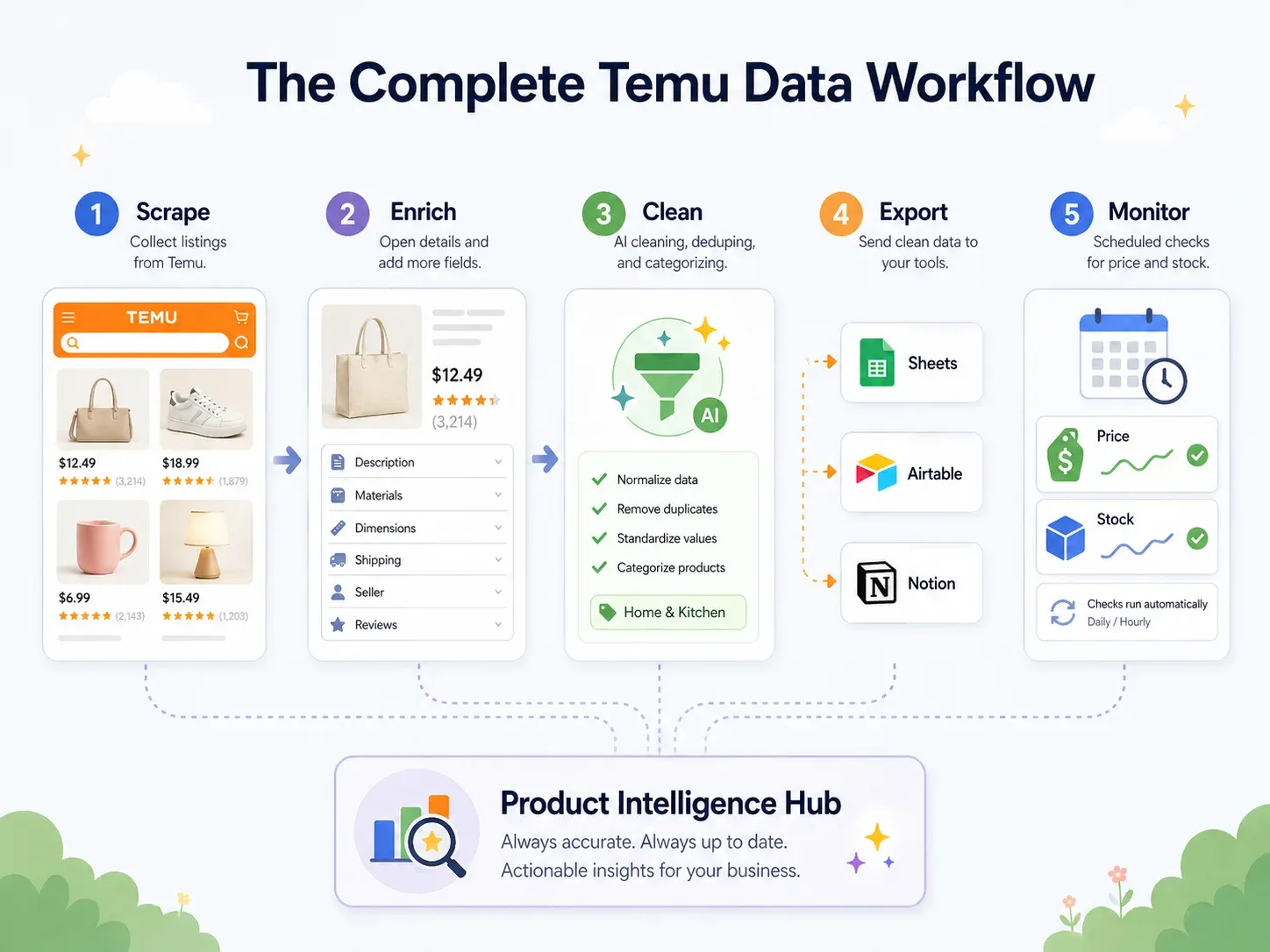
| Workflow Step | What Happens | Thunderbit Capability |
|---|---|---|
| Scrape | Extract data from Temu pages | AI Suggest Fields → Scrape (2 clicks) |
| Enrich | Visit each product's detail page | Scrape Subpages (1 click) |
| Clean & Label | Categorize products, normalize prices, translate titles | Field AI Prompt — label, format, translate during scrape |
| Export | Push data to business tools | Free export to Excel, Google Sheets, Airtable, Notion; download CSV/JSON |
| Monitor | Track changes over time | Scheduled Scraper with natural-language intervals |
Here's a concrete example: You scrape 200 Temu kitchen products. During the scrape, a Field AI Prompt auto-categorizes each product into "Utensils / Small Appliances / Storage / Cleaning / Decor." Prices are normalized to numeric USD values. Chinese product titles are translated to English. The data exports directly to an Airtable base with product images intact (not just URLs — actual image attachments, as described in Thunderbit's image scraping guide). A scheduled scrape refreshes the data weekly.
Some useful Field AI Prompt instructions for Temu data:
- "Categorize this product into one of: Kitchen Utensils, Small Appliances, Storage, Cleaning, Decor, Other. Return only the category."
- "Translate the product title into concise English while preserving brand names, quantities, sizes, and model numbers."
- "Normalize the price as a number without currency symbols."
- "Label demand as High, Medium, or Low based on rating, review count, and sold count. If data is missing, return Unknown."
This workflow turns a raw scrape into a living product intelligence database — without a developer building a separate ETL pipeline.
Best Temu Scrapers Compared: Side-by-Side Table
| Tool | Skill Level | Setup Time | Anti-Bot Handling | Subpage Scraping | Scheduling | Export Options | Pricing Tier | Best For |
|---|---|---|---|---|---|---|---|---|
| Thunderbit | Beginner | Minutes | Browser mode, cloud mode, AI field detection | Yes (Scrape Subpages) | Yes (natural-language schedules) | Excel, CSV, Google Sheets, Airtable, Notion, JSON | Free 6 pages; paid from ~$9–15/mo for 500 credits | Non-technical ecommerce teams, dropshippers |
| Octoparse | Beginner–Intermediate | 10–60 min | Cloud extraction, proxy/CAPTCHA add-ons | Yes (template workflows) | Yes (paid/cloud plans) | Excel, CSV, JSON, HTML, XML, database, Google Sheets | Free; from $69/mo Standard (billed annually); add-ons extra | Operators who want visual workflows + Temu template |
| ParseHub | Beginner–Intermediate | 30–60 min | Dynamic rendering, paid IP rotation | Yes (project flows) | Paid plans | CSV/JSON, Dropbox/S3 on paid | Paid from $189/mo | Teams building visual projects for dynamic sites |
| ScraperAPI | Developer | Hours | Proxy rotation, JS rendering, premium pools | Custom coded | DataPipeline/scheduler | HTML/JSON/CSV | Trial 5K credits; Hobby $49/mo; higher tiers available | Developers building custom Temu pipelines |
| Apify | Intermediate | 10–30 min if actor fits | Actor-specific browser/proxy logic | Actor-dependent | Yes | JSON, CSV, Excel, API/datasets | Free platform; Temu actors ~$4–5/1K products | Developers/operators who can vet actor quality |
| Bright Data | Advanced/Enterprise | Hours–Days | Full proxy, CAPTCHA, unblocking, autoscaling | Custom via scraper/API | Yes | JSON, CSV, Parquet, S3, GCS, Azure, BigQuery, Snowflake | ~$1.5/1K records PAYG; Scale from $499/mo | Enterprise data teams, high-volume extraction |
| Oxylabs | Advanced | Hours | JS handling, IP/CAPTCHA claims | Custom via API | Yes | JSON/API output | From $49/mo; trial up to 2K results | Developer teams needing Temu API access |
| Custom Python (Playwright) | Advanced | 1–4 hrs+; ongoing maintenance | Manual proxies, CAPTCHA, fingerprints | Fully custom | Cron/queue/manual | Custom | Dev time + proxy/CAPTCHA/hosting costs | Edge cases, teams with scraping engineers |
Which Temu Scraper Should You Pick? Quick Recommendations
- Dropshipper who needs quick product research? Start with Thunderbit's free tier. It's the fastest path from "I want Temu data" to "I have a spreadsheet." If it works on your target pages (and it should for most public category and product pages), you're done.
- Operator who wants visual control and reusable templates? Octoparse has a public Temu Details template and a visual workflow builder. Expect 10–30 minutes of setup and some proxy/CAPTCHA configuration.
- Developer building a data pipeline or internal tool? ScraperAPI or Apify give you API/actor workflows that integrate with code and scheduled jobs. Vet Apify actors carefully — check maintenance status and user ratings.
- Enterprise team needing high-volume Temu data and warehouse delivery? Bright Data is the infrastructure play. Expensive, but it handles scale, unblocking, and delivery to S3/BigQuery/Snowflake.
- Scraping engineer who needs unusual logic? Custom Playwright/Selenium gives you full control. Just budget for ongoing maintenance, proxy costs, and CAPTCHA handling.
For most non-technical business users, I'd recommend testing Thunderbit's free tier first. The immediate question is always "can I get the rows I need from this exact Temu page?" — and you can answer that in under two minutes without spending anything. For developers, run a cost-per-successful-row benchmark across Apify, ScraperAPI, and a small Playwright prototype before committing budget.
Try Thunderbit Free for Temu Scraping
FAQs About Scraping Temu
Is it legal to scrape Temu?
It depends on jurisdiction, the data you're collecting, your access method, and how you use the data. Temu's Terms of Use explicitly restrict automated access, including crawling, scraping, or spidering pages or data. U.S. courts have offered some favorable precedent for accessing publicly available data (the Ninth Circuit's hiQ v. LinkedIn decision), but subsequent rulings also upheld breach-of-contract and trespass claims. The short answer: scraping publicly available product data for research may be defensible in some contexts, but Terms of Service, privacy law, copyright, and how you use the data all matter. This is not legal advice — consult counsel for commercial use.
How often does Temu change its website layout?
No public cadence has been documented. Community reports and the tool ecosystem treat Temu as a dynamic, frequently updated target. Assume CSS selectors can break at any time, and prefer AI/semantic extraction or actively maintained templates over hard-coded selectors.
Can I scrape Temu without getting blocked?
For limited public pages with responsible pacing, yes — especially using tools with real browser rendering, session support, and throttling. No tool should be treated as a universal guarantee. Cloud scraping with rotating IPs works well for public catalog pages; browser scraping with your current session works better when region, login, or popups affect the data.
What data can I extract from Temu product pages?
Common public fields include product title, URL, current price, original price, discount percentage, image URLs, star rating, review count, sold count, seller/shop name, shipping information, category, product specs, variants (colors, sizes), and scrape timestamp. The exact fields available depend on the page type (listing vs. detail) and region.
Do I need proxies to scrape Temu?
For small browser-mode manual-style extraction (a few pages at a time), you may not. For cloud, scheduled, or high-volume collection, proxies or managed anti-blocking infrastructure are usually necessary. Tools like Thunderbit, Bright Data, and ScraperAPI bundle proxy management into their platforms so you don't have to configure it separately.
If you want to go deeper on related topics, check out our guides on web scraping for price comparison, best ecommerce web scrapers, scraping data from websites to Excel, and how to scrape into Google Sheets. You can also watch walkthroughs on the Thunderbit YouTube channel.
Try Thunderbit for Temu Scraping Get Started Free
Learn More




