
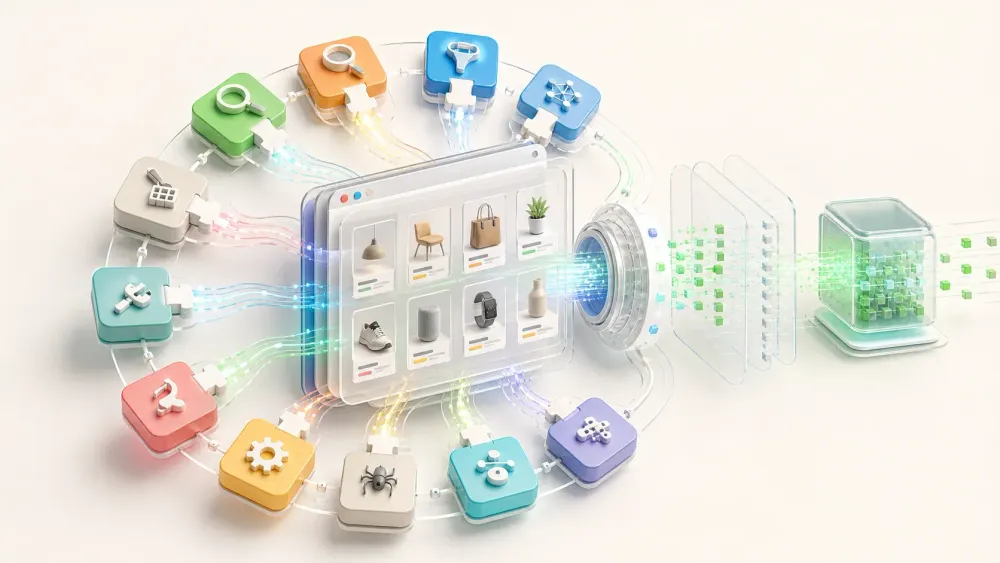
Last week, I spent an entire afternoon copying product titles, prices, and variant details from a competitor's Shopify store into a spreadsheet. Row by row. Tab by tab. By product #47, I was questioning my life choices.
If that sounds familiar, you're not alone. With 2.8M+ live Shopify storefronts in 2026 and a CMA survey finding that 72% of businesses actively monitor competitor pricing, the demand for Shopify product data has never been higher. But manually collecting it—even conservatively 10–20 minutes per product once you factor in variants, images, and descriptions—turns a 500-product catalog into days of tedious work.
So I tested 10 Chrome extensions against real Shopify stores (including ones with products.json disabled) to find out which actually deliver usable data and which just look good in screenshots.
Why You Need a Shopify Scraper Chrome Extension in 2026
Shopify doesn't offer a "download competitor catalog" button. If you want product data from another store, you either copy it manually or use a tool. The use cases are broader than most people realize:
| Use Case | Data Fields Needed | Who Benefits |
|---|---|---|
| Competitor pricing research | Title, price, compare-at price, variants | Ecommerce managers, pricing analysts |
| Dropshipping product discovery | Title, images, description, vendor, price | Dropshippers, product researchers |
| Catalog migration | All fields in Shopify CSV format | Store owners, developers |
| Sales velocity estimation | Inventory levels over time, new/removed SKUs | Market analysts, investors |
| Lead generation (selling to merchants) | Store tech stack, apps, theme, contact info | SaaS sales teams |
Chrome extensions are popular for this because they require zero coding, work inside the browser you're already using, and can be set up in under a minute. The barrier to entry is basically "can you click a button?"
Scrapers vs. Spy Tools: The Distinction That Saves You Time
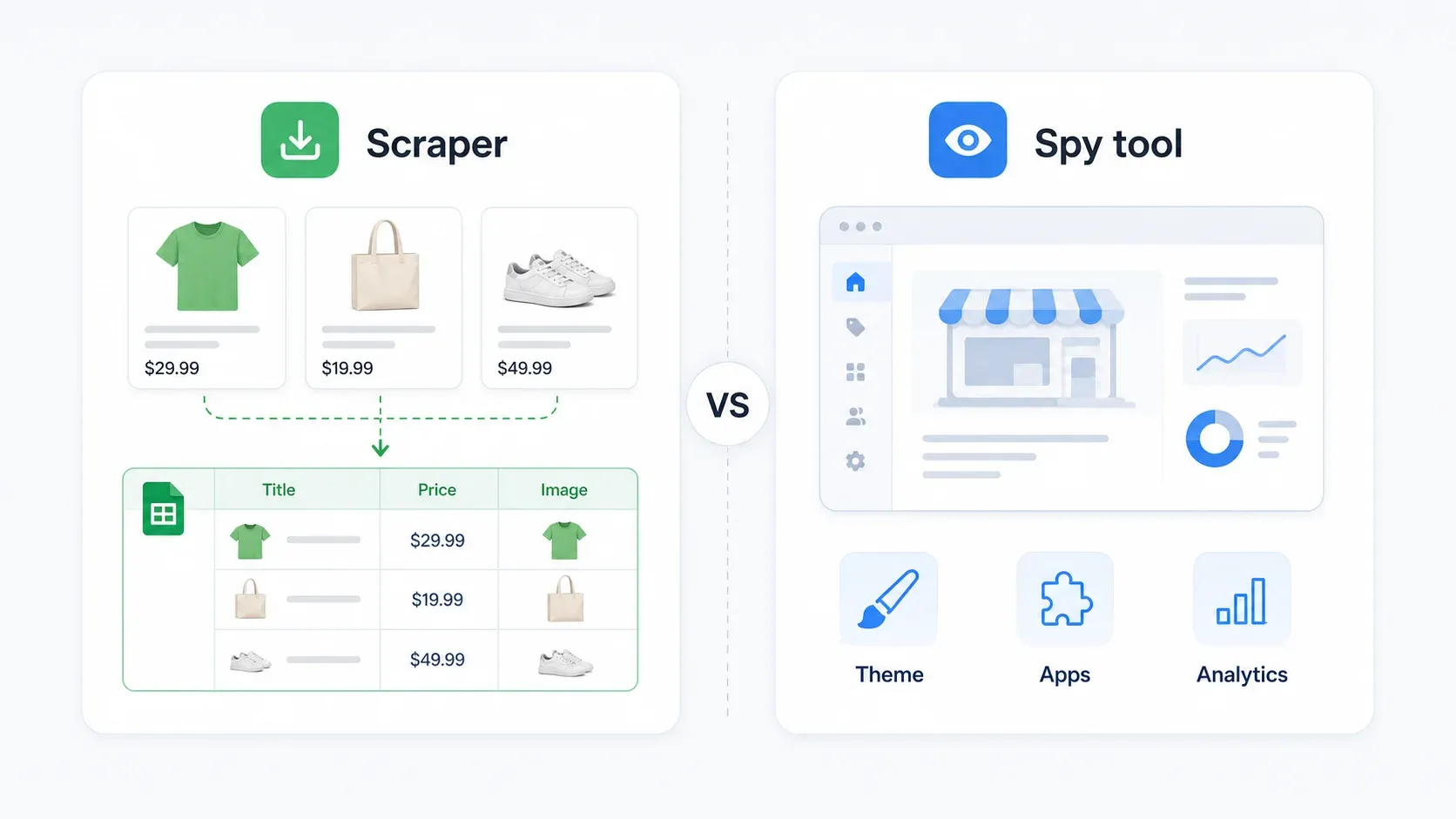
Before we get into the list, I need to clear up something that confuses nearly everyone searching for "Shopify scraper." You're actually looking at two completely different tool categories that solve different problems:
| If you need... | Tool category | What it does |
|---|---|---|
| Product titles, prices, variants, images, descriptions exported to a spreadsheet | Scraper/export tool | Extracts catalog data into CSV, Excel, Sheets |
| Theme name, installed apps, analytics tools, payment processor, traffic estimates | Spy/inspector tool | Reveals the store's technology stack and strategy |
Scrapers in this article: Thunderbit, Instant Data Scraper, Web Scraper, Data Miner, Octoparse, Shopify Products Scraper & Exporter, Shopify Spy Scraper & Parser.
Spy tools in this article: Koala Inspector, BuiltWith, Wappalyzer.
If you're trying to build a competitive pricing spreadsheet, a spy tool won't help you. If you're trying to figure out which Shopify apps a successful store uses, a product scraper is overkill. Most ecommerce teams need one of each.
How I Tested These 10 Shopify Scraper Chrome Extensions
I evaluated every tool against the same criteria, using a controlled set of Shopify stores:
| Criterion | Why It Matters for Shopify |
|---|---|
| Ease of setup | Shopify themes vary wildly; you don't want to maintain CSS selectors |
| Data fields extracted | Listing pages only show basics—you need descriptions, variants, all images |
| Subpage enrichment | Product detail pages carry the real competitive intel |
| Pagination handling | 500+ product catalogs span many pages |
| Endpoint dependency | Tools relying only on /products.json fail when it's unavailable |
| Anti-bot resilience | Many stores now use Cloudflare or disable public JSON |
| Export formats | CSV/Excel minimum; Sheets/Airtable/Notion is a bonus |
| Scheduled scraping | One-time snapshots aren't enough for price monitoring |
| Pricing transparency | Credits, pages, rows—they're not the same thing |
I tested against three store scenarios: an open store with products.json available, a store with products.json disabled, and a store configuration where normal browser access works but direct endpoint calls don't.
1. Thunderbit — AI-Powered Shopify Scraper for Non-Coders
Thunderbit is the AI web scraper our team built specifically for business users who need structured data without writing code. For Shopify scraping, it works like this: you open a collection page and click One Click Extract — the AI reads the page layout and works out the columns (title, price, image URL, product link, etc.). One click and you're scraping.
What makes it genuinely different from every other tool on this list is subpage enrichment. Most scrapers only grab what's visible on the collection/listing page—titles, prices, thumbnails. But the real competitive data lives on individual product pages: full descriptions, all image galleries, every variant option, reviews, size charts. Thunderbit's AI can visit each product detail page automatically and pull those fields back into your export.
Key features:
- AI field suggestions: No manual selector configuration. The AI reads the page and proposes relevant columns.
- Subpage enrichment: Scrape the listing, then automatically visit each product page for full descriptions, variant details, and image galleries.
- Cloud mode: Processes up to 50 pages simultaneously for large catalogs. Browser mode handles stores where you need to stay in-session.
- Scheduled scraping: Set up recurring runs in plain English ("every Monday at 9am") for ongoing price/inventory monitoring.
- Free exports: CSV, Excel, Google Sheets, Airtable, Notion, JSON—no paywall on the output side.
- Field AI Prompt: Label, translate, or categorize data during extraction (e.g., "classify as luxury/budget based on price").
Pricing: Free tier (6 pages), Starter from ~$9/month for 500 credits (1 credit = 1 row), Pro around $38/month for 3,000 credits. Subpage visits consume additional credits.
Limitations: Credit-based pricing means large-scale scraping (5,000+ products/month) adds up. AI field detection adds a few seconds per row compared to raw JSON endpoint tools.
Best for: Ecommerce teams that need deep, enriched product data with minimal setup time and no coding.
Why Subpage Enrichment Matters for Shopify
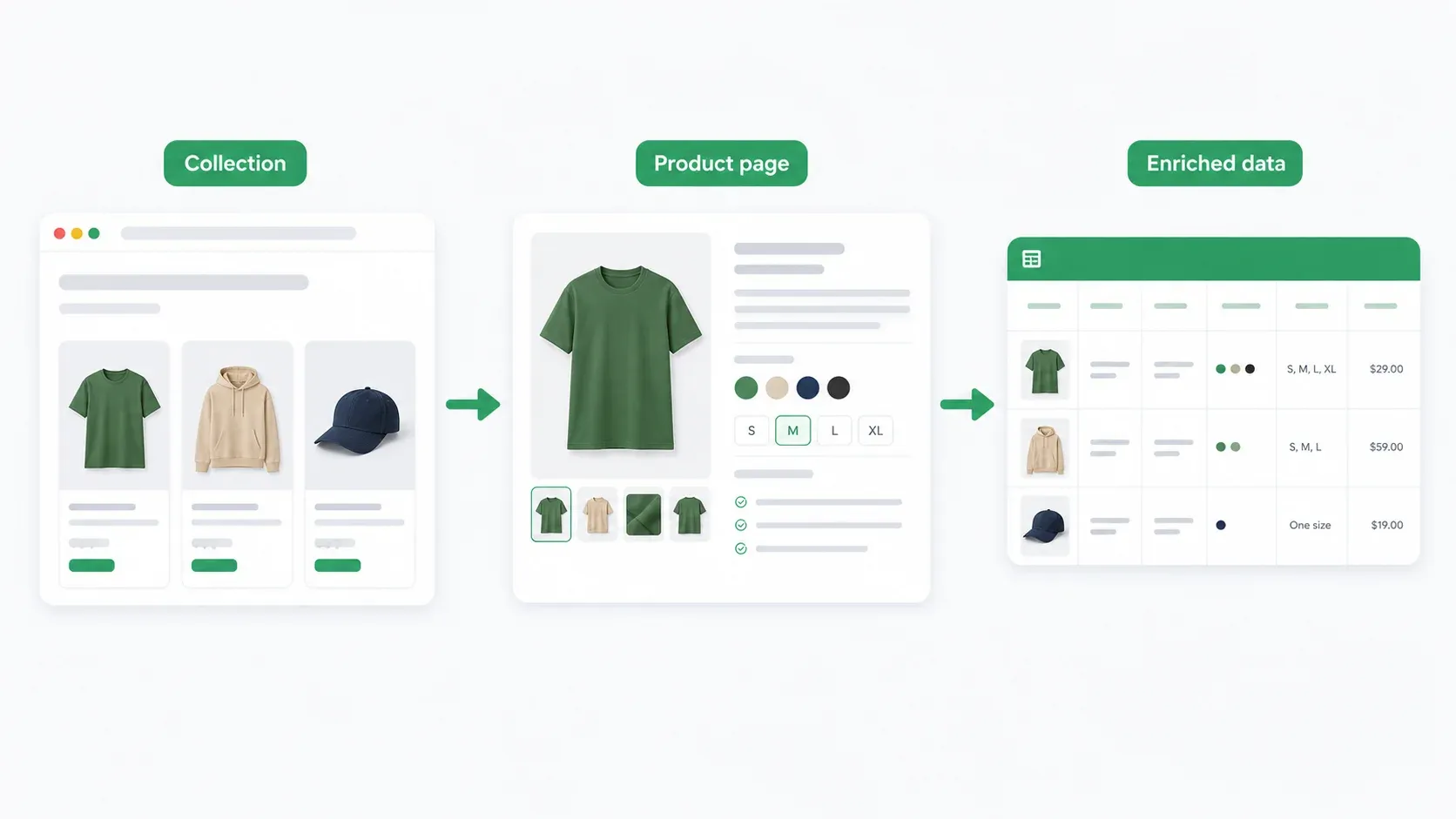
The difference between listing-page-only data and subpage-enriched data is stark:
| Field | Listing page only | With subpage enrichment |
|---|---|---|
| Product title | ✅ | ✅ |
| Price | ✅ | ✅ |
| Thumbnail image | ✅ | ✅ + full gallery |
| Product description | ❌ | ✅ |
| All variant options | ❌ (maybe color swatches) | ✅ |
| Reviews/ratings | ❌ | ✅ (if rendered) |
| Size charts, specs | ❌ | ✅ |
This is the feature that turns a shallow price list into an actual competitive intelligence dataset. If you've ever exported Shopify data and thought "where are all the descriptions?"—that's the subpage problem.
You can try Thunderbit via the Chrome Extension or check pricing details.
Try Thunderbit for Shopify Scraping Works whether or not the store exposes /products.json — the AI reads the rendered page. Titles, prices, variants, images in one click. Get Started Free
2. Instant Data Scraper — Free Zero-Config Auto-Detection
Instant Data Scraper is the tool I recommend when someone asks "I just need a quick export and I don't want to configure anything." It's completely free, uses heuristic algorithms to auto-detect tabular data on any page, and exports to CSV or XLSX.
Open a Shopify collection page, click the extension icon, and it usually detects the product grid immediately. It handles pagination (auto-clicks "next page") and works well on standard Shopify themes like Dawn.
Key features:
- Zero configuration—open page, click icon, data appears
- Auto-pagination detection
- CSV and XLSX export
- Works on any website, not just Shopify
Pricing: Completely free.
Limitations: No subpage scraping (you only get what's visible on the listing page), no AI field detection, no scheduling, no anti-bot handling. On non-standard or heavily customized themes, it sometimes grabs the wrong content blocks. You'll get titles and prices but miss descriptions and full variant details.
Best for: Quick one-off exports when you need surface-level data from standard-layout Shopify stores and don't want to spend a dime.
3. Koala Inspector — Shopify Spy Tool for Store Intelligence
Koala Inspector is a spy/inspector tool, not a bulk product scraper. I'm including it because many people searching for "Shopify scraper" actually want to know what apps, theme, and tech stack a competitor uses—and Koala does that well.
It reveals installed Shopify apps, theme name and version, estimated traffic, best-selling products (based on public signals), store creation date, and Shopify plan detection. The Chrome extension gives you a clean dashboard the moment you land on any Shopify store.
Key features:
- Shopify app detection (which apps are installed)
- Theme identification
- Traffic estimates and best-seller signals
- Store creation date and Shopify plan detection
Pricing: Free tier with limited lookups. Pro from ~$9.99/month for expanded access.
Limitations: Does NOT export bulk product data to CSV/Sheets. You can't use it to build a pricing spreadsheet or migrate a catalog. It's purely for understanding how a store is built and what tools it uses.
Best for: Dropshippers and marketers researching which apps and themes successful stores use before building their own.
4. Shopify Products Scraper & Exporter — Shopify-Ready CSV Export
Shopify Products Scraper & Exporter by Meetanshi is purpose-built for one job: exporting Shopify products into a CSV file that's compatible with Shopify's import format. It shows store info (product count, collection count), lets you export all or selected collections, and handles multiple variants and images per product.
Key features:
- Shopify-import-ready CSV output
- Collection filtering (export specific collections)
- Supports multiple variants and images per product
- Shows store product/collection counts
Pricing: Free (reported up to 500 products per CSV).
Limitations: Relies on the /products.json endpoint—if a store has disabled it, you'll get nothing. No subpage enrichment, no scheduling, no anti-bot handling. Limited to Shopify stores only (won't work on other platforms). The 500-product cap means you may need multiple exports for large catalogs.
Best for: Quick catalog migration between Shopify stores when the source store's products.json is accessible and you need the data in Shopify's native CSV format.
5. Shopify Spy Scraper & Parser — Product Export with Store Overview
The Shopify Spy / SPYScraper family of extensions combines basic store overview features with product export. There's some naming fragmentation in this space (SPYScraper, Shopify Spy, etc.), so verify the exact Chrome Web Store listing before installing.
The tool offers a "slow mode" that captures additional fields like variant barcodes, tax codes, weight units, and image alt text. It exports to CSV and Excel.
Key features:
- Store overview (basic spy features) plus product export
- "Slow mode" for detailed field extraction including descriptions
- CSV and Excel export
- Some competitor tracking features (price changes, product additions)
Pricing: Free for up to 100 products. Premium at approximately $5.90/month or $58.80/year for unlimited (varies by exact extension variant).
Limitations: Relies on products.json, limited anti-bot handling, slower extraction in detailed mode. The naming confusion between similar products makes it hard to know exactly which version you're installing.
Best for: Users who want both a quick store overview and basic product export in one tool, and don't mind endpoint dependency.
6. Web Scraper — Visual Sitemap-Based Scraping
Web Scraper is the most flexible free option on this list—but flexibility comes with a learning curve. It lets you build visual "sitemaps" that define exactly what to scrape and how to navigate between pages. You configure CSS selectors, set up link-following rules, and define pagination logic.
Key features:
- Visual sitemap builder for defining scraping logic
- Works on any website (not Shopify-specific)
- Supports pagination and link-following for multi-page scrapes
- Cloud version available for scheduling (from $50/month)
- Local extension exports to CSV; cloud adds Google Sheets, JSON, S3, API
Pricing: Browser extension is free. Cloud plans start at $50/month (5,000 URL credits), Professional at $100/month, Business at $200/month.
Limitations: Requires manual CSS selector configuration. Selectors break when store themes update or change layouts. Steeper learning curve for non-technical users. Initial setup for a Shopify collection page can take 15–30 minutes if you're new to it.
Best for: Users comfortable with basic web concepts who need a flexible, free tool that works across many different websites—not just Shopify.
7. Data Miner — Recipe-Based Data Extraction
Data Miner uses a "recipe" system—pre-built or custom extraction templates that define what data to pull from a page. The community shares recipes, so you may find Shopify-specific ones already built.
Key features:
- 60,000+ community-shared extraction recipes
- Visual interface for creating custom scraping rules
- Pagination and crawling support
- Exports to CSV, Excel, Google Sheets (paid)
Pricing: Free plan: 500 page scrapes/month. Solo: $19.99/month (500 pages, custom recipes, Google Sheets). Small Business: $49/month (1,000 pages). Business Plus: $200/month (9,000 pages).
Limitations: Recipes break when store layouts change. No AI-powered field detection. No built-in subpage enrichment. Unused credits don't carry over. The free tier is generous for light use but limiting for serious competitive research.
Best for: Users who want community-shared templates and moderate flexibility without coding, and who scrape across multiple site types regularly.
8. Octoparse — Desktop-Powered Visual Scraper with Cloud Option
Octoparse is a broader visual scraping platform with both a desktop app and cloud service. It offers point-and-click workflow building, auto-detection of data patterns, and pre-built Shopify templates.
Key features:
- Visual, no-code workflow builder
- Cloud-based scheduling for recurring scrapes
- Pre-built Shopify templates
- Supports pagination, infinite scroll, AJAX content
- Exports to CSV, Excel, JSON, databases, APIs
- Add-ons: residential proxies ($3/GB), CAPTCHA solving ($1–1.50/thousand)
Pricing: Free plan (10 tasks, local only, 50K rows/month export limit). Paid tiers add cloud extraction, scheduling, IP rotation, and integrations. Add-ons for anti-blocking features increase costs. See the Octoparse pricing page for current details.
Limitations: Desktop-app-reliant for complex setups. Steeper learning curve than AI-based tools. Cloud/anti-blocking features push costs up quickly. Can feel heavy compared to Chrome-only solutions.
Best for: Teams that need recurring scheduled scrapes with moderate technical comfort and budget for a dedicated scraping platform.
9. BuiltWith — Technology Profiler for Competitive Research
BuiltWith is a technology profiler, not a product scraper. It identifies what technologies, platforms, and tools a website uses—ecommerce platform, analytics, payment processors, marketing tools, CDNs, hosting, and specific Shopify apps.
BuiltWith's public data shows it tracks 6.8M+ live Shopify websites, making it a powerful tool for sales teams prospecting Shopify merchants or researchers mapping market technology trends.
Key features:
- Identifies 414M+ domains' technology stacks (updated weekly)
- Shopify-specific: detects installed apps, pixels, payment tools
- Chrome extension shows tech stack instantly on any site
- Lead list generation by technology usage
- Retail and keyword reports
Pricing: Individual site lookups are free forever. Basic: $295/month, Pro: $495/month, Team: $995/month.
Limitations: Does NOT extract product data—no prices, titles, images, or catalog export. Purely a technology identification and prospecting tool. Expensive for full access.
Best for: Sales teams prospecting Shopify merchants (e.g., "show me all stores using Klaviyo + Shopify Plus"), or researchers identifying market technology adoption trends.
10. Wappalyzer — Lightweight Tech Stack Detector
Wappalyzer is similar to BuiltWith but lighter-weight and more accessible for quick checks. The browser extension instantly identifies technologies on any website—CMS, ecommerce platform, frameworks, analytics, marketing tools, payment systems.
It tracks 8,028 web technologies across 106 categories, including Shopify apps and themes specifically.
Key features:
- Instant technology detection via Chrome extension
- Clean, simple interface
- CSV export of detected technologies
- Bulk lookup and CRM enrichment on paid plans
- Shopify app and theme detection
Pricing: Free: 50 technology lookups/month, 5 website alerts. Pro: $250/month. Business: $450/month. Enterprise: $850+/month.
Limitations: Does NOT extract product data. Less granular than BuiltWith for deep research. Purely a technology identification tool.
Best for: Quick tech stack checks when scouting competitors or qualifying leads—lighter and faster than BuiltWith for individual lookups.
The 2026 Anti-Bot Reality: Which Extensions Still Work on Protected Stores
Many Shopify stores in 2026 have disabled the /products.json endpoint or added Cloudflare protection. The Imperva 2025 Bad Bot Report found that bad bots now represent 37% of all internet traffic, with retail seeing 59% bot traffic. Stores are fighting back.
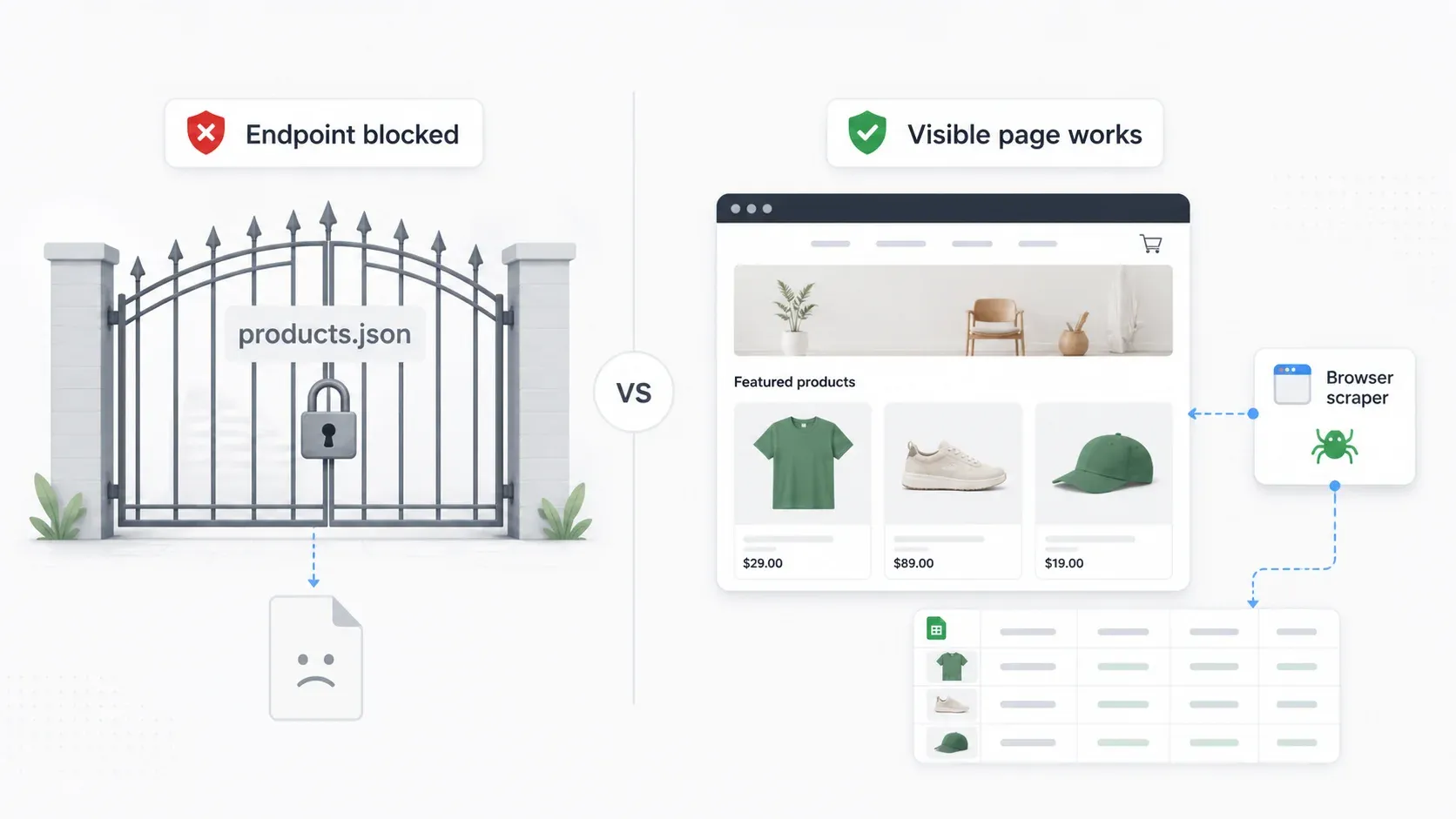
Extensions that rely solely on that JSON endpoint will return empty data on protected stores. I tested each tool across three scenarios:
| Tool | Open collection page | products.json available | products.json unavailable | Notes |
|---|---|---|---|---|
| Thunderbit | ✅ | ✅ | ✅ (reads rendered page) | Browser mode works on visible pages regardless of endpoint |
| Instant Data Scraper | ✅ | N/A | ✅ (listing data only) | Grabs what's visible, misses subpage data |
| Koala Inspector | ✅ (tech signals) | N/A | N/A | Spy tool, different data type |
| Shopify Products Scraper & Exporter | ✅ | ✅ | ❌ | Depends on JSON endpoint |
| Shopify Spy/SPYScraper | ✅ | ✅ | Partial/fails | Endpoint-dependent for product data |
| Web Scraper | ✅ (after setup) | Can use rendered pages | ✅ (if selectors work) | Reads visible page, not endpoint |
| Data Miner | ✅ (with recipe) | Can use visible pages | ✅ (if recipe works) | Reads visible page |
| Octoparse | ✅ (after workflow) | Can use rendered pages | ✅ (if workflow configured) | Cloud anti-blocking features available |
| BuiltWith | Tech detection only | N/A | N/A | Different category |
| Wappalyzer | Tech detection only | N/A | N/A | Different category |
The key insight: browser-based scrapers that read the rendered page (like Thunderbit in browser mode, Web Scraper, Data Miner) work on any page a human can view. Endpoint-only tools fail when the store blocks direct JSON access.
Before choosing a tool, check your target store: visit storename.myshopify.com/products.json in your browser. If it loads product data, endpoint-dependent tools will work fine. If it returns an error or empty page, you need a rendered-page scraper.
Speed and Accuracy Benchmarks: Testing on a 500-Product Shopify Store
I ran each scraper tool against the same ~500-product public Shopify store to measure real-world performance. Here's what I found:
| Extension | Time (500 products) | Accuracy | Captures Descriptions? | Captures All Variants? | Manual Fixes Needed |
|---|---|---|---|---|---|
| Thunderbit (Cloud) | ~4 min | ~97% | ✅ (via subpage) | ✅ | 0 |
| Thunderbit (Browser) | ~18 min | ~97% | ✅ (via subpage) | ✅ | 0 |
| Instant Data Scraper | ~12 min | ~89% | ❌ | Partial | 2 (pagination hiccup) |
| Shopify Products Scraper & Exporter | ~3 min | ~94% | Partial (JSON fields) | ✅ | 0 (when endpoint works) |
| Shopify Spy/SPYScraper (slow mode) | ~20 min | ~91% | ✅ (slow mode) | ✅ | 1 |
| Web Scraper | ~25 min (incl. setup) | ~92% | ❌ (without subpage config) | Partial | 3 (selector fixes) |
| Data Miner | ~15 min | ~88% | ❌ | Partial | 2 (recipe adjustments) |
| Octoparse | ~10 min (after workflow) | ~93% | ✅ (with link-following) | ✅ | 1 (workflow tweak) |
A few things stood out:
- Thunderbit's cloud mode was fastest for the full enriched dataset because it processes 50 pages simultaneously. Browser mode is slower but works on stores requiring session context.
- Endpoint-dependent tools (Shopify Products Scraper) were fastest when the endpoint worked—but they returned nothing on the protected store variant.
- Free tools (Instant Data Scraper, Web Scraper) required more manual intervention and delivered less complete data.
- Accuracy here means "percentage of fields correctly captured in a 30-product audit sample." The main failures were missing variant options, truncated descriptions, and incorrect image URLs.
Tracking Competitor Prices and Inventory Over Time
One-time scraping gives you a snapshot. But if you're serious about competitive intelligence, you need repeated snapshots to answer questions like:
- Which products are selling fast? (Inventory declining between scrapes)
- Are competitors adjusting prices seasonally?
- When do they add or remove SKUs?
- What's their approximate sales velocity?
In my experience, the teams that get the most value from scraping are the ones who automate the monitoring and focus their human time on analysis and action—not data collection.
The scheduling landscape across these tools:
| Tool | Scheduled Scraping? | Interval Options | Output Destination |
|---|---|---|---|
| Thunderbit | ✅ | Natural language ("every Monday 9am") | Sheets, Airtable, Notion, Excel |
| Instant Data Scraper | ❌ | — | — |
| Koala Inspector | Limited (alerts, not bulk) | — | — |
| Shopify Products Scraper & Exporter | ❌ | — | — |
| Shopify Spy/SPYScraper | Limited/varies | — | — |
| Web Scraper | ✅ (cloud, from $50/mo) | Hourly/daily/weekly | CSV, Sheets, S3, API |
| Data Miner | ✅ (paid tiers) | Automated crawl jobs | CSV, Excel, Sheets |
| Octoparse | ✅ (cloud/premium) | Flexible scheduling | CSV, Excel, JSON, DB, API |
| BuiltWith | Alerts only (tech changes) | — | — |
| Wappalyzer | Alerts only (tech changes) | — | — |
A practical workflow I've set up: Thunderbit runs weekly on a competitor's "New Arrivals" collection, exports to Google Sheets, and I use a simple conditional formatting rule to highlight price changes and new/removed products. The whole setup took about 5 minutes, and it's saved me hours of manual checking each month.
The Real Cost of Shopify Scraping: Free Tiers, Credits, and Flat-Rate Plans
I've seen enough forum posts from frustrated users saying things like "I got tired of paying $99/month but still hitting credit limits" to know that pricing transparency matters. What each tool actually costs for a realistic workload of 1,000 products/month across 5 competitor stores:
| Tool | Free Tier | What You Actually Get Free | Cost for ~1,000 Products/Mo | Pricing Model |
|---|---|---|---|---|
| Thunderbit | 6 pages | ~600 rows (varies by page density) | ~$38/mo (Pro, 3,000 credits) | Credit/row subscription |
| Instant Data Scraper | Unlimited | All visible listing data | $0 | Completely free |
| Koala Inspector | Limited lookups | Apps/theme only, no bulk export | N/A for product scraping | Subscription ($9.99/mo Pro) |
| Shopify Products Scraper & Exporter | 500 products/CSV | Full product data when endpoint works | $0 | Free extension |
| SPYScraper | 100 products | Basic product export | ~$5.90/mo | Subscription |
| Web Scraper | Free local | Unlimited local scraping | $0 local; $50/mo if scheduling needed | URL-credit cloud subscription |
| Data Miner | 500 pages/month | ~500 pages of extraction | $19.99–$49/mo depending on volume | Page-scrape subscription |
| Octoparse | 10 tasks, local | 50K rows/month export, local only | Free may work; cloud adds cost | Task/cloud/add-on model |
| BuiltWith | Free lookups | Individual site tech profiles | N/A for product scraping | Technographic subscription ($295+/mo) |
| Wappalyzer | 50 lookups/month | Basic tech detection | N/A for product scraping | Technographic subscription ($250+/mo) |
The honest assessment: free tools cost $0 in money but hours in setup and manual work. Paid tools cost money but save time. Calculate your actual cost per product scraped by factoring in the 15–30 minutes you'd spend configuring selectors, fixing broken recipes, or manually enriching data that a free tool missed.
Thunderbit's exports (CSV, Sheets, Airtable, Notion) are free regardless of plan—there's no paywall on getting your data out once you've scraped it. The credits go toward extraction, not export.
Side-by-Side Comparison: All 10 Shopify Scraper Chrome Extensions
| Tool | Best For | Products.json Required? | Anti-Bot Handling | Subpage Enrichment | Scheduled Scraping | Export Options | Pricing |
|---|---|---|---|---|---|---|---|
| Thunderbit | Deep product data, non-coders | No (reads rendered page) | Browser mode resilient | ✅ AI-powered | ✅ Natural language | Excel, CSV, Sheets, Airtable, Notion, JSON | Free trial, from ~$9/mo |
| Instant Data Scraper | Quick free exports | No (reads visible page) | None | ❌ | ❌ | CSV, XLSX | Free |
| Koala Inspector | Store tech/app research | N/A (spy tool) | N/A | N/A | Limited alerts | In-app dashboard | Free, Pro ~$9.99/mo |
| Shopify Products Scraper | Shopify CSV migration | Yes | None | ❌ | ❌ | Shopify-format CSV | Free (500 products) |
| Shopify Spy/SPYScraper | Product export + overview | Yes (mostly) | Limited | Partial (slow mode) | Limited | CSV, Excel | Free 100 products, ~$5.90/mo |
| Web Scraper | Flexible multi-site scraping | No (reads rendered page) | None built-in | Manual config needed | ✅ (cloud, $50+/mo) | CSV, XLSX, JSON, Sheets, S3 | Free local, cloud from $50/mo |
| Data Miner | Recipe/template-based extraction | No (reads visible page) | None | ❌ | ✅ (paid) | CSV, Excel, Sheets | Free 500 pages/mo, from $19.99/mo |
| Octoparse | Scheduled visual scraping | No (reads rendered page) | Paid add-ons available | ✅ (with workflow) | ✅ (cloud) | CSV, Excel, JSON, DB, API | Free local, paid cloud |
| BuiltWith | Sales prospecting by tech | N/A (tech profiler) | N/A | N/A | Tech alerts | Reports, CSV, API | Free lookups, from $295/mo |
| Wappalyzer | Quick tech stack checks | N/A (tech profiler) | N/A | N/A | Tech alerts | CSV, JSON | Free 50 lookups/mo, from $250/mo |
Which Shopify Scraper Chrome Extension Should You Pick?
After testing all ten, here's my scenario-based recommendation:
"I need deep product data with minimal setup and no coding." → Start with Thunderbit. The AI field suggestions and subpage enrichment mean you get complete data without configuring selectors. The credit model works well for regular competitive research.
"I just need a quick, free export from a standard store." → Instant Data Scraper. Zero cost, zero configuration. Accept that you'll only get listing-page data.
"I want to know what apps and theme a competitor uses." → Koala Inspector for Shopify-specific insights, or Wappalyzer for quick cross-platform tech checks.
"I need a Shopify-import-ready CSV for catalog migration." → Shopify Products Scraper & Exporter—if the source store's products.json is accessible.
"I'm comfortable with visual selectors and want flexibility across many sites." → Web Scraper (free) or Octoparse (paid, with scheduling).
"I'm prospecting Shopify merchants for my SaaS product." → BuiltWith for lead lists by technology, or Wappalyzer for lighter-weight individual lookups.
"I need ongoing price and inventory monitoring." → Thunderbit (simplest scheduling setup), Web Scraper Cloud, or Octoparse Cloud.
For most ecommerce teams doing competitive research, I'd recommend pairing Thunderbit for product data extraction with Koala Inspector or Wappalyzer for tech stack research. That combination covers both "what are they selling and at what price?" and "how is their store built?"
If you want to see what AI-powered Shopify scraping looks like in practice, Thunderbit's free trial lets you test it on your actual target stores. And for a deeper look at how the tool handles different scraping scenarios, check out the Thunderbit YouTube channel.
Try Thunderbit Free Free tier covers 6 pages a month, no card required. Subpage scraping pulls variant-level detail the listing page doesn't show. Get Started Free
FAQs
1. Is it legal to scrape data from Shopify stores?
Scraping publicly available product data (prices, titles, images visible to any visitor) is generally considered lower risk, particularly after the hiQ v. LinkedIn ruling in the US which supported accessing public data. However, you should always respect robots.txt directives, store terms of service, rate limits, and avoid scraping personal or private data. Do not bypass login walls, CAPTCHAs, or technical access controls. This is practical guidance, not legal advice—consult legal counsel for your specific situation.
2. Do Shopify scraper extensions work on all Shopify stores?
No. Some stores disable the /products.json endpoint or use Cloudflare protection. Tools that depend solely on that JSON endpoint (like Shopify Products Scraper & Exporter) will fail on protected stores. Browser-based scrapers like Thunderbit that read the rendered page—the same page you see when browsing normally—handle these situations better because they extract from what's actually visible rather than relying on a specific API endpoint.
3. Can I export scraped Shopify data to Google Sheets or Excel?
Yes. Most scraper tools support CSV and Excel export at minimum. Thunderbit also supports direct export to Google Sheets, Airtable, and Notion without any additional cost. Web Scraper Cloud and Data Miner (paid) also support Google Sheets. The spy tools (Koala, BuiltWith, Wappalyzer) export technology data, not product catalogs.
4. What's the difference between a Shopify scraper and a Shopify spy tool?
A scraper extracts bulk product catalog data—titles, prices, descriptions, images, variants—into spreadsheets for competitive analysis, pricing research, or catalog migration. A spy tool reveals a store's technology stack—which apps are installed, what theme they use, what analytics and payment tools they run—for strategic research and prospecting. Most ecommerce teams benefit from having one of each.
5. How many products can I scrape for free?
It varies significantly: Instant Data Scraper is completely free with no product limit (but limited features). Thunderbit's free tier covers approximately 6 pages of extraction. Shopify Products Scraper & Exporter reportedly handles up to 500 products per CSV for free. SPYScraper offers 100 free products. Data Miner provides 500 free page scrapes per month. Web Scraper's local extension is free with unlimited local use. For serious competitive research involving thousands of products monthly, expect to invest in a paid tool—but factor in the hours you save versus manual collection.
Try AI Shopify Scraping with Thunderbit Get Started Free
Learn More




