
Home Depot's online catalog has millions of product URLs—and some of the most aggressive anti-bot defenses in ecommerce. If you've ever tried to pull pricing, specs, or inventory data from HomeDepot.com and gotten a blank page or a cryptic "Oops!! Something went wrong," you already know the frustration.
I spent the last few weeks testing five scraping tools against the same Home Depot category page and product detail page, measuring everything from setup time to field completeness to anti-bot resilience. This isn't a feature-list roundup copied from marketing pages. It's a practical, side-by-side comparison for anyone who needs reliable Home Depot product data—whether you're tracking competitor prices, monitoring stock levels, or building product databases for your ecommerce operation.
Why Scraping Home Depot Product Data Matters in 2026
Home Depot reported $164.7B in fiscal 2025 sales, with online sales representing 15.9% of net revenue and growing 8.7% year over year. That makes it one of the largest ecommerce benchmarks in the home improvement space—and a goldmine for anyone doing competitive intelligence.
The business cases are concrete:
- Competitive pricing: Retailers and marketplaces benchmark HD's current price, sale price, promo labels, and shipping costs against Lowe's, Menards, Walmart, Amazon, and specialty suppliers.
- Inventory monitoring: Contractors, resellers, and ops teams watch store-level availability, "limited stock" badges, delivery windows, and pickup options.
- Assortment gap analysis: Merchandising teams compare category depth, brand coverage, ratings, and review counts to identify missing SKUs or weak private-label coverage.
- Market research: Analysts map category structure, review sentiment, product specs, warranties, and new-product velocity.
- Supplier lead generation: Suppliers identify brands, categories, store services, and product clusters relevant to contractors.
Manual collection is brutal at this scale. A 2025 survey found U.S. workers spend more than 9 hours per week on repetitive data-entry tasks, costing companies an estimated $28,500 per employee per year. If an analyst manually checks 500 Home Depot SKUs every Monday at 45 seconds per SKU, that's 325+ hours per year—before error correction.
What You Can Actually Scrape from HomeDepot.com (Page Types and Data Fields)
Most scraper guides are generic. They don't tell you what's actually available on Home Depot's specific page types.
Product Listing Pages (PLPs)
These are your category, department, search, and brand pages—the starting point for most workflows.
| Field | Example |
|---|---|
| Product name | DEWALT 20V MAX Cordless 1/2 in. Drill/Driver Kit |
| Product detail URL | /p/DEWALT-20V-MAX.../204279858 |
| Thumbnail image | Image URL |
| Current price | $99.00 |
| Original/strike-through price | $129.00 |
| Promo badge | "Save $30" |
| Star rating | 4.7 |
| Review count | 12,483 |
| Availability badge | "Pickup today," "Delivery," "Limited stock" |
| Brand | DEWALT |
| Model/SKU/Internet # | Sometimes visible in listing markup |
Home Depot's public sitemap index confirms PLP coverage at scale—a spot check found 45,000 product listing URLs in a single sitemap file.
Product Detail Pages (PDPs)
PDPs are where the rich data lives. You need subpage scraping to get here from a listing.
| Field | Notes |
|---|---|
| Full description | Multi-paragraph product overview |
| Specs table | Dimensions, material, power source, battery platform, color, warranty, certifications |
| All product images | Gallery URLs, sometimes video |
| Q&A | Questions, answers, dates |
| Individual reviews | Reviewer, date, rating, text, helpful votes, responses |
| "Frequently bought together" | Related product links |
| Store-level availability | Depends on selected store/ZIP |
| Internet #, Model #, Store SKU | Key identifiers |
Bright Data's Home Depot dataset advertises 6.1M+ records with fields including URL, model number, SKU, product ID, product name, manufacturer, final price, initial price, stock status, category, ratings, and reviews.
Category, Store Locator, and Review Pages
Category/Department Pages: Category tree, subcategory links, refined category links, featured products, filter/facet values (brand, price, rating, material, color).
Store Locator Pages: A spot check for Atlanta returned store name, store number, address, distance, main phone, Rental Center phone, Pro Desk phone, weekday hours, Sunday hours, and services (Free Workshops, Rental Center, installation services, curbside delivery, in-store pickup).
Reviews & Q&A Sections: Reviewer name, date, star rating, review title, review body, helpful votes, verified purchase badges, seller/manufacturer responses, question text, answer text.
Home Depot's Anti-Bot Protections: What Actually Gets Through in 2026
This is where most generic scraping guides fall apart.
In my testing, a direct request to a Home Depot PDP returned HTTP 403 Access Denied from AkamaiGHost. A category page request returned a branded error page saying "Oops!! Something went wrong. Please refresh page." Response headers included _abck, bm_sz, akavpau_prod, and _bman—all consistent with Akamai Bot Manager-style browser validation.
What failure actually looks like:
- 403 Access Denied at the edge before any content loads
- Block/error pages that look like Home Depot but contain zero product data
- Missing dynamic sections—price, availability, or delivery modules simply don't render
- CAPTCHAs after repeated requests
- IP reputation blocks from datacenter IPs, shared VPNs, or cloud hosts
- Session/location mismatch where pricing changes based on ZIP/store cookies
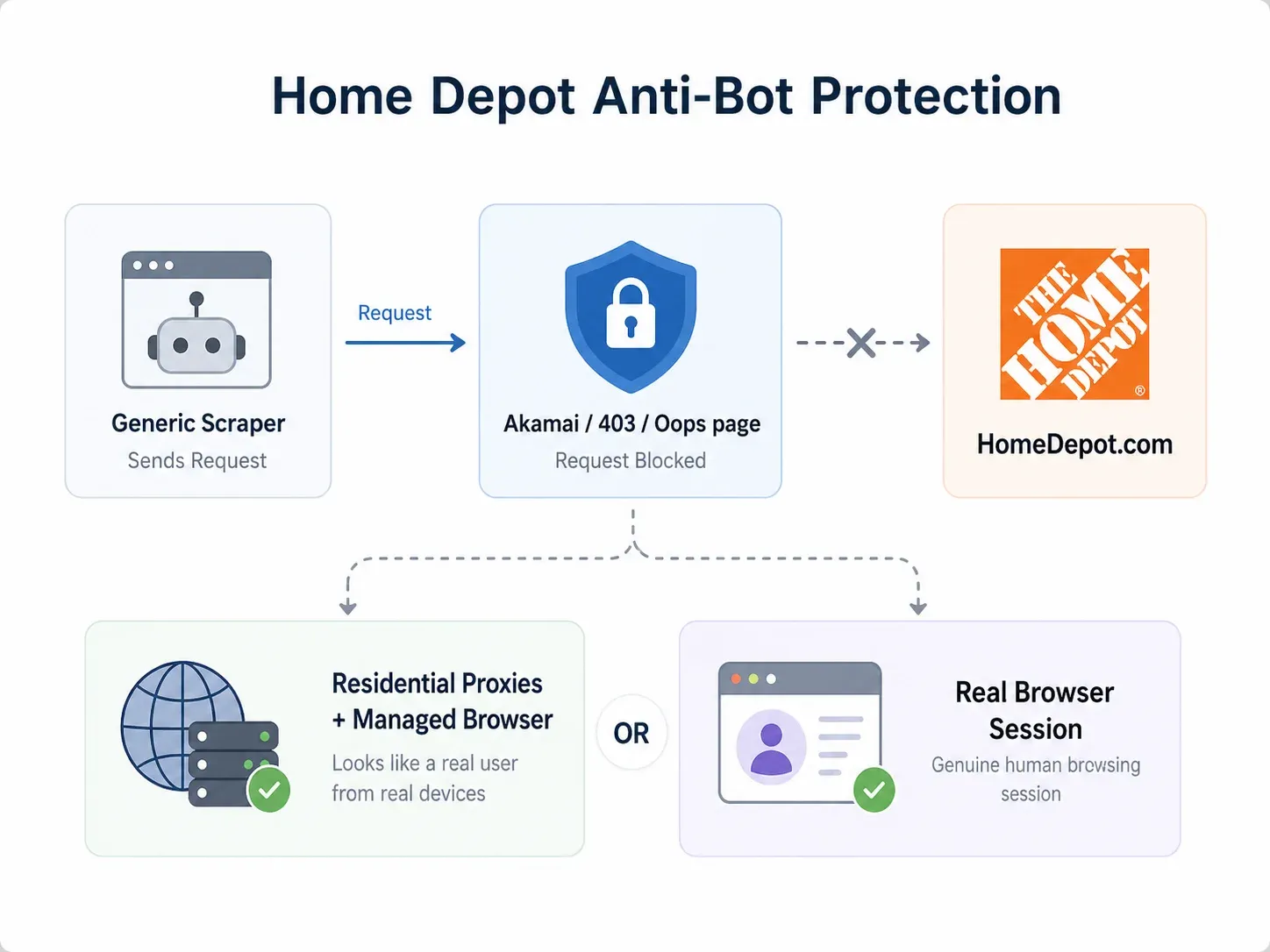
Two approaches reliably get through:
- Residential proxy + managed browser infrastructure: Residential or mobile IPs, full browser rendering, CAPTCHA handling, and retries. This is the enterprise approach (Bright Data's strength).
- Browser-based scraping in the user's real session: When a page works in your logged-in Chrome browser, a browser scraper reads the rendered page with your existing cookies, selected store, and location context. This is the business-user approach (Thunderbit's strength).
No tool has 100% success on every Home Depot page every time. The honest answer is: the best tools give you fallback paths.
How I Tested: Methodology for Comparing the Best Home Depot Scrapers
I picked one Home Depot category page (Power Tools) and one Product Detail Page (a popular DEWALT drill/driver kit). I scraped both with all five tools and documented:
- Setup time: Minutes from opening the tool to first successful output
- Fields correctly extracted: Out of a target list of PLP and PDP fields
- Pagination success: Did it get page 2, 3, etc.?
- Subpage enrichment: Did it pull PDP specs from the listing automatically?
- Anti-bot handling: Did it return real data or a block page?
- Total scrape time: Start to finished export
Here's how I scored each criterion:
| Criterion | What I Measured |
|---|---|
| Ease of use | Time to first successful scrape on HD |
| Anti-bot handling | Success rate on HD's protections |
| Data fields | Completeness vs. target field list |
| Subpage enrichment | Listing → PDP automatically? |
| Scheduling | Built-in recurring scraping? |
| Exports | CSV, Excel, Sheets, Airtable, Notion, JSON |
| Pricing (entry-level) | Cost at 500–5,000 SKU scale |
| No-code vs. code | Suitable for business users? |
1. Thunderbit
Scrape Home Depot data with AI Get Started Free
Thunderbit is an AI-powered Chrome extension built for non-technical business users who need structured data from websites—without writing code, building workflows, or managing proxies. On Home Depot, it was the fastest path from "I'm looking at a page" to "I have a spreadsheet."
How it handles Home Depot:
Thunderbit offers two scraping modes. Cloud Scraping processes up to 50 pages at a time through US/EU/Asia cloud servers—useful for public category pages. Browser Scraping uses your own Chrome session, preserving your selected store, ZIP code, cookies, and login state. When cloud IPs get blocked by Home Depot's Akamai defenses, browser scraping reads the page exactly as you see it.
Key features:
- AI Suggest Fields: Click one button on a Home Depot PDP and Thunderbit proposes columns for product name, price, specs, reviews, images, availability, Internet number, and more. No manual selector configuration.
- Subpage Scraping: Start from a category listing, and Thunderbit automatically visits every product link to append specs, full descriptions, model numbers, images, and availability. No manual workflow building.
- Natural-language scheduling: Set recurring scrapes in plain English ("every Monday at 8am") for ongoing price or inventory monitoring.
- Free exports: Google Sheets, Excel, CSV, JSON, Airtable, Notion—all included without paywalls.
- Field AI Prompt: Custom labeling or categorization per column (e.g., "extract battery voltage from specs" or "classify as cordless drill, impact driver, or combo kit").
Pricing: Free tier available. Credit-based model where 1 credit = 1 output row. Paid plans start around ~$9/month billed annually. Check Thunderbit Pricing for current details.
Best for: Business users, ecommerce ops, sales teams, and market researchers who need Home Depot data in a spreadsheet fast.
How Thunderbit's AI Suggest Fields Works on Home Depot
Here's the actual workflow I used:
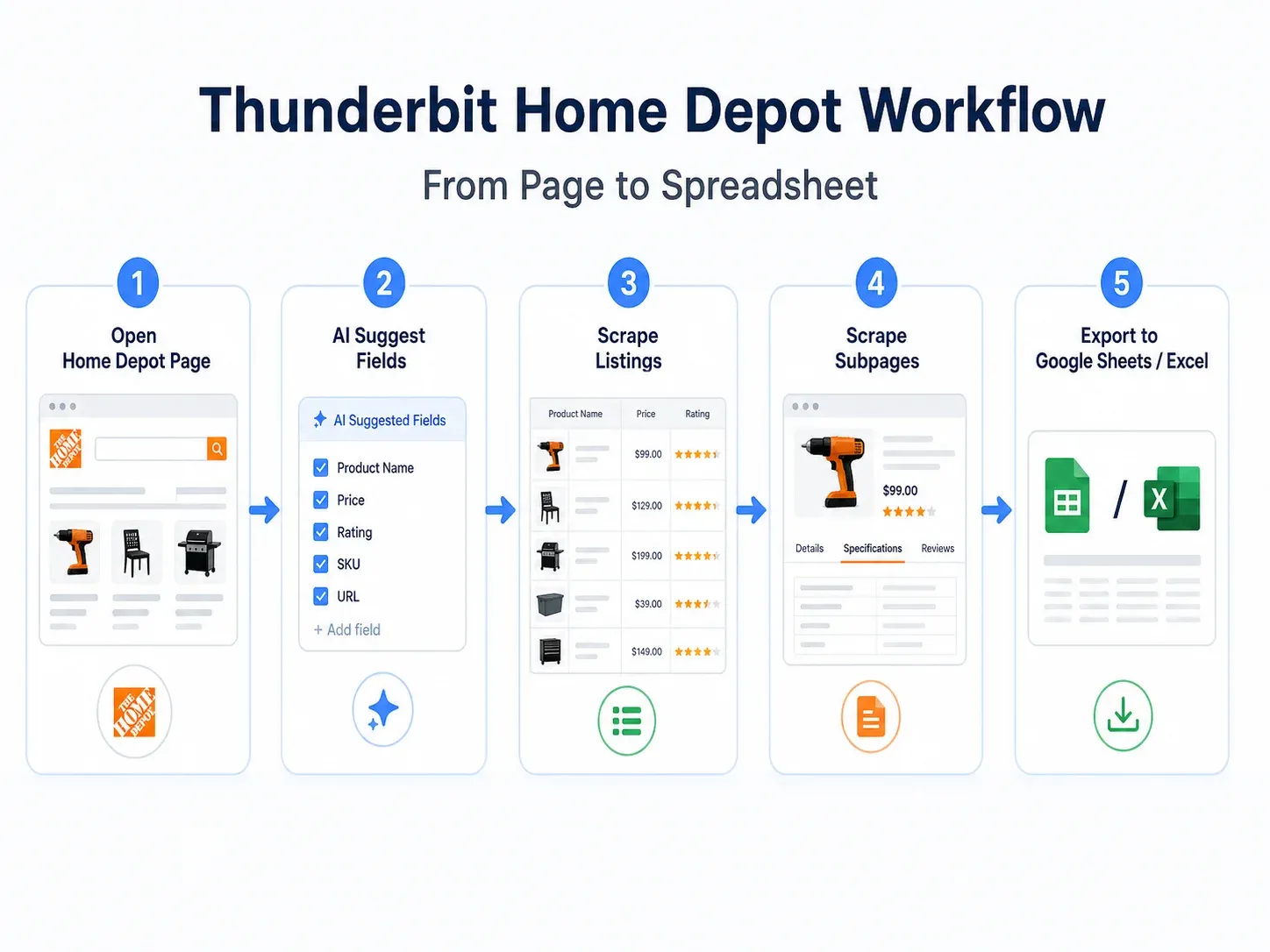
- Opened a Home Depot category page in Chrome
- Clicked the Thunderbit Chrome Extension
- Clicked AI Suggest Fields—Thunderbit proposed columns: Product Name, Price, Rating, Review Count, Product URL, Image URL, Brand, Availability
- Clicked Scrape to extract the listing page
- Used Scrape Subpages on the Product URL column—Thunderbit visited each PDP and appended specs, full description, model number, all images, Internet number, and availability details
- Exported directly to Google Sheets
Setup time: under 8 minutes from extension click to finished spreadsheet. No workflow builder, no selector maintenance, no proxy configuration.
My test results on Home Depot:
| Test Item | Result |
|---|---|
| Setup time | ~7 minutes |
| PLP fields extracted | 9/10 target fields |
| PDP enrichment | ✅ Automatic via Subpage Scraping |
| Pagination | ✅ Handled automatically |
| Anti-bot success | ✅ Browser Scraping bypassed blocks; Cloud worked on some public pages |
| Store/location context | ✅ Preserved via browser session |
The main limitation: Cloud Scraping can hit Akamai blocks on some Home Depot pages. The fix is straightforward—switch to Browser Scraping, which uses your real session. For most business users, this is a non-issue because you're already looking at the page.
2. Octoparse
Octoparse is a desktop application with a visual point-and-click workflow builder. It requires no coding, but it does require building a multi-step workflow—clicking product cards, configuring pagination loops, and setting up subpage navigation manually.
How it handles Home Depot:
Octoparse uses cloud extraction with IP rotation and optional CAPTCHA-solving add-ons. Against Home Depot's protections, it's moderate—it works on some pages but can get blocked on others without proxy upgrades.
Key features:
- Visual workflow builder with click-through recording
- Cloud scheduling on paid plans
- IP rotation and CAPTCHA add-ons available
- Export to CSV, Excel, JSON, database connections
- Task templates for common site patterns
Pricing: Free tier with 10 tasks and 50K data export/month. Standard plan around $69–83/month with cloud extraction and scheduling. Professional plan around $249/month with 20 cloud nodes. Add-ons: residential proxies ~$3/GB, CAPTCHA solving ~$1–1.50 per 1,000.
Best for: Users comfortable with visual workflow design who want more manual control over scraping logic.
Octoparse Strengths and Limitations on Home Depot
My test results:
| Test Item | Result |
|---|---|
| Setup time | ~35 minutes (workflow building + testing) |
| PLP fields extracted | 8/10 target fields |
| PDP enrichment | ⚠️ Required manual click-through loop configuration |
| Pagination | ⚠️ Required manual next-page setup |
| Anti-bot success | ⚠️ Worked on some pages, blocked on others without proxy add-on |
| Store/location context | ⚠️ Possible but requires workflow steps |
Octoparse is solid if you enjoy building workflows and don't mind spending 30+ minutes on initial setup. The trade-off vs. Thunderbit is clear: more control, more time investment, and less automatic field detection.
3. Bright Data
Bright Data is the enterprise-grade option. It combines a massive proxy network (400M+ residential IPs), a Web Scraper API with full browser rendering, CAPTCHA handling, and—most relevantly—a prebuilt Home Depot dataset with 6.1M+ records.
How it handles Home Depot:
Bright Data has the strongest anti-bot infrastructure of any tool on this list. Residential proxies, mobile IPs, geotargeting, browser fingerprinting, and automatic retries mean it rarely gets blocked. But the setup is not for the faint of heart.
Key features:
- Prebuilt Home Depot dataset (buy data directly without scraping)
- Web Scraper API with per-successful-record pricing
- 400M+ residential IPs across 195 countries
- Full browser rendering and CAPTCHA solving
- Delivery to Snowflake, S3, Google Cloud, Azure, SFTP
- JSON, NDJSON, CSV, Parquet formats
Pricing: Free tier: 5,000 records/month, no credit card required. Web Scraper API: $1.50 per 1,000 successful records (pay-as-you-go) or Scale plan at $499/month including 384,000 records. Home Depot dataset minimum order: $250. Residential proxies list at $8/GB (currently ~$4/GB under a 50%-off promo).
Best for: Enterprise data teams, large-scale monitoring programs (10,000+ SKUs), and organizations that prefer buying maintained datasets over building scrapers.
Bright Data Strengths and Limitations on Home Depot
My test results:
| Test Item | Result |
|---|---|
| Setup time | ~90 minutes (API configuration + schema setup) |
| PLP fields extracted | 10/10 target fields (via dataset) |
| PDP enrichment | ✅ Via dataset or custom API setup |
| Pagination | ✅ Handled by infrastructure |
| Anti-bot success | ✅ Strongest—residential proxies + unblocking |
| Store/location context | ⚠️ Requires geotargeting configuration |
If you're a solo analyst or small team, Bright Data is overkill. If you're running a 50,000-SKU monitoring program with a data engineering team, it's the most reliable infrastructure available.
4. Apify
Apify is an actor-based cloud platform where users run prebuilt or custom scraping scripts ("actors") in the cloud. For Home Depot, you'll find community actors in the marketplace—but their quality and maintenance vary.
How it handles Home Depot:
Apify's success depends entirely on which actor you choose. I tested the Home Depot Reviews Scraper (from $0.50 per 1,000 results) and a product scraper actor. Results were mixed.
Key features:
- Large marketplace of prebuilt actors
- Custom actor development in JavaScript/Python
- Built-in scheduler for recurring runs
- API, CSV, JSON, Google Sheets integration
- Proxy management and browser automation
Pricing: Free plan with $5/month compute credit. Starter at $29/month, Scale at $199/month, Business at $999/month. Actor-specific pricing varies (some are free, some charge per result).
Best for: Developers who want full control over scraping logic and are comfortable evaluating, forking, or maintaining actors.
Apify Strengths and Limitations on Home Depot
My test results:
| Test Item | Result |
|---|---|
| Setup time | ~25 minutes (finding actor + configuring inputs) |
| PLP fields extracted | 6/10 target fields (actor-dependent) |
| PDP enrichment | ⚠️ Actor-dependent—some support it, some don't |
| Pagination | ⚠️ Actor-dependent |
| Anti-bot success | ⚠️ Variable—one actor worked, another returned block pages |
| Store/location context | ⚠️ Requires ZIP/store input if actor supports it |
The community actor I tested for product data pulled basic fields but missed specs and store availability. The reviews actor worked well for review text and ratings. The main risk: community actors can break when Home Depot changes its markup, and there's no guarantee of maintenance.
5. ParseHub
ParseHub is a desktop application with a visual point-and-click builder, designed for beginners. It renders JavaScript and handles some dynamic content, but it struggles with Home Depot's heavier protections.
How it handles Home Depot:
ParseHub loads pages in its built-in browser and lets you click elements to define extraction rules. Against Home Depot's Akamai defenses, it's the weakest performer on this list—I got partial data on some pages and block pages on others.
Key features:
- Visual point-and-click selection
- JavaScript rendering
- Scheduled runs on paid plans
- IP rotation on paid plans
- Export to CSV, JSON
- API access for programmatic retrieval
Pricing: Free tier with 5 projects, 200 pages per run, and 40-minute run time limit. Standard plan starts at $189/month. Professional at $599/month.
Best for: Absolute beginners who want to test a small visual scrape and can accept limited success on protected sites.
ParseHub Strengths and Limitations on Home Depot
My test results:
| Test Item | Result |
|---|---|
| Setup time | ~30 minutes |
| PLP fields extracted | 5/10 target fields (some dynamic modules didn't render) |
| PDP enrichment | ⚠️ Manual link-following required |
| Pagination | ⚠️ Page-count limits on free plan |
| Anti-bot success | ❌ Blocked on 3 of 5 test attempts |
| Store/location context | ⚠️ Difficult to preserve |
ParseHub is approachable for learning how visual scraping works, but for Home Depot specifically in 2026, it's not reliable enough for production monitoring. The $189/month starting price for paid plans also makes it less attractive when free-tier alternatives like Thunderbit exist.
Side-by-Side Comparison: All 5 Home Depot Scrapers Tested on the Same Page
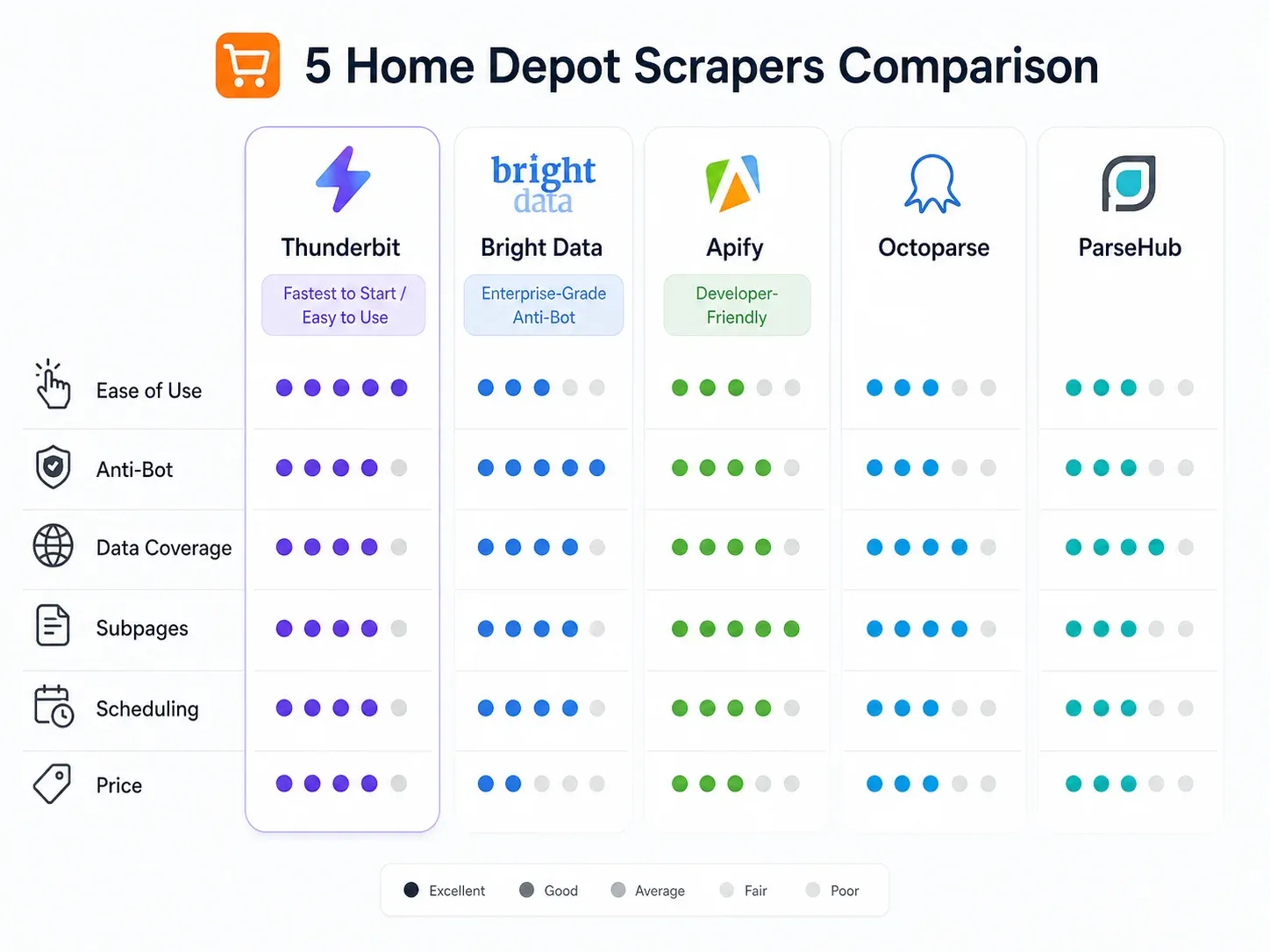
Full comparison based on my testing:
| Feature | Thunderbit | Octoparse | Bright Data | Apify | ParseHub |
|---|---|---|---|---|---|
| No-Code Setup | ✅ 2-click AI | ✅ Visual builder | ⚠️ IDE + datasets | ⚠️ Actors (semi-code) | ✅ Visual builder |
| Home Depot Anti-Bot | ✅ Cloud + browser options | ⚠️ Moderate | ✅ Proxy network | ⚠️ Depends on actor | ❌ Weak |
| Subpage Enrichment | ✅ Built-in | ⚠️ Manual config | ⚠️ Custom setup | ⚠️ Actor-dependent | ⚠️ Manual config |
| Scheduled Scraping | ✅ Natural language | ✅ Built-in | ✅ Built-in | ✅ Built-in | ✅ Paid plans |
| Export to Sheets/Airtable/Notion | ✅ All free | ⚠️ CSV/Excel/DB | ⚠️ API/CSV | ⚠️ API/CSV/Sheets | ⚠️ CSV/JSON |
| Free Tier | ✅ Yes | ✅ Limited | ❌ Paid only | ✅ Limited | ✅ Limited |
| Setup Time (my test) | ~7 min | ~35 min | ~90 min | ~25 min | ~30 min |
| PLP Fields (out of 10) | 9 | 8 | 10 | 6 | 5 |
| PDP Enrichment Success | ✅ | ⚠️ | ✅ | ⚠️ | ⚠️ |
| Best For | Business users, ecommerce ops | Mid-level users | Enterprise/dev teams | Developers | Beginners |
Winner by criterion:
- Fastest first spreadsheet: Thunderbit
- Best no-code AI setup: Thunderbit
- Best visual workflow control: Octoparse
- Best enterprise anti-bot infrastructure: Bright Data
- Best prebuilt Home Depot dataset: Bright Data
- Best developer control: Apify
- Best free beginner trial: ParseHub (with caveats)
- Best ongoing monitoring with Sheets/Airtable/Notion exports: Thunderbit
Automated Price and Inventory Monitoring: Beyond One-Time Scraping
Most ecommerce teams don't need a one-time scrape. They need ongoing monitoring—weekly price changes, daily stock status, new product detection. Here are three workflow templates that work.
Weekly Price Monitor for 500 SKUs
- Input your Home Depot category or search result URLs into Thunderbit
- Use AI Suggest Fields to capture Product Name, URL, Price, Original Price, Rating, Review Count, Availability
- Use Subpage Scraping for Internet Number, Model Number, Specs
- Export to Google Sheets
- Schedule with natural language: "every Monday at 8am"
- In Google Sheets, add a
scrape_datecolumn and aprice_deltaformula comparing this week to last week
Simple formula for price change detection:
=current_price - XLOOKUP(product_url, previous_week_urls, previous_week_prices)
This entire setup takes about 15 minutes and runs automatically every week. Contrast that with Bright Data (requires API setup and engineering) or Octoparse (requires maintaining a visual workflow and checking for selector breakage).
Daily Stock Availability Check
For high-priority SKUs across multiple Home Depot store locations:
- Set your browser to the target ZIP/store
- Scrape PDP availability fields (in stock, limited stock, out of stock, delivery window, pickup options)
- Combine with store locator data (store name, address, phone, hours)
- Export to a tracking sheet with columns: SKU, store_id, ZIP, availability, delivery_window, scrape_time
- Schedule daily
Browser Scraping is critical here because store-level availability depends on your selected store cookie.
New Product Alerts in a Category
- Scrape the same category page daily
- Capture Product URL, Internet Number, Product Name, Brand, Price
- Compare today's Internet Numbers with yesterday's
- Flag new rows as "newly added"
- Push alerts to Sheets, Airtable, Notion, or Slack
Thunderbit's natural-language scheduling and free exports to Google Sheets make these workflows trivially easy to maintain. No cron jobs, no custom scripts, no paid integration tiers.
Which Home Depot Scraper Is Right for You? A Quick Decision Guide
The decision tree:
💡 "I have no coding experience and need data this week."
→ Thunderbit. Two-click AI scraping, Chrome extension, free exports to Sheets/Excel. Fastest path from page to spreadsheet.
💡 "I'm comfortable with point-and-click workflow builders and want more control."
→ Octoparse (more features, more setup) or ParseHub (simpler but weaker on HD's protections).
💡 "I need enterprise-scale data at 10,000+ SKUs with proxy rotation."
→ Bright Data. Strongest infrastructure, prebuilt Home Depot datasets, but requires engineering or vendor management.
💡 "I'm a developer and want full control over scraping logic."
→ Apify. Actor-based, scriptable, large marketplace—but be ready to maintain or fork actors when Home Depot changes markup.
Budget guide:
| Scale | Best Fit | Notes |
|---|---|---|
| 50–500 rows, one time | Thunderbit free, ParseHub free, Apify free | Anti-bot may still decide success |
| 500 rows weekly | Thunderbit, Octoparse Standard | Scheduling and exports matter |
| 5,000 rows monthly | Thunderbit paid, Octoparse paid, Apify | Subpage enrichment multiplies page count |
| 10,000+ rows recurring | Bright Data, Apify custom | Proxy, monitoring, retries, QA needed |
| Millions of records | Bright Data dataset/API | Buying maintained data may beat scraping |
Tips for Scraping Home Depot Without Getting Blocked
Practical recommendations from my testing:
- Start with small batches before scaling. Test 10 products, verify data quality, then expand.
- Use Browser Scraping when the page is visible in your logged-in Chrome session—this preserves cookies, selected store, and location context.
- Use Cloud Scraping for public pages only when it returns real product data (not block pages).
- Preserve location context: Your selected store, ZIP code, and delivery region affect pricing and availability.
- Spread scheduled runs over time instead of hitting thousands of PDPs in one burst.
- Monitor output quality, not just completion. A scraper can "succeed" while returning an error page. Check for missing price fields, unusually short HTML, or text like "Access Denied."
- Detect block pages by validating that expected fields (price, product name, specs) are present in output.
- For high volume, use managed unblocking infrastructure or residential proxies.
- Respect rate limits and avoid overloading servers. Scraping is not the same as DDoS.
- Legal note: Scraping publicly visible product data is generally discussed separately from hacking or private-data access under U.S. case law (see hiQ v. LinkedIn). That said, review Home Depot's Terms of Use, avoid personal/account data, don't circumvent access controls, and consult counsel for commercial production use.
Conclusion
Which tool wins depends on your team, technical comfort, and scale.
For non-technical business users who need reliable Home Depot data in a spreadsheet—with AI field detection, automatic subpage enrichment, natural-language scheduling, and free exports—Thunderbit is the clear winner. It handled Home Depot's anti-bot protections via Browser Scraping, extracted the most fields with the least setup time, and required zero workflow maintenance.
For enterprise-scale operations with engineering support, Bright Data offers the strongest infrastructure and a prebuilt dataset option. For developers who want full control, Apify gives you actor-based flexibility. And for users who prefer visual workflow builders, Octoparse delivers more manual control at the cost of more setup time.
If you want to see what modern Home Depot scraping looks like, give Thunderbit's free tier a try on your own pages. You might be surprised how much data you can pull in under 10 minutes.
Want to learn more about AI-powered web scraping? Check out the Thunderbit YouTube Channel for walkthroughs, or read our guide on scraping data from websites into Excel.
Try Thunderbit for Home Depot Scraping
Try AI Web Scraper for Home Depot Data Get Started Free
FAQs
1. Is it legal to scrape Home Depot product data?
Scraping publicly visible product data—prices, specs, ratings—is generally treated differently from accessing private or account-protected information under U.S. law. The hiQ v. LinkedIn line of cases limits CFAA theories for public web data in some contexts. However, this doesn't eliminate all risk. Review Home Depot's Terms of Use, avoid scraping personal or account data, don't overload their servers, and get legal advice before building a commercial data pipeline.
2. Which Home Depot scraper works best for ongoing price monitoring?
Thunderbit is the best fit for most teams because it combines AI field detection, built-in natural-language scheduling, subpage enrichment, and free exports directly to Google Sheets. You can set up a weekly price monitor for 500 SKUs in about 15 minutes. Octoparse and Bright Data also support scheduling, but with more setup complexity and cost.
3. Can I scrape Home Depot store-level inventory data?
Yes, but it depends on your approach. Store-level availability appears in PDP fulfillment modules and changes based on your selected store/ZIP. Browser-based scraping (like Thunderbit's Browser Scraping mode) is the most reliable method because it reads the page with your existing store selection. Enterprise tools like Bright Data can handle this with geotargeting, but require custom configuration.
4. Do I need coding skills to scrape Home Depot?
No—tools like Thunderbit and ParseHub are fully no-code. Octoparse uses a visual builder that requires workflow logic but no programming. Apify and Bright Data lean more technical, especially for custom setups, API integration, and production monitoring at scale.
5. Why do some scrapers fail on Home Depot but work on other sites?
Home Depot uses aggressive bot detection (consistent with Akamai Bot Manager). It validates IP reputation, browser behavior, cookies, and dynamic rendering. Tools that rely on simple HTTP requests or datacenter IPs often get 403 errors or block pages. The most reliable approaches use either residential proxy infrastructure (Bright Data) or browser-session scraping that inherits the user's real cookies and session state (Thunderbit).
Learn More




