

When I first started working with ecommerce brands, I quickly learned that Amazon reviews are more than just a vanity metric—they’re a goldmine of actionable business intelligence. These days, a single customer review can tip the scales for a shopper on the fence, and a string of negative comments can send your conversion rates plummeting faster than a dropped smartphone on Black Friday. With over 90% of consumers reading reviews before making a purchase and Amazon’s algorithm weighing review quality and recency, structured review analysis isn’t just “nice to have”—it’s essential for staying competitive.
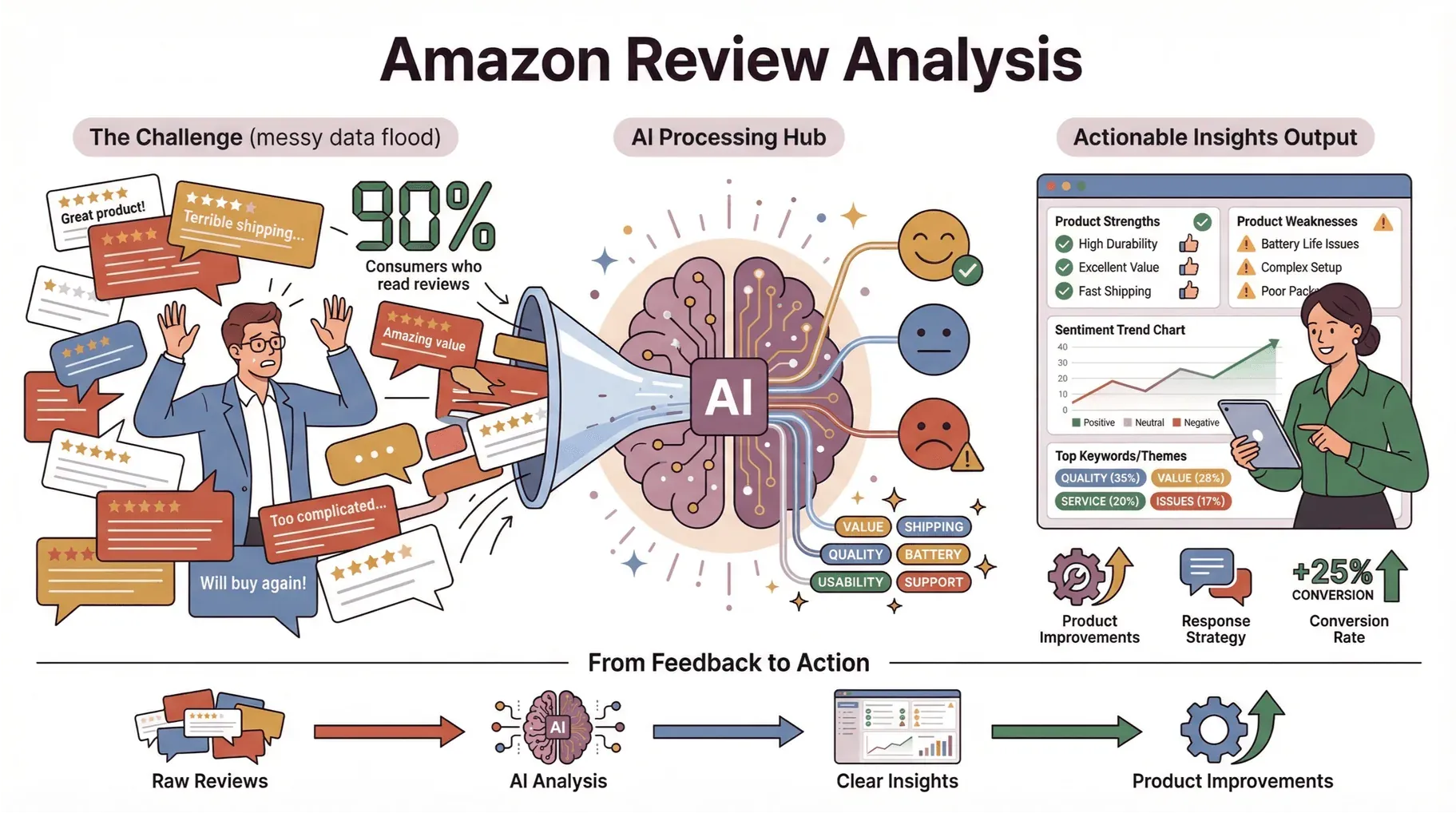
But here’s the catch: the sheer volume and messiness of Amazon review data can overwhelm even the most seasoned teams. That’s why I’m a big believer in using AI-powered tools (like Thunderbit) to turn this flood of feedback into clear, actionable insights. In this guide, I’ll walk you through the best practices for Amazon customer review analysis—from identifying product strengths and weaknesses to responding to negative reviews and driving real product improvements.
Why Amazon Customer Review Analysis Matters for Every Brand
Let’s get real: Amazon reviews are the heartbeat of your brand’s reputation and sales velocity. Whether you’re a solo seller or managing a portfolio of hundreds of SKUs, understanding what your customers are saying (and why they’re saying it) can make or break your business.

Here’s why structured review analysis is a must:
- Direct Line to Customer Sentiment: Reviews are unfiltered, real-world feedback on product quality, usability, and value.
- Impact on Sales: Reviews influence up to 93% of purchase decisions, and a product with a 4.5-star rating can see conversion rates double compared to a 3-star competitor.
- Product Development Goldmine: Recurring themes in reviews highlight what’s working—and what’s not—so you can prioritize improvements.
- Competitive Benchmarking: Comparing your reviews to competitors’ reveals market gaps and opportunities.
Here’s a quick look at how review analysis drives business value:
| Use Case | Example Scenario | Business Value (ROI) |
|---|---|---|
| Product Optimization | Spotting repeated complaints about battery life | Directs R&D to fix top pain points, boosting satisfaction and reducing returns |
| Marketing Messaging | Identifying keywords customers use to praise features | Refines ad copy and listings to match real customer language |
| Customer Service | Tracking negative review trends | Enables proactive outreach, turning unhappy buyers into loyal fans |
| Competitive Analysis | Comparing sentiment trends with rivals | Reveals market gaps and helps position your product more effectively |
Brands like Anker and Instant Pot have famously used review analysis to iterate on product design and customer support, leading to cult followings and category dominance.
Laying the Groundwork: Setting Up for Effective Amazon Customer Review Analysis
Before you can turn review data into insight, you need a solid foundation. Here’s what I’ve found works best:
- Data Collection: Gather reviews consistently and in a structured format (CSV, Excel, Google Sheets, etc.).
- Tool Selection: Decide between manual review, API-based extraction, or AI-powered tools like Thunderbit.
- Team Roles: Assign clear ownership—typically a mix of product, marketing, and customer service.
Manual vs. Automated Review Analysis
| Approach | Pros | Cons |
|---|---|---|
| Manual | No setup, flexible, good for small volume | Time-consuming, error-prone, hard to scale |
| API Extraction | Structured, automatable | Requires technical skills, limited by API scope |
| AI Tools (Thunderbit) | Fast, no code, handles large volumes, built-in sentiment/keyword analysis | May require a learning curve for new users |
Choosing the Right Data Sources
- Amazon Seller Central: Offers basic review exports, but limited filtering and formatting.
- Amazon APIs: Provide structured data but often require developer resources and have usage limits.
- Browser Extensions & AI Tools: Thunderbit and similar tools can extract reviews at scale, including metadata like date, rating, and reviewer profile.
Pro tip: Automated tools like Thunderbit are ideal for regular, large-scale review analysis—no more copy-paste marathons.
Best Practice #1: Identify Product Strengths and Weaknesses with Review Trends
One of the most powerful uses of Amazon customer review analysis is surfacing recurring themes—both good and bad. I’ve seen brands uncover hidden gems (“customers love our packaging!”) and lurking landmines (“everyone’s complaining about the zipper”).
How to do it:
- Track Keyword Frequency: Use tools to extract and count keywords or phrases (e.g., “battery life,” “customer service,” “easy to use”).
- Monitor Sentiment Shifts: Analyze the ratio of positive to negative reviews over time. A sudden spike in negative sentiment can signal a quality issue or supply chain hiccup.
- Feature Mentions: Identify which features are most discussed—and whether they’re praised or panned.
Example: A kitchen gadget brand noticed a surge in “difficult to clean” mentions. They updated their product design and saw a 20% drop in negative reviews within three months.
Turning Review Keywords into Actionable Insights
- Extract Keywords: Use AI tools or word cloud generators to pull out the most common terms.
- Prioritize by Frequency and Sentiment: Focus on keywords that appear often and are linked to strong positive or negative sentiment.
- Visualize with Heatmaps or Word Clouds: These make it easy to spot what matters most to your customers.
Recommended tools: Thunderbit, MonkeyLearn, or even Excel’s built-in word count functions for smaller datasets.
Best Practice #2: Responding Effectively to Negative Amazon Reviews
Negative reviews sting—but they’re also an opportunity. The best brands don’t just react; they respond strategically and use negative feedback to drive improvement.
Why it matters:
- Brand Reputation: Prompt, empathetic responses show you care and can even turn critics into advocates.
- Sales Impact: Addressing issues publicly reassures potential buyers that you stand behind your product.
How to do it:
- Use Sentiment Analysis: Surface the most common complaint themes and prioritize by frequency and severity.
- Respond Promptly: Thank the reviewer, acknowledge the issue, and offer a solution (refund, replacement, or explanation).
- Close the Loop: If you fix a recurring issue, update your listing and highlight the improvement.
Example: After a rash of “arrived damaged” reviews, a home goods brand revamped its packaging and publicly announced the change in responses—leading to a surge in positive follow-ups.
Using Sentiment Analysis to Prioritize Issues
- Automate Sentiment Scoring: Tools like Thunderbit can classify reviews as positive, neutral, or negative.
- Tag and Track: Group complaints by category (e.g., shipping, quality, instructions) to spot systemic problems.
- Prioritize High-Impact Fixes: Focus on issues that affect many customers or are tied to 1-star reviews.
Recommended tools: Thunderbit (extraction plus AI sentiment scoring at scrape time), Altair RapidMiner for teams that already run a data-science stack, or one of the no-code sentiment platforms positioned at marketing teams (Brand24, Sprout Social Listening, Talkwalker). MonkeyLearn was retired into Medallia's platform in 2022.
Best Practice #3: Leveraging Thunderbit for Amazon Customer Review Analysis
I’m a little biased here, but I genuinely believe Thunderbit is a game-changer for Amazon review analysis—especially for teams that want results without wrestling with code or clunky exports.
What makes Thunderbit stand out:
- Instant Review Extraction: Use Thunderbit’s Amazon review template to pull reviews (including date, rating, reviewer, and text) in seconds.
- AI Keyword & Sentiment Analysis: Built-in tools categorize reviews, extract top keywords, and score sentiment—no manual tagging required.
- Data Visualization: Export directly to Google Sheets, Notion, or Airtable for easy charting and dashboarding.
- Subpage Scraping: Grab additional context from reviewer profiles or related products for deeper analysis.
Step-by-Step: Using Thunderbit to Analyze Amazon Reviews
- Install the Thunderbit Chrome Extension.
- Navigate to the Amazon product page or review section.
- Open Thunderbit and select the Amazon Reviews template.
- Click “Scrape”—Thunderbit pulls all visible reviews into a structured table.
- Use “AI Suggest Fields” to add custom columns (e.g., sentiment, keyword tags).
- Export your data to Sheets, Notion, or Airtable for further analysis or visualization.
It’s honestly that simple—no more copy-paste, no more CSV headaches.
Scrape Amazon Reviews Instantly with Thunderbit
Best Practice #4: Monitoring Reviews Regularly and Tracking Trends Over Time
Review analysis isn’t a one-and-done task. The most successful brands set up ongoing monitoring to catch emerging issues and opportunities before they snowball.
Why it matters:
- Early Warning System: Spot negative trends (like a manufacturing defect) before they tank your ratings.
- Trend Tracking: See how changes in product, packaging, or service impact customer sentiment over time.
How to do it:
- Schedule Regular Data Pulls: Use Thunderbit’s scheduled scraping to automate weekly or monthly review exports.
- Set Up Alerts: Flag sudden spikes in negative sentiment or mentions of specific issues.
- Categorize Feedback: Tag reviews by theme (e.g., quality, shipping, customer service) for easier trend analysis.
Visualizing Review Trends for Better Decision-Making
- Dashboards: Build simple dashboards in Google Sheets or Airtable to track average rating, sentiment ratio, and top complaint themes over time.
- Charts & Heatmaps: Use line charts for sentiment trends, bar charts for keyword frequency, and heatmaps for feature mentions.
Example: A supplement brand used weekly review dashboards to catch a spike in “expired product” complaints—leading to a quick recall and minimal brand damage.
Best Practice #5: Turning Review Insights into Product and Marketing Improvements
The real magic of Amazon customer review analysis is turning insight into action. I’ve seen brands transform their fortunes by listening—and responding—to what customers are really saying.
How to do it:
- Feed Insights to Product Teams: Share recurring complaints or feature requests directly with R&D.
- Update Listings and Messaging: Use customer language and top keywords in your product titles, bullets, and ads.
- Close the Feedback Loop: Let customers know when you’ve made changes based on their input—this builds loyalty and trust.
Examples of review-driven improvements:
- Packaging Redesign: After repeated “leaks in transit” complaints, a cosmetics brand switched to double-sealed bottles and highlighted the change in their listing.
- Instruction Updates: A tech brand added a quick-start guide after “hard to set up” reviews, leading to a 30% drop in negative feedback.
- Feature Additions: A kitchenware company launched a new color option after dozens of “wish it came in red” reviews.
Collaborating Across Teams for Review-Driven Innovation
- Cross-Functional Meetings: Schedule regular syncs between product, marketing, and customer service to review insights and action items.
- Share Dashboards: Make review analysis dashboards accessible to all stakeholders.
- Celebrate Wins: Recognize teams when review-driven changes lead to improved ratings or sales.
Best Practice #6: Benchmarking Against Competitors Using Amazon Customer Review Analysis
Your reviews don’t exist in a vacuum. Comparing your feedback to competitors’ can reveal market gaps, differentiators, and threats.
How to do it:
- Extract Competitor Reviews: Use Thunderbit to scrape reviews from top competing products.
- Track Key Metrics: Compare average rating, sentiment ratio, and frequency of specific feature mentions.
- Identify Gaps: Look for complaints in competitor reviews that your product solves—or strengths you can learn from.
Example: A pet supply brand noticed competitors’ reviews were full of “hard to clean” complaints. They doubled down on their “easy-clean” messaging and saw a bump in conversion rates.
Recommended tools: Thunderbit for scraping competitor reviews into a structured table, plus Keepa or Helium 10 for the rating/price history that surrounds those reviews. Two tools that earlier versions of this list called out — Fakespot and ReviewMeta — are no longer usable: Mozilla discontinued Fakespot in mid-2025, and ReviewMeta has been unreachable for most of 2026.
Best Practice #7: Ensuring Data Quality and Compliance in Review Analysis
With great data comes great responsibility. Messy or non-compliant analysis can lead to bad decisions—or worse, trouble with Amazon.
Best practices:
- Validate Data Accuracy: Spot-check scraped reviews against the live site to ensure completeness and correct mapping.
- Clean and Deduplicate: Remove duplicate entries, fix formatting issues, and standardize fields (e.g., dates, ratings).
- Respect Amazon’s Policies: Only use review data for internal analysis or permitted use cases. Don’t republish reviews without permission, and avoid scraping private or restricted content.
- Handle Personal Data Carefully: If reviews contain personal information, follow privacy best practices and relevant regulations.
Pro tip: Thunderbit’s exports are structured and ready for analysis, but always do a quick data quality check before making big decisions.
Recap: Key Takeaways for Amazon Customer Review Analysis Success
Let’s bring it all together. Here are the most important best practices for Amazon customer review analysis:
- Make review analysis a regular habit, not a one-off project.
- Use AI-powered tools like Thunderbit to extract, categorize, and visualize review data—no code required.
- Track trends, keywords, and sentiment to identify strengths, weaknesses, and emerging issues.
- Respond to negative reviews with empathy and action—turn critics into fans.
- Feed insights back into product development and marketing for continuous improvement.
- Benchmark against competitors to spot market gaps and opportunities.
- Ensure data quality and compliance at every step.
Structured review analysis isn’t just about protecting your reputation—it’s about fueling growth, innovation, and customer loyalty. If you haven’t started yet, there’s no better time to make review insights your secret weapon.
Ready to turn Amazon reviews into real business value? Download Thunderbit and see how easy it can be to unlock actionable insights from your customer feedback. And for more tips on web data, check out the Thunderbit Blog.
Try Thunderbit for Amazon Review Analysis
FAQs
1. What is Amazon customer review analysis and why is it important?
Amazon customer review analysis is the process of extracting, categorizing, and interpreting reviews to understand customer sentiment, product strengths and weaknesses, and market trends. It’s essential because reviews directly impact sales, reputation, and product development decisions.
2. How can I extract Amazon reviews for analysis?
You can manually copy reviews, use Amazon’s Seller Central exports, access APIs (if you have developer resources), or use AI-powered browser extensions like Thunderbit for fast, structured extraction.
3. What’s the best way to handle negative Amazon reviews?
Respond promptly and professionally, acknowledge the issue, offer a solution, and use sentiment analysis to identify and prioritize recurring problems. Turning negative experiences into positive ones can boost brand trust and even improve ratings over time.
4. How does Thunderbit help with Amazon customer review analysis?
Thunderbit provides instant review extraction templates, AI-powered keyword and sentiment analysis, and seamless export to tools like Google Sheets and Notion. It’s designed for non-technical users who want actionable insights without coding.
5. Is it legal and compliant to scrape and analyze Amazon reviews?
Yes, as long as you’re extracting publicly available data for internal analysis, respecting Amazon’s terms of service, and not republishing reviews without permission. Always handle any personal data with care and follow privacy best practices.
How To Scrape Amazon Products and Reviews in 2025 using AI Get Started Free
Want to see more ways to turn web data into business growth? Dive into the Thunderbit Blog for more guides, tips, and real-world examples.
Try AI Web Scraper for Amazon Reviews Get Started Free
Learn More




