TED-Ed Scraper

โดย
Extract structured data from TED-Ed for research, analysis, or knowledge management. Save time by automatically collecting titles, subjects, durations, and view counts.

อยากดึงข้อมูลแบบจำนวนมากใช่ไหม? ลองใช้ Thunderbit ฟรี

Chrome Store Rating
PRODUCT HUNT#1 Product of the Week
Accenture logoCriteo logoGrammarly logoVerisk logoklook logoPuma logoRingCentral logoAccenture logoCriteo logoGrammarly logoVerisk logoklook logoPuma logoRingCentral logoAccenture logoCriteo logoGrammarly logoVerisk logoklook logoPuma logoRingCentral logoAccenture logoCriteo logoGrammarly logoVerisk logoklook logoPuma logoRingCentral logoAccenture logoCriteo logoGrammarly logoVerisk logoklook logoPuma logoRingCentral logoAccenture logoCriteo logoGrammarly logoVerisk logoklook logoPuma logoRingCentral logo
Collect TED-Ed Data in SecondsUse Thunderbit to batch extract TED-Ed details for research or content analysis—no manual copy-paste required.
chrome-web-store
ติดตั้งจากChrome Web Store

Collect TED-Ed Data in Seconds

Thunderbit scrapes TED-Ed pages and subpages, capturing lesson titles, URLs, subjects, durations, and view counts in a structured format. With just a few clicks, you can gather comprehensive data for research, content curation, or educational projects. Export your results directly to Google Sheets, Airtable, or Notion. Thunderbit also supports summarizing and categorizing data, making it easy to organize and analyze large TED Talk collections.

How to Extract TED-Ed Data Using Thunderbit

step_01.png
STEP 1Download and InstallDownload and install the Thunderbit Chrome Extension from the Thunderbit Chrome Extension Download Page. Once installed, log in or create a free account to get started.
step_02.png
STEP 2Open ExtensionNavigate to the TED-Ed channel or TED-Ed video page you want to extract data from. Open the Thunderbit Chrome Extension and select the 'TED-Ed Scraper' tool from the menu. Enter the TED-Ed channel or video URL in the provided field.
step03.png
STEP 3Click the Extract TED-Ed Data ButtonClick the 'Extract TED-Ed Data' button. Thunderbit will process the page and extract structured information such as Lesson Title, Lesson URL, Subject, Lesson Duration (minutes), and Views. Once the data is displayed in a table, you can export it to Excel, Google Sheets, Airtable, Notion, or download it as a CSV or JSON file.

Learn how to extract structured data from TED-Ed for research and analysis

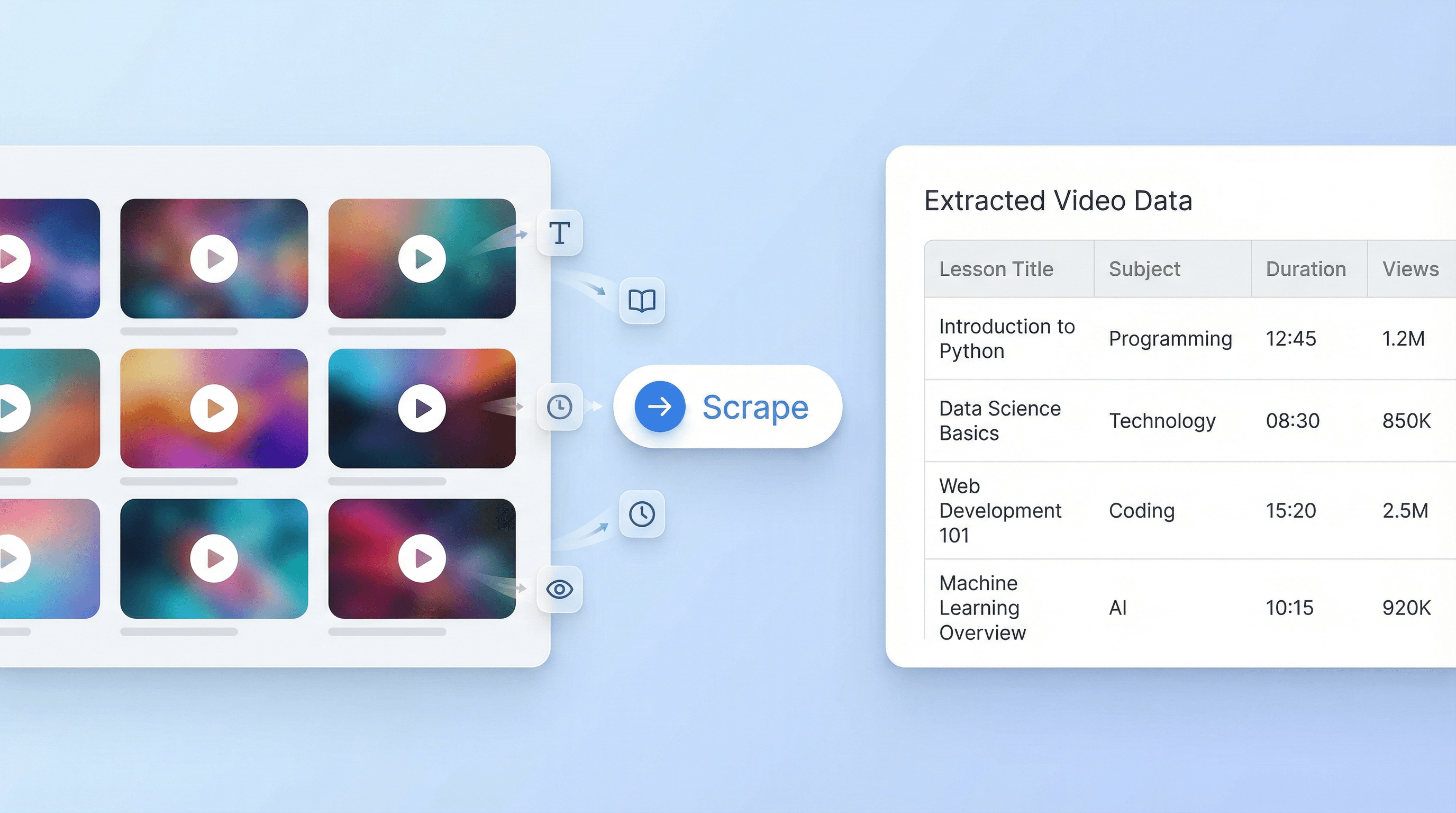
Collect TED-Ed Information in Bulk

The TED-Ed Scraper enables users to gather detailed information from multiple TED Talks or entire TED-Ed channels with just a single URL input. It automatically identifies and extracts key data such as lesson titles, subjects, durations, and view counts. This feature is ideal for researchers, educators, and content analysts who need to organize large volumes of TED content without manual data entry.
เริ่มต้นฟรี
ted_ed_scraper_illustration.png

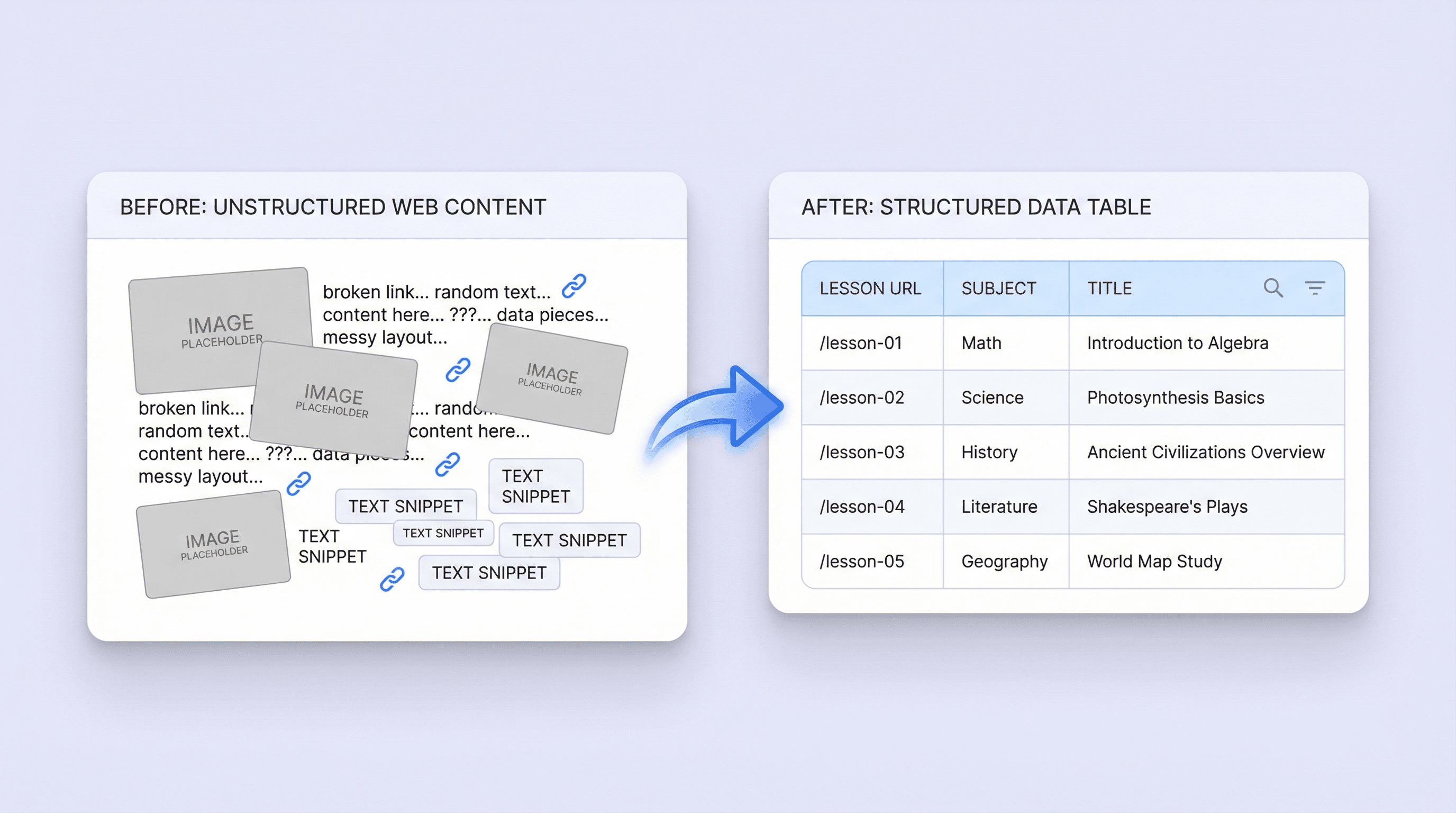
Organize and Structure TED-Ed Content Efficiently

By transforming unstructured TED-Ed pages into a clean, tabular format, the tool streamlines the process of content analysis and knowledge management. Users can quickly access lesson URLs, subjects, and other relevant details, making it easier to compare talks, track trends, or curate educational resources. This structured approach saves time and reduces the risk of missing important information.
เริ่มต้นฟรี
content_organization_illustration.png

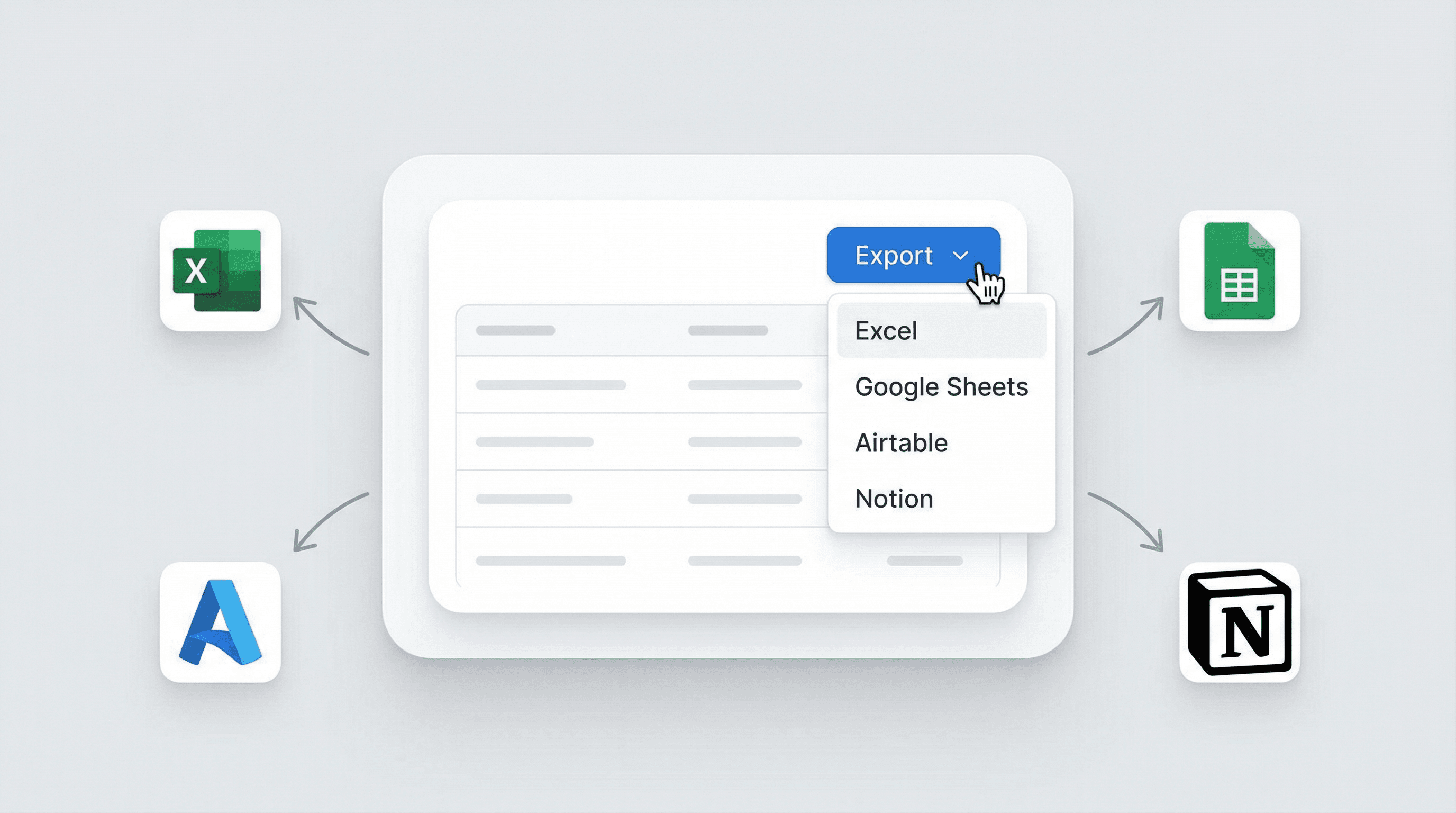
Export Data for Further Research and Collaboration

Once the TED-Ed data is extracted, users can export the results to Excel, Google Sheets, Airtable, or Notion. This makes it simple to share findings with colleagues, integrate the data into research projects, or build custom databases for ongoing analysis. The export-ready format ensures that the information is immediately usable for presentations, reports, or collaborative work.
เริ่มต้นฟรี
data_export_illustration.png

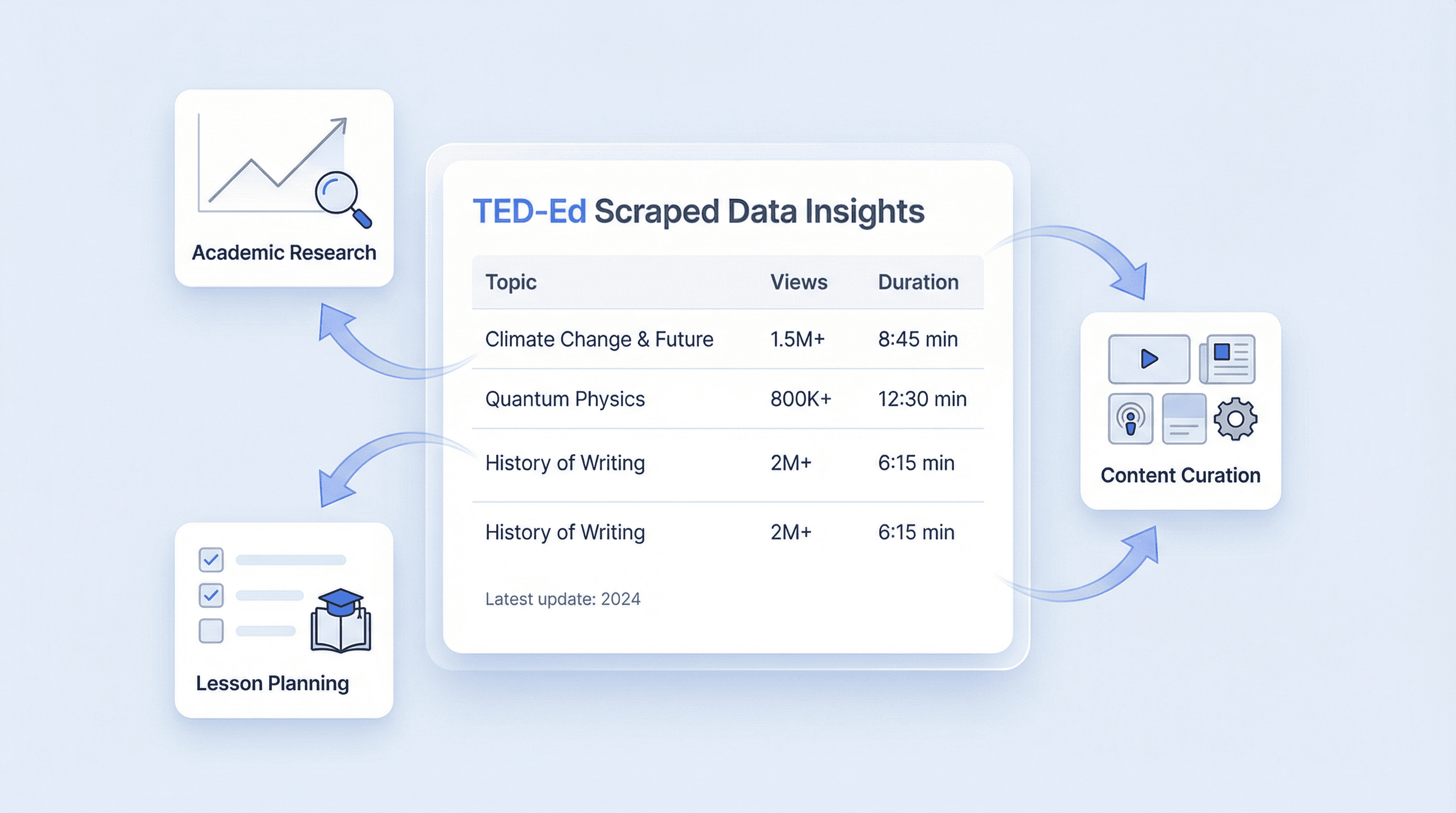
Support Academic, Educational, and Content Curation Workflows

The Ted Talk Scraper is especially useful for academic teams, educators, and content curators who need to analyze TED-Ed content at scale. Whether you’re conducting topic research, building lesson plans, or tracking the popularity of talks, this tool provides a reliable way to collect and manage the data you need. It helps streamline workflows and supports data-driven decision making in educational and research settings.
เริ่มต้นฟรี
academic_workflow_illustration.png

ค้นพบเครื่องมือฟรีเพิ่มเติม

ตัวค้นหา Niche

ค้นหา Niche ที่กำลังมาแรงและทำกำไรได้จากคีย์เวิร์ดใดก็ได้ พร้อมดูสัญญาณความต้องการ ระดับการแข่งขัน และซับนิชที่เกี่ยวข้อง เพื่อมองเห็นโอกาสได้เร็วขึ้น

เครื่องมือสร้างชื่อโดเมน

สร้างไอเดียชื่อโดเมนสุดครีเอทีฟจากคีย์เวิร์ดของคุณ พร้อมตัวเลือกที่เหมาะกับแบรนด์และโปรเจกต์ของคุณ

เครื่องมือสร้างคำบรรยายลักษณะงาน (Job Description Generator)

สร้างคำบรรยายลักษณะงานที่ดูเป็นมืออาชีพจากรายละเอียดตำแหน่ง เพื่อให้ประกาศรับสมัครมีมาตรฐานสม่ำเสมอและช่วยให้การจ้างงานเร็วขึ้น

เครื่องมือสร้างหัวข้ออีเมลด้วย AI

สร้างหัวข้ออีเมลที่น่าสนใจได้จากคำอธิบายสั้น ๆ ช่วยเพิ่มอัตราการเปิดอ่านด้วยคำแนะนำจาก AI ใช้งานง่าย รวดเร็ว และไม่ต้องสมัครสมาชิก

เครื่องมือสร้างลายเซ็นอีเมล

สร้างลายเซ็นอีเมลที่ดูเป็นมืออาชีพจากข้อมูลติดต่อและรายละเอียดบริษัทของคุณ ปรับแต่งเลย์เอาต์ ฟอนต์ สี และโลโก้ให้สอดคล้องกับแบรนด์ คัดลอกหรือดาวน์โหลดได้ทั้งแบบ HTML และข้อความล้วน ใช้ได้กับทุกโปรแกรมอีเมล

เครื่องมือดึงและตรวจสอบอีเมล

ค้นหาและดึงที่อยู่อีเมลด้วย Email Extractor จากหน้าเว็บ PDF หรือข้อความได้อย่างรวดเร็ว แม่นยำ และพร้อมส่งออกได้ทุกเมื่อ

ตัวสร้างหัวข้อ

สร้างพาดหัวที่พร้อมใช้งานกับกลุ่มเป้าหมายจากเนื้อหาของคุณ เลือกสไตล์ได้ตามงาน เช่น บล็อก วิดีโอ สโลแกน หรือเชิงวิชาการ และกำหนดความยาวที่ต้องการ รับทั้งรายการที่คัดสรรมาแล้วและตารางสำหรับตรวจทานอย่างรวดเร็ว

เครื่องมือสร้างชื่อธุรกิจ

สร้างไอเดียชื่อธุรกิจที่นำไปใช้ต่อยอดแบรนด์ได้จากคีย์เวิร์ดและสไตล์ที่คุณต้องการ เพื่อช่วยระดมความคิดได้เร็วขึ้น และหาชื่อที่เข้ากับธุรกิจของคุณจริง ๆ

ตัวดึงข้อมูล Pinterest

ดึงบอร์ดสาธารณะเพื่อเก็บ URL รูปภาพ ชื่อเรื่อง และข้อมูลเมตาในรูปแบบรายการที่มีโครงสร้าง ประหยัดเวลาด้วยการส่งออกข้อมูลที่สะอาดพร้อมสำหรับการวิเคราะห์หรือจัดเก็บเป็นคลัง

เครื่องมือตรวจสอบอีเมลแบล็กลิสต์

ตรวจสอบว่าโดเมนอีเมลหรือ IP ของเมลเซิร์ฟเวอร์ถูกขึ้นบัญชีดำในรายการหลัก ๆ หรือไม่ ดูผลจากหลายฐานข้อมูลเพื่อประเมินความเสี่ยงด้านการส่งอีเมล (deliverability) พร้อมสถานะที่ชัดเจนและคำแนะนำขั้นตอนถัดไป

เครื่องมือสร้างชื่อบริษัท

สร้างชื่อบริษัทที่สร้างสรรค์จากคีย์เวิร์ดหรือประเภทธุรกิจของคุณ ช่วยระดมไอเดียตัวเลือกที่พร้อมใช้เป็นแบรนด์ได้อย่างรวดเร็ว

Text Paraphraser

Rephrase and enhance your content for clarity and engagement. Choose your preferred language and tone to generate error-free, original rewrites. Perfect for marketers, copywriters, and students.

เครื่องมือสร้างหัวเรื่องอีเมลด้วย AI

สร้างหัวเรื่องอีเมลจากฉบับร่างหรือบรีฟของคุณ เลือกโทน กลุ่มเป้าหมาย และความยาวให้เหมาะกับแคมเปญ เพิ่มอัตราการเปิดด้วยตัวเลือกที่พร้อมใช้งาน

เครื่องมือสร้างข้อความขาย

สร้างข้อความขายที่โน้มน้าวใจจากรายละเอียดสินค้าและอินไซต์ของกลุ่มเป้าหมาย เพื่อประหยัดเวลาและเพิ่มอัตราการแปลง

Yelp Review Scraper

Extract detailed Yelp reviews including usernames, ratings, and review content into a structured table. Save time collecting feedback for analysis or reporting.

ตัวสร้างแท็ก

สร้างแท็กที่เกี่ยวข้องจากชื่อวิดีโอเพื่อเพิ่มการค้นพบและการจัดระเบียบ รับคำแนะนำคีย์เวิร์ดที่สอดคล้องกับเจตนาการค้นหาเพื่อเพิ่มการเข้าถึงแบบออร์แกนิก

หาเครื่องมือเพิ่มเติมตอนนี้

ผู้ใช้พูดถึง Thunderbit ว่าอย่างไร

Taryn W.Growth Strategist@Thunderbit เปลี่ยนวิธีที่ฉันทำรีเสิร์ชคู่แข่งไปเลย ฉันกด 'AI Suggest Fields' แล้วมันก็สร้างตารางที่สะอาดจากผลลัพธ์หลายหน้าให้ทันที—ไม่ต้องเขียนโค้ด ไม่ต้องแตะ CSS ช่วยประหยัดเวลาได้มากตอนวิเคราะห์ข้อมูลสินค้าจากมาร์เก็ตเพลสเฉพาะกลุ่ม
Miles T.Sales Development Consultantฉันใช้ Thunderbit ดึงอีเมลและเบอร์โทรจากไดเรกทอรี มันดึงข้อมูลติดต่อได้สะอาดในคลิกเดียว และส่งออกไป Sheets หรือ Notion ก็ใช้เวลาแค่ไม่กี่วินาที ไม่ต้องตั้งค่าเพิ่ม ไม่ต้องเขียนโค้ด—ได้ข้อมูลพร้อมใช้งานทันที
Rhea C.E-commerce AnalystThunderbit ช่วยให้ฉันติดตามข้อมูล SKU ข้ามหลายหน้าได้ ฉันดึงรายการสินค้า แล้วใช้ Subpage Scraping เพื่อเก็บสเปกสินค้า ราคา รีวิว และสต็อกแบบครบ ๆ AI จัดทุกอย่างลงคอลัมน์ตามที่ฉันกำหนด
Cassian B.Real Estate AdvisorScheduled Scraper ของ Thunderbit ทำให้การติดตามอสังหาฯ ง่ายขึ้นมาก ฉันแค่บอกช่วงเวลาที่ต้องการเป็นภาษาธรรมดา แล้วมันก็ไปดึงรายการ ราคา และลิงก์ที่อัปเดตให้เอง โดยไม่ต้องกลับมาแตะการตั้งค่าอีก เรียบง่ายและใช้งานได้จริงมาก
Dorian B.Content & SEO Specialistฉันใช้ Field AI Prompts ของ Thunderbit เพื่อทำความสะอาดและติดแท็กคอนเทนต์บล็อกที่ดึงมา มันดึงหัวข้อ ผู้เขียน และยังช่วยแนะนำหมวดหมู่ได้ด้วย ใช้ได้ดีทั้งกับเว็บไดนามิกและ subpage—เหมาะมากสำหรับสร้างชุดข้อมูล SEO แบบมีโครงสร้าง
Lina K.Marketplace Operations Leadเราติดตาม SKU จากร้านเฉพาะกลุ่มด้วย Thunderbit Cloud Scraping จัดการได้ครั้งละ 50 หน้า และถ้าเป็นเว็บที่ต้องล็อกอิน เราก็สลับไปใช้โหมดเบราว์เซอร์ได้ มันเร็ว ยืดหยุ่น และไม่ต้องดูแลหรือแก้ไขเองต่อเนื่อง
Jorge F.Inbound Sales ManagerAI Autofill ของ Thunderbit ช่วยชีวิตมาก หลังดึงข้อมูลติดต่อแล้ว ฉันใช้มันเติมฟอร์มลีดตรงในเบราว์เซอร์ แค่เลือกแท็บ มันก็กรอกทุกอย่างจากแถวข้อมูลที่ดึงมา ไม่ต้องพิมพ์เองเลย
Alina D.Freelance Researcherฉันพึ่ง Thunderbit ในการดึงข้อมูลจาก PDF เว็บที่เป็นรูปภาพ และหน้าที่เลื่อนแบบไม่สิ้นสุด มันจัดการฟอร์แมตที่ยุ่งยากด้วย AI และส่งออกเป็นตารางที่พร้อมใช้งาน ส่งต่อไป Google Sheets หรือ Airtable ได้ในไม่กี่วินาที
Taryn W.Growth Strategist@Thunderbit เปลี่ยนวิธีที่ฉันทำรีเสิร์ชคู่แข่งไปเลย ฉันกด 'AI Suggest Fields' แล้วมันก็สร้างตารางที่สะอาดจากผลลัพธ์หลายหน้าให้ทันที—ไม่ต้องเขียนโค้ด ไม่ต้องแตะ CSS ช่วยประหยัดเวลาได้มากตอนวิเคราะห์ข้อมูลสินค้าจากมาร์เก็ตเพลสเฉพาะกลุ่ม
Miles T.Sales Development Consultantฉันใช้ Thunderbit ดึงอีเมลและเบอร์โทรจากไดเรกทอรี มันดึงข้อมูลติดต่อได้สะอาดในคลิกเดียว และส่งออกไป Sheets หรือ Notion ก็ใช้เวลาแค่ไม่กี่วินาที ไม่ต้องตั้งค่าเพิ่ม ไม่ต้องเขียนโค้ด—ได้ข้อมูลพร้อมใช้งานทันที
Rhea C.E-commerce AnalystThunderbit ช่วยให้ฉันติดตามข้อมูล SKU ข้ามหลายหน้าได้ ฉันดึงรายการสินค้า แล้วใช้ Subpage Scraping เพื่อเก็บสเปกสินค้า ราคา รีวิว และสต็อกแบบครบ ๆ AI จัดทุกอย่างลงคอลัมน์ตามที่ฉันกำหนด
Cassian B.Real Estate AdvisorScheduled Scraper ของ Thunderbit ทำให้การติดตามอสังหาฯ ง่ายขึ้นมาก ฉันแค่บอกช่วงเวลาที่ต้องการเป็นภาษาธรรมดา แล้วมันก็ไปดึงรายการ ราคา และลิงก์ที่อัปเดตให้เอง โดยไม่ต้องกลับมาแตะการตั้งค่าอีก เรียบง่ายและใช้งานได้จริงมาก
Dorian B.Content & SEO Specialistฉันใช้ Field AI Prompts ของ Thunderbit เพื่อทำความสะอาดและติดแท็กคอนเทนต์บล็อกที่ดึงมา มันดึงหัวข้อ ผู้เขียน และยังช่วยแนะนำหมวดหมู่ได้ด้วย ใช้ได้ดีทั้งกับเว็บไดนามิกและ subpage—เหมาะมากสำหรับสร้างชุดข้อมูล SEO แบบมีโครงสร้าง
Lina K.Marketplace Operations Leadเราติดตาม SKU จากร้านเฉพาะกลุ่มด้วย Thunderbit Cloud Scraping จัดการได้ครั้งละ 50 หน้า และถ้าเป็นเว็บที่ต้องล็อกอิน เราก็สลับไปใช้โหมดเบราว์เซอร์ได้ มันเร็ว ยืดหยุ่น และไม่ต้องดูแลหรือแก้ไขเองต่อเนื่อง
Jorge F.Inbound Sales ManagerAI Autofill ของ Thunderbit ช่วยชีวิตมาก หลังดึงข้อมูลติดต่อแล้ว ฉันใช้มันเติมฟอร์มลีดตรงในเบราว์เซอร์ แค่เลือกแท็บ มันก็กรอกทุกอย่างจากแถวข้อมูลที่ดึงมา ไม่ต้องพิมพ์เองเลย
Alina D.Freelance Researcherฉันพึ่ง Thunderbit ในการดึงข้อมูลจาก PDF เว็บที่เป็นรูปภาพ และหน้าที่เลื่อนแบบไม่สิ้นสุด มันจัดการฟอร์แมตที่ยุ่งยากด้วย AI และส่งออกเป็นตารางที่พร้อมใช้งาน ส่งต่อไป Google Sheets หรือ Airtable ได้ในไม่กี่วินาที

Frequently Asked Questions

ดึงข้อมูลด้วย AI
ส่งข้อมูลไปยัง Google Sheets, Airtable หรือ Notion ได้อย่างง่ายดาย
Chrome Store Rating
PRODUCT HUNT#1 Product of the Week