Random Team Generator

โดย
Quickly split a list of names into random teams based on your chosen team count. Ideal for group activities, meetings, or classroom assignments.

อยากดึงข้อมูลแบบจำนวนมากใช่ไหม? ลองใช้ Thunderbit ฟรี

Chrome Store Rating
PRODUCT HUNT#1 Product of the Week
Accenture logoCriteo logoGrammarly logoVerisk logoklook logoPuma logoRingCentral logoAccenture logoCriteo logoGrammarly logoVerisk logoklook logoPuma logoRingCentral logoAccenture logoCriteo logoGrammarly logoVerisk logoklook logoPuma logoRingCentral logoAccenture logoCriteo logoGrammarly logoVerisk logoklook logoPuma logoRingCentral logoAccenture logoCriteo logoGrammarly logoVerisk logoklook logoPuma logoRingCentral logoAccenture logoCriteo logoGrammarly logoVerisk logoklook logoPuma logoRingCentral logo
Create Random Teams in SecondsUse Thunderbit to divide any list of names into teams with just a few clicks—no manual sorting required.
chrome-web-store
ติดตั้งจากChrome Web Store

Create Random Teams in Seconds

Organizing a group event or classroom activity? Thunderbit's Random Team Generator lets you input names and instantly get balanced, randomized teams in a clear table format. No more manual shuffling or time-consuming sorting—just enter your list, set the number of teams, and get results right away. Thunderbit also supports exporting your team assignments to Google Sheets, Airtable, or Notion for easy sharing and collaboration. Perfect for teachers, managers, or anyone needing quick team assignments.

How to Randomly Generate Teams Using Thunderbit

step_01.png
STEP 1Download and InstallDownload and install the Thunderbit Chrome Extension from the Thunderbit Chrome Extension Download Page. Once installed, log in or create a free account to get started.
step_02.png
STEP 2Open ExtensionNavigate to the Thunderbit Chrome Extension in your browser. Select the "Randomly Divide into Teams" tool from the menu. Enter the names of all participants, separated by commas or line breaks, and specify the number of teams you want to create.
step03.png
STEP 3Click the Generate Teams ButtonClick the "Generate Teams" button. Thunderbit will randomly assign the names into the specified number of teams and display the results in a table. You can review the team assignments and export the table as needed.

Learn how to randomly generate teams from a list of names

Create Random Teams from Any Group
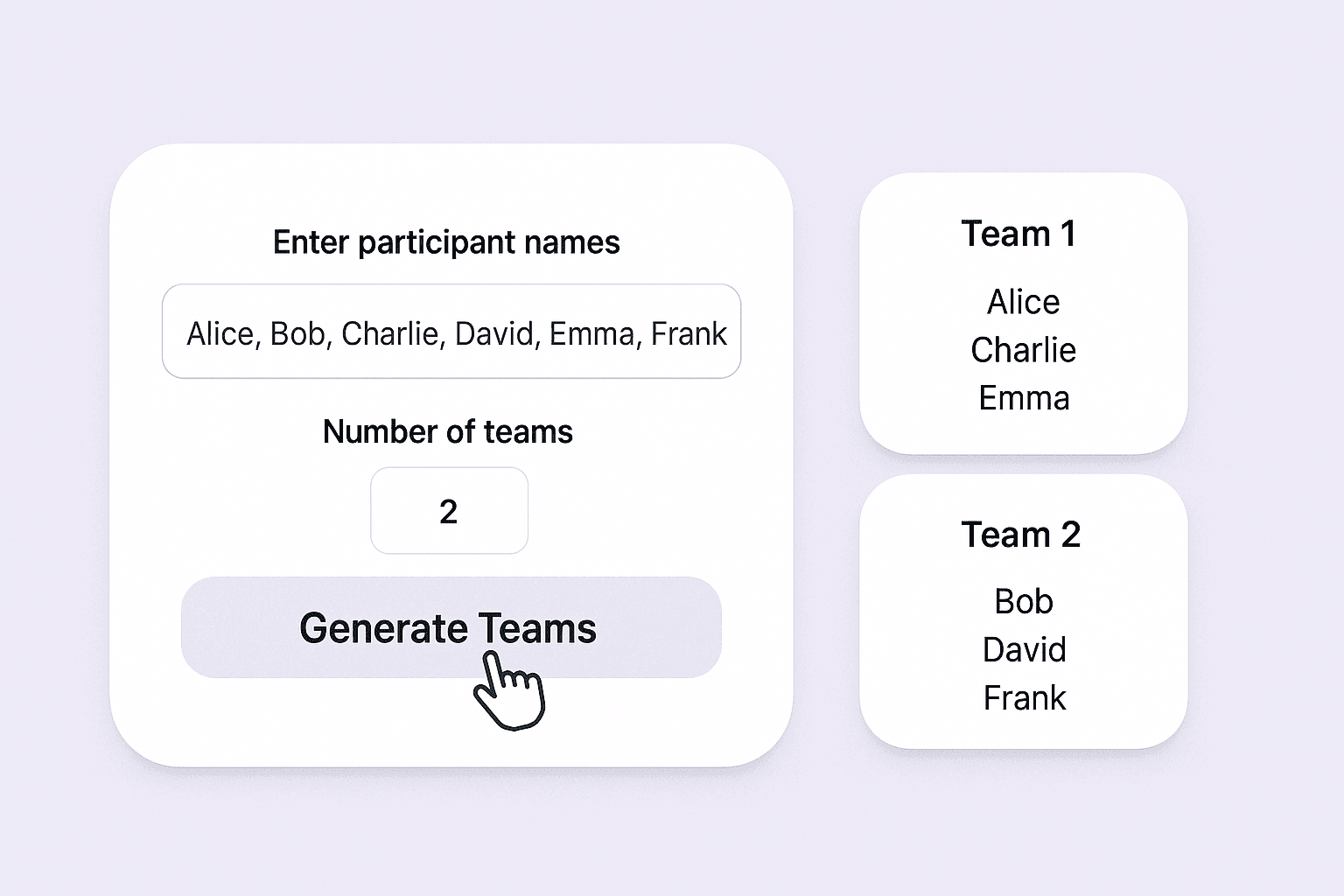
The Random Team Generator allows you to quickly divide any group of people into teams at random. Simply enter the names of all participants and specify how many teams you need. This tool is ideal for teachers, event organizers, managers, or anyone who needs to split people into groups for activities, projects, or competitions. It removes bias and manual effort, ensuring fair and balanced team assignments every time.
เริ่มต้นฟรี
team_randomizer_ui (1).png

Distribute Members Evenly and Fairly

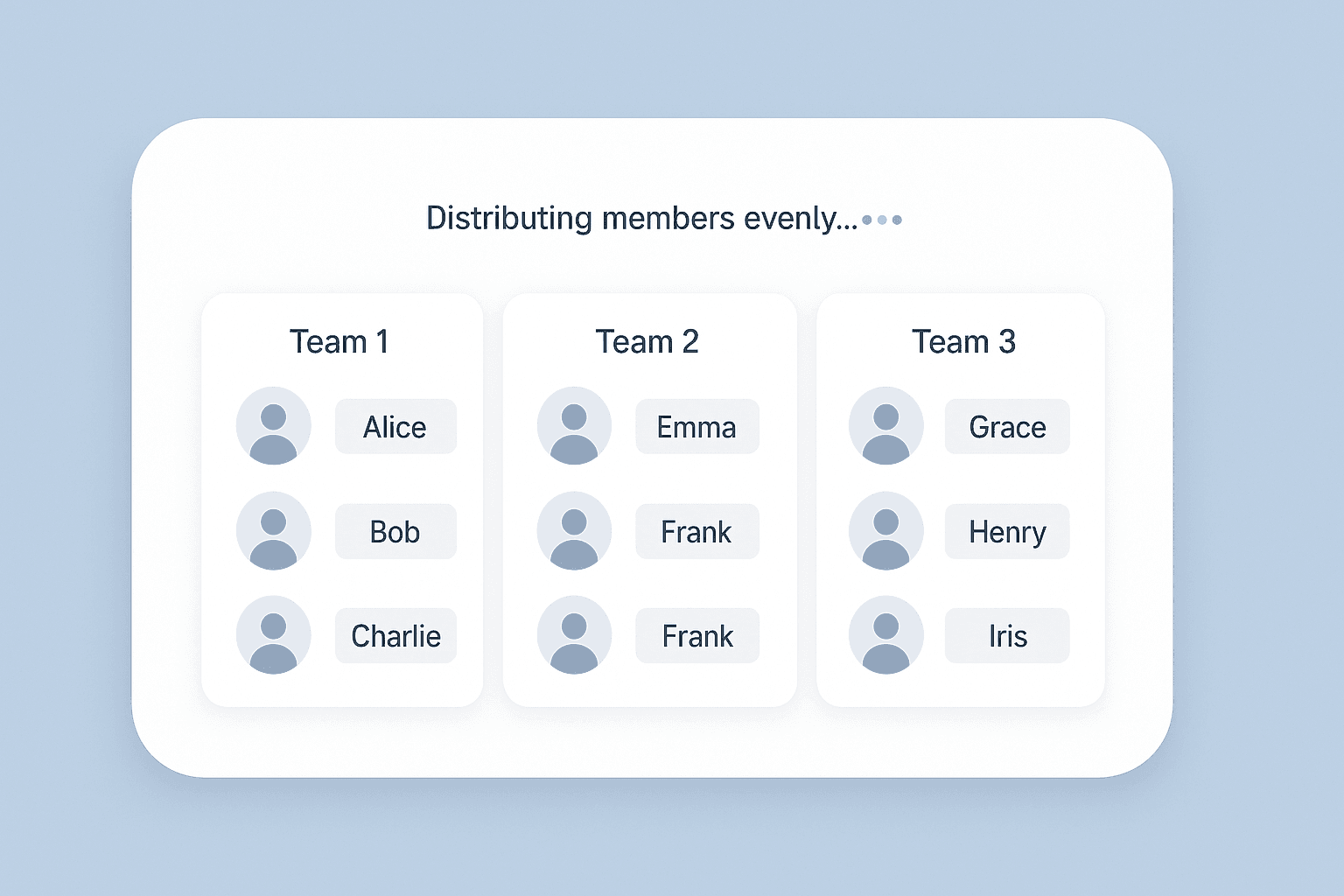
With advanced randomization, the tool ensures that team members are distributed as evenly as possible. No matter the group size or number of teams, the algorithm works to balance the number of participants in each team. This is especially useful for classroom activities, sports, workshops, or collaborative projects where fairness and variety are important. The process is quick and eliminates the need for manual sorting or drawing lots.
เริ่มต้นฟรี
team_distribution_ui (1).png

Export Team Assignments in Table Format
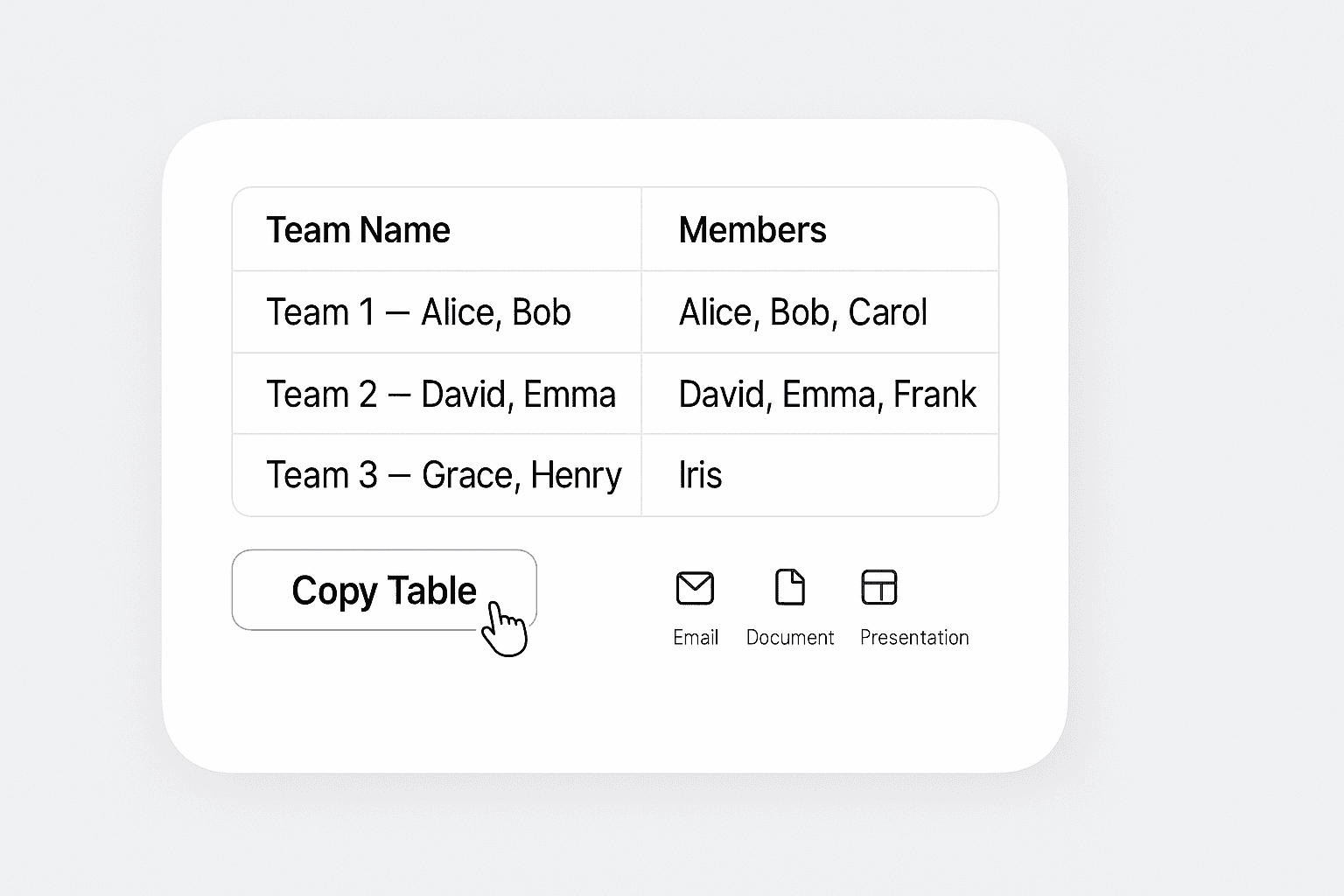
Once the teams are generated, the results are displayed in a clear table format. Each team is listed with its assigned members, making it easy to review and share. You can copy the table for use in emails, documents, or presentations. This organized output helps you communicate team assignments efficiently, whether you’re coordinating a meeting, planning a game, or managing a group project.
เริ่มต้นฟรี
team_results_table_ui (1).png

Use for Team Building, Games, and More

The Random Team Generator is perfect for a wide range of scenarios, including classroom group work, corporate team-building exercises, sports matches, and party games. By automating the team selection process, you can focus on the activity itself rather than logistics. The tool adapts to any group size and team count, making it a versatile solution for educators, coaches, and facilitators.
เริ่มต้นฟรี
use_cases_showcase_ui_v2 (1).png

ค้นพบเครื่องมือฟรีเพิ่มเติม

Talabat Scraper

ดึงข้อมูลร้านอาหารจากรายการของ Talabat แล้วแปลงเป็นตารางที่มีโครงสร้างสำหรับการวิเคราะห์ ประหยัดเวลาจากการค้นคว้าด้วยตนเองและได้อินไซต์เกี่ยวกับคู่แข่ง

เครื่องคำนวณ TAM, SAM, SOM

ประเมินโอกาสทางการตลาดของคุณได้ด้วยข้อมูลแบบ Top-down หรือ Bottom-up พร้อมผลลัพธ์ TAM, SAM และ SOM ที่ชัดเจนสำหรับใช้วางแผน ระดมทุน และตรวจสอบสมมติฐาน

เครื่องคำนวณส่วนลด

คำนวณยอดประหยัดและราคาสุทธิจากราคาเต็มและอัตราส่วนลด หรือคำนวณย้อนหาเปอร์เซ็นต์ส่วนลดจากราคาสุทธิ แสดงผลชัดเจนด้วยทศนิยม 2 ตำแหน่งเพื่อช่วยตัดสินใจซื้อได้เร็วขึ้น

เครื่องคำนวณ ROI

คำนวณผลตอบแทนจากการลงทุน (ROI) จากต้นทุนและกำไรสุทธิ เพื่อให้ได้เปอร์เซ็นต์ ROI ที่ชัดเจนสำหรับเปรียบเทียบโอกาสและประเมินผลงานของโครงการ

เครื่องมือตรวจสอบ VAT

ตรวจสอบหมายเลข VAT กับฐานข้อมูลทางการเพื่อยืนยันความถูกต้อง และเมื่อมีข้อมูลพร้อมใช้งาน สามารถดึงรายละเอียดบริษัทที่จดทะเบียน เช่น ชื่อและที่อยู่ เพื่อลดความเสี่ยงด้านการออกใบแจ้งหนี้และการปฏิบัติตามข้อกำหนด

เครื่องคำนวณจุดคุ้มทุน

คำนวณปริมาณการขายที่ต้องใช้เพื่อครอบคลุมต้นทุนรวม ใส่ต้นทุนคงที่ ต้นทุนผันแปรต่อหน่วย และราคาต่อหน่วย เพื่อหาจำนวนหน่วยที่คุ้มทุน วางแผนราคาและเป้าหมายได้อย่างมั่นใจ

เครื่องมือนับคำออนไลน์

นับจำนวนคำ ตัวอักษร ประโยค และย่อหน้าในข้อความใดก็ได้ ดูสถิติความยาวอย่างชัดเจนสำหรับงานเขียน การเรียน และการแก้ไขข้อความ

เครื่องมือตรวจสอบ BIN

ค้นหา BIN ของบัตรเพื่อระบุธนาคารผู้ออกบัตร แบรนด์ ประเภท และประเทศ ตรวจสอบข้อมูลการชำระเงินเพื่อลดข้อผิดพลาด และช่วยจับสัญญาณธุรกรรมเสี่ยงได้รวดเร็วยิ่งขึ้น

Glassdoor Review Exporter

Extract company reviews from Glassdoor, including ratings, summaries, pros, cons, and employee details, into a structured table for easy analysis.

Crunchbase Scraper

Extract key company details from any Crunchbase profile, including funding, social links, and descriptions. Save time on research and export structured data in one click.

เครื่องมือค้นหา ESP

ระบุผู้ให้บริการอีเมล (ESP) ที่อยู่เบื้องหลังอีเมลหรือโดเมน ดูรายละเอียดผู้ให้บริการ, MX records และคะแนนความเชื่อมั่น เพื่อช่วยงาน outreach และการตรวจสอบด้าน IT


เครื่องมือดึงข้อมูลโปรไฟล์ออนไลน์ฟรี

ดึงข้อมูลโปรไฟล์สาธารณะที่เป็นโครงสร้างจากหน้าสังคมออนไลน์และไดเรกทอรีด้วย AI รวบรวมชื่อ แฮนเดิล ไบโอ ที่ตั้ง และสถิติผู้ติดตามเพื่อการวิเคราะห์และการเข้าถึงลูกค้า

เครื่องมือดึงข้อมูล Naver

ดึงชื่อเรื่อง ลิงก์ สรุป และวันที่จากหน้า Naver ช่วยประหยัดเวลาทำวิจัยด้วยข้อมูลที่มีโครงสร้างจากผลการค้นหาและเนื้อหาบนหน้าเว็บ

เครื่องมือสร้างหัวข้ออีเมลด้วย AI

สร้างหัวข้ออีเมลที่น่าสนใจได้จากคำอธิบายสั้น ๆ ช่วยเพิ่มอัตราการเปิดอ่านด้วยคำแนะนำจาก AI ใช้งานง่าย รวดเร็ว และไม่ต้องสมัครสมาชิก

Amazon สินค้า Scraper

เพียงวาง URL สินค้าจาก Amazon ก็สามารถดึงข้อมูลสินค้าออกมาได้ทันที ไม่ว่าจะเป็นชื่อสินค้า ราคา คะแนนรีวิว และรายละเอียดอื่น ๆ จัดเป็นตารางที่เป็นระเบียบ พร้อมสำหรับส่งออกและตรวจสอบได้อย่างรวดเร็ว

เครื่องมือดึงและตรวจสอบอีเมล

ค้นหาและดึงที่อยู่อีเมลด้วย Email Extractor จากหน้าเว็บ PDF หรือข้อความได้อย่างรวดเร็ว แม่นยำ และพร้อมส่งออกได้ทุกเมื่อ

หาเครื่องมือเพิ่มเติมตอนนี้

ผู้ใช้พูดถึง Thunderbit ว่าอย่างไร

Taryn W.Growth Strategist@Thunderbit เปลี่ยนวิธีที่ฉันทำรีเสิร์ชคู่แข่งไปเลย ฉันกด 'AI Suggest Fields' แล้วมันก็สร้างตารางที่สะอาดจากผลลัพธ์หลายหน้าให้ทันที—ไม่ต้องเขียนโค้ด ไม่ต้องแตะ CSS ช่วยประหยัดเวลาได้มากตอนวิเคราะห์ข้อมูลสินค้าจากมาร์เก็ตเพลสเฉพาะกลุ่ม
Miles T.Sales Development Consultantฉันใช้ Thunderbit ดึงอีเมลและเบอร์โทรจากไดเรกทอรี มันดึงข้อมูลติดต่อได้สะอาดในคลิกเดียว และส่งออกไป Sheets หรือ Notion ก็ใช้เวลาแค่ไม่กี่วินาที ไม่ต้องตั้งค่าเพิ่ม ไม่ต้องเขียนโค้ด—ได้ข้อมูลพร้อมใช้งานทันที
Rhea C.E-commerce AnalystThunderbit ช่วยให้ฉันติดตามข้อมูล SKU ข้ามหลายหน้าได้ ฉันดึงรายการสินค้า แล้วใช้ Subpage Scraping เพื่อเก็บสเปกสินค้า ราคา รีวิว และสต็อกแบบครบ ๆ AI จัดทุกอย่างลงคอลัมน์ตามที่ฉันกำหนด
Cassian B.Real Estate AdvisorScheduled Scraper ของ Thunderbit ทำให้การติดตามอสังหาฯ ง่ายขึ้นมาก ฉันแค่บอกช่วงเวลาที่ต้องการเป็นภาษาธรรมดา แล้วมันก็ไปดึงรายการ ราคา และลิงก์ที่อัปเดตให้เอง โดยไม่ต้องกลับมาแตะการตั้งค่าอีก เรียบง่ายและใช้งานได้จริงมาก
Dorian B.Content & SEO Specialistฉันใช้ Field AI Prompts ของ Thunderbit เพื่อทำความสะอาดและติดแท็กคอนเทนต์บล็อกที่ดึงมา มันดึงหัวข้อ ผู้เขียน และยังช่วยแนะนำหมวดหมู่ได้ด้วย ใช้ได้ดีทั้งกับเว็บไดนามิกและ subpage—เหมาะมากสำหรับสร้างชุดข้อมูล SEO แบบมีโครงสร้าง
Lina K.Marketplace Operations Leadเราติดตาม SKU จากร้านเฉพาะกลุ่มด้วย Thunderbit Cloud Scraping จัดการได้ครั้งละ 50 หน้า และถ้าเป็นเว็บที่ต้องล็อกอิน เราก็สลับไปใช้โหมดเบราว์เซอร์ได้ มันเร็ว ยืดหยุ่น และไม่ต้องดูแลหรือแก้ไขเองต่อเนื่อง
Jorge F.Inbound Sales ManagerAI Autofill ของ Thunderbit ช่วยชีวิตมาก หลังดึงข้อมูลติดต่อแล้ว ฉันใช้มันเติมฟอร์มลีดตรงในเบราว์เซอร์ แค่เลือกแท็บ มันก็กรอกทุกอย่างจากแถวข้อมูลที่ดึงมา ไม่ต้องพิมพ์เองเลย
Alina D.Freelance Researcherฉันพึ่ง Thunderbit ในการดึงข้อมูลจาก PDF เว็บที่เป็นรูปภาพ และหน้าที่เลื่อนแบบไม่สิ้นสุด มันจัดการฟอร์แมตที่ยุ่งยากด้วย AI และส่งออกเป็นตารางที่พร้อมใช้งาน ส่งต่อไป Google Sheets หรือ Airtable ได้ในไม่กี่วินาที
Taryn W.Growth Strategist@Thunderbit เปลี่ยนวิธีที่ฉันทำรีเสิร์ชคู่แข่งไปเลย ฉันกด 'AI Suggest Fields' แล้วมันก็สร้างตารางที่สะอาดจากผลลัพธ์หลายหน้าให้ทันที—ไม่ต้องเขียนโค้ด ไม่ต้องแตะ CSS ช่วยประหยัดเวลาได้มากตอนวิเคราะห์ข้อมูลสินค้าจากมาร์เก็ตเพลสเฉพาะกลุ่ม
Miles T.Sales Development Consultantฉันใช้ Thunderbit ดึงอีเมลและเบอร์โทรจากไดเรกทอรี มันดึงข้อมูลติดต่อได้สะอาดในคลิกเดียว และส่งออกไป Sheets หรือ Notion ก็ใช้เวลาแค่ไม่กี่วินาที ไม่ต้องตั้งค่าเพิ่ม ไม่ต้องเขียนโค้ด—ได้ข้อมูลพร้อมใช้งานทันที
Rhea C.E-commerce AnalystThunderbit ช่วยให้ฉันติดตามข้อมูล SKU ข้ามหลายหน้าได้ ฉันดึงรายการสินค้า แล้วใช้ Subpage Scraping เพื่อเก็บสเปกสินค้า ราคา รีวิว และสต็อกแบบครบ ๆ AI จัดทุกอย่างลงคอลัมน์ตามที่ฉันกำหนด
Cassian B.Real Estate AdvisorScheduled Scraper ของ Thunderbit ทำให้การติดตามอสังหาฯ ง่ายขึ้นมาก ฉันแค่บอกช่วงเวลาที่ต้องการเป็นภาษาธรรมดา แล้วมันก็ไปดึงรายการ ราคา และลิงก์ที่อัปเดตให้เอง โดยไม่ต้องกลับมาแตะการตั้งค่าอีก เรียบง่ายและใช้งานได้จริงมาก
Dorian B.Content & SEO Specialistฉันใช้ Field AI Prompts ของ Thunderbit เพื่อทำความสะอาดและติดแท็กคอนเทนต์บล็อกที่ดึงมา มันดึงหัวข้อ ผู้เขียน และยังช่วยแนะนำหมวดหมู่ได้ด้วย ใช้ได้ดีทั้งกับเว็บไดนามิกและ subpage—เหมาะมากสำหรับสร้างชุดข้อมูล SEO แบบมีโครงสร้าง
Lina K.Marketplace Operations Leadเราติดตาม SKU จากร้านเฉพาะกลุ่มด้วย Thunderbit Cloud Scraping จัดการได้ครั้งละ 50 หน้า และถ้าเป็นเว็บที่ต้องล็อกอิน เราก็สลับไปใช้โหมดเบราว์เซอร์ได้ มันเร็ว ยืดหยุ่น และไม่ต้องดูแลหรือแก้ไขเองต่อเนื่อง
Jorge F.Inbound Sales ManagerAI Autofill ของ Thunderbit ช่วยชีวิตมาก หลังดึงข้อมูลติดต่อแล้ว ฉันใช้มันเติมฟอร์มลีดตรงในเบราว์เซอร์ แค่เลือกแท็บ มันก็กรอกทุกอย่างจากแถวข้อมูลที่ดึงมา ไม่ต้องพิมพ์เองเลย
Alina D.Freelance Researcherฉันพึ่ง Thunderbit ในการดึงข้อมูลจาก PDF เว็บที่เป็นรูปภาพ และหน้าที่เลื่อนแบบไม่สิ้นสุด มันจัดการฟอร์แมตที่ยุ่งยากด้วย AI และส่งออกเป็นตารางที่พร้อมใช้งาน ส่งต่อไป Google Sheets หรือ Airtable ได้ในไม่กี่วินาที

Frequently Asked Questions

ดึงข้อมูลด้วย AI
ส่งข้อมูลไปยัง Google Sheets, Airtable หรือ Notion ได้อย่างง่ายดาย
Chrome Store Rating
PRODUCT HUNT#1 Product of the Week