Invoice OCR

Extracts text from invoice PDFs or images, making it easy to digitize and organize billing information for faster processing.

ลากและวางใบแจ้งหนี้ (PDF หรือรูปภาพ) หรือคลิกเพื่อเรียกดู — สูงสุด 10 ไฟล์

อยากดึงข้อมูลแบบจำนวนมากใช่ไหม? ลองใช้ Thunderbit ฟรี

Chrome Store Rating
PRODUCT HUNT#1 Product of the Week
Accenture logoCriteo logoGrammarly logoVerisk logoklook logoPuma logoRingCentral logoAccenture logoCriteo logoGrammarly logoVerisk logoklook logoPuma logoRingCentral logoAccenture logoCriteo logoGrammarly logoVerisk logoklook logoPuma logoRingCentral logoAccenture logoCriteo logoGrammarly logoVerisk logoklook logoPuma logoRingCentral logoAccenture logoCriteo logoGrammarly logoVerisk logoklook logoPuma logoRingCentral logoAccenture logoCriteo logoGrammarly logoVerisk logoklook logoPuma logoRingCentral logo
Extract Invoice Data in SecondsUse Thunderbit to quickly convert invoice PDFs or images into structured text—no manual entry required.
chrome-web-store
ติดตั้งจากChrome Web Store

Extract Invoice Data in Seconds

Thunderbit’s Invoice OCR reads invoices from PDFs or images and extracts key details like dates, amounts, and vendor names. The process is fully automated, saving you time and reducing errors compared to manual data entry. You can further organize, categorize, and export the extracted data to Google Sheets, Airtable, or Notion. Thunderbit supports batch processing and works with invoices in multiple languages.

How to Extract Invoice Text Using Thunderbit

step_01.png
STEP 1Download and InstallDownload and install the Thunderbit Chrome Extension from the Thunderbit Chrome Extension Download Page. Once installed, log in or create a free account to get started.
step_02.png
STEP 2Open ExtensionNavigate to the PDF or image file of the invoice you want to process. Open the Thunderbit Chrome Extension and select the "Invoice OCR" tool from the menu. Click on "Upload Invoice File" and upload your invoice file by dragging and dropping it into the provided area.
step03.png
STEP 3Click the Extract Invoice Text ButtonClick the "Extract Invoice Text" button. Thunderbit will process the uploaded invoice and extract all visible text in reading order. Once extraction is complete, you can copy the text or export it to your preferred application.

Learn how to extract text from invoices using AI-powered OCR

Extract Text from Invoice PDFs and Images

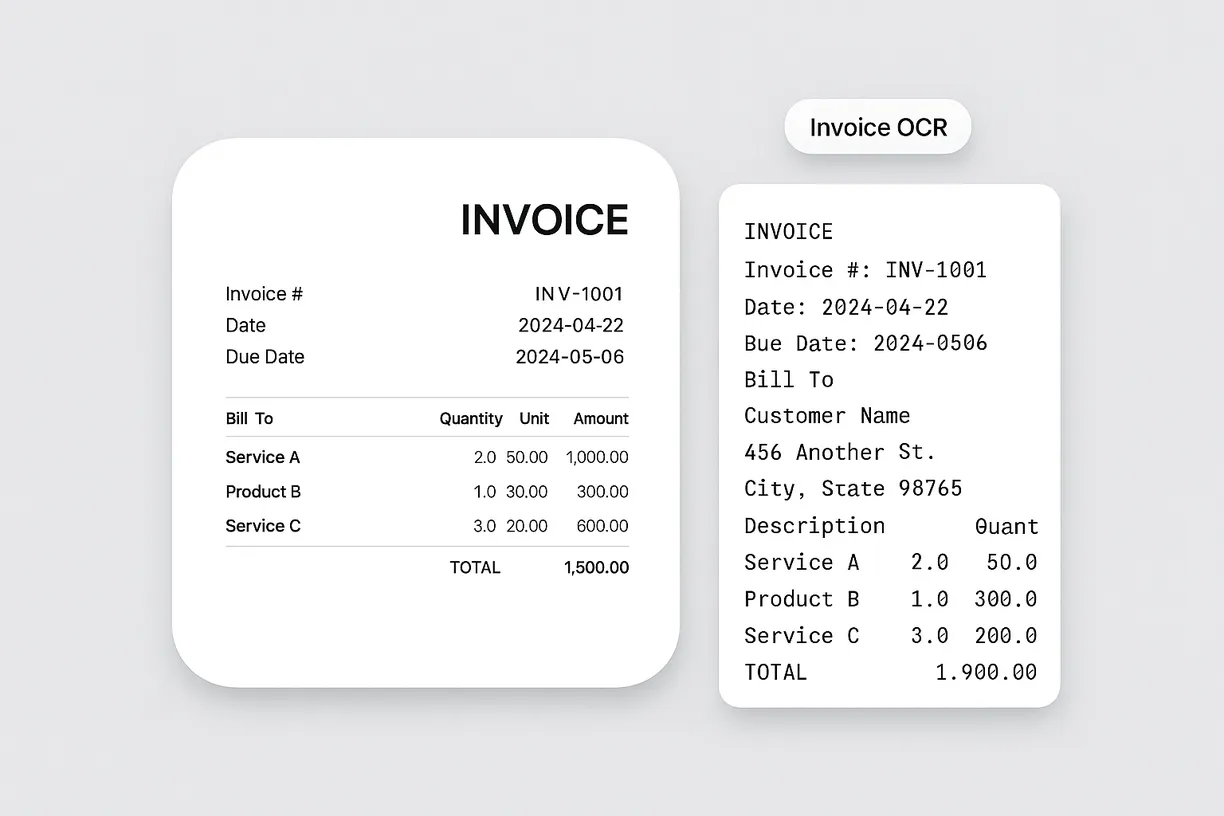
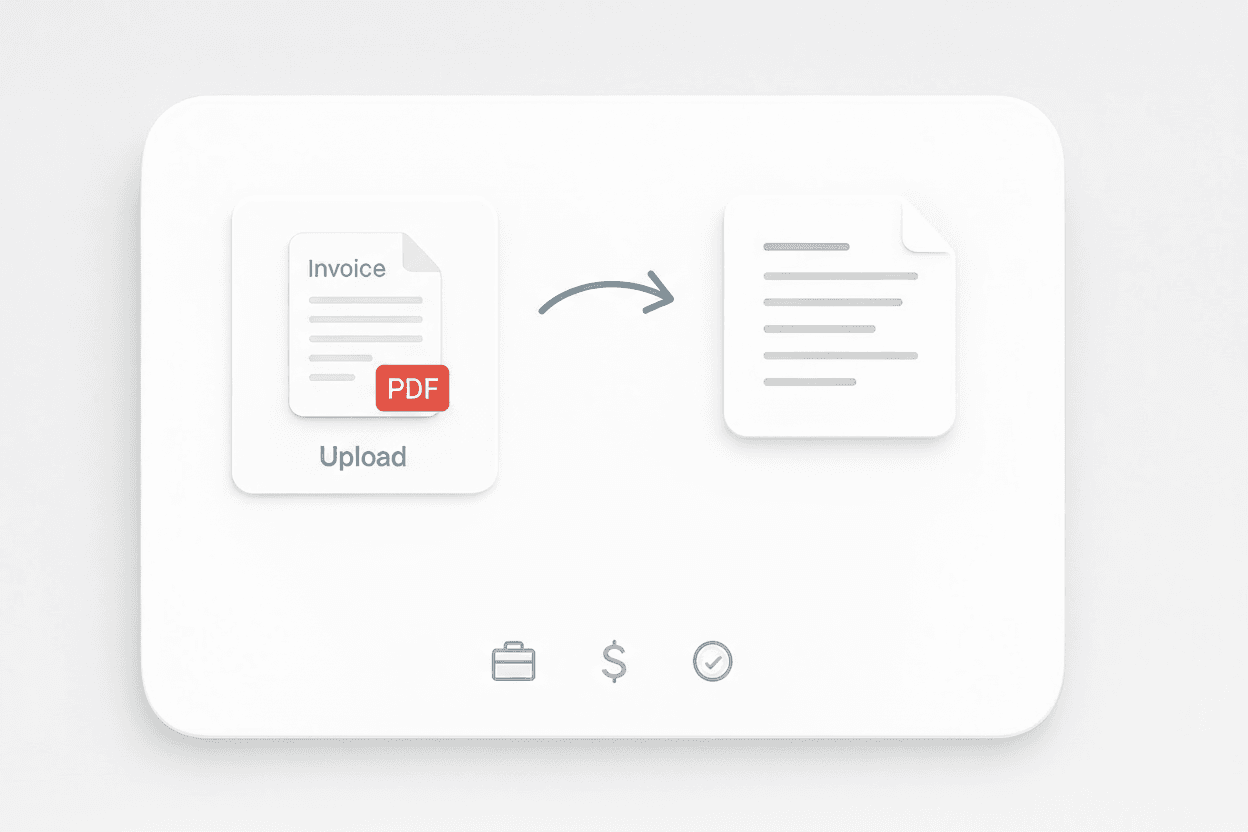
The Invoice OCR tool allows you to upload a PDF or image of an invoice and extract all visible text. This feature is designed for finance teams, accountants, and business owners who need to digitize invoice data quickly. By converting printed or scanned invoices into editable text, you can reduce manual data entry and minimize errors, making it easier to process and organize financial documents.
เริ่มต้นฟรี
1.webp

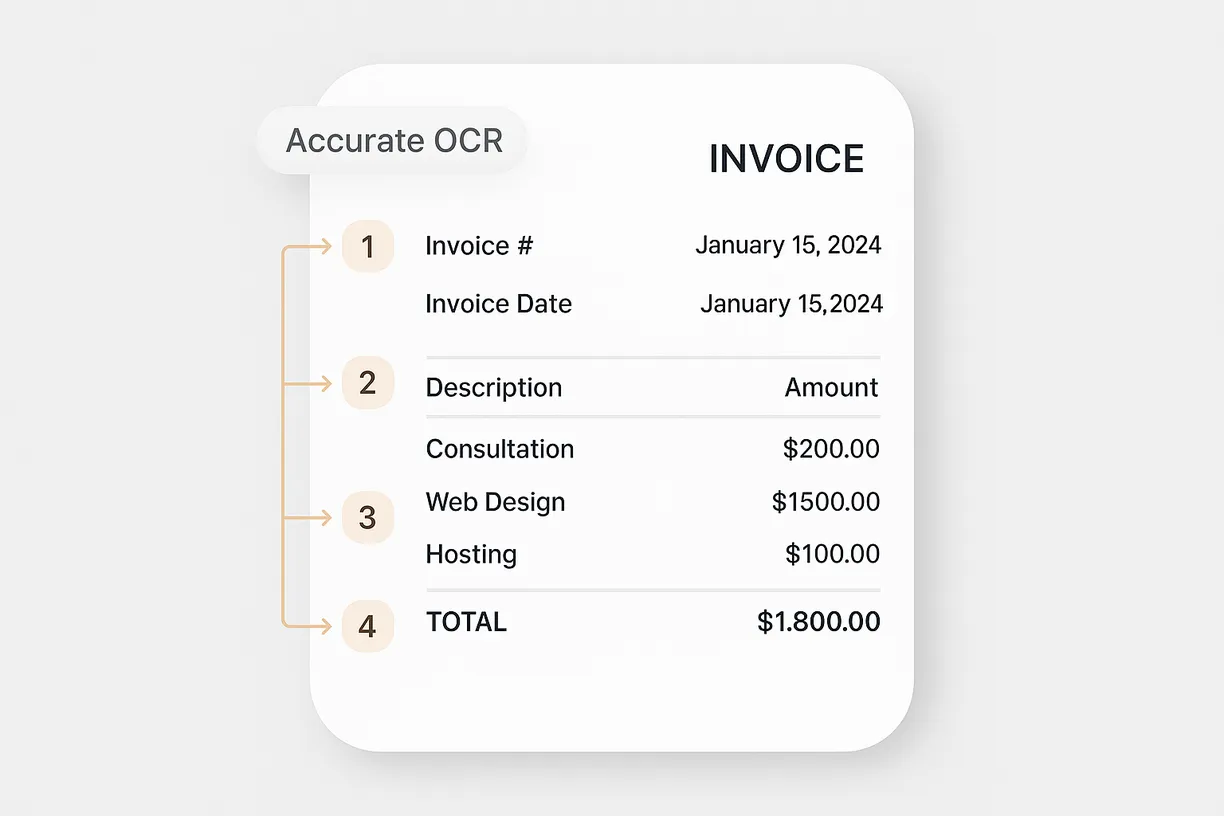
Preserve Reading Order for Accurate Data Capture

With advanced OCR technology, the tool maintains the original reading order of the invoice content as much as possible. This ensures that important details like invoice numbers, dates, line items, and totals are captured in a logical sequence. Accurate text extraction helps streamline downstream processes such as bookkeeping, auditing, and compliance checks, saving time and improving data reliability.
เริ่มต้นฟรี
2.webp

Export Extracted Text for Further Processing

Once the invoice text is extracted, you can easily copy and paste it into spreadsheets, accounting software, or document management systems. This makes it simple to integrate the data into your existing workflows, whether you’re reconciling accounts or preparing financial reports. The extracted text is ready for immediate use, helping you stay organized and efficient.
เริ่มต้นฟรี
3.webp

Support Document Digitization for Multiple Use Cases

The Invoice OCR tool is ideal for businesses looking to digitize paper records, automate invoice processing, or archive financial documents. It’s also useful for auditors and consultants who need to review large volumes of invoices. By turning physical or scanned invoices into searchable text, you can improve document accessibility and support digital transformation initiatives.
เริ่มต้นฟรี
4.png

ค้นพบเครื่องมือฟรีเพิ่มเติม

ตัวแปลง PDF เป็น CSV

แปลงตารางในไฟล์ PDF ให้เป็น CSV ที่สะอาดพร้อมใช้กับสเปรดชีต อัปโหลด PDF แล้วดาวน์โหลดข้อมูลแบบแถวและคอลัมน์ที่จัดโครงสร้างไว้ภายในไม่กี่วินาที เหมาะสำหรับใบแจ้งหนี้ รายงาน และรายการเดินบัญชี

ตัวแปลง JPG เป็น Excel

แปลงภาพตาราง JPG ให้เป็นไฟล์ Excel ที่แก้ไขได้ด้วย OCR ดึงแถวและคอลัมน์อย่างแม่นยำเพื่อประหยัดเวลาการป้อนข้อมูลด้วยมือ

เครื่องมือแปลง JPG เป็นข้อความ

แปลงภาพ JPG เป็นข้อความที่แก้ไขได้ด้วย OCR ดึงคำจากสแกน ภาพหน้าจอ และโน้ต เพื่อให้คุณคัดลอก ค้นหา และนำเนื้อหาไปใช้ซ้ำได้อย่างรวดเร็ว

ตัวแปลงรูปภาพเป็น Excel

แปลงรูปภาพของตาราง ใบเสร็จ หรือรายการ ให้เป็นอาร์เรย์ JSON ที่มีโครงสร้าง เพื่อส่งออกไปยัง Excel ได้ง่าย ประหยัดเวลาการป้อนข้อมูลด้วยมือและเพิ่มความแม่นยำ

ตัวแปลง PNG เป็น Excel

แปลงภาพตาราง PNG เป็นสเปรดชีต Excel ที่มีโครงสร้างด้วย OCR เก็บแถว คอลัมน์ และการจัดรูปแบบสำคัญไว้ เพื่อเร่งการป้อนข้อมูลและการรายงาน

Table Extraction

Convert tables from images into downloadable Excel files. Quickly turn visual or scanned tables into structured spreadsheets for easy analysis.

ตัวแปลง PNG เป็นข้อความ

ดึงข้อความที่แก้ไขได้จากรูปภาพ PNG ด้วย OCR แปลงภาพหน้าจอและกราฟิกที่สแกนให้เป็นข้อความที่ค้นหาได้ เพื่อนำไปใช้ซ้ำและแก้ไขต่อ

ตัวแปลงภาพเป็นข้อความ

ดึงข้อความจากภาพใดก็ได้ในไม่กี่วินาที แล้วแปลงเป็นเนื้อหาที่แก้ไขได้และมีโครงสร้าง ช่วยประหยัดเวลาการพิมพ์ซ้ำและทำให้เวิร์กโฟลว์ของคุณราบรื่นขึ้น

เครื่องมือสร้างหัวข้ออีเมลด้วย AI

สร้างหัวข้ออีเมลที่น่าสนใจได้จากคำอธิบายสั้น ๆ ช่วยเพิ่มอัตราการเปิดอ่านด้วยคำแนะนำจาก AI ใช้งานง่าย รวดเร็ว และไม่ต้องสมัครสมาชิก

Amazon สินค้า Scraper

เพียงวาง URL สินค้าจาก Amazon ก็สามารถดึงข้อมูลสินค้าออกมาได้ทันที ไม่ว่าจะเป็นชื่อสินค้า ราคา คะแนนรีวิว และรายละเอียดอื่น ๆ จัดเป็นตารางที่เป็นระเบียบ พร้อมสำหรับส่งออกและตรวจสอบได้อย่างรวดเร็ว

เครื่องมือดึงและตรวจสอบอีเมล

ค้นหาและดึงที่อยู่อีเมลด้วย Email Extractor จากหน้าเว็บ PDF หรือข้อความได้อย่างรวดเร็ว แม่นยำ และพร้อมส่งออกได้ทุกเมื่อ

AI Sales Email Generator

Create personalized sales emails in seconds with the free AI Sales Email Generator. Perfect for sales teams and entrepreneurs. Try it now and boost your outreach with Thunderbit’s suite of AI tools.

เครื่องมือดึงเบอร์โทรศัพท์

สแกนหน้าเว็บ ไฟล์ หรือข้อความได้อย่างรวดเร็วเพื่อค้นหาเบอร์โทรศัพท์ รับรายการที่สะอาดและส่งออกได้ภายในไม่กี่วินาที เหมาะสำหรับการสร้างรายชื่อติดต่อหรือยืนยันข้อมูล

เครื่องทดสอบหัวข้ออีเมล

ให้คะแนนหัวข้ออีเมลตามความยาว ความชัดเจน ความเร่งด่วน การปรับให้เป็นส่วนตัว และความเสี่ยงสแปม พร้อมเคล็ดลับที่นำไปใช้ได้จริงเพื่อเพิ่มอัตราการเปิดอ่าน

หาเครื่องมือเพิ่มเติมตอนนี้

ผู้ใช้พูดถึง Thunderbit ว่าอย่างไร

Taryn W.Growth Strategist@Thunderbit เปลี่ยนวิธีที่ฉันทำรีเสิร์ชคู่แข่งไปเลย ฉันกด 'AI Suggest Fields' แล้วมันก็สร้างตารางที่สะอาดจากผลลัพธ์หลายหน้าให้ทันที—ไม่ต้องเขียนโค้ด ไม่ต้องแตะ CSS ช่วยประหยัดเวลาได้มากตอนวิเคราะห์ข้อมูลสินค้าจากมาร์เก็ตเพลสเฉพาะกลุ่ม
Miles T.Sales Development Consultantฉันใช้ Thunderbit ดึงอีเมลและเบอร์โทรจากไดเรกทอรี มันดึงข้อมูลติดต่อได้สะอาดในคลิกเดียว และส่งออกไป Sheets หรือ Notion ก็ใช้เวลาแค่ไม่กี่วินาที ไม่ต้องตั้งค่าเพิ่ม ไม่ต้องเขียนโค้ด—ได้ข้อมูลพร้อมใช้งานทันที
Rhea C.E-commerce AnalystThunderbit ช่วยให้ฉันติดตามข้อมูล SKU ข้ามหลายหน้าได้ ฉันดึงรายการสินค้า แล้วใช้ Subpage Scraping เพื่อเก็บสเปกสินค้า ราคา รีวิว และสต็อกแบบครบ ๆ AI จัดทุกอย่างลงคอลัมน์ตามที่ฉันกำหนด
Cassian B.Real Estate AdvisorScheduled Scraper ของ Thunderbit ทำให้การติดตามอสังหาฯ ง่ายขึ้นมาก ฉันแค่บอกช่วงเวลาที่ต้องการเป็นภาษาธรรมดา แล้วมันก็ไปดึงรายการ ราคา และลิงก์ที่อัปเดตให้เอง โดยไม่ต้องกลับมาแตะการตั้งค่าอีก เรียบง่ายและใช้งานได้จริงมาก
Dorian B.Content & SEO Specialistฉันใช้ Field AI Prompts ของ Thunderbit เพื่อทำความสะอาดและติดแท็กคอนเทนต์บล็อกที่ดึงมา มันดึงหัวข้อ ผู้เขียน และยังช่วยแนะนำหมวดหมู่ได้ด้วย ใช้ได้ดีทั้งกับเว็บไดนามิกและ subpage—เหมาะมากสำหรับสร้างชุดข้อมูล SEO แบบมีโครงสร้าง
Lina K.Marketplace Operations Leadเราติดตาม SKU จากร้านเฉพาะกลุ่มด้วย Thunderbit Cloud Scraping จัดการได้ครั้งละ 50 หน้า และถ้าเป็นเว็บที่ต้องล็อกอิน เราก็สลับไปใช้โหมดเบราว์เซอร์ได้ มันเร็ว ยืดหยุ่น และไม่ต้องดูแลหรือแก้ไขเองต่อเนื่อง
Jorge F.Inbound Sales ManagerAI Autofill ของ Thunderbit ช่วยชีวิตมาก หลังดึงข้อมูลติดต่อแล้ว ฉันใช้มันเติมฟอร์มลีดตรงในเบราว์เซอร์ แค่เลือกแท็บ มันก็กรอกทุกอย่างจากแถวข้อมูลที่ดึงมา ไม่ต้องพิมพ์เองเลย
Alina D.Freelance Researcherฉันพึ่ง Thunderbit ในการดึงข้อมูลจาก PDF เว็บที่เป็นรูปภาพ และหน้าที่เลื่อนแบบไม่สิ้นสุด มันจัดการฟอร์แมตที่ยุ่งยากด้วย AI และส่งออกเป็นตารางที่พร้อมใช้งาน ส่งต่อไป Google Sheets หรือ Airtable ได้ในไม่กี่วินาที
Taryn W.Growth Strategist@Thunderbit เปลี่ยนวิธีที่ฉันทำรีเสิร์ชคู่แข่งไปเลย ฉันกด 'AI Suggest Fields' แล้วมันก็สร้างตารางที่สะอาดจากผลลัพธ์หลายหน้าให้ทันที—ไม่ต้องเขียนโค้ด ไม่ต้องแตะ CSS ช่วยประหยัดเวลาได้มากตอนวิเคราะห์ข้อมูลสินค้าจากมาร์เก็ตเพลสเฉพาะกลุ่ม
Miles T.Sales Development Consultantฉันใช้ Thunderbit ดึงอีเมลและเบอร์โทรจากไดเรกทอรี มันดึงข้อมูลติดต่อได้สะอาดในคลิกเดียว และส่งออกไป Sheets หรือ Notion ก็ใช้เวลาแค่ไม่กี่วินาที ไม่ต้องตั้งค่าเพิ่ม ไม่ต้องเขียนโค้ด—ได้ข้อมูลพร้อมใช้งานทันที
Rhea C.E-commerce AnalystThunderbit ช่วยให้ฉันติดตามข้อมูล SKU ข้ามหลายหน้าได้ ฉันดึงรายการสินค้า แล้วใช้ Subpage Scraping เพื่อเก็บสเปกสินค้า ราคา รีวิว และสต็อกแบบครบ ๆ AI จัดทุกอย่างลงคอลัมน์ตามที่ฉันกำหนด
Cassian B.Real Estate AdvisorScheduled Scraper ของ Thunderbit ทำให้การติดตามอสังหาฯ ง่ายขึ้นมาก ฉันแค่บอกช่วงเวลาที่ต้องการเป็นภาษาธรรมดา แล้วมันก็ไปดึงรายการ ราคา และลิงก์ที่อัปเดตให้เอง โดยไม่ต้องกลับมาแตะการตั้งค่าอีก เรียบง่ายและใช้งานได้จริงมาก
Dorian B.Content & SEO Specialistฉันใช้ Field AI Prompts ของ Thunderbit เพื่อทำความสะอาดและติดแท็กคอนเทนต์บล็อกที่ดึงมา มันดึงหัวข้อ ผู้เขียน และยังช่วยแนะนำหมวดหมู่ได้ด้วย ใช้ได้ดีทั้งกับเว็บไดนามิกและ subpage—เหมาะมากสำหรับสร้างชุดข้อมูล SEO แบบมีโครงสร้าง
Lina K.Marketplace Operations Leadเราติดตาม SKU จากร้านเฉพาะกลุ่มด้วย Thunderbit Cloud Scraping จัดการได้ครั้งละ 50 หน้า และถ้าเป็นเว็บที่ต้องล็อกอิน เราก็สลับไปใช้โหมดเบราว์เซอร์ได้ มันเร็ว ยืดหยุ่น และไม่ต้องดูแลหรือแก้ไขเองต่อเนื่อง
Jorge F.Inbound Sales ManagerAI Autofill ของ Thunderbit ช่วยชีวิตมาก หลังดึงข้อมูลติดต่อแล้ว ฉันใช้มันเติมฟอร์มลีดตรงในเบราว์เซอร์ แค่เลือกแท็บ มันก็กรอกทุกอย่างจากแถวข้อมูลที่ดึงมา ไม่ต้องพิมพ์เองเลย
Alina D.Freelance Researcherฉันพึ่ง Thunderbit ในการดึงข้อมูลจาก PDF เว็บที่เป็นรูปภาพ และหน้าที่เลื่อนแบบไม่สิ้นสุด มันจัดการฟอร์แมตที่ยุ่งยากด้วย AI และส่งออกเป็นตารางที่พร้อมใช้งาน ส่งต่อไป Google Sheets หรือ Airtable ได้ในไม่กี่วินาที

Frequently Asked Questions

ดึงข้อมูลด้วย AI
ส่งข้อมูลไปยัง Google Sheets, Airtable หรือ Notion ได้อย่างง่ายดาย
Chrome Store Rating
PRODUCT HUNT#1 Product of the Week