
هناك نكتة متداولة بين المؤسسين تقول: إذا أردت أن ترى كيف يبدو التحول الرقمي الحقيقي، فانظر خلف الكواليس في أي شركة وعدّ كم شخصًا لا يزال ينسخ ويلصق البيانات من شاشة إلى أخرى. رأيت ذلك في كل مكان—من فرق عمليات التجارة الإلكترونية التي تتعامل مع آلاف وحدات SKU، إلى مندوبي المبيعات الذين يبنون قوائم العملاء المحتملين، وصولًا إلى موظفي المالية الذين يحدّقون في ملفات PDF ثم يكتبون الأرقام يدويًا في Excel. نحن في 2026، ومع ذلك ما يزال إدخال البيانات يدويًا هو “المرحلة الأخيرة” من الرقمنة... وهي مرحلة مليئة بالأخطاء والتأخير، ومعها الكثير من القهوة.
لكن الخبر السار هو: الذكاء الاصطناعي لإدخال البيانات وصل أخيرًا، وهو لم يعد حكرًا على شركات Fortune 500. سواء كنت تجمع أسعار المنتجات من الويب، أو تستخرج البيانات من الفواتير، أو تؤتمت تعبئة النماذج، فهناك اليوم أداة قادرة على إزالة العناء—والملل—من هذه العملية. وبصفتي شخصًا أمضى سنوات في بناء أدوات الأتمتة ومشاهدة الفرق وهي تتعثر مع جداول البيانات، فأنا متحمس فعلًا لما وصلت إليه هذه الحلول من سهولة وقوة. لذا لنبدأ—إليك أفضل 10 أدوات للذكاء الاصطناعي في إدخال البيانات التي تُحدث فرقًا حقيقيًا للشركات في 2026.
لماذا تحتاج الشركات إلى الذكاء الاصطناعي لإدخال البيانات في 2026
إدخال البيانات يدويًا ليس مملًا فقط—بل هو مستنقع يبتلع الإنتاجية. يتراوح متوسط دقة إدخال البيانات البشرية بين 96% و99%، وهذا يبدو جيدًا إلى أن تدرك أنه لا يزال يعني 100 إلى 400 خطأ لكل 10,000 عملية إدخال (DocuClipper). وإذا ضاعفت هذا عبر آلاف الفواتير أو العملاء المحتملين أو الطلبات، فستجد نفسك أمام فوضى تكلّف الشركات الأمريكية ما يُقدَّر بنحو $75 مليار سنويًا بسبب ضعف جودة البيانات.
وليس الأمر متعلقًا بالمال فقط. أكثر من 40% من العاملين يقضون ربع أسبوعهم على الأقل في مهام إدخال بيانات متكررة. هذا وقت كان يمكن أن يُستثمر في التحليل، أو مكالمات العملاء، أو أي شيء أكثر إثارة من سباقات النسخ واللصق.
الذكاء الاصطناعي لإدخال البيانات يقلب المعادلة. مع الأتمتة تحصل على:
- السرعة: الأدوات المعتمدة على الذكاء الاصطناعي تعالج المعلومات في ثوانٍ بدلًا من ساعات.
- الدقة: تصل الأتمتة الحديثة إلى دقة تتجاوز 99.95%—أي من 1 إلى 4 أخطاء فقط لكل 10,000 إدخال.
- قابلية التوسع: الذكاء الاصطناعي لا يحتاج إلى عمل إضافي أو استراحة قهوة. يمكنه التعامل مع 10 سجلات أو 10,000 سجل على مدار الساعة.
- التكامل: كثير من الأدوات اليوم تتصل مباشرةً بجداول البيانات وCRM وERP وغيرها.
أهم فئات الأتمتة التي ستراها في هذا الدليل هي:
- استخلاص بيانات الويب: تحويل المواقع إلى بيانات منظمة.
- تحليل المستندات: استخراج المعلومات من ملفات PDF والصور والنماذج.
- أتمتة النماذج: التعبئة التلقائية أو التقاط البيانات من النماذج الرقمية والورقية.
- تكامل قواعد البيانات: نقل البيانات بين الأنظمة دون تدخل بشري.
كيف اخترنا أفضل أدوات الذكاء الاصطناعي لإدخال البيانات
مع هذا العدد الكبير من الأدوات، كيف تختار الأنسب؟ لقد راجعت عشرات الحلول وركّزت على هذه المعايير:
- نوع الأتمتة: هل هي لاستخلاص بيانات الويب، أو OCR للمستندات، أو تحليل البريد الإلكتروني، أو أتمتة سير عمل كامل؟
- مصادر البيانات المدعومة: هل تتعامل مع البيانات المهيكلة (الجداول والنماذج) وغير المهيكلة (رسائل البريد والمستندات الممسوحة)؟
- سهولة الاستخدام: الأفضلية للحلول بدون كود أو منخفضة الكود—فمستخدمو الأعمال لا ينبغي أن يحتاجوا إلى شهادة دكتوراه في التعبيرات النمطية.
- التخصيص: هل يمكنك ضبط ربط الحقول، أو تدريب نماذج مخصصة، أو بناء قوالبك الخاصة؟
- التكامل: هل يتوافق بسهولة مع أدواتك الحالية (Excel وGoogle Sheets وERP وCRM)؟
- التسعير: هل توجد نسخة مجانية أو فترة تجريبية؟ وهل تتدرج التكلفة مع احتياجاتك؟
أدرجت هنا أدوات متخصصة مثل محللات الفواتير، إضافةً إلى منصات أتمتة شاملة، حتى تجد الخيار المناسب لعملك—سواء كنت مؤسسًا منفردًا أو تدير فريق عمليات عالمي.
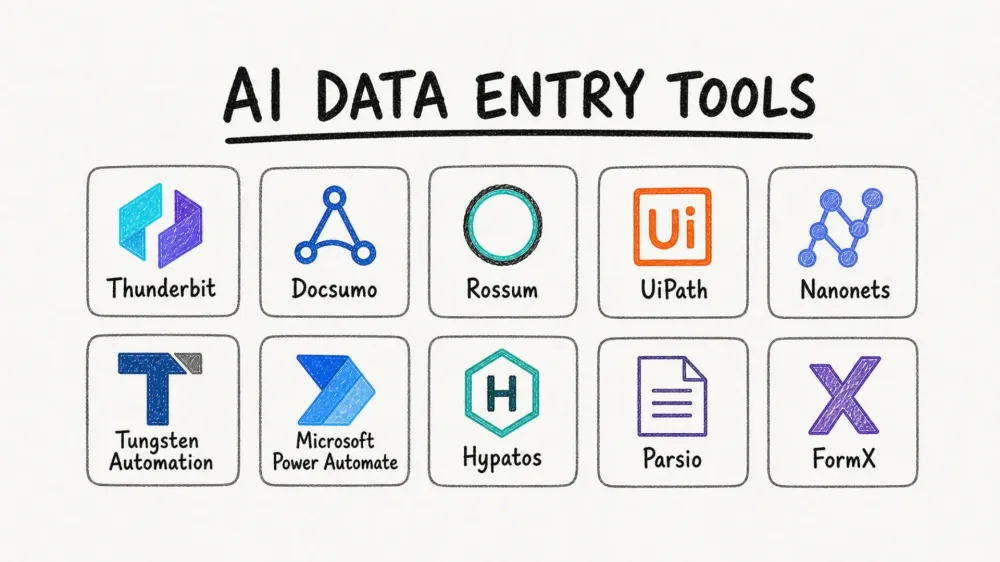
أفضل 10 أدوات للذكاء الاصطناعي لإدخال البيانات في 2026
كل أداة من هذه الأدوات رائدة في فئتها، وقد ربطتها بالسيناريوهات التي تتألق فيها. لنغص في التفاصيل.
1. Thunderbit: مُستخرج ويب بالذكاء الاصطناعي لإدخال بيانات سريع ومرن

ماذا يفعل Thunderbit
Thunderbit هو إضافة Chrome لاستخلاص بيانات الويب مدعومة بالذكاء الاصطناعي، يحوّل أي موقع إلى بيانات منظمة—بدون كود وبدون تعقيد. تخيّل أنك أمام صفحة مليئة بقوائم المنتجات أو معلومات التواصل أو تفاصيل العقارات. مع Thunderbit، كل ما عليك هو النقر مرة واحدة، وسيقوم الذكاء الاصطناعي بقراءة الصفحة، وتحديد المعلومات المهمة (الأسماء، الأسعار، البريد الإلكتروني، الصور، سمّ ما شئت)، ثم يبني لك جدولًا جاهزًا. وإن تركته يعمل وحده، يُكمل المهمة من البداية إلى النهاية؛ وإذا احتجت شيئًا محددًا، فقط صف له ما تريد بجمل طبيعية. وبعدها يمكنك التصدير مباشرةً إلى Excel أو Google Sheets أو Airtable أو Notion.
إنه أشبه بامتلاك متدرب لا يملّ أبدًا من النسخ واللصق—لكن أسرع بكثير وأقل طلبًا للزيادة في الراتب.
استخرج البيانات من أي موقع باستخدام الذكاء الاصطناعي Get Started Free
المزايا الفريدة
- الحقول على الطيار الآلي: اكتشاف الحقول بنقرة واحدة—لا حاجة لتحديد الأعمدة أو العبث بـ CSS selectors.
- استخلاص الصفحات الفرعية: تحتاج إلى مزيد من التفاصيل؟ يمكن لـ Thunderbit الانتقال إلى كل صفحة فرعية (مثل صفحات تفاصيل المنتجات) وجلب المعلومات الإضافية تلقائيًا.
- تصدير جماعي: صدّر بياناتك إلى Excel أو Google Sheets أو Airtable أو Notion أو CSV أو JSON—مجانًا وبلا حدود.
- قوالب فورية: للمواقع الشائعة (Amazon وZillow وInstagram وShopify وغيرها)، استخدم قالبًا جاهزًا لاستخلاص البيانات بنقرة واحدة.
- استخراج الصور والبريد الإلكتروني وأرقام الهاتف: استخرج كل الصور أو رسائل البريد أو أرقام الهاتف من الصفحة بنقرة واحدة.
- استخلاص سحابي مجدول: اضبطه وانسَ—يمكن لـ Thunderbit تنفيذ عمليات الاستخلاص وفق جدول زمني في السحابة.
- يدعم 34 لغة: فرق العمل العالمية ستُحب هذا.
لمن يناسب
- فرق المبيعات: إنشاء قوائم العملاء المحتملين من الأدلة، واستخلاص البريد الإلكتروني وأرقام الهاتف.
- فرق عمليات التجارة الإلكترونية: مراقبة أسعار المنافسين، وتتبع وحدات SKU، أو تجميع معلومات المنتجات.
- وكلاء العقارات: جمع قوائم العقارات وبيانات الوكلاء والمزيد.
- أي شخص يريد نقل بيانات الويب إلى جدول بيانات بسرعة.
ما الذي يميزه
Thunderbit ليس مجرد أداة OCR أو محلّل نماذج آخر. فبينما تركز الأدوات التقليدية على قراءة المستندات الممسوحة أو ملفات PDF، يركّز Thunderbit على بيانات الويب. إنه يستخدم الذكاء الاصطناعي لـ فهم بنية أي موقع، حتى لو كانت فوضوية أو تتغير باستمرار. لا مزيد من كتابة السكربتات أو تحديث القوالب في كل مرة يغيّر فيها الموقع شكله.
وعلى عكس أدوات الاستخلاص القديمة، فإن ميزات الصفحات الفرعية والتصدير الجماعي في Thunderbit تعني أنك تستطيع التعمق (مثل: كل صفحة تفاصيل منتج) والتوسع أفقيًا (مئات القوائم دفعة واحدة) دون أي برمجة.
التسعير
- الخطة المجانية: استخرج ما يصل إلى 6 صفحات شهريًا (إضافة إلى تجربة 10 صفحات).
- الخطط المدفوعة: تبدأ من 15 دولارًا شهريًا مقابل 500 رصيد (كل رصيد = صف إخراج واحد).
- الفئات الأعلى: تتوسع إلى عشرات الآلاف من الأرصدة للفرق الكبيرة.
- كل الميزات مشمولة: لا رسوم إضافية على الذكاء الاصطناعي أو الجدولة أو التصدير.
تريد أن تراه عمليًا؟ نزّل إضافة Thunderbit لـ Chrome واطّلع على مدونة Thunderbit للأدلة وحالات الاستخدام.
2. Docsumo: تحليل المستندات واستخراج الجداول بالذكاء الاصطناعي

ماذا يفعل Docsumo
Docsumo يؤتمت إدخال البيانات من المستندات—مثل الفواتير والإيصالات والكشوفات البنكية والنماذج. يستخدم OCR متقدمًا وذكاءً اصطناعيًا لاستخراج الحقول الرئيسية والجداول حتى من التخطيطات المربكة أو المتنوعة. إذا كنت غارقًا في ملفات PDF أو الأوراق الممسوحة، فـ Docsumo هو طوق النجاة.
المزايا الفريدة
- استخراج ذكي للجداول: ينقل بنود الفواتير أو الكشوف إلى صفوف منظمة.
- التحقق الآلي: يفحص الإجماليات، ويكشف الشذوذ، ويحيل الحقول منخفضة الثقة للمراجعة البشرية.
- نماذج مدرّبة مسبقًا: جاهزة للمستندات الشائعة؛ مع تدريب مخصص للنماذج الفريدة.
- التكاملات: يتصل بـ QuickBooks وSalesforce وZapier وغيرها.
لمن يناسب
- فرق المالية والمحاسبة: أتمتة معالجة الفواتير وإدارة المصروفات والامتثال.
- العمليات: رقمنة النماذج والإيصالات والكشوف على نطاق واسع.
التسعير
- تجربة مجانية لمدة 14 يومًا
- عروض سعرية مخصصة للشركات؛ أفضل قيمة عند التوسع.
3. Rossum: أتمتة ذكية للمستندات للمؤسسات

ماذا يفعل Rossum
Rossum منصة معالجة مستندات ذكية (IDP) مخصصة للمؤسسات. تستخدم التعلم العميق لتحليل المستندات غير المهيكلة (الفواتير، أوامر الشراء، نماذج التأمين) وتؤتمت سير العمل من البداية إلى النهاية—من التقاط البيانات إلى التكامل مع ERP/CRM.
المزايا الفريدة
- التقاط معرفي للبيانات: يقرأ المستندات كما يفعل الإنسان، وليس فقط عبر القوالب.
- مراجعة بشرية ضمن الحلقة: واجهة سهلة للتحقق من الحقول منخفضة الثقة.
- أتمتة شاملة: يطلق إجراءات لاحقة ويتكامل مع SAP وOracle وغيرها.
- تعلم مستمر: يتحسن الذكاء الاصطناعي كلما استخدمته.
لمن يناسب
- المنظمات الكبيرة: تدفقات عمل مستندات معقدة وعالية الحجم (الحسابات الدائنة، اللوجستيات، الخدمات المشتركة).
- القطاعات المنظمة: الامتثال، وسجلات التدقيق، والدعم متعدد البلدان.
4. UiPath: منصة RPA لأتمتة إدخال البيانات من البداية إلى النهاية

ماذا يفعل UiPath
UiPath هو أحد رواد أتمتة العمليات الروبوتية (RPA). يتيح لك بناء روبوتات تحاكي أفعال البشر—النقر، والكتابة، ونسخ البيانات بين التطبيقات، وقراءة البريد الإلكتروني، وغير ذلك. ومع فهم المستندات المدعوم بالذكاء الاصطناعي، يمكن لـ UiPath التعامل مع إدخال البيانات المهيكلة وغير المهيكلة عبر الويب وسطح المكتب والأنظمة القديمة.
المزايا الفريدة
- مصمم سير عمل بالسحب والإفلات: أنشئ الأتمتة بصريًا—من دون حاجة لبرمجة ثقيلة.
- رؤية حاسوبية بالذكاء الاصطناعي: أتمتة حتى الواجهات الصعبة (Citrix وVDI والتطبيقات القديمة).
- فهم المستندات: OCR مدمج ونماذج ذكاء اصطناعي مخصصة.
- التنسيق: إدارة الروبوتات وجدولتها وتوسيعها للأتمتة المراقَبة أو غير المراقَبة.
لمن يناسب
- المنظمات ذات إدخال البيانات المعقد ومتعدد الخطوات: خاصة عندما تنتقل البيانات بين عدة أنظمة أو تطبيقات قديمة.
- فرق تقنية المعلومات: تحتاج إلى مزيد من التحكم والتخصيص.
5. Nanonets: الذكاء الاصطناعي لإدخال البيانات من المستندات الممسوحة والبريد الإلكتروني

ماذا يفعل Nanonets
Nanonets منصة OCR بالذكاء الاصطناعي بدون كود لاستخراج البيانات من المستندات الممسوحة وملفات PDF والصور وحتى رسائل البريد الإلكتروني. يمكنك تدريب نماذج مخصصة عبر تمييز الحقول في مستندات نموذجية—من دون برمجة أو علم بيانات.
المزايا الفريدة
- تدريب نماذج مخصصة: علّم الذكاء الاصطناعي ما الذي يستخرجه عبر تسمية الأمثلة.
- قوالب جاهزة: للفواتير والبطاقات الشخصية والإيصالات وغيرها.
- استخراج الجداول: يتعامل مع البنود والبيانات متعددة الصفوف.
- API والتكاملات: اربطه بسير عملك عبر Zapier أو API أو التصدير المباشر.
لمن يناسب
- الفرق التي ترقمن العمليات الورقية: المالية، الموارد البشرية، اللوجستيات، الامتثال.
- أي شخص يحتاج OCR عالي الدقة ومخصصًا دون توظيف مهندسي تعلم آلي.
6. Kofax: مجموعة أتمتة ذكية لالتقاط البيانات

ماذا يفعل Kofax
Kofax هو الحل الثقيل للمؤسسات في التقاط المستندات وأتمتة سير العمل. يجمع بين OCR متقدم وتصنيف المستندات وتنسيق سير العمل وRPA في منصة واحدة—وهو مثالي للعمليات الضخمة والحساسة.
المزايا الفريدة
- OCR متقدم: يتعرف على أكثر من 100 لغة، والكتابة اليدوية، والباركود، والمزيد.
- سير عمل شامل: من المسح إلى التحقق إلى التكامل مع أنظمة ERP.
- الامتثال والتدقيق: ضوابط تفصيلية، وسجلات تدقيق، ودعم تنظيمي.
- تكامل RPA: أتمتة إدخال البيانات في الأنظمة القديمة.
لمن يناسب
- المؤسسات الكبرى وBPO والجهات الحكومية: أتمتة غرف البريد، والحسابات الدائنة، والرعاية الصحية، وغيرها.
7. Microsoft Power Automate: أتمتة سير العمل مع تكامل الذكاء الاصطناعي

ماذا يفعل Power Automate
Power Automate (المعروف سابقًا باسم Flow) هو منصة الأتمتة منخفضة الكود من Microsoft. يربط مئات التطبيقات (Excel وSharePoint وOutlook وSalesforce وغيرها) ويؤتمت نقل البيانات بينها. ومع AI Builder، يمكنك إضافة OCR ومعالجة النماذج إلى تدفقاتك.
المزايا الفريدة
- موصلات جاهزة: أكثر من 300 تكامل من البداية.
- AI Builder: درّب نماذج مخصصة لاستخراج البيانات من النماذج والصور.
- RPA لسطح المكتب: أتمتة التطبيقات القديمة وتدفقات سطح المكتب.
- تكامل عميق مع Microsoft 365: مثالي للمنظمات التي تعتمد على Office.
لمن يناسب
- الشركات التي تتمحور حول Microsoft: أتمتة إدخال البيانات ونقلها داخل منظومة M365.
- الفرق التي تحتاج إلى أتمتة سريعة بدون كود.
8. Hypatos: تعلم عميق لإدخال بيانات الفواتير والمستندات

ماذا يفعل Hypatos
Hypatos منصة تعلم عميق تركز على أتمتة إدخال البيانات للمستندات المالية—وخاصة الفواتير والإيصالات. تستهدف معالجة شبه “من دون لمس” مع اكتشاف الشذوذ المدمج والتكامل مع ERP.
المزايا الفريدة
- نماذج فواتير مدرّبة مسبقًا: دقة عالية منذ البداية، حتى مع التخطيطات المعقدة.
- اكتشاف الشذوذ: يحدد الأخطاء والتكرارات واحتمالات الاحتيال.
- تكامل ERP: يتصل مباشرةً بـ SAP وOracle وغيرها.
- تعلم مستمر: يتحسن مع كل تصحيح.
لمن يناسب
- فرق الحسابات الدائنة والمالية: معالجة الفواتير بكثافة، والامتثال، وكشف الاحتيال.
- المؤسسات التي تحتاج إلى أتمتة قوية وآمنة وقابلة للتدقيق.
9. Parsio: استخراج بيانات البريد والمرفقات بطريقة سهلة

ماذا يفعل Parsio
Parsio أداة بدون كود لتحليل رسائل البريد والمرفقات (PDFs، صور، CSVs) واستخراج بيانات منظمة منها. تقوم بإعداد القوالب عبر تمييز الحقول في رسائل نموذجية، ثم يتولى Parsio الباقي—من دون برمجة أو regex.
المزايا الفريدة
- التمييز ثم الاستخراج: علّم Parsio ما الذي يجب أخذه بمجرد تمييز النص.
- تحليل المرفقات: يتعامل مع PDF والصور وExcel وغيرها.
- تصدير فوري: يدفع البيانات إلى Google Sheets أو Slack أو CRM أو عبر Zapier.
- عدة صناديق بريد: أنشئ محللات مختلفة لتدفقات عمل مختلفة.
لمن يناسب
- الشركات الصغيرة والأفراد: أتمتة معالجة الطلبات أو التقاط العملاء المحتملين أو تجميع التقارير من البريد الإلكتروني.
- أي شخص سئم من النسخ واللصق من صندوق الوارد.
10. FormX: الذكاء الاصطناعي لإدخال بيانات النماذج والإيصالات

ماذا يفعل FormX
FormX متخصص في استخراج البيانات من النماذج والإيصالات وبطاقات الهوية والمستندات الأخرى—خصوصًا عبر الالتقاط من الهاتف المحمول. يوفّر SDK للهواتف المحمولة وAPI لدمج المسح وOCR داخل تطبيقاتك، بما يتيح استخراجًا فوريًا للبيانات في الميدان.
المزايا الفريدة
- SDK للهواتف المحمولة: أضف المسح وOCR إلى تطبيقات iOS/Android الخاصة بك.
- مستخرجات جاهزة: للإيصالات وبطاقات الهوية والفواتير وغيرها.
- التحقق اللحظي: تغذية راجعة فورية وفحص للأخطاء.
- تدريب مستخرج مخصص: ابنِ نماذجك الخاصة للنماذج الفريدة.
لمن يناسب
- العمليات الميدانية وتجارة التجزئة واللوجستيات: التقاط البيانات أثناء التنقل (مسح الإيصالات وبطاقات الهوية ونماذج التسليم).
- المطورون الذين يبنون تطبيقات تحتاج إلى رقمنة فورية للمستندات.
جدول مقارنة سريع: أدوات الذكاء الاصطناعي لإدخال البيانات في لمحة
| الأداة | نوع الأتمتة الأساسي | مصادر البيانات | التخصيص | التكامل | سهولة الاستخدام | التسعير | الأفضل لـ |
|---|---|---|---|---|---|---|---|
| Thunderbit | استخلاص بيانات الويب بالذكاء الاصطناعي | مواقع الويب، الصفحات الفرعية | حقول ذكاء اصطناعي بدون كود، قوالب | Excel، Sheets، Airtable، Notion | سهل جدًا (بنقرة واحدة) | مجاني (6 صفحات)، 15 دولارًا+/شهر | فرق المبيعات، التجارة الإلكترونية، والعمليات التي تحتاج تدفق عمل من الويب إلى الجدول |
| Docsumo | OCR ذكي للمستندات | PDFs، الصور، النماذج | نماذج مخصصة، تحقق | QuickBooks، Salesforce، API | متوسط (واجهة ويب) | تجربة 14 يومًا، عروض مخصصة | المالية، المحاسبة، ومعالجة المستندات عالية الحجم |
| Rossum | معالجة مستندات بالذكاء الاصطناعي | الفواتير، أوامر الشراء، صيغ متعددة | نماذج مدرّبة مسبقًا، سير عمل | ERP/CRM، SAP، Oracle | متوسط (مؤسسي) | اشتراك، مخصص | المؤسسات الكبيرة، سير العمل المعقد، والامتثال |
| UiPath | RPA + ذكاء اصطناعي | أي تطبيق، مستندات، أنظمة قديمة | سحب وإفلات، ذكاء اصطناعي مخصص | أكثر من 700 موصل، RPA | أصعب قليلًا (ملائم للمطورين) | مجاني/مجتمعي، مؤسسي | الأتمتة المعقدة بين التطبيقات، وفرق IT |
| Nanonets | OCR بالذكاء الاصطناعي (تعلم آلي) | مستندات ممسوحة، PDFs، صور | تدريب بدون كود، قوالب | API، Zapier، تصدير | سهل للأساسيات | تجربة مجانية، 0.30 دولار/صفحة، 499 دولارًا/شهر | الفرق التي ترقمن العمليات الورقية |
| Kofax | مجموعة التقاط مؤسسية | ماسحات ضوئية، بريد، فاكس، مستندات | سكربتات مخصصة، تعلم آلي | ERP، ECM، RPA | معقد (يتطلب خبرة) | مؤسسي، ترخيص حسب الحجم | المؤسسات الكبرى، BPO، غرف البريد، الامتثال |
| Power Automate | سير عمل/RPA + ذكاء اصطناعي | البريد، النماذج، Office 365 | منخفض الكود، AI Builder | أكثر من 300 موصل، RPA لسطح المكتب | سهل جدًا | 15 دولارًا/مستخدم/شهر، AI Builder إضافي | الشركات المعتمدة على Microsoft، والأتمتة السريعة |
| Hypatos | أتمتة AP بالتعلم العميق | الفواتير، الإيصالات، المستحقات | نماذج مدرّبة مسبقًا، تعلم | ERP، SAP، API | متوسط (إعداد للمطورين) | مؤسسي، مخصص | العمليات المالية، الحسابات الدائنة، الحجم الكبير، والامتثال |
| Parsio | تحليل البريد والمرفقات | البريد، PDFs، الصور، CSV | قوالب بدون كود | Sheets، Slack، Zapier، API | سهل جدًا | مجاني (30 رسالة)، 19–299 دولارًا/شهر | الشركات الصغيرة، الأفراد، وسير العمل المعتمد على البريد |
| FormX | API لـ OCR وSDK للهواتف | النماذج، الإيصالات، بطاقات الهوية (موبايل) | جاهز مسبقًا، تدريب مخصص | REST API، SDK | سهل للمستخدم النهائي | تسعير API، تجربة مجانية | العمليات الميدانية، تطبيقات الجوال، والتقاط البيانات الفوري |
كيف تختار الحل المناسب للذكاء الاصطناعي في إدخال البيانات
اختيار الأداة المناسبة يعتمد على مواءمة احتياجاتك مع نقاط قوة كل حل. هكذا أفكر في الأمر:
- حدّد مصادر بياناتك:
- بيانات ويب؟ Thunderbit هو خيارك الأول.
- PDFs/مستندات ممسوحة؟ Docsumo أو Rossum أو Hypatos أو Nanonets.
- بريد إلكتروني/مرفقات؟ Parsio.
- سير عمل بين التطبيقات؟ UiPath أو Power Automate.
- التقاط عبر الهاتف المحمول؟ FormX.
- قيّم حجم البيانات:
- حجم كبير وحاسم للعمليات؟ Kofax أو Hypatos أو Rossum.
- منخفض إلى متوسط؟ Thunderbit أو Docsumo أو Power Automate أو Parsio.
- فكّر في الدقة والتحقق:
- المالية/الامتثال؟ اختر الأدوات التي تحتوي على تحقق مدمج وبشر في الحلقة (Rossum وHypatos وKofax).
- توليد العملاء أو البحث؟ Thunderbit أو Parsio—السرعة أهم من الوصول إلى 100% دقة.
- احتياجات التكامل:
- تحتاج إلى دفع البيانات إلى ERP/CRM؟ Docsumo أو Hypatos أو Rossum أو UiPath.
- تريد فقط جدول بيانات؟ Thunderbit أو Parsio أو Nanonets.
- المستوى التقني:
- لا يوجد فريق IT؟ Thunderbit وPower Automate وParsio وNanonets (للأساسيات).
- تتوفر موارد تطوير؟ UiPath وKofax وFormX (للتكاملات المخصصة).
- الميزانية:
- شركات ناشئة/SMBs؟ Thunderbit وParsio وPower Automate وNanonets (الدفع حسب الاستخدام).
- مؤسسات كبيرة؟ Kofax وHypatos وRossum.
- جرّب بشكل تجريبي:
- معظم الأدوات تقدم نسخًا تجريبية مجانية—اختبرها على بياناتك الفعلية قبل الالتزام.
اطّلع على المزيد من أدلة أتمتة الذكاء الاصطناعي Get Started Free
أمثلة على سيناريوهات الاستخدام:
- متجر تجارة إلكترونية صغير: Parsio لتحليل رسائل الطلبات، وPower Automate لنقل البيانات إلى الشحن.
- قسم الحسابات الدائنة: Docsumo أو Rossum للفواتير مع تكامل QuickBooks.
- ترحيل الأنظمة القديمة: UiPath أو Power Automate Desktop لأتمتة نقل البيانات.
- العمل الميداني: FormX للمسح عبر الهاتف للنماذج والإيصالات.
- أبحاث السوق: Thunderbit لاستخلاص بيانات الويب، وNanonets لاستخراج PDF.
أبرز الاتجاهات في الذكاء الاصطناعي لإدخال البيانات والأتمتة
عالم أتمتة إدخال البيانات يتطور بسرعة. إليك ما يبرز في 2026:
- اكتشاف الحقول بالذكاء الاصطناعي: أصبحت أدوات مثل Thunderbit قادرة على “رؤية” الصفحة وتحديد ما ينبغي استخراجه—من دون إعداد.
- استخلاص الصفحات الفرعية والتنقل العميق: تستطيع مستخرجات الويب بالذكاء الاصطناعي النقر عبر القوائم، والتعامل مع الترقيم الصفحي، وجلب البيانات من صفحات التفاصيل.
- سحابي وAPI-first: معظم الأدوات الجديدة SaaS مع وصول سهل إلى API—لا حاجة بعد اليوم لتثبيتات معقدة.
- إتاحة بدون كود للجميع: لم يعد بناء الأتمتة حكرًا على IT. Parsio بنمط التمييز ثم التحليل، وPower Automate بتدفقات السحب والإفلات، مثالان ممتازان.
- تحسن OCR والتعرف على الكتابة اليدوية: التعلم العميق دفع الدقة إلى 95%–99% حتى مع المستندات الصعبة.
- التكامل مع تطبيقات الأعمال: إدخال البيانات ينتقل إلى داخل سير العمل—والروبوتات والمساعدون بدأوا يتولون المدخلات الروتينية.
- تحسين الجودة وتقليل الأخطاء: أصبح التحقق واكتشاف الشذوذ والقواعد التجارية معيارًا—فالأتمتة ليست أسرع فقط، بل أدق من البشر.
- تغيّر الأدوار الوظيفية: موظفو إدخال البيانات يتحولون إلى مراجعين للعمليات ومتعاملين مع الحالات الاستثنائية، وليسوا مجرد ناسخين.
الخلاصة: إطلاق الإنتاجية مع أفضل أدوات الذكاء الاصطناعي لإدخال البيانات
كان إدخال البيانات يدويًا يُنظر إليه سابقًا على أنه شر لا بد منه. أما في 2026، فهو يوشك أن يصبح من الماضي—بفضل أدوات الذكاء الاصطناعي الأسرع والأدق، بل والأمتع في الاستخدام من أي وقت مضى. سواء كنت تجمع العملاء المحتملين، أو تعالج الفواتير، أو تؤتمت تعبئة النماذج، فإن الأداة المناسبة يمكن أن تحوّل ساعات من العمل الروتيني إلى دقائق من المراجعة.
نصيحتي؟ ابدأ صغيرًا. اختر نقطة ألم واحدة—ربما التقرير الأسبوعي للمبيعات، أو كومة الإيصالات التي يخشاها متدرب المالية—وجرّب أداة من هذه القائمة. معظمها يوفّر تجربة مجانية، لذا يمكنك رؤية الأثر بنفسك. ولا تنسَ أن تُشرك فريقك؛ فعندما يرون كم من الوقت والإرهاق يوفره التحول إلى الأتمتة، سيصبحون أكبر داعمين لها.
مستقبل إدخال البيانات هنا بالفعل، وهو يقوم على ترك الآلات تتولى العمل اليدوي كي يركز البشر على ما يهم حقًا: التحليل، والاستراتيجية، والنمو. لذا تفضل—أرح عضلات النسخ واللصق قليلًا. ستشكرك شركتك، وستشكرك معصمك أيضًا.
نزّل Thunderbit وجرّب إدخال البيانات بالذكاء الاصطناعي
هل أنت مستعد لتجربة أسهل أداة لإدخال بيانات الويب؟ نزّل Thunderbit واكتشف مدى السرعة التي يمكنك بها تحويل المواقع إلى جداول بيانات. لمزيد من النصائح وأدلة الأتمتة، اطلع على مدونة Thunderbit.
جرّب مُستخرج الويب بالذكاء الاصطناعي لإدخال البيانات Get Started Free
الأسئلة الشائعة
1. ما هو الذكاء الاصطناعي لإدخال البيانات، ولماذا هو مهم في 2026؟
يشير الذكاء الاصطناعي لإدخال البيانات إلى التقنيات التي تؤتمت عملية إدخال البيانات يدويًا من مصادر متعددة (المواقع، المستندات، البريد الإلكتروني، النماذج) إلى تنسيقات منظمة مثل جداول البيانات أو قواعد البيانات. وفي 2026 أصبح مهمًا لأنه يعزز السرعة والدقة وقابلية التوسع، ويزيل المهام المتكررة التي تكلف الشركات مليارات سنويًا بسبب الأخطاء وفقدان الإنتاجية.
2. ما أفضل أداة ذكاء اصطناعي لاستخراج البيانات من المواقع؟
Thunderbit هو الخيار الأفضل لاستخراج بيانات الويب. فهو يستخدم الذكاء الاصطناعي لاكتشاف البيانات المنظمة واستخراجها تلقائيًا من أي موقع—بما في ذلك الصفحات الفرعية—ويصدّرها مباشرةً إلى Excel أو Google Sheets أو Notion دون الحاجة إلى كود. وهو مثالي لفرق المبيعات والتجارة الإلكترونية والبحث.
3. كيف أختار أداة الذكاء الاصطناعي المناسبة لإدخال البيانات في عملي؟
ابدأ بتحديد مصدر البيانات لديك (مثل الويب، PDFs، البريد الإلكتروني، النماذج)، وحجم البيانات، واحتياجات التكامل. إذا كنت فريقًا صغيرًا بموارد تقنية محدودة، فاختر أدوات بدون كود مثل Thunderbit أو Parsio أو Power Automate. أما لسير العمل على مستوى المؤسسات، ففكّر في Rossum أو Kofax أو UiPath.
4. هل هذه الأدوات مناسبة للمبتدئين أم تحتاج إلى مهارات تقنية؟
العديد من الأدوات في هذه القائمة مصممة لمستخدمين غير تقنيين. Thunderbit وParsio وNanonets توفر واجهات سهلة وبقدرات بدون كود، بينما تستهدف منصات مثل UiPath وKofax المستخدمين ذوي الخبرة التقنية الأكبر أو من لديهم دعم من IT.
5. هل يمكنني تجربة هذه الأدوات مجانًا قبل الاشتراك؟
نعم، معظم الأدوات توفر فترة تجريبية مجانية أو خطة مجانية محدودة. يتيح Thunderbit استخراج ما يصل إلى 6 صفحات مجانًا شهريًا، ويقدم Parsio 30 عملية تحليل مجانية للبريد الإلكتروني، كما يتضمن Power Automate خطة مجانية مع حسابات Microsoft 365. واختبار الأداة على بياناتك الحقيقية خلال التجربة هو أفضل طريقة لتقييم ملاءمتها.




